Strapi: Infinite loading when creating new entry
Informations
- Node.js version: 10.10.0 (9.x isn't supported for Fedora 28)
- npm version: 5.10
- Strapi version: 3.0.0-alpha.14.1.1
- Database: Mongodb
- Operating system: Fedora 28
What is the current behavior?
When trying to creating a new entry, admin panel never stop loading
Steps to reproduce the problem
1) go to Content Type Builder
2) create a new Content Type named Restaurant
3) add 3 fields to this Content Type: name (string), description (text) then save
4) go to "Restaurants" (top of left menu on admin panel) then click on "Add new Restaurant"
Here you should have an infinite loading
What is the expected behavior?
Allowing me inserting new entry
 LeBovin
All 47 comments
Hello @LeBovin !
Did you have any errors in your browser console ? and what is the browser you use ?
Did you have a pending network request ?
 lauriejim
on 17 Sep 2018
lauriejim
on 17 Sep 2018
I just experienced this with a brand new instance, and trying to create a new user. I didn't see any browser errors, network errors or server output errors. Browser was both Firefox and Chrome, so I doubt it's a browser issue.
We modified the user object, saved the modifications, and the server restarted and then we were able to create a new user just fine through the admin UI.
 NickBolles
on 22 Sep 2018
NickBolles
on 22 Sep 2018
@lauriejim @NickBolles Hi and thanks for your replies
As @NickBolles said, no error in the console, and I tried on both Firefox and Chrome
@NickBolles I'll try it and say if I can reproduce the "solution" you got
Anyway, thanks guys
LeBovin
on 24 Sep 2018
I have the same problem
 inoisy
on 25 Sep 2018
inoisy
on 25 Sep 2018
@LeBovin @inoisy I'm unable to reproduce the bug which version of strapi are you on?
Is the error occuring in production or in development?
 soupette
on 26 Sep 2018
soupette
on 26 Sep 2018
I'm not 100% sure. But I may have resolved this by copying the build folder from
node_modules/strapi-admin/admin/ to admin/admin/build
Apologies if those paths aren't 100% correct. I'm going off of memory right now.
NickBolles
on 26 Sep 2018
Hi everyone,
As @NickBolles said, I modified the entity structure, save the modifications and then I was able to create new entry.
Thanks you !
@soupette I am using the 3.0.0-alpha.14.1.1 in development mode
LeBovin
on 28 Sep 2018
@LeBovin @inoisy I'm unable to reproduce the bug which version of strapi are you on?
Is the error occuring in production or in development?
3.0.0-alpha.14.1.1 in prod mode
inoisy
on 28 Sep 2018
@inoisy did you migrate your db (core_store) into your production db?
soupette
on 1 Oct 2018
@inoisy I experienced the same issue deleting the plugin_content_manager_schema made it work again.
soupette
on 3 Oct 2018
same problem here. @soupette where is "plugin_content_manager_schema"?
 john916zhang
on 8 Oct 2018
john916zhang
on 8 Oct 2018
@anderson916 core_store in your database
 derrickmehaffy
on 8 Oct 2018
derrickmehaffy
on 8 Oct 2018
For instance in MySQL:
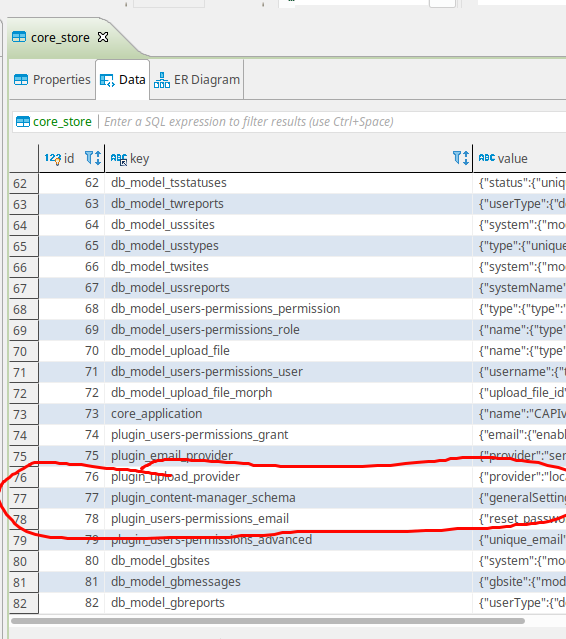
derrickmehaffy
on 8 Oct 2018
I am using MongoDB. After removing the document of plugin_content_manager_schema, Strapi cannot start.
john916zhang
on 8 Oct 2018
Is there an error message?
( I don't use mongo so honestly I'm not much help here )
derrickmehaffy
on 8 Oct 2018
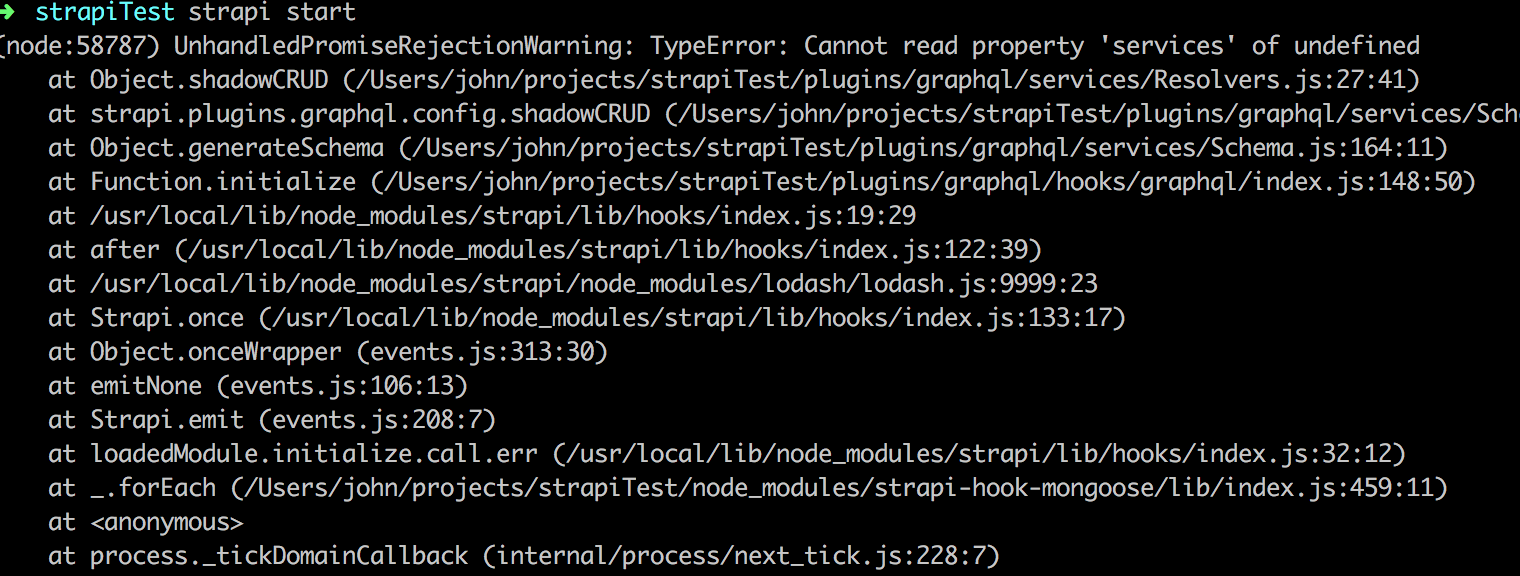
john916zhang
on 8 Oct 2018
That doesn't look like a related error @anderson916 can you remove the graphQL plugin and try starting again?
derrickmehaffy
on 8 Oct 2018
working now. thanks.
john916zhang
on 8 Oct 2018
Informations
Node.js version: v10.2.0
npm version: 5.6.0
Strapi version: 3.0.0-alpha.14.3
Database: Mongodb
Operating system: Ubuntu 18.04.1 LTS
What is the current behavior?
When trying to creating a new entry, admin panel never stop loading
Steps to reproduce the problem
1) go to Content Type Builder
2) create a new Content Type named "division"
3) add 2 fields to this Content Type: name (string), title (string) then save
4) create a new Content Type named "subDivision"
5) add 2 fields to this Content Type: name (string), title (string) then save
6) go to "subDivision" (top of left menu on admin panel) then click on "Add new"
7) Here you should have an infinite loading
Tried:
1) NickBolles solution (does not work):
"We modified the user object, saved the modifications, and the server restarted and then we were able to create a new user just fine through the admin UI."
--> I've added and remove the fields for "subDivision"
2) soupette solution works!!!:
db.core_store.deleteMany({“key":”plugin_content-manager_schema"})
Thanks @soupette
 Keatooon
on 17 Oct 2018
Keatooon
on 17 Oct 2018
I understood why this is happening to me. This started after updating the strapi. That is, he does not want to create new entry to old content type. With new created content type everything is fine
inoisy
on 17 Oct 2018
I am having this issue with postgres using docker image ID 61992ba649f9
 ak5
on 30 Nov 2018
ak5
on 30 Nov 2018
@soupette deleting "plugin_content_manager_schema" in core_store fixed it for me as well. The entry was regenerated. Maybe a note should be added to the deployment documentation?
 abegehr
on 9 Dec 2018
abegehr
on 9 Dec 2018
I have the same problem with postgres
 ntloi95
on 10 Jan 2019
ntloi95
on 10 Jan 2019
ok the solution that i found is... let me explain first.
so i created a --dev version, Created 1 test content-type and added few fields in it. Did logo changes and created a build afterwards. Next upon staring server, I had babel-polyfill issue, after resolving it (https://github.com/strapi/strapi/issues/514#issuecomment-453684059) on Dashboard i saw my previously created Data-type and i tried to create a post. Upon pressing "saving" it was infinitely loading and eventually gave error.
Solution: Just go to your Content-Type Manager > Choose previously created Content-type > Re "save" it. Now i was able to correctly create/edit/delete my post.
Final thoughts i feel like changes related to Content-type at the time of --dev were not tracked correctly, or there entries were missing from DB.
 yeomann
on 12 Jan 2019
yeomann
on 12 Jan 2019
Fixed this issue by this procedure (when using heroku + mlab).
- strapi-verion: 3.0.0-alpha.18
heroku config // get heroku's mlab config info
mongo mongodb... // connect to mongodb
db.core_store.deleteMany({"key":"plugin_content-manager_schema"})
heroku restart
But this is very tricky , it should be documented in somewhere (like wiki).
 yareyaredesuyo
on 21 Jan 2019
yareyaredesuyo
on 21 Jan 2019
just writing for anybody having the same problem....
Deleting "plugin_content_manager_schema" in core_store does not solve my problem.
So, what i did was copying value from "plugin_content_manager_schema" from my local to live server. It worked form me.
Cheers..
-- i couldn't restart the server
i think a migration should be written... so "plugin_content_manager_schema" will be automatically changed.
 juji
on 23 Jan 2019
juji
on 23 Jan 2019
I think this issue happens at random in dev too. I experienced it when working locally a lot. What concerns me the most is that there is no error message or timeout. It hangs indefinitely. There is no apparent memory leak anywhere either. It should throw an error of some sort.
 cupojoe
on 18 Mar 2019
cupojoe
on 18 Mar 2019
I also had this error if there is an error in data type definition
inoisy
on 25 May 2019
I'm also experiencing this bug
 Ic3m4n34
on 3 Jun 2019
Ic3m4n34
on 3 Jun 2019
Encountering this in 3.0.0-beta.5 too.
The db.core_store.deleteMany({"key":"plugin_content-manager_schema"}) and then restart fix worked for me too but this is definite a bug that needs addressing.
 rmcfadzean
on 17 Jun 2019
rmcfadzean
on 17 Jun 2019
I've also experienced this, and I also found that deleting the plugin_content-manager_schema in the core_store and then restarting the code fixes the issue. I'm using the beta.6 version.
 pgjones
on 20 Jun 2019
pgjones
on 20 Jun 2019
If Strapi provided clarity on the data structure stored in plugin_content-manager_schema then perhaps the community could help each other debug the serious issues everyone is experiencing with upgrades and moving between dev/staging/production. It is not an option to delete this document because it holds critical field display customizations that took a lot of time to create. I have an app headed for production but I don't know how it can happen with the issues in staging. Can't move dev's schema to staging. Once a copy of staging db is copied to dev and qa, those systems now experience the same problem. How can anyone expect to use Strapi as a viable production environment with the current issues? I can't add an administrator - infinite spin. Help!
 rhaft
on 21 Jun 2019
rhaft
on 21 Jun 2019
@rhaft the Content-Manager plugin is going to be completely rebuilt and that schema entry is going to be broken up to prevent these problems. (There is no ETA but trust me it is high on their list of priorities)
derrickmehaffy
on 21 Jun 2019
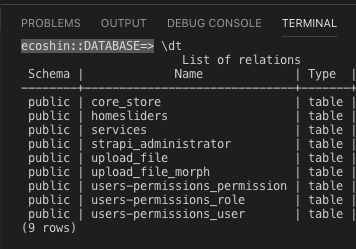
@soupette please help i dont have any colums in my core_store datatable to delete plugin_content_manager_schema
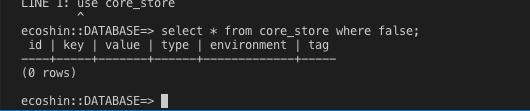
i am using strapi 3.0.0-beta.6
 har17bar
on 23 Jun 2019
har17bar
on 23 Jun 2019
@har17bar your SQL command is wrong.... lol
SELECT * FROM core_store WHERE core_store.`key` = 'plugin_content-manager_schema';
The problem is you are using where false which is going to return nothing.
derrickmehaffy
on 23 Jun 2019
Also key is a reserved sql word hence the reason for the core_store.`key`
derrickmehaffy
on 23 Jun 2019
thank you i mistakenly typed long time))) DELETE FROM core_store WHERE key='plugin_content_manager_schema';
instead of
DELETE FROM core_store WHERE key='plugin_content-manager_schema';
har17bar
on 23 Jun 2019
@derrickmehaffy now i have in production this situation
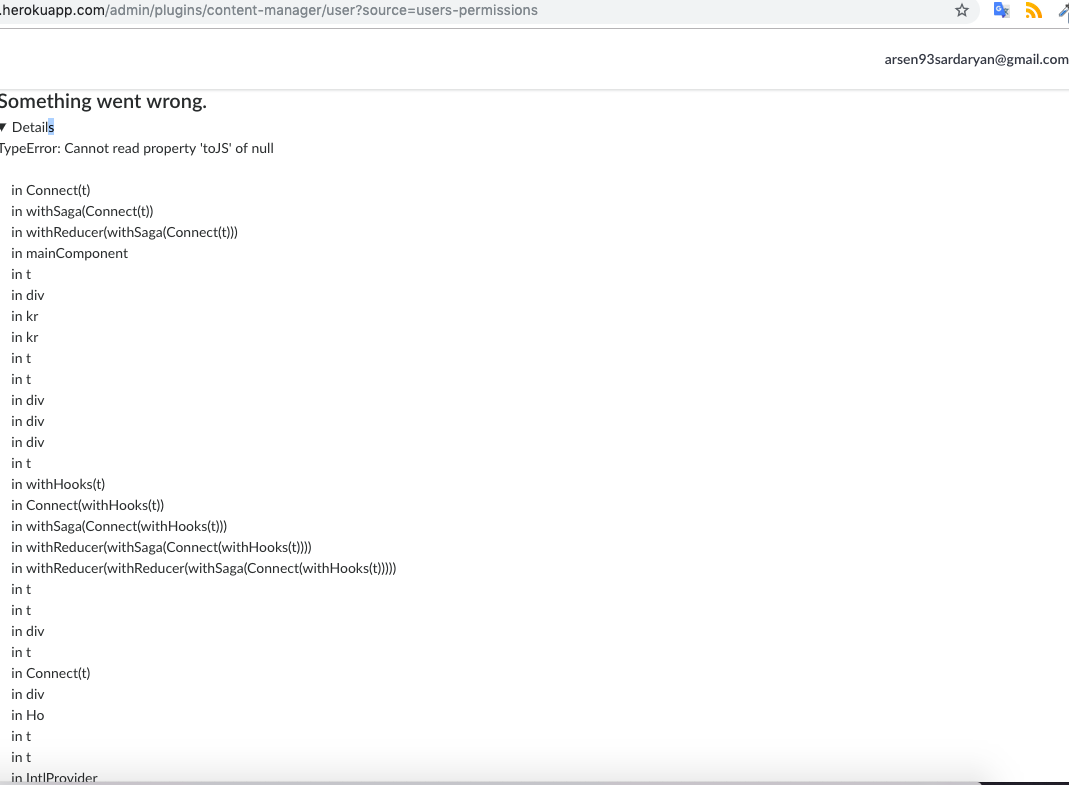
and lost all CONTENT TYPES
har17bar
on 23 Jun 2019
@har17bar you need to "restart" strapi, however heroku does that. That entry is created when strapi starts.
derrickmehaffy
on 23 Jun 2019
@derrickmehaffy wtf web development is))) thank you
har17bar
on 23 Jun 2019
if you using postgreSQL :))
1.go to heroku type in terminal value of Heroku CLI
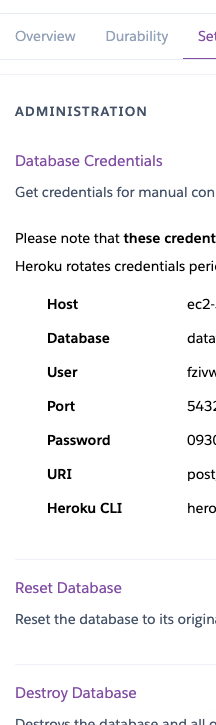
2.DELETE FROM core_store WHERE key='plugin_content-manager_schema';
- heroku restart
if mac-os first of all brew install postgresql :)
har17bar
on 23 Jun 2019
ok the solution that i found is... let me explain first.
so i created a
--devversion, Created 1 test content-type and added few fields in it. Did logo changes and created a build afterwards. Next upon staring server, I had babel-polyfill issue, after resolving it (#514 (comment)) on Dashboard i saw my previously created Data-type and i tried to create a post. Upon pressing "saving" it was infinitely loading and eventually gave error.Solution: Just go to your Content-Type Manager > Choose previously created Content-type > Re "save" it. Now i was able to correctly create/edit/delete my post.
Final thoughts i feel like changes related to Content-type at the time of
--devwere not tracked correctly, or there entries were missing from DB.
This method from @yeomann solved my issue, I was actually recreating the type in Content Type Builder and it worked. I'm using v3.0.0-alpha.23
 hezzze
on 26 Jun 2019
hezzze
on 26 Jun 2019
same problem here. @soupette where is "plugin_content_manager_schema"?
Thnak You.!
 mkhizeryounas
on 28 Jul 2019
mkhizeryounas
on 28 Jul 2019
Hey guys.
This issue still exist right? Shouldn't we open it back untik it's resolved?
 muhajirdev
on 20 Aug 2019
muhajirdev
on 20 Aug 2019
I have the same problem in several entries. I'm getting it resolved as @NickBolles said.
I'm adding a fake field to each entry, save it and then it works.
 miguelangeltorresfp
on 25 Aug 2019
miguelangeltorresfp
on 25 Aug 2019
Hey guys.
This issue still exist right? Shouldn't we open it back untik it's resolved?
Why is this closed, i spent my day on this.
 ptrkvsky
on 2 Sep 2019
ptrkvsky
on 2 Sep 2019
This issue has been widely discussed, it's known and has been fixed in the develop branch and will be released in beta.16
Not to mention there are about 20 issues that are all the same thing.
derrickmehaffy
on 2 Sep 2019
Related issues
 Aurelsicoko
·
74Comments
Aurelsicoko
·
74Comments
 mnlbox
·
43Comments
mnlbox
·
43Comments
 dsheyp
·
46Comments
dsheyp
·
46Comments
 djbingham
·
40Comments
djbingham
·
40Comments
 abdonrd
·
42Comments
abdonrd
·
42Comments
Most helpful comment
Fixed this issue by this procedure (when using heroku + mlab).
But this is very tricky , it should be documented in somewhere (like wiki).