Strapi: Content Manager cannot open created Content Types
Informations
- Node.js version: 9.11.1
- npm version: 5.6.0
- Strapi version: 3.0.0-alpha.14
- Database: MongoDB 4.1
- Operating system: Alpine Linux (inside a Docker container using the
strapi/strapiimage)
What is the current behavior?
The Strapi admin UI crashes with the following console errors when opening a content type in the Content Manager.
Console log:
main.js:16 TypeError: Cannot read property 'getIn' of undefined
    at e.value (main.js:46)
    at main.js:46
    at We.__iterate (main.js:6)
    at We.forEach (main.js:6)
    at e.value (main.js:46)
    at new e (main.js:46)
    at main.js:40
    at Me (main.js:6)
    at Me (main.js:6)
    at Me (main.js:6)
Io @ main.js:16
Uo.o.callback @ main.js:16
to @ main.js:16
oo @ main.js:16
mn @ main.js:16
cn @ main.js:16
un @ main.js:16
ln @ main.js:16
bn @ main.js:16
We @ main.js:16
main.js:16 Uncaught TypeError: Cannot read property 'getIn' of undefined
    at e.value (main.js:46)
    at main.js:46
    at We.__iterate (main.js:6)
    at We.forEach (main.js:6)
    at e.value (main.js:46)
    at new e (main.js:46)
    at main.js:40
    at Me (main.js:6)
    at Me (main.js:6)
    at Me (main.js:6)
Steps to reproduce the problem
- Create a new content type
Articlewith string fieldtitleand text fieldcontent. - Wait for the UI to refresh and indicate that the update has been applied (Docker logs indicate the app restarted successfully).
- Navigate to Content Manager and select
Article. - See that settings for the
Articletype are displayed. - Return to the Content Type Editor and add a relation field
authorwhich relatedArticletoUser. The relation typeUser has many Articles. - Return to Content Manager and select
Articleagain. - See the page flicker (presumably loading the intended page) and then go blank. Check the console log for errors.
What is the expected behavior?
Options to modify settings for the selected content type should be displayed.
Suggested solutions
In the reproduction steps, I describe exactly what I did to reproduce this error after seeing it the first time. I've experimented a bit and I believe the error does not occur unless a relation has been added to a user-defined content type. However, once a relation has been added to any one content type, it seems to cause this error for all other content types as well.
 djbingham
All 40 comments
I'm running into a related issue, occurring when opening an existing content and also when trying to create a new one:
main.js:16 TypeError: Cannot read property 'type' of undefined
    at r.renderAttr (main.js:40)
    at Array.map (<anonymous>)
    at t.value (main.js:40)
    at Po (main.js:16)
    at Co (main.js:16)
    at Yo (main.js:16)
    at $o (main.js:16)
    at cn (main.js:16)
    at un (main.js:16)
    at ln (main.js:16)

main.js:56 uncaught at o TypeError: Cannot read property 'type' of undefined
    at r.renderAttr (https://appserver.herokuapp.com/dashboard/content-manager/main.js:40:393585)
    at Array.map (<anonymous>)
    at t.value (https://appserver.herokuapp.com/dashboard/content-manager/main.js:40:394501)
    at Po (https://appserver.herokuapp.com/dashboard/main.js:16:42275)
    at Co (https://appserver.herokuapp.com/dashboard/main.js:16:47849)
    at Yo (https://appserver.herokuapp.com/dashboard/main.js:16:56588)
    at $o (https://appserver.herokuapp.com/dashboard/main.js:16:56896)
    at cn (https://appserver.herokuapp.com/dashboard/main.js:16:60278)
    at un (https://appserver.herokuapp.com/dashboard/main.js:16:59787)
    at ln (https://appserver.herokuapp.com/dashboard/main.js:16:59613)
 hansemannn
on 7 Sep 2018
hansemannn
on 7 Sep 2018
Can you guys test again with last version of Strapi please (just published new version and I think it's fixed)
 lauriejim
on 12 Sep 2018
lauriejim
on 12 Sep 2018
Still the same problem with 14.1.1
 cliqer
on 14 Sep 2018
cliqer
on 14 Sep 2018
Same here, just a blank page and the errors above. Let me know if you need our app!
hansemannn
on 15 Sep 2018
That happens in a new 14.1.1 project.
Copied apis from previous one and only these give this error when I try to edit them in Content manager. Any newly created behave correctly.
Is there something else that should be created for content management to work?
cliqer
on 15 Sep 2018
@hansemannn you can't create stuff on heroku because the storage isn't persistent. You will need to create new models locally then push to heroku.
 derrickmehaffy
on 15 Sep 2018
derrickmehaffy
on 15 Sep 2018
I am also experiencing this issue - if I can provide any information to help with debugging, please let me know.
 ChrisSargent
on 16 Sep 2018
ChrisSargent
on 16 Sep 2018
@derrickmehaffy That's a good point! But actually this happens with a locally-deployed instance where all content-types have been created earlier.
hansemannn
on 16 Sep 2018
Also to mention I can't edit at all these copied apis and can't add new fields any more. @lauriejim can you please give us any hints of where to look? This is urgent if it is a bug
cliqer
on 16 Sep 2018
I've been doing a little bit of debugging on this this morning. In the constructor of Manager.js in content-type-builder/utils, when it is throwing an error, the variable with name layout is coming through as undefined.
ChrisSargent
on 16 Sep 2018
Okay.... I think this could be a casing issue, it only happens if you use some camel / pascal casing and it looks like it's down to the value that's being passed to state.getIn.
In plugins/content-manager/admin/src/containers/App/reducer.js at this case of the reducer switch:
case SET_LAYOUT: {
  let updatedList = List([]);
  const path = action.keys.split(".");
  const modelName = path.length > 2 ? path[2] : path[0];
  const layout = state.getIn([
    "modifiedSchema",
    "layout",
    modelName,
    "attributes"
  ]);
The modelName variable comes through in all lower case but in the reducer, the value is in the original case as defined when it was setup.
In my case, I had setup a model as appUser but the modelName was coming as appuser and the nested value was not being found (see screenshot).
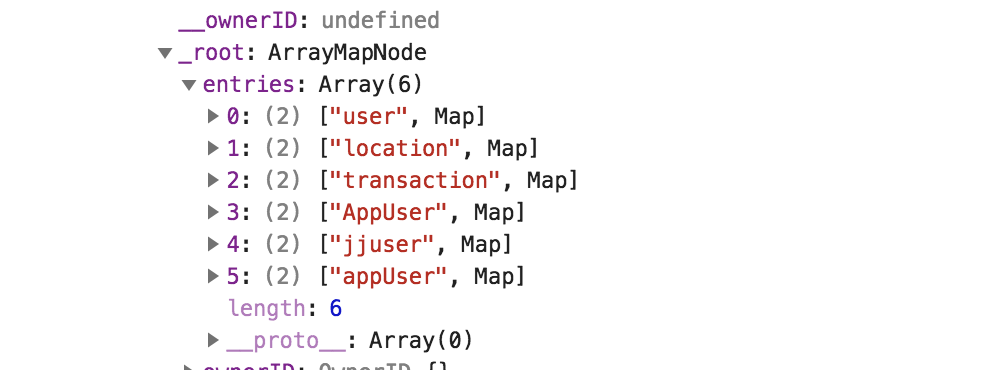
I setup the same model using jjuser and it worked with no problems.
ChrisSargent
on 16 Sep 2018
@ChrisSargent This is huge progress! Do you know a way to clean this up? I am searching through both the model settings and the MongoDB itself, but cannot find any old references to camel-cased fields, except Strapi's own ones (updatedAt, createdAt & resetPasswordToken).
hansemannn
on 16 Sep 2018
@hansemannn, well when I first ran in to this problem I couldn't get back to a working / clean state either. So, I setup a new repo with these changes to that I could track exactly what was being changed in the code. I also committed a working .json file from the core_store collection that Strapi creates. There is an entry there with a key called plugin_content-manager_schema and it seems to control the menu items and available content types for editing. By committing it, I could also monitor the changes being made.
However, looking at the original issue it doesn't seem that they were using any casing in their models.
ChrisSargent
on 16 Sep 2018
After your reply @ChrisSargent looked into db's core_store and realised that is the root of these problems, at least in my case.
In the migration guide it does not mention anywhere that you need to copy core_store from previous db or nothing works. I assumed this entry gets automatically created when it reads what's inside the /api/ folder but it seems it doesn't. So the schema of the content-manager plugin does not have any info about these apis, thus the errors.
The question: Is there anyway to force core_store creation correctly from available apis?
cliqer
on 16 Sep 2018
Thanks to both of you! In my case, a field was appended twice in the core_store, resulting in the blank page. Cleaning it up manually fixed the issue.
hansemannn
on 16 Sep 2018
I’m not sure. It seems that maybe this dB entry is created from scratch every time a model type is edited through the UI. Or maybe it updates it. Either way, it seems it would be better if it always recreated the entry based on data in the code.
Sent from my iPhone
On 16 Sep 2018, at 15:10, Protogon notifications@github.com wrote:
After your reply @ChrisSargent looked into db's core_store and realised that is the root of these problems, at least in my case.
In the migration guide it does not mention anywhere that you need to copy core_store from previous db or nothing works. I assumed this entry gets automatically created when it reads what's inside the /api/ folder but it seems it doesn't. So the schema of the content-manager plugin does not have any info about these apis, thus the errors.
The question: Is there anyway to force core_store creation correctly from available apis?
—
You are receiving this because you were mentioned.
Reply to this email directly, view it on GitHub, or mute the thread.
ChrisSargent
on 16 Sep 2018
@lauriejim I think this is still an on-going issue. Had another user report something similar on slack. May want to keep this open to make sure there is no existing issue to be fixed.
derrickmehaffy
on 17 Sep 2018
@lauriejim is this resolved? You guys just keep closing issues without fixing them. why? Strapi is a great idea but so unstable. I'm holding up a client's project because I can't trust strapi anymore. Keep loosing and redoing the work every time I do an upgrade and migration. If camel case is not allowed and creates all these problems you should add an error check on the fields and not just let us ruin the hard work of creating an api.
cliqer
on 17 Sep 2018
@gianniskarmas the content manager plugin (customizing the look of the edit/list views) is very new.
The project as a whole is currently in alpha thus I would expect a lot of changes to happen, at this point everything is pretty much subject to change.
That being said the Strapi team is small, and they get a lot of duplicate tickets. I spoke with him on the slack and in this case the issue is with the core_store entry and you needed to delete the entry after the update due to a change in how the schema is created. I've spoken with @soupette on this issue and I'm not a huge fan of it is currently being stored.
derrickmehaffy
on 17 Sep 2018
@derrickmehaffy Thank you for all the hard work all of you put on this project.
Unfortunately that is not the only problem but also a part of a bigger one .
It looses any access and track to the old apis and does not recreate the schema.
- Can't create any new fields in Content Type. When I try to I get the infinite spinning wheel.
- Can't edit with Content Manager. PUT http://localhost:1337/content-type-builder/models/materials 500 (Internal Server Error)
- Can't edit with Content Type Builder. TypeError: Cannot read property 'getIn' of undefined
The api and graphql works in all crud operations but the admin, which is the best part of strapi, becomes corrupted very easily.
The way I see it (and while I've had to learn these limitations after destroy days of work) this is a core problem and something to consider fixing urgently.
cliqer
on 17 Sep 2018
@gianniskarmas yeah as I said it was related to how the content manager plugin (what changes those views on the admin panel) stores the data. Right now all that information is stored in one very deeply nested json on a single db entry (good luck breaking that down by hand).
There was a change in how that schema is built, thus it couldn't parse the json from the previous version, hence why it had to be deleted to get the content manager to work again.
Trust me I know it is frustrating for you, your talking to someone who has roughly 75 models that I had to rebuild one by one. But I expect this in an alpha project and I've been talking with the Strapi team to help them with some of these "quality of life" improvements, in this case it was a needed change. I won't lie and say who knows if something like this will be needed again, like I said before Alpha = everything is subject to change.
I understand that you are trying to use this and develop for a production application. I use strapi in production (or well getting close to) so trust me when I say I feel your pain, however the Strapi team right now are solely focused on getting a stable release out by the end of the year and aren't focused on those of us that are currently using it. In this case it was a bug with updating and not creating a new project.
I am not a Strapi team member, but I have been around here for some time now and am very focused on helping them where I can with the skills I have. I always suggest to everyone here that if there is something you don't like or something you think should change, fork the code, fix it, and submit a PR. :smile:
My javascript skills unfortunately are not very strong and I have basically zero frontend development skills, thus I usually try and poke around where I can. In this case, I recommend you backup your core_store table, delete it, and restart the server. That should get you access again to the adminUI
derrickmehaffy
on 17 Sep 2018
For what it's worth, I've encountered this as well, and figured it's the content-manager plugin's config. I've basically just used https://jsonformatter.org/ to format the string @derrickmehaffy mentioned, inside core_store under plugin_content-manager__schema. The site lets me collapse nodes, and generally has good formatting (to me anyway).
Just keep a look out for duplicate keys and any keys that you may have removed. These will cause the content-manager page on your admin to not work properly.
 signorekai
on 17 Sep 2018
signorekai
on 17 Sep 2018
Good hint @signorekai I was trying to break it down manually. Exporting as CSV from MySQL and trying to manually modify the CSV. Most programs won't even open a CSV that big (a good 75 models worth) :laughing:
derrickmehaffy
on 17 Sep 2018
Yeah was a massive pain to deal with. Hopefully this will get better in the
future. Until then!
On Tue, 18 Sep 2018, 12:39 AM DMehaffy, notifications@github.com wrote:
Good hint @signorekai https://github.com/signorekai I was trying to
break it down manually. Exporting as CSV from MySQL and trying to manually
modify the CSV. Most programs won't even open a CSV that big (a good 75
models worth) 😆—
You are receiving this because you were mentioned.
Reply to this email directly, view it on GitHub
https://github.com/strapi/strapi/issues/1912#issuecomment-422085797, or mute
the thread
https://github.com/notifications/unsubscribe-auth/ALms12KJuOrx2OXax-uKAh4uF54EfQW0ks5ub9BbgaJpZM4WdR7Z
.
signorekai
on 17 Sep 2018
Same problem here after migrate and deploy the 3.0.0-alpha.14.1.1 release
 devaublanc
on 24 Sep 2018
devaublanc
on 24 Sep 2018
3.0.0-alpha.14.2 still problem, if i can help, where I should start?
 mandaputtra
on 28 Sep 2018
mandaputtra
on 28 Sep 2018
Warning to this migration https://github.com/strapi/strapi/wiki/migration-guide-alpha.13.1-to-alpha.14#reset-your-content-manager-settings
lauriejim
on 28 Sep 2018
same problem here.
 john916zhang
on 8 Oct 2018
john916zhang
on 8 Oct 2018
@anderson916 see the comment above yours, there is an incompatibility from older strapi versions with the content manager plugin, you need to purge the content-manager schema entry from your DB in the core_store table (or collection in mongo)
derrickmehaffy
on 8 Oct 2018
Yes, it works.
When I use "straps generate:api" to create a model, one field has a name of "averageFrequency", the field will be changed to "average frequency" in the Admin UI. After I change the name back to "averageFrequency", the Content Manager doesn't work. But as you suggested to remove the content-manager schema entry from your DB in the core_store table (or collection in mongo), and restart Strapi manually, everything is working now.
Thanks. You save my time.
john916zhang
on 8 Oct 2018
No problem :wink:
derrickmehaffy
on 8 Oct 2018
@anderson916 see the comment above yours, there is an incompatibility from older strapi versions with the content manager plugin, you need to purge the content-manager schema entry from your DB in the
core_storetable (or collection in mongo)
That did the trick. Thanks for the information.
 fsc7
on 23 Oct 2018
fsc7
on 23 Oct 2018
Hi,
I'm working with a React + Strapi project and when I ran strapi start in my terminal I get to my admin page. However, when I press Content Manager I am met by Content Manager
Configure the default settings for all your Content types where I can either Save or Cancel. Whichever one I choose sends me to a blank page called http://localhost:1337/admin/plugins/content-manager/ctm-configurations
I cannot see any of my products or pics i uploaded a few weeks ago.
What can i do?
 Matildahermansson
on 23 Oct 2018
Matildahermansson
on 23 Oct 2018
@Matildahermansson see the comment above yours, more than likely your ctm view settings got borked, purge that entry from your core_store.
Also just a heads up in the future, might be worth include your f12 menu in your screenshot, a white page won't help us much :stuck_out_tongue:
derrickmehaffy
on 23 Oct 2018
I just created a clean version with strapi version 3.0.0-alpha.14.4.0 and am still receiving the issue as stated above.
 brandonin
on 30 Oct 2018
brandonin
on 30 Oct 2018
I have the same problem in a fresh project
 kenn44
on 4 Nov 2018
kenn44
on 4 Nov 2018
I still experience this bug in alpha 14.5 - but only on my server (on my local machine everything is fine). On my server, this bug occurs on a fresh project as well.
 avirankatzsofi
on 15 Nov 2018
avirankatzsofi
on 15 Nov 2018
Same error here, only on my server too, and with a new empty project.
 T-Zahil
on 30 Nov 2018
T-Zahil
on 30 Nov 2018
@avirankatzsofi @T-Zahil I solved it by running
npm run setup
kenn44
on 30 Nov 2018
I have also this spinng wheel when I want to add a post and production but not development. Nothing seem to help.
 rahimimo
on 1 Dec 2018
rahimimo
on 1 Dec 2018
Related issues
 johhansantana
·
45Comments
johhansantana
·
45Comments
 Aurelsicoko
·
74Comments
Aurelsicoko
·
74Comments
 hkovacs
·
43Comments
hkovacs
·
43Comments
 cesarvarela
·
63Comments
cesarvarela
·
63Comments
 Nyeedz
·
39Comments
Nyeedz
·
39Comments
Most helpful comment
I have the same problem in a fresh project