Strapi: Newly created Content Types do not appear in the Content Types list
- 10.12.0
- 6.4.1
- 3.0.0-alpha.14.4.0
- 5.7.23
- Mojave
What is the current behavior?
Newly created types do not appear in the content types list.
Steps to reproduce the problem
Just follow the Quick Start guide
What is the expected behavior?
They should appear. I see them in the database and in the Content Manager.
Suggested solutions
🤷♂️
 cesarvarela
All 63 comments
Same issue here! :)
 abdonrd
on 26 Oct 2018
abdonrd
on 26 Oct 2018
Hello @cesarvarela and @abdonrd.
Did you install strapi with yarn ? or with npm ?
It work on my side, new fresh app with new fresh database.
 lauriejim
on 27 Oct 2018
lauriejim
on 27 Oct 2018
For for debug reasons: Works for me on High Sierra with a fresh install (with npm)
- npm: 6.4.1
- node: v9.11.1
- strapi: 3.0.0-alpha.14.4.0
- mongodb 4.0.3
- macOS 10.13.6
 pbov
on 27 Oct 2018
pbov
on 27 Oct 2018
Does not work when upgrading from version 14.3 (
 masiya255
on 28 Oct 2018
masiya255
on 28 Oct 2018
Same issue. I'm running the same version of everything as cesarvarela.
My workaround for now is manually entering the content type name into the URL.
Ex: http://localhost:1337/admin/plugins/content-manager/{insert content type name}
Update: once I created an item of the type, the type then appeared in the sidebar.
Update 2: it disappeared again.
 ladvoc
on 28 Oct 2018
ladvoc
on 28 Oct 2018
I've tried both mongo and mysql and got the same result.
once thing I've noticed is that If I manually delete my user from the db and then signup again, I do see the new Types, but if I refresh the page the items disappear again...
cesarvarela
on 28 Oct 2018
I have got the same issue as @cesarvarela
 joakgord
on 28 Oct 2018
joakgord
on 28 Oct 2018
Same issue here. I had to roll back to 14.3
 stiko
on 28 Oct 2018
stiko
on 28 Oct 2018
Ok so I followed the contributing guide, and seems like what is causing the issue is the strapi-cli if I run server.js directly or from vscode, the new types do show in the content types list.
cesarvarela
on 28 Oct 2018
BTW, is it possible to see the debug output when running server.js` from vscode?
cesarvarela
on 28 Oct 2018
I've found more stuff, maybe this can help you guys::
I can access the new types If I do what I mention above, but when I add new fields to this new types, they don't work immediately, the Type.settings.json gets modified with the new field definition, but only gets visible in the UI if I restart strapi.
Is this a caching issue maybe?
cesarvarela
on 28 Oct 2018
All my content types disappear if I modify a content type from content type builder. I only get them visible if I clear cache from browser settings.
stiko
on 28 Oct 2018
@stiko same here.
 orangesmartie92
on 28 Oct 2018
orangesmartie92
on 28 Oct 2018
I have same issue. After upgrade to 14.4.0
My other issue (#2114) fixed but now I can't see my new content types in side bar. (I'm using Firefox)
 mnlbox
on 28 Oct 2018
mnlbox
on 28 Oct 2018
Hello @cesarvarela and @abdonrd.
Did you install strapi with yarn ? or with npm ?It work on my side, new fresh app with new fresh database.
With npm!
abdonrd
on 28 Oct 2018
I also installed from npm based on this migration guide: https://github.com/strapi/strapi/wiki/migration-guide-alpha.14.3-to-alpha.14.4
mnlbox
on 28 Oct 2018
Was it a app migration or new app ?
lauriejim
on 28 Oct 2018
@lauriejim I test new app and also migrate an old app. Both have same issue.
mnlbox
on 28 Oct 2018
@lauriejim I think it's based on browser. In chromium anything is OK but I have issue in Firefox. Is it a cache problem?
mnlbox
on 28 Oct 2018
@mnlbox I also tried migrating to 14.3 but same issues too
orangesmartie92
on 28 Oct 2018
For for debug reasons: Works for me on High Sierra with a fresh install (with npm)
- npm: 6.4.1
- node: v9.11.1
- strapi: 3.0.0-alpha.14.4.0
- mongodb 4.0.3
- macOS 10.13.6
I have all the same versions for all of the above but my node version is v10.10.0.
It works on my mac, but when I try on a remote ubuntu 16.04, it doesn't work
orangesmartie92
on 28 Oct 2018
Was it a app migration or new app ?
I have tried both!
abdonrd
on 28 Oct 2018
Hi,
I've same issue, but after some steps I've achieved that the table for a new content type appears.
How to reproduce it.
- First, I've run the application.
- Next, I've tried to create a new content type, then that issue appears (the table doesn't appear in database but all files inside api folder have been created).
- After that, I've stopped the application and I've run again it.
- Finally, now the table will appear for new content type (obviously, if you previously have tried to created that content type).
Also, I have same issues as @cesarvarela, @jacobgelman and @stiko (items disappear)
 davidenq
on 29 Oct 2018
davidenq
on 29 Oct 2018
I have same issue too.
But I found that if using Firefox, the bootstrap function of content manager wouldn't be executed. Thus, the types won't appear. However, Chromium can run it successfully.
----Edited----
I think I found the problem.
In Firefox, checkLogin() run before the plugins register, so there is no plugin when checkLogin() is going to run the bootstrap functions of the plugins. But Chromium run in the correct order most of the time.
 Leo1003
on 30 Oct 2018
Leo1003
on 30 Oct 2018
Well the problem seems to be with Firefox when running the build. The error doesn't appear in dev mode (on localhost:4000).
 soupette
on 30 Oct 2018
soupette
on 30 Oct 2018
I always use Chrome. 😕
abdonrd
on 30 Oct 2018
It's working on my side with Chrome but not with Firefox...
soupette
on 30 Oct 2018
I've been working with Chrome but, I have same issue.
Google Chrome Version 69.0.3497.100 (Official Build) (64-bit) on MacOS X El Capitan Version 10.11.6 (15G31)
davidenq
on 30 Oct 2018
I can't see the /content-manager/models request in the Network tab when the content doesn't appear.
abdonrd
on 30 Oct 2018
@soupette Is it related to #1271 ?? :thinking:
If it is I think it's better to fix both of them in #2229 PR. :wink:
mnlbox
on 31 Oct 2018
I have the same issue.
and I have tried many times to reinstall it with Quick Start guide,but it still doesn't appear in the content types list.
 Dogtiti
on 31 Oct 2018
Dogtiti
on 31 Oct 2018
@mnlbox the fix I made should also fix #1271.
@Dogtiti there's a PR open #2229 until this is released you can just take the code and run the following command at the root of your project npm run setup your app should work properly after that.
soupette
on 31 Oct 2018
@soupette thx.
however,I need it Immediately,I have took your code but I can't build them, so how can I do?
maybe I have built them ,but it didn't change any more, so what should be the right steps?###
Dogtiti
on 1 Nov 2018
@mnlbox the fix I made should also fix #1271.
@Dogtiti there's a PR open #2229 until this is released you can just take the code and run the following command at the root of your projectnpm run setupyour app should work properly after that.
Hey @soupette :)
I'm running
node v11.1.0
strapi 3.0.0-alpha.14.4.0
Mac OSX 10.14.1 here,
When I run npm run setup and start the server again, I'm still not seeing that newly created content type.
 roghernandez
on 6 Nov 2018
roghernandez
on 6 Nov 2018
Same issue here. Itis strange, because my app deployed at Heroku shows the content types :S

BTW, at localhost, only users type is show.
 Globerada
on 6 Nov 2018
Globerada
on 6 Nov 2018
Same issue, on Chrome.
Got it working though by pushing my changes to my production server - then added content to the content type and pulled my changes locally... now I have it in the side bar.
 Gillinghammer
on 6 Nov 2018
Gillinghammer
on 6 Nov 2018
-- i will move this to another issue --
 merijnponzo
on 14 Nov 2018
merijnponzo
on 14 Nov 2018
Related: https://github.com/strapi/strapi/issues/2306
@merijnvanessen can you post your comment on the new issue. Also can you please include a screenshot of the error in your browser console.
 derrickmehaffy
on 14 Nov 2018
derrickmehaffy
on 14 Nov 2018
It's weird is that's it's working on my side in both Firefox and Chrome.
soupette
on 14 Nov 2018
@soupette like I said in 2306 I couldn't duplicate it either on Linux Mint in both Chrome Stable/Beta & Firefox stable
derrickmehaffy
on 14 Nov 2018
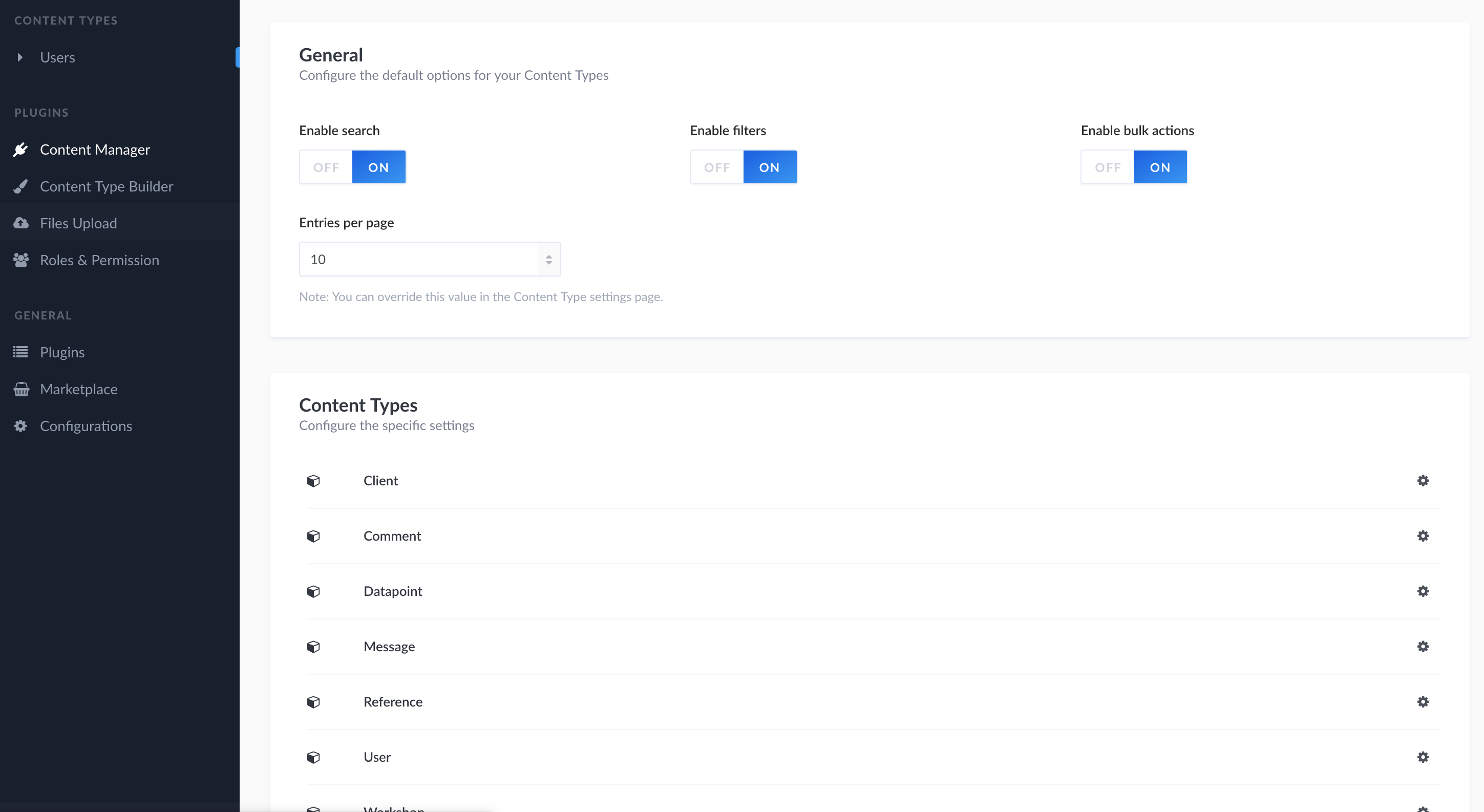
I'm also experiencing this. Version: 3.0.0-alpha.14.4.0
Oddly enough, I've seen it work and then disappear again upon login. I login and I can view the content types. Upon refresh they disappear. (Subsequent logins without clearing cache will cause them to remain hidden)
 kalms
on 19 Nov 2018
derrickmehaffy
on 19 Nov 2018
kalms
on 19 Nov 2018
derrickmehaffy
on 19 Nov 2018
@derrickmehaffy Ah sorry. Carry on! 👍
kalms
on 19 Nov 2018
So,Has it been fixed already in the latest version?
I can't find it in the list https://github.com/strapi/strapi/releases/tag/v3.0.0-alpha.14.5
Dogtiti
on 11 Dec 2018
@Dogtiti the latest is v16, please test on that. I believe this issue is random and seem to be user environment based. Many of the loading functions of the adminUI have been modified to wait on the browser and I believe this issue was "indirectly" fixed due to that.
derrickmehaffy
on 11 Dec 2018
I have a similar issue. 3.0.0-alpha.21
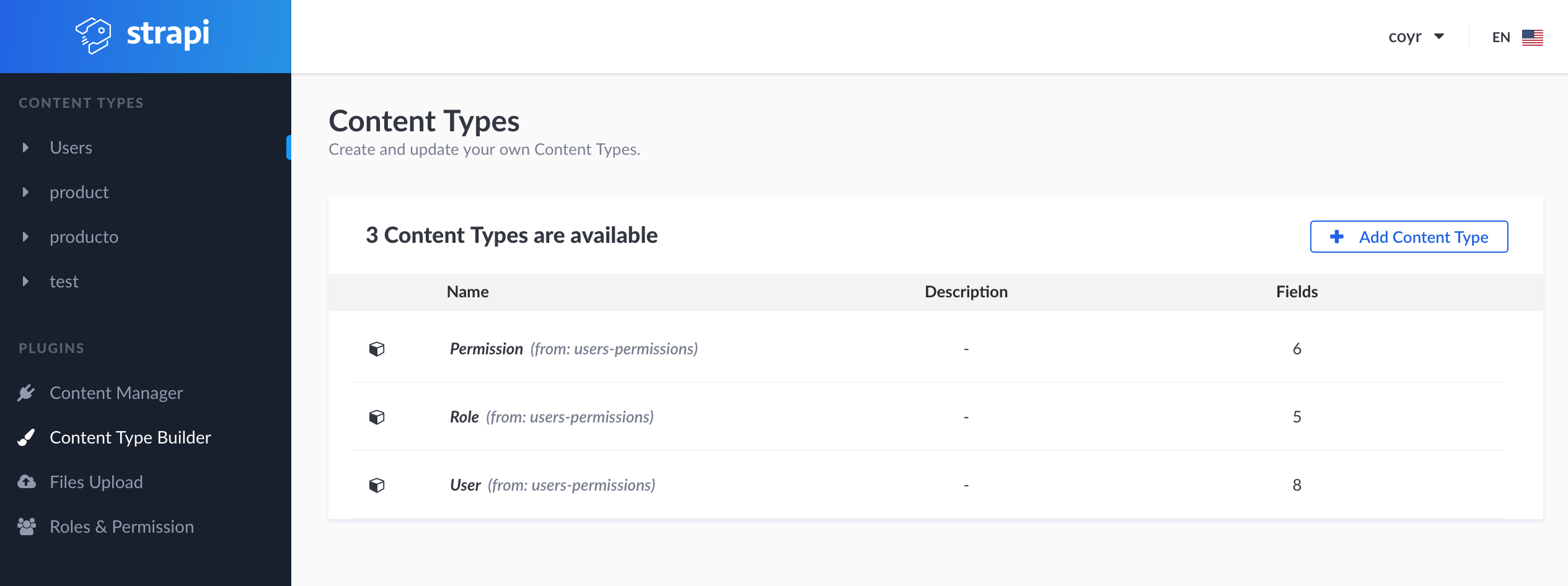
Is there some solution?
 coyr
on 25 Jan 2019
coyr
on 25 Jan 2019
@coyr How did you start your Strapi application ? npm start or strapi start or using a module like pm2 ?
lauriejim
on 27 Jan 2019
@lauriejim When I use the development environment strapi start works fine. When I use pm2 NODE_ENV=production pm2 start server.js --name api now it is not listing the content types in content types page. Also when I click a content type in the sidebar and I try to add new content, it keeps loading

I tried to stop and delete the process, restart nginx and restart with NODE_ENV=production pm2 start server.js --name api but it doesn't work. What can I try?
coyr
on 31 Jan 2019
@coyr try deleting your plugin_content-manager_schema from core_store in your database then restart your Strapi server.
derrickmehaffy
on 31 Jan 2019
@derrickmehaffy it works! thanks
coyr
on 31 Jan 2019
@derrickmehaffy That works perfectly!
 nikosolihin
on 6 Mar 2019
nikosolihin
on 6 Mar 2019
I have the same issue while creating and deleting content-types. tried both with mongo and mysql. But the issue is only when I am trying to run the app through pm2. The normal "strapi start" has no issues. (With the latest version of strapi.) @lauriejim. I couldn't find the plugin in the fix mentioned by @derrickmehaffy
 snehapvs
on 9 Apr 2019
snehapvs
on 9 Apr 2019
@coder477 this is intended as strapi start auto restarts the server, which you should not be doing on production (such as running with pm2) to not cause issues. Using a production server without NODE_ENV=production is also not a good idea.
This won't be fixed, only Strapi start supports auto-restarting which is needed when you create/modify files and this is how models are stored as files. Node can only see those changes then it restarts.
derrickmehaffy
on 9 Apr 2019
@derrickmehaffy Yes I too have no issues with strapi start. Actually, the app would not be directly used by me, once I have launched it on a server, people will start using it and create content-types. I am using NODE_ENV=development with pm2, as I don't want this to be terminated in between. Any alternate If you could suggest.
snehapvs
on 10 Apr 2019
@coder477 Nope, strapi is designed so that it should not auto restart when deployed to a server. Hence the reason for the different environments. Only the strapi start command allows for it to auto restart IE when new content types are created. I would suggest to other members on your team to clone it locally for development and follow normal git commit and proper testing before deployment.
derrickmehaffy
on 10 Apr 2019
Unlike other CMSes, Strapi is effective an API framework aka a "Headless" CMS. 😉
derrickmehaffy
on 10 Apr 2019
@soupette every time I delete this record - plugin_content-manager_schema - I have to upload all of my images again. Do you have a better workaround for this issue? The more content I build into my CMS, the more impossible this solution will become.
 markjlaney
on 21 May 2019
markjlaney
on 21 May 2019
@soupette @alexandrebodin to clarify I don't think the Upload multi-file should be stored in that content-manager schema entry as it is not just a UI thing but a backend one as well, I think that entry should be stored in the model settings JSON file.
derrickmehaffy
on 22 May 2019
Just wanted to post my issue in case some one have the same. I work with Strapi and Heroku i got same problems, on staging environment all was working good but on production get the loading spinner and on the content manager i didn't see the new content type.
I checked on mLab the plugin_content-manager_schema from core_store and i discover that i had two, i just removed both, redeploy and all is working good, so thanks for the fix @derrickmehaffy
 Fdom92
on 22 May 2019
Fdom92
on 22 May 2019
I delete data.db file inside .tmp folder and the issue was resolved.
 j27gj
on 24 Jun 2019
j27gj
on 24 Jun 2019
I created a project with beta version and everything is working fine you can follow this article to create content types in your project.
https://www.mstweaks.com/how-to-create-content-types-and-fetch-data-through-api-in-strapi/
 Nauman440
on 14 Nov 2019
Nauman440
on 14 Nov 2019
I have the same issue after a new install. Adding ContentTypes is working, but they are not shown in the list. (Development Mode)
Restarting the Node-Server every time you add a ContentType will "fix" it. After the restart they are shown.
But this can't be a proper solution.
Does there exist a bugfix at the current date?
 DanielWahl
on 24 Jan 2020
DanielWahl
on 24 Jan 2020
@DanielWahl This issue is really old and outdated. Can you please open a new one so we know your setup / versions etc. Thanks !
 alexandrebodin
on 27 Jan 2020
alexandrebodin
on 27 Jan 2020
Related issues
 niallobrien
·
47Comments
niallobrien
·
47Comments
 dannydtk
·
43Comments
dannydtk
·
43Comments
 Nyeedz
·
39Comments
Nyeedz
·
39Comments
 Cpaczek
·
44Comments
Cpaczek
·
44Comments
 Mat-thieu
·
45Comments
Mat-thieu
·
45Comments
Most helpful comment
@coyr try deleting your
plugin_content-manager_schemafromcore_storein your database then restart your Strapi server.