Strapi: 403 user-permission/init during application creation
Describe the bug
Lacking permission to for initial admin account setup
Console Error http://localhost:1337/users-permissions/init 403 (Forbidden)
Steps to reproduce the behavior
Step 1
strapi new test-project --quickstart
Step 2
Navigate to localhost:1337/admin
See console error with 403 forbidden
Expected behavior
Should allow for regular initial setup.
Screenshots
If applicable, add screenshots to help explain your problem.
System
Versions:
Strapi: 3.0.0-beta.16.8
npm: 6.9.0
node: 10.16.1
database: sqllite
OS: windows 10
Additional context
Found multiple other issues but the none of the solved my problem. Found a potential work around but here but i don't seem to have a plugins folder or defaults.json.
 Cpaczek
All 44 comments
Hello! It has been fixed in this PR.
It's release in beta.17 ;)
https://github.com/strapi/strapi/pull/4246
 lauriejim
on 16 Oct 2019
lauriejim
on 16 Oct 2019
Having the same Problem on beta.17.1.
Created a new Project with MySQL (no SSL).
Strapi: 3.0.0-beta.17.1
npm: 6.12.0
node: 10.16.3
database: MySQL
OS: macOS
 mariusbolik
on 17 Oct 2019
mariusbolik
on 17 Oct 2019
@mariusbolik the new update worked for me. I'm does it work if you use sqllite?
Cpaczek
on 17 Oct 2019
What version of MySQL?
 derrickmehaffy
on 17 Oct 2019
derrickmehaffy
on 17 Oct 2019
What version of MySQL?
Server-Type: MySQL
Server-Connection: No SSL
Server-Version: 5.7.28 - MySQL Community Server (GPL)
Protocol-Version: 10
Char Set: cp1252 West European (latin1)
DB Dump: https://we.tl/t-HS8LgebxaQ
mariusbolik
on 17 Oct 2019
@mariusbolik the new update worked for me. I'm does it work if you use sqllite?
If I use the --quickstart Option I have no problems. Also with beta.16.8 I had no Problems with SQLite. But I really need MySQL.
mariusbolik
on 17 Oct 2019
Okay. Now I created a Project with the --quickstart Flag. Then I created an Account. After that I converted the SQLite File (data.db) to an MySQL File, imported it into my Database and changed the default DB Settings to my MySQL credentials. Now Strapi seems to work with MySQL. Very strange.
mariusbolik
on 17 Oct 2019
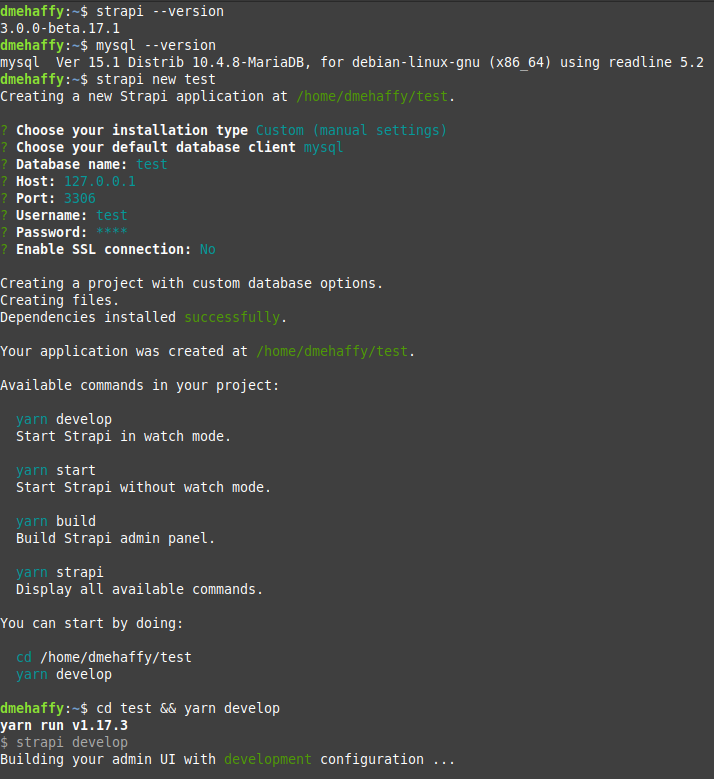
@mariusbolik I'm guessing it's your db permissions, I just tested with a fresh project on MariaDB 10.4 and no issues:

derrickmehaffy
on 17 Oct 2019
@derrickmehaffy can you tell me what happens if you use a remote database from a random hosting provider?
The strange thing ist that it's working after I imported the SQLite Dump into my MySQL Database.
mariusbolik
on 17 Oct 2019
There isn't many that offer MySQL. But I did test with Digital Ocean managed with a DO droplet and it worked fine. Same for AWS
derrickmehaffy
on 17 Oct 2019
Reopening as other users still reporting issues
derrickmehaffy
on 18 Oct 2019
Some more Infos in this case:
- I had a fresh, external MySQL Database
- After I created a new strapi project, the tables were created in my DB
- I got a "403 Forbidden" Message in the console
- I only was able to see the loading spinner on /admin
Solution:
- I created a new project with the
--quickstartflag - Everything worked fine and I was able to create an admin user
- I searched for the data.db file in my project
- I converted the file into MySQL
- Imported it in my DB
- Everything works fine with MySQL
Next Strange thing:
After running strapi run build and strapi run start multiple times it seems to work with a fresh strapi installation and a fresh MySQL DB.
But I also got some errors that some modules couldn't be loaded. And also some bookshelf timeouts. Maybe it's because I'm on the train and I have a poor internet connection. Also the following error appeared very often:
Impossible to register the 'core_store' model.
TimeoutError: Knex: Timeout acquiring a connection. The pool is probably full. Are you missing a .transacting(trx) call?`
Can't explain the behavior.
Is there any difference between using npm run start and strapi start?
mariusbolik
on 18 Oct 2019
@mariusbolik I'm guessing its your connection. Databases are designed to be as low latency as possible, when you start messing with them over poor connections they start failing. Most have connection limits so if you create a connection, you time out, and reconnect you now have 2 connections. Most Databases (mysql) allow for a sleep timer before the connection is killed. So if you have very spotty internet you can start compounding those idle connections by a lot very quickly.
No there is no difference in running npm run start and strapi start the only change is where the command is run from. Npm uses the node_modules version of strapi, where as calling it directly uses the global install (based on your $PATH)
derrickmehaffy
on 18 Oct 2019
Ideally you would want your database connection be to under 10ms for MySQL but it really prefers to be much lower
derrickmehaffy
on 18 Oct 2019
It really seems to work better if I have an excellent internet connection. Especially when use Strapi with an external (remote) MySQL Database.
mariusbolik
on 18 Oct 2019
There isn't really much Strapi can do to help you, I believe your problem is really related to your latency. If you need to do local development, it would probably be best to install MySQL locally
derrickmehaffy
on 18 Oct 2019
@mariusbolik you can try adding this code to your database.json:
"options": {
        "pool": {
          "min": 0,
          "max": 10,
          "idleTimeoutMillis": 3000,
          "createTimeoutMillis": 3000,
          "acquireTimeoutMillis": 3000
        }
      }
that help me with the connection timeout issue.
 fmaldonados
on 18 Oct 2019
fmaldonados
on 18 Oct 2019
@fmaldonados @mariusbolik @lorenries From what I can gather the issue here is in fact the latency between your strapi application and your database. If you are on MySQL or Postgres you can try using the settings that @fmaldonados provided or you can test using mine:
      "options": {
        "debug": false,
        "acquireConnectionTimeout": 100000,
        "pool": {
          "min": 0,
          "max": 50,
          "createTimeoutMillis": 30000,
          "acquireTimeoutMillis": 600000,
          "idleTimeoutMillis": 20000,
          "reapIntervalMillis": 20000,
          "createRetryIntervalMillis": 200
        }
      }
Add this to your database.json (under options, which I've included as part of it)
But realistically you are likely going to have issues in the future with performance due to the database latency. If you are working locally, then I suggest you install your database locally or run it in a docker container. If you are having issues with your host and the database then I would suggest you contact your host or find a new one. As "useful" as it is to run your DB over the internet, it really isn't a good idea. Most databases typically want to be as low latency as possible, when you run their connections over the internet (especially with something like SSL you are increasing that latency by quite a lot. Even inside the same cloud over their private LAN.
I have personally tested Digital Ocean and their managed databases and didn't see many issues. Likewise with AWS EC2 and their managed DB Hosting (same datacenter).
For now I'm marking this as closed as this is not an issue with Strapi but due to user environment.
derrickmehaffy
on 18 Oct 2019
Reopening. This is not a latency issue. I've tested this within the same VPS and same 403 Forbiden issue is there when you access admin.
 arnoldgamboa
on 28 Oct 2019
arnoldgamboa
on 28 Oct 2019
Any updates on this issue?
MySQL Server version: 5.7.27 ubuntu 0.18.04.1 no-ssl
Strapi 3.0.0-beta.17.5
DigitalOcean droplet
Happened after upgrading to 3.0.0-beta.17.5
 slashvortal
on 5 Nov 2019
slashvortal
on 5 Nov 2019
@arnoldgamboa For some reasons, it was the MySQL db user privileges problem.
Unfortunately, I couldn't track the privileges changes when I granted ALL to the user while testing. But after granting ALL everything worked fine!.
slashvortal
on 5 Nov 2019
Hi,
I am currently facing this issue on my Windows machine. Recently I tried creating a new project at work on a Ubuntu machine and it worked without any issues. Are there any fixes for this?
 chrisd666
on 8 Nov 2019
chrisd666
on 8 Nov 2019
got the same issue.
seems this issue only happen on windows.
 yaoyonstudio
on 25 Dec 2019
yaoyonstudio
on 25 Dec 2019
Happening to me when running Strapi on a Windows Subsystem for Linux.
Tried:
- Initialized the Ubuntu subsystem with admin privileges.
- Run Strapi as root user (
sudo npm start)
Host OS: Windows 10 Pro Version 1909, OS build 18363.535
Subsystem: Ubuntu 18.04 LTS
Strapi Version: 3.0.0-beta.18.3
Node Version: 13.5.0
 RaisinBread42
on 25 Dec 2019
RaisinBread42
on 25 Dec 2019
Same on docker:
Host OS: MacOS 10.14.6
Docker image: node:12
Strapi -v: 3.0.0-beta.18.3
Node -v: 12.13.1
db: mongodb-community 4.2.1
 darvanen
on 27 Dec 2019
darvanen
on 27 Dec 2019
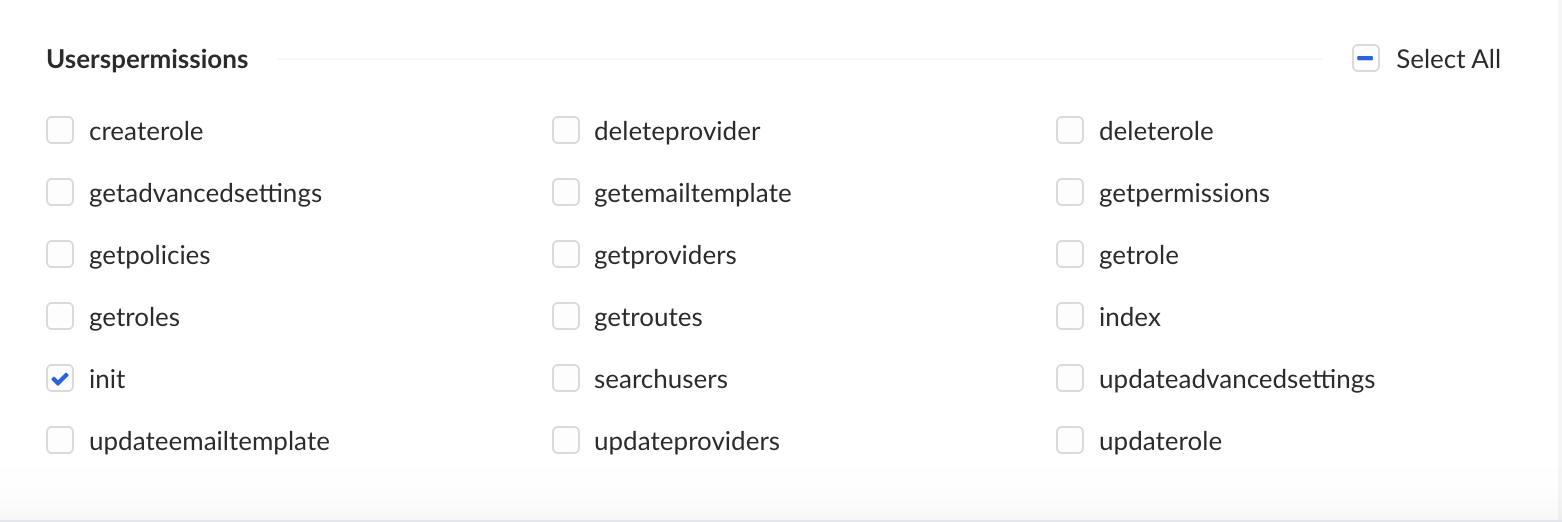
... So if you're running into this and, like me, you removed all permissions from public users because the app is only meant for admin access... go back and enable 'init' on the users-permissions plugin for public users. /facepalm
darvanen
on 27 Dec 2019
Following is working for me:
- Open table users-permissions_role
- Find record with "action" column = "init"
- Update role column from 1 to 2
That means Public user has ability to init the UserPermission plugin.
 truongnguyen1912
on 30 Dec 2019
truongnguyen1912
on 30 Dec 2019
I had the same problem. I tried to install a clean version created with quickstart and switch to mysql or create a create-strapi-app with mysql from start and it didn't work.
The only thing that worked was changing what @truongnguyen1912 said!!
I first checked with SELECT:
SELECT * FROM `users-permissions_permission` WHERE action = 'init';
And then the UPDATE:
UPDATE `users-permissions_permission` SET role = 2 WHERE action = 'init';
 santicros
on 12 Jan 2020
santicros
on 12 Jan 2020
Thanks man it worked!
 vskrch
on 17 Jan 2020
vskrch
on 17 Jan 2020
similar problem and solution here. I had to query users-permissions_role and found that "action" = "init" had id 4, then I ran:
UPDATE
users-permissions_permissionSET role = 4 WHERE action = 'init';
 petre2dor
on 21 Jan 2020
petre2dor
on 21 Jan 2020
@derrickmehaffy
There is some issue clearly going when populating MySQL databases for the first time.
This shouldn't be closed.
Can you please re-open it so it gets the attention it deserves?
Thanks.
 sandokanelcojo
on 23 Mar 2020
sandokanelcojo
on 23 Mar 2020
@derrickmehaffy
There is some issue clearly going when populating MySQL databases for the first time.
This shouldn't be closed.
Can you please re-open it so it gets the attention it deserves?Thanks.
@sandokanelcojo
Can you open a new issue so we can test fresh with proper reproductive steps
derrickmehaffy
on 26 Mar 2020
I had the same problem. I tried to install a clean version created with quickstart and switch to mysql or create a create-strapi-app with mysql from start and it didn't work.
The only thing that worked was changing what @truongnguyen1912 said!!I first checked with SELECT:
SELECT * FROM `users-permissions_permission` WHERE action = 'init';And then the UPDATE:
UPDATE `users-permissions_permission` SET role = 2 WHERE action = 'init';
Very very very thanks !!!!!!!!! It works here in your way.
 shamim-42
on 26 Mar 2020
shamim-42
on 26 Mar 2020
I had the same problem. I tried to install a clean version created with quickstart and switch to mysql or create a create-strapi-app with mysql from start and it didn't work.
The only thing that worked was changing what @truongnguyen1912 said!!I first checked with SELECT:
SELECT * FROM `users-permissions_permission` WHERE action = 'init';And then the UPDATE:
UPDATE `users-permissions_permission` SET role = 2 WHERE action = 'init';
Using the little hack makes it possible to init Strapi. But I can't authenticate users:

I also can't Login on the Web interface. Only with admin users.
If I use SQLite (--quickstart) or Postgres everything works fine!!!
There seems to be a major problem with User Permissions when using MySQL.
mariusbolik
on 8 Apr 2020
Do you have a way to reproduce?
lauriejim
on 13 Apr 2020
@lauriejim this appears at random but I think it relates to a low resource database, slow database, or just overall lack of resources. As far as I can tell Strapi tries to send database requests and they either timeout or fail to set all the values.
derrickmehaffy
on 14 Apr 2020
Hello! Thank you @mariusbolik for sharing database credentials to let me reproduce.
Can you send me the resources of your database, please.
RAM, CPU, ...
Thank you.
lauriejim
on 14 Apr 2020
@lauriejim Thank you for helping. I'M using the first Server of this list: https://www.hetzner.com/managed-server (MC40)
Databas Info:
Version: mysql  Ver 14.14 Distrib 5.7.29, for Linux (x86_64) using  EditLine wrapper
Charset: utf8mb4_unicode_ci

Memory Info:

CPU Info

I hope I did it right. Please tell me if you need more Information :)
mariusbolik
on 14 Apr 2020
@lauriejim Something I forget to say:
If I init Strapi with a MariaDB Database, then export all data and import it to my MySQL Database, everything works fine.
But if I init Strapi directly with a MySQL Database, the above mentioned error appears.
mariusbolik
on 17 Apr 2020
Adding another anecdotal report, when I reported this in https://github.com/strapi/strapi/issues/4286, we were setting Strapi up on a DB in an xlarge AWS RDS instance (32gb of memory) with all of our resources running in a virtual private cloud.
I doubt there's any way latency and memory could have been factors!
 lorenries
on 17 Apr 2020
lorenries
on 17 Apr 2020
Same here running in an aws ecs cluster. The ecs cluster and RDS are in the same VPC. Traffic is NOT flowing over the internet so latency more than likely not a factor.
 bluehawk27
on 27 Apr 2020
bluehawk27
on 27 Apr 2020
@bluehawk27 This issue has become really big and it is hard to see what is going on. can you share the exact error messages you get and your info (strapi version, db, db version) so we can reproduce your usecase too.
 alexandrebodin
on 30 Apr 2020
alexandrebodin
on 30 Apr 2020
@alexandrebodin i saw 403 on a GET request to users-permissions/init. Using Node 12 in a Docker container rds is running mysql 8.0 strapi version "3.0.0-beta.20"
bluehawk27
on 30 Apr 2020
Ok thank you ! We made a fix in beta.20.1 that should prevent this from happening.
i'm going to close this issue. If user are using a version prior to beta.20.1 please upgrade and tell us if this still happens.
alexandrebodin
on 4 May 2020
Related issues
 lucaperret
·
36Comments
lucaperret
·
36Comments
 dannydtk
·
43Comments
dannydtk
·
43Comments
 MattAurich
·
81Comments
MattAurich
·
81Comments
 blondie63
·
48Comments
blondie63
·
48Comments
 abdonrd
·
38Comments
abdonrd
·
38Comments
Most helpful comment
I had the same problem. I tried to install a clean version created with quickstart and switch to mysql or create a create-strapi-app with mysql from start and it didn't work.
The only thing that worked was changing what @truongnguyen1912 said!!
I first checked with SELECT:
And then the UPDATE: