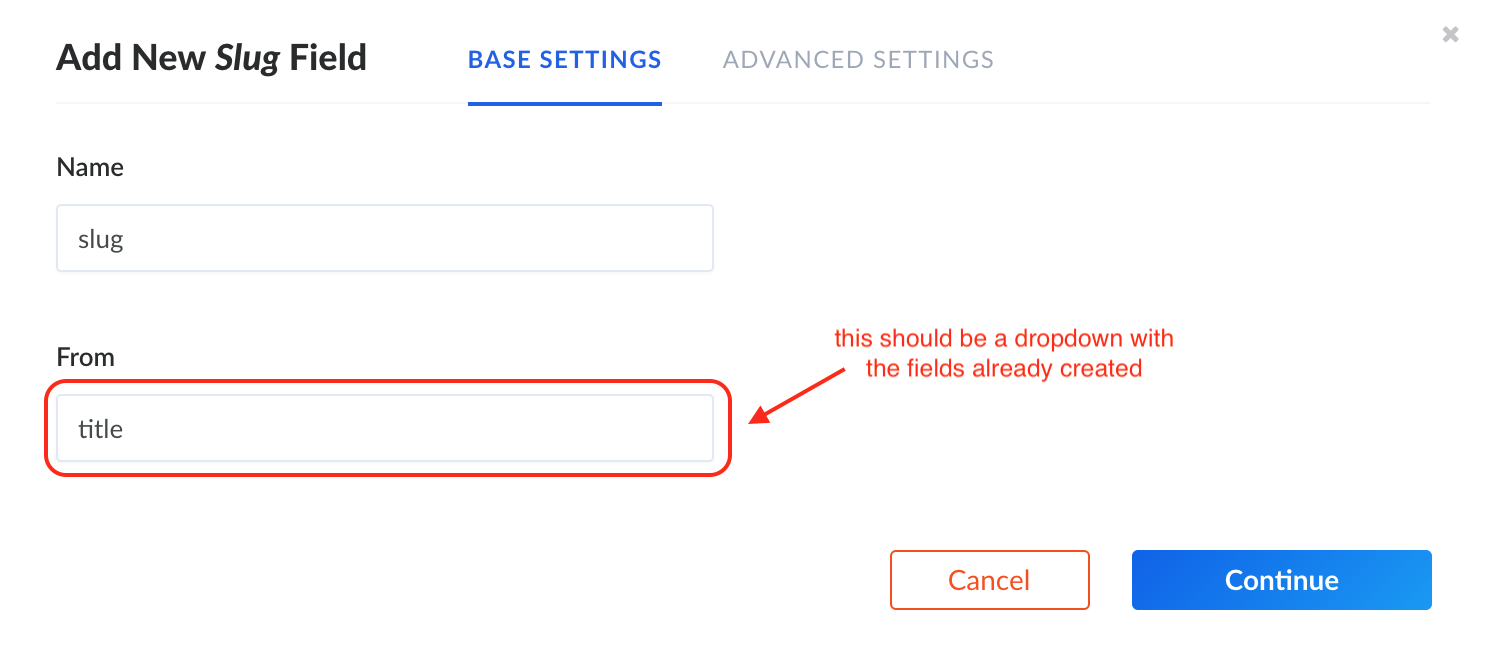
The Slug field should depend on other fields already created.
A possible workaround:


 abdonrd
All 42 comments
As I already said on Slack, I really like the idea! However, this slug field has to be more powerful. For example, we should be able to define the format of the slug, maybe the slug can be based on many fields (ID, Name and updated_at). I would love to merge your work, btw!
 Aurelsicoko
on 19 Mar 2018
Aurelsicoko
on 19 Mar 2018
For a CMS, slug is really important.
@Aurelsicoko is right about the feature of slugs fields. And I think it will take quite amount of time to implement. In the mean time, can you provide us a way to verify the slug only have the ability to check the uniqueness, by making all the field name slug always be _slug ?
If user need to wait for a whole feature, please just give us this tool to make life easier :)
Greatly appreciate what you guys doing here.
 thucxuong
on 30 Apr 2018
thucxuong
on 30 Apr 2018
Hi @thucxuong We will not work on this feature request. If you want it, feel free to submit a PR. Will appreciate your contribution.
 lauriejim
on 30 Apr 2018
lauriejim
on 30 Apr 2018
I'm confused is there a slug field in development from @abdonrd or is there not one? Would make creating urls a lot easier. I know of many headless that have it.
 Mr-Black-Dahlia
on 18 May 2018
Mr-Black-Dahlia
on 18 May 2018
I'm a bit confused about "non headless CMS" features like these tho. Is there plan to implement pages, slug, navigation, etc? That seems like something a traditional CMS would do and not one meant for building API.
 raulriera
on 18 May 2018
raulriera
on 18 May 2018
@raulriera I recently made a simple blog using Strapi as the backend. To have nice URLs, I created a slug field, but I have to manually format it just like the GIF in the OP each time I write a new article. In my client side application, I query the API using the slug which is in the URL. For example:
blog.com/hello-world queries the API with api.blog.com/article?slug=hello-world.
It's important that a slug is assigned per article post so I can have these nice URLs. I could use the ID, but that will lead to an ugly URL structure.
I would love to see this feature request built into Strapi to avoid the manual process of creating slugs.
 krestaino
on 18 May 2018
krestaino
on 18 May 2018
True, but this will be adding a feature that is outside of the scope of a headless CMS. This could be automatic the way Rails does it
api.blog.com/article/00001-title-of-the-page-doesn't-matter-only-the-number-is-used that way you have nice human friendly URLs, but it's only handled by the router, the real "id" is passed as 00001 (or whatever your identifier is...
Obviously I'm just asking here 🙂
raulriera
on 18 May 2018
It's important that a slug is assigned per article post so I can have these nice URLs. I could use the ID, but that will lead to an ugly URL structure.
I would love to see this feature request built into Strapi to avoid the manual process of creating slugs.
Bingo! Seriously just being able to call a slug to load something would be very nice like @krestaino said.
I will have users adding new data that aren't tech savvy and I don't want to have to remind them every day to create a slug like this "this-is-my-slug" When they could just type it out quickly and its done for them. I have had nightmares about this in my current system.
I mean yes I could just use something like: https://gist.github.com/mathewbyrne/1280286 or https://github.com/dodo/node-slug to get the job done, but that's just going to be a headache.
I think the biggest competitor to Strapi is GraphCMS (which open sources later this month) and this is a standard feature.
Mr-Black-Dahlia
on 18 May 2018
For example, by changing the router
{
"method": "GET",
"path": "/article/:_id-:title",
"handler": "Article.findOne",
"config": {
"policies": []
}
}
You can use /article/id-whatever-value-here and it will only take the first bit as the id and properly return what you want
raulriera
on 18 May 2018
You can use /article/id-whatever-value-here and it will only take the first bit as the idea and properly return what you want
Would this make it:
myblog.com/1001-my-title-goes-here
or
myblog.com/1001
My platform is setup to show slugs for video and is shareable on social media. If I was running my own netflix like solution that was closed I could just use the id with no problem, but we need slugs for SEO and better social media sharing.
I mean yes I can just make a string that says slug and manually type "this-is-my-slug" But just doing it automatically would be so much faster. I guess I will just have to learn how to bake it in myself.
Mr-Black-Dahlia
on 18 May 2018
I implemented this one some time ago: annexare/toURI, which works with Cyrillic as well (transliterates correctly by the char map). Not sure about competitors :)
Pretty lightweight. Should probably add tests.
 dmythro
on 18 May 2018
dmythro
on 18 May 2018
As for slugs itself I had experience with canonical and short URLs for articles. But this should work properly with meta tags generation then.
Short URLs redirect to the canonical with slug.
Added article ID to canonical URL to have a permanent redirect if slug was changed.
All of this was nice for SEO then.
dmythro
on 18 May 2018
Would this make it:
myblog.com/1001-my-title-goes-hereor
myblog.com/1001
It will make it myblog.com/1001-my-title-goes-here
raulriera
on 18 May 2018
@raulriera Thank you for your helpful example, much appreciated. Just to clarify though, the ID's generated by Strapi are 24 digits long, thus making the URLs more akin to myblog.com/5aef0015687c17071592c605-my-title-goes-here. Is that correct?
krestaino
on 19 May 2018
That's correct, if you want a smaller value you can edit the route to be whatever you want "path": "/article/:_id-:title" just replace :_id with anything else. It just needs to be a unique field in your model.
"path": "/user/:username" would be a good example for when custom routes are helpful. Obviously you could automate all of this intro strapi itself within the admin, but that "screams" plugin to me instead of built in functionality
raulriera
on 19 May 2018
That's correct, if you want a smaller value you can edit the route to be whatever you want
So then I could create a slug and use your example to create the route. Thanks really appreciate the insight.
Mr-Black-Dahlia
on 20 May 2018
@abdonrd can you share your code? :)
 aguilera51284
on 19 Jun 2018
aguilera51284
on 19 Jun 2018
@aguilera51284 I haven't code, I just edited a bit from the Chrome Dev Tools to be able to do the animation.
abdonrd
on 19 Jun 2018
@Aurelsicoko i can start working on this if you can give me the OK
 jacargentina
on 25 Oct 2018
jacargentina
on 25 Oct 2018
@abdonrd
Having a field type can make this easy; but i think it can be done already using https://strapi.io/documentation/3.x.x/guides/models.html#lifecycle-callbacks right? At least with beforeSave, make the required transliteration and put the resulting slug on a given field on the model.
jacargentina
on 25 Oct 2018
I also think it is something that is better to be added programmatically. A lot of content in my projects generate slug out of more than 1 field, sometimes connected collections used (like artist-year-album slug for releases). Plus, localization. I also have localized slugs for each locale, etc.
dmythro
on 25 Oct 2018
Yes, we can do it programmatically. But being able to define it from the UI would be great.
abdonrd
on 25 Oct 2018
@jacargentina You can start working on it, sure. Feel free to reach me on Slack to discuss more precisely about the feature.
I read all the comments here, there are a lot of good insights. I understand the need behind. I created a new card on the public portal, please upvote the feature and feel free to give me more insights (https://portal.productboard.com/strapi/c/29-support-slug-type-seo).
Aurelsicoko
on 1 Nov 2018
Guys please note that slug in UTF-8 languages like Arabic is a little different.
Please also support UTF-8 in this feature implementation for more general approach.
Thanks :wink:
 mnlbox
on 6 Nov 2018
mnlbox
on 6 Nov 2018
As we're considering to implement this feature, I'm closing the issue. You can still comment on it or give us more insights through Product Board (https://portal.productboard.com/strapi/c/29-support-slug-type-seo).
Aurelsicoko
on 11 Nov 2018
Guys, truth is that you don't have to add a slug field. You can fake it.
Here's for example your router:
const AppRouter = () => (
<Router>
<div>
<nav>
<ul>
<li><Link to="/">Home</Link></li>
<li><Link to="/blog/">About</Link></li>
<li><Link to="/users/">Users</Link></li>
</ul>
</nav>
<Route path="/" exact component={Home} />
<Route path="/blog/" component={Blog} />
<Route path="/blog/:slug/:id" component={BlogPost} />
<Route path="/users/" component={Users} />
<Route path="/users/:slug/:id" component={UserProfile} />
</div>
</Router>
);
Here's your blog component:
class Blog extends React.Component {
constructor(props) {
super(props);
this.state = {
loading: true,
posts: []
};
this.slugify = this.slugify.bind(this);
}
async componentDidMount() {
let response = await fetch("http://127.0.0.1:1337/posts");
if (!response.ok) {
return
}
let posts = await response.json();
this.setState({ loading: false, posts: posts });
}
slugify(string) {
const a = 'àáäâãåèéëêìíïîòóöôùúüûñçßÿœæŕśńṕẃǵǹḿǘẍźḧ·/_,:;';
const b = 'aaaaaaeeeeiiiioooouuuuncsyoarsnpwgnmuxzh------';
const p = new RegExp(a.split('').join('|'), 'g');
return string.toString().toLowerCase()
.replace(/\s+/g, '-') // Replace spaces with
.replace(p, c => b.charAt(a.indexOf(c))) // Replace special characters
.replace(/&/g, '-and-') // Replace & with ‘and’
.replace(/[^\w\-]+/g, '') // Remove all non-word characters
.replace(/\-\-+/g, '-') // Replace multiple — with single -
.replace(/^-+/, ''); // Trim — from start of text .replace(/-+$/, '') // Trim — from end of text
}
render() {
return (
<div>
{this.state.loading ?
<Skeleton/> :
this.state.posts.map((post, index) => {
// Make a slug out of post title
let slug = this.slugify( post.Title );
return (
<BlogPost
title={post.Title}
link={`/blog/${slug}/${post.id}`}
description={post.Excerpt}
/>
);
})
}
</div>
);
}
}
export default Blog;
And here's BlogPost component:
class BlogPost extends React.Component {
constructor(props) { /* ... */ }
async componentDidMount() {
// Ignore slug completely, use only ID
let response = await fetch(`http://127.0.0.1:1337/posts/${this.props.match.params.id}`);
let data = await response.json();
this.setState({ /* ... */ });
}
render() {
// Render goes here
}
}
export default BlogPost;
All the posts/users can be queried by ID only. The :slug between http://domainname.com/blog/:slug/:id is for the browsers, it's being completely ignored by React application. Your final URL could look like this: https://domainname.com/blog/building-skeleton-component-with-react-and-scss/15
Same way you can query users by ID, for example:
let postAuthor = await fetch(`http://127.0.0.1:1337/users/5`);
While on front-end the URL could it look like this:
https://domainname.com/users/sergey-monin/5
Hope this helps.
 r007
on 15 Dec 2018
r007
on 15 Dec 2018
I implemented this one some time ago: annexare/toURI
@z-ax not gonna work, because it's built for jQuery. ES6 version is needed.
r007
on 15 Dec 2018
@r007 there's nothing about jQuery there :) It has standard AMD/UMD export, or expanding of scope (like window for browser).
dmythro
on 15 Dec 2018
@r007
Guys, truth is that you don't have to add a slug field. You can fake it.
I though about doing that. But you may want control over your slugs. Generally you're fine with them being automatically generated. But some times you need to edit them, so it's really useful to have them as editable strings on your cms.
Another advantage of having the slug actually stored on the db as a string is that you may want to use your api to build other kind of apps, not just a web app. For example a chatbot that can query records and return the appropriate link to the record on your web app. Of course you could write the same function that "fakes" the slug on both apps. But as you can see, it becomes harder to maintain.
 guayom
on 5 Jan 2019
guayom
on 5 Jan 2019
@guayom true, but this is just one of the possible workarounds. I am not a strapi developer and not associated with their team. But I agree that would be nice to have "true slugs", then it will make my solution obsolete. So far I don't see anything better than this (which would work as no-brainer, of course I can always manually add "slug" field).
I'll be closely watching if they decide to make a plugin for slugs.
r007
on 5 Jan 2019
We'll make a new field called "slug" for sure. I cannot give you a release date though. The 2019 roadmap is already pretty heavy. I hope we'll find some time to release this new slug 👍
Aurelsicoko
on 11 Jan 2019
For someone who want to add slug:
- add name and slug fields as normal.
- I add a function in model:
function getSlug(title) {
let slug;
//Đổi chữ hoa thành chữ thường
slug = title.toLowerCase();
//Đổi ký tự có dấu thành không dấu
slug = slug.replace(/á|à|ả|ạ|ã|ă|ắ|ằ|ẳ|ẵ|ặ|â|ấ|ầ|ẩ|ẫ|ậ/gi, 'a');
slug = slug.replace(/é|è|ẻ|ẽ|ẹ|ê|ế|ề|ể|ễ|ệ/gi, 'e');
slug = slug.replace(/i|í|ì|ỉ|ĩ|ị/gi, 'i');
slug = slug.replace(/ó|ò|ỏ|õ|ọ|ô|ố|ồ|ổ|ỗ|ộ|ơ|ớ|ờ|ở|ỡ|ợ/gi, 'o');
slug = slug.replace(/ú|ù|ủ|ũ|ụ|ư|ứ|ừ|ử|ữ|ự/gi, 'u');
slug = slug.replace(/ý|ỳ|ỷ|ỹ|ỵ/gi, 'y');
slug = slug.replace(/đ/gi, 'd');
//Xóa các ký tự đặt biệt
slug = slug.replace(/`|~|!|@|#|||$|%|^|&|*|(|)|+|=|,|.|/|?|>|<|'|"|:|;|_/gi, '');
//Đổi khoảng trắng thành ký tự gạch ngang
slug = slug.replace(/ /gi, " - ");
//Đổi nhiều ký tự gạch ngang liên tiếp thành 1 ký tự gạch ngang
//Phòng trường hợp người nhập vào quá nhiều ký tự trắng
slug = slug.replace(/-----/gi, '-');
slug = slug.replace(/----/gi, '-');
slug = slug.replace(/---/gi, '-');
slug = slug.replace(/--/gi, '-');
//Xóa các ký tự gạch ngang ở đầu và cuối
slug = '@' + slug + '@';
slug = slug.replace(/@-|-@|@/gi, '');
slug = slug.replace(/ /g, '');
return slug;
}
This function to convert from vietnamese to slug, up to you with this function.
And then I call it in function beforeCreate:
beforeCreate: async (model, attrs, options) => {
console.log(model.attributes.name)
const slug = getSlug(model.attributes.name);
model.set('slug', slug)
},
It will work.
 goodguy000
on 10 Apr 2019
goodguy000
on 10 Apr 2019
@goodguy000 you need to add a backup plan, slug may already exist. So check with the db, if it doesn't exist, go ahead, if it does, you can automatically append a number like the date (since slug+number could also be taken)
Besides that, it's more or less how I'd do it, but I'm a strapi newbie.
 nmaxcom
on 7 Jul 2019
nmaxcom
on 7 Jul 2019
For those who are interested to track the progress on that feature, check out the RFC.
Aurelsicoko
on 7 Sep 2019
Follow the next steps for solve it.
Create new type title Unique and Required and slug (NOT its Required and NOT its Unique)
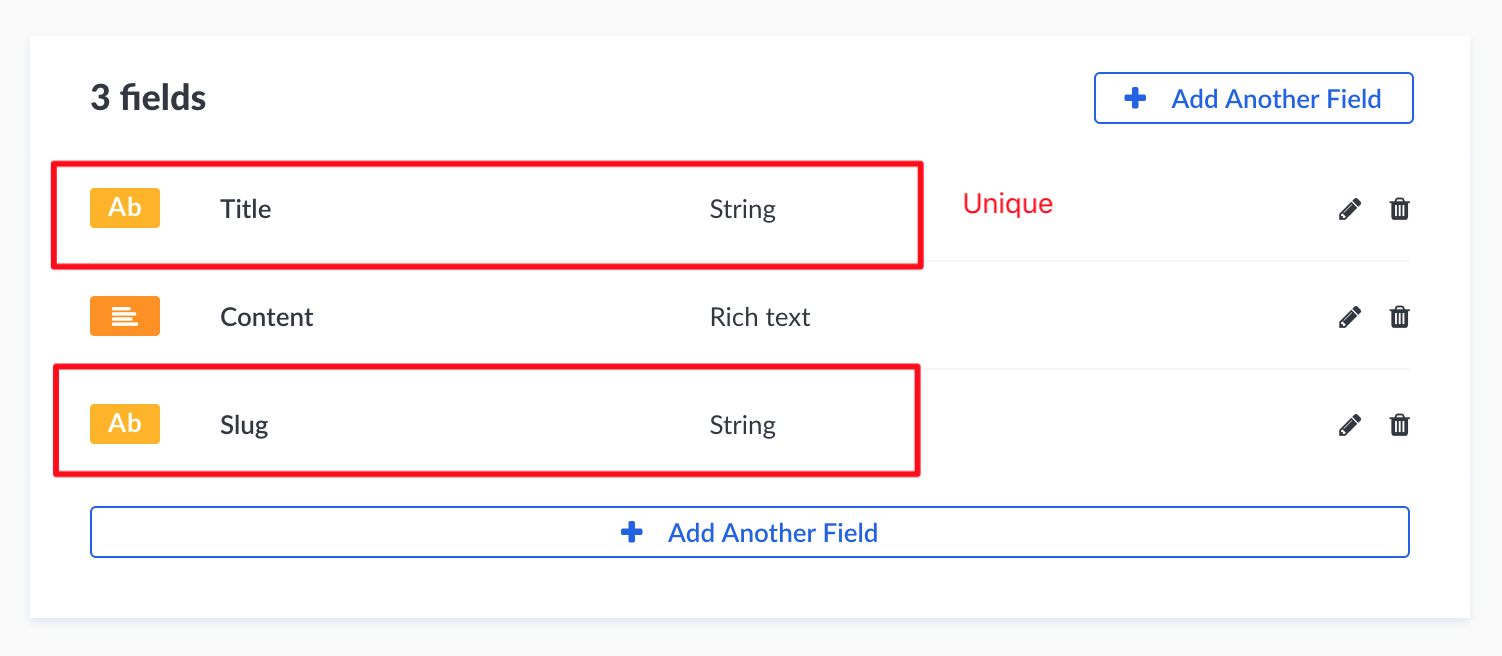
Go to create a new entry and edit layout
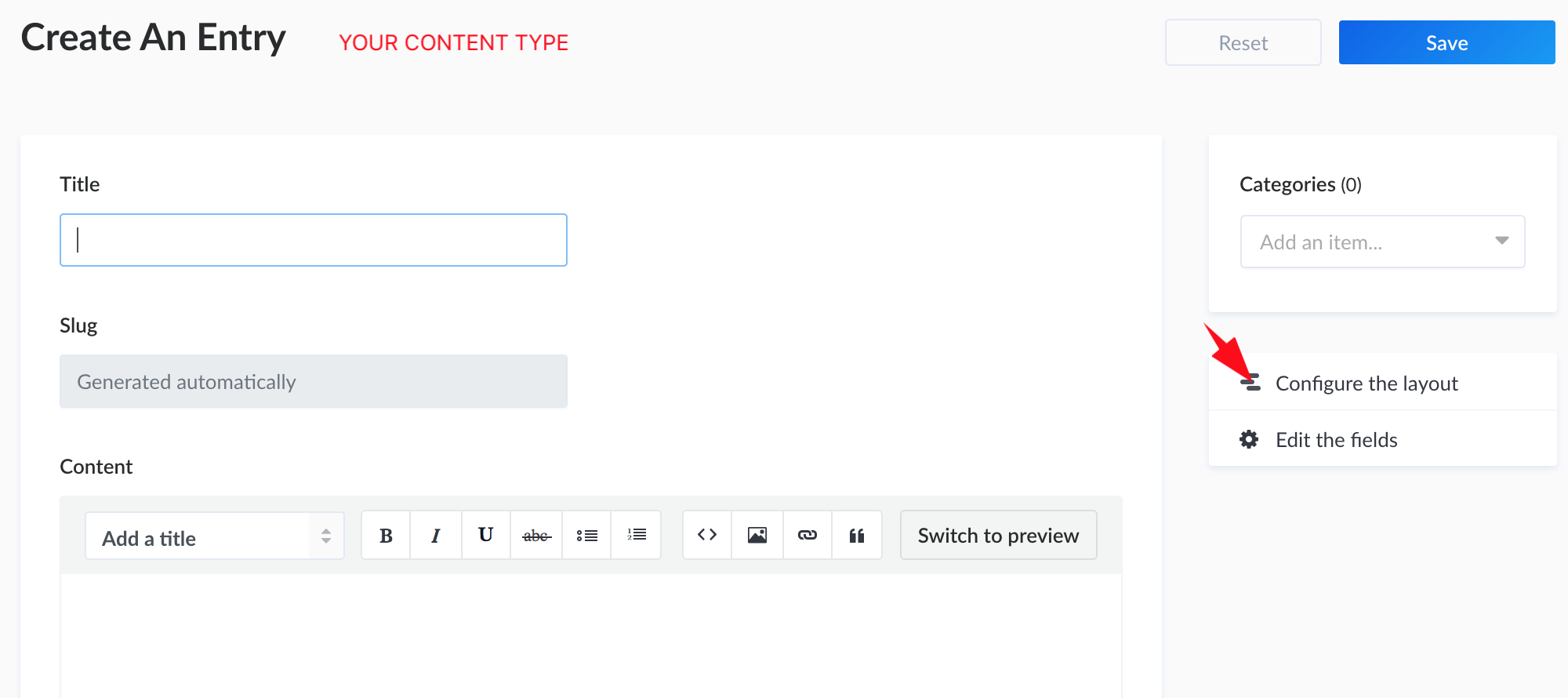
Set it like to picture

Install slug module in your project https://www.npmjs.com/package/slug
bash
cd yourProject
npm install slug
Edit your model
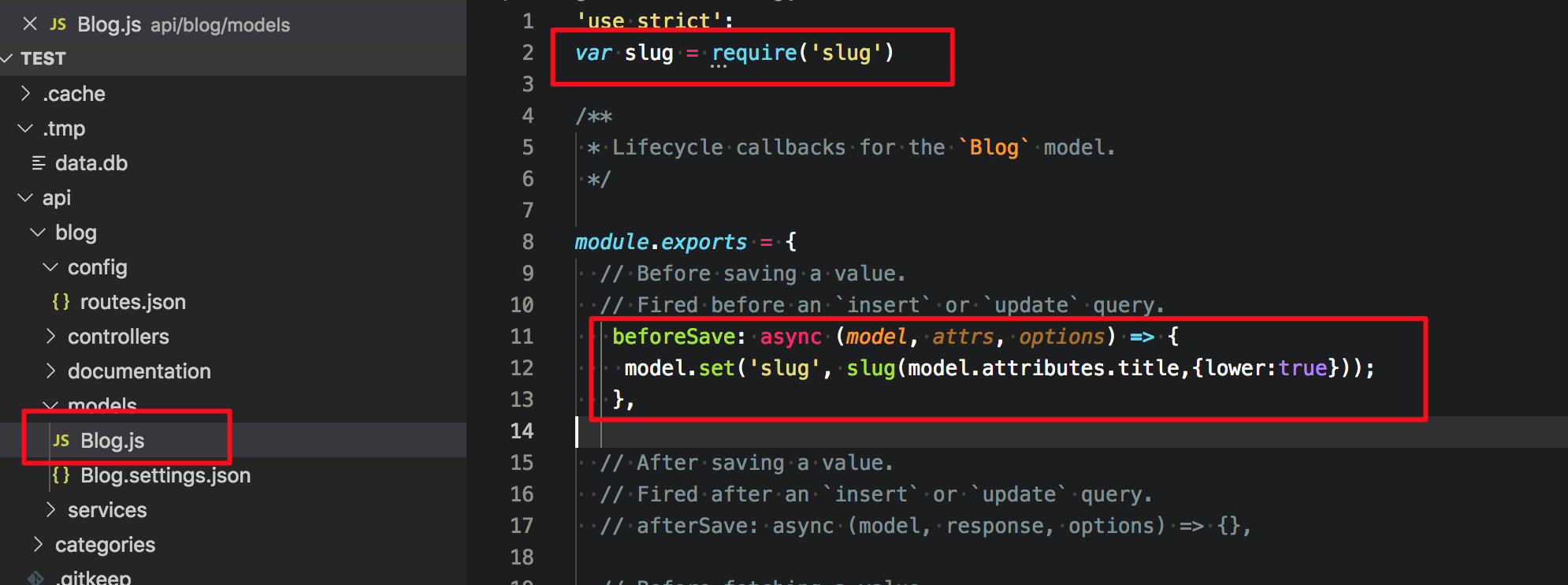
All new antry have slug field now :)
Create a new entry
And now you can filter by slug
http://localhost:1337/blogs/?slug=YOUR-SLUG
 jodacame
on 27 Oct 2019
jodacame
on 27 Oct 2019
it's all fun and games until you realize the beforeSave lifecycle method doesn't work. That said, adding it to beforeCreate was "close enough" for me, so thanks @jodacame
 4strid
on 4 Nov 2019
4strid
on 4 Nov 2019
@4strid - beforeSave does seem to not work but you can run an additional save in the afterSave for now and it will work. My comment on another thread may be of help to you? https://github.com/strapi/strapi/issues/1443#issuecomment-571224053
 MaffooBristol
on 7 Jan 2020
MaffooBristol
on 7 Jan 2020
There is a guide here in the docs.
lauriejim
on 9 Jan 2020
I made a bit more handy solution on my project.
- Created folder
utilsin project root - Installed @sindresorhus/slugify. It removes all symbols and brings to lowercase by default, in
slugandslugifypackages you need to configure it. - Created ./utils/slugify.js:
// https://strapi.io/documentation/3.0.0-beta.x/guides/slug.html#auto-create-update-the-slug-attribute
const slugify = require('@sindresorhus/slugify');
module.exports = (model, fieldName = 'name') => {
if (model[fieldName] && !model.slug) {
// eslint-disable-next-line no-param-reassign
model.slug = slugify(model[fieldName]);
}
};
- Use it it in
./api/${contenType}/model/${contentType}.js
const slugify = require('../../../utils/slugify');
module.exports = {
beforeSave: async (model) => {
slugify(model);
},
// or
beforeSave: async (model) => {
slugify(model, 'customField');
},
},
P.S. cant wait for UUID feature to be released 🙏
P.P.S.
You can use one graphQL query for request single or multiple instances.
query BlogPosts($slug: String) {
blogPosts(where: { slug: $slug }) {
name
content
}
}
if $slug is not passed it will return all Posts, if passed - only which u need :)
 souljorje
on 12 Feb 2020
souljorje
on 12 Feb 2020
Thank you for this tip!
lauriejim
on 13 Feb 2020
I don't get the idea about how the API can be SEO friendly. Who would share an API endpoints on social media?
 leolux
on 16 Feb 2020
leolux
on 16 Feb 2020
@leolux if you go to yourfavoriteshop.com/item-size-42, how would you associate that slug with the specific item? you have a slug field.
How else would you retrieve that item? this request is just an enhancement. more user-friendly.
 99diagha
on 27 Feb 2020
99diagha
on 27 Feb 2020
Related issues
 MattAurich
·
81Comments
MattAurich
·
81Comments
 Nyeedz
·
39Comments
Nyeedz
·
39Comments
 djbingham
·
40Comments
Aurelsicoko
·
74Comments
djbingham
·
40Comments
Aurelsicoko
·
74Comments
 dsheyp
·
46Comments
dsheyp
·
46Comments
Most helpful comment
Follow the next steps for solve it.
Create new type title Unique and Required and slug (NOT its Required and NOT its Unique)
Go to create a new entry and edit layout
Set it like to picture
Install slug module in your project https://www.npmjs.com/package/slug
bash
cd yourProject
npm install slug
Edit your model
All new antry have slug field now :)
Create a new entry
And now you can filter by slug
http://localhost:1337/blogs/?slug=YOUR-SLUG