Status-react: Allow replies to specific messages in public chats
User Story
As a user, I want to reply to specific messages in public, 1:1 chats or group chats so that conversations are easier to follow.
Description
Type: Feature
Summary: Double tap on messages in busy chats to reference the message in a reply.
Expected behavior
Double tapping on a message allows me to reply with a snippet of the original message included in my own.
Tapping on my reply scrolls back to the original message.

Actual behavior
No response when I tap on a message.
 rachelhamlin
All 17 comments
I think this may require more advanced UI/UX. Simply citing a message may create even more mess in the chat. We may want to research messages threads, like for instance Slack does it.
cc @errorists
 lukaszfryc
on 26 Jun 2018
lukaszfryc
on 26 Jun 2018
Btw, Telegram has really a nice interaction for replying to a message. User can reply to any message by swiping it to the left:
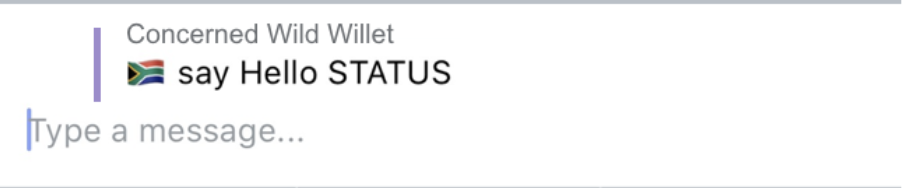
The reply is quoted and generates a notification.
We can start with this if we don't want to implement threads. Such quoting is definitely good enough for 1-1 chats.
lukaszfryc
on 16 Jul 2018
Here's a prototype of the design. I've decided to go with a long press rather than swipes since
- I find it more discoverable than swipes,
- we already use it,
- the swipes we have right now are rather janky,
- we create a unified behaviour for all message actions.
Long press on messages to see possible actions

 errorists
on 23 Jul 2018
errorists
on 23 Jul 2018
This looks great @errorists.
When I click on a reply, it scrolls that to the top of the window, right? Is there any sort of highlight or animation to emphasize it?
And if I'm the person being replied to, is there any visual distinction or would the copy simply say, "You"?
rachelhamlin
on 23 Jul 2018
@rachelhamlin good catch on both, thanks!
When I click on a reply, it scrolls that to the top of the window, right? Is there any sort of highlight or animation to emphasize it?
It should scroll to the original message you've replied to and once there we could also show the 'scroll back to bottom' button to allow a quick jump back.
And if I'm the person being replied to, is there any visual distinction or would the copy simply say, "You"?
I like to keep things simple, I find a copy change to 'You' sufficient but I'll explore it a bit, see if there's something to be done with the icon etc.
errorists
on 23 Jul 2018
@rachelhamlin @errorists
- what about quoting send/request messages?
- what about quoting my own messages?
- any plans for PNs for this action? (I assume this should trigger notification, just to double check)
 asemiankevich
on 23 Jul 2018
asemiankevich
on 23 Jul 2018
@errorists how about long messages that are shown with "Show more" link at the end to expand the message? Should it be same in the quote or only 1st time visible text to be shown?
 annadanchenko
on 23 Jul 2018
annadanchenko
on 23 Jul 2018
@rachelhamlin as I see from issue description it's intended only for public or group chats. However, I might want to quote some specific message in 1:1 chat so it's clear which part of the dialog is addressed. Should the scope be expanded for 1:1 chats too?
annadanchenko
on 23 Jul 2018
@errorists if I will quote a link - should it be clickable in the quote message? I would expect yes :)
annadanchenko
on 23 Jul 2018
@errorists
- what if I want to quote a quote? trying to long tap in the prototype but nothing happens.
- Also wondering how copy/paste and share will work on the quote especially if it hides some long text: I would expect that the full quoted text and full reply will be copied... but what happens when I share or paste it? any cuts?
annadanchenko
on 23 Jul 2018
Thanks for the feedback @asemiankevich @annadanchenko I will address all of your points and more in-depth cases in a separate design documentation that I'll be preparing now, the purpose of the prototype was to communicate the general design and interactions.
what about quoting send/request messages?
Currently, you can't select or copy them unlike regular messages, my thinking here is replying to them should follow the same rule. To me, these are system messages and not a person you'd reply to.
what about quoting my own messages?
I'm still weighing in on this, my gut feeling is you shouldn't be able to reply to yourself, but I'm totally open to being proven wrong :)
how about long messages that are shown with "Show more" link at the end to expand the message? Should it be same in the quote or only 1st time visible text to be shown?
In general, the idea is to truncate the quoted snippet above a certain length, which I'll specify in the documentation. You can tap on the snippet to scroll back to the original message and see the entire original message. In the prototype that's visible if you reply to the longest message in chat.
as I see from issue description it's intended only for public or group chats.
+1, I strongly think we should make this available for 1:1 chats as well, no harm done in doing so and I see a lot of use cases where it might come in handy.
if I will quote a link - should it be clickable in the quote message? I would expect yes :)
Yes, totally. Clicking on a link should override the default behaviour for clicking on the entire snippet which is scrolling back to the original message.
what if I want to quote a quote? trying to long tap in the prototype but nothing happens.
It's not there, I'll add this to documentation. You should be able to reply to a message with a quote, and what would happen is you'd only quote the reply (black part) in that message and not the previous quote. (greyed out part), so we're not introducing any awfully long quote>quote>quote messages :)
Also wondering how copy/paste and share will work on the quote especially if it hides some long text: I would expect that the full quoted text and full reply will be copied... but what happens when I share or paste it? any cuts?
Good point. Actually, I don't think there's a 'best' way of doing this, what I propose is copying the entire text and it's up to the user to decide if he doesn't care about the quoted part or the reply and edit it out.
errorists
on 24 Jul 2018
Published the finalised designs
Zeplin: zpl.io/aRYAgnv
Prototype: https://framer.cloud/XvSUR/
Updated the prototype to allow replying to other replies, replying to yourself.
One change from what we discussed above: links in quotes are not tappable, I've prototyped and tested that and it was a mess, the touch target for links was so small that more often than not I'd hit the surrounding quote which would scroll me back to the original message. So instead users will tap anywhere within the quote and be taken back to the original message and tap the link there.
errorists
on 27 Jul 2018
Looks good to me @errorists! cc @yenda in case this work might interest you—adding direct replies into chat.
rachelhamlin
on 27 Jul 2018
Have some exciting news on this issue... @jeluard is going to make this happen with EXTENSIONS!!!!
And this will be the first feature done on both mobile and desktop at the same time. Features before platforms :)
@EugeOrtiz and @errorists Can you sync and make sure we have final designs for both mobile and desktop together?
 chadyj
on 6 Sep 2018
chadyj
on 6 Sep 2018
I see this issue is about public chats but it is quite nice to reply everywhere.
chadyj
on 6 Sep 2018
@chadyj After more digging I guess I was too optimistic about how easy it would be to implement this with extension. I will blame my Fritz kola abuses!
Simpler to just implement this feature natively.
 jeluard
on 6 Sep 2018
jeluard
on 6 Sep 2018
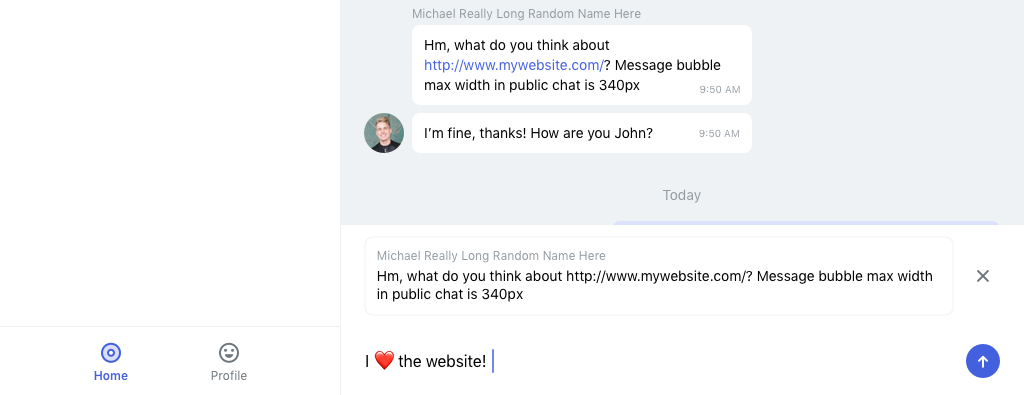
Here are the designs for desktop based on the mobile ones: zpl.io/a3l8dgY (Zeplin)
Screenshot:
 EugeOrtiz
on 10 Sep 2018
EugeOrtiz
on 10 Sep 2018
Related issues
 andytudhope
·
4Comments
annadanchenko
·
3Comments
errorists
·
3Comments
andytudhope
·
4Comments
annadanchenko
·
3Comments
errorists
·
3Comments
 andmironov
·
3Comments
annadanchenko
·
3Comments
andmironov
·
3Comments
annadanchenko
·
3Comments
Most helpful comment
Have some exciting news on this issue... @jeluard is going to make this happen with EXTENSIONS!!!!
And this will be the first feature done on both mobile and desktop at the same time. Features before platforms :)
@EugeOrtiz and @errorists Can you sync and make sure we have final designs for both mobile and desktop together?