Sqlitebrowser: im not getting how to insert the tables
Details for the issue
What did you do?
What did you expect to see?
What did you see instead?
Useful extra information
DB4S v3.11.1 [built for x86_64-little_endian-llp64] on Windows 10 (10.0) (winnt/10.0.10240) [x86_64]
using SQLite Version 3.27.1
and Qt 5.11.3
 MrunaliniShiraganvi
All 3 comments
Unfortunately, your template is empty - just the title of 'how to insert tables'.
What do you need help on?
Have you created a new database and now don't know what to do?
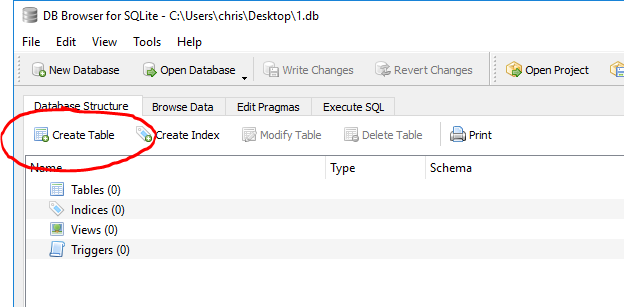
Click on the 'database structure' tab, and click on 'Create table'

In the 'edit table definition' dialog, enter the table name and then define the fields for the table.
I don't know what you know about database and what you don't, do don't want to tell you what you may already know. There are some simple rules though. Not hard-fast rules, but 'best practices'. Feel ftree to ask 'why?' if you're bored.
- table names shouldn't have spaces in them
- field names shouldn't have spaces in them
- ideally field names should be unique across the whole database
- SQLite only knows about 5 field types - text, integer, real, numeric and blobs. For 90% of databases, you're only going to use text and integer.
- the first field should be an id field of type integer and have the 'pk' checkbox checked (primary key)
There are probably other rules, but I'm not 100% sure what issue you've got...
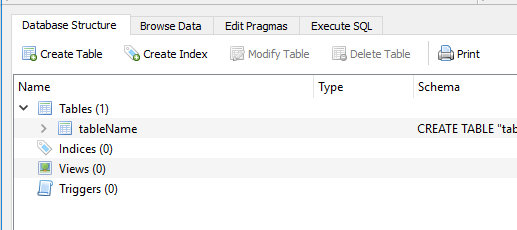
Click on OK and your table is saved.
 chrisjlocke
on 24 Mar 2019
chrisjlocke
on 24 Mar 2019
You mention 'insert' tables - do you mean from CSV files? SQL files? Bananas?
chrisjlocke
on 24 Mar 2019
@MrunaliniShiraganvi I hope you were able to solve your doubt with @chrisjlocke's anwser. Otherwise, let us know.
 mgrojo
on 1 Apr 2019
mgrojo
on 1 Apr 2019
Related issues
chrisjlocke
·
3Comments
 VA1DER
·
3Comments
VA1DER
·
3Comments
 freekee1
·
4Comments
freekee1
·
4Comments
 botist
·
3Comments
botist
·
3Comments
 emrecpp
·
3Comments
emrecpp
·
3Comments