Sqlitebrowser: How do I word wrap the table viewer?
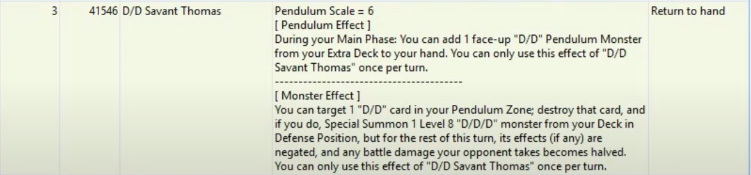
So instead of this:

I get something more like this:
 botist
All 3 comments
If you increase the row height, the text should be displayed.
https://youtu.be/TdABaZN_1Vs
You can also double-click the cell border to make the cell as high as needed.
https://youtu.be/8Pk4COJUOQI
 chrisjlocke
on 5 Aug 2020
chrisjlocke
on 5 Aug 2020
👍2
Additionally, you can press the secondary mouse button to get the context menu over the vertical header (where the row numbers are shown) and select 'Adjust rows to contents'. That wil automatically adjust the row heights to the current contents. Each time the table is refreshed, the heights are readjusted. This setting is not currently stored in project files, but should be in the future.
 mgrojo
on 5 Aug 2020
mgrojo
on 5 Aug 2020
👍2
Thank you, much better now!
botist
on 10 Aug 2020
Was this page helpful?
0 / 5 - 0 ratings
Related issues
 meness
·
4Comments
meness
·
4Comments
 tonurics
·
3Comments
tonurics
·
3Comments
 VA1DER
·
3Comments
VA1DER
·
3Comments
 noahplusplus
·
3Comments
chrisjlocke
·
3Comments
noahplusplus
·
3Comments
chrisjlocke
·
3Comments
Most helpful comment
Additionally, you can press the secondary mouse button to get the context menu over the vertical header (where the row numbers are shown) and select 'Adjust rows to contents'. That wil automatically adjust the row heights to the current contents. Each time the table is refreshed, the heights are readjusted. This setting is not currently stored in project files, but should be in the future.