Sql-docs: Request syntax update
This page does not provide helpful information, as most of the content is either plain wrong, e.g.:
- there is no such command as "docker builds", it should read docker build
- the directory "mssql-mlservices" does not exist in the given repo
So please provide working documentation on how to install ML services!
Document Details
⚠ Do not edit this section. It is required for docs.microsoft.com ➟ GitHub issue linking.
- ID: d6a10dd4-ef5f-f9a4-f4cb-36346ef183be
- Version Independent ID: 567e43d3-67dd-a771-fcd4-566c84b44dde
- Content: Install on Docker - SQL Server Machine Learning Services
- Content Source: docs/linux/sql-server-linux-setup-machine-learning-docker.md
- Product: sql
- Technology: machine-learning
- GitHub Login: @cawrites
- Microsoft Alias: chadam
 ogsadmin
All 23 comments
@ogsadmin -- He, thank you for your feedback.
@cawrites -- please look into this issue.
 WilliamAntonRohm
on 12 May 2020
WilliamAntonRohm
on 12 May 2020
@ogadmin thank you for contacting Microsoft. I will be reviewing this content to determine what updates are needed to address your concern. I will post an update once that is done. Thank you for your patience while this is being reviewed.
 cawrites
on 12 May 2020
cawrites
on 12 May 2020
@ogsadmin please be sure you are in the correct directory: /mssql-docker/linux/preview/examples/mssql-mlservices
The DOCKERFILE will be located when it is executed from this path. If you have executed the 'git clone' command in a different directory please confirm. Running the 'docker build' command in the wrong directory will generate an error.
cawrites
on 12 May 2020
@ogsadmin based on your feedback I have updated the documentation to include the path for the DOCKERFILE since you were unable to run the command successfully. Confirmation of docker running is confirmed. I walked through the documentation again and the container started without error. Additional minor update to the syntax removing the 's' in docker build. I confirmed the DOCKERFILE is in the repository with no additional changes. Please confirm your directory path before running the step.
cawrites
on 12 May 2020
Hi,
thank you very much for the quick response.
Unfortunately on my machine (freshly installed Server 2019 Standard running docker EE 19.03.5 - installed as described here), the build fails repeatedly with an error (see below).
The exact steps I ran are here:
PS C:\tmp\ml> git clone https://github.com/microsoft/mssql-docker.git
PS C:\tmp\ml> cd .\mssql-docker\linux\preview\examples\mssql-mlservices\
PS C:\tmp\ml\mssql-docker\linux\preview\examples\mssql-mlservices> docker build -t mssql-server-mlservices .
The last few lines of the output of the docker build command are:
Setting up mssql-mlservices-packages-py (9.4.7.408) ...

+-------------------------------------------------------------------------------------+
Please run 'sudo /opt/mssql/bin/mssql-conf setup accept-eula-ml'
to accept the Machine Learning Services EULA.
+-------------------------------------------------------------------------------------+

Setting up mssql-mlservices-packages-r (9.4.7.408) ...
INFO: Searching for runtime at /opt/microsoft/ropen/3.5.2/lib64/R
INFO: Found R runtime at /opt/microsoft/ropen/3.5.2/lib64/R
INFO: Setting up R Runtime

+-------------------------------------------------------------------------------------+
Please run 'sudo /opt/mssql/bin/mssql-conf setup accept-eula-ml'
to accept the Machine Learning Services EULA.
+-------------------------------------------------------------------------------------+

Setting up ncurses-term (6.0+20160213-1ubuntu1) ...
Setting up python3-pkg-resources (20.7.0-1) ...
Setting up python3-chardet (2.3.0-2) ...
Setting up python3-six (1.10.0-3) ...
Setting up python3-urllib3 (1.13.1-2ubuntu0.16.04.3) ...
Setting up python3-requests (2.9.1-3ubuntu0.1) ...
Setting up tcpd (7.6.q-25) ...
Setting up libc6-dbg:amd64 (2.23-0ubuntu11) ...
Setting up ssh-import-id (5.5-0ubuntu1) ...
Processing triggers for libc-bin (2.23-0ubuntu11) ...
Processing triggers for systemd (229-4ubuntu21.27) ...
re-exec error: exit status 1: stderr: unexpected EOF
PS C:\tmp\ml\mssql-docker\linux\preview\examples\mssql-mlservices>
My docker version is:
Client: Docker Engine - Enterprise
 Version:           19.03.5
 API version:       1.40
 Go version:        go1.12.12
 Git commit:        2ee0c57608
 Built:             11/13/2019 08:00:16
 OS/Arch:           windows/amd64
 Experimental:      false

Server: Docker Engine - Enterprise
 Engine:
  Version:          19.03.5
  API version:      1.40 (minimum version 1.24)
  Go version:       go1.12.12
  Git commit:       2ee0c57608
  Built:            11/13/2019 07:58:51
  OS/Arch:          windows/amd64
  Experimental:     true
Can you reproduce? What is your exact environment you use to run the build command?
ogsadmin
on 12 May 2020
@ogsadmin can you confirm are you running Docker for Windows? The mapping appears to be Windows based?
cawrites
on 12 May 2020
@cawrites Yes, I am running docker EE on Windows Server 2019.
ogsadmin
on 12 May 2020
@ogsadmin The setup requirements are clearly noted within the documentation: https://docs.microsoft.com/en-us/sql/linux/sql-server-linux-setup. The operating systems are: Red Hat, SUSE or Ubuntu.
cawrites
on 12 May 2020
Ok, thanks. I am new to Docker, and understood that if I run a containerized Ubuntu machine, the instructions given for Linux/Ubuntu would be valid.
As far as I understood the whole idea of containers is about packaging applications including their dependencies (in this case SQL server and the Linux OS) and making them portable and independent of the host OS. So I guessed that it should basically be irrelevant, if I run a dockerized application under Docker for Windows or Docker for Linux...
Can you please point to some information on installing a Docker for Windows container including the SQL server and ML services?
ogsadmin
on 12 May 2020
@ogsadmin I understand you are interested in running Docker for Windows. Documentation for running SQL ML in Windows can be found here https://docs.microsoft.com/sql/machine-learning/install/sql-machine-learning-services-windows-install, but it does not include Docker.
cawrites
on 12 May 2020
I don't want to be nit-picky, but the documentation (see https://docs.microsoft.com/en-us/sql/linux/sql-server-linux-setup-machine-learning-docker?view=sql-server-ver15#prerequisites and in this repo: https://github.com/MicrosoftDocs/sql-docs/blob/live/docs/linux/sql-server-linux-setup-machine-learning-docker.md) explicitely state that the steps should work for Docker on Windows.
The Prerequisites sections lists [...] or Docker for Mac/Windows[...]:
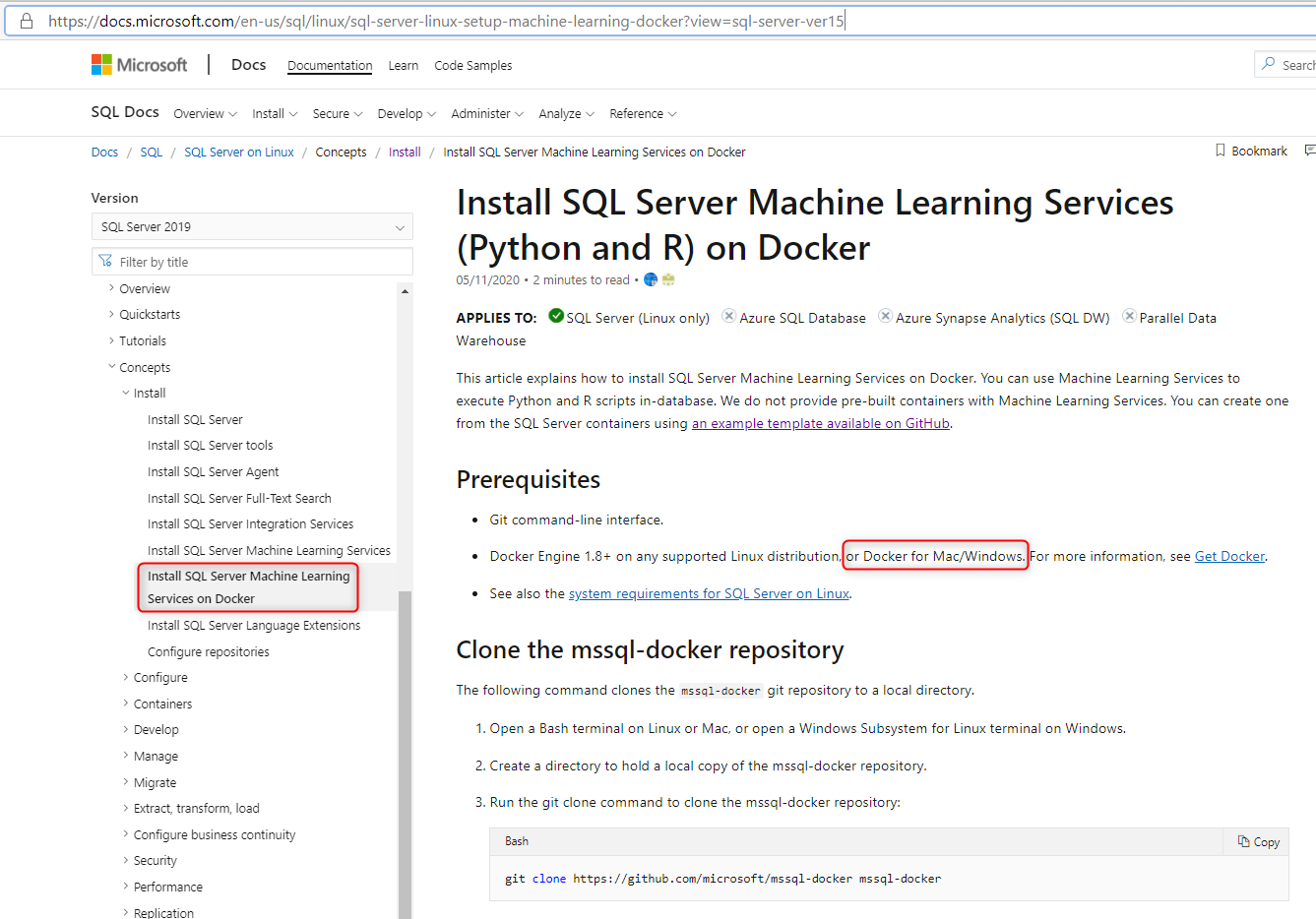
So again: either the documentation (regarding the prerequisites) is incorrect or the sample files given in the mssql-repo do not work as they should...
ogsadmin
on 14 May 2020
@ogsadmin I will confirm this information and provide an update to this issue to reflect that. The test performed was in a Linux operating system, as you did not state your operating system in your initial comment. I understand the concern for a process to work, but it is helpful to provide the working environment in the initial question so that we are starting from the same place.
cawrites
on 14 May 2020
Perfect, thanks!
Sorry for the confusion - I started out trying to get this working under Docker for Windows - then after your comment that this is not a supported scenario, switched to Docker for Linux. As this failed, too, I went over the documentation again - finding that it actually should work on Docker for Windows, too...
I'm keeping my feet still now until you had the time to check - I really apreciate your help here, thanks!
ogsadmin
on 14 May 2020
@ogsadmin Please review this link and confirm that your setup meets the supported scenario defined here: https://support.microsoft.com/en-us/help/4047326/support-policy-for-microsoft-sql-server
cawrites
on 14 May 2020
@ogsadmin can you briefly explain what you are planning to use this for? Do you have a business scenario(use case), or are you just testing a service?
cawrites
on 14 May 2020
@cawrites we are currently selling a product based on SQL Server SSRS + ML services with a SPA web frontend hosted on IIS (using a ASP.NET Core backend). We currently deploy this solution either to a single server (for small setups, usually with SQL Server Express) or for larger installations to the customers infrastructure (typically SQL Server Enterprise (in various versions) + additional VMs).
The deployment of our solution is pretty complex (and a manual process so far), so we have been looking into options to improve this. One solution could have been docker - which (if working as expected) could also solve the problems we currently have for demoing the system (sales/customers expecting a "one-click" demo setup for their laptops).
To the supported scenarios: I missed that initially - I've actually started with an unsupported configuration first (host Ubuntu 18.04 with the sample Dockerfile refering to a ubuntu:16.04 image), but then switched the host to Ubuntu 16.04 (actually 16.04.6). With the now supported configuration, I still have the problems described (license expired and Unexpected call to legacy ABI)...
Our preferred environment would be Docker on Windows anyway - to me (coming from a Windows Server background) it feels a bit strange, that the Linux versions seem to be the first class citizens now...
ogsadmin
on 15 May 2020
@ogsadmin Thank you for providing the information regarding your use of Microsoft products.
cawrites
on 16 May 2020
@ogsadmin I want to make sure that you get the support that is needed. I appreciate any feedback that helps us to improve our documentation. In reviewing your use case as well as your original comments, your issues may be more focused on your setup. I will provide more definitive information during the week. Thank for your patience.
cawrites
on 16 May 2020
@ogsadmin we appreciate your feedback and the need for a clear understanding. We take this feedback seriously and we have made some additional edits to provide further clarity. I understand your setup is using Windows Server 2019 and the Enterprise version of Dockers. The documentation has general guidance for completing a successful build. In our testing, we have completed a successful build, but not based on your configuration.
The error messages you have defined are likely due to a previous install not being uninstalled completely before you attempted to reinstall it (or you still have an expired system in your container). You can research each of those error messages for guidance. This is only general feedback regarding the error messages, please research specific information based on your setup. If problems persist I recommend creating a case directly with Microsoft to get assistance. https://www.microsoft.com/en-us/industry/services/support Thank you for your support and for contacting Microsoft.
cawrites
on 21 May 2020
please-close
cawrites
on 21 May 2020
Obviously nobody at Microsoft tested this recently. With the comments from @dbamaster regarding the Polybase sample (see https://github.com/microsoft/mssql-docker/issues/589), I finally was able to get this working.
It turned out, that the sample from the master branch refers to a time-bombed preview version of SQL server, which does not work anymore today - so everybody trying to follow the official documentation will fall into this trap...
I've fixed the Dockerfile by changing the repo URLs to use the SQL Server 2019 repositories and filed a pull request here: https://github.com/microsoft/mssql-docker/pull/609
Best regards!
ogsadmin
on 22 May 2020
I totally agree with you @ogsadmin . It has been really difficult to test those docker images, and it does not seem to be updated regularly by their development team. I am testing your PR to see if it would work for me! So which setup did you end working on? Microsoft server with docker or linux?
 camille-rodriguez
on 22 May 2020
camille-rodriguez
on 22 May 2020
@camille-rodriguez to keep this conversation single-threaded please post comments in the open PR. This is a closed issue.
cawrites
on 23 May 2020
Related issues
 paulomorgado
·
9Comments
paulomorgado
·
9Comments
 sidesw1pe
·
13Comments
sidesw1pe
·
13Comments
 DanielGoehler
·
11Comments
DanielGoehler
·
11Comments
 ahdung
·
8Comments
ahdung
·
8Comments
 trbenning
·
13Comments
trbenning
·
13Comments