Spreed: Improve the way we handle shared files
At the moment every file shared in a room is a normal file share for all room members. This means all files from all rooms will be stored in my Nextcloud root. If you are in multiple rooms and people start sharing some pictures this quickly become a huge mess in the users root folder.
Also the user can easily destroy their chat history by deleting/unsharing a file shared in a chat by accident.

I don't have a a good solution :disappointed:
We could share the files from rooms into a hidden folder. But sometimes it can be a nice feature if a file shared to a room ends up on your desktop. IMHO it highly depends on the file type.
- If people share some funny pictures in a room I probably don't want to download all of them to my desktop (but I also don't want to destroy the whole chat history by deleting/unsharing them).
- If a coworker shares a document in the chat on which we both want to work, then having it as a normal file in my cloud is a welcoming feature
To have at least some structure we could introduce a "Talk" folder to which we share chat files. This would also allow users to exclude it from syncing for example
I'm not entirely convinced of any of the solution but I also don't like the current state... Maybe others have good ideas?
 schiessle
All 12 comments
Maybe @nextcloud/designers have some good ideas from a UX point of view...
schiessle
on 10 May 2019
Yeah guess most is covered with https://github.com/nextcloud/spreed/issues/1129
But yeah maybe somthing like not adding them by default but only with a "add to my files" would be an option, ...
In the case you linked above it I think its actually morris would have posted a link when that would have shown the image, instead of attaching it.
 nickvergessen
on 10 May 2019
nickvergessen
on 10 May 2019
In the case you linked above it I think its actually morris would have posted a link when that would have shown the image, instead of attaching it.
In the screenshot above Morris attached a image. I saw it in the chat and it was in my Nextcloud root as a shared file. After I unshared it from myself the chat history looked like in the screenshot.
While thinking about it, there is another issue with this approach:
People who share stuff regularly to rooms will accumulate a lot of outgoing shares. So also their "shared with other" view will get crowded over time. At some point they might clean up their outgoing shares and mess up a lot of chat histories by accident. This poses the general question: Should people be allowed to revoke stuff they wrote/shared in a chat? But also the risk that they just do it by accident will grow over time.
Same happens if people delete files at some point by the way... The more I think about it, sharing to a room should probably upload the file to a system wide folder which holds all the files shared to a room. If we want to expose it as normal files, this system wide room folders could be mounted for all room members similar to group folders. But this folders should then probably forbid to add new files to it or to delete files. Read and edit could be allowed to enable people to work on documents shared to a room... Maybe this would be a good solution?
schiessle
on 10 May 2019
But yeah maybe somthing like not adding them by default but only with a "add to my files" would be an option, ...
Yep, this is a good way to go. Most content in a chat is only temporarily relevant.
Messages with files/photos could have a 3-dot menu with "Add to Files" (and "Download" as well). In the case of adding to Files, we could still think if connecting it as a share makes sense.
 jancborchardt
on 11 May 2019
jancborchardt
on 11 May 2019
I'd start with a relatively simple fix, as Jan already said last year - put files in a Talk subfolder. You could further group them based on the name of the conversation.
This would solve the clutter in the root.
Meanwhile, the 'add-to-my-files' is probably the best long-term solution... And it doesn't obsolete the above solution, which would still help keep things clean.
I think an overview of all attachments shared in a chat is also something needed at some point, but that's a different conversation.
 jospoortvliet
on 17 May 2019
jospoortvliet
on 17 May 2019
If there was a Talk folder, would it be possible to share images to the conversation directly from the device?
- User clicks "+" to share an image.
- User chooses to share an image from the device (not from Nextcloud).
- Once the image is selected, it is uploaded to the Talk subfolder on Nextcloud and then shared in the conversation.
This user flow makes much more sense to me, so I don't have to upload an image beforehand in order to share it.
 brentbiglin
on 20 May 2019
brentbiglin
on 20 May 2019
@brentbiglin yes – that’s a separate issue and already planned via https://github.com/nextcloud/spreed/issues/1129 :)
There will be 2 options when you press the '+' button.
- Share a file (that you already have in your NC)
- Upload a file (that will be stored in a specific folder and shared directly in the chat)
jancborchardt
on 22 May 2019
Regarding the destroyed chat histories:
IMHO users should always be allowed to revoke shares or delete their own files, even if it destroys someones chat history. And there are requests for the ability to edit or delete messages which would also change/destroy the chat history.
Would it be possible to create a setting to show/hide files that are shared only via chat in the shares-view. That might keep it manageable.
 DudleyDursley
on 29 May 2019
DudleyDursley
on 29 May 2019
Would it be possible to create a setting to show/hide files that are shared only via chat in the shares-view. That might keep it manageable.
Just for information :)
We aim to keep things simple, and settings are rarely found or changed by anyone. And on top we have to test double the scenarios (everything with on or off) which increases workload unnecessarily. So no, we will not introduce a setting for this.
jancborchardt
on 29 May 2019
Because it is fun, I have another problem. When you share a file in a chat which is already shared with the user (say, from a groupfolder...) all chat participants get that file another time in their root.
Concrete example:
- Let's say your company has weekly meetings
- In that meeting, they keep a protocol. Those are kept in a company-wide shared folder, let's say something like /General/Meeting Protocols
- With a nice cooperative editor in Nextcloud, they would just share the protocol for the week in the chat so everybody can click and edit
The result is that that file can then be found, for every user, in their root as well as in /General/Meeting Protocols. That is... excessive... :cry:
jospoortvliet
on 19 Jun 2019
So here are a view ideas I want to share with you:
I think the solution is to differentiate between Nextcloud-shares and direct-uploads at a basic level.
You need two new subcategories for the share-sidelist for shares from and by nextcloud-talk: they could be named as „Shared with you by Talk“ and „Shared with others by Talk“. Here are only shares listed, that share a folder or file from nextcloud and not direct-uploads. They also should be shown in the share-sidelist main-menu but these „Nextcloud-shares by Talk“ should never be listed in your root-folder (or under /Shared).
Instead, for every chat that you create in talk, is a virtual folder automatically shown in the nextcloud-root of each chat-member with the same name the chat has. You could propably add a config.php – entry to your server to configure the rootpath for these chat-folders – a littlebit comparable to " ‘share_folder‘ => /Shared" you could propably add a " ‘talk_folder‘ => /Talk" entry. Afterwards every chat-folder would be inside this "/Talk"-folder and no longer located in the root-path of each user. Inside these chatfolders are listed all the files or folders that get shared in this chat regardless of whether you or another person shared the file or folder and regardless of whether it is a nextcloud-share or a direct-upload.
By the way: Direct-uploads should always get stored in the data folder under: "data -> user -> talk -> chatname-> files". You could also probably direct-upload folders this way that are then also stored there, inside the chat-folder.
Concerning the filename for direct-uploads you could probably add a creation-time-entry, so e.g. a file direct-uploaded on 2019y06m20d at 18h00m50s to talk by "Martin" with the name "DSC001.jpg" into the „IT“-Chat (created at 2019y06m20d at 18h00m00s) is then stored under "data->Martin->Talk->IT(20190620180000)->DSC001(20190620180005).jpg" and shown in his Nextcloud under "/Talk/IT/DSC001.jpg"
Chats and direct-uploaded files/folders should always be shown in nextcloud under its original name. The same applies to downloading the file or folder or copying it from the /Talk folder over to another folder in your nextcloud.
When you rename a file, folder or chat (over talk) just the original name (and not the date and time) is changed. E.g. "DSC001.jpg" is renamed to "DSC008.jpg" results in the file getting renamed from "DSC001(20190620180005).jpg" to "DSC008(20190620180005).jpg".
If "Thomas" direct-uploads a folder with the name „Projekt“ to the "IT"-chat and inside is "DSC002.jpg" and "DSC003.jpg", they also are accessible for "Martin" in his Nextcloud under "/Talk/IT/Projekt/DSC002.jpg" and "/Talk/IT/Projekt/DSC003.jpg" but in reality are just stored once in "/data/Thomas/Talk/IT(20190620180000)/Project(20190620190000)/..."
So I think the best way is probably to just disable the sharing (and -editing), renaming, inserting and moving funcionality for every file and folder in the "/Talk"-folder in your nextcloud so that you are just able to change that with the talk app (there you just remove the file, folder or chat, unshare or rename it, move it to another chat...). Alternatively you could copy that file or folder to another folder in your nextcloud (save to your nextcloud-feature) and now are free to do whatever you want with that file/folder.
When Thomas is sharing a folder e.g. „Munich“ from his Nextcloud in the IT-Chat, it is afterwards shown for Thomas and Martin under "/Talk/IT/Munich" and also shown in the sidelist in the main-share-list and for Thomas additionally in the sublist „Shared with others by Talk“ and for Martin in the sublist „Shared with you by Talk“
Another idea for chats, folders or files that are named like an already existing file/folder/chat is, to automatically rename the e.g. second uploaded "DSC001.jpg" to "DSC001(1).jpg" and the third "DSC001.jpg" to "DSC001(2).jpg". Probably also without showing the (X) in Nextcloud. That would dastically shorten the renaming-process when copying or downloading.
I know it is a lot of input but I think you should make that right.
(The numeration is just for better discussion.)
 szaimen
on 20 Jun 2019
szaimen
on 20 Jun 2019
At the current contributor week we came to the following image:
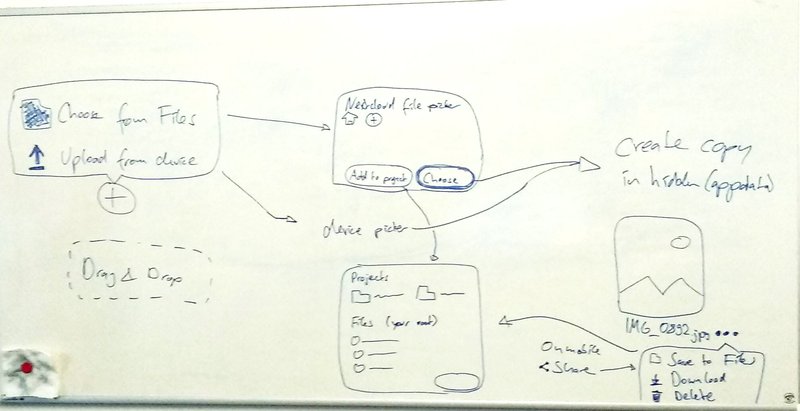
The main two usecases to cover are:
- Static file that is temporarily.
It does not need to end up in the users files, be synced by everyone, be editable etc. e.g. a Meme image as reaction to an ongoing discussion, funny cat/food picture to share, where the content matters, not the file. - Collaborative file that should be persistent.
These files should be synced, findable in the Files app, be editable with the known editors etc.
We came to the conclusion that they can not be covered with the same flow. Also currently 2. is implemented, while most of the times people would use case 1.. Especially for outsiders which don't come from the Nextcloud Files app as a user, the current behaviour of 2. is disturbing and not logical.
So the idea for the web is:
- The :heavy_plus_sign: button opens a tooltip dialog
- In the dialog the user decides to:
a. Choose a file from the Files app
1. An additional :heavy_plus_sign: is there in case you thought the file is in your cloud, but is actually not.
2. Primary action: "Choose" - Continue at 3.
3. Secondary action: "Add to project"/"Collaborate" - Continue at 6.
b. Upload a file from the device
- In both cases by default, the file is copied/uploaded to a folder in
appdata_*/talk/<conversation token>/ - A system message presents the file, for non-image or images without a preview the file name is also shown. The viewer apps from the normal Files app should be able to view the files.
- The file can be
a. Downloaded to your device
b. Deleted for everyone
c. Saved to your files - Saving to files will allow you to save the file to:
a. A normal folder in your file system (creating a non-shared copy)
b. A project linked to the conversation (creating a copy shared with all participants)
At the same time, we keep track of the temporary and the other files in a new oc_talk_files/attachment table, in Order to be able to generate a fast list for #1577
cc @jancborchardt @mario @Ivansss @danxuliu @jenniferpiperek in case I missed something
nickvergessen
on 24 Jun 2019
Related issues
jospoortvliet
·
4Comments
 brylie
·
3Comments
brylie
·
3Comments
 cbacit
·
3Comments
cbacit
·
3Comments
 pilsnerbeer
·
3Comments
pilsnerbeer
·
3Comments
 q-wertz
·
3Comments
q-wertz
·
3Comments
Most helpful comment
At the current contributor week we came to the following image:
The main two usecases to cover are:
It does not need to end up in the users files, be synced by everyone, be editable etc. e.g. a Meme image as reaction to an ongoing discussion, funny cat/food picture to share, where the content matters, not the file.
These files should be synced, findable in the Files app, be editable with the known editors etc.
We came to the conclusion that they can not be covered with the same flow. Also currently 2. is implemented, while most of the times people would use case 1.. Especially for outsiders which don't come from the Nextcloud Files app as a user, the current behaviour of 2. is disturbing and not logical.
So the idea for the web is:
a. Choose a file from the Files app
1. An additional :heavy_plus_sign: is there in case you thought the file is in your cloud, but is actually not.
2. Primary action: "Choose" - Continue at 3.
3. Secondary action: "Add to project"/"Collaborate" - Continue at 6.
appdata_*/talk/<conversation token>/a. Downloaded to your device
b. Deleted for everyone
c. Saved to your files
a. A normal folder in your file system (creating a non-shared copy)
b. A project linked to the conversation (creating a copy shared with all participants)
At the same time, we keep track of the temporary and the other files in a new oc_talk_files/attachment table, in Order to be able to generate a fast list for #1577
cc @jancborchardt @mario @Ivansss @danxuliu @jenniferpiperek in case I missed something