Spreed: Nextcloud Talk remote video black
Continuation of #586
When joining calls in Nextcloud Talk, the remote participant video is black.
Steps to reproduce
- Install Nextcloud 13
- enable Nextcloud Talk
- create two users
- log in with both users in separate devices
- establish a Talk call between the users
Expected behaviour
The users should see one anothers' video.
Actual behaviour
The 'remote' video is black, while the local device video is working.
Browser
Microphone available: yes
Camera available: yes
Operating system: Tested with OSX, Ubuntu, and Android (app and browser)
Browser name: Tested with Firefox, Chrome, and Chromium
Browser version: 58.0.2
Browser log
join CB
Object { clients: {} }
simplewebrtc.js:18270:4
XXX Remove peer xGtA+Pp7697Sey5bS22l528zlqOP1NplVFOoyVjwlgS5Wi3poZsBjkVnNj15nrjRrSxIs3IXWutieF4C1SwDjRGQk45QoJ5x51qNRKG4aks6yDrdt6M1nAsNjVk6XLZ39SV1uu17gACKgu/iug9V0HYn+YYpyJNn0KiiDS5mYBXWU+zYonEvBBJI9TfWQZQIOzhzVaN3PZ7VLJraHU6beFyjyJPSBz/9nQzyX90awL4Y7T0/NXpht4OsBXB+0DL
webrtc.js:102:4
Spreed app
Spreed app version: 3.1.0
Custom TURN server configured: yes
Note: I have, twice, gone through the steps in the article Setting up a TURN Server for Nextcloud Video Calls.
Custom STUN server configured: yes
The default STUN server is configured: stun.nextcloud.com:443
Server configuration
Nextcloud Version: 13.0.0
List of activated apps:
Enabled:
  - activity: 2.6.1
  - bruteforcesettings: 1.0.3
  - calendar: 1.6.0
  - circles: 0.13.6
  - comments: 1.3.0
  - dav: 1.4.6
  - deck: 0.3.0
  - federatedfilesharing: 1.3.1
  - federation: 1.3.0
  - files: 1.8.0
  - files_pdfviewer: 1.2.0
  - files_sharing: 1.5.0
  - files_texteditor: 2.5.1
  - files_trashbin: 1.3.0
  - files_versions: 1.6.0
  - files_videoplayer: 1.2.0
  - firstrunwizard: 2.2.1
  - gallery: 18.0.0
  - logreader: 2.0.0
  - lookup_server_connector: 1.1.0
  - nextcloud_announcements: 1.2.0
  - notifications: 2.1.2
  - oauth2: 1.1.0
  - password_policy: 1.3.0
  - provisioning_api: 1.3.0
  - richdocuments: 2.0.3
  - serverinfo: 1.3.0
  - sharebymail: 1.3.0
  - spreed: 3.1.0
  - survey_client: 1.1.0
  - systemtags: 1.3.0
  - theming: 1.4.1
  - twofactor_backupcodes: 1.2.3
  - updatenotification: 1.3.0
  - workflowengine: 1.3.0
Disabled:
  - admin_audit
  - encryption
  - files_external
  - testing
  - user_external
  - user_ldap
Nextcloud configuration:
{
    "system": {
        "passwordsalt": "***REMOVED SENSITIVE VALUE***",
        "secret": "***REMOVED SENSITIVE VALUE***",
        "trusted_domains": [
            "**REMOVED SENSITIVE VALUE***",
        ],
        "datadirectory": "***REMOVED SENSITIVE VALUE***",
        "overwrite.cli.url": "http:\/\/localhost",
        "dbtype": "mysql",
        "version": "13.0.0.14",
        "dbname": "***REMOVED SENSITIVE VALUE***",
        "dbhost": "***REMOVED SENSITIVE VALUE***",
        "dbport": "",
        "dbtableprefix": "bva",
        "dbuser": "***REMOVED SENSITIVE VALUE***",
        "dbpassword": "***REMOVED SENSITIVE VALUE***",
        "logtimezone": "UTC",
        "installed": true,
        "instanceid": "***REMOVED SENSITIVE VALUE***",
        "loglevel": 2,
        "maintenance": false,
        "memcache.local": "\\OC\\Memcache\\APCu",
        "updater.release.channel": "stable",
        "theme": ""
    }
}
 brylie
All 3 comments
On further consideration, I realized that I was adding https:// (or http://) to the TURN server URL field. The field placeholder text also includes the https:// protocol prefix, which seems to be incorrect:
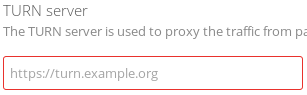
Removing the https:// protocol prefix on from the turn server TLD resolved the issue for me.
brylie
on 4 Mar 2018
Duplicate of #600
 nickvergessen
on 8 Mar 2018
nickvergessen
on 8 Mar 2018
After at least one hour of debugging, i luckily found this ticket, removed the "https://" prefix and got calls workings. Kudos to @brylie for pointing out the exact issue!
 ctrlaltca
on 16 Mar 2018
ctrlaltca
on 16 Mar 2018
Related issues
 danxuliu
·
3Comments
danxuliu
·
3Comments
 jospoortvliet
·
3Comments
jospoortvliet
·
3Comments
 ChristophAGietl
·
4Comments
ChristophAGietl
·
4Comments
 pilsnerbeer
·
3Comments
pilsnerbeer
·
3Comments
 mario
·
3Comments
mario
·
3Comments
Most helpful comment
After at least one hour of debugging, i luckily found this ticket, removed the "https://" prefix and got calls workings. Kudos to @brylie for pointing out the exact issue!