Spreed: Improved design of avatars in calls
A mockup without the controls, because we can use this in lots of cases – be it for voice calls on desktop or mobile, and also for incoming calls. cc @nextcloud/talk @mario @Ivansss
- Left: current – the view is quite dark and bland
- Middle: Possible enhancement, larger picture, and picture in blurry in the background
- Right: Maybe even like that, full size picture, with some dark fade on the top so the white text can be read

 jancborchardt
All 18 comments
Don't forget that people might also upload small icon like images as avatars, so we need a strategy for when the image is only 100/200 pixels wide, but I like it a lot more than the all black
 nickvergessen
on 27 Jun 2018
nickvergessen
on 27 Jun 2018
I would prefer the one in the middle, because of the same reasons as @nickvergessen said - avatars could be too small.
 MorrisJobke
on 27 Jun 2018
MorrisJobke
on 27 Jun 2018
Good point, yes. Then let's go with the middle one.
What do you think regarding mobile @mario @ivansss?
jancborchardt
on 27 Jun 2018
I'm not sure this will work.
The first screen you posted is not from Android since it also has the buttons (like you mentioned) + "Incoming call from".
Given that, I'm not sure buttons + text would be visible enough on the second mockup.
Introducing @AndyScherzinger to the mix.
 mario
on 27 Jun 2018
mario
on 27 Jun 2018
As said above:
A mockup without the controls
And
with some dark fade on the top so the white text can be read
(Just like in video apps like Netflix, Twitch, Newpipe etc)
I can do a specific mockup again, but will only be back on Monday.
jancborchardt
on 27 Jun 2018
Ok. We can try this, but keep in mind we need to get call type in the notification first otherwise we'll have giant public and group icons in the background :P
mario
on 28 Jun 2018
btw is this something you want to change on the desktop as well? or only in the mobile apps? @jancborchardt
nickvergessen
on 18 Jul 2018
Yes, as said above:
because we can use this in lots of cases – be it for voice calls on desktop or mobile, and also for incoming calls
:) So what we need is to have another element for the current speaker avatar which repeats that avatar, so that we can resize and blur it via CSS. (Or do we do it via ::before @nextcloud/designers?)
jancborchardt
on 18 Jul 2018
Superseded by #1056
Or is this only for mobile @jancborchardt
nickvergessen
on 7 Dec 2018
This is specific for 1-on-1 calls, and it’s for both mobile and server. As in a 1-on-1 voice call on the server there’s a lot of black space around the other person’s avatar which we can improve the looks of through the design above. :)
And regarding mobile:
- Is this done on iOS at all @Ivansss?
- On Android, the avatar duplicate shown in the background is stretched. Should always keep the aspect ration and just fill the background. @mario as discussed. :)
jancborchardt
on 11 Dec 2018
Already done @jancborchardt , thanks for the reminder ;)
mario
on 11 Dec 2018
Not implemented on iOS yet. But it's in the todo list :)
 Ivansss
on 11 Dec 2018
Ivansss
on 11 Dec 2018
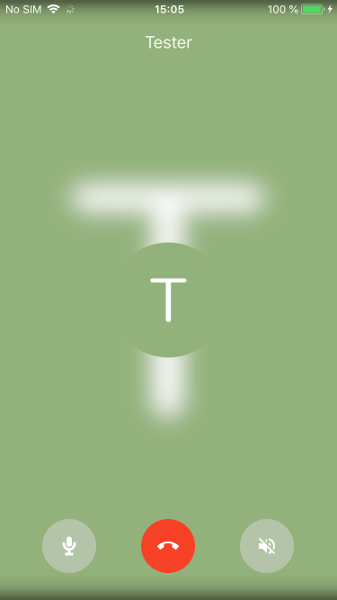
@jancborchardt I think for default avatars it looks a bit weird.
@mario How do you handle this on Android?
Ivansss
on 12 Dec 2018
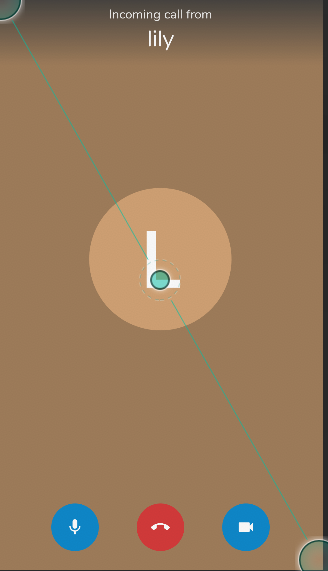
So if it's the default avatar (I check if the value returned is 201), I generate the background color using the following code:
                                    int color = palette.getDominantColor(getResources().getColor(R.color.grey950));

                                    if (color != getResources().getColor(R.color.grey950)) {
                                        float[] hsv = new float[3];
                                        Color.colorToHSV(color, hsv);
                                        hsv[2] *= 0.75f;
                                        color = Color.HSVToColor(hsv);
                                    }
Basically, I get the dominant color off of the avatar (basically, the circle colour, and then adjust intensity)
mario
on 12 Dec 2018
Here you go @Ivansss.
mario
on 12 Dec 2018
Btw. keep in mind I check if we have no-ping since 201 was introduced at the same time. Before that, the avatar endpoint would always return 200.
mario
on 12 Dec 2018
Closing as the mobile apps are fixed or should deal with it in their repo, and server UI is going to be adjusted with #1056
nickvergessen
on 21 Mar 2019
Related issues
 isas-institute
·
4Comments
nickvergessen
·
3Comments
isas-institute
·
4Comments
nickvergessen
·
3Comments
 ma12-co
·
3Comments
ma12-co
·
3Comments
 danxuliu
·
3Comments
danxuliu
·
3Comments
 brylie
·
3Comments
brylie
·
3Comments