Spinnaker: Halyard: Halyard/Spinnaker does not see any tags in repositories
_Migrated from https://github.com/spinnaker/halyard/issues/694_
__Opened by__: @wheleph _(2018-02-19 14:43:04)_ When I add a docker-registry like this
hal config provider docker-registry account add gcr-eu --address https://eu.gcr.io --repositories my-project --password-file ~/.gcp/gcp.json --username _json_key
Halyard gives this warning:
Problems in default.provider.dockerRegistry.gcr-eu:
- WARNING None of your supplied repositories contain any tags.
  Spinnaker will not be able to deploy anything.
? Push some images to your registry.
But the repo does contain tags. I'm able to pull the image using the same credentials like so:
> gcloud auth activate-service-account --key-file=.gcp/gcp.json
> gcloud docker -- pull eu.gcr.io/my-project/psa-app:703
703: Pulling from eu.gcr.io/my-project/psa-app
Is there an issue in halyard or am I doing something wrong?
__Comments__:
@lwander _(2017-09-15 13:37:52)_: When you deploy spinnaker, does clouddriver pick up tags?
@wheleph _(2017-09-15 13:39:19)_: Apparently yes because the Spinnaker is successfully deployed and running
@lwander _(2017-09-15 13:40:19)_: Well Spinnaker will run fine without tags to deploy, but when you go to deploy a server group in spinnaker do you see any listed images?
@wheleph _(2017-09-15 13:54:39)_: There are no images in the list of containers when I create a new server group.
@lwander _(2017-09-15 13:59:07)_: At least it's consistent :) Could you try
- enable the resource manager API: https://console.developers.google.com/apis/api/cloudresourcemanager.googleapis.com/overview
- remove
my-projectas a repository to instead rely on the _catalog endpoint to grab repos?
Oh wait - I see what the error is - your repository is listed as my-project, when in fact you need my-project/psa-app.
@TYsewyn _(2017-09-18 03:00:22)_: You shouldn't need to specify any repository. The _catalog endpoint is smart enough to only return repositories that the service account is allowed to access.
hal config provider docker-registry account add gcr-eu --address https://eu.gcr.io --password-file ~/.gcp/gcp.json --username _json_key should work.
(hal config provider docker-registry account edit gcr-eu --remove-repository my-project should also suffice)
@wheleph _(2017-09-18 08:33:39)_: @TYsewyn this is a very good point. But unfortunately when I skip the repository part:
hal config provider docker-registry account add gcr-eu2 --address https://eu.gcr.io --password-file ~/.gcp/gcp.json --username _json_key
then I get this error:
+ Get current deployment
  Success
- Add the gcr-eu2 account
  Failure
Problems in default.provider.dockerRegistry.gcr-eu2:
! ERROR Your docker registry has no repositories specified, and the
  registry's catalog is empty.
? Manually specify some repositories for this docker registry to
  index.

- Failed to add account gcr-eu2 for provider dockerRegistry.
@wheleph _(2017-09-18 08:47:51)_: @lwander the resource manager API was enabled on the project.
When I applied your suggestion and used my-project/psa-app there were no warnings. Thanks!
But I'm wondering why the _catalog endpoint doesn't work in my case (see my comment above). That would be more convenient.
@lwander _(2017-09-18 19:40:31)_: I don't know why GCR isn't listing your images... Most likely it's a quota issue. I would try deploying with --cache-interval-seconds set to something like 300 to ensure you don't overpoll, and then check the _catalog endpoint again in at least 24 hours.
@lwander _(2017-09-18 19:40:46)_: https://www.spinnaker.io/reference/halyard/commands/#hal-config-provider-docker-registry-account-edit has the --cache-interval-seconds setting.
@fernandoguedes _(2017-11-13 21:40:02)_: Thanks a lot @lwander, you save me!
@Subaru365 _(2018-01-11 14:39:33)_: @lwander I'm suffering with the same problem.
I tried --cache-interval-seconds 300. but, It does not display any Images.
Could you advise me about it?
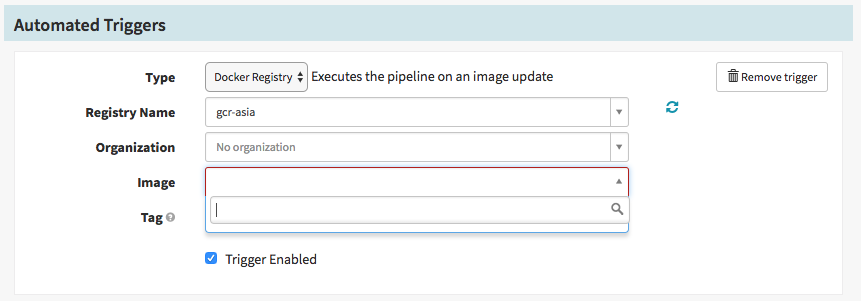
@lwander _(2018-01-11 14:41:48)_: Hey @Subaru365 which version of Spinnaker are you running? We found a bug in GCR a few weeks ago that caused auth issues for long lived clouddriver instances. We have a workaround in the latest Spinnaker (1.5.4) for the GCR issue.
@Subaru365 _(2018-01-11 14:45:43)_: @lwander Oh. I use 1.5.2. Thank you very much for the information. I'll try latest version!
@wheleph _(2018-01-26 16:11:29)_: @Subaru365, @fernandoguedes did it help you? I still cannot use the _catalog endpoint for some reason and have to explicitly list Docker repositories.
@Subaru365 _(2018-01-27 16:51:38)_: Hi @wheleph. No, it didn't. I have the same situation as you do at 1.5.4.
@lwander Are there any other important things?
@TYsewyn _(2018-01-27 18:21:33)_: I'm not 100% sure, but if I'm not mistaken you're obligated to select an organisation when using Google Container Registry.
@wheleph _(2018-01-29 07:46:53)_: @TYsewyn could you elaborate on how to select an organization?
@TYsewyn _(2018-01-31 15:52:43)_: Check one of @Subaru365's previous post.
You can see that the organisation isn't selected in the image.
@wheleph _(2018-01-31 21:12:11)_: If you refer to the screenshot for automated triggers then it's not possible to select an organization because it's empty
@felimartina _(2018-02-13 04:55:59)_: We see this happening every few days (spinnaker 1.5.2). And I am almost certain that it is related to this issue.
We were able to workaround the issue by restarting clouddriver service. However, this only buys us a couple days until it gets stuck again.
sudo service clouddriver restart
I will be looking at a more longterm solution and come back later. I hope this solves someone elses issue
@sami9gag _(2018-02-14 02:57:13)_: @felimartina That is most likely a different issue than the one reported here. spinnaker/spinnaker#2039 talks about runtime issues where the repositories are initially visible but later disappear. This issue appears to talk about no repositories found during deploy time (and immediately after deploy).
@wheleph _(2018-02-19 14:43:04)_: After some research it turned out that the GCP service account that is used by Spinnaker docker-registry account has to have an additional (undocumented) role _roles/browser_ in order to be able to use the __catalog_ endpoint. See this answer for more details. The author suggests to use _roles/viewer_ but it turned out that _roles/browser_ is sufficient.
After I applied the suggestion I see the list of images even if I don't specify any repositories explicitly:
hal config provider docker-registry account add gcr-eu --address https://eu.gcr.io --password-file ~/.gcp/gcp.json --username _json_key
Also the list is growing as new repositories appear in the registry.
So in summary my service account has the following permissions:
- Project role _roles/browser_
- _roles/storage.legacyBucketReader_, _roles/storage.objectViewer_ on the appspot bucket (for example _eu.artifacts.my-project.appspot.com_) that is created behind the scenes to store the GCR images.
@Subaru365 I hope this will solve the issue you see as well.
@lwander I think it would be useful to document this setup somewhere (maybe in this guide) because it's not very straightforward. What do you think about that?
 spinnaker-release
>All comments
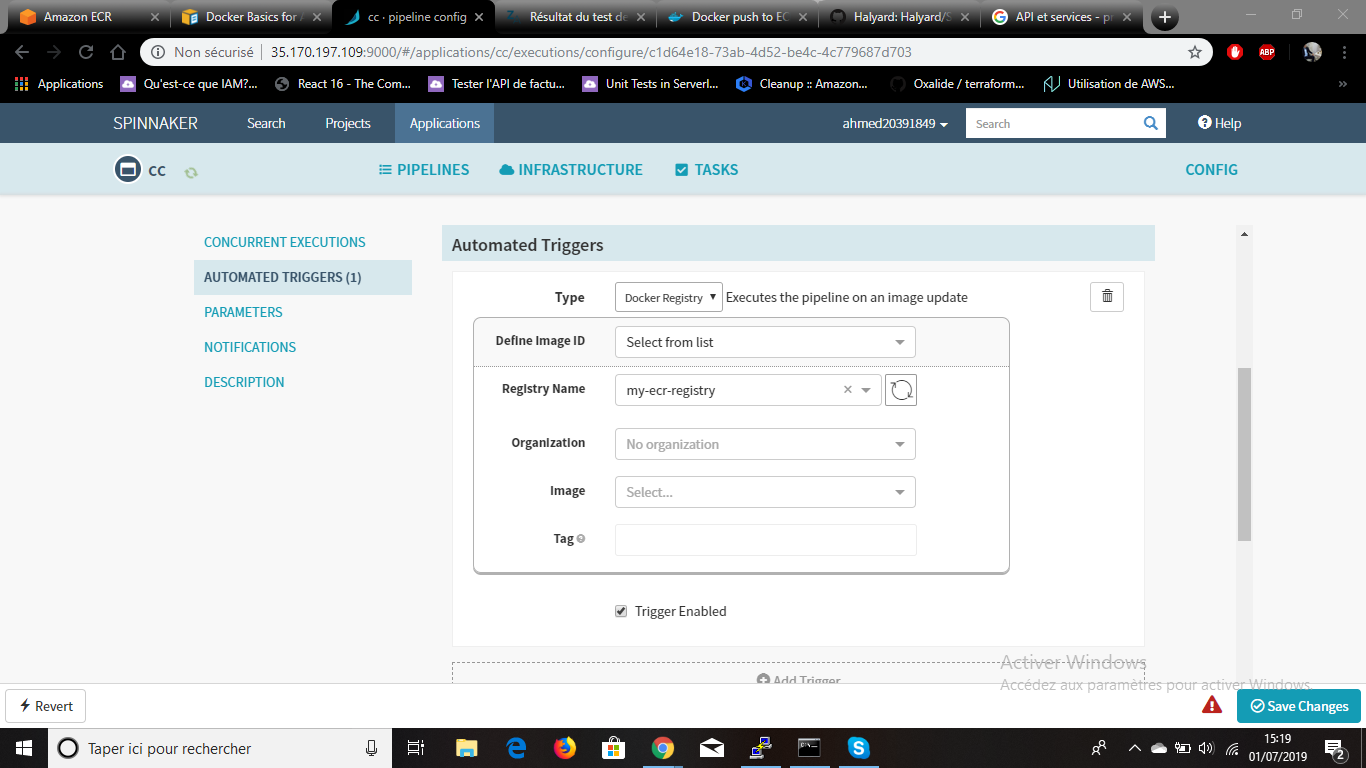
i have a probleme while automated triggers with spinnaker and ecr AWS
 ahmed20391849
on 1 Jul 2019
ahmed20391849
on 1 Jul 2019
Related issues
 ksegun
·
3Comments
ksegun
·
3Comments
 iniinikoski
·
3Comments
iniinikoski
·
3Comments
 noralutz
·
3Comments
noralutz
·
3Comments
 sdpoueme
·
3Comments
sdpoueme
·
3Comments
 sbwsg
·
3Comments
sbwsg
·
3Comments
Most helpful comment
i have a probleme while automated triggers with spinnaker and ecr AWS
