Spinnaker: ECS/Fargate: recurring deployments with "copySourceScalingPoliciesAndActions" start failing
Issue Summary:
When the "copySourceScalingPoliciesAndActions" is set to true and a scaling policy is set & the deployment is rerun a number of times (max. 5), the deployments start to time out (in step "Disable Cluster").
Cloud Provider(s):
ECS/Fargate
Environment:
Spinnaker version 1.15.1 running on top of GKE, Google Cloud MemoryStore & Cloud SQL
Feature Area:
Pipelines
Description:
Repeated deployments with scaling policies enabled (pipeline) should not timeout.
Steps to Reproduce:
Note: set "copySourceScalingPoliciesAndActions" to true...
- create a new pipeline which deploys the app to a new cluster + verify that deployment finishes
- add a scaling policy (e.g. target tracking) to the current Service
- re-run the pipeline multiple times (it will work for the first executions)
- after X number of re-runs (2-5-ish), the deployments start to timeout
Additional Details:
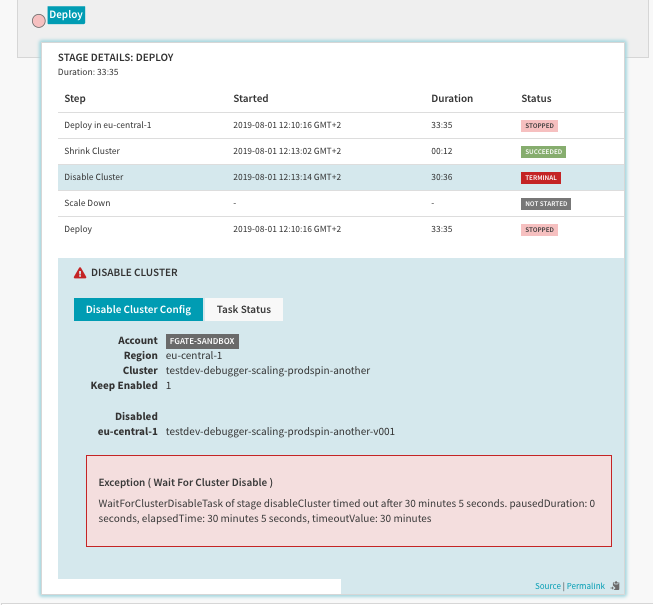
The logs of Clouddriver & Orca do not seem to reveal anything special here.
 iniinikoski
All 3 comments
Root cause analysis:
Disable Server Group operation sets the desired count down to zero, but Auto Scaling targets are still in place. While WaitForClusterDisableTask is running, there is a race condition between the service stopping all tasks and Auto Scaling resetting the desired count to non-zero according to the registered scaling policies. Other operations handle the interaction with Auto Scaling correctly: Resize Server Group operation will update the range of the Auto Scaling scalable target. Destroy Service operation deregisters the service as an Auto Scaling scalable target.
When scaling down the service to zero, Disable Server Group should also adjust the scalable target range to zero.
https://github.com/spinnaker/clouddriver/blob/d15d7f775c30056510aca016c712e1d68c16d51a/clouddriver-ecs/src/main/java/com/netflix/spinnaker/clouddriver/ecs/deploy/ops/DisableServiceAtomicOperation.java#L47
 clareliguori
on 1 Aug 2019
clareliguori
on 1 Aug 2019
@spinnakerbot add-label provider/ecs
clareliguori
on 1 Aug 2019
After looking at this more, this is more complex than I originally thought. A service can be re-enabled after Disable (for example, in case of rollback prior to Destroy), where it needs to be set back to a non-zero desired count, ideally something in the same min/max range as it was in before.
The current ECS behavior for Enable is to query the scalable target for min/max, and set the desired count to the max capacity:
https://github.com/spinnaker/clouddriver/blob/d15d7f775c30056510aca016c712e1d68c16d51a/clouddriver-ecs/src/main/java/com/netflix/spinnaker/clouddriver/ecs/deploy/ops/EnableServiceAtomicOperation.java#L58
If we set the min/max of the scalable target to zero in Disable (as suggested by me above), then we won't know what value to use for desired count in Enable. I'm not sure if there are other sources in Spinnaker we could use to grab the fallback min/max configured for the server group (AFAIK that is only available during the Create stage). We are also reaching out to the Application Autoscaling team to see if there are any alternatives.
clareliguori
on 13 Aug 2019
Related issues
 beyond-code-github
·
3Comments
beyond-code-github
·
3Comments
 katsew
·
3Comments
katsew
·
3Comments
 hammett
·
3Comments
hammett
·
3Comments
 ezimanyi
·
3Comments
ezimanyi
·
3Comments
 noralutz
·
3Comments
noralutz
·
3Comments
Most helpful comment
Root cause analysis:
Disable Server Group operation sets the desired count down to zero, but Auto Scaling targets are still in place. While WaitForClusterDisableTask is running, there is a race condition between the service stopping all tasks and Auto Scaling resetting the desired count to non-zero according to the registered scaling policies. Other operations handle the interaction with Auto Scaling correctly: Resize Server Group operation will update the range of the Auto Scaling scalable target. Destroy Service operation deregisters the service as an Auto Scaling scalable target.
When scaling down the service to zero, Disable Server Group should also adjust the scalable target range to zero.
https://github.com/spinnaker/clouddriver/blob/d15d7f775c30056510aca016c712e1d68c16d51a/clouddriver-ecs/src/main/java/com/netflix/spinnaker/clouddriver/ecs/deploy/ops/DisableServiceAtomicOperation.java#L47