Spaceship-prompt: Everything after/including line_sep sometimes disappears
Issue
I recently installed this theme and have kept it mostly default. I've noticed sometimes after ^Cing a command or exiting something like Vim, when coming back to a new prompt everything after and including the line_sep will disappear until I exit zsh and start it again. I haven't been able to reliably reproduce it, but it happens often. I'm using the default order. No error messages are displayed.
If I can find a way to reliably reproduce it I'll update this, happy to provide more info if needed.
Thanks!
Screenshot
Normal UI:

No line_sep:

Environment
Operating system: macOS
Terminal emulator: terminal
ZSH version: zsh 5.2 (x86_64-apple-darwin15.0.0)
Relevant .zshrc
# Path to your oh-my-zsh installation.
export ZSH=/Users/me/.oh-my-zsh

# Set name of the theme to load. Optionally, if you set this to "random"
# it'll load a random theme each time that oh-my-zsh is loaded.
# See https://github.com/robbyrussell/oh-my-zsh/wiki/Themes#
# Probably don't need this since it's sourced at the bottom
ZSH_THEME="spaceship"

# Uncomment the following line to enable command auto-correction.
ENABLE_CORRECTION="true"

# Which plugins would you like to load? (plugins can be found in ~/.oh-my-zsh/plugins/*)
# Custom plugins may be added to ~/.oh-my-zsh/custom/plugins/
# Example format: plugins=(rails git textmate ruby lighthouse)
# Add wisely, as too many plugins slow down shell startup.
plugins=(
    git
    common-aliases
    brew
    docker
    git-extras
    npm
    osx
    pep8
    pip
    python
    redis-cli
    fasd
    sudo
    tmux
    virtualenvwrapper
    zsh-history-substring-search
    zsh-syntax-highlighting
)

source $ZSH/oh-my-zsh.sh

# spaceship theme settings
# https://github.com/denysdovhan/spaceship-zsh-theme
# {{{
    SPACESHIP_TIME_SHOW=true
    SPACESHIP_BATTERY_THRESHOLD=35 # 10% isn't enough time to find a charger
    SPACESHIP_PROMPT_SYMBOL="➜ "   # Add a small space after the arrow
    SPACESHIP_VENV_PREFIX="working on "

    # disable some plugins I don't need
    SPACESHIP_KUBECONTEXT_SHOW=false
    SPACESHIP_PYENV_SHOW=false
    SPACESHIP_NODE_SHOW=false
    SPACESHIP_PACKAGE_SHOW=false
#   }}}

source "/Users/me/.oh-my-zsh/custom/themes/spaceship.zsh-theme"
 SeventhHelix
All 17 comments
Thanks for reporting!
If I can find a way to reliably reproduce it I'll update this, happy to provide more info if needed.
Would be great.
 denysdovhan
on 19 Oct 2017
denysdovhan
on 19 Oct 2017
Hi again.
I still haven't been able to reliably reproduce this, but it seems to often happen when zsh gets interrupted before the next prompt comes up. For example, this just happened now:
18:28:24 in ~/las_elasticsearch
•100% ➜  cd etc/elasticsearch

18:28:26 in las_elasticsearch/etc/elasticsearch ls
backup-logging     elasticsearch.yml  logging.yml
I cd'd into a directory, typed lsbefore the prompt came up, and the newline/battery/arrow disappeared from then on. I'm not able to reliably reproduce this (because of course whenever I try to, cd is too fast). Mashing ^c doesn't seem to trigger it.
Is there a way I can just disable the newline separator for now?
SeventhHelix
on 14 Nov 2017
This is happening for me as well. It is every time my command should wrap. the entire line, including the prompt disappears.
this:

turns into this:

when my command goes to the next line.
 carrickjason
on 16 Nov 2017
carrickjason
on 16 Nov 2017
Yeah, the similar problem happens to me. Let's see how can we solve this. However, I have to notice that such bugs are not in priority right now, since I have to finally finish the 3.0 (it takes to long to release this).
@salmanulfarzy I'll appreciate if you take a look at this 🙏
denysdovhan
on 16 Nov 2017
Sure thing. I haven't been able to reproduce the issue. Will look into it once I could reproduce it.
 salmanulfarzy
on 17 Nov 2017
salmanulfarzy
on 17 Nov 2017
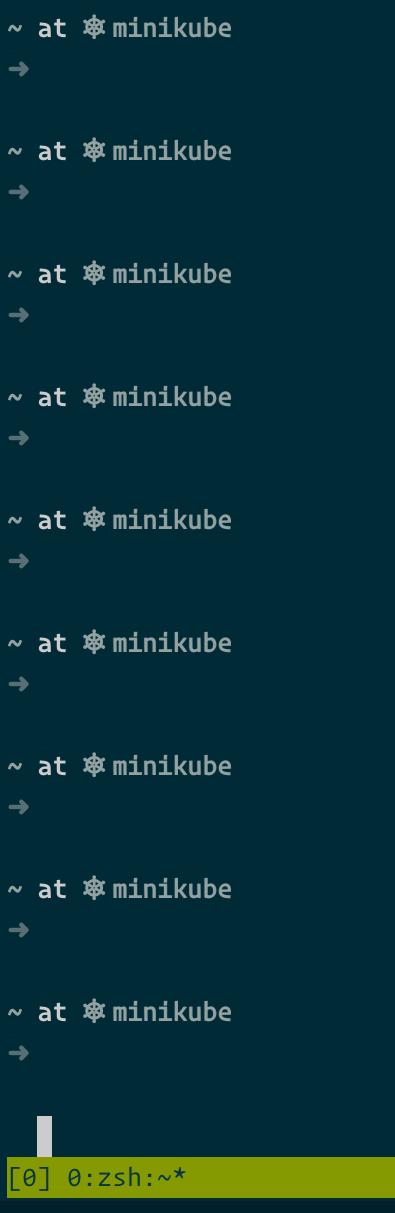
Happens to me too. In tmux, once the prompt reaches the bottom of the screen it starts breaking off. Typing clear resolves it until the next time.
 randomvariable
on 23 Nov 2017
randomvariable
on 23 Nov 2017
Package: zsh-5.4.1-1.fc27.x86_64
randomvariable
on 23 Nov 2017
Ghost bug. Still, don't understand what causes this and how to fix that. Any help would be appreciated.
denysdovhan
on 12 Jan 2018
I noticed that sections or segments with unicode characters cause funny behavior with the prompt char.
For instance, here is my spaceship config:
SPACESHIP_PROMPT_ORDER=(
  user          # Username section
  host          # Hostname section
  dir           # Current directory section
  git           # Git section (git_branch + git_status)
  node          # Node.js section
  ruby          # Ruby section
  golang        # Go section
  docker        # Docker section
  aws           # Amazon Web Services section
  line_sep      # Line break
  char          # Prompt character
)

SPACESHIP_RPROMPT_ORDER=(
  jobs          # Background jobs indicator
  exec_time     # Execution time
  exit_code     # Exit code section
  kubecontext   # Kubectl context section
  battery       # Battery level and status
  time          # Time stampts section
)
Causes this behavior (note the missing prompt char)

But, disabling the unicode symbol for kubecontext:
SPACESHIP_KUBECONTEXT_SYMBOL=''
Fixes the issue

Same goes for battery
Before:

After:
SPACESHIP_BATTERY_SHOW='always'
SPACESHIP_BATTERY_SYMBOL_CHARGING='+'
SPACESHIP_BATTERY_SYMBOL_DISCHARGING='-'
SPACESHIP_BATTERY_SYMBOL_FULL=''

A few additional observations:
- Unicode characters in left prompt (
PROMPT) doesn't cause any issues with the prompt char - I'm able to consistently repro this issue with any unicode character in right prompt (
RPROMPT)
 pbnj
on 27 Feb 2018
pbnj
on 27 Feb 2018
I think I just figured it out.
Exported the following environment variables for UTF-8 and all unicode characters work without messing up the prompt:
export LANG="en_US.UTF-8"
export LC_COLLATE="en_US.UTF-8"
export LC_CTYPE="en_US.UTF-8"
export LC_MESSAGES="en_US.UTF-8"
export LC_MONETARY="en_US.UTF-8"
export LC_NUMERIC="en_US.UTF-8"
export LC_TIME="en_US.UTF-8"
export LC_ALL="en_US.UTF-8"

pbnj
on 27 Feb 2018
@randomvariable , @carrickjason , and @SeventhHelix - can you try exporting the environment variables I've listed above to see if it helps or resolves your issue(s) with prompt weirdness?
pbnj
on 27 Feb 2018
@petermbenjamin I exported the language env variables as shown but the problem remains.
carrickjason
on 30 Apr 2018
@carrickjason, can you provide some additional information:
- Are you using tmux?
- If so, what version?
- What does the spaceship prompt look like outside tmux and inside tmux?
- Have you tried disabling plugins one at a time to rule out specific plugins that could be causing this problem?
- Have you tried disabling the emoji in your prompt to rule out unicode characters that could be causing this problem?
- Do you only run into this problem when the terminal/shell tries to line-wrap? Cursory Google searches regarding shell/terminal line-wrap overwrite reveal that this bug is caused by a number of different things (e.g. unprintable unicode characters or unescaped shell color codes). Could this be what you're running into?
- What's your environment (e.g. OSX/Win/Linux, terminal application, zsh version, spaceship-prompt version)? Could you also share your
.zshrc?
pbnj
on 30 Apr 2018
It's very possible that you are all experiencing the same bug we found in OMZ with zsh 5.2: https://github.com/robbyrussell/oh-my-zsh/issues/6818#issuecomment-388925608. Try to reproduce with the following:
zsh -f
autoload -U compinit && compinit
zstyle ':completion:*' menu select
 mcornella
on 15 May 2018
mcornella
on 15 May 2018
It'll be a while before I'm able to test. Currently on PowerShell (long story).
I also suspect part of my issue was at least dealt with in a previous release of VS Code around multi-line clear (although I can't find the PR where it was fixed).
I'm happy for this to be closed if it's resolved for others.
randomvariable
on 15 May 2018
This issue has cleared up for me since upgrading to a 3.x release.
Thank-you for all your hard work on Spaceship!
SeventhHelix
on 15 May 2018
Looks like this can be closed per @SeventhHelix and @randomvariable. Does this still happen to you @carrickjason ?
@randomvariable please do make new issue if anything else pops. Thank you @mcornella and @petermbenjamin for the support and information :v:
salmanulfarzy
on 15 May 2018
Related issues
 conradwt
·
3Comments
salmanulfarzy
·
3Comments
conradwt
·
3Comments
salmanulfarzy
·
3Comments
 jwhipp
·
3Comments
jwhipp
·
3Comments
 maccius
·
3Comments
maccius
·
3Comments
 gillesdemey
·
3Comments
gillesdemey
·
3Comments
Most helpful comment
This is happening for me as well. It is every time my command should wrap. the entire line, including the prompt disappears.


this:
turns into this:
when my command goes to the next line.