Sp-dev-fx-webparts: Do we need any permission for the webpart(react-taxonomypicker) to access the term store
Thank you for reporting an issue, suggesting an enhancement, or asking a question. We appreciate your feedback - to help the team understand your
needs please complete the below template to ensure we have the details to help. Thanks!
Please check out the Docs to see if your question is already addressed there. This will help us ensure our documentation covers the most frequent questions.
Category
- [ ] Enhancement
- [ ] Bug
- [x] Question
- [ ] Documentation gap/issue
Version
Please specify what version of the library you are using: [ npm -v 6.14.4 ]
Please specify what version(s) of SharePoint you are targeting: [ SharePoint Online ]
Hello,
I downloaded the samples(sp-dev-fx-webparts-master) and I'm checking this sample: react-taxonomypicker, because I'm interested in use taxonomy picker for some react forms.
So I'm able to open the sample in VS code and I updated the term set id as below:
protected getPropertyPaneConfiguration(): IPropertyPaneConfiguration {
return {
pages: [
{
header: {
description: strings.PropertyPaneDescription
},
groups: [
{
groupName: strings.BasicGroupName,
groupFields: [
PropertyPaneTaxonomyPicker("Language", {
key: "Language_Field",
name: "Language",
displayName: "Language",
multi: true,
termSetGuid: "1f016867-6b8b-4f95-8e47-f2c8ec7b2d00",
Then I was able to run the sample with below commands:
- npm install
- gulp serve
- go to https://mydevtenant.sharepoint.com/_layouts/15/workbench.aspx and i can see the webpart but it's not showing any term set.
My question is: Do we need any permission for the webpart to access the term store?
Here a screenshot for my term store:
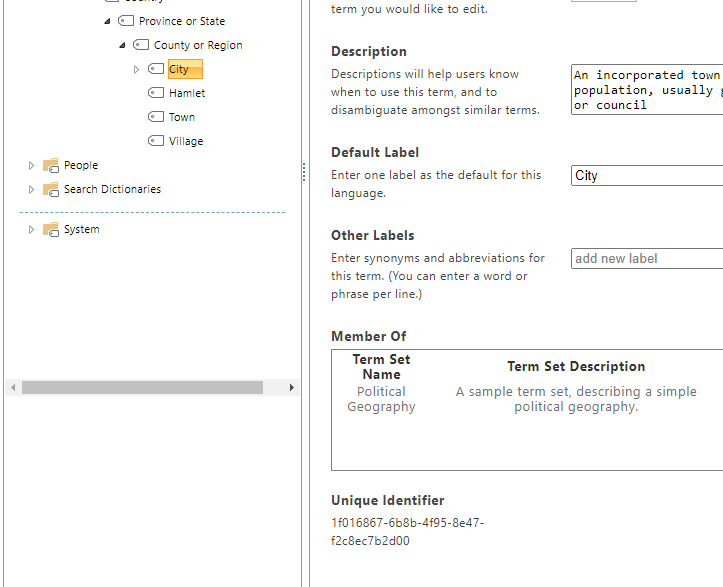
Thank you so much for your help!!!!
 RubenHerrera86
All 6 comments
Thank you for reporting this issue. We will be triaging your incoming issue as soon as possible.
![msftbot[bot] picture](https://avatars2.githubusercontent.com/in/26612?v=4&s=40) msftbot[bot]
on 3 Jun 2020
msftbot[bot]
on 3 Jun 2020
Hello,
I also tried with Taxonomy picker but still unable to access to terms.
Below taxonomy piker url and the code used on render method:
https://pnp.github.io/sp-dev-fx-controls-react/controls/TaxonomyPicker
<TaxonomyPicker allowMultipleSelections={false}  termsetNameOrID="1f016867-6b8b-4f95-8e47-f2c8ec7b2d00"
              panelTitle="Select City"
              label="TaxonomyPicker"
              context={this.props.context}
              onChange={this._onTaxPickerChange}
              isTermSetSelectable={false} />
Thank you
RubenHerrera86
on 4 Jun 2020
Hi @RubenHerrera86,
Thank you for making a Screenshot of your TermStore with the TermSet I marked with A it works like expected. with your React code
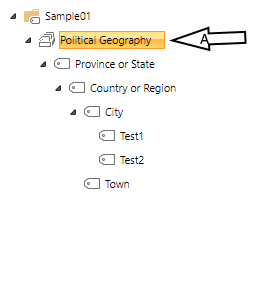
at the control documentation page, I found the Property anchorId this can help you to get your expected result
<TaxonomyPicker allowMultipleSelections={false}
              termsetNameOrID="c8952ad4-42c7-42eb-8ea7-43073b365fe5"
              anchorId="42f9b542-d3d4-476a-8b20-17ebaf263bc4"
              panelTitle="Select City"  label="TaxonomyPicker" context={this.props.context}
              onChange={this.onTaxPickerChange.bind(this)}
              isTermSetSelectable={true} />
termsetNameOrID="c8952ad4-42c7-42eb-8ea7-43073b365fe5" Political Geography
anchorId="42f9b542-d3d4-476a-8b20-17ebaf263bc4" City
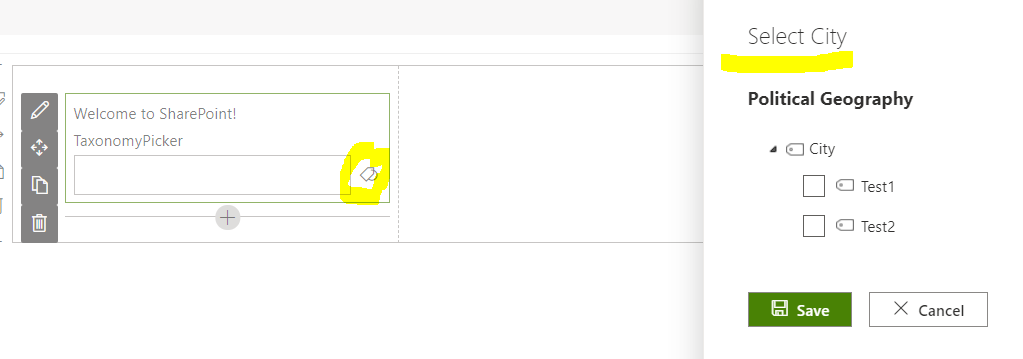
I hope this helps you
 petkir
on 9 Jun 2020
petkir
on 9 Jun 2020
@RubenHerrera86 did @petkir 's suggestion help you solve your issue?
 hugoabernier
on 9 Jun 2020
hugoabernier
on 9 Jun 2020
Wow!!!!!! It's working!!!!!!!!!!!!!!
so thankfully with you guys!!!!!!
here my updated code with your code changes!!!
anchorId="1f016867-6b8b-4f95-8e47-f2c8ec7b2d00"
panelTitle="Select City"
label="City"
//initialValues={this.state.selectedTerms}
context={this.props.context}
onChange={this._onTaxPickerChange}
isTermSetSelectable={false} />
RubenHerrera86
on 9 Jun 2020
@RubenHerrera86 I'm glad you were able to resolve the issue!
Thanks @petkir for your help!
hugoabernier
on 9 Jun 2020
Related issues
 PathToSharePoint
·
4Comments
PathToSharePoint
·
4Comments
 Abiman194
·
3Comments
Abiman194
·
3Comments
 shrirampophali
·
4Comments
shrirampophali
·
4Comments
 Brentless
·
5Comments
Brentless
·
5Comments
 JenniferUN
·
3Comments
JenniferUN
·
3Comments
Most helpful comment
Wow!!!!!! It's working!!!!!!!!!!!!!!
so thankfully with you guys!!!!!!
here my updated code with your code changes!!!
anchorId="1f016867-6b8b-4f95-8e47-f2c8ec7b2d00"
panelTitle="Select City"
label="City"
//initialValues={this.state.selectedTerms}
context={this.props.context}
onChange={this._onTaxPickerChange}
isTermSetSelectable={false} />