Sp-dev-fx-webparts: In react-list-form webpart, validation not firing for required list fields before saving the item
https://github.com/pnp/sp-dev-fx-webparts/tree/master/samples/react-list-form
Sample: #react-list-form
Author: @DanyWyss
Expected or Desired Behavior
List form should perform validation of all required fields before saving
Observed Behavior
List form saving the form without any validation of required fields
Steps to Reproduce
If I leave "Title" field empty, it just shows me message as "Item Added Successfully" after click on save button
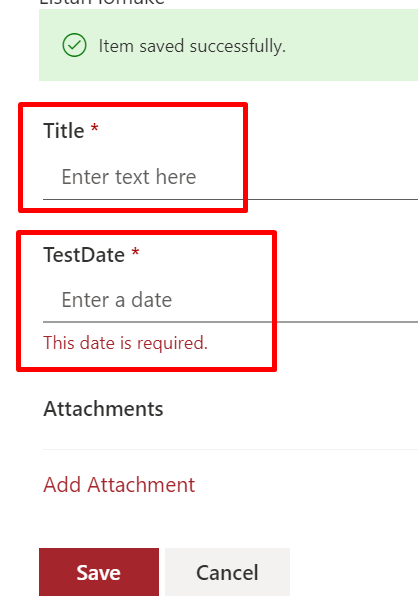
Steps to reproduce the behavior:
- Add the webpart to Modern SharePoint Site
- Select sample SharePoint List from Properties
- Try to Save without filling required fields
- It will show "Item Saved Successfully" message
Environment Details (Development & Target environment)
- OS: Windows 10
- Target Environment: SharePoint Online
- Framework: Node.js v8
- Browser(s): Chrome v83
- Tooling: VS Code | SPFx v1.9.1
- Additional details: It shows required error message for DateTime Field and not for Title
 shrirampophali
All 4 comments
Thank you for reporting this issue. We will be triaging your incoming issue as soon as possible.
![msftbot[bot] picture](https://avatars2.githubusercontent.com/in/26612?v=4&s=40) msftbot[bot]
on 22 Jun 2020
msftbot[bot]
on 22 Jun 2020
Hi @hugoabernier, I will look into this issue. Could you please assign my name?
 Harshagracy
on 25 Jun 2020
Harshagracy
on 25 Jun 2020
Thank you @Harshagracy, you are now assigned!
 hugoabernier
on 25 Jun 2020
hugoabernier
on 25 Jun 2020
Thank you @Harshagracy for fixing the issue 👍 and @hugoabernier for merging! 👍
Would be nice to have unsupported fields supported in future as well! :)
- Person Group
- Managed Metadata
- HyperLink or Picture
shrirampophali
on 2 Aug 2020
Related issues
 albegut
·
4Comments
albegut
·
4Comments
 parmira5
·
4Comments
parmira5
·
4Comments
 joshburns49
·
3Comments
joshburns49
·
3Comments
 russgove
·
4Comments
russgove
·
4Comments
 pap1723
·
5Comments
pap1723
·
5Comments
Most helpful comment
Thank you @Harshagracy, you are now assigned!