Sp-dev-fx-webparts: Is it possible to use office ui fabric components or css in react-content-query-webpart
I am actually trying to implement office ui fabric css , but it is not working.
How can i make it work ?
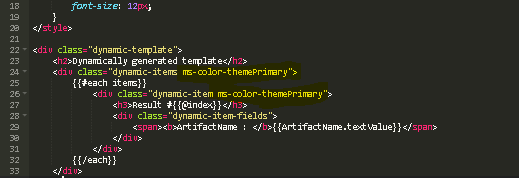
I can see the theme gets applied for a seconds and then changes to dark grey.
 harshdamaniahd
All 9 comments
I observed that , the css is overwritten

harshdamaniahd
on 5 Dec 2018
Please see, if this helps you anyway:
https://www.c-sharpcorner.com/article/sharepoint-framework-css-considerations/
 nanddeepn
on 6 Dec 2018
nanddeepn
on 6 Dec 2018
@harshdamaniahd I didn’t add this functionnality so far in the WebPart. I know the Search Refiners webpart available in the samples recently added this exact possibility to use Office UI Fabric CSS in the templates, it could be a nice add on :)
Will let you know if I find any time to add this functionality :)
 spplante
on 13 Dec 2018
spplante
on 13 Dec 2018
This is what I did,
I created a common css file and packaged with the webpart.
for eg :
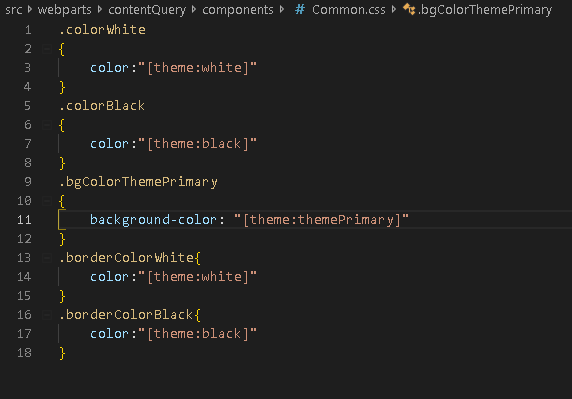
Now, when I am using template or editing the template , I just have to use the class as highlighted below
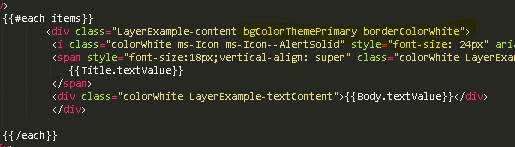
Using this approach, I was able to make it aligned with Office UI Fabric Theme.
@spplante What do you think ?
harshdamaniahd
on 17 Dec 2018
This is perfectly fair but will require you do add your own style each time you want to use UI Fabric. There is a way to include the whole UI fabric library that way you can use their grid layouts and stuff like that.
What you can do instead, is to include the required scss files at the root of the main WebPart scss file, that way the UI fabric classes are only enabled when using them within your template selector and won't conflict with everything else on the page :
.cqwp {
@import '~office-ui-fabric/dist/sass/Fabric.scss';
@import '~office-ui-fabric/dist/components/Label/Label.scss';
@import '~office-ui-fabric/dist/components/List/List.scss';
@import '~office-ui-fabric/dist/components/ListItem/ListItem.scss';
.cqwpValidations {
...
}
}
Let me know if that helps 👍
spplante
on 17 Dec 2018
Great....Let me try :-)
harshdamaniahd
on 17 Dec 2018
after including them, how can i use it in my template ?.. i tried but not working
harshdamaniahd
on 17 Dec 2018
@harshdamaniahd my bad, if you simply add the includes to ContentQuery.module.scss like I suggested, since it's a SASS module, the classes like .cqwp gets renamed at the compilation with a guid, which makes it impossible to use the classes in the Handlebars template because the template isn't aware of the GUID to use. So the way I initially suggested will create something like this :
.cqwp_3a5j23n56 {
    ...

    .ms-fontColor-themePrimary_3a5j23n56 {
        ...
    }
}
You can't do much with this you are right. To avoid this, use the :global selector in order to tell SASS that the incoming selector has to be excluded from the guid generation, and point directly to the global namespace. That way the includes won't get the guid as well.
So the final solution is the following, in the ContentQuery.module.scss file :
.cqwp {
    :global .rootTemplate {
    @import '~office-ui-fabric/dist/sass/Fabric.scss';
    @import '~office-ui-fabric/dist/components/Label/Label.scss';
    @import '~office-ui-fabric/dist/components/List/List.scss';
    @import '~office-ui-fabric/dist/components/ListItem/ListItem.scss';
        ...
    }

    .cqwpValidations {
        ...
    }
}
In your handlebars template :
<div class="rootTemplate">
    <h1 class="ms-fontColor-themePrimary">Testing theme color!</h1>
</div>
Just tested it and it works 👍
spplante
on 17 Dec 2018
Thank you @spplante. Got it
harshdamaniahd
on 17 Dec 2018
Related issues
 sivanu137
·
4Comments
sivanu137
·
4Comments
 PathToSharePoint
·
4Comments
PathToSharePoint
·
4Comments
 russgove
·
4Comments
russgove
·
4Comments
 jbranders
·
5Comments
jbranders
·
5Comments
 shrirampophali
·
4Comments
shrirampophali
·
4Comments
Most helpful comment
@harshdamaniahd my bad, if you simply add the includes to ContentQuery.module.scss like I suggested, since it's a SASS module, the classes like .cqwp gets renamed at the compilation with a guid, which makes it impossible to use the classes in the Handlebars template because the template isn't aware of the GUID to use. So the way I initially suggested will create something like this :
You can't do much with this you are right. To avoid this, use the :global selector in order to tell SASS that the incoming selector has to be excluded from the guid generation, and point directly to the global namespace. That way the includes won't get the guid as well.
So the final solution is the following, in the ContentQuery.module.scss file :
In your handlebars template :
Just tested it and it works 👍