Sp-dev-fx-webparts: react-search-refiners not able to display default results and use Search Box
Category
- [ ] Question
- [x] Bug
- [ ] Enhancement
Authors
@FranckyC @VesaJuvonen
Expected or Desired Behavior
Similar to classic Search results web part, I wanted to display default search results on a page e.g all recent documents and also allow users to use Search Box, using a KQL: {SearchBoxQuery} ContentType:Document
Observed Behavior
Its not possible to both display default results and allow users to use Search Box connected to the web part. I've also tries many permutations of all know settings to make that working.
Steps to Reproduce
Add both "Search Box" and "Search Results with Refiners" web parts, connect "Search Results with Refiners" to the" Search Box" and in the "Query Template" add: {SearchBoxQuery} ContentType:Document
Submission Guidelines
Thanks for your contribution! Sharing is caring.
 MichalExpP
All 37 comments
Hi @MichalExpP, did you try to use {searchTerms} instead of {SearchBox} to get the keywords from the search box? The {SearchBox} token is not available in the query template condition.
 FranckyC
on 5 Jul 2018
FranckyC
on 5 Jul 2018
Hi Franky.
Just tried "{searchTerms} Path:{SiteCollection} ContentType:News NewsPublishedDate<={Today}" and that does work, thank you.
I got incorrect suggestion from https://www.techmikael.com/2015/07/sharepoint-rest-do-support-query.html that it was the {SearchBoxQuery} that was supported, not the searchTerms and I didnt; try that.
Thank you
MichalExpP
on 5 Jul 2018
No problem @MichalExpP. FYI {SearchBoxQuery} was supported through classic search WP only (probably via a dirty a hard-coded token ;))
FranckyC
on 5 Jul 2018
I've tried this again on a new site collection and I get the same issue, my previous try after your response must have been affected by the browser cache. To reproduce:
1) Add Search Box - no configuration
2) Add Search Results
- Connect to a Search Box
-In Query template add {searchTerms} ContentType:Item
I'd expect default items to be displayed upon page refresh, I'm using SP Online and unmodified version of your app.
MichalExpP
on 6 Jul 2018
{searchTerms} also don't work if you use that on a Result Source
MichalExpP
on 6 Jul 2018
Hi @MichalExpP , @FranckyC
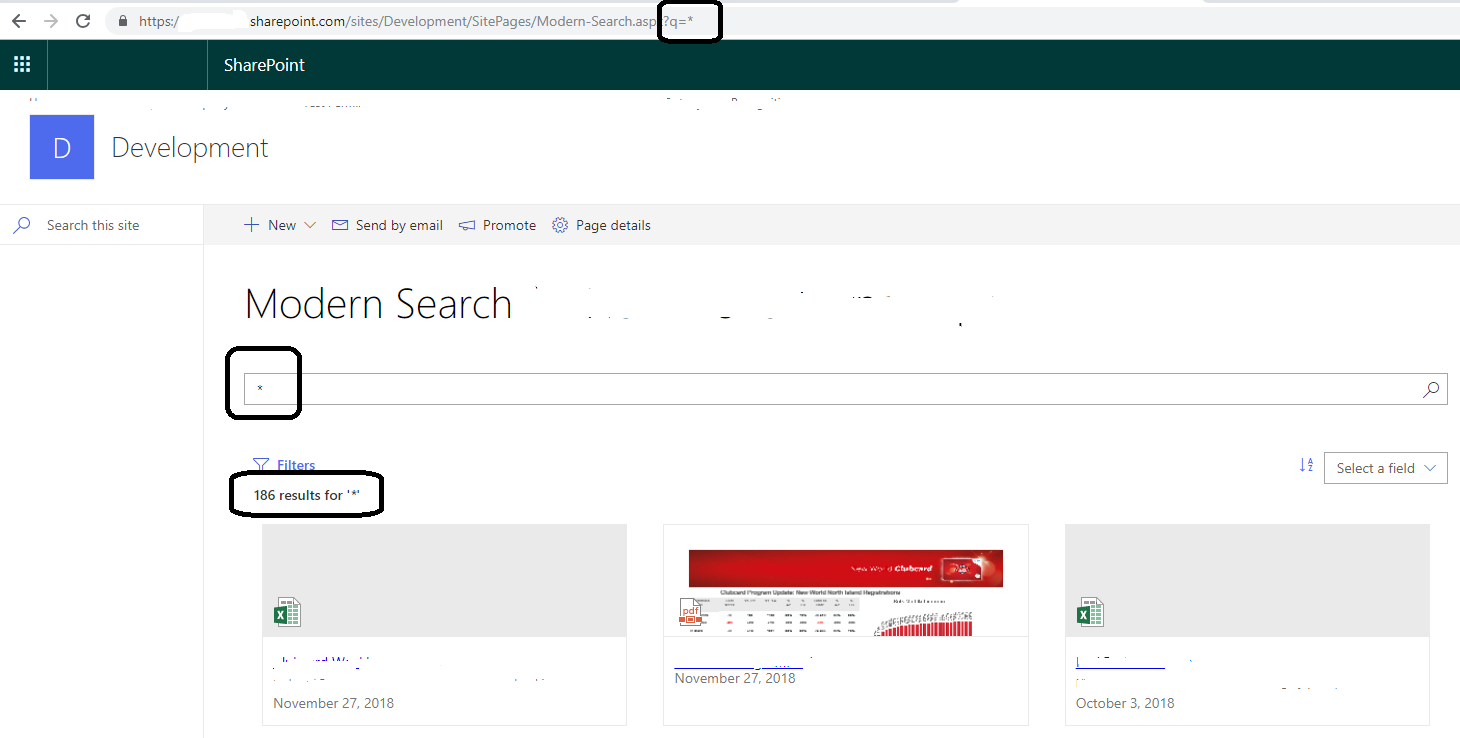
We have the same problem. Only workaround that I could find is to use query string /sites/Development/SitePages/Modern-Search.aspx?q=* and use dynamic data source property in the search box web part to get this default query(q parameter) from url. It would be nice to have default results as it was in good old classic search web part.
 vui211
on 27 Nov 2018
vui211
on 27 Nov 2018
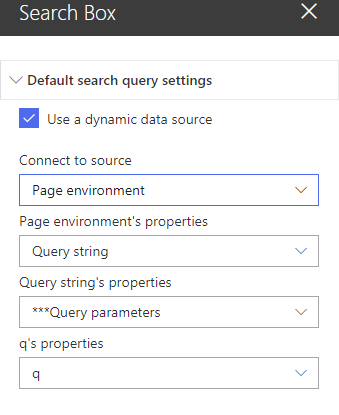
@vui211 do you use the latest version of this WP? I guess not since the 'q' parameter is not used anymore.
FranckyC
on 27 Nov 2018
@FranckyC I use 2.2.0.0 seems like it's latest one. 'q' parameter is my custom parameter not web part parameter.
vui211
on 27 Nov 2018
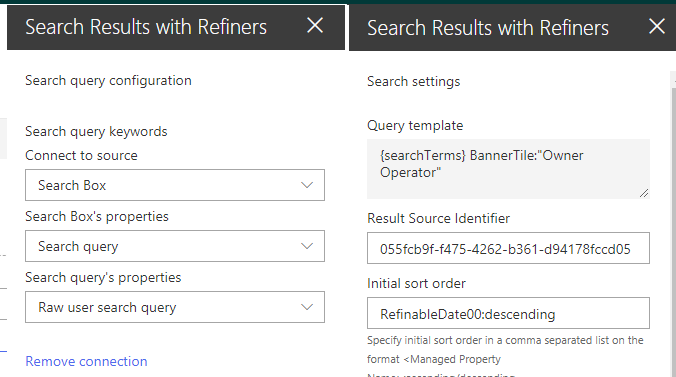
So when you type * in the search keywords property pane property and {searchTerms} in Query Template, you've got no result?
FranckyC
on 27 Nov 2018
here is setting for serach result web parts
vui211
on 27 Nov 2018
Ok can I see the result source query as well?
FranckyC
on 27 Nov 2018
{?{searchTerms} path:https://DomainName.sharepoint.com/sites/nw* OR path:https://DomainName.sharepoint.com/ban*} But It works the same without result source
vui211
on 27 Nov 2018
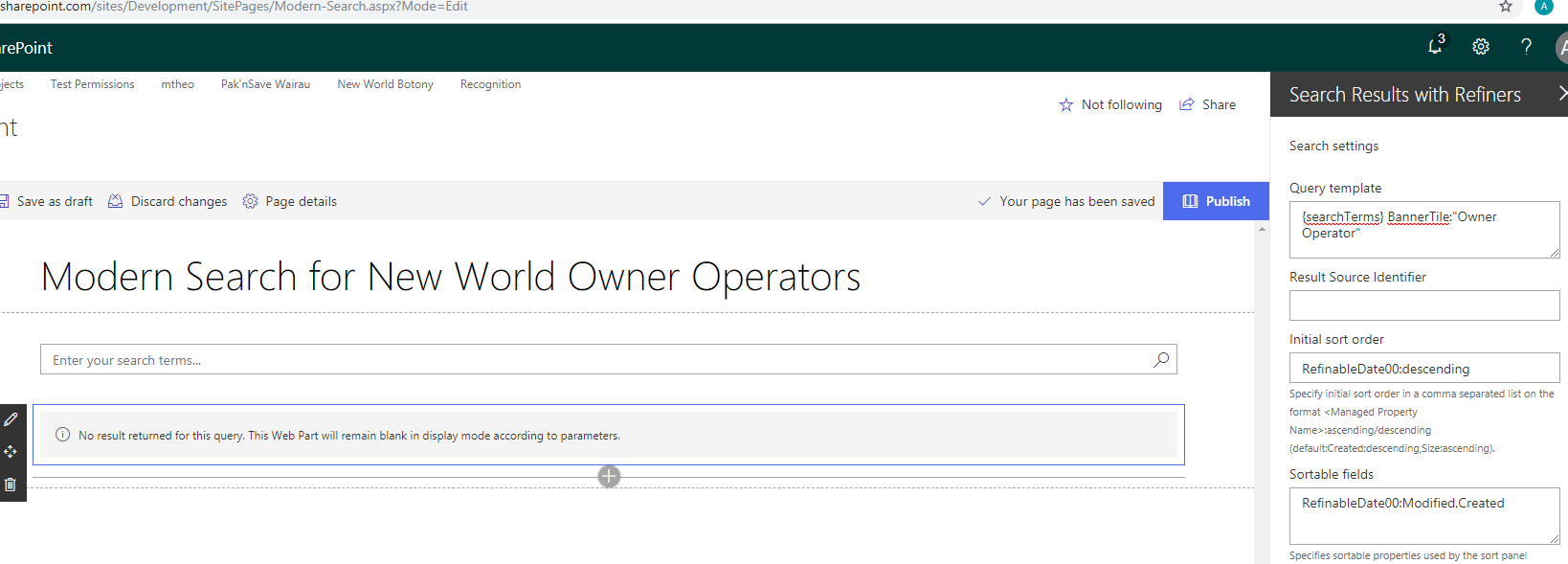
Ok try to add the same query in query template wihtout result source and no {? }
FranckyC
on 27 Nov 2018
vui211
on 27 Nov 2018
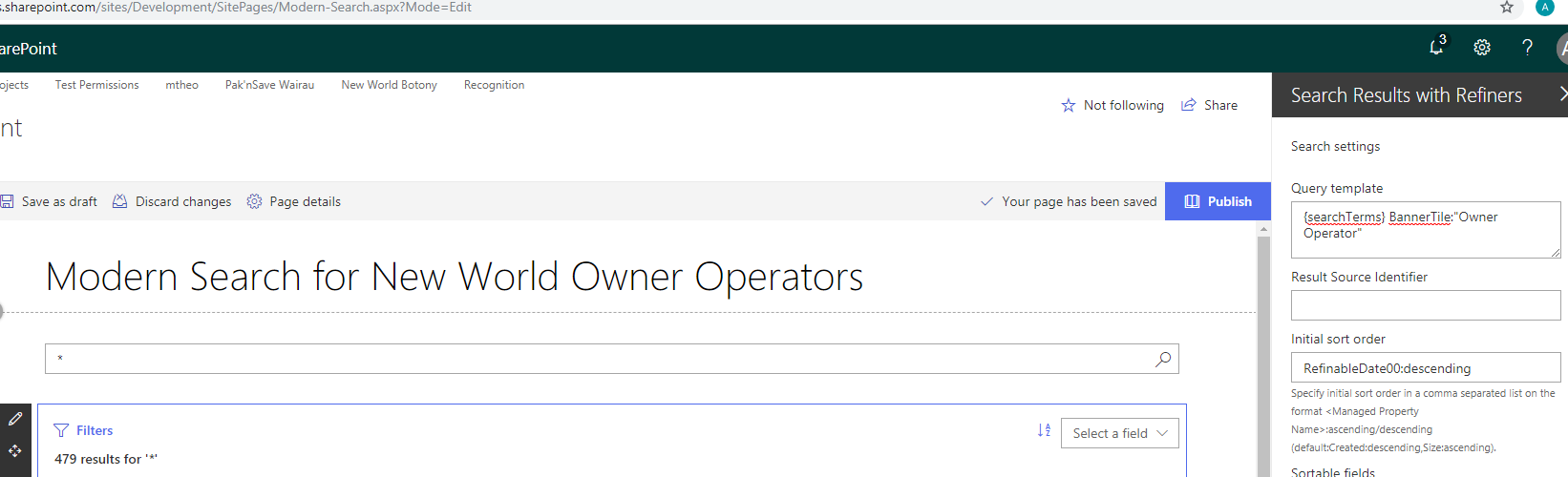
Does it work when you type '*' in the search box? Also, are you sure you will get results with this query' You can try to use Search Query Tool to confirm.
FranckyC
on 27 Nov 2018
and if I use'*' all works as expected
vui211
on 27 Nov 2018
Unfortunately, I think the only solution is to use a default parameter to search box like you did.
FranckyC
on 27 Nov 2018
Thanks, at least this behavior is not because I did something wrong :) As I understood, you are not going to solve it in future releases? Just curious, is it not possible to implement or just not important thing and there is workaround?
vui211
on 27 Nov 2018
@vui211 Not in the plans yet. I will think about adding a new "Default query" property but can't guarantee a release date ;).
FranckyC
on 27 Nov 2018
So disappointed, I hoped you fix it today or at least tomorrow :))) Thanks again!
vui211
on 27 Nov 2018
Here you go @vui211 @MichalExpP https://github.com/SharePoint/sp-dev-fx-webparts/pull/695. @wobba could you please review this one an merge it to dev if correct?
Thanks!
FranckyC
on 29 Nov 2018
Thank you for that, I'll test asap it's been merged.
MichalExpP
on 29 Nov 2018
Merged.
 wobba
on 29 Nov 2018
wobba
on 29 Nov 2018
@FranckyC I've updated from 2.0.0.5 and deployed the dev branch package to my global AppCatalog and after updating the app on the site, I'm not able to find either of the web parts in the we part search. /sites/appcatalog/Lists/ComponentManifests/AllItems.aspx list has correct entries but /sites/mysite/_api/web/GetClientSideWebParts doesn't. If I use a site collection AppCatalog where I did not update from the previous version, web parts appear correctly. Also checked on my other tenant and I've deployed the same package successfully. Do I have to delete the the 2.0.0.5 from my global app catalog and add the new version? I have this app added to many sites and I don;t want to lose all web part configuration.
MichalExpP
on 29 Nov 2018
@FranckyC Sorry correction, I've deleted the app from AppCatalog and added the newest version. The old web parts still work and display results when site app got upgraded from 2.0.0.5, but I'm not able to open web part configuration anymore. When I edit the page, I get empty web part and clicking edit doesn't do anything. Is this because web part properties were changed and new were added? Do you think, a similar thing will happen with any future releases?
MichalExpP
on 29 Nov 2018
@MichalExpP it's a known issue as the feature id internally has changed. Deleting the clientside manifest entries and regenerating those, as well as upgrade or re-add the app on all sites should make it work. We can revert to the old feature id with a hack but I'd rather keep the new one as it's easier to maintain.
If the webpart shows in the webpart picker, it should work to edit as well. Does the browser debug console show anything?
wobba
on 29 Nov 2018
@wobba Hi Mikael. I get the error:
Uncaught Error: Serialization failed for web part WebPart.SearchBoxWebPart.34fb8c5a-97dc-4328-aba5-a73003046232.
at t [as constructor] (sp-pages-assembly_en-us_9173a5775441df7c3045ae467b2875e0.js:843)
at new t (sp-pages-assembly_en-us_9173a5775441df7c3045ae467b2875e0.js:1425)
at Function.t.create (sp-pages-assembly_en-us_9173a5775441df7c3045ae467b2875e0.js:1425)
at t._internalSerialize (sp-pages-assembly_en-us_9173a5775441df7c3045ae467b2875e0.js:1425)
at t._internalSetDirtyBit (sp-pages-assembly_en-us_9173a5775441df7c3045ae467b2875e0.js:1425)
at sp-pages-assembly_en-us_9173a5775441df7c3045ae467b2875e0.js:1425
at sp-pages-assembly_en-us_9173a5775441df7c3045ae467b2875e0.js:1425
at Map.forEach (
at e._executeForIdsOrAll (sp-pages-assembly_en-us_9173a5775441df7c3045ae467b2875e0.js:1425)
at sp-pages-assembly_en-us_9173a5775441df7c3045ae467b2875e0.js:1425
MichalExpP
on 29 Nov 2018
@wobba Removing the Search Box does not make the Search Results to open properties, but if I open the console and refresh the page, the Search Results properties do open and I get the error:
sp-pages-assembly_en-us_9173a5775441df7c3045ae467b2875e0.js:761 TypeError: Cannot read property 'defaultView' of null
at e.removeResizeListener (search-results-web-part_b2a0257f825dad601b40d793f596aff6.js:56)
at t.componentWillUnmount (search-results-web-part_b2a0257f825dad601b40d793f596aff6.js:56)
at l (sp-pages-assembly_en-us_9173a5775441df7c3045ae467b2875e0.js:761)
at u (sp-pages-assembly_en-us_9173a5775441df7c3045ae467b2875e0.js:761)
at s (sp-pages-assembly_en-us_9173a5775441df7c3045ae467b2875e0.js:761)
at commitDeletion (sp-pages-assembly_en-us_9173a5775441df7c3045ae467b2875e0.js:761)
at x (sp-pages-assembly_en-us_9173a5775441df7c3045ae467b2875e0.js:761)
at C (sp-pages-assembly_en-us_9173a5775441df7c3045ae467b2875e0.js:761)
at y (sp-pages-assembly_en-us_9173a5775441df7c3045ae467b2875e0.js:761)
at v (sp-pages-assembly_en-us_9173a5775441df7c3045ae467b2875e0.js:761)
MichalExpP
on 29 Nov 2018
@wobba At least I can view properties, so I can copy it. Do you think the feature id will change in the future? I can resolve all of this manually, but not every time the web part gets updated?
MichalExpP
on 29 Nov 2018
Feature id will not change as long as we don't revert. And seems the code need to check for a missing prop from old configs. Should be an easy fix. I don't have time to look at it myself right now. Maybe @FranckyC has when he wakes up :)
wobba
on 29 Nov 2018
@MichalExpP Found some time and basically added a try/catch around the error you reported - as I cannot reproduce it and should be safe to ignore the error on unmount. If possible it would be great to have your webpart properties which makes the parts fail, in order to try to reproduce the error.
Settings and in which browser.
wobba
on 29 Nov 2018
@wobba
1) Delete all apps from the site, recycle bin(s) and app catalog
2) Add a package again to global AppCatalog
3) Add an app to a site
4) Add "Search Results" web part to a modern page, add "*" to "Search query keywords" on the first tab and Publish the page
5) Edit the page and try to edit the web part, I can't do that again. Edge and Chrome give the same issue
MichalExpP
on 29 Nov 2018
Does it work in the workbench?
wobba
on 29 Nov 2018
@wobba This works in a workbench fine, but the workbench doesn't allow to "Publish" the page, and it seems that only after publishing the page with the web part this issue comes out. I've also tried with the current Master branch and the same happens, so this is not related to a recent update on the Dev branch. I'm not sure if this is related, but for this web part (SPFx 1.7) I had to downgrade node to v8.9.4, as gulp was giving an error https://o365insights.com/downgrade-npm-for-spfx-1.7.0/
Have you tried publishing the page with the web part and tried to edit the web part again? I've bundled and packaged this solution at least 5 times and I don't see any errors in gulp, I've added a .gif recording and sppgk https://github.com/MichalExpP/SharedFiles
MichalExpP
on 29 Nov 2018
@MichalExpP I built the latest dev branch. Built a pakcage, deployed, added to a site. Added to a page, entered *, published, and I have no problem editing the page and wp later.
wobba
on 30 Nov 2018
@MichalExpP would help if you looked at console errors when you re-edit the page. From the recording it looks like something fails to load properly.
wobba
on 1 Dec 2018
Just found some time to come back to this. Removing all npm modules, removing all node.js versions, nvm, deleting environment path, clearing all AppData\Roaming\npm* and then reinstalling everythin to npm 8.9.4 has resolved the issue. This was an issue with my upgrade to support SPFx 1.7 on a dev PC.
MichalExpP
on 17 Dec 2018
Related issues
 JenniferUN
·
3Comments
JenniferUN
·
3Comments
 floriemoulin
·
4Comments
floriemoulin
·
4Comments
 spo-theworst
·
5Comments
spo-theworst
·
5Comments
 luismanez
·
5Comments
luismanez
·
5Comments
 shrirampophali
·
4Comments
shrirampophali
·
4Comments
Most helpful comment
Here you go @vui211 @MichalExpP https://github.com/SharePoint/sp-dev-fx-webparts/pull/695. @wobba could you please review this one an merge it to dev if correct?
Thanks!