Skywalking: Service instance dependency and metrics of them
We are planning to provide service instance level dependency and metrics of them.
Before that, the mapping of IP:port to service must be improved. We need to add IP:port to instance mapping.
Also after this, we could add OAL and manual relationship about service instance relationship and metrics of them.
The last step is providing GraphQL query for instance dependency. The idea right now is querying the instance relationship by given services of source and dest, we are not providing instance-level topology by default.
@kezhenxu94 Do you have interests to do this? Or any other @apache/skywalking-committers wants to do? Please let me know.
After the above is done, UI need to be upgraded too. When clicking the service relationship, the user should have a chance(button?) to dig deeper to instance relationships, and binding with metrics(similar to the service relationship and metrics in the topology). @Fine0830 @x22x22 @TinyAllen Which one of you could take this part in next release, please let me know.
 wu-sheng
All 15 comments
So cool. I want to try it, but I'm not sure I can handle it.
 arugal
on 11 Nov 2019
arugal
on 11 Nov 2019
So cool. I want to try it, but I'm not sure I can handle it.
You need to understand how current topology generated from trace raw data. This is not an easy task. This enhancement could be a separated release from my understanding. I would say 6.6.0 or 6.7.0 should for this, before the end of this year, as a closure and super powerful feature of SkyWalking 2019.
wu-sheng
on 11 Nov 2019
So cool. I want to try it, but I'm not sure I can handle it.
You need to understand how current topology generated from trace raw data. This is not an easy task. This enhancement could be a separated release from my understanding. I would say 6.6.0 or 6.7.0 should for this, before the end of this year, as a closure and super powerful feature of SkyWalking 2019.
I know about the collection of the raw data, but I don't understand topology generation. maybe I can do the odd jobs?
arugal
on 11 Nov 2019
You should read
- MultiScopesSpanListener
- Service Topology Query
Then, you may get the idea.
wu-sheng
on 11 Nov 2019
I would like to do it with you, @arugal . But I am not familiar at OAL.
 dmsolr
on 11 Nov 2019
dmsolr
on 11 Nov 2019
I would like to do it with you, @arugal . But I am not familiar at OAL.
OAL is a super easy part :) The mapping and new query are really works.
wu-sheng
on 11 Nov 2019
Give us two weeks to learn. If no one else accepts the assignment, just assign the task to us. How about this idea?
arugal
on 11 Nov 2019
Give us two weeks to learn. If no one else accepts the assignment, just assign the task to us. How about this idea?
Sure. Take your time. If you need help, ping me.
wu-sheng
on 11 Nov 2019
@wu-sheng I also hope to participate in this work. I don't know if it is ok?
 ghost
on 11 Nov 2019
ghost
on 11 Nov 2019
@aderm any one could be. The key is you could understand what should be done by yourself.😆
Who could provide a design and adjustment doc are the core requirement.
wu-sheng
on 11 Nov 2019
@kezhenxu94 Do you have interests to do this?
I'll have a detailed look and discuss here
 kezhenxu94
on 11 Nov 2019
kezhenxu94
on 11 Nov 2019
Hi, this is my current train of thought:
- add a
SourceDispatcherimplementation to storeServiceInstanceRelation,refer to the implementation ofServiceCallRelationDispatcher - add
getServiceInstanceTopologytoTopologyQueryprovide data query.
arugal
on 16 Nov 2019
These two are right, but you miss one part. See closer about how topology generated for service topology. There is a IP:port <-> service name mapping by analysis segment ref data, but today, we don't save the IP:port <-> service instance mapping even it is existing in the ref.
wu-sheng
on 16 Nov 2019
@Fine0830 We have merged the backend PR. We will redeploy the latest codes to the demo env.
The UI changes should be like this,
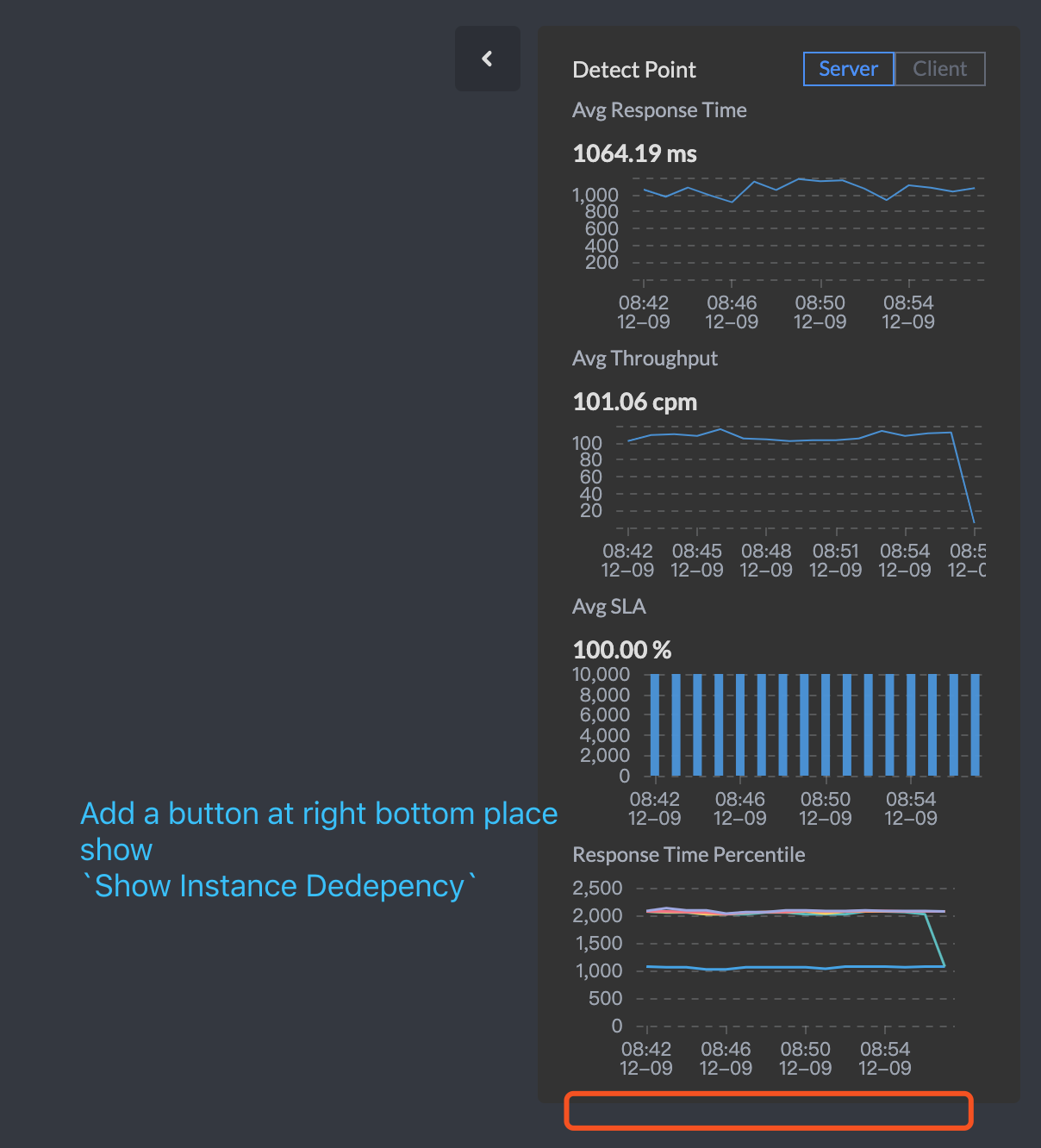
After user clicks the new button, it should a box showing up, the new topo query API should be used for this.
You should be able to get client id and server id from the original topology map.
In the new box, in default, we should show all instances of client and server, like this
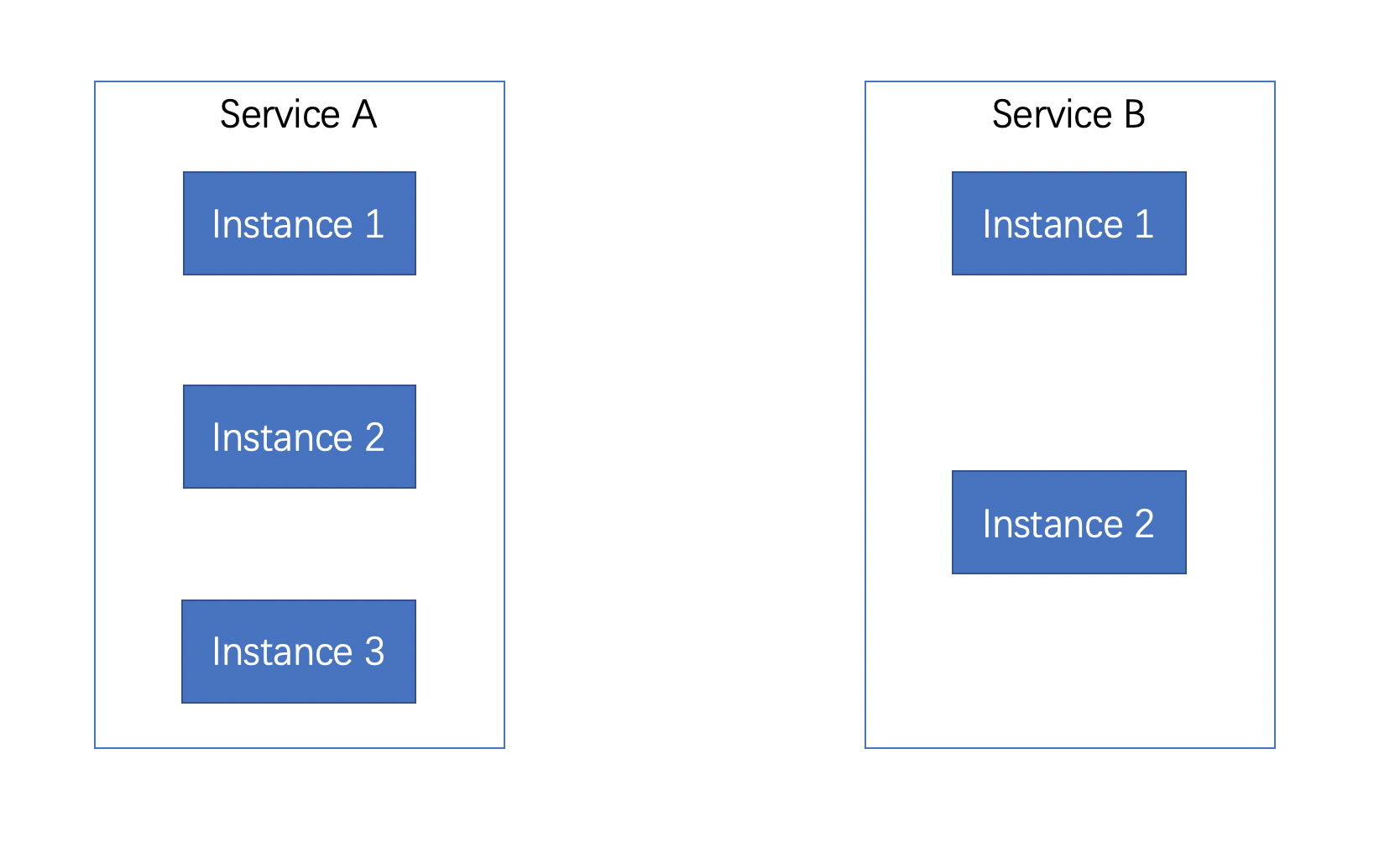
Then we could click the any client instance and get the dependency server instance relationship. The line could be clicked like service topology line, and get following metrics of them
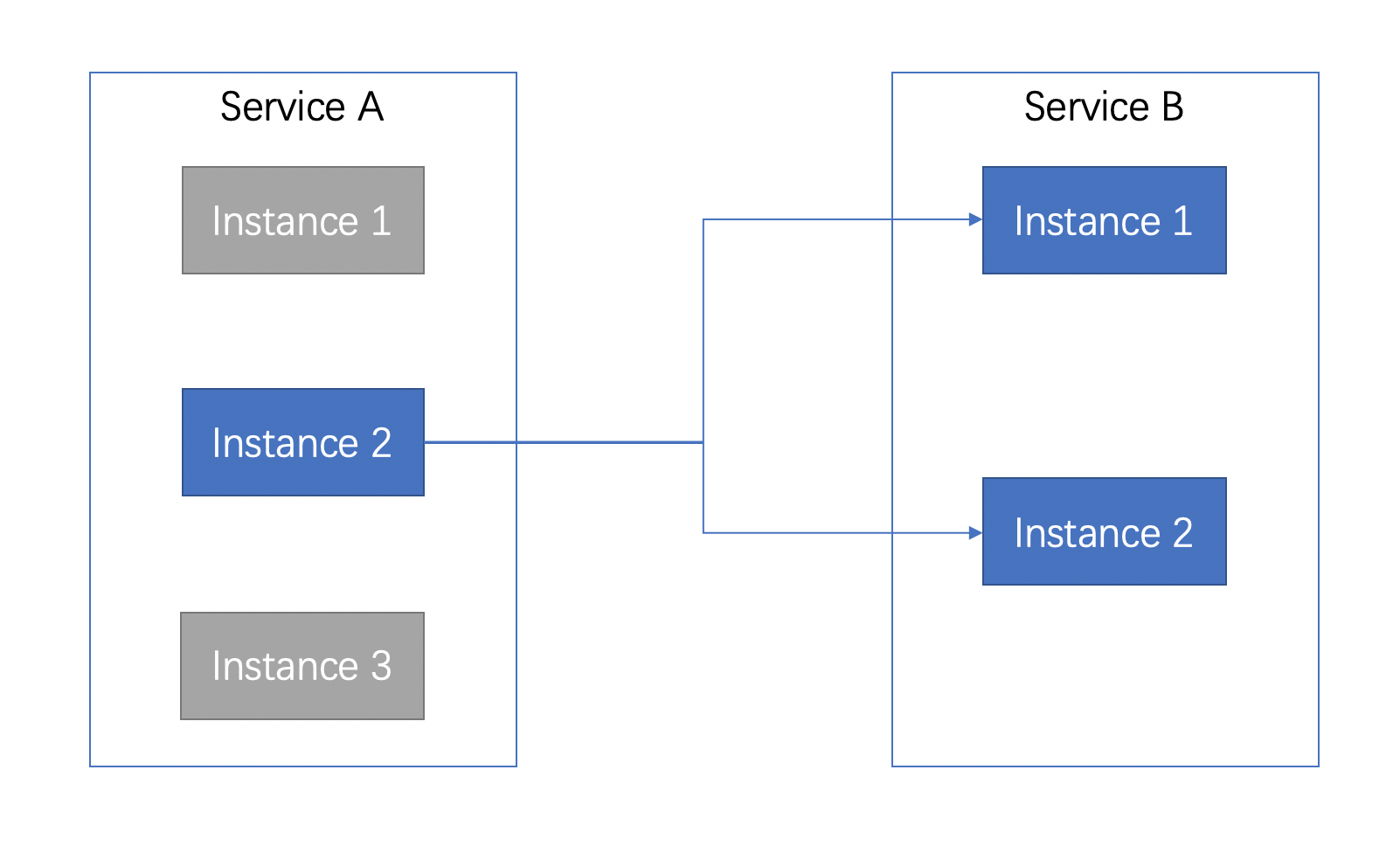
OAL of metrics, nearly as same as relationship metrics of service level. You should provide client/server side switch too.
service_instance_relation_client_cpm = from(ServiceInstanceRelation.*).filter(detectPoint == DetectPoint.CLIENT).cpm();
service_instance_relation_server_cpm = from(ServiceInstanceRelation.*).filter(detectPoint == DetectPoint.SERVER).cpm();
service_instance_relation_client_call_sla = from(ServiceInstanceRelation.*).filter(detectPoint == DetectPoint.CLIENT).percent(status == true);
service_instance_relation_server_call_sla = from(ServiceInstanceRelation.*).filter(detectPoint == DetectPoint.SERVER).percent(status == true);
service_instance_relation_client_resp_time = from(ServiceInstanceRelation.latency).filter(detectPoint == DetectPoint.CLIENT).longAvg();
service_instance_relation_server_resp_time = from(ServiceInstanceRelation.latency).filter(detectPoint == DetectPoint.SERVER).longAvg();
service_instance_relation_client_p99 = from(ServiceInstanceRelation.latency).filter(detectPoint == DetectPoint.CLIENT).p99(10);
service_instance_relation_server_p99 = from(ServiceInstanceRelation.latency).filter(detectPoint == DetectPoint.SERVER).p99(10);
service_instance_relation_client_p95 = from(ServiceInstanceRelation.latency).filter(detectPoint == DetectPoint.CLIENT).p95(10);
service_instance_relation_server_p95 = from(ServiceInstanceRelation.latency).filter(detectPoint == DetectPoint.SERVER).p95(10);
service_instance_relation_client_p90 = from(ServiceInstanceRelation.latency).filter(detectPoint == DetectPoint.CLIENT).p90(10);
service_instance_relation_server_p90 = from(ServiceInstanceRelation.latency).filter(detectPoint == DetectPoint.SERVER).p90(10);
service_instance_relation_client_p75 = from(ServiceInstanceRelation.latency).filter(detectPoint == DetectPoint.CLIENT).p75(10);
service_instance_relation_server_p75 = from(ServiceInstanceRelation.latency).filter(detectPoint == DetectPoint.SERVER).p75(10);
service_instance_relation_client_p50 = from(ServiceInstanceRelation.latency).filter(detectPoint == DetectPoint.CLIENT).p50(10);
service_instance_relation_server_p50 = from(ServiceInstanceRelation.latency).filter(detectPoint == DetectPoint.SERVER).p50(10);
And also you could click server side instance.

wu-sheng
on 9 Dec 2019
Gotcha. I will do in the late few days.
 Fine0830
on 9 Dec 2019
Fine0830
on 9 Dec 2019
Related issues
 hanahmily
·
5Comments
hanahmily
·
5Comments
 yang-xiaodong
·
4Comments
yang-xiaodong
·
4Comments
 dingsongjie
·
4Comments
wu-sheng
·
5Comments
dingsongjie
·
4Comments
wu-sheng
·
5Comments
 wuxingye
·
4Comments
wuxingye
·
4Comments