Skiasharp: Implement SKCanvas.DrawTextOnPath
It seems Google removed the TextOnPath functionality:
https://groups.google.com/forum/#!searchin/skia-discuss/drawTextOnPath%7Csort:date/skia-discuss/971LXXfT1o0/pamVf88uAQAJ
We actually need this function, but just like SVG, need more functionality, we want to provide the offsets of the glyphs on the path ourselves.
Does anyone have a pure C# implementation of TextOnPath, maybe with the extra SVG features?
Also, will future versions of SkiaSharp still contain TextOnPath, and is an extra overload with float[] hOffsets something that could be included? If so, I could make a PR for this.
Thanks,
Peter
 Ziriax
All 14 comments
I noticed this too and I will make sure that something of equivalent support is available. I think I was working on something, but please send in a PR anyway so we can get the better version in, or even merge things.
I was looking around, but have not yet started writing actual code on this exact feature yet. I have a few other ones which are more common that I am starting on.
So, a PR will be especially helpful, and I can make sure that we get features that are useful instead of just matching current support. In fact, if you have a nice implementation, then we can swap out the current one which is pretty rudimentary now and get better support for text today.
 mattleibow
on 20 Mar 2020
mattleibow
on 20 Mar 2020
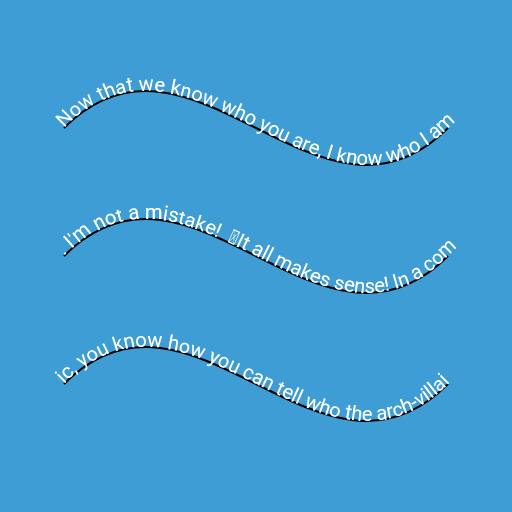
I have a first draft of a prototype, the friendly Google Skia folks already did all the hard work.
Simple demo looks like:
// Based on https://cs.chromium.org/chromium/src/third_party/skia/gm/drawatlas.cpp?q=draw_text_on_path&sq=package:chromium&g=0&l=130
var canvas = context.Canvas;

var txtFace = GetTypeface(RobotoRegularFontUrl);

using var font = new SKFont(txtFace, 20)
{
    Hinting = SKFontHinting.Full,
    EmbeddedBitmaps = false,
    Subpixel = true,
};

// https://slipsum.com/
var text = @"Now that we know who you are, I know who I am. I'm not a mistake!
It all makes sense! In a comic, you know how you can tell who the arch-villain's going to be?
He's the exact opposite of the hero. And most times they're friends, like you and me!
I should've known way back when... You know why, David? Because of the kids.
They called me Mr Glass. Your bones don't break, mine do. That's clear.
Your cells react to bacteria and viruses differently than mine.
You don't get sick, I do. That's also clear.But for some reason, you and I react the exact same way to water.
We swallow it too fast, we choke.We get some in our lungs,
we drown.However unreal it may seem, we are connected, you and I.
We're on the same curve, just on opposite ends.";

var glyphOffsets = font.GetGlyphOffsets(text);

using var path = SKPath.ParseSvgPathData(
    string.Concat(
        "M 64 128 c 128 -128 256 128 384 0",
        "M 64 256 c 128 -128 256 128 384 0",
        "M 64 384 c 128 -128 256 128 384 0")
);

using var pathMeasure = new SKPathMeasure(path);

var glyphTransforms = new List<SKRotationScaleMatrix>();

// HACK: This returns the length of the *current contour* of the path!
float thisContourOffset = 0;
float nextContourOffset = pathMeasure.Length;

foreach (var glyphOffset in glyphOffsets)
{
    var distance = glyphOffset - thisContourOffset;

    if (distance >= nextContourOffset)
    {
        if (!pathMeasure.NextContour())
            break;

        thisContourOffset = glyphOffset;
        nextContourOffset = pathMeasure.Length;
        distance = glyphOffset - thisContourOffset;
    }

    if (pathMeasure.GetPositionAndTangent(distance, out var position, out var tangent))
    {
        var matrix = new SKRotationScaleMatrix(tangent.X, tangent.Y, position.X, position.Y);
        glyphTransforms.Add(matrix);
    }
}

// TODO: Crashes when text is larger than glyphTransforms?
using var blob = SKTextBlob.CreateRotationScale(
    text.Substring(0, glyphTransforms.Count),
    font,
    glyphTransforms.ToArray());

using var paint = new SKPaint
{
    IsAntialias = true,
    TextAlign = SKTextAlign.Center,
};

using (context.Scope(SKColors.SkyBlue))
{
    paint.Color = SKColors.Black;
    paint.Style = SKPaintStyle.Stroke;
    paint.StrokeWidth = 2;
    canvas.DrawPath(path, paint);

    paint.Color = SKColors.White;
    paint.Style = SKPaintStyle.Fill;
    canvas.DrawText(blob, 0, 0, paint);
}
Ziriax
on 24 Mar 2020
That is awesome! The code looks good too.
With the case of the string length causing a crash... It probably should be throwing an exception there. But, maybe instead of substring, convert the string to a span and the use a slice to avoid allocations. In fact, the only issue I can see is that there may be too many arrays being used and allocated and copied. But, this can be done a bit later.
Looking forward to this PR!
mattleibow
on 25 Mar 2020
Thanks!
Yes, this is just a proof of concept, not for production. Indeed, the final version should be optimised!
One would also need a bit more control, I will look at the SVG specs, and see what can be borrowed from that.
Ziriax
on 25 Mar 2020
After review, I still have a bit work to do. Some of Google's code already does this, but
- by default, the glyphs should be positioned at their bottom-center anchor
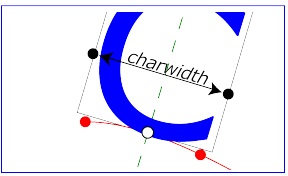
One might also want to deal with vertical text cultures
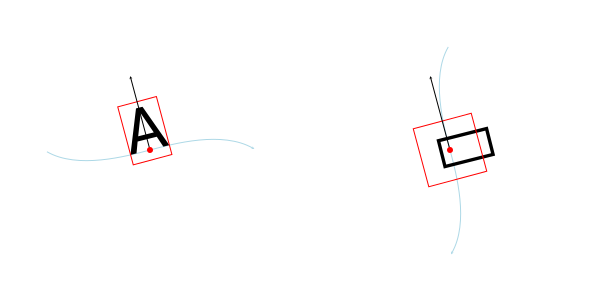
- allow secondary-axis (vertical for left-to-right text) offsets
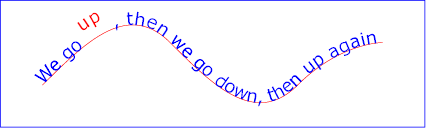
- control on what side of the path the text should be placed:
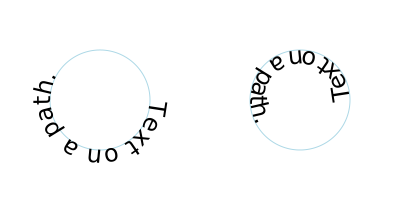
- relative placement on the path:
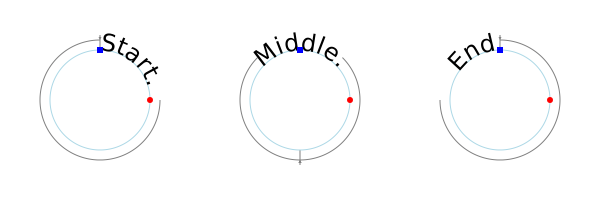
- visual vs exact spacing (this is vague in the SVG spec)
I don't think I will be able to support all of this, we'll see
Ziriax
on 25 Mar 2020
Some things might not be great since skia does not do any shaping. However, there might be a way to just expose the things needed so that user can first shape text with harfbuzz and pass the details to SkiaSharp. I think for the first versions, we just need to get the most basic implementation that ensures backwards compatibility. And, the current support now is very, very limited. So I think for a v1, we just need to get the basics in.
However, I am not against a much better implementation at all. If you are working on things, continue as we do actually want a great drawing system. But, don't feel you need to get an implementation that is perfect before submitting a PR. Unlike skia, we do have the ability to release patches and previews more frequently.
So, my suggestion would be to get a good implementation in. We can merge and get feedback. At the same time, we can improve or re-work the implementation as we see. Eventually we will have that awesome implementation, but we will also have a useful implementation sooner.
Does that sort of make some sense?
mattleibow
on 25 Mar 2020
Perfect sense, that agile approach generally works fine.
Ziriax
on 25 Mar 2020
Marking this as a bug-feature as it will be a bug without it, but it is a new feature for SkiaSharp. Sort of.
mattleibow
on 25 Mar 2020
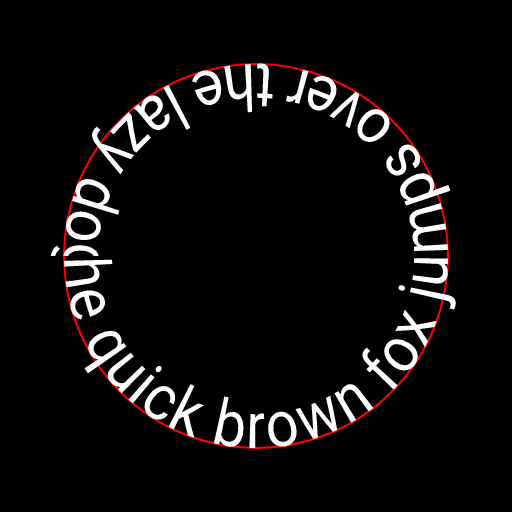
It seems that Google's original code even warped and clipped the glyph geometry...
I ported the code to C#, one with warping, the other without (like SVG). My first tests give identical results with the original code when using the warped variant, but since I don't have access to Skia internals that were using the original code (SKGlyphCache, ...), surely differences will exist.
Work in progress. Now my customer doesn't need warped text, so I can't spend too much time on this (unless after hours of course ;-))
using System;
using System.Collections.Generic;
using System.Diagnostics;
using SkiaSharp;

namespace SkiaRenderTests
{
    public static class SkiaTextExt
    {
        private static void MorphPoints(
            Span<SKPoint> dst,
            Span<SKPoint> src,
            int count,
            SKPathMeasure meas,
            in SKMatrix matrix)
        {
            for (int i = 0; i < count; i++)
            {
                SKPoint s = matrix.MapPoint(src[i].X, src[i].Y);

                if (!meas.GetPositionAndTangent(s.X, out var p, out var t))
                {
                    // set to 0 if the measure failed, so that we just set dst == pos
                    t = SKPoint.Empty;
                }

                // y-offset the point in the direction of the normal vector on the path.
                dst[i] = new SKPoint(p.X - t.Y * s.Y, p.Y + t.X * s.Y);
            }
        }

        /*  TODO
         Need differentially more subdivisions when the follow-path is curvy. Not sure how to
         determine that, but we need it. I guess a cheap answer is let the caller tell us,
         but that seems like a cop-out. Another answer is to get Rob Johnson to figure it out.
         */
        private static void MorphPath(SKPath dst, SKPath src, SKPathMeasure meas, in SKMatrix matrix)
        {
            using var it = src.CreateIterator(false);

            SKPathVerb verb;

            var srcP = new SKPoint[4];
            var dstP = new SKPoint[4];

            while ((verb = it.Next(srcP)) != SKPathVerb.Done)
            {
                switch (verb)
                {
                    case SKPathVerb.Move:
                        MorphPoints(dstP, srcP, 1, meas, matrix);
                        dst.MoveTo(dstP[0]);
                        break;
                    case SKPathVerb.Line:
                        // turn lines into quads to look bendy
                        srcP[0].X = (srcP[0].X + srcP[1].X) * 0.5f;
                        srcP[0].Y = (srcP[0].Y + srcP[1].Y) * 0.5f;
                        MorphPoints(dstP, srcP, 2, meas, matrix);
                        dst.QuadTo(dstP[0], dstP[1]);
                        break;
                    case SKPathVerb.Quad:
                        MorphPoints(dstP, srcP.AsSpan().Slice(1, 2), 2, meas, matrix);
                        dst.QuadTo(dstP[0], dstP[1]);
                        break;
                    case SKPathVerb.Conic:
                        MorphPoints(dstP, srcP.AsSpan().Slice(1, 2), 2, meas, matrix);
                        dst.ConicTo(dstP[0], dstP[1], it.ConicWeight());
                        break;
                    case SKPathVerb.Cubic:
                        MorphPoints(dstP, srcP.AsSpan().Slice(1, 3), 3, meas, matrix);
                        dst.CubicTo(dstP[0], dstP[1], dstP[2]);
                        break;
                    case SKPathVerb.Close:
                        dst.Close();
                        break;
                    default:
                        Debug.Fail("unknown verb");
                        break;
                }
            }
        }
        public static SKPath CreateWarpedTextOnPath(
            this SKPath path,
            SKFont font,
            string text,
            SKTextAlign align = default,
            SKPoint offset = default)
        {
            var warpedPath = new SKPath();

            var glyphIds = font.GetGlyphs(text);

            if (glyphIds.Length == 0)
                return warpedPath;

            var glyphOffsets = font.GetGlyphOffsets(glyphIds);
            var glyphWidths = font.GetGlyphWidths(glyphIds);

            var textLength = glyphOffsets[glyphIds.Length - 1] + glyphWidths[glyphIds.Length - 1];

            using var pathMeasure = new SKPathMeasure(path);

            var contourLength = pathMeasure.Length;

            var startOffset = offset.X + (contourLength - textLength) * (int)align / 2f;

            var glyphPathCache = new Dictionary<ushort, SKPath>();

            // TODO: Deal with multiple contours?
            for (var index = 0; index < glyphOffsets.Length; index++)
            {
                var gw = glyphWidths[index];
                var x0 = startOffset + glyphOffsets[index];
                var x1 = x0 + gw;

                if (x1 >= 0 && x0 <= contourLength)
                {
                    var glyphId = glyphIds[index];
                    if (!glyphPathCache.TryGetValue(glyphId, out var glyphPath))
                    {
                        glyphPath = font.GetPath(glyphId);
                        glyphPathCache[glyphId] = glyphPath;
                    }

                    var transformation = SKMatrix.CreateTranslation(x0, offset.Y);
                    MorphPath(warpedPath, glyphPath, pathMeasure, transformation);
                }
            }

            return warpedPath;
        }

        public static SKTextBlob CreateTextBlobOnPath(
                this SKPath path,
                    SKFont font,
                    string text,
                SKTextAlign align = default,
                SKPoint offset = default)
        {
            var glyphIds = font.GetGlyphs(text);

            if (glyphIds.Length == 0)
                return SKTextBlob.Create(text, font);

            var glyphTransforms = new SKRotationScaleMatrix[glyphIds.Length];
            var glyphOffsets = font.GetGlyphOffsets(glyphIds);
            var glyphWidths = font.GetGlyphWidths(glyphIds);

            var textLength = glyphOffsets[glyphIds.Length - 1] + glyphWidths[glyphIds.Length - 1];

            using var pathMeasure = new SKPathMeasure(path);

            var contourLength = pathMeasure.Length;

            var startOffset = offset.X + (contourLength - textLength) * (int)align / 2f;

            var firstGlyphIndex = 0;
            var pathGlyphCount = 0;

            // TODO: Deal with multiple contours?
            for (var index = 0; index < glyphOffsets.Length; index++)
            {
                var halfWidth = glyphWidths[index] * 0.5f;
                var pathOffset = startOffset + glyphOffsets[index] + halfWidth;

                if (pathOffset >= 0 &&
                     pathOffset < contourLength &&
                     pathMeasure.GetPositionAndTangent(pathOffset, out var position, out var tangent))
                {
                    if (pathGlyphCount == 0)
                        firstGlyphIndex = index;

                    var tx = tangent.X;
                    var ty = tangent.Y;

                    var px = position.X;
                    var py = position.Y;

                    // Horizontally offset the position using the tangent vector
                    px -= tx * halfWidth;
                    py -= ty * halfWidth;

                    // Vertically offset the position using the normal vector  (-ty, tx)
                    px -= offset.Y * ty;
                    py += offset.Y * tx;

                    var matrix = new SKRotationScaleMatrix(tx, ty, px, py);

                    glyphTransforms[pathGlyphCount++] = matrix;
                }
            }

            if (pathGlyphCount == 0)
                return SKTextBlob.Create("", font);

            // TODO: Can't pass glyph-identifiers here?
            return SKTextBlob.CreateRotationScale(
                text.AsSpan().Slice(firstGlyphIndex, pathGlyphCount),
                font,
                glyphTransforms.AsSpan().Slice(0, pathGlyphCount)
            );
        }
    }
}
Oh and I just noticed now when reading, I forgot to cleanup the font-cache-dictionary...
Strangely enough, my warped code also seems to perform clipping, but I don't understand why, since I don't clip anything...
Image rendered with code above
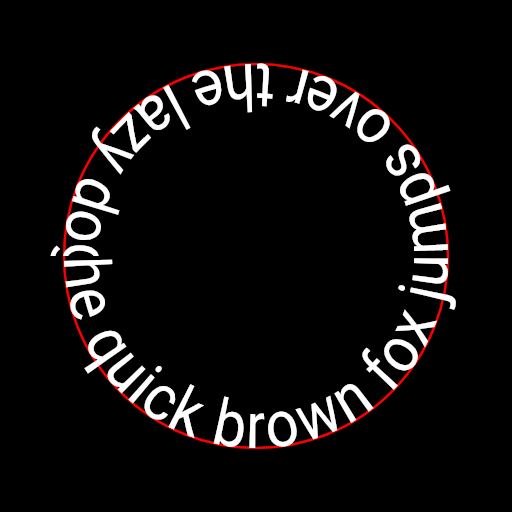
SkiaSharp 1.68 using original Google native code:
Ziriax
on 26 Mar 2020
Consider accepting Spans of GlyphId, GlyphOffset and GlyphAdvance instead of working with strings. That way one could shape the text etc. You can still introduce overloads that accept a string. Your current approach assumes text has always a 1:1 mapping for Codepoints to GlyphId. Just my two cents. 👍
 Gillibald
on 27 Mar 2020
Gillibald
on 27 Mar 2020
Certainly! These test method were just to see if it was possible to make a backwards compatible DrawTextOnPath method in C# on top of the rest of the API.
That being said, I noticed that SkiaSharp sometimes misses overloads that accept glyph IDs; I added comments in the code above where I encountered this.
Ziriax
on 27 Mar 2020
I have been trying to add the overloads that accept glyphs with the text operations. In the next version (v2) that is the default way, and then the string will just be convenience overloads.
mattleibow
on 3 Apr 2020
@mattleibow Do you have any idea when v2 will be released, roughly, and what version of Skia it will be based on?
Ziriax
on 3 Apr 2020
I am hoping for a preview of v2 very soon. It was for this month, but a delay to fix some crashes took longer than expected. I might go stable in a month or so, still a bit more work. It is based on skia m80 - basically the latest at this time. Or rather, the latest used by stable Chrome.
But, take your time on this PR. Don't feel you have to get it done ASAP. I am planning on a preview soon, but that is also missing a few other things still. When this code is ready, then we merge and move closer to stable.
mattleibow
on 3 Apr 2020
Related issues
 vlkam
·
3Comments
vlkam
·
3Comments
 corliss
·
4Comments
corliss
·
4Comments
 antongit
·
4Comments
antongit
·
4Comments
 michaldobrodenka
·
3Comments
michaldobrodenka
·
3Comments
 ReactorScram
·
3Comments
ReactorScram
·
3Comments