Skiasharp: [BUG] 2 Issues: Antialiasing is broken, SVG doesn't show up on GPU backend
Description
Our another test with the 1.68.1 on GPU backend:
- [ ] we see that Antialias doesn't work anymore on some machines
- [ ] SVGs do not show up
Regarding Antialias: the machine I'm using: ThinkPad X1, GeForce GTX 1050 Ti, Driver 441.12, tested with different drivers.
Regarding SVG: the SVG is drawn only if the SKPaint is set to null.
Code
            var paint = new SKPaint();
            paint.IsAntialias = true;
            paint.Style = SKPaintStyle.Stroke;
            paint.StrokeWidth = 2;

            //no Antialias while drawing paths
            var path = new SKPath();
            path.AddCircle(100.0f, 100.0f, 70.0f);
            canvas.DrawPath(path, paint);

            var svg = new SkiaSharp.Extended.Svg.SKSvg();
            var picture = svg.Load(@"Resources/heart-solid.svg");

            //SVG is there
            var mat = new SKMatrix();
            mat.SetScaleTranslate(0.3f, 0.3f, 200.0f, 20.0f);
            canvas.DrawPicture(picture, ref mat, null);

            //SVG doesn't show up
            var mat2 = new SKMatrix();
            mat2.SetScaleTranslate(0.3f, 0.3f, 400.0f, 20.0f);
            canvas.DrawPicture(picture, ref mat2, new SKPaint());
Expected & Actual Behavior
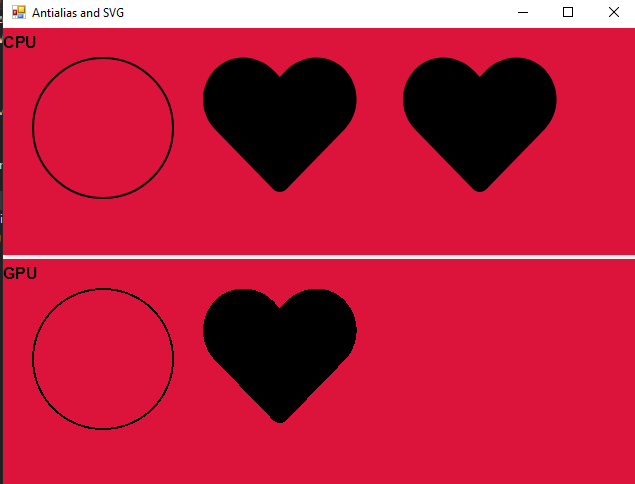
The circle is a path, hearts are SVG.
Basic Information
- Version with issue: 1.68.1
- Last known good version: 1.68.0
- IDE: Visual Studio
- Platform Target Frameworks:
- Windows Classic: Windows10
- Target Devices:
- Desktop
Reproduction Link
 antongit
All 4 comments
Confirmed that this still works fine on macOS. I bet it has to do with something on Windows because we switched from the ancient OpenTK v1.1 to v3.0.
👀
 mattleibow
on 13 Dec 2019
mattleibow
on 13 Dec 2019
I can repro this on my Surface Book 2 with the NVIDIA GeForce GTX 1050. It is fine on the Intel(R) UHD Graphics 620 though... Probably the setup for the graphics.
mattleibow
on 13 Dec 2019
Thanks for reporting this. The issue was that the control was just going for the max samples that SkiaSharp supported, which was sometimes too high for the actual GPU. The fix is to actually ask the control how many samples to use.
mattleibow
on 13 Dec 2019
Hurray! Thank you.
antongit
on 13 Dec 2019
Related issues
 loketha
·
4Comments
loketha
·
4Comments
 parthipanr
·
4Comments
antongit
·
3Comments
parthipanr
·
4Comments
antongit
·
3Comments
 dsadlowski
·
3Comments
dsadlowski
·
3Comments
 vlkam
·
3Comments
vlkam
·
3Comments
Most helpful comment
Thanks for reporting this. The issue was that the control was just going for the max samples that SkiaSharp supported, which was sometimes too high for the actual GPU. The fix is to actually ask the control how many samples to use.