Skiasharp: [BUG] iOS physical device crash with System.DllNotFoundException when using free Apple developer account
Description
I am trying to instantiate the SkiaSharp.SKPictureRecorder() and I am getting the following DllNotFoundException:
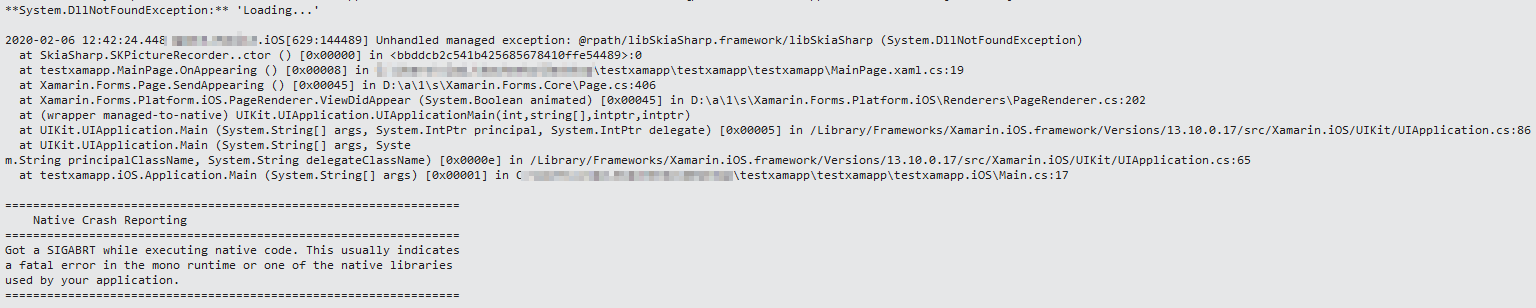
Code

Expected Behavior
Shouldn't crash
Actual Behavior
Crashes on instantiation
Basic Information
I stumbled upon this exception when I was trying to use svg images via the FFImageLoading library.
I saw that in the stack trace it was trying to instantiate the SkPictureRecorder object and got the dll not found exception.
To reproduce this, I directly installed the skiasharp library and instantiated this object myself and got the same issue
- Version with issue: 1.68.1.1
- Last known good version: don't know
- IDE: Visual studio
- Platform Target Frameworks:
- iOS: 13.2
- Target Devices: Ipad air 2
 vtkachen111
All 16 comments
I am getting the same kind of DllNotFoundException when using FFImageLoading and a SvgCachedImage view:
2020-02-08 10:21:32.917 MyApp.iOS[232:9057] Image loading failed: resource://MyApp.Resources.icon_calender.svg?assembly=MyApp,%20Version=1.0.0.0,%20Culture=neutral,%20PublicKeyToken=null;(size=56x0,type=SvgDataResolver)
System.DllNotFoundException: @rpath/libSkiaSharp.framework/libSkiaSharp
  at SkiaSharp.SKPictureRecorder..ctor () [0x00000] in <bbddcb2c541b425685678410ffe54489>:0
  at FFImageLoading.Svg.Platform.SKSvg.Load (System.Xml.Linq.XDocument xdoc, System.Threading.CancellationToken token) [0x0024c] in C:\projects\ffimageloading\source\FFImageLoading.Svg.Shared\SkSvg.cs:172
  at FFImageLoading.Svg.Platform.SKSvg.Load (System.Xml.XmlReader reader, System.Threading.CancellationToken token) [0x00000] in C:\projects\ffimageloading\source\FFImageLoading.Svg.Shared\SkSvg.cs:100
  at FFImageLoading.Svg.Platform.SKSvg.Load (System.IO.Stream stream, System.Threading.CancellationToken token) [0x00012] in C:\projects\ffimageloading\source\FFImageLoading.Svg.Shared\SkSvg.cs:94
  at FFImageLoading.Svg.Pl
atform.SvgDataResolver.Resolve (System.String identifier, FFImageLoading.Work.TaskParameter parameters, System.Threading.CancellationToken token) [0x0019d] in C:\projects\ffimageloading\source\FFImageLoading.Svg.Shared\SvgDataResolver.cs:232
  at FFImageLoading.DataResolvers.WrappedDataResolver.Resolve (System.String identifier, FFImageLoading.Work.TaskParameter parameters, System.Threading.CancellationToken token) [0x0004e] in C:\projects\ffimageloading\source\FFImageLoading.Common\DataResolvers\WrappedDataResolver.cs:21
  at FFImageLoading.Work.ImageLoaderTask`3[TDecoderContainer,TImageContainer,TImageView].RunAsync () [0x0032d] in <a159011f32534c8eb0455a9cf0bad5a7>:0
- Version: 1.68.1.1
- IDE: Visual Studio Community 2019
- Target device: iPhone 5
 martinjevans
on 8 Feb 2020
martinjevans
on 8 Feb 2020
This issue is caused by a bug (or intention) in iOS 13.3.1 and seems to only manifest with free developer accounts. There are more projects having the same issue, like Flutter: https://github.com/flutter/flutter/issues/49504
 VitezslavImrysek
on 8 Feb 2020
VitezslavImrysek
on 8 Feb 2020
Ah, let me send this over to the iOS team. Maybe there is something they know.
 mattleibow
on 8 Feb 2020
mattleibow
on 8 Feb 2020
Hi @vtkachen111, is it possible to attach some sort of repro project? Also, let us know if you are using a free/paid Apple developer account (@VitezslavImrysek mentions that it may be related)
Here are some guides for submitting an issue, which just guides you on how best to attach a repro/zip: https://github.com/mono/SkiaSharp/wiki/Submitting-Issues
Also, let us know what versions of Visual Studio and Xamarin.iOS you are using.
mattleibow
on 10 Feb 2020
Hi @mattleibow. I am using a free Apple developer account, so that is probably why I am running into this issue.
I am using VS 2019
Xamarin 4.4.0.991640
I don't think attaching the project is necessary, All you need is to call any of the skiasharp constructors/methods from anywhere. Quite simple to reproduce.
vtkachen111
on 10 Feb 2020
I didn't write this in my original comment, but I am also experiencing this issue with free developer account. And just like @vtkachen111 wrote, it is very simple to reproduce.
VitezslavImrysek
on 10 Feb 2020
There may be something with the target version of iOS... What is the version of Xamarin you are using? And, what is the target device iOS version?
Just trying to see if there is some correlation as this does appear very weird. There should be nothing limiting things with a free account...
mattleibow
on 11 Feb 2020
@mattleibow I tried different target versions all yield the same result. Xamarin version is Xamarin 4.4.0.991640.
So I got my hands on an older iphone for testing purposes, it's an iphone 6 with ios 12.4.5 (can't be updated further) and it works flawlessly. So it does seem like an ios 13.3 issue.
My app worked fine before I updated the ipad to 13.3
vtkachen111
on 11 Feb 2020
Today I restored my iPad Pro from 13.3.1 to 13.3.0 and everything works just fine while my iPhone XS on 13.3.1 continues to show this issue.
All testing is done on the latest release versions of Visual Studio (16.4.4) and Visual Studio for Mac (8.4.4 + Mono 6.6.0.155, Xamarin.iOS 13.10.0.17).
Changing application iOS target version to 12.2, 13.2 has no effect.
VitezslavImrysek
on 11 Feb 2020
Thanks to twitter, I found this: https://github.com/flutter/flutter/issues/49504#issuecomment-581554697
This is an issue with iOS 13.3.1 on a real device, not the simulator.
This should not impact apps that are already distributed to the App Store (meaning: your customers are not hitting this crash).This is not a SkiaSharp specific issue that can be worked around. ALL dynamic frameworks (not in the iOS SDK) are having this problem. See:
- https://github.com/flutter/flutter/issues/49504#issuecomment-580966141
- https://forums.developer.apple.com/message/404653
You can:
- Use a non-Personal Team provisioning profile.
- Run on the 13.3.1 simulator.
- Test on a real iOS device running 13.3 or lower.
We've escalated to Apple (FB7562472) and will let you know if we hear anything.
mattleibow
on 13 Feb 2020
I managed to confirm this is the case. I also opened a bug with Apple (FB7577994) so we will just have to wait. Although, the iOS 13.4 beta also appears to have this issue. Either Apple is going for a pay-to-build mode, or it is a bug that I really hope gets fixed soon.
mattleibow
on 13 Feb 2020
[...] iOS 13.4 beta also appears to have this issue. [...]
[iOS 13.4 beta 2 (17E5233g)](https://developer.apple.com/news/releases/?id=02192020d) is out now--maybe someone could test it?
 BartmanEH
on 21 Feb 2020
BartmanEH
on 21 Feb 2020
[...] iOS 13.4 beta also appears to have this issue. [...]
[iOS 13.4 beta 2 (17E5233g)](https://developer.apple.com/news/releases/?id=02192020d) is out now--maybe someone could test it?
Still reproduces on iPadOS 13.4 Beta 2
VitezslavImrysek
on 22 Feb 2020
Appears to have been fixed in iOS 13.4 Beta 4̶3. Phew!
[edited typo thanks to @Vitezslavlmrysek]
BartmanEH
on 27 Feb 2020
Appears to have been fixed in iOS 13.4 Beta 4. Phew!
I can confirm this issue is indeed fixed with iPadOS 13.4 Beta 3 👌 (typo in previous post - beta 4 is not out yet).
VitezslavImrysek
on 27 Feb 2020
Closing this as it appears that iOS 13.4 beta 3 fixes this issue.
Thanks for all the comments and testing folks!
mattleibow
on 13 Mar 2020
Related issues
 PieroCastillo
·
3Comments
PieroCastillo
·
3Comments
 N-Olbert
·
3Comments
N-Olbert
·
3Comments
 AwsomeCode
·
4Comments
AwsomeCode
·
4Comments
 joreg
·
4Comments
joreg
·
4Comments
 antongit
·
4Comments
antongit
·
4Comments
Most helpful comment
I can confirm this issue is indeed fixed with iPadOS 13.4 Beta 3 👌 (typo in previous post - beta 4 is not out yet).