Skiasharp: Wrong Text Size on Windows Desktop
This is similar to: SkiaSharp Text Size on Xamarin Forms
The question: How does the TextSize property on an SKPaint object relate to the 'standard' Windows Forms FontSize on windows desktop?
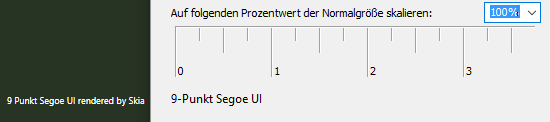
In the screenshot you see left the text as rendered by SKCanvas (which has no scaling applied) and right i put the windows system dialog "userdefined scaling" for comparison where you see that the string "9-Punkt Segoe UI" is written significantly larger. Also my dpi settings are at 100%.
In the question referenced above, @mattleibow answers with applying a scaling factor but doesn't clarify what the variables mean, in the code he shows: specifically what does "viewWidth" refer to?
var scale = canvasWidth / viewWidth;
 joreg
joreg
All 4 comments
To be honest, I am not particularly sure - and I know this is not exactly encouraging. This is because there are many factors at play here:
- System settings:
- the screen dpi
- whether scaling is enabled
- OS version
- WinForms settings:
- autosize mode
- autosize enabled
- target framework version
- app.config settings
- app.manifest settings
- Other factors:
- WinForms (GDI) fonts are points (pt)
- SkiaSharp is pixels (px)
Important thing about SkiaSharp is that it will ALWAYS draw text with pixels and will do so regardless of DPI/scaling. On machines that have scaling, you will probably have to scale up. The reason this is not so well supported for SkiaSharp is that you are one of the first people that I know that have tried WinForms.
I will try and get to the bottom of this, but in the meantime - here are some docs:
- https://docs.microsoft.com/en-us/dotnet/framework/winforms/adjusting-the-size-and-scale-of-windows-forms
- https://docs.microsoft.com/en-us/dotnet/framework/winforms/high-dpi-support-in-windows-forms
- https://msdn.microsoft.com/en-us/library/windows/desktop/ff684173
- https://msdn.microsoft.com/en-us/library/ms838191.aspx
Not the greatest of results, but I hope this helps a bit. This is fundamentally an issue with WinForms (I believe) as it is a very old framework and much support has been added on later.
 mattleibow
on 26 Oct 2017
mattleibow
on 26 Oct 2017
thanks for the elaborate answer. i'll dig into these..
joreg
on 31 Oct 2017
finally got back to this and what helped me was:
WinForms (GDI) fonts are points (pt)
SkiaSharp is pixels (px)
so i now convert my pts to px and all is good.
thanks again!
joreg
on 12 Apr 2018
NICE! Glad to have helped.
mattleibow
on 12 Apr 2018
Related issues
 loketha
·
4Comments
loketha
·
4Comments
 alanricker
·
3Comments
alanricker
·
3Comments
 corliss
·
4Comments
corliss
·
4Comments
 antongit
·
4Comments
antongit
·
4Comments
 lothargrieb
·
3Comments
lothargrieb
·
3Comments
Most helpful comment
finally got back to this and what helped me was:
so i now convert my pts to px and all is good.
thanks again!