Skiasharp: [BUG] Much higher RAM usage on x64 compared with x86
Description
We are putting images to GPU(texture based SKImage) to render them later with perfect performance.
On x86 build images are allocating only GPU RAM.
On x64 build images are allocating also CPU RAM.
This is a huge issue for us 👎. App is working some times slower on x64 and eating a lot more RAM, like 10 times more in some cases(200mb vs 2gb), because we store a lot images on GPU.
I've provided a repro project repo link below.
Code
using (var surf = SKSurface.Create(_grContext, false, _imageInfo, 1, GRSurfaceOrigin.TopLeft))
{
    surf.Canvas.DrawImage(_rasterImg, 0, 0);
    surf.Canvas.Flush();
    _textureImages.Add(surf.Snapshot());
}
Is there a better way to transform raster image to texture-backed image? We've tried to create textures and then push image to it - but this approach generated some artifacts on rendering.
Expected Behavior
On x86 Snapshot() SKImage is allocating only GPU memory
On x64 Snapshot() SKImage is allocating only GPU memory
Actual Behavior
On x64 Snapshot() SKImage is allocating only GPU memory
On x64 Snapshot() SKImage is allocating GPU and CPU memory
Basic Information
- Version with issue: 1.68
- IDE: Visual Studio
- Windows Classic: Windows 10
- Target Devices: High-end PC
Reproduction Link
 Mikolaytis
All 5 comments
Yes, this is really a problem(
 AndreyGrishin
on 10 Jun 2019
AndreyGrishin
on 10 Jun 2019
+1. Our team would highly appreciate your attention to this issue.
 marizombie
on 19 Jun 2019
marizombie
on 19 Jun 2019
This is a big problem! Please help!
 Donsezan
on 19 Jun 2019
Donsezan
on 19 Jun 2019
New prerelease 1.68.1-pre did not fix this issue
Mikolaytis
on 10 Oct 2019
Update:
Turns out there is no issue about increased memory usage on x64. It has an another behavior on x64.
On x86 test prefers to use shared GPU memory,
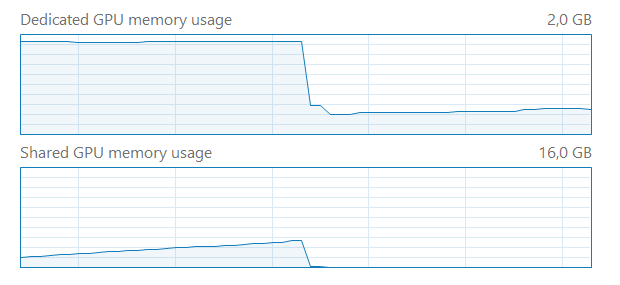
_(shared GPU memory was used by x86 launch and disposed after test end)_
but x64 test prefers to use just a process RAM, not shared GPU memory.
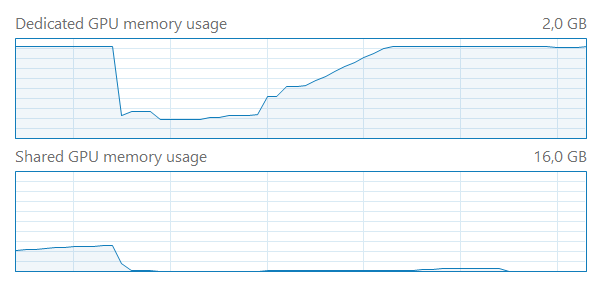
_(second test on x64 started right after first, you can see a rise on GPU memory, but nothing is going in the shared GPU memory - because somehow it started to eat regular RAM)_
It can be:
- a driver issue
- an OpenGL issue
- Windows issue
- Skia issue
- SkiaSharp issue
Now I think that this is not an issue at all. Because it looks like it does not matter how used RAM will be named in Windows - shared GPU RAM or regular RAM, it should work almost the same as I believe. So I think I can close this issue.
Mikolaytis
on 26 Jan 2020
Related issues
 Ziriax
·
3Comments
Ziriax
·
3Comments
 michaldobrodenka
·
3Comments
michaldobrodenka
·
3Comments
 alanricker
·
3Comments
alanricker
·
3Comments
 joreg
·
4Comments
joreg
·
4Comments
 vlkam
·
3Comments
vlkam
·
3Comments