Site-kit-wp: Flush browser/session cache when plugin upgraded.
Feature Description
On the Admin->Plugins screen after the user upgrades Site Kit to the latest version, we should flush any session data stored in the user's browser (ie. sessionStorage). Otherwise this cached data may not work correctly when they return to Site Kit (for example if the expected cached data or data schema has changed).
Question: when the plugin is upgraded in the background (eg auto-updates), should we still endeavor to flush local/browser caches? This would still be straightforward if the plugin version were stored in sessionStorage and compared with each load. This situation seems much less likely to be encountered by actual users though.
_Do not alter or remove anything below. The following sections will be managed by moderators only._
Acceptance criteria
- Site Kit
sessionStorageandlocalStorageitems from a previous release should not be used for the current version after upgrading
Implementation Brief
- Edit the webpack config file:
- Import
DefinePluginfrom thewebpackpackage; - Add a new instance of the
DefinePluginclass to the plugins list of the main configuration (with all javascript files): - The constructor should accept an object with
${ global.GOOGLESITEKIT_VERSION || '' }property that contains the plugin version read from thegoogle-site-kit.phpfile and appended with an underscore (something like1.20.0_). Use the following snippet to read version from the PHP file:
js
fs.readFileSync( path.resolve( __dirname, 'google-site-kit.php' ) )?.match( /(?<!GOOGLESITEKIT_VERSION',\s+')\d+\.\d+\.\d+(?=')/ig )?.[0] || ''
- Import
- Update the
STORAGE_KEY_PREFIXconstant in theassets/js/googlesitekit/api/cache.jsfile to get the following value instead of what it has right now:
js
`googlesitekit_${ global.GOOGLESITEKIT_VERSION || '' }`
DefinePluginwill update it to be'googlesitekit_1.20.0_'during compilation and we will get versioned prefixes for the session storage. - Update the
STORAGE_KEY_PREFIXconstant in theassets/js/components/data/cache.jsfile using the same approach - it should have the following value:
js
`googlesitekit_legacy_${ global.GOOGLESITEKIT_VERSION || '' }`
Test Coverage
- Not needed
Visual Regression Changes
- No visual changes are expected
QA Brief
- Make sure session storage uses prefixes with the current version of the plugin to store data;
- Check that browser caching keeps working as before.
Changelog entry
- Flush browser session storage on plugin updates to prevent stale data from being served against new logic.
 adamsilverstein
All 9 comments
@adamsilverstein @felixarntz I've thought about this before as well. Rather than flushing the cache, I think we should just include the plugin version in the cache key generation functions instead as a constant. That way, when the plugin version changes, it would use a different cache key hash for the same request parameters automatically, essentially achieving the same end result. That way no change would be required in PHP such as detecting version changes on page load or something. It could simply be rolled into the build process.
 aaemnnosttv
on 10 Nov 2020
aaemnnosttv
on 10 Nov 2020
@aaemnnosttv I'm not sure about that approach, wouldn't that result in us "polluting" browser storage with more and more unnecessary values? I think clearing storage on update is the more appropriate action - we won't use the existing storage any longer, so I think it makes sense to remove it.
 felixarntz
on 10 Nov 2020
felixarntz
on 10 Nov 2020
@felixarntz I don't think it would be a big concern since we use session storage as our primary request cache so any stale cache would naturally be flushed with the browser session.
I'm curious what @tofumatt would recommend here as the resident storage expert? 😄
aaemnnosttv
on 11 Nov 2020
@eugene-manuilov IB ✅ , just one detail: Let's use GOOGLESITEKIT_VERSION for the JS global like in PHP.
felixarntz
on 17 Nov 2020
@felixarntz sounds good, updated.
 eugene-manuilov
on 17 Nov 2020
eugene-manuilov
on 17 Nov 2020
Just chiming in here: given our default storage is sessionStorage, every time the browser restarts it would be cleared. Additionally, the size limit for localStorage/sessionStorage is 5MB—it should be plenty for our cached data. If we run into a quota error we can clear the _entire_ cache anyway, without much issue.
The current approach is fine, but if we eventually use something like IndexedDB we'll want to explore expiring those caches.
Frankly, having something than ran on page load to expire all out-of-date cached values could be useful and more appropriate here anyway.
I think this approach is good for now 👍🏻 (Sorry for the delayed response, I missed this ping!)
 tofumatt
on 20 Nov 2020
tofumatt
on 20 Nov 2020
@benbowler I have answered your comment in the PR.
eugene-manuilov
on 27 Nov 2020
Note: I updated the ACs here to be closer to the intended outcome rather than being specific to clearing the cache which is no longer in line with the approved IB.
aaemnnosttv
on 3 Dec 2020
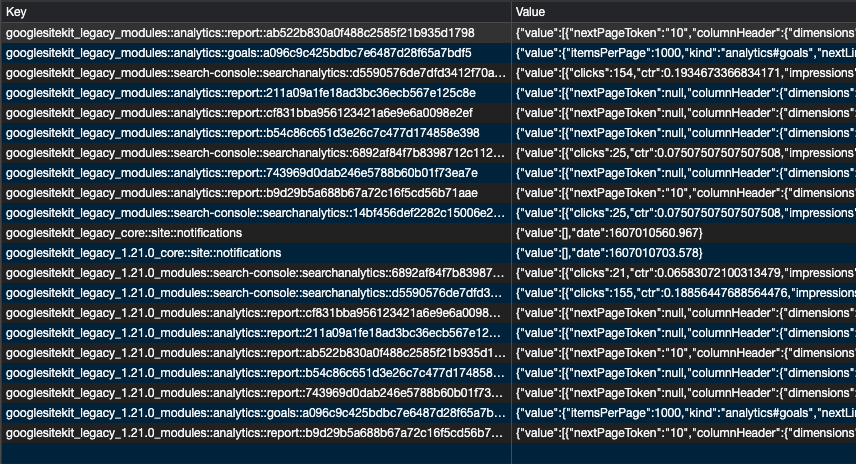
QA ✅
Tested upgrading from the current release to the current develop build and fresh cache items were added with the version baked into the key triggering new API requests:
aaemnnosttv
on 3 Dec 2020
Related issues
 quangbahoa
·
5Comments
aaemnnosttv
·
3Comments
quangbahoa
·
5Comments
aaemnnosttv
·
3Comments
 Loganson
·
5Comments
felixarntz
·
5Comments
aaemnnosttv
·
3Comments
Loganson
·
5Comments
felixarntz
·
5Comments
aaemnnosttv
·
3Comments
Most helpful comment
@felixarntz I don't think it would be a big concern since we use session storage as our primary request cache so any stale cache would naturally be flushed with the browser session.
I'm curious what @tofumatt would recommend here as the resident storage expert? 😄