Site-kit-wp: Refactor `CompatibilityChecks` component
The CompatibilityChecks component should be refactored to be a functional component using hooks and the datastore.
_Do not alter or remove anything below. The following sections will be managed by moderators only._
Acceptance criteria
- The
CompatibilityChecksinassets/js/component/setup/compatibility-checks.jscomponent should be refactored to be a functional component using hooks and the datastore. - The component should no longer use global state or legacy utility functions. It should not use the
getExistingTagfunction and instead rely on thegetHTMLForURLselector ofcore/site, for the site's home URL (no need to check an AMP post here as that is not relevant for this scenario). It can then extract the tag viaextractExistingTag, relying on the tag defined inassets/js/components/setup/tag-matchers.js. - The component should make use of the
getDeveloperPluginStateselector in thecore/sitestore. The other API calls should be kept internal to the component and useAPI.get/API.setdirectly like today. - The component file should be renamed to
CompatibilityChecks.js. - The
assets/js/components/setup/tag-matchers.jsfile should be removed, the tag should be handled within the component. - The now unused functions
getExistingTag,scrapeTag, andextractTagfromassets/js/util/tag.jsshould be removed.
Implementation Brief
- Using
/assets/js/googlesitekit/datastore/site/html.js
- Add a new action called:
checkForSetupTagwith the type set toCHECK_FOR_SETUP_TAG. No payload is required. - In
baseControls, add a new entry with the following key:CHECK_FOR_SETUP_TAG. It should request thehomeURLusingregistry.select( CORE_SITE ).getHomeURL()andregistry.dispatch( STORE_NAME ).fetchGetHTMLForURL( homeURL ) )to get the HTML, get the setup token (const { token } = await API.set( 'core', 'site', 'setup-tag' );), and check the homepage fortoken(extractExistingTag( response, [ /<meta name="googlesitekit-setup" content="([a-z0-9-]+)"/ ] )). (Example)
- Add a new action called:
- Rename
/assets/js/components/setup/compatibility-checks.jstoCompatibilityChecks.js
- Update paths where
compatibility-checks.jsare referenced to use the new file name - Rename the
checksvariable tocompatibilityChecks. - Use the new
useChecks()hooks in the component (eg:const { complete, error } = useChecks( compatibilityChecks );)
- Update paths where
- Create a new file at the following location
/assets/js/hooks/useChecks.js
- The hooks should accept one argument: an array of checks to run. It should return an object with the shape:
{ complete: Boolean, error: Error|null }.completeisfalseby default andtrueonce checks have been run.completeshould be immediately set tofalseif any error is encountered.errorisnullby default/if no errors were encountered, and the firsterrorobject encountered byPromise.all()throwing if it throws. We should wrap thePromise.all()call in atry/catch, and catch the error thrown by the checks, then assign it to theerrorvariable we return. - Change the current sequential approach to use
Promise.all( checks.map( check => check() ) )to allow the checks to run in parallel. See discussion below. We may want an option in the future to control how many checks are run in parallel, but for now: running all at once is okay. - use the
useEffecthook to run the checks and returning an object which contains thecompleteanderrorkeys (eg:return { complete, error };). - As soon as an
erroris encountered do not re-run the checks and simply return the first error encountered.
- The hooks should accept one argument: an array of checks to run. It should return an object with the shape:
- Add an
/assets/js/components/setup/CompatibilityErrorNotice.jsfile that renders when a compatibility error is detected:
- Move the contents of
renderErrorto this new component and render it in place of whererenderError( error )is currently: https://github.com/google/site-kit-wp/blob/7f32ab24bef46f216891a8bf04f08445e5eca784/assets/js/components/setup/compatibility-checks.js#L250, eg:{error && <CompatibilityErrorNotice error={error} />} - Move the logic of
helperCTAto this new component, replacing https://github.com/google/site-kit-wp/blob/7f32ab24bef46f216891a8bf04f08445e5eca784/assets/js/components/setup/compatibility-checks.js#L176 - It should check to see if the developer plugin is installed using a hook:
const developerPlugin = useSelect( ( select ) => select( CORE_SITE ).getDeveloperPluginState() );
- Move the contents of
- Delete
assets/js/components/setup/tag-matchers.jssince we are using the tag directly in the code when calling theextractExistingTagfunction - Using
assets/js/util/tag.js
- Delete the following functions:
getExistingTagscrapeTagextractTag
- Delete the following functions:
- Using
assets/js/components/setup/compatibility-checks.test.js
- Rename file to:
assets/js/components/setup/CompatibilityChecks.test.js
- Rename file to:
Test Coverage
- As the logic of the _checks_ is to remain largely the same, no major changes to existing tests should be required, though some tests may now require slight changes to mocks.
- Ensure the actual
CompatibilityCheckscomponent is tested with the actual failures in place to ensure the component outputs the correct error based on data store state. (See discussion below.) - Add tests for:
CompatibilityChecks.test.js- tests what renders as a result of the status and result of its setup-specific checksuseChecks.test.js- tests the return value of the hook as it runs its given checks
CompatibilityErrorNoticedoesn't require tests; this should be handled byCompatibilityChecks.test.js
Visual Regression Changes
- VRT tests should not change as a result of this refactor.
QA Brief
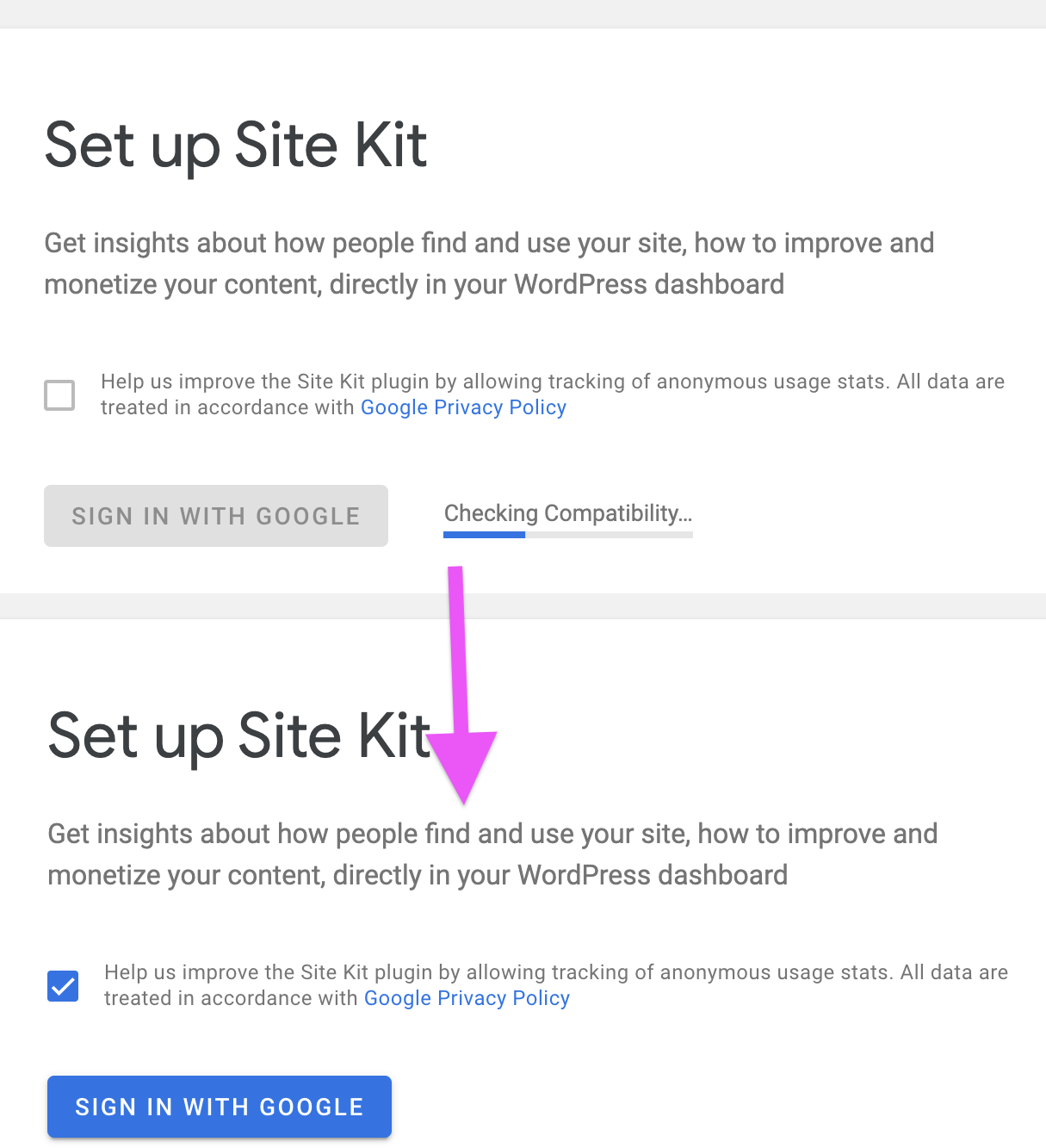
- Remove the sitekit link, and visit the setup page /wp-admin/admin.php?page=googlesitekit-splash
- Ensure that you get the checking compatibility, followed by sign-in with google. This is the exact behaviour as previous, and it should not have changed.
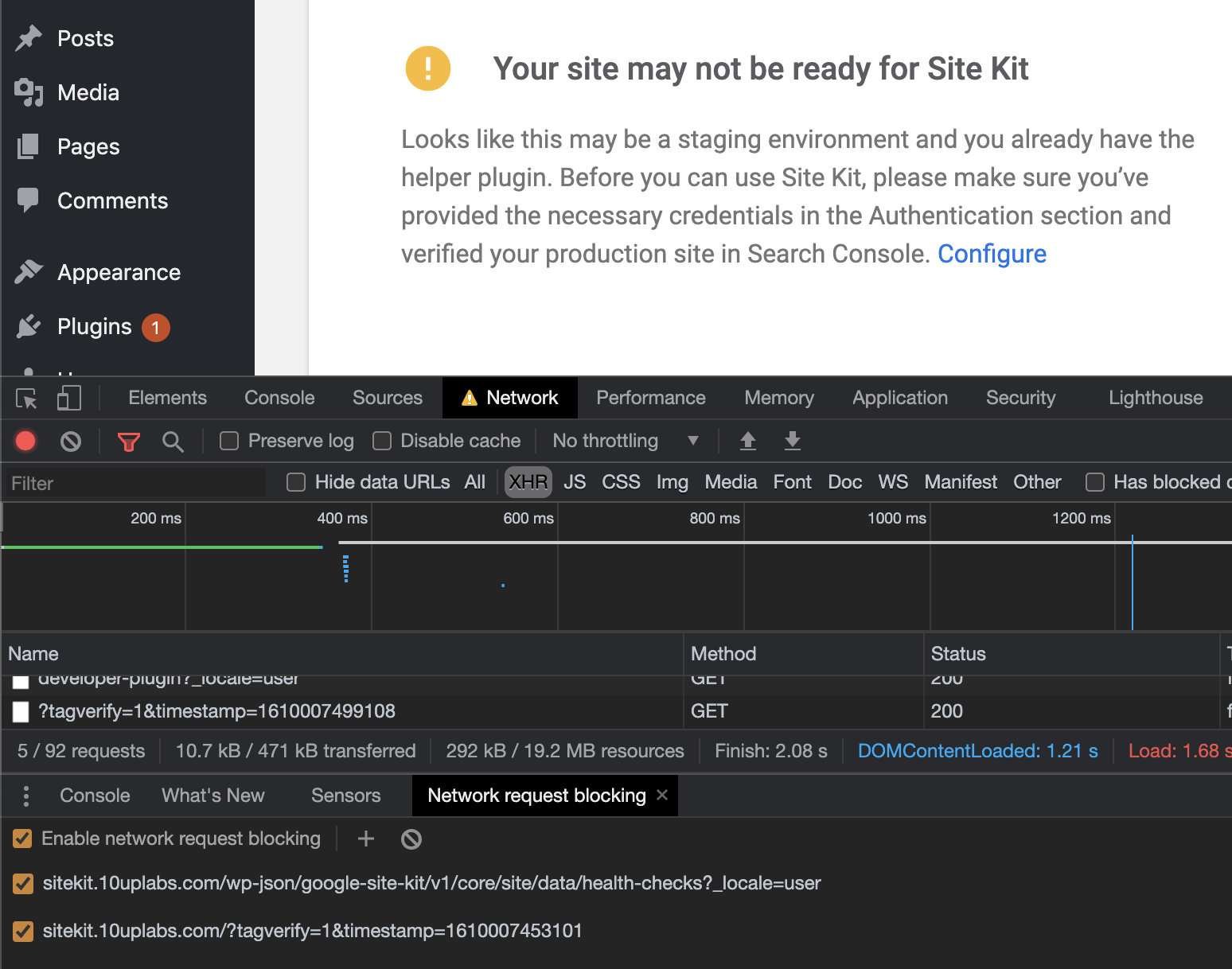
- Without proceeding, trigger some errors by e.g. blocking the requests in your dev console and ensure that the error message appears:
Changelog entry
 felixarntz
All 16 comments
@felixarntz @aaemnnosttv While working on this IB, I found out one issue as a result of refactoring the CompatibilityChecks component into a functional one. Since we are using hooks to get the HTML markup(to look for the googlesitekit-setup tag),
const homeURL = useSelect( ( select ) => select( CORE_SITE ).getHomeURL() );
const html = useSelect( ( select ) => select( CORE_SITE ).getHTMLForURL( homeURL ) );
it must be called at the top level of the functional component. Later in the code, we then set the googlesitekit-setup tag value like this:
const { token } = await API.set( 'core', 'site', 'setup-tag' );
and then we extract the googlesitekit-setup tag
This results in having a tag mismatch since first, we got the HTML from the getHTMLForURL selector, then we set the tag and finally we extract the tag from the original HTML. Obviously the tags values will not match since we changed the tag value after we got the initial HTML markup.
I thus suggest we create another functional component, for e.g CompatibilityChecksProgress which will run only when the tag value has been set. Thus when fetching the HTML, it'll have the correct value to compare. This has been described in details in the IB.
 asvinb
on 11 Nov 2020
asvinb
on 11 Nov 2020
const { isSiteKitConnected } = global._googlesitekitLegacyData.setup;
We have a selector for isConnected on core/site 🙂
@felixarntz – @asvinb and I had a conversation about this to explore a few other options and we came up with something like this:
- Add a new
checkSetupTag(better name TBD) action tocore/site - Put the full set-tag-and-check routine in the control for this action, similar to a call to
submitChanges, something like this:
```js
controls[ CHECK_SETUP_TAG ] = createRegistryControl( ( registry ) => async () => {
let response, error;
try {
const { token } = await API.set( 'core', 'site', 'setup-tag' );
const homeURL = registry.select( CORE_SITE ).getHomeURL(); // async select needed?
// Always fetch.
( { response, error } ) = await registry.dispatch( CORE_SITE ).fetchGetHTMLForURL( homeURL );
response = hasSetupTag( response ); // function doesn't exist
} catch ( err ) {
error = err
}
    return { response, error };
};
```
- As for the array of checks, we thought it would be good to separate this logic from the component and talked about moving all of this out into custom hook, e.g.
useCompatibilityCheckswhich would be used by theCompatibilityCheckscomponent to provide the relevant state as to the progress and result, but wouldn't be concerned with rendering anything which is what the component would handle.
@asvinb – let's continue refining this a bit rather than introducing a CompatibilityChecksProgress component
 aaemnnosttv
on 13 Nov 2020
aaemnnosttv
on 13 Nov 2020
@aaemnnosttv @asvinb That all sounds good to me, +1 on creating an action to core/site and introducing a useCompatibilityChecks hook.
felixarntz
on 13 Nov 2020
@aaemnnosttv @felixarntz IB has been updated.
asvinb
on 16 Nov 2020
Thanks for the detailed update @asvinb !
Add a new action called:
getHTMLWithSetupTagwith the type set toGET_HTML_WITH_SETUP_TAG
Generally speaking, we only use get* names for selectors so we should continue to maintain that convention. One exception to this is getRegistry but that is a bit of a special case.
Also, since the response and token are only relevant together we should check it in the control rather than do that in the hook. We can still provide the other data in the response like so:
const response = { html: fetchResponse, tokenMatch, token }
return { response, error }
Where tokenMatch would be set by checking if token and the extracted tag match (the important part here 😄 ). I'm not sure there is any real value in returning those extra keys though, except maybe for tests?
With that in mind, something like checkSetupTag would be a more accurate name I think.
invariant( err, 'An error occurred.' );
This should be removed as it would cause a new error to be thrown with the invariant message when we want the caught error to be returned.
useSelect( ( select ) => select( CORE_SITE ).getDeveloperPluginState() );
Regarding this select in the hook, this would cause the developer plugin endpoint to be hit every time, whereas before it was only called if there was an error and complete would only be set after that was loaded as well.
Since selectors have to be called unconditionally, I think we can extract the notice shown for these two errors into its own component which itself selects the getDeveloperPluginState and renders the appropriate message accordingly, similar to what we do with setup/settings FormInstructions or ExistingTagNotice components. Then we would only need to return this here: https://github.com/google/site-kit-wp/blob/d720e79196474496b9f2164f86bd4bc4ba0d2201/assets/js/components/setup/compatibility-checks.js#L170-L180
This would also allow us to move all of the cases for helperCTA into that new component as well which would keep CompatibilityChecks a bit cleaner and more focused, and useCompatibilityChecks would no longer need to be concerned with the developer plugin state either.
A similar approach may be useful for the other error messages to be rendered where more complex or needed.
In summary this is looking good and on the right track 👍 It still needs the sections completed for Test Coverage and VRT changes even if none are expected (there should be none here 😄 ). For tests though, we should add tests for the new useCompatibilityChecks hook as well as the new "check" action.
Let's aim a little higher with the estimate as well since this is proving to be fairly complicated 👍
aaemnnosttv
on 24 Nov 2020
(@asvinb isn't around this week so I'm going to take over the IB for this one.)
 tofumatt
on 24 Nov 2020
tofumatt
on 24 Nov 2020
Thanks @tofumatt! As a whole, I think the IB here looks good as far as what needs to be done.
With that said, I think the copy/paste factor is a bit too high 😄 This was already a bit of an issue before you took over but I think it's worth dialing back a bit now that we have a better idea as to what's needed. Can we reduce it a bit using some placeholders/pseudo-code or references to existing code, remove doc blocks, etc so that the IB is more useful as a support/guide to get to the right result rather than a partial solution? I don't want to waste the definition that has been done here but I think we can make it better without being so concrete. If you don't think that's possible or worth the time, then we can keep it mostly as-is, but let's try to make it a bit higher-level.
aaemnnosttv
on 25 Nov 2020
I've made it a bit higher-level, but left reference gists of the existing code that was written. Should be a good compromise! 🙂
tofumatt
on 25 Nov 2020
@tofumatt looks great, thanks!
One last suggestion/consideration around the tests: you mentioned useCompatibilityChecks in the tests somewhat but I think we can improve the tests by moving the tests for the test-specific logic into the tests for the hook. Perhaps we can export the array of checks and add tests for those directly, or maybe export a runChecks function which runs them all, and then we could simply make assertions that the function throws or not, and the error. It would be nice if this could be mocked for testing the hook itself and perhaps CompatibilityChecks as well. Then we can make the tests for the hook and the CompatibilityChecks component more about what they render/return than trying to make assertions about the checks from outside. What do you think?
aaemnnosttv
on 26 Nov 2020
As mentioned in the IB: I think it'd be better to put all these checks in one function—the abstraction of separately them out into mini-functions doesn't serve much of a purpose to me, as we want them all to run sequentially anyway. Doing so makes it easier to return early and simplifies the logic/flow.
But I've added a point that we could add tests for the useCompatibilityChecks hook directly, sounds good.
I think it's still worth testing the actual function's output based on the return value of the hook, but testing the hook as well is okay by me.
But largely what we care about is what the component outputs based on the found compatibility error, I think.
tofumatt
on 27 Nov 2020
@tofumatt – I think what I was trying to get at was we should separate tests for the component and the hook so that the component tests could be put into the error state a bit more directly (e.g. checks = [ () => throw ERROR_INVALID_HOSTNAME ] – maybe checks go into their own module for easy mocking?) rather than trying to setup the test environment in a way that would fail the check you want to trigger for the state to test.
Then the array of tests for the hook could be a bit more abstract as well to keep those tests more specific to the responsibility and behavior of the hook rather than the functions. Then if we wanted, we could have dedicated tests for the functions we provide to that array which would be cleaner and easier to understand than mixing with React/hook test code rendering logic which gets a bit hairy with async act waiting and whatnot.
I think it'd be better to put all these checks in one function—the abstraction of separately them out into mini-functions doesn't serve much of a purpose to me, as we want them all to run sequentially anyway. Doing so makes it easier to return early and simplifies the logic/flow.
Not sure I agree here. The order of the checks isn't particularly significant, I think it was mostly done by order of "cost" before, with quickest/easiest running first. Since the functions throw when they fail, it's easy to return early since it will be handled by the try/catch. It might be fine to run them all in parallel though – I'm not sure they really need to run in sequence.
Let me know what you think.
aaemnnosttv
on 30 Nov 2020
so that the component tests could be put into the error state a bit more directly (e.g.
checks = [ () => throw ERROR_INVALID_HOSTNAME ]– maybe checks go into their own module for easy mocking?) rather than trying to setup the test environment in a way that would fail the check you want to trigger for the state to test.
Ah, I see. My only issue with that is that it decouples our actual checks with the component's output. In that case, we need to remember to refactor both the component tests and the hook tests when things change. It'd be possible to update the hooks and their respective tests—and even the component's logic—but not have the component tests cover the change because they aren't relying on the real tests.
These are important components and the checks are multiple and nuanced, so my thinking is that the tests should mirror the real-world use as closely as possible. We could certainly use dependency-injection for the component tests, but as I wouldn't consider the component a "dumb component"—it's closely tied to the datastore state and the errors the hooks return—I don't think it's safe to do.
The approach I find works best is to only allow DI for components that don't actually rely on external (eg Redux) state, or we will wind up in a scenario where the component isn't testing something that can happen in the app because the logic is decoupled even when the real-world usage is not.
Not sure I agree here. The order of the checks isn't particularly significant, I think it was mostly done by order of "cost" before, with quickest/easiest running first. Since the functions throw when they fail, it's easy to return early since it will be handled by the try/catch. It might be fine to run them all in parallel though – I'm not sure they really need to run in sequence.
That's fair. Looking through the checks, the only one that makes sense to run "first" is the "localhost" site URL check, but that's so fast that as long as the approach is to "fail fast" then it's fine. One thing to note: currently there are about six checks; running those in parallel (they all involve API requests) is a bit heavy. Once/if there are a LOT of checks it might be too much to run them at once, but batching them/running up to three at a time is reasonable.
For now, I suppose we can separate out the checks to allow running them in parallel. That's a compelling reason for the separation, but since we weren't doing that before it seemed wasteful. But that's a good point; I'll update the IB.
tofumatt
on 1 Dec 2020
@tofumatt – after thinking about this a little bit more, I think part of the confusion here is around the useCompatibilityChecks hook. In that, the original idea here was to separate the check logic from the rendering component which only really cares about the result and intermediate state. For that reason, I think it would make much more sense (from a testing perspective as well) to actually make this a useChecks( arrayOfChecks ) hook instead. That way, we could actually reuse this behavior in other components rather than making it (setup)compatibility-specific.
With that in mind, here's what I'm thinking regarding the tests:
CompatibilityChecks.test.js- tests what renders as a result of the status and result of its setup-specific checksuseChecks.test.js- tests the return value of the hook as it runs its given checks (perhaps it has an option to run in series/parallel?)CompatibilityErrorNotice- related to specific errors ofCompatibilityChecks- not sure it really needs its own tests though
What do you think?
aaemnnosttv
on 1 Dec 2020
@tofumatt – IB looks great, just two points to tweak:
The hooks should accept one argument: an array of checks to run. It should return an object with the shape:
{ passed: Boolean|undefined, error: Error }
Let's keep the previous { complete: Boolean, error: Error|null } shape as it shouldn't be possible for checks to both pass and have an error (at least for now). So this way we don't need to add a 3rd value to passed to account for loading/in-progress. complete = false = in progress, true = done (regardless of pass/fail); and if error = fail, otherwise pass. You actually already have it this way above where it starts "Use the new useChecks() hooks in the component" 😄
... the first error object encountered by
Promise.all()throwing if it throws.
This is probably what you meant but worth clarifying that await Promise.all( ... ) would throw on the first rejected promise created by an error thrown in the check function, so we wouldn't need to re-throw it, but rather catch it and save it for returning.
aaemnnosttv
on 1 Dec 2020
IB ✅ 🎉
aaemnnosttv
on 2 Dec 2020
QA Update: Pass ✅
Verified:
- The checking compatibility appears when you go to
/wp-admin/admin.php?page=googlesitekit-splash - The sign-in with google button appears when compatibility check is completed. Screenshot
- The error appears when you block the requests in dev console. Screenshot
@aaemnnosttv @ivankruchkoff thank you to whoever included the screenshots in QAB, these were really helpful!
 wpdarren
on 20 Jan 2021
wpdarren
on 20 Jan 2021
Related issues
 marrrmarrr
·
5Comments
marrrmarrr
·
5Comments
 Loganson
·
5Comments
felixarntz
·
5Comments
tofumatt
·
5Comments
aaemnnosttv
·
3Comments
Loganson
·
5Comments
felixarntz
·
5Comments
tofumatt
·
5Comments
aaemnnosttv
·
3Comments