Apollo Version: 5.0
OS: Ubuntu 16.04
GPU: GTX 1080
I followed the instructions to build the simulator from source and to build Apollo 5.0. Everything was running fine until I ran Dreamview.
I used Lincoln2017MKZ vehicle and BorregasAve map. I added all sensors from this link https://www.lgsvlsimulator.com/docs/apollo5-0-json-example/#complete-json-configuration .

Localization is the only module working correctly as seen in the picture.
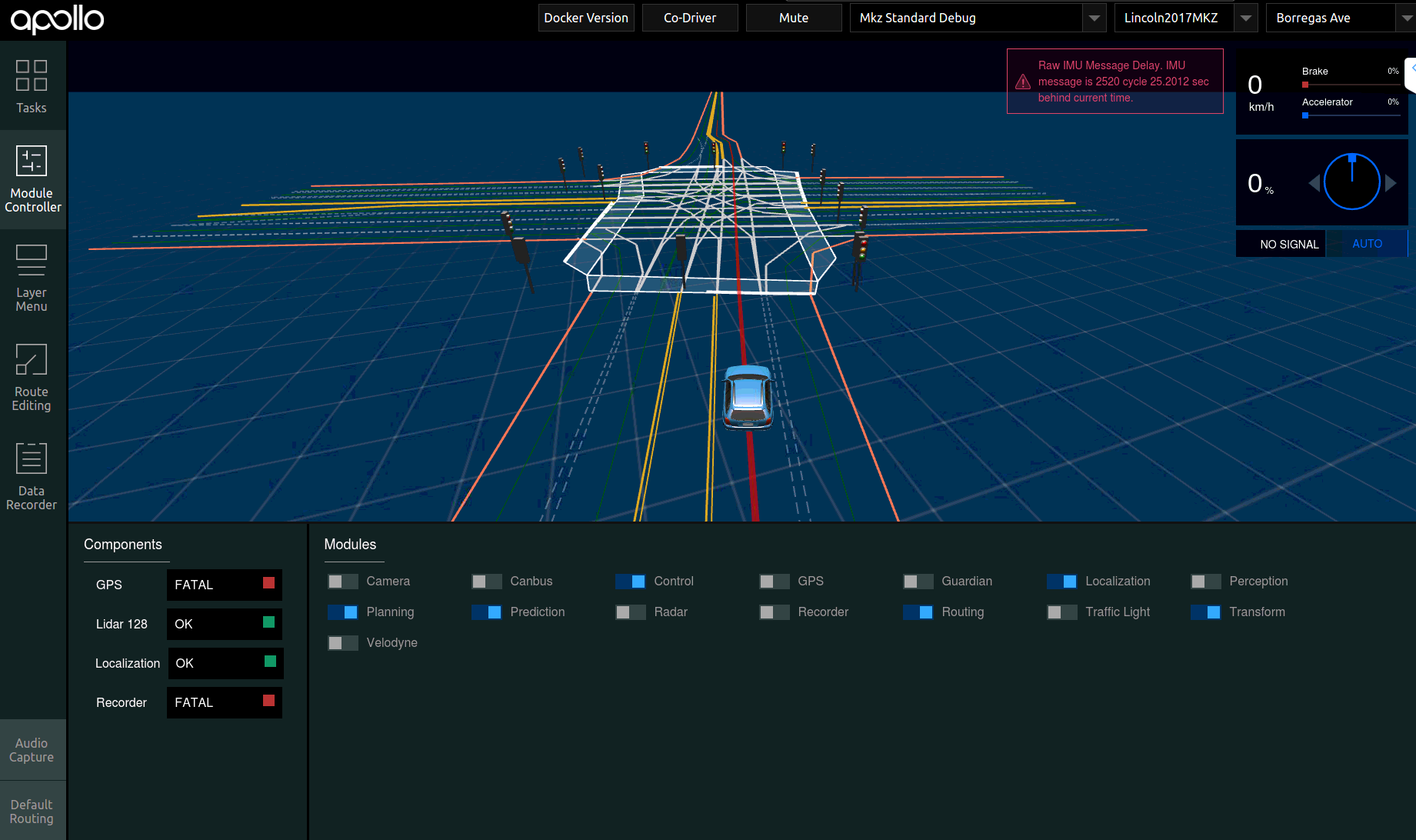
Whenever I try to navigate the ego vehicle to a destination it draws the route, but it doesn't control the vehicle in the simulator. I tried nudging the vehicle with the Up Arrow key, but still it won't be controlled.
In addition, perception and traffic light modules automatically switch off. I have read in other issues that it might be cuda version issue, GPU issue, or many other reasons that I already checked (or think I checked)
I have been trying to run these modules for a long time with no luck. So any help would be appreciated. Thanks!
 michaelhany55
All 17 comments
@luqiang21 have you seen this issue?
 EricBoiseLGSVL
on 13 Feb 2020
EricBoiseLGSVL
on 13 Feb 2020
Hi @michaelhany55 ,
Perception needs to be running for Planning and Control to work. With Perception toggled off in Dreamview, in the Apollo docker container, can you run
apollo$ perception.sh start_fe
That should tell you what error Perception is running into.
Are you running Apollo on a separate computer than the simulator? The most common issue I run into is syncing the times of both computers. I set the computer running Apollo to be 1 minute ahead of the simulator computer.
 shalinmehtalgsvl
on 13 Feb 2020
shalinmehtalgsvl
on 13 Feb 2020
Hello @shalinmehtalgsvl,
Thank you for your response. I am using Apollo and simulator on the same computer, so I don't think I have the time sync issue.
After running the the command you suggested this was the result. What do you think it is?
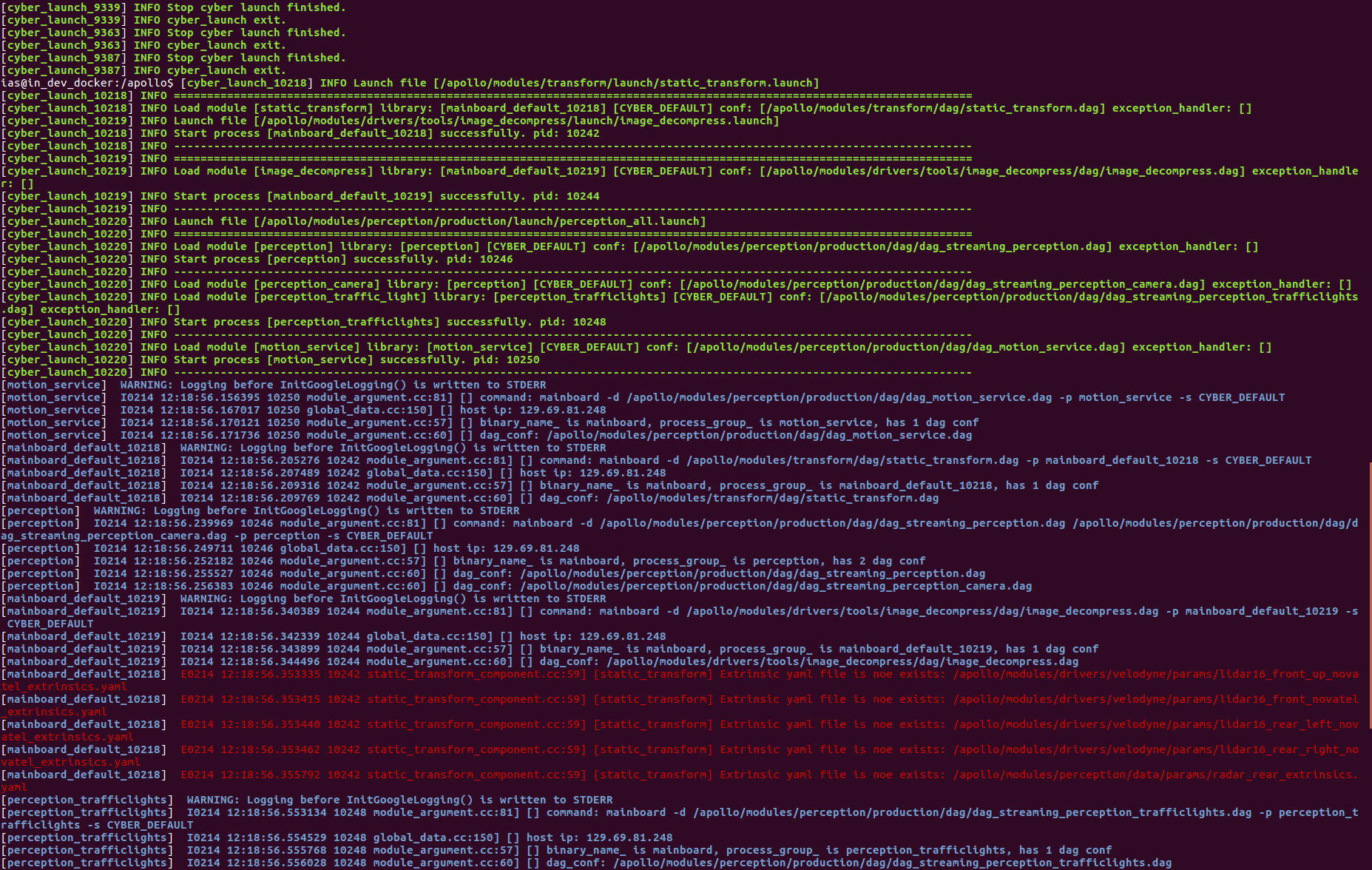
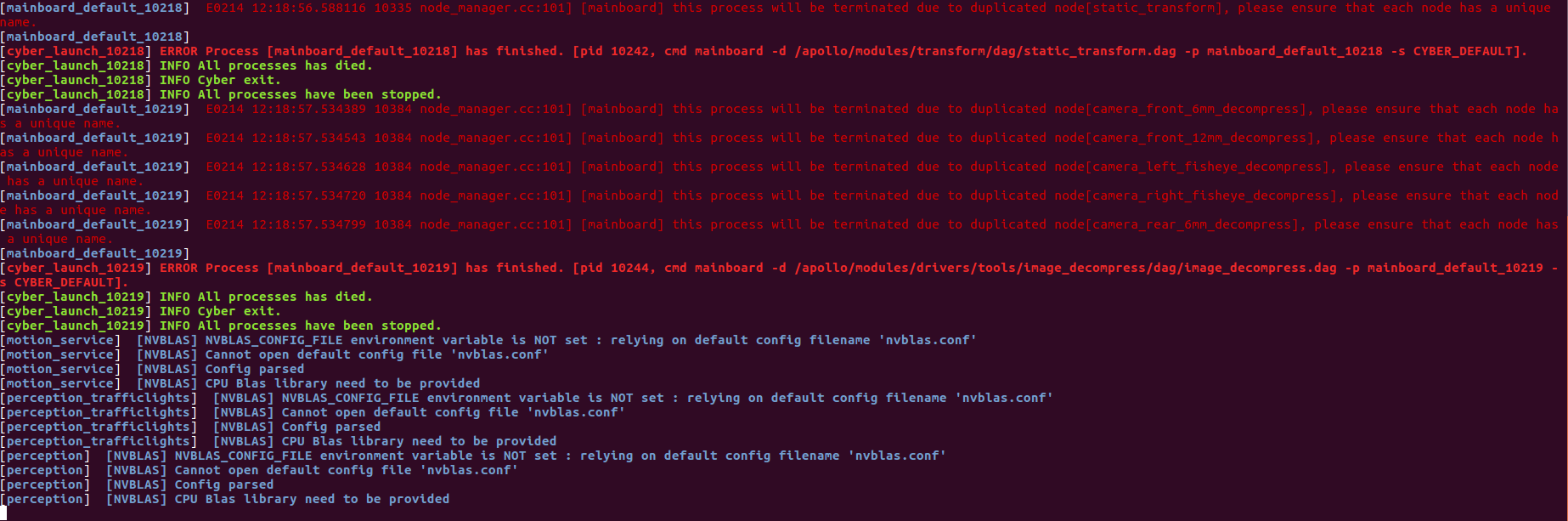
Thanks.
michaelhany55
on 14 Feb 2020
@michaelhany55 The errors in the screenshots seem to be some modules you already ran by clicking the button and you are running them again using command line. Can you try to stop everything and run only transform, localization, and perception (using cmd line) to see whether perception will be running? I am not sure whether the issue is you don't have enough gpu for perception? You can monitor gpu usage while you launch the module.
 luqiang21
on 14 Feb 2020
luqiang21
on 14 Feb 2020
@luqiang21 I tried stopping everything and running them again with Dreamview and cmd line, still it gives the same errors. Can you give me a list of steps I could follow to run transform, localization and perception as you said.
Whenever I run perception the GPU memory is maximum at 50%.
Is there anything I could do? What kind of error is that? I never saw it before in any other issue. I'm sure I installed all the requirements, but could it be that one of them isn't working correctly? How could I check that?
Thanks.
michaelhany55
on 17 Feb 2020
@luqiang21 @shalinmehtalgsvl @martins-mozeiko
Can anyone help me with this issue, it's persisting and I can't solve it. I also couldn't find any other issue that is similar to mine.
Thanks.
michaelhany55
on 18 Feb 2020
@michaelhany55 I cannot see anything causing perception not working from the screenshots. Since the perception is not working, we should try only this module. Steps should be:
- Run
Localizationin dreamview - Run
Transformin dreamview - Run
Perceptionin terminal by runningperception.sh start_fe, check whether there are errors.
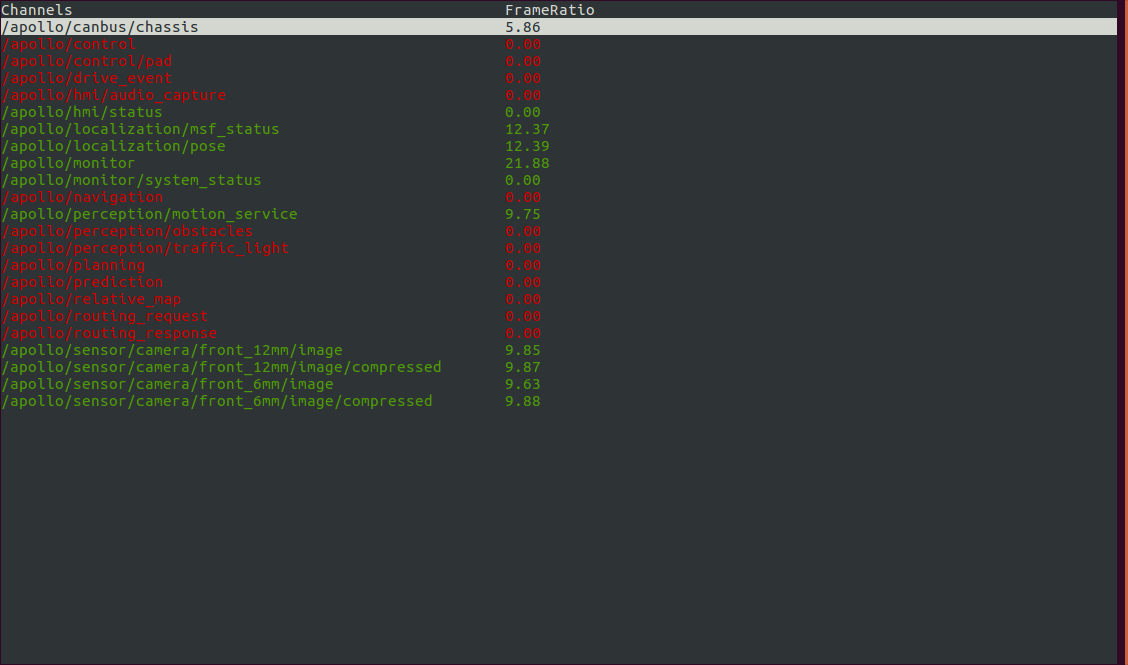
And also run cyber_monitor in terminal to check whether there are perception related channels published like obstacle.
Hope it will help you debug.
luqiang21
on 18 Feb 2020
@luqiang21 I tried these steps and the same errors occurred:
[cyber_launch_27492] ERROR Process [mainboard_default_27492] has finished. [pid 27516, cmd mainboard -d /apollo/modules/drivers/tools/image_decompress/dag/image_decompress.dag -p mainboard_default_27492 -s CYBER_DEFAULT].[cyber_launch_27491] ERROR Process [mainboard_default_27491] has finished. [pid 27523, cmd mainboard -d /apollo/modules/transform/dag/static_transform.dag -p mainboard_default_27491 -s CYBER_DEFAULT].
These were also some of the errors that appeared before the process was killed:
[mainboard_default_27491] E0219 14:21:09.485260 27523 static_transform_component.cc:59] [static_transform] Extrinsic yaml file is noe exists: /apollo/modules/drivers/velodyne/params/lidar16_front_up_novatel_extrinsics.yaml(this happened for 4 other Extrinsic yaml files)[mainboard_default_27492] E0219 14:21:10.658511 27661 node_manager.cc:101] [mainboard] this process will be terminated due to duplicated node[camera_front_6mm_decompress], please ensure that each node has a unique name.(this happened for 4 other nodes)
cyber_monitor command showed me this:
Also, I thought it might be related to mention that whenever I run bootstrap.sh for the first time when I enter the docker, it fails and gives me Failed to start Dreamview. Please check /apollo/data/log or /apollo/data/core for more information.
When I go to the log file I don't really see something different than the normal log file.
I believe there should be something I could do to further debug this issue and fix it.
michaelhany55
on 19 Feb 2020
@michaelhany55 Thank you for your reply. Errors for lidar16_front_up_novatel_extrinsics.yaml file missing doesn't matter since we are not using these sensors. The duplicated process should be because you somehow ran the process twice through dreamview and terminal. But I believe all these cannot give me a clue on the cause.
As you mentioned, you cannot start dreamview, I guess something wrong in the built files. Can you try to rebuild apollo using ./apollo.sh build_gpu and let me know can you run perception or not?
luqiang21
on 19 Feb 2020
@luqiang21 thanks for your quick reply. I also have to note (regarding building apollo again) that I followed the instructions here debug dreamview start problem and found out that my CPU does not support AVX instruction; therefore, I had to remove the --copt=-mavx2 line. Would this affect anything? If so, how should I solve it?
Thanks
michaelhany55
on 20 Feb 2020
@michaelhany55 Sorry I am not very familiar with AVX, but our apollo repo did some change on AVX2 here. You can refer to it.
Were you able to run perception after rebuild?
luqiang21
on 20 Feb 2020
@luqiang21 sorry it took me a while to reply, but I was trying to build it in different ways, but nothing worked. I am really stuck and frustrated with not being able to make it work. Any suggestions would be useful.
michaelhany55
on 21 Feb 2020
@luqiang21
- I removed all apollo images and local git repository and tried to follow the instructions starting from pulling the docker image.
- Commented out the
--copt=-mavx2line inapollo.shfile. - Entered docker.
./apollo.sh build_gpubootstrap.shbridge.sh- Started the simulator with a LinkolnMKZ vehicle having all Apollo 5.0 sensors and BorregasAve map.
- Started Dreamview.
- Started
LocalizationandTransformfrom Dreamview. - Wrote
Perception.sh start_fein the command line inside docker.
The result is the same errors.
I am willing to reinstall the OS (Ubuntu), but I would like a complete list of commands to run to initialize the OS to accept and run Apollo. I followed the steps found in the FAQ section in your website to initialize Ubuntu, but they got me here. Is it possible to give me such a list?
If it is a hardware problem, please advise me what should I change.
- GPU: GTX 1080
- CPU: Intel i7 8 core 3.33 GHz
- Memory: 12 GB
michaelhany55
on 24 Feb 2020
@michaelhany55 hardware looks fine, must be software side. @luqiang21 Thanks for helping Michael. We will find a solution
EricBoiseLGSVL
on 28 Feb 2020
@michaelhany55 For me, sometimes perception also failed to start, then I do bootstrap.sh stop and bootstrap. Everything starts to work again. Maybe you can try this to see if it helps.
luqiang21
on 5 Mar 2020
@michaelhany55 , I have the exact same problem as you do '(https://github.com/ApolloAuto/apollo/issues/10814?email_token=AL6MPQJ3QE3E4S6DVSJ7JXDRGMVU3A5CNFSM4LDP25GKYY3PNVWWK3TUL52HS4DFVREXG43VMVBW63LNMVXHJKTDN5WW2ZLOORPWSZGOEOENEOQ)'.
Have you found a solution for this yet?
 Avps1
on 11 Mar 2020
Avps1
on 11 Mar 2020
@Avps1 @michaelhany55 If you still have the problem for perception, I suggest to first try fake prediction on apollo by:
mainboard -d modules/tools/prediction/fake_prediction/fake_prediction.dag
With fake prediction, you can verify other modules like planning, routing, control works. After verifying those, I suggest you to monitor GPU memory while running simulator and apollo perception at the same time, and try to run them in two machines to see whether perception will work.
luqiang21
on 14 May 2020
Related issues
 yumianhuli2
·
3Comments
yumianhuli2
·
3Comments
 nniranjhana
·
5Comments
nniranjhana
·
5Comments
 mehmetdogru
·
7Comments
mehmetdogru
·
7Comments
 frontw
·
5Comments
frontw
·
5Comments
 clepz
·
6Comments
clepz
·
6Comments