Silent-hill-2-enhancements: Disable Screen Position in Options Menu
@belek666
Could the "Screen Position" selection either be removed or grayed out (disabled) in the Options menu?

This feature was originally included to adjust positioning on CRT monitors, but it is no longer needed on modern displays (which have accurate screen positioning), and doesn't work correctly when played in windowed mode, anyways.
When using a widescreen resolution, here is what happens if you change the screen position from X: 0 & Y: 0 (in the image below, I set X: -32 & Y: 32):
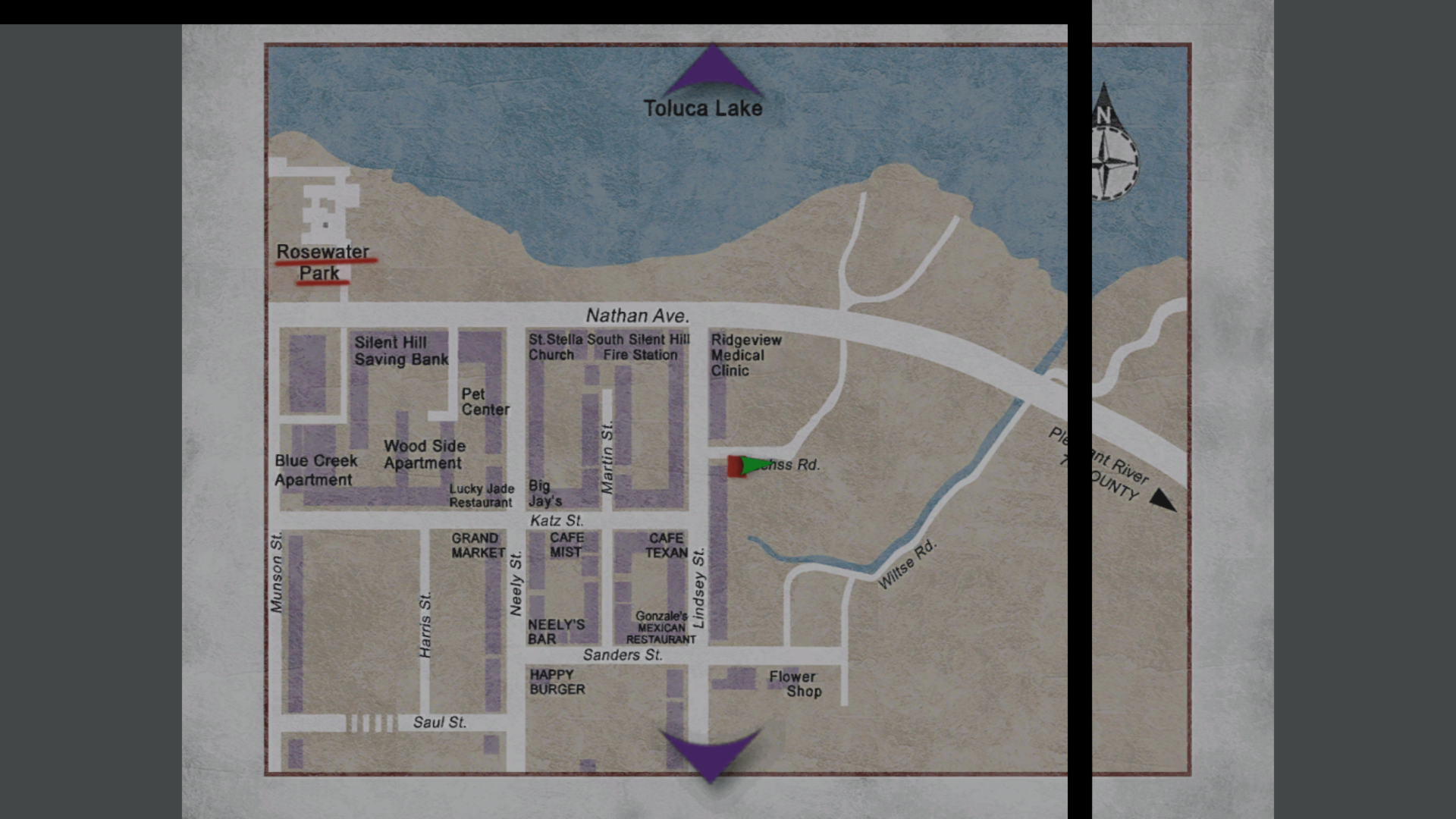
This visual error happens for all full screen events (main menu, save screens, maps, etc).
 Polymega
All 36 comments
Actually many people are coming back to HD CRT monitors/TVs (you can find a lot of videos like this on YT):
https://www.youtube.com/watch?v=V8BVTHxc4LM
There shouldn't be need of that option anyway, since once you have your screen size matching the PC desktop you should be done with any application, at least if you boot it at the same resolution as the desktop (or using the video resize function).
I could check if the option correctly works on the HD-CRT.
 Badore90
on 7 Dec 2019
Badore90
on 7 Dec 2019
If an option can be made for this, it could always be disabled like all other options in the INI for those who still use CRTs.
I follow John Linneman's work (big fan of his) and even he admits that using a CRT in this day and age is really only for the most die hard gaming enthusiasts:
The majority of consumers won't be going back to CRTs; most people will be using modern displays and the intent of this request is to stop a visual issue before it even starts. (To help prevent GitHub support tickets from happening for it.)
We also recommend playing the project in windowed mode for a variety of reasons, and the Screen Position feature doesn't work when playing in windowed mode, anyways.
Polymega
on 7 Dec 2019
If an option can be made for this, it could always be disabled like all other options in the INI for those who still use CRTs.
Perfect then
I follow John Linneman's work (big fan of his) and even he admits that using a CRT in this day and age is really only for the most die hard gaming enthusiasts:
https://youtu.be/tvRyVZWuvQ4
I saw that video Yesterday. Well yes, actually is not that easy to find a good CRT this days. Btw they're the best for gaming (and for general image quality). Sure if some company would made a CRT/SED line-up a lot of (aware) people would come back to this tec. (as you can read from the comments in the video you linked).
the intent of this request is to stop a visual issue before it even starts. (To help prevent GitHub support tickets from happening for it.)
We also recommend playing the project in windowed mode for a variety of reasons, and the Screen Position feature doesn't work when playing in windowed mode, anyways.
It's all clear, thank you.
Badore90
on 8 Dec 2019
We also recommend playing the project in windowed mode for a variety of reasons, and the Screen Position feature doesn't work when playing in windowed mode, anyways.
About this I have the best performance with these settings on my PC (Y/X res on 0):
EnableWndMode = 1
FullscreenWndMode = 0
WndModeBorder = 0
O.T. question:
I have all these new ini files:
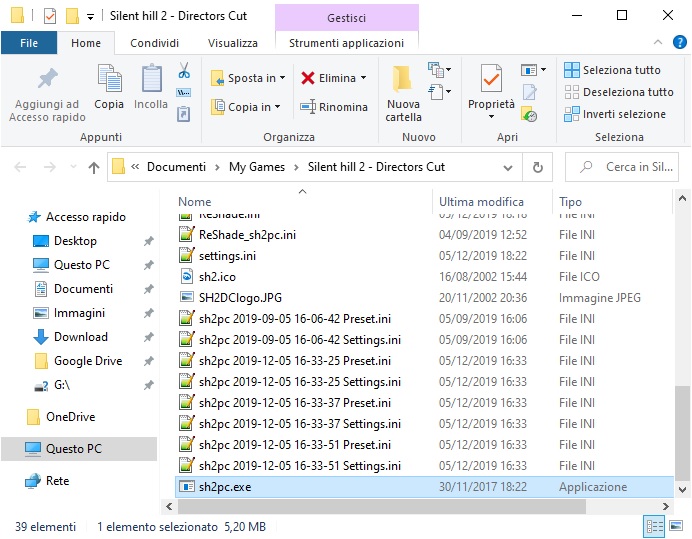
Are they related to the new reshade version, or perhaps the screenshot function?? They didn't appear before, can I delete them?
Badore90
on 8 Dec 2019
Are they related to the new reshade version, or perhaps the screenshot function??
How odd. Based on the file naming convention, they are definitely from ReShade.
They didn't appear before, can I delete them?
Yes, you should be fine to delete them. Question: Are these files created every time you start the game? Or whenever you take a snapshot using ReShade?
I'm using the latest version (4.4.2) and don't have this issue. I'd recommend opening ReShade's control panel in-game (by pressing the Home key) and seeing if there's a setting that was accidentally enabled?
Edit: That is the issue. Open ReShade's control panel, go to the Settings tab, and uncheck "Include current preset" under the Screenshots section.
Polymega
on 8 Dec 2019
Yes, you should be fine to delete them. Question: Are these files created every time you start the game? Or whenever you take a snapshot using ReShade?
I'll delete them and check it.
I'm using the latest version (4.4.2) and don't have this issue. I'd recommend opening ReShade's control panel in-game (by pressing the Home key) and seeing if there's a setting that was accidentally enabled?
I'm also using this version. The only thing I changed (as I done with previous versions) is that I opened the ReShade control panel and unchecked the SMAA and HQ4X.
But it's been a while, most probable it is related to the screenshot function, I'll make you know.
Badore90
on 8 Dec 2019
Funny timing as I just edited my post. :)
Try opening ReShade's control panel, go to the Settings tab, and uncheck "Include current preset" under the Screenshots section.
Polymega
on 8 Dec 2019
Funny timing as I just edited my post. :)
Try opening ReShade's control panel, go to the Settings tab, and uncheck "Include current preset" under the Screenshots section.
It solved, thank you :D
EDIT: I forgot to install the last ReShade version, I was actually using rev. 4.3.0.562
After installed rev. 4.4.2 that setting was already unchecked (by default, since I delete all the ReShade related files when upgrading, indeed I had to uncheck the 2 anti-aliasing option again as usual).
Maybe ReShade 4.3.0.562 had that option enabled by default for mistake.
Badore90
on 8 Dec 2019
@Polymega
Right now I can lock it like the resolution option but I will try to grey it out like the sound option. Should be better with that way :)
 belek666
on 19 Dec 2019
belek666
on 19 Dec 2019
Thanks, Belek!
I will try to grey it out like the sound option. Should be better with that way
I agree. If it helps with testing/researching: If you remove the dsound.dll file from the game's directory then Software 3D Sound selection will no longer be grayed out. If you put dsound.dll back in, that selection will be grayed out once more.
Polymega
on 19 Dec 2019
Hi @belek666 ,
Could I step up the challenge of this request?
In addition to locking/greying out the Screen Position option, is it also possible to lock/grey out the following options:
- High Res. Textures
- Shadows
- Fog
- Advanced Filters
- Lens Flare
... and overwrite these options to always be set to on/complex? (And also overwrite the screen position option to always be X:0/Y:0?)
A mock-up:

So this would leave Brightness Level, Noise Effect, Resolution, and Software 3D Sound (if not using dsound.dll) adjustable within this menu.
Polymega
on 31 Jan 2020
Here are relevant addresses (using v1.0 executable):
// Toggles for advanced options. Set on game launch - one write, no constant iteration.

00A333F8 4 byte (fog toggle); 0 = off, 1 = on
00A33400 4 byte (lens flare toggle); 0 = off, 1 = on
00A333FC 4 byte (shadow toggle); 0 = off, 1 = on
00A333A8 4 byte (low res texture toggle); 0 = off, 1 = on //note we would want to use 0 (off) for this one

//NOTE: The two addresses below must be toggled off/on together!
00A33404 4 byte (motion blur toggle (advanced filter pt. 1)); 0 = off, 1 = on
00A33408 4 byte (bloom/blur toggle (advanced filter pt. 2)); 0 = off, 1 = on

01DBBFF7 byte (screen position X); set to 0
01DBBFF8 byte (screen position Y); set to 0
...I'm having trouble finding the address(es) for the high res. textures option. I don't think this one is a simple on/off switch like the others, as you must enter a new area for the texture changes to take effect.
I'll update this post if/when I come across something for high res. textures.
Edit:
- Shadow toggle was used before to disable shadows for certain cutscenes when working with FrozenFish of soft shadows. Here, I believe (double-check that's the same address being used).
- Elisha may have used that fog toggle address for the upcoming pillarbox fix, I'm not certain.
Edit 2:
I think maybe make "DisableScreenPosition" its own fix (as that one will likely always remain disabled for most users), and all the other advanced options be put into its own fix, like "UseBestGraphics" or something, as some people may want to disable this one for tweaking.
Polymega
on 31 Jan 2020
When using a widescreen resolution, here is what happens if you change the screen position from X: 0 & Y: 0 (in the image below, I set X: -32 & Y: 32):
This visual error happens for all full screen events (main menu, save screens, maps, etc).
This is caused by FullscreenImages. Yet another reason I wanted to remove it... this should no longer be an issue once we start working on the next update.
 AeroWidescreen
on 31 Jan 2020
AeroWidescreen
on 31 Jan 2020
Thanks for checking on that, Aero_. If we zoom in extra on the riddle/memo images as planned for the next update still, this issue still won't be a concern? Also, double-check me, but it looks to still be an issue for the maps, even when FullscreenImages is disabled? (I'm thinking it's due to Fix2D?)
Polymega
on 31 Jan 2020
I think, at the very least, we should lock screen position down to X:0 and Y:0, regardless. There's no point in this day and age to change it. And for the fringe cases where someone is using a CRT that has a severely misaligned image, they can disable the fix and adjust it.
Polymega
on 31 Jan 2020
Thanks for checking on that, Aero_. If we zoom in extra on the riddle/memo images as planned for the next update still, this issue still won't be a concern? Also, double-check me, but it looks to still be an issue for the maps, even when FullscreenImages is disabled? (I'm thinking it's due to Fix2D?)
You're talking about the black line that appears, right? It's an error with Fix2D, yes. I should be able to fix it on the widescreen fix repository very easily. I'll do it in a second.
Elisha will have to update SH2E himself since I don't know how that's done anymore.
I think, at the very least, we should lock screen position down to X:0 and Y:0, regardless. There's no point in this day and age to change it. And for the fringe cases where someone is using a CRT that has a severely misaligned image, they can disable the fix and adjust it.
Yeah, I agree, but if this isn't fixed then changing the X/Y coordinates won't be of any use to anyone.
AeroWidescreen
on 1 Feb 2020
@elishacloud
Could you update the widescreen fix within SH2E, please? I added code that solves an issue with black bars appearing when the screen position was changed in the options menu.
AeroWidescreen
on 1 Feb 2020
Could you update the widescreen fix within SH2E, please?
Currently I am sourcing the WSF code directly from ThirteenAG's repository. What this means is that it needs to be updated by ThirteenAG. I could switch it to be sourced from a fork of ThirteenAG's repository, but my preference normally is to take it from the source.
 elishacloud
on 1 Feb 2020
elishacloud
on 1 Feb 2020
Well, I've updated the code in ThirteenAG's repository. Am I correct to assume that my changes will automatically be applied in the next build you upload?
AeroWidescreen
on 1 Feb 2020
Well, I've updated the code in ThirteenAG's repository.
I see. Ok, then I can pull it from there.
Am I correct to assume that my changes will automatically be applied in the next build you upload?
No. I need to update the sub module to use the latest update.
I will pull this update in the next check-in.
elishacloud
on 1 Feb 2020
Done! ea390e500fcaaf32c45c3e43f0683be274f71573
elishacloud
on 1 Feb 2020
@elishacloud
I updated it again with a few more pointers I missed. That should be it based on my testing.
Done!
Are you sure the new changes I made are being applied? Nothing was different after cloning and building. Same code, same problem. If you're sure then don't worry about it. Maybe I'm doing something wrong.
AeroWidescreen
on 1 Feb 2020
...I'm having trouble finding the address(es) for the high res. textures option. I don't think this one is a simple on/off switch like the others, as you must enter a new area for the texture changes to take effect.
@Polymega
You definitely have to undergo a loading process for the textures to be changed from low to hi-res and vice versa.
The addresses responsible for textures switch:
sh2pc.exe+541710 (00941710) byte — Immidiate text switch on the options screen
sh2pc.exe+541784 (00941784) byte — Stored text switch on the options screen
sh2pc.exe+6333A8 (00A333A8) 4 byte — Actual switch function
 Bigmanjapan
on 1 Feb 2020
Bigmanjapan
on 1 Feb 2020
sh2pc.exe+6333A8 (00A333A8) 4 byte — Actual switch function
Thank you, Bigmanjapan. This is what was messing me up. For this particular function, 0 = on, 1 = off. I've updated my previous post with this information.
You don't have to change/switch the options screen selection if you switch/enable the actual advanced graphics options on game launch; the options screen selections will change correctly afterwards, once you go into the options menu.
Polymega
on 1 Feb 2020
I updated it again with a few more pointers I missed. That should be it based on my testing.
@AeroWidescreen, Ok, I updated the submodule to the latest WSF check-in.
Are you sure the new changes I made are being applied?
It was pulling the wrong head. Should be fixed now.
elishacloud
on 1 Feb 2020
Ok, I updated the submodule to the latest WSF check-in.
It was pulling the wrong head. Should be fixed now.
Confirmed. Thanks!
AeroWidescreen
on 1 Feb 2020
@AeroWidescreen, If you have access to the WSF code, can you merge my pull request? This eliminates all the compiler warning when building the WSF code.
elishacloud
on 1 Feb 2020
Hi @belek666 ,
Could I step up the challenge of this request?
In addition to locking/greying out the Screen Position option, is it also possible to lock/grey out the following options:
* High Res. Textures

* Shadows

* Fog

* Advanced Filters

* Lens Flare
... and overwrite these options to always be set to on/complex? (And also overwrite the screen position option to always be X:0/Y:0?)
A mock-up:
So this would leave Brightness Level, Noise Effect, Resolution, and Software 3D Sound (if not using
dsound.dll) adjustable within this menu.
Sorry for the long wait, here is what I got now:
d3d8.zip
Selected options are locked like resolution and theirs values are set to the best one when entering Advanced Option. Currently all patching is done in resolution locking function. I think that 'LockResolution' should be renamed to 'LockAdvancedOptions' so all would be done in single function/setting.
belek666
on 6 Feb 2020
Thanks Belek!
I ran some tests with it. If a user disables these features in the settings.ini file then the settings will also be disabled in the game, and you will be unable to change them back with this fix.
Maybe we can slightly modify the entire approach to this? Please let me know your thoughts on the matter:
Disable screen position (and set them to X:0 and Y:0)
From the original request, lock the ability to open the Screen Position selection, and also set X:0 and Y:0 on game launch:
// Toggles for screen position. Set on game launch - one write, no constant iteration.

01DBBFF7 byte (screen position X); set to 0
01DBBFF8 byte (screen position Y); set to 0
; Disables the screen position feature in the game's options menu, which is no longer needed for modern displays.
LockScreenPosition = 1
... would it also be possible to grey out Screen Position as well, Belek?
The main purpose of this request is, adjusting the screen position will skew all full screen graphics, such as menus, text, selections, etc. And screen alignment is no longer a concern for modern displays. (People who still play on CRT can disable this fix, of course.)
Set advanced options to best values, but do NOT lock them out
Here is the purpose of this request: https://www.reddit.com/r/silenthill/comments/ewit80/enhanced_edition_not_showing_2d_fog_help_please/
... and this is but one example. Occasionally, I try to watch streamers play our project. While this doesn't happen every time, there have been instances where a streamer is playing without the fog enabled, or without the lens flare enabled, or without shadows.
It turns out they were completely unaware that you could enable these features! And it was only until I brought this up to them that they became aware.
I think the issue is that, on the console releases, you could never disable things like fog/lens flare/shadows, etc. So if someone starts the PC game and these things are already disabled, they must assume "that's just the way it is" and think there is no way to change/enable them.
With that said... maybe we could make another fix that enables these features on game launch, but does not lock them down?
// Toggles for advanced options. Set on game launch - one write, no constant iteration.

00A333F8 4 byte (fog toggle); 0 = off, 1 = on
00A33400 4 byte (lens flare toggle); 0 = off, 1 = on
00A333FC 4 byte (shadow toggle); 0 = off, 1 = on
00A333A8 4 byte (low res texture toggle); 0 = off, 1 = on // note: we would want to use 0 (off) for this one

//NOTE: The two addresses below must be toggled off/on together!
00A33404 4 byte (motion blur toggle (advanced filter pt. 1)); 0 = off, 1 = on
00A33408 4 byte (bloom/blur toggle (advanced filter pt. 2)); 0 = off, 1 = on
... this way, all the advanced options are set to "on" from game launch, but the player can still disable them after-the-fact, if they wish. Each time they relaunch the game, these features would reset back to "on" (best options).
; Enables all advanced graphics settings from the game's options menu on game launch.
UseBestGraphics = 1
I think that 'LockResolution' should be renamed to 'LockAdvancedOptions' so all would be done in single function/setting.
If you don't mind, let's keep LockResolution as its own fix. In the future Elisha has a plan to restore certain resolution options, and it will also require/use your LockResolution fix as it currently is.
Polymega
on 6 Feb 2020
Isn't the game itself setting the best options when there is no 'settings.ini' file? I will check when this happens. If function that sets the best option (I have found it already) is called every time on start we could just discard reading selected option from ini file.
Is current locking method for screen position enough? I could try to grey it out but this require more work.
belek666
on 7 Feb 2020
Isn't the game itself setting the best options when there is no 'settings.ini' file?
I'm not sure on that. I purposefully opened my settings.ini file and changed all the options to bad for testing. We'd have to assume that some players will already have this file and the options within are configured to the bad settings.
If function that sets the best option (I have found it already) is called every time on start we could just discard reading selected option from ini file.
Exactly. I think that would be the better/easier option here. I ran tests with that, and, if you set them to best options on game launch, the game's options menu will also correctly update to show the best options selected.
It would be okay if the user decides to change these options afterwards, so long as they're set to "best" on game launch.
Is current locking method for screen position enough?
It may cause confusion if the option is still bright and the player can scroll on it, but nothing happens when they try to select it.
Maybe we can just also set screen position X:0 and Y:0 on game launch as well, like for the other advanced options, and not worry about locking out the option?
Polymega
on 7 Feb 2020
d3d8.dll loads very early in the startup cycle, even before the game reads the ini file. I recommend modifying the settings later in the cycle. Adding the code here or here should work.
elishacloud
on 7 Feb 2020
@elishacloud
I've patched function that reads settings. Selected options are modified after loading ini file.
@Polymega
Release.zip
Now it should be ok :}
belek666
on 8 Feb 2020
Nice work, Belek! You even managed to fully reset and lock out Screen Position--nice touch!
Everything looks good and solid. I tested it on all binaries and everything works very good. There's just one visual inconsistency I found:
The names for these settings are dark grey:
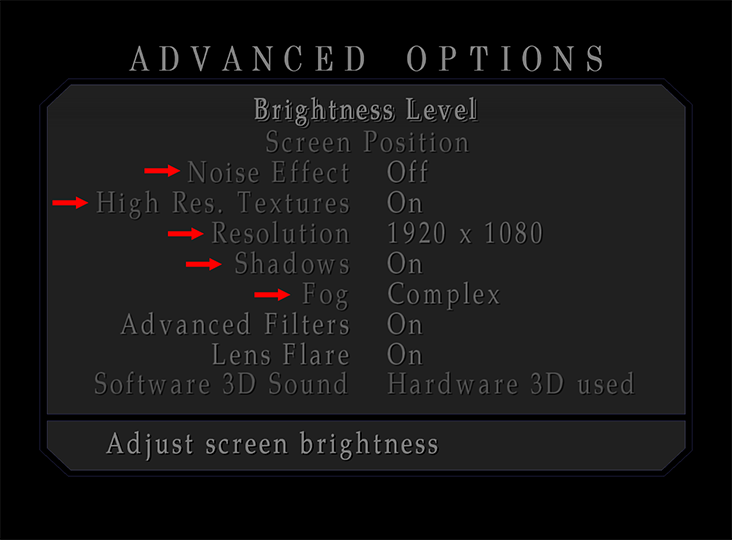
Can they be their normal light gray color? (Because you can adjust these after-the-fact)
Changing the gray color should finalize this. Thank you very much! This will ensure first-time players of SH2 PC/EE will experience the best visual settings from the start, as first impressions are important!
Polymega
on 8 Feb 2020
Fixed:
d3d8.zip
I forget to change color back :) I didn't notice difference when testing. If everything is ok I'll make pull request to repo.
belek666
on 8 Feb 2020
Everything looks great now. Thank you once more, Belek!
Polymega
on 9 Feb 2020
Related issues
Badore90
·
9Comments
 silentdream21
·
8Comments
silentdream21
·
8Comments
 Supernaturallll
·
13Comments
Polymega
·
15Comments
Polymega
·
8Comments
Supernaturallll
·
13Comments
Polymega
·
15Comments
Polymega
·
8Comments