Silent-hill-2-enhancements: Disable changing res in the game menu and show true res size
Hi @belek666,
With your recent pull request to unlock the ability for all language options in the North American EXE, plus the custom string file for the PC pause menu, I was wondering if I could ask your help with doing something else that is similar in spirit?
While using our project, if a player tries to change the resolution through the game's Options menu the game may likely crash. While this isn't a widespread problem, I have received a handful of questions/confusion over this from YouTube comments whenever we release a new update.
May I ask if you could help us do the following?
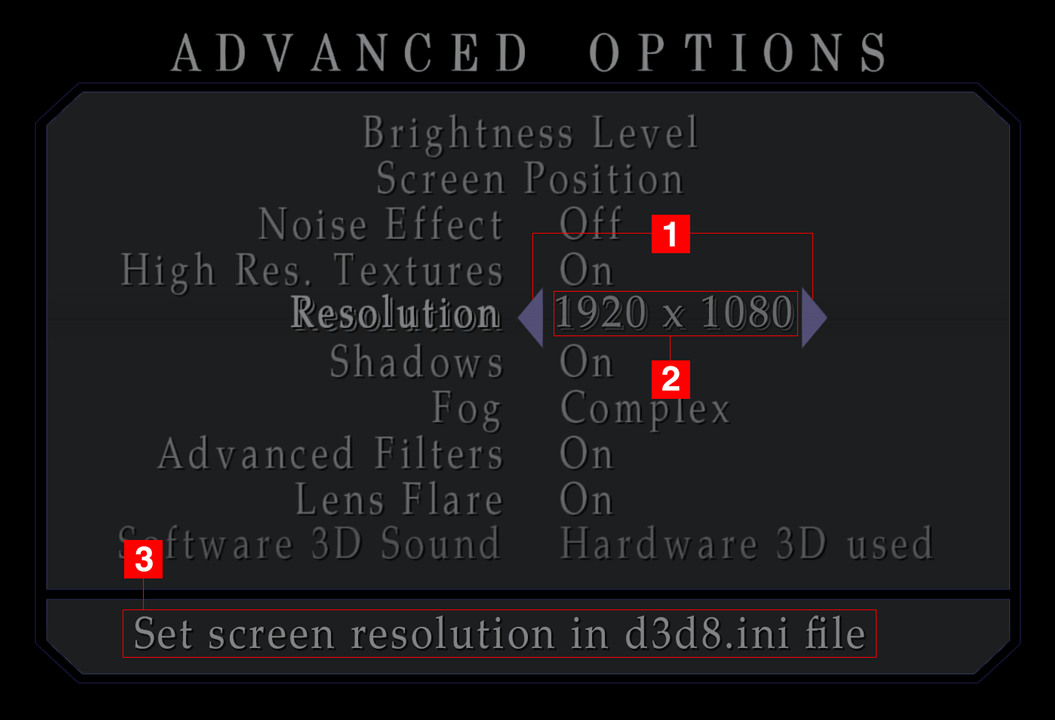
LockResolution = 1 // Disables the ability to change resolution in the game's options menu, which can crash the game while using enhancement packages.
- Disable the ability to cycle/change the resolution settings. (Similar to how the North American EXE disabled language selection before you unlocked that feature.)
- Display the true resolution being used. Currently, the game shows one of its predefined resolution selections here, which can lead to player confusion.
- _Optional:_ If
LockResolutionis being used, have custom text for the resolution description telling people where to change this. This part isn't that important to implement, compared to the previous parts.
Thanks for any help/insight on this!
 Polymega
All 23 comments
Hello @Polymega
It shouldn't be hard to implement 1 and 2. I will take a look at this if find some free time. The easiest way to achieve 3 is by editing mes file. What do you think about that solution?
I was thinking about making main menu background (start00.tex) and menu texts (start01.tex in North American exe) dependent on selected language. Game already has Japanese main menu background file (start00j.tex). So others languages will use different files.
 belek666
on 1 Jun 2019
belek666
on 1 Jun 2019
Thank you, Belek!
What do you think about that solution?
Sure, that would work out just fine. :)
I was thinking about making main menu background (start00.tex) and menu texts (start01.tex in North American exe) dependent on selected language.
That would be awesome! If even just start01.tex could have different files for different languages that would be extremely beneficial.
Polymega
on 1 Jun 2019
All 3 implemented. Custom text for resolution is used from exe_str.txt file. Also partially fixed issue with Blood settings string misalignment for other language. There is still a problem when using mouse in all Game Option menu.
Release.zip
belek666
on 13 Jun 2019
Beautifully done, Belek!
You have just made user experience much better for the common player. They will no longer be confused as to why they can't adjust the resolution from the game's Options menu or why it crashes the game when they attempt to change it here.
I contacted some friends on Facebook and did a call-out on Twitter for translations of the new line. Here is what I got: exe_str.zip
Also partially fixed issue with Blood settings string misalignment for other language. There is still a problem when using mouse
Great! I hope the mouse part will not give you too much trouble. I noticed the alignment of the text is off from the rest of the choices:
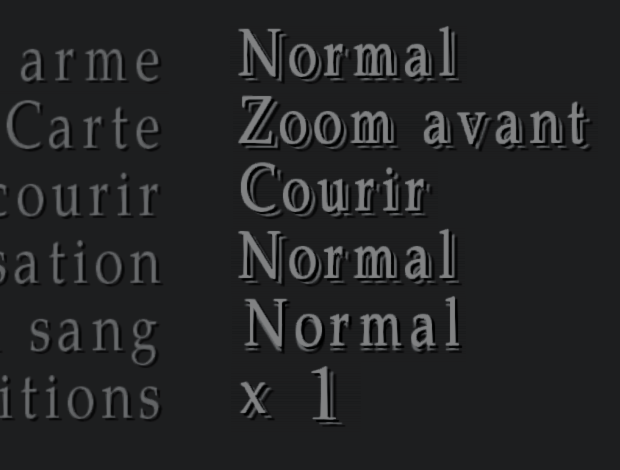
If it proves to be too much trouble to re-align then don't worry about it. Most people probably wouldn't notice that slight offset from the rest of the text.
Polymega
on 13 Jun 2019
It should be ok now:
d3d8.zip
Has version 1.1 mouse pointer misalignment in the main menu?
belek666
on 15 Jun 2019
Nice! It looks and the mouse functions perfect on it now!
Has version 1.1 mouse pointer misalignment in the main menu?
Interesting... all three versions (1.0, 1.1, & DC) have the mouse misalignment.
Only 1.0 had the visual misalignment.
Your latest build fixes all these issues for the blood color change. :)
Polymega
on 15 Jun 2019
Has version 1.1 mouse pointer misalignment in the main menu?
Sorry, I misread that. Yes, 1.1 is notoriously known for it's horrendous misalignment in the _main menu_. That's pretty much the sole reason we never use it.
If you could also fix that we could start telling people to use 1.1 instead.
That would probably be a huge help because, as of right now, we're using 1.0 which was turned into a "No CD" from hackers many years ago. The problem is, we don't know what else the hackers might have changed in the binary for this executable, which could possibly lead to stability issues when using our project.
However, version 1.1 is what happens when you run 1.0 through Konami's official sound patcher (PC Sound Support Patch*). After you run 1.0 through this patcher, it turns into 1.1 and it also removes the DRM from the executable.
Yes, that's right! Konami's official patcher _removes_ the DRM from 1.0! We could use an untouched (DRM) 1.0 that came with the base installation of the game, run the patcher to turn it into 1.1, use your main menu alignment fix, and that way we could know that nothing else has been tampered with inside the binary.
*These downloads were taken from the official Konami support website many years ago from myself. They should be completely safe to use.
Polymega
on 15 Jun 2019
Thank you for information, It was quite easy:
Release.zip
Looks like developers left mouse hitbox values from dc text version. Changing them to original values from 1.0 graphical menu fixed issue :)
belek666
on 15 Jun 2019
Incredibly solid and thorough work with all of this, Belek! Well done!
@elishacloud @AeroWidescreen
Thanks to Belek's work the main menu for 1.1 is now properly aligned to the cursor. This means we can run an untouched 1.0 (with DRM intact) through the official Konami patcher to turn it into a DRM-free 1.1 executable.
If either of you see no objection to this, I can change the executable to 1.1 in the installation guide on the next update (that includes Belek's fixes above) for people to start using? We would continue work/testing on 1.0, of course, but the end user could use 1.1 to ensure maximum stability (as we know it isn't tampered with by other modders outside the project).
Polymega
on 16 Jun 2019
@belek666
I was thinking about making main menu background (start00.tex) and menu texts (start01.tex in North American exe) dependent on selected language.
I made start01.tex in the different languages in case it may help you with testing: start01_languages.zip
I noticed some of the words got cut off in other languages. Also, I'm happy to do this in Polish as well if you can translate the following for me:
CONTINUE
NEW GAME
OPTIONS
MOVIES
EXIT
ACTION LEVEL
RIDDLE LEVEL
HARD
NORMAL
EASY
BEGINNER
Main Scenario: LETTER FROM SILENT HEAVEN
Sub Scenario: BORN FROM A WISH
Thanks :)
KONTYNUUJ
NOWA GRA
OPCJE
FILMY
WYJŚCIE
WALKI
ZAGADKI
TRUDNE
NORMALNE
PROSTE
BARDZO PROSTE
I SCENARIUSZ: LIST Z MILCZĄCEGO NIEBA
II SCENARIUSZ: ZRODZONA Z PRAGNIENIA
Here is new version:
Release.zip
It will load "data/pic/etc/start00x.tex" and "data/pic/etc/start01x.tex" according to language (x is language first letter). Some menus prepared by you are to long. Game does not display them fully (I saw this in spanish and italian).
belek666
on 17 Jun 2019
Thank you! I'll translate the verbiage to Polish for you soon. :)
Game does not display them fully (I saw this in spanish and italian).
Yes, I will try and work around this. It seems that the mask size/area for each word is a predefined size.
Couple things I've noticed:
- If a single file is missing for the selected language, the main menu screen turns completely black and freezes the game.
- Can a safety check be put in place to where if the file is not found/detected it defaults to
start00.texorstart01.tex? This will both prevent a black screen and having the game freeze.
- Can a safety check be put in place to where if the file is not found/detected it defaults to
- If the above request can be done, we probably will only use the original
start00.texfor the time being (as it will say SILENT HILL 2 across all languages). But it would still be good to have the option for differentstart00x.texfiles in the future.
Polymega
on 17 Jun 2019
- If you set 'd3d8to9 = 0' (looks like there is an issue causing freezing when using dx9) it will show error screen about missing files. No problem adding file checks.
- There is already
start00j.texwith additional text so maybe we can add similar to rest of languages
belek666
on 17 Jun 2019
Here is the main menu in Polish: start01p.zip
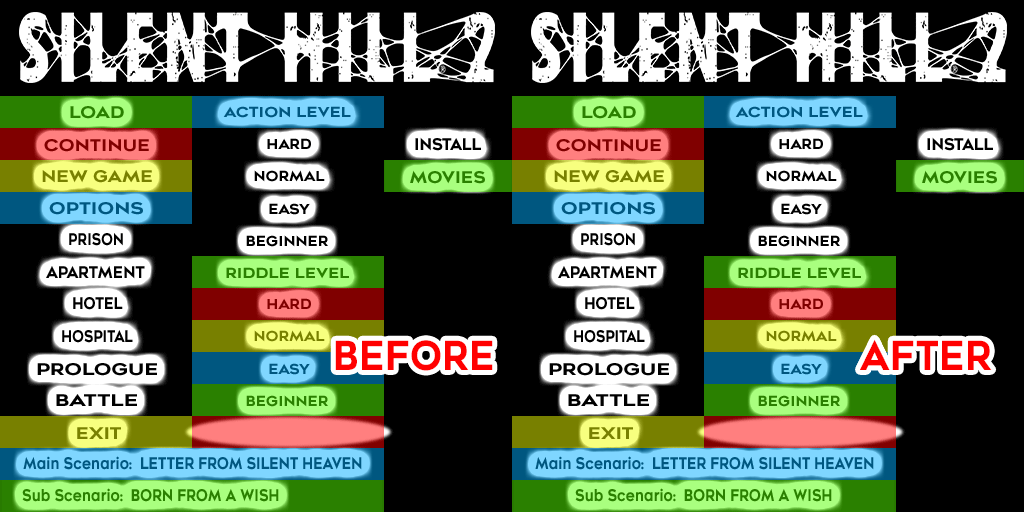
Also, here are the masking sizes for each part. This is an approximation but it's fairly accurate:
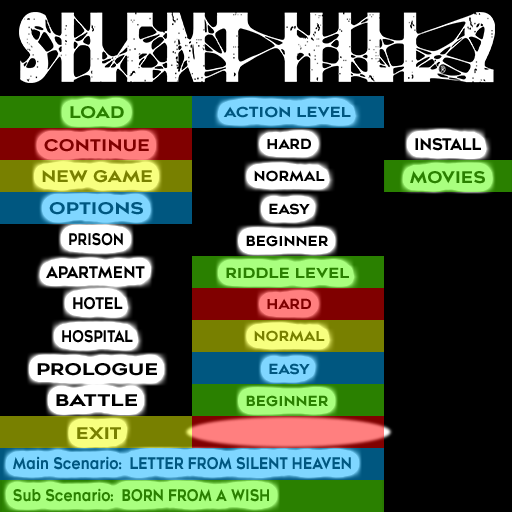
The game uses the Beginner/Easy/Normal/Hard at the bottom of this image for both menu choices.
Once we start work on the "Fullscreen Image Enhancement Pack," I will go back and make the menu text images much nicer. But for now, this can hold us over for the time being.
Also, I will next work on making the other languages fit within the confines of these mask shapes.
Polymega
on 17 Jun 2019
Belek,
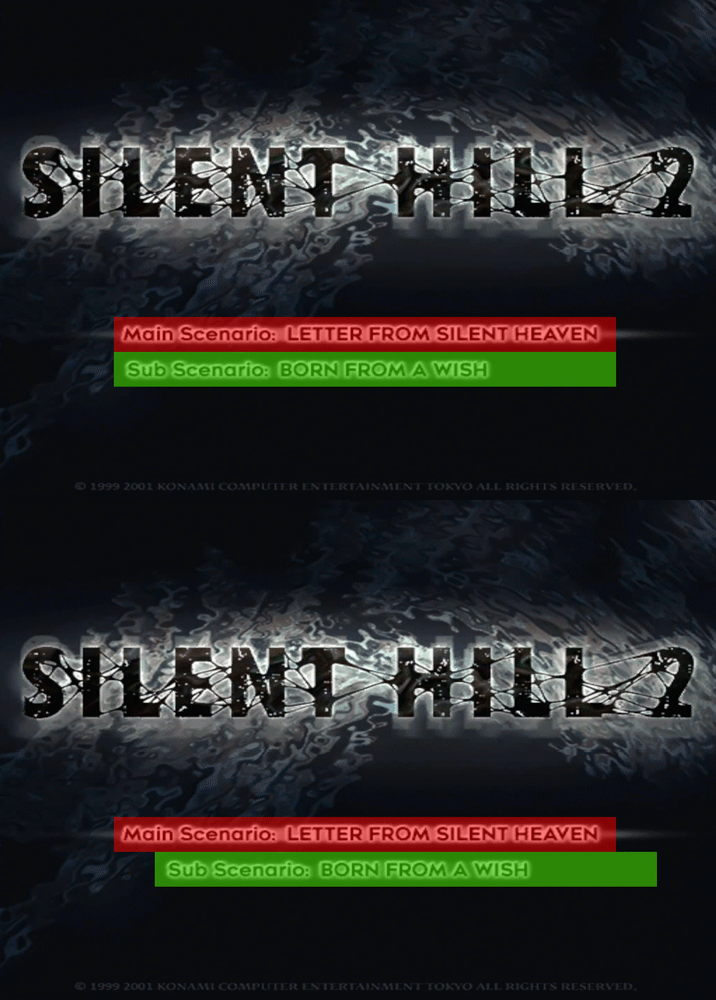
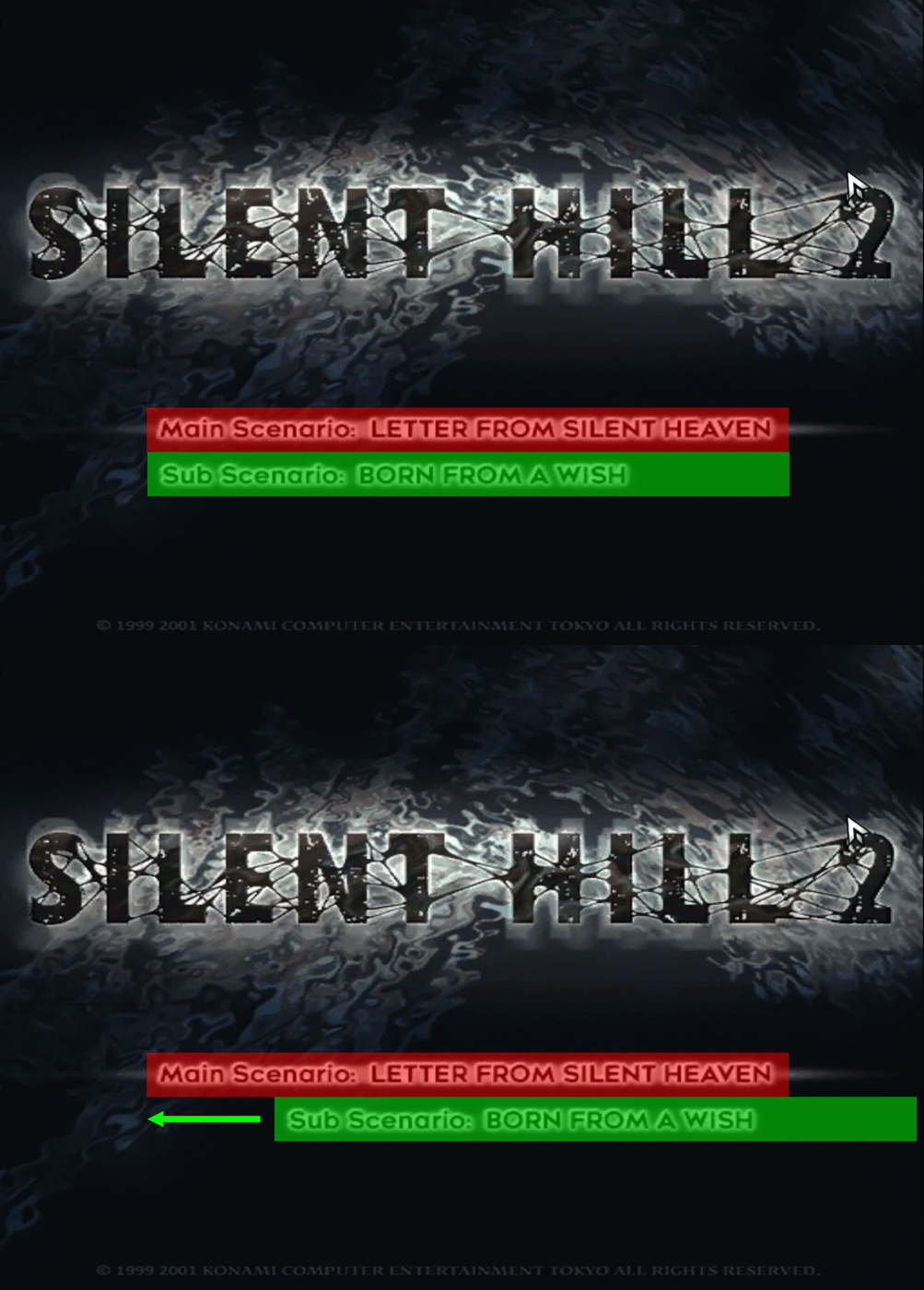
Refer to the image above showing the masking size for the main menu lettering. The game offsets the "Born From a Wish" text by shifting it more to the right. Is it possible to make its alignment the same as "Letter From Silent Heaven"?
If this can be done, I can then re-center the "Born From a Wish" text in the texture file itself. This is useful because "Born From a Wish" is translated into much longer sentences in other languages.
Polymega
on 17 Jun 2019
Hi @belek666,
Elisha and I were working on another fix for the project and found a critical issue: If a player is using the newest exe_str.txt file (that includes the "Set screen resolution in d3d8.ini file" messages) but are still using an older version of the SH2 Enhancements module (without your newest fixes) it will crash the game upon trying to load a save file.
Could a fail safe also be put in for this? I was thinking one of the easier ways to do this would be to move the "Set screen resolution in d3d8.ini file" messages to its own txt file. Such as: \sh2e\text\[new file name].txt
That way, the contents of the original exe_str.txt file remains untouched and wouldn't crash the game if someone continues to use an older version of the SH2 Enhancements module. Do you think that would be a simple solution? Maybe something different?
Polymega
on 21 Jun 2019
Belek,
Refer to the image above showing the masking size for the main menu lettering. The game offsets the "Born From a Wish" text by shifting it more to the right. Is it possible to make its alignment the same as "Letter From Silent Heaven"?
If this can be done, I can then re-center the "Born From a Wish" text in the texture file itself. This is useful because "Born From a Wish" is translated into much longer sentences in other languages.
I could make text position dependent on selected language. I've control over texts and selector position.
Hi @belek666,
Elisha and I were working on another fix for the project and found a critical issue: If a player is using the newest
exe_str.txtfile (that includes the "Set screen resolution in d3d8.ini file" messages) but are still using an older version of the SH2 Enhancements module (without your newest fixes) it will crash the game upon trying to load a save file.Could a fail safe also be put in for this? I was thinking one of the easier ways to do this would be to move the "Set screen resolution in d3d8.ini file" messages to its own txt file. Such as:
\sh2e\text\[new file name].txtThat way, the contents of the original
exe_str.txtfile remains untouched and wouldn't crash the game if someone continues to use an older version of the SH2 Enhancements module. Do you think that would be a simple solution? Maybe something different?
Old version reads text file without checking number of strings. Since new file has more strings in it will excess memory and cause crash. New version has checks for proper number of strings in file. Since old version doesn't have those, the best way is to use updated module. But to remain compatible with older version the only way is to keep exe_str.txt unchanged (number of strings) and use new file. I don't know if we should do that. I could make needed changes.
belek666
on 23 Jun 2019
I could make text position dependent on selected language. I've control over texts and selector position.
Thank you! It looks like the "Born From a Wish" text was pushed further to the right. Can it be pushed left to match the same hit box alignment as "Letter From Silent Heaven"? I apologize as I probably should have clarified that better.
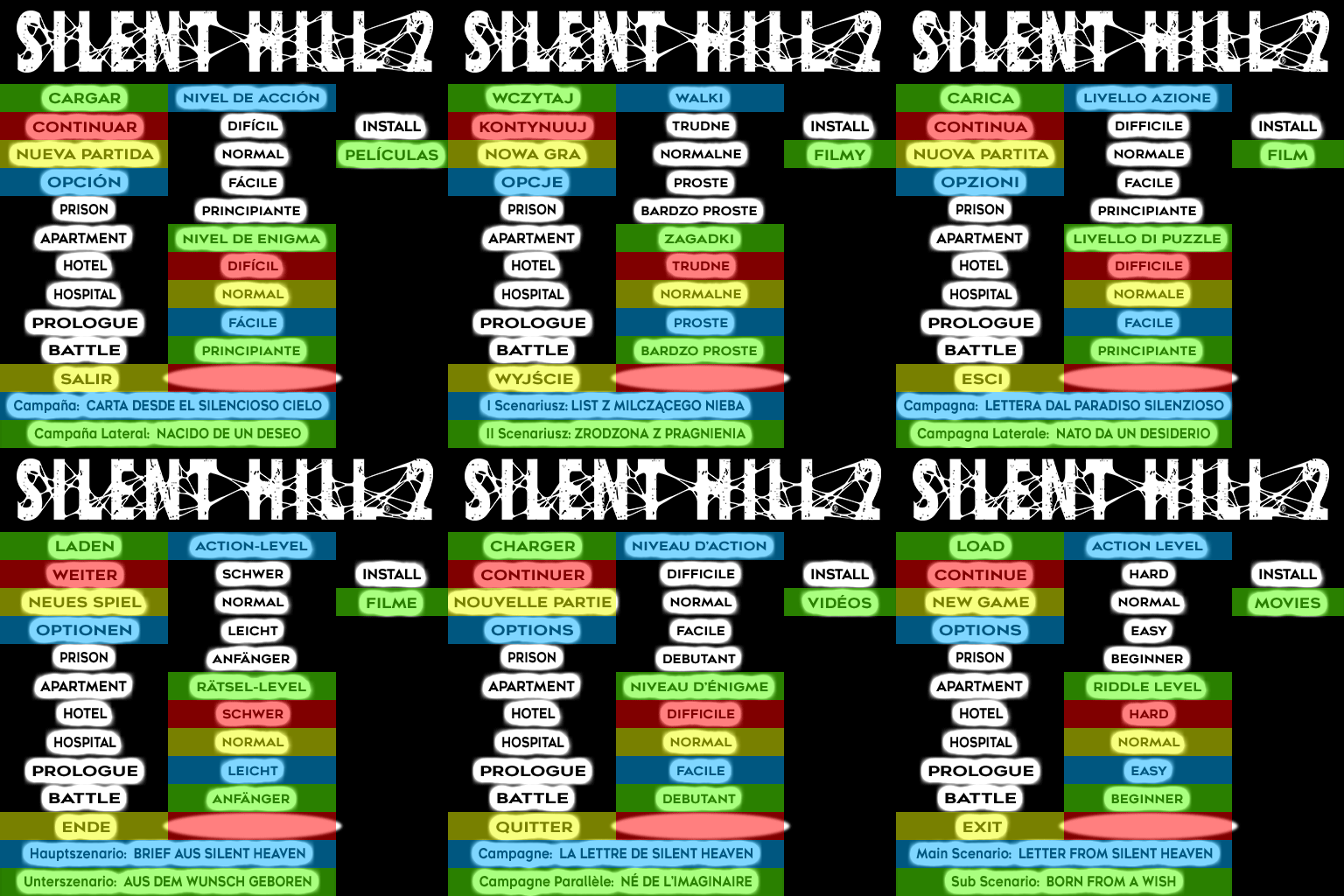
If the alignments can be the same, the new texture files will then look like this (where I center both campaign names within the hit box boundaries). By doing this, both campaign names should be centered between each other for all languages:
Here are updated language main menu textures if it may help with testing: start01_languages.zip
Since old version doesn't [check for proper number of strings in file], the best way is to use updated module.
I completely agree with you and I will always push people to use the latest version of all our work. Although I am concerned about the people who don't pay attention to such things and may only update the 'Enhanced Edition Essential Files' package and not the SH2 Enhancements module.
Although hopefully those types of people are few and far between...
If you think we would be okay and most people will be careful to also update the module, we can keep everything in one exe_str.txt file. Please forgive my worrying: I used to do a lot of websites for clients and one of the first things we learned was, "Always assume people have never been to a website before." :)
Polymega
on 23 Jun 2019
Thank you! It looks like the "Born From a Wish" text was pushed further to the right. Can it be pushed left to match the same hit box alignment as "Letter From Silent Heaven"? I apologize as I probably should have clarified that better.
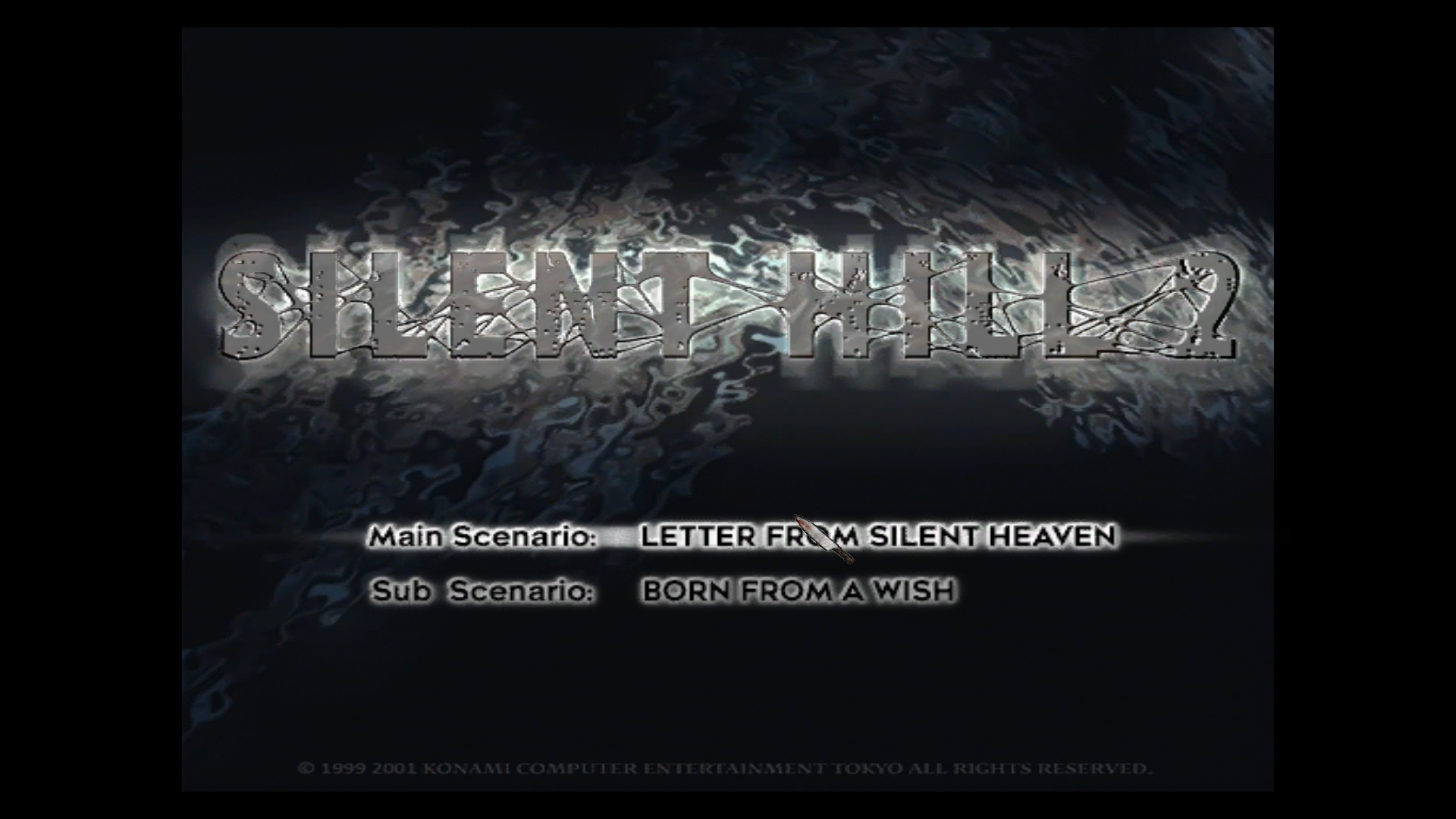
It should work that way. I'm getting this:
BTW Thank you for making Polish version :)
belek666
on 23 Jun 2019
It should work that way. I'm getting this:
D'oh! Knowing me I probably grabbed the wrong d3d8.dll test file (I have a bunch of test versions I switch between at the moment). Sorry about that... and yes! It looks great! Well done!
Polymega
on 23 Jun 2019
Thank you again for all your hard work with this, Belek. With your latest test build, I purposefully removed some lines in the exe_str.txt file and all other lines were still in their correct spots within the game. Nice planning with that!
There's one other text/translation area that could possibly use some adjusting. Please see the video below:
https://youtu.be/dm5U3EL2y94
Edit: This video was recorded a while ago and isn't using your latest builds that change the language text on the main menu.
Whichever language was pre-selected upon launching the game will have "Now loading..." displayed in that language. If you change the language in the Options menu and back out into the main menu, the "Now loading..." text does not update to the newly-selected language.
I did notice that if you start a new game/load a save file, then back out to the main menu the "Now loading..." will then update to the correct, new language. I also noticed that the Director's Cut EXE simply hides/removes the "Now loading..." message entirely (probably because of this issue).
Could we hide the "Now loading..." message for 1.0 and 1.1 executables, like what the DC EXE does? Or could updating that text string to the correct, selected language be a relatively straight forward thing to fix? If there isn't an easy way to fix it, I'd say hiding it like what the DC EXE does would be completely fine to do.
Thank you very much again
Polymega
on 25 Jun 2019
Thank you again for all your hard work with this, Belek. With your latest test build, I purposefully removed some lines in the
exe_str.txtfile and all other lines were still in their correct spots within the game. Nice planning with that!
I made it to just ignore exe_str.txt if there is no proper number of strings.
There's one other text/translation area that could possibly use some adjusting.
Here you go:
belek666
on 25 Jun 2019
I made it to just ignore exe_str.txt if there is no proper number of strings.
Simple but effective; nice thinking. :)
Here you go:
I'd say this part of the project is done now! The improvements here have evolved past the original concept of a resolution fix to now fix many user interface issues; and all of these improvements are completely wonderful!
You did an excellent and thorough job with these improvements. Thank you again for all of your hard work.
Polymega
on 25 Jun 2019
Related issues
 Ihavedepressionimsad
·
4Comments
Polymega
·
10Comments
Polymega
·
18Comments
Ihavedepressionimsad
·
4Comments
Polymega
·
10Comments
Polymega
·
18Comments
 Storm3000
·
10Comments
Storm3000
·
10Comments
Storm3000
·
10Comments
Storm3000
·
10Comments