Silent-hill-2-enhancements: Restoring specularity to objects throughout the game
This may be a more involved fix so making its own post.
Throughout the game, certain meshes should always have a specularity/"reflection" to them. These include James' eyes; flashlight body; flashlight lens; all other character eyes; Maria's skirt, necklace, hip rope/pendants; etc.
Yet, throughout the game these meshes will often not have any specularity to them. It's only when you go in specific rooms or when specific cutscenes initiate that these types of objects get their shine back.
Here are some image examples of where they shine: https://github.com/elishacloud/Silent-Hill-2-Enhancements/issues/66#issuecomment-443391958
Looking into this I've noticed shader consistencies between when these things do and don't shine. This was tested by capturing a handful of scenes using the Intel Frame Analyzer where certain mesh objects do shine correctly and where they don't. I haven't done any extensive research with this yet but captured a few test areas for the time being.
- I don't believe this is a true specular material but instead something that mimics the effect. When the "specularity" works, the mesh has three textures: 1) The actual texture file, 2) a simple white gradient circle (that very likely has some sort of alpha channel with it) which simulates the specular shine, and 3) a cube map for which the gradient circle moves around in relation to the camera's position upon the mesh.
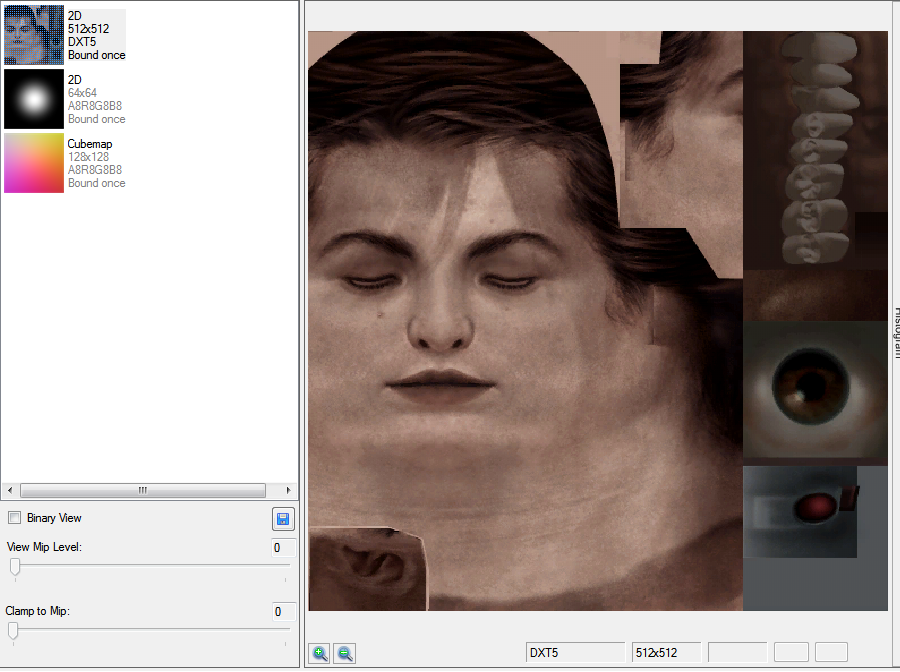
The gradient circle is always the second texture loaded in, and the cube map is always the last (third) texture to load in.
Every object that does shine may have different vertex shader codes, but there are portions within each of their vertex shader codes that share identical lines to others that also render the specularity right.
The majority of objects that do shine have the same, exact pixel shader code.
Objects that should shine but don't do not have any pixel shader. They do have a vertex shader and, as mentioned above, there are lines within it that are indentical to those in vertex shaders where the shine works.
Objects that should shine but don't do not have a cube map; just the main texture file and the white gradient:
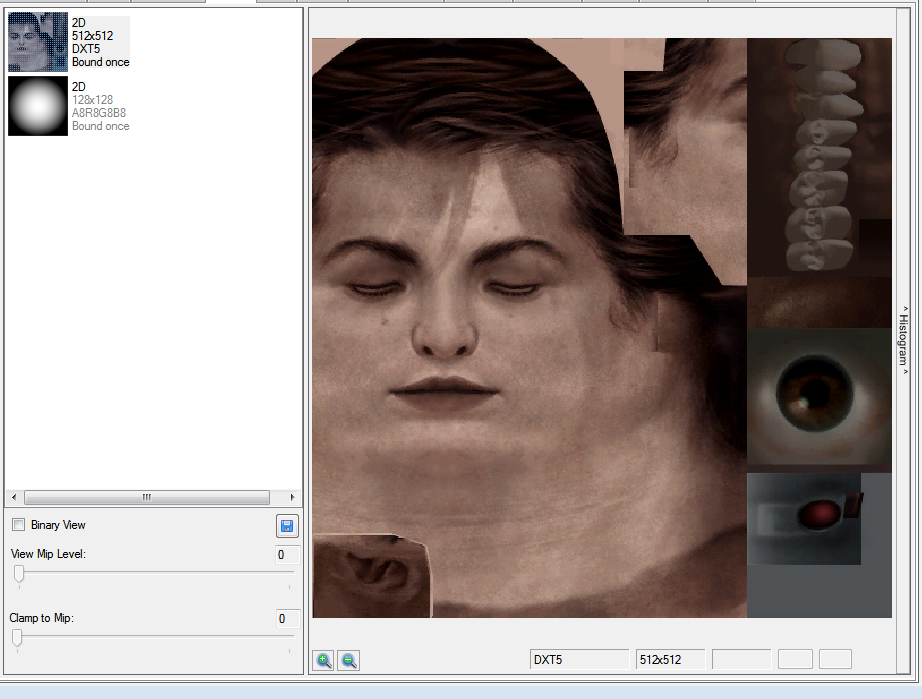
For the majority of meshes that do correctly shine, they all share the following pixel shader:
Edit: Removed _a bunch_ of vertex shader code that really didn't mean anything.
All just observational talk at the moment but perhaps worth sharing the segments of similarites in shaders between different meshes that currently do shine correctly vs. those that don't.
 Polymega
All 71 comments
@Belek666 thank you very much again for your help with restoring bugged lighting transitions for the game. We should have those areas fully fixed soon thanks to your help!
While testing the lighting transition fix, I noticed something interesting when adjusting the SomeType address from 3 to 2 in areas that I tested: The specularity for certain objects either become enabled/disabled.
SomeType = 3
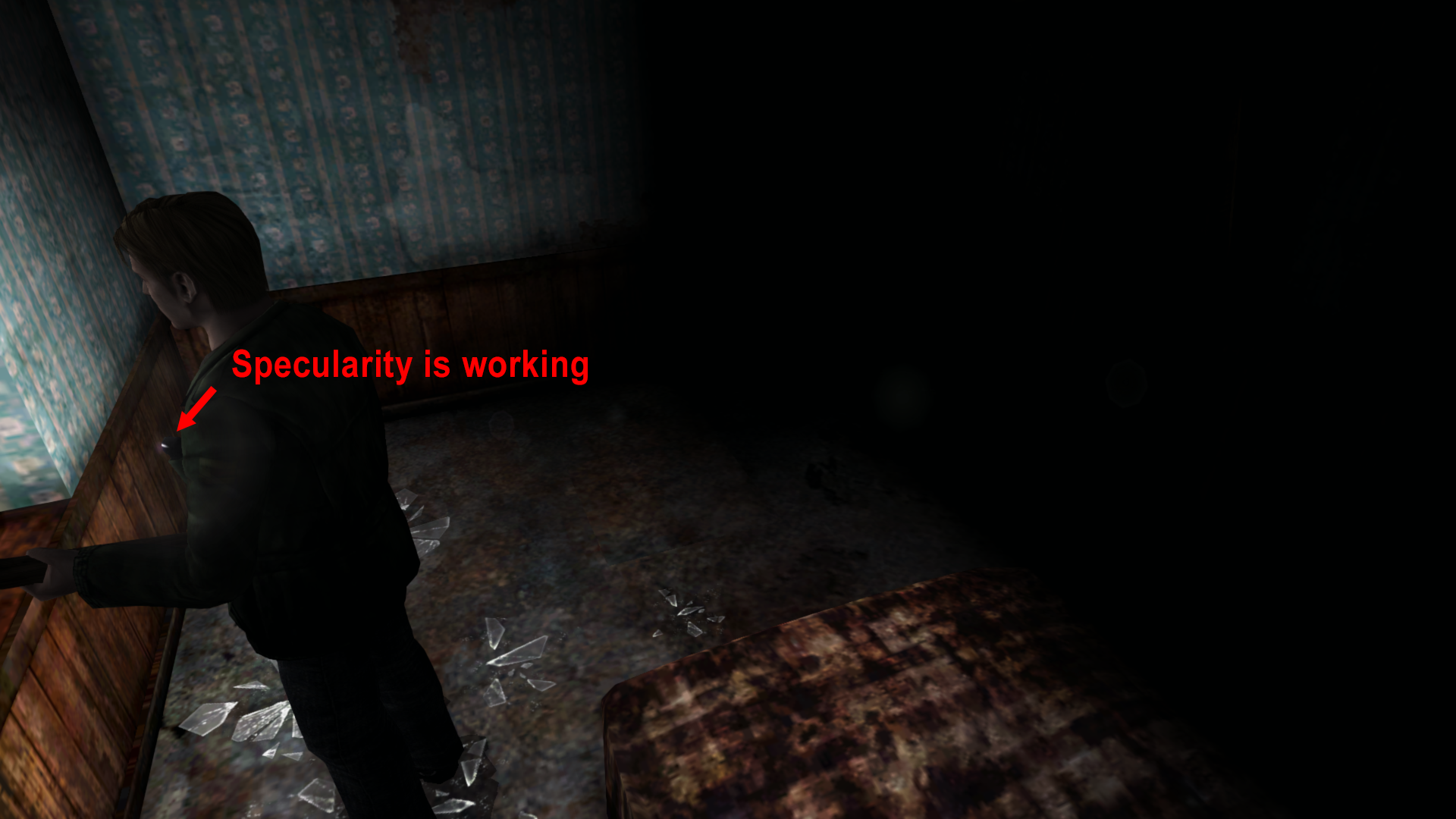
SomeType = 2
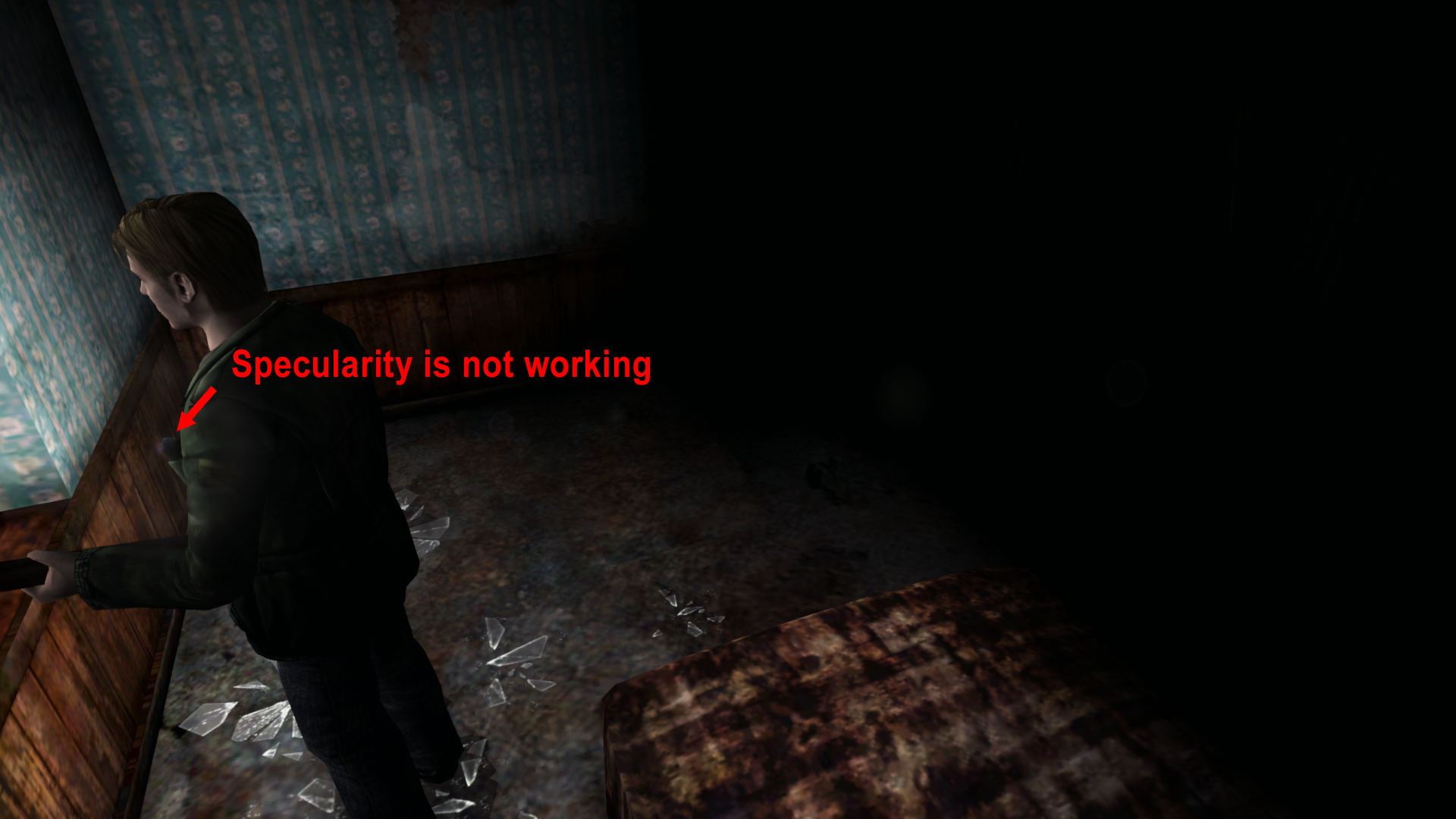
This is another issue prevalent throughout the PC version of the game. For many areas, specularity ("shininess") for certain objects simply doesn't render. For example, these objects should have specularity on them:
- James' flashlight body
- flashlight lens
- Maria's skirt
- Maria's jewelry
- Store shop windows
- All characters' eyes
- Etc.
But on the PC version, for much of the game, they don't have this effect. However, for certain areas/cutscenes, their specularity is restored. You can see image examples of some of these spots working correctly here.
With that said, and seeing how specularity became enabled/disabled by adjusting an address you provided, I wanted to ask you: Is there perhaps an address (or set of addresses) that can toggle the specularity on and off throughout the entirety of the game?
All this time I thought the PC version simply didn't have the code/functions to have this always enabled. But now I'm curious if there's something hidden in the code that can be restored...
Polymega
on 29 Jan 2019
Here's a video example showing how certain, specific light regions will enabled/disable the specularity on James:
If you set SomeType to 2 in this room the specularity (along with shadows) will be gone within that lighting region.
So the question becomes: How can we have specularity enabled for all objects that should have specularity even when they are not in certain light regions (basically have it on at all times).
Polymega
on 29 Jan 2019
@Polymega
Sorry for long silence but I still didn't find proper fix. My initial solution (discovered by accident) was to call game's function which sets light spot (function with 'SomeType 3', set light with direction and has bugged lighting transitions) with zeroed arguments before setting other light spots. It 'restored' specularity in all places but with strange shadows and wrong reaction to flashlight in comparison to ps2 version. By looking into code I've found that function with 'SomeType 3' is using pixel shaders but others not. You can check this by changing function with 'SomeType 2' to '3'. Here is address for it: 50d3c6 Now you get specularity in different light spots but with bugged transition. So maybe this is main cause. I have no experience with pixel/vertex shaders to check it what may be wrong.
 belek666
on 14 Feb 2019
belek666
on 14 Feb 2019
Hi @belek666 ,
Thank you for looking into this! I'm sorry you've ran into troubles with this but you've done really great work with this already. Not only have you helped us restore lighting transitions for a few bugged areas, but you have now proven that specularity for certain objects _is still there_ within the PC version.
That is a big deal in and of itself! It's refreshing to know the ability to restore this feature should still be there within the game and we possibly won't have to "brute force" a fix for it by sniffing out certain geometry meshes and hard-coding pixel shaders back onto them.
Polymega
on 15 Feb 2019
@belek666 @FrozenFish24
Just an observation, but, if you add then set either HACK DX_CONFIG_USE_PIXEL_SHADERS 0 or
HACK DX_CONFIG_USE_VERTEX_SHADERS 0 within the local.fix file the game restores specularity to things:
https://youtu.be/lkzdheZumEQ
We of course do not want to use this because it either removes or neuters a lot of other effects used elsewhere in the game. But I thought it odd that disabling pixel and/or vertex shaders _restores_ the pixel and/or vertex shaders that give certain objects their specularity back.
Polymega
on 6 Mar 2019
@Polymega
Thank you for this information. I may have discovered a solution, but as usual I need you to test it for me.
@belek666 @FrozenFish24
005018CB mov eax, 00000000 // restores "specular" visibility
When the game is using pixel shading for the flashlight, the value in eax is 1. When you switch to vertex shading, the value is 0. Changing it back to 0 for pixel shading restores the missing specularity, even when the flashlight is off or when the Lighting Transition Fix (SomeType) is enabled. I've checked a few areas and haven't noticed any problems with this yet.
One thing I noticed is that the results aren't 100% the same as when the vertex shaders are in use. For example: the flashlight lens doesn't reflect anything, only the outer part of it does. Perhaps there's room for improvement.
 AeroWidescreen
on 7 Mar 2019
AeroWidescreen
on 7 Mar 2019
Wow! What a nice surprise. Thanks, Aero_! I'll give this a full playtest soon and report back.
One thing I noticed is that the results aren't 100% the same as when the vertex shaders are in use. For example: the flashlight lens doesn't reflect anything, only the outer part of it does. Perhaps there's room for improvement.
This has to do with how the camera is oriented to the object that is specular. The camera must be at a particular angle in relation to the object for it to shine. So, happily, the flashlight lens does still shine. :)

But I'll make sure other things that should shine are shining when I do the thorough playtest.
Polymega
on 8 Mar 2019
This has to do with how the camera is oriented to the object that is specular. The camera must be at a particular angle in relation to the object for it to shine. So, happily, the flashlight lens does still shine. :)
Huh, you're right. I wonder if that could be adjusted? Or maybe it shouldn't be adjusted? I'll have to check the PS2 version later. EDIT: Looks like it's accurate to the PS2 version after all. No need to change anything I guess.
That's a big relief though. It means that everything is there working as intended. Hopefully you don't find any problems during your testing.
AeroWidescreen
on 8 Mar 2019
I'm about to hit the bed but got to the start of the hospital and, so far, everything is working great. No weird shadow bugs, and everything remains specular.
I can suggest one pre-emptive change recommendation:
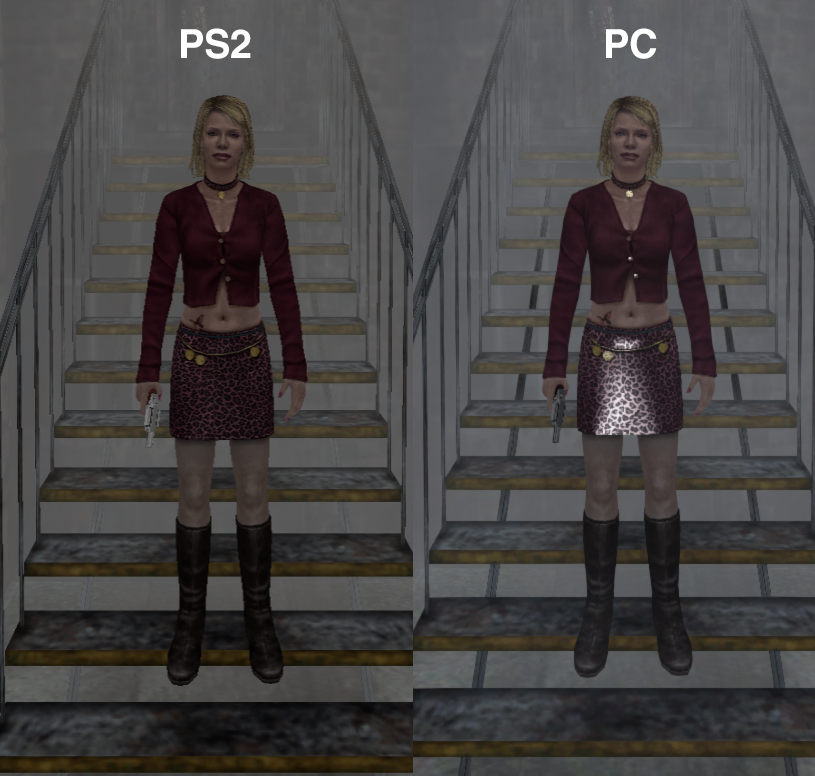
This fix makes the shine on specular objects full force (100% brightness/whiteness). Whereas, in the PS2 version, the specularity by default is at ~25% (so you see some specularity but it's not full-on bright white and, instead, has some transparency to it).
I did a little back-and-forth with the PS2 version myself and found the following:
- The "default" specularity levels are at ~25%. Meaning, if there is no specialized lighting areas it uses ~50%. These areas would be the outside town (both night and day) or any indoor area where it would be pitch black unless you used your flashlight, as some examples.
- The specularity goes to~50% whenever you are in a specialized lighting zone (which the vanilla PC game actually does for some specialized lighting zones, already). As soon as you leave a special/unique light zone, specularity goes back to ~25%. Here is a PS2 example:
https://youtu.be/_dQEXITWNtM
(Pay attention to his flashlight. You can typically tell when you're in a special light zone as shadow casting will change when you enter/leave the area.)
Of course, this may not be a one-size fits all change for the game, _but_, if we can tone down the intensity of the specularity when in "default" lighting zones, but keep everything else the same as what you've already done, I'd wager it'd be good to go as-is at that point.
Polymega
on 8 Mar 2019
@AeroWidescreen
I didn't test all endings but went through both campaigns and every room I could. It all worked great. No visual/shadow bugs to speak of and everything remained specular. Well done with this!
If it's possible to tone down the "default" intensity/brightness of the specularity (and let specialized lighting zones change it as it's already doing from the base PC version) I think that would be all that needs to be changed/added.
Polymega
on 8 Mar 2019
If it's possible to tone down the "default" intensity/brightness of the specularity (and let specialized lighting zones change it as it's already doing from the base PC version) I think that would be all that needs to be changed/added.
I don't know if I'll be able to do anything about this right now, unfortunately. I can only control the intensity for when the flashlight is on, and my control over that is limited to only certain objects. Things like Maria's skirt, James' flashlight, etc. are handled separately for some reason. Nothing that I've tried so far has any effect.
AeroWidescreen
on 8 Mar 2019
005018CB mov eax, 00000000 // restores "specular" visibilityWhen the game is using pixel shading for the flashlight, the value in
eaxis 1. When you switch to vertex shading, the value is 0. Changing it back to 0 for pixel shading restores the missing specularity, even when the flashlight is off or when the Lighting Transition Fix (SomeType) is enabled. I've checked a few areas and haven't noticed any problems with this yet.One thing I noticed is that the results aren't 100% the same as when the vertex shaders are in use. For example: the flashlight lens doesn't reflect anything, only the outer part of it does. Perhaps there's room for improvement.
@AeroWidescreen
Great finding! By looking into code it looks like specularity is realized in 3 ways:
- using pixel shader, only when it was loaded before (by light spot with SomeType 3), works only in those light areas
- using vertex shader (when dword_A33374 = 1 -> eax = 1), not working
- using directx functions (when dword_A33374 = 0 -> eax = 0), works
Additional checking value of dword_A33374 is also in those addresses (in the same function as 005018CB):
00501628
00501758
I'm curious if same solution would work for light transition bug.
belek666
on 12 Mar 2019
Hi everyone, hope you're all doing well.
I believe many of these issues are caused by improperly configured materials in the mdl files. I've written a little GUI tool for editing them. You can find it here (let me know if it blows up on you):
https://github.com/FrozenFish24/SH2MapTools/releases/tag/sh2modelmaterialeditor-v1.0
Here I've enabled specular highlights on Maria's eyes in the hospital where they were previously missing by editing material 3 in lll_mar.mdl:
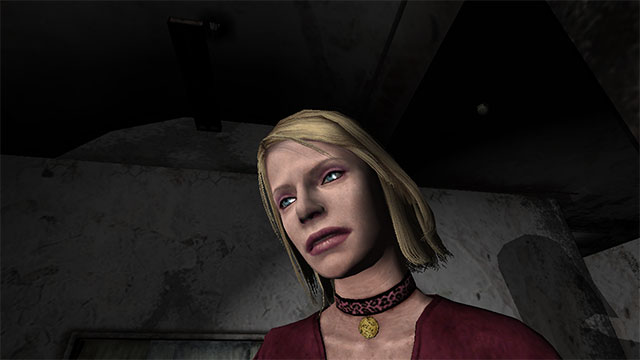
with the following changes (values based on Angela's from the Abstract Daddy fight):
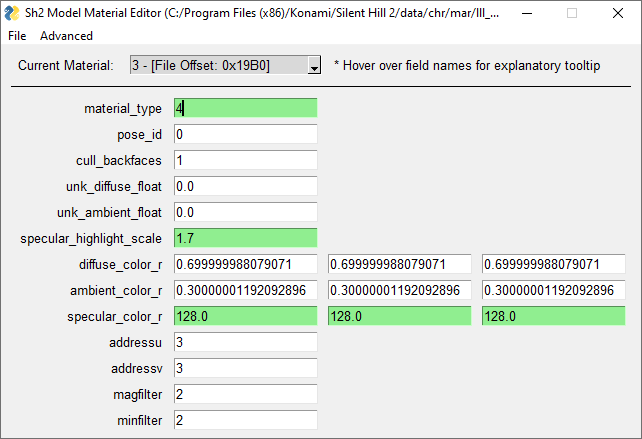
Characters actually have multiple mdl files each that they switch between as the game requires, so this may account for why characters have specularity in some areas and not others.
I haven't reversed the model format very far so it's kind of a pain to actually track down the material you want to edit. I've just been moving or renaming each of the character's mdl files until the area fails to load, then changing the diffuse color of 8 materials at a time to solid colors (red, green, blue, cyan, yellow, magenta, black, white) until the piece I want changes color, then I know the file and the material index.
 FrozenFish24
on 2 Nov 2020
FrozenFish24
on 2 Nov 2020
FrozenFish! Glad to hear from you again.
I haven't reversed the model format very far so it's kind of a pain to actually track down the material you want to edit.
Do you think some of this could be changed in memory? That might be an easier approach.
AeroWidescreen
on 2 Nov 2020
Hey Aero_!
Yep, we probably don't want to be distributing modified versions of every mdl file in the game. I'm not totally sure what the best way to go about it is, but the game does seem to just slurp mdl files into memory in their entirety, perhaps we could do the edits on-the-fly at that point?
FrozenFish24
on 2 Nov 2020
So good to see you again, FrozenFish! Great work on your new tool!
Do you think some of this could be changed in memory? That might be an easier approach.
I'm hoping what I found a while ago is a static address, but setting sh2pc.exe+4A015C (008A015C) float to 0 will change the entire texture of what should be specular white (this only works if the things that're specular are currently shining):
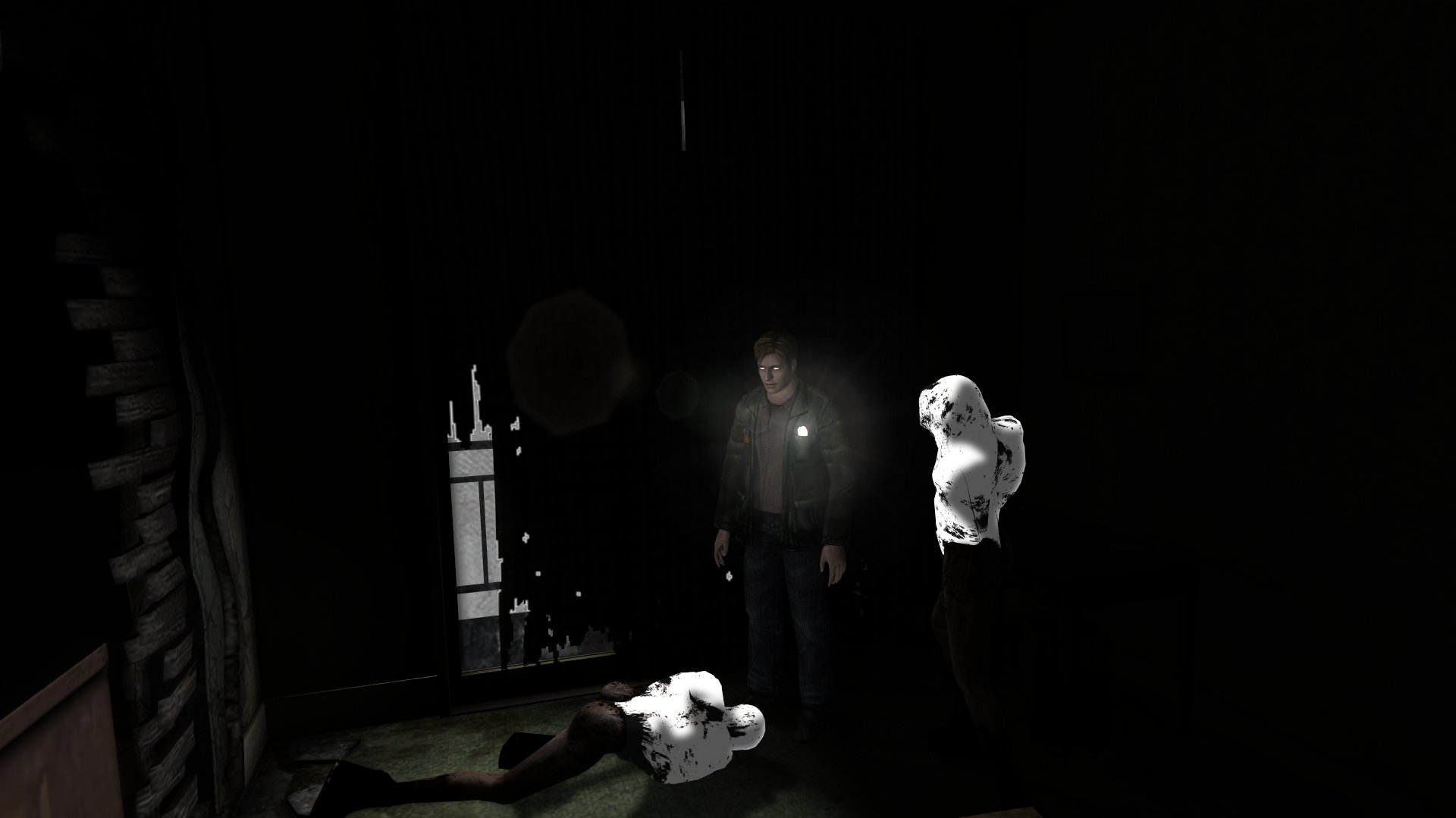
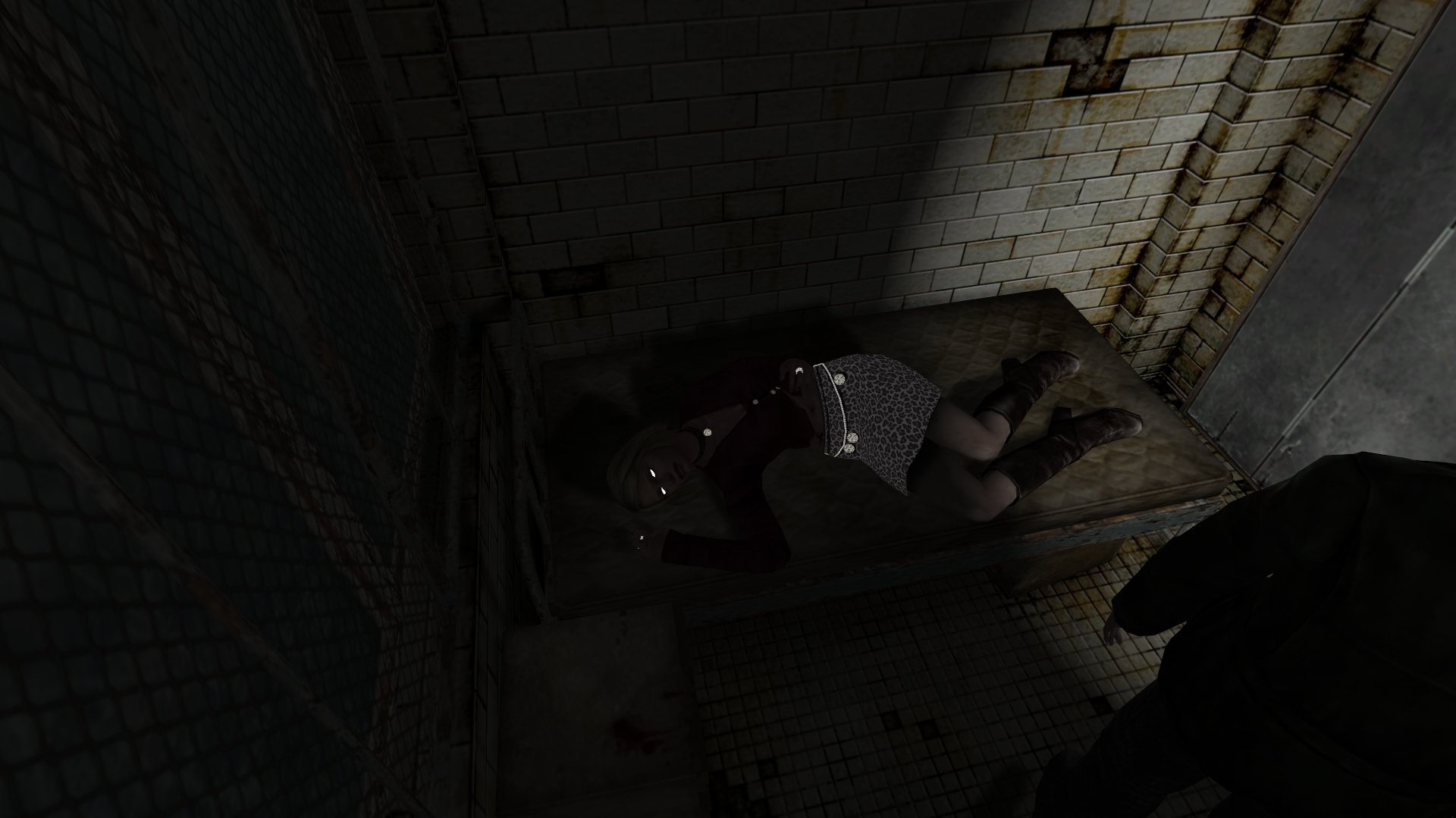
My hope is that, if the right address (maybe this one?) is backtraced, the instructions to make specularity work everywhere else (besides when James' flashlight is on) is still in the game's code, but just being nop'ed.
This was more-or-less the case for @CookiePLMonster's work with restoring right joystick functionality; the code was still there in the game, just disabled and needed to be enabled again.
Polymega
on 2 Nov 2020
Characters actually have multiple mdl files each that they switch between as the game requires, so this may account for why characters have specularity in some areas and not others.
That's a possibility. I wonder how similar in structure the PS2 .mdl files are to compare. That might help us know if it's a .mdl change (from PS2/Xbox to PC) going on. If it's possible, maybe monitor to see if the game swaps .mdl of a character when they enter/leave certain lighting zones. Check out my written thing below.
Something I've written up a while ago (click to expand):
Specular things should ALWAYS have some shine on them at all times... even in complete darkness (yes, I know). It's just the shine is more dim/transparent when the flashlight is not on, or if the thing is not under a light source.
Currently, things that should be specular are not unless James' flashlight is turned on. When his light is off, they are no longer specular, when they still should be. For many of these rooms/areas, James himself is not specular at all (regardless of his flashlight state), when he should also have shine as well.
Save files: http://www.igotaletter.com/temp/sh2pc/2020-05-12_Specular_Saves.zip
The save files above are rooms where specularity is either working partially correct or fully correct. These rooms are few and far between. Most areas the specularity doesn't work at all (unless James' light is turned on, and even then, it doesn't affect James himself).
If you open the save list in the game:
HOSPITAL 3F
Maria has correct specularity, but only when James' flashlight is on. When the light is off, her specularity goes away. James has no specularity at all, which is not right. Maria has shine on her eyes, necklace pendant, rings, skirt, and jewelry on her skirt. There is no specialized light source in this room.
HOTEL ALTERNATE BASEMENT
This one is working perfectly. James has specularity on himself. This would be his eyes, flashlight body, and things such as the nails at the end of his wooden plank weapon (if equipped). It's worth noting James' flashlight can NOT be used at this point in the game, and he's currently under a specialized lighting zone.
HOTEL 2F
Everything that should be specular is, including James, regardless if his flashlight is on or off, while within the specialized light source (at the balcony window). This includes the monster's upper bodies (they should shine).
HOTEL ALTERNATE 1F
This is another perfect room. Everything is specular that should be. However, James can no longer use his flashlight in this point of the game. Specialized lighting is used in this room.
MARIA: MANSION 2F
In the attic here, you light a candle. Once lit, specularity is fully restored. Maria's eyes and all her accessories have shine, including her revolver. (Maria never has/uses a flashlight in her campaign.) Once the candle goes out, specularity is gone on her. In other words, the candle is a specialized light source for this room.
Polymega
on 2 Nov 2020
Some initial findings using your address:
It seems to affect geometry with material of Type 4 assigned to it, for reference:
Determines which of the diffuse/ambient/specular color arrays are passed to vertex/pixel shaders
1 = No lighting (fullbright), ignores diffuse, ambient and specular color
2 = Matte, respects diffuse and ambient color, no specular highlight
3 = Seems the same as 2, but always paired with non-zero specular color, unk_diffuse_float and unk_ambient_float
4 = Glossy, respects diffuse, ambient and specular colors
Just fiddling with your saves now
FrozenFish24
on 2 Nov 2020
Is there an example of something maintaining its specularity when James has the flashlight and it's turned off?
FrozenFish24
on 2 Nov 2020
Yes, at least one of those save files mentioned above can. One example is the Hotel 2F save.
If you turn off his light, things will still be specular because of the specialized light source near the balcony window. If you move far away from the balcony window while in this room, the specularity disables (because you left the light source). There should still be specularity when you move away from this source; it should just be more dim/transparent, is all.
(I pay attention to the flashlight body to test when specularity goes away.)
Here's a few other spots with specularity.
It's like the code/instructions to keep things specular "by default" (while not in a special light source or when his flashlight is on) is just not there... Except for those few rooms that break this rule.
Polymega
on 2 Nov 2020
Oh, and Aero_ made a proof-of-concept code to restore specularity by default for objects. The issue with it though is the specularity shine is at max 100% brightness (way too bright). Info is further up this thread.
There's also the chance that approach might be a red herring to a bigger issue that needs to be looked into for it.
Polymega
on 2 Nov 2020
Sorry guys, looks like I had the wrong end of the stick on this problem. Editing the materials can add specular where it's completely missing, but it disappearing when you turn off your flashlight is clearly something else. I'll take another look tomorrow morning, and actually re-read the whole thread so I stop re-treading old ground 😛
FrozenFish24
on 2 Nov 2020
Searched around as much as I could hoping for some dead code I could resurrect, but no luck on that front.
I experimented a bit with Aero_'s code, and the reason it's so bright is because it's using the specular texture's alpha for blending as is. I couldn't think of any way to adjust this programmatically so, and I'm not sure how viable this actually is, but I thought why not dump the texture out, edit it ourselves and create our own Direct3DTexture with it in sh2ee, then we can add some code to SetTexture so we can return ours instead whenever we want.

This prevents Maria's dress blowing out.
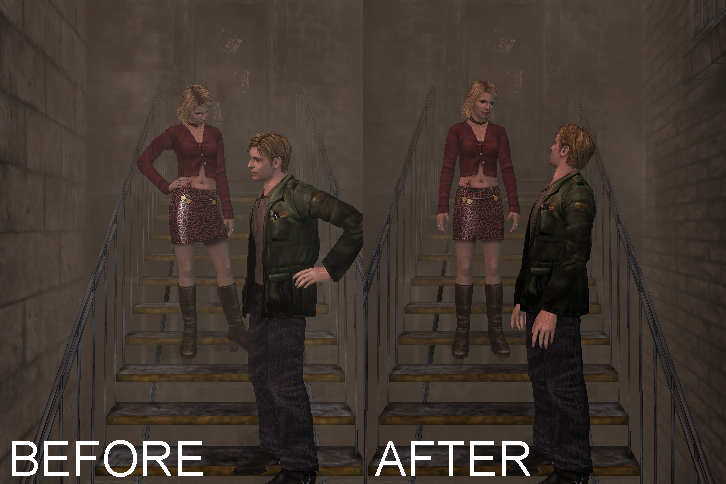
The big problem though, is the pixel shaders use the same texture so they also wind up with 25% opacity which is much too subtle and I'm not sure if there's a way to differentiate.
Here's a build if you want to see it for yourself, you'll still need to apply Aero_'s code manually:
d3d8.zip
I'll keep messing with it tomorrow if you guys think this has any promise. Good night!
FrozenFish24
on 3 Nov 2020
_Nice_. I'll play around with this very soon. Thanks FrozenFish!
Also, I've had a lot of things pre-written and saved about specularity in anticipation for when we'd start looking into this seriously. I'm going to paste it below but tweak it to discuss the new experiments you just tried out. Sorry for the wall of text here:
INTENDED SPECULAR BEHAVIOR
Any object that should be specular is _always_ specular, even in areas that have no specialized light zones. That means, for example, if you're in an interior (dark) room with no special light zones and you turn off your flashlight, the specular objects will still have a "shine" on them.
The behavior of specularity mimics self shadow work in some ways:
James' silhouette only:
- If not in a specialized light zone, the specular "shine" within his silhouette is ~25% opaque, regardless of flashlight state
- If in a specialized light zone, the specular "shine" within his silhouette is ~75% opaque, regardless of flashlight state
Maria's silhouette only:
- If James' flashlight is off, the specular "shine" within her silhouette is ~0% opaque
- If James' flashlight is on, the specular "shine" within her silhouette is ~25% opaque
- If Maria is in a specialized light zone, the specular "shine" within her silhouette is ~25% opaque, regardless of flashlight state
All _other_ objects outside of James'/Marias' silhouette:
- If James' flashlight is off, the specular "shine" is ~25% opaque
- If James' flashlight is on, the specular "shine" is ~50% opaque
- If an object is in a specialized light zone, the specular "shine" is ~50% opaque, regardless of flashlight state
(Note that those percentages are approximations and would likely need to be tweaked in the end.)
Now here is the concern with this: How can we determine when, for example, a Mannequin walks into a special light zone and only increase _that_ monster's specular opacity during the time it's in this light zone? How do we do the same for Maria?
I don't know if it's possible or if we _really_ want to dive that deep into this particular part for the overall fix. Maybe we drop those particular bullet points and only change objects outside of James' silhouette depending on his flashlight state?
So it'd consolidate down to:
James' silhouette only:
- If not in a specialized light zone, the specular "shine" within his silhouette is ~25% opaque, regardless of flashlight state
- If in a specialized light zone, the specular "shine" within his silhouette is ~75% opaque, regardless of flashlight state
All _other_ objects outside of James' silhouette:
- If James' flashlight is off, the specular "shine" is ~25% opaque
- If James' flashlight is on, the specular "shine" is ~50% opaque
What's nice about this consolidation is that good chunks of the self shadow code could probably be carried over here (determining when James is in a light zone, stenciling out his silhouette only, etc).
But the other concern: Is it possible to give James his own specular texture, and everything else use a different specular texture? I'm not sure if that's possible to do. If it isn't, we could consolidate it even more:
- If James' flashlight is off, the specular "shine" for everything is ~25% opaque
- If James' flashlight is on, the specular "shine" for everything is ~50% opaque
...ideally it'd be better to aim for the slightly more advance specular behavior mentioned right above this one. But if that's not possible, this more simplified version could always be a possibility.
OTHER REMARKS
In regards to Z-indexing, the shadow layer(s) need to sit on top of the specular shine layer(s).
Polymega
on 3 Nov 2020
I goofed around with it for a bit FrozenFish and... wow. It's so good to see things shiny--but not overblown--everywhere again.
Polymega
on 4 Nov 2020
The big problem though, is the pixel shaders use the same texture so they also wind up with 25% opacity which is much too subtle and I'm not sure if there's a way to differentiate.
Using the DirectX8 wrapper we could add a second texture for the specularity and then dynamically set the appropriate texture based on whether the pixel shader or specularity is being drawn. This would allow us to separate these into different textures.
 elishacloud
on 4 Nov 2020
elishacloud
on 4 Nov 2020
Hey @elishacloud!
You're right, calling GetPixelShader and only swapping out the texture if it's NULL seems to do the trick. Don't know if that's what you had in mind.
Ultimately this is probably not the right approach though as it won't give us the behaviour in @Polymega's post. Particularly:
How can we determine when, for example, a Mannequin walks into a special light zone and only increase that monster's specular opacity during the time it's in this light zone? How do we do the same for Maria?
EDIT: Another build if anyone wants to try it:
d3d8.zip
FrozenFish24
on 4 Nov 2020
You're right, calling GetPixelShader and only swapping out the texture if it's NULL seems to do the trick. [...] Another build if anyone wants to try it:
I see what you mean now. It no longer overrides the transparency levels for specularity that still works in the game. That's an improvement right there. Maybe this approach should also be used/kept in any specular work moving forward? So we'd fix it where it's missing, but it won't override for the rooms/areas where it's currently working right?
Polymega
on 4 Nov 2020
You're right, calling
GetPixelShaderand only swapping out the texture if it'sNULLseems to do the trick. Don't know if that's what you had in mind.
I was thinking more about this solution:
- Detecting when that particular texture is being created and modify it with the new image. We can call this 'Texture1'.
- Create a duplicate texture using the original game's image. We can call this 'Texture2'.
- Let the game use Texture1 as normal. This texture will be used during the specularity.
- Whenever calling a PixelShader if the game is using Texture1 switch it to using Texture2.
- Once the PixelShader call is completed restore the game back to using Texture1. Note: this step may not be needed, depending on when the PixelShader is used.
elishacloud
on 5 Nov 2020
@elishacloud That makes sense, sorry for the belated response.
I've been messing around with another approach that doesn't require activating the fixed function lighting.
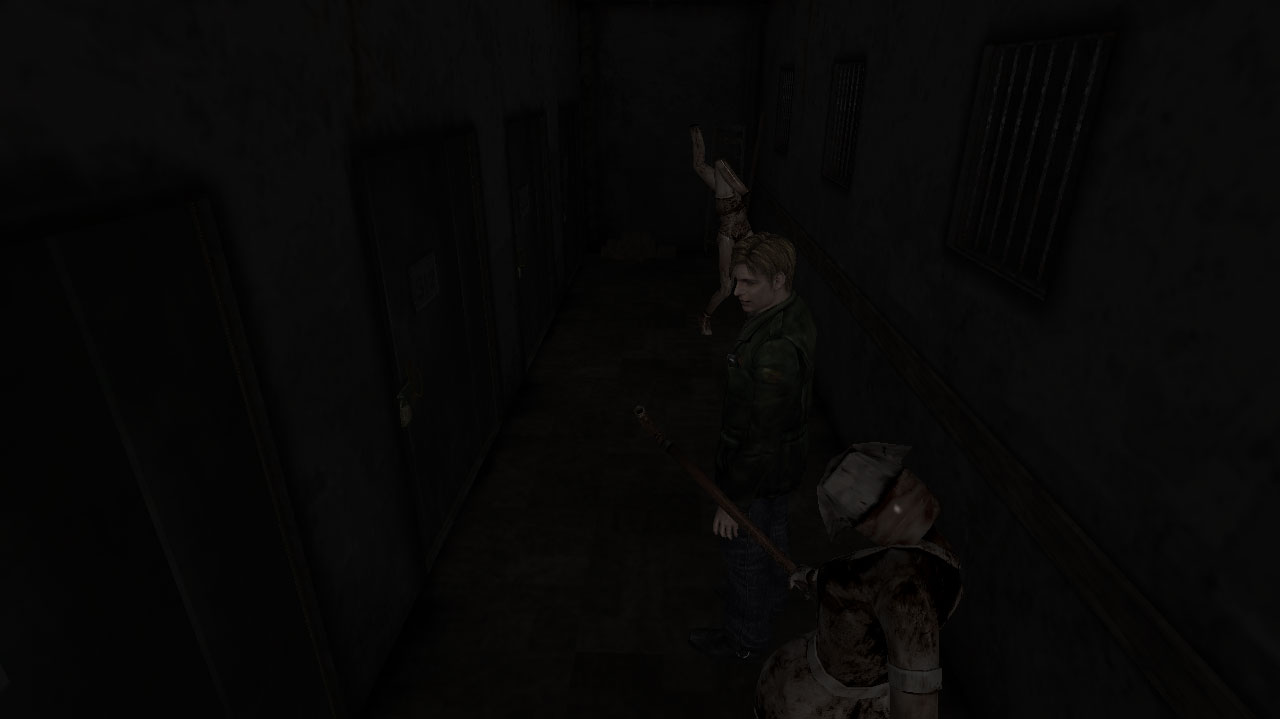
See James' flashlight has specularity for the first time and the the enemies have retained their specularity, at a reduced intensity.
Basically when the game is setting up to draw a character/enemy the game calls a function to get the number of light sources, it then iterates through each and pulls each light source structure from a dynamic array by index. By patching the game we can set this count to 1 when it would otherwise be zero and then substitute our own light source. We can then also later patch the opacity/color before it is sent to the pixel shader.
You can see my initial implementation here:
https://github.com/FrozenFish24/Silent-Hill-2-Enhancements/blob/specular-fix/Patches/Specular.cpp
I had to decompile a bunch of functions to work this out, you can mess around with them on this branch if you like:
https://github.com/FrozenFish24/Silent-Hill-2-Enhancements/tree/decomp
You can toggle which functions get replaced with a reimplementation here:
https://github.com/FrozenFish24/Silent-Hill-2-Enhancements/blob/decomp/Patches/Specular.cpp
The relevant locations in the decomp:
Part 1
Part 2
Part 3
Here's a build to test out:
d3d8.zip
The opacities probably won't be right and specular highlights will be active everywhere there isn't a special lighting zone. But this should all be tweakable.
FrozenFish24
on 25 Nov 2020
The relevant locations in the decomp:
_Damn!_ Absolutely incredible you decompiled code to find and restore relevant functions... Bravo!
[...] and specular highlights will be active everywhere there isn't a special lighting zone.
Happily, that's a good thing. Things that are specular should always have some degree of shine no matter what. They just become shinier (more opaque) while in a special light zone.
Although, I think I found an issue where, while in a special light zone, there's no shine at all.
On the plus side, whenever I lured a Lying Figure into a special light zone, its shine was also removed _but_ it was removed independently of James or anything else. So the code to know when unique objects are in/out of light zones looks to be there!
Polymega
on 25 Nov 2020
Although, I think I found an issue where, while in a special light zone, there's no shine at all.
I think this should be an easy fix, could I get a save? I'm realising I only tested against your saves from here and a few other areas.
FrozenFish24
on 25 Nov 2020
Yes sir: http://www.igotaletter.com/temp/sh2pc/Folder%2001.zip
Load the first or second "Apartment SW Staircase" file (near the top) and head to the second floor hallway.
Turn off James' light to easily know when you're in a special light zone; whenever he casts a shadow (with his light off) that means he's in a light zone. You can either use the flashlight body or the nails/nail heads at the top end of the plank weapon to tell if specularity is working or not. (As James walks/runs, you can see the nail heads shine/shimmer on the plank as he moves.)
I also lured Lying Figures into these light zones in this same hallway. With your light off, whenever the creatures start casting a shadow, that means they're in the light zone.
Polymega
on 25 Nov 2020
Ah right, so these areas never had specularity on PC when the flashlight was off, and my fix isn't helping because there is technically still a light source so it's never activated. This might take a little more research but I think it's fixable.
FrozenFish24
on 25 Nov 2020
You're the man, FrozenFish. Really great work you've done so far with this. ❤️
Edit:
Ah right, so these areas never had specularity on PC when the flashlight was off
I should clarify that, for the PC version, the specularity is disabled (at least, for James only) even if his light is on while within a light zone (it's always been like this, at least for the apartment area). It's just easier to know when you're in the light zone or not with his light off.
Polymega
on 25 Nov 2020
Okay I think this should solve it, the problem was those special lighting zones are D3DLIGHT_SPOT but the game will only create a specular highlight when it sees a D3DLIGHT_DIRECTIONAL. I've modified my code so if no directional lights are found we report a lightSourceCount one greater than reality, and then when the game attempts to retrieve a light from that index we pass them our fake.
I haven't updated the opacity changing code yet, so all specular highlights will be 100% white. I'll fix this tomorrow.
Also there may or may not be some issues in certain areas if we go over the max number of lights the game can handle (I think I saw 6 somewhere) as I currently don't check for this. Let me know if you encounter any oddities.
Goodnight!
FrozenFish24
on 25 Nov 2020
You're killing it!
Also there may or may not be some issues in certain areas if we go over the max number of lights the game can handle (I think I saw 6 somewhere) as I currently don't check for this. Let me know if you encounter any oddities.
This bent my mind a bit trying to think of any room in the game that uses ~6 light sources (something I've never really thought about before).
The apartment hallways and BFaW mansion areas were the only ones that really came to mind that would have a lot of light sources per room. So I quickly ran around these parts and didn't see any issues immediately.
After the opacity code changes are implemented, I can do a more serious sit-down with it and report back.
Have a good night!
Polymega
on 25 Nov 2020
@Polymega It might be another day or two before I get the opacities sorted. Here's another build to mess around with that's a bit closer to correct behavior in the meantime.
- James, flashlight off = ~25% opacity
- James, flashlight on = ~25% opacity
- Enemy, flashlight on = 100% opacity
- Enemy, flashlight off = ~25% opacity
- James, special light zone, flashlight on = ~25% opacity
- James, special light zone, flashlight off = ~25% opacity
- Enemy, special light zone, flashlight on = 100% opacity
- Enemy, special light zone, flashlight off = ~25% opacity
This bent my mind a bit trying to think of any room in the game that uses ~6 light sources (something I've never really thought about before).
I saw this limit in the code by the way, sorry if I had you hunting around for some non-existent room. I think you're right about the BFaW mansion having the most light sources, but even then it would have to be 6 (or whatever the real limit is) affecting Maria at the same time before we run in to problems not just 6 in the room, so it's probably a non-issue.
FrozenFish24
on 26 Nov 2020
Won't be able to check this for another few hours (I'm excited!!) but it's more like this:
JAMES
Flashlight off: ~25%
Flashlight on: ~25%
Light zone, flashlight off: ~75%
Light zone, flashlight on: ~75%
MARIA
Flashlight off: ~10%
Flashlight on: ~25%
Light zone, flashlight off: ~25%
Light zone, flashlight on: ~25%
ENEMY/OTHERS
Flashlight off: ~25%
Flashlight on: ~50%
Light zone, flashlight off: ~50%
Light zone, flashlight on: ~50%
*The higher the percentage, the more opaque (shiny) it should be. Percentages may likely need adjusting after testing.
Edit: Fixed a bunch of values as I got myself all sorts of confused.
Polymega
on 26 Nov 2020
This should be pretty close! I've included a color-coded version to make your life a bit easier.
Red = 25% opacity
Blue = 50% opacity
Green = 75% opacity
I'm checking for James by his model Id, which as far as I've seen is always 257. It's possible he has different Id's in different scenes so let me know if his specularity goes funny.
A couple of questions: This version overwrites the specularity with one of the 3 intensities, would you rather we multiply by model's base specularity instead? Also would you like me to implement Maria as described in your previous post or leave her with the enemy/other behaviour so she never drops to 0%?
FrozenFish24
on 28 Nov 2020
Incredible! I'll do a full playthrough this weekend and report back. And thanks for the color-coded version as well; that'll be very useful if I need to double-check any spots.
I'm simply flabbergasted that here you are giving us soft shadows and now this... Just wonderful!
This version overwrites the specularity with one of the 3 intensities, would you rather we multiply by model's base specularity instead?
It sounds like doing a full overwrite may give overall better control for the specular opacities? If so, my vote would be for overwriting as you're doing to keep its behavior more predictable on our end with setting it. From your research, do you feel one is better/safer than the other?
Also would you like me to implement Maria as described in your previous post or leave her with the enemy/other behaviour so she never drops to 0%?
Before you go through the extra effort to do this, I'll give this a playthrough over the weekend and let you know; it may be a nice adjustment for Maria.
Again: Flabbergasted!
Polymega
on 28 Nov 2020
Awesome,
From your research, do you feel one is better/safer than the other?
I'm not sure, this way we there won't be any outliers, but we could end up losing some subtlety, might be too little to worry about though. If you don't like the result we can try multiplying or some other approach or even special casing certain models if it come to that.
FrozenFish24
on 28 Nov 2020
Just starting to test this and...
Also would you like me to implement Maria as described in your previous post or leave her with the enemy/other behaviour so she never drops to 0%?
May I ask you to go ahead and add this change in as well? I see why they made Maria a special exception: The curve of her booty can make a single-but-big specular point on her skirt:
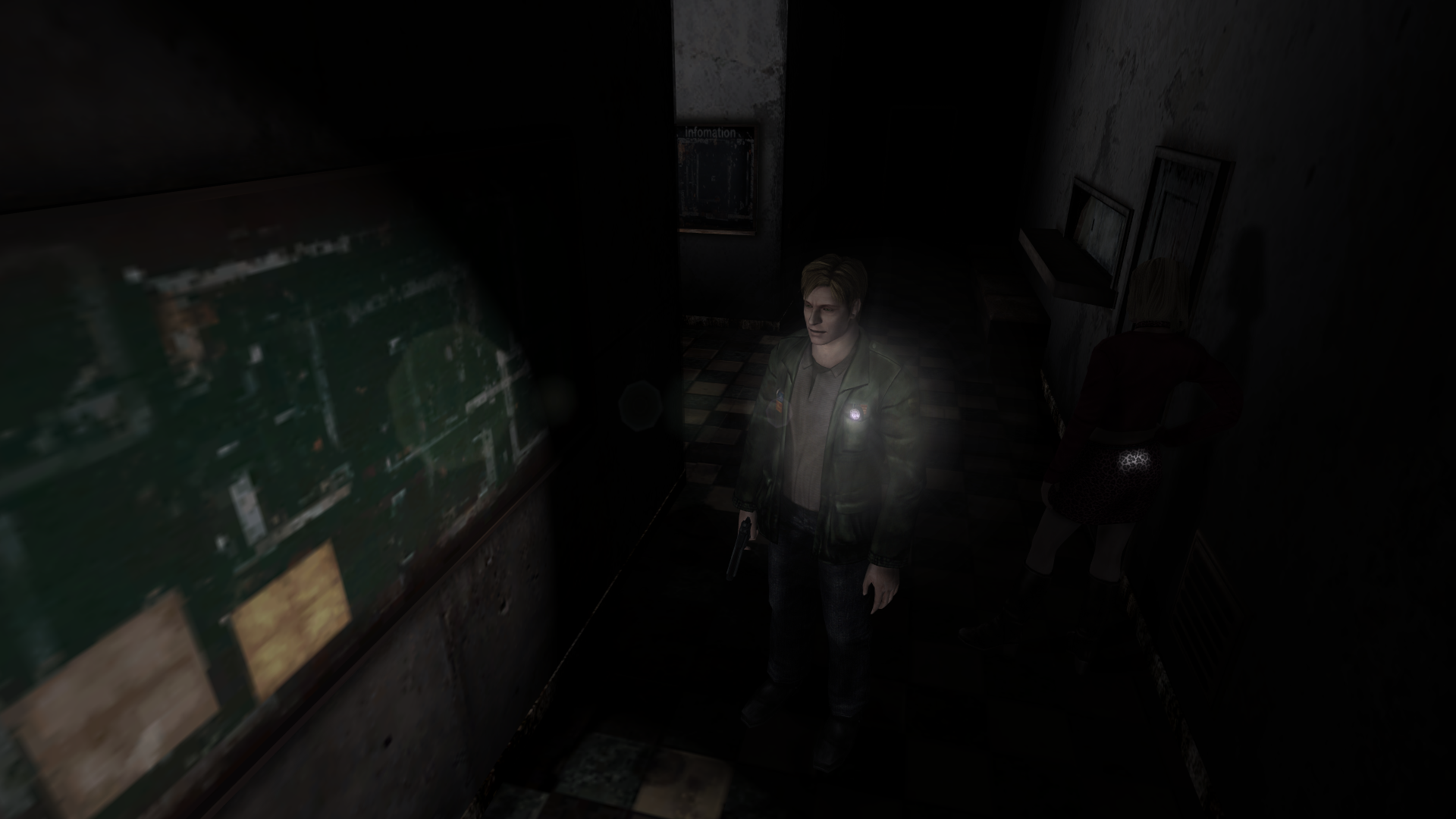
A guess would be that the dev team thought it's fine if the shine is bright on monsters (perhaps to also guide your eyes to them to know where your threats are at), but since Maria is with you a lot of the time, it may be too distracting on her.
So to add to that list (some new values, upon closer examination):
MARIA
Flashlight off: ~10%
Flashlight on: ~25%
Light zone, flashlight off: ~25%
Light zone, flashlight on: ~25%
I'm not sure how you'll be pin-pointing Maria out, but note there are multiple Maria's used in the game: Regular, bloody on labyrinth bed, upside down on Pyramid Head cage (and maybe more).
this way we there won't be any outliers, but we could end up losing some subtlety, might be too little to worry about though
To put your mind at ease, I think the game is pretty much set in stone with the opacity behaviors that we're testing now. (Such as setting Maria's opacities to what's listed right above.) Once we set these values, I don't think they ever "change the rules" on themselves throughout the game. Could be wrong on this, of course, but I think this behavior is fairly set in place.
Polymega
on 28 Nov 2020
Done! Here's another build:
d3d8.zip
d3d8-color-coded.zip
Yellow = 10% opacity
Red = 25% opacity
Blue = 50% opacity
Green = 75% opacity
I'm not sure how you'll be pin-pointing Maria out, but note there are multiple Maria's used in the game: Regular, bloody on labyrinth bed, upside down on Pyramid Head cage (and maybe more).
I'm going by the model Ids the game uses internally and I thought we were in for some pain here, but it turns out they can found easily in the .mdl files, 4 bytes in. So we should be fully covered now.
To put your mind at ease, I think the game is pretty much set in stone with the opacity behaviors that we're testing now.
The base specularity is fixed in the model files so I'm not worried about them changing. I'm just concerned that with the current flat replacement we can't have things like, for instance, Maria's pendant being shiner than her ring because they'll both just be overwritten to 10% or 25%. But again this might all be too subtle for anyone to notice.
FrozenFish24
on 28 Nov 2020

This is looking great so far. It makes the world look a lot less... flat? Yes, more dimensional.
I trust that you and Polymega will implement this correctly, but if you guys need any help with testing then let me know.
AeroWidescreen
on 28 Nov 2020
I'm just concerned that with the current flat replacement we can't have things like, for instance, Maria's pendant being shiner than her ring because they'll both just be overwritten to 10% or 25%. But again this might all be too subtle for anyone to notice.
In regards to Maria, this was something I was already thinking/worried about when testing the build you sent me before this latest build. But I wanted to re-test with your latest build before saying what I'm about to say next:
I'm playing the PS2 (PCSX2) version side-by-side for comparison and noticed that Maria's eye's are brighter than the rest of her specularity. (My main point of testing this is initiating the two bonus cutscenes after Maria lies down on the Hospital bed.) So it'd be more like:
MARIA
Flashlight off: ~10%
Flashlight on: ~25%
Light zone, flashlight off: ~25%
Light zone, flashlight on: ~25%
ENEMY/MARIA'S EYES/OTHER
Flashlight off: ~25%
Flashlight on: ~50%
Light zone, flashlight off: ~50%
Light zone, flashlight on: ~50%
Singling out her eyes to give them a different opacity makes things more complicated, but is that plausible to do? Would doing multiples of the base specularity rather than overwriting be the better path then?
Unrelated, but PS2 James' eyes still haunt me to this day lol:

Polymega
on 29 Nov 2020
Here's another build:
d3d8.zip
d3d8-color-coded.zip
I'm detecting Maria's eyes by checking if the index of the current material is 3. Hopefully this assumption holds true for all 9 of her mdls.
If we only need to special case a few things, the extra control of flat replacement is preferable.
FrozenFish24
on 30 Nov 2020
Are the eyes on the left from PCSX2?? That is terrifying.
 umbrellacorp53
on 30 Nov 2020
umbrellacorp53
on 30 Nov 2020
BTW specularity, soft shadows, hd fullscreen images, 3D HQ audio, restored pseudo-bloom and "motion blur", color grading, texture seam fixes, better fog... You guys are amazing. I really wish my friend who was obsessed with Silent Hill 2 and 3 could have been here to see this. It's truly amazing what you guys have done. This is the respect this game deserves, but the community does not deserve you guys (neither does Konami). Thanks again for all your hard work.
umbrellacorp53
on 30 Nov 2020
Thanks yet again FrozenFish. I think I'm all set up now to do a legit, full sweep of the game. I'll report back!
If we only need to special case a few things, the extra control of flat replacement is preferable.
I'm hoping Maria's eyes will be the extent of it. 👍
Are the eyes on the left from PCSX2?? That is terrifying.
From PS2, haha. I've even read comments in the past of people saying this was intentional by Team Silent... despite them fixing it in the Xbox version. 🙄
I really wish my friend who was obsessed with Silent Hill 2 and 3 could have been here to see this. It's truly amazing what you guys have done.
I'm happy this all means so much to you, and what it would have meant to your friend. ❤️
Polymega
on 30 Nov 2020
hi :D, It is wonderful what you have done with the game, I am a fan of yours and I am a girl player of the game since its launch, but I am curious how to do the shiny effect and how you are modifying, I would like to learn something like that :)
 Superkinzie
on 30 Nov 2020
Superkinzie
on 30 Nov 2020
Alrighty FrozenFish, this is what I have for you:
The values that are crossed out are the changes. Also note I made a new conditional statement for James (if a cutscene is active and flashlight is on), made Maria's eyes a set opacity no matter what, and added a new model (Mary/Maria boss) that needs its own special opacity values:
JAMES
IF { Cutscene ID != 0 && Flashlight is ON && IsJames }
No matter what: 75%
ELSE { IsJames }
Flashlight off: 25%
Flashlight on: 25%
Light zone, flashlight off: 75%
Light zone, flashlight on: 75%
MARIA
Flashlight off: 10%
Flashlight on: 25% 20%
Light zone, flashlight off: 25% 20%
Light zone, flashlight on: 25% 20%
MARIA'S EYES
No matter what: 50%
MARY/MARIA FINAL BOSS MODEL
No matter what: 25%
EVERYTHING ELSE (aka ENEMY/OTHER)
Flashlight off: 25% 15%
Flashlight on: 50% 40%
Light zone, flashlight off: 50% 40%
Light zone, flashlight on: 50% 40%
SPECIAL EXCEPTIONS
This should hopefully be easy.
If in these Room IDs, set specular opacity for EVERYTHING ELSE to 10% no matter what:
- 0x1B (Apt 3F Handgun Room)
- This reduces the shine of bullet casings littered on the ground, which would otherwise be too intense/disctracting.
- 0x3E (Hospital Special Treatment Hallway)
- This reduces the shine of the broken pipes/wires in this room, which would otherwise be too intense/disctracting.
... and that's all I have for you!
I'll need to check the cutscenes of speaking with Mary/Maria before the final fight for all possible endings, but at the moment I don't have them easily accessible on PCSX2. So I _may_ have some adjustments for these cutscenes in the near future (hopefully not though).
Note to FrozenFish: The values for EVERYTHING ELSE might need to be tweaked a bit more (not including the "Special Exceptions" part). Once I get a build with these new values I'll let you know.
Note to self: After next build, re-check cutscenes:
- [x] Hospital bed
- [x] unlocking Heaven's Night door
- [x] Encountering first Lying Figure
- [x] Meeting Maria behind prison bars
- [x] BFaW ending (gun to head)
- [x] Angela flesh room
- [x] Eddie boss first cutscene
- [x] Laura piano scare
- [x] Final RPT fight (Maria upside down)
Thanks!
Polymega
on 30 Nov 2020
Here you go @Polymega:
d3d8.zip
d3d8-color-coded.zip
Red = 10%
Green = 15%
Blue = 20%
Yellow = 25%
Cyan = 40%
Magenta = 50%
White = 75%
FrozenFish24
on 1 Dec 2020
Thanks! Very quick testing it looks like the conditional statement for James isn't working.
I don't know if this helps/is the right variable to use, but perhaps if FlashLightRenderAddr = 1 to signify when his light is on?
Edit: I think it has something to do with useFakeLight, as "EVERYTHING ELSE" is also no longer changing opacities when the flashlight is on but not in a special light zone.
As an example: The plank correctly turns (from green to) cyan when passing under a special light zone, but does not turn cyan when James' light is on (while in or out of a special light zone): https://youtu.be/NoiK8FKefm8~~
Ignore this, it looks like items equipped in James' hand (such as the plank) aren't affected by his light being on or off? Sorry for the confusion here. The conditional statement for James still doesn't appear to be working though.
Edit 2: Maybe this:
GetCutsceneID() != 0
should be this?
GetCutsceneID() != 0x00
Polymega
on 1 Dec 2020
Weird !useFakeLight works to check if the flashlight is on for enemies but not equipped weapons. I swapped it for GetFlashLightRender(), see if that fixes things.
looks like items equipped in James' hand (such as the plank) aren't affected by his light being on or off?
This should be fixed too
FrozenFish24
on 1 Dec 2020
Nice! Very quick tests and that looks to fix it.
Before I do another full sweep of the game, here are, what I hope to be, my final notes/adjustments for the feature. "Angela's Eyes" and "Mary (Healthy) Model" are new:
MARIA
Flashlight off: 10% 5%
Flashlight on: 20%
Light zone, flashlight off: 20%
Light zone, flashlight on: 20%
ANGELA'S EYES (agl\agl.mdl & ragl.mdl)
Flashlight off: 25%
Flashlight on: 50%
Light zone, flashlight off: 50%
Light zone, flashlight on: 50%
MARY (HEALTHY) (mry\mry.mdl)
No matter what: 50%
Maria's upside down model (item\dmr.mdl) from final RPT fight needs to be added to her model checklist.
The room ID checks to reduce specularity for select rooms under EVERYTHING ELSE aren't working. I'm thinking this is due to the specular objects we're trying to reduce being tied/linked to .map files, instead of .mdl files. I looked into this and fixed it on a hex level within the .map files. My question to you is: Are you okay with reducing the specular objects in these particular rooms as I've done through editing the .map files? Or would you prefer this to be done on your end through code?
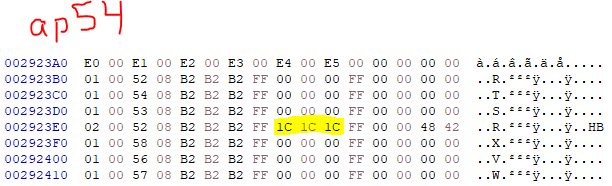
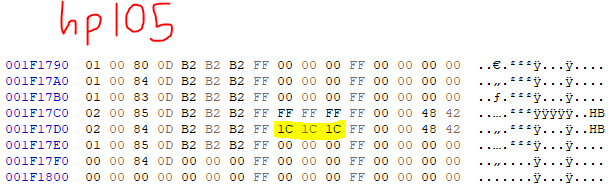
(Changed FF FF FF (BGR 255, 255, 255) to 1C 1C 1C (BGR 28, 28, 28))
Polymega
on 1 Dec 2020
Red = 5%
Green = 15%
Blue = 20%
Yellow = 25%
Cyan = 40%
Magenta = 50%
White = 75%
If they're part of the map and not actual mdls, then my code won't touch it. Best to do it through a map edit at least for now. We can always look in to doing it on-the-fly later if it's worth it. I've removed the checks.
FrozenFish24
on 1 Dec 2020
Thanks as always, FrozenFish. The first thing I checked was Maria's eyes for her upside down model, as I figured if there'd be any discrepancies left, it might be that her eye's material index is different from her other models and... that looks to be the case.
Polymega
on 1 Dec 2020
I'm lazy so I haven't tested, but I think it should be material 1:
d3d8.zip
d3d8-color-coded.zip
FrozenFish24
on 1 Dec 2020
That's what I'm here for (to test)! You guys already do all the heavy lifting, so put this stuff on me. 😃
Her eyes are indeed magenta now while hanging upside down. 👍 With that, I'm going to call it a night and try to get another full playthrough in tomorrow. If all goes well, this'll be the end of customizing for the feature!
Thanks friend
Polymega
on 1 Dec 2020
Awesome! Have a good one mate!
FrozenFish24
on 1 Dec 2020
Sorry FrozenFish, I do have another important adjustment for you. One I'll need before I do the serious playthrough again:
Without going into excruciating detail, I'd recommend using useFakeLight as you previously done instead of GetFlashLightRender for the all the checks you're doing.
I checked the PS2 version and the specular opacity for equipped weapons is also not affected by his flashlight, so this is "normal" behavior. But that's not the reason for this request: I forgot we're using GetFlashLightRender for various other features to fix things and it can mess up opacity levels while in these rooms/cutscenes/whatever, since we're overriding the GetFlashLightRender value with our own in these situations.
Sorry I didn't realize this sooner. :-/
Polymega
on 1 Dec 2020
You're right, I think I should have been using GetFlashlightSwitch, either way here's both versions.
using GetFlashlightSwitch:
d3d8-v1.zip
d3d8-v1-color-coded.zip
using !useFakeLight:
d3d8-v2.zip
d3d8-v2-color-coded.zip
FrozenFish24
on 2 Dec 2020
Can we try a "v3" that's a blend of these two?
Use !useFakeLight as you're doing with v2, except for the conditional statement for James, which instead use GetFlashlightSwitch for this.
Polymega
on 2 Dec 2020
Actually, ignore that request for now.
Comparing with PS2, I mentioned that if James is in a cutscene and is able to use his flashlight then the game makes his specularity very bright during the cutscene. But testing more, it kinda makes more sense to have James' specularity within cutscenes only get bright if he happens to be in a special light zone as the cutscene plays out.
Here's an example from PS2 version:
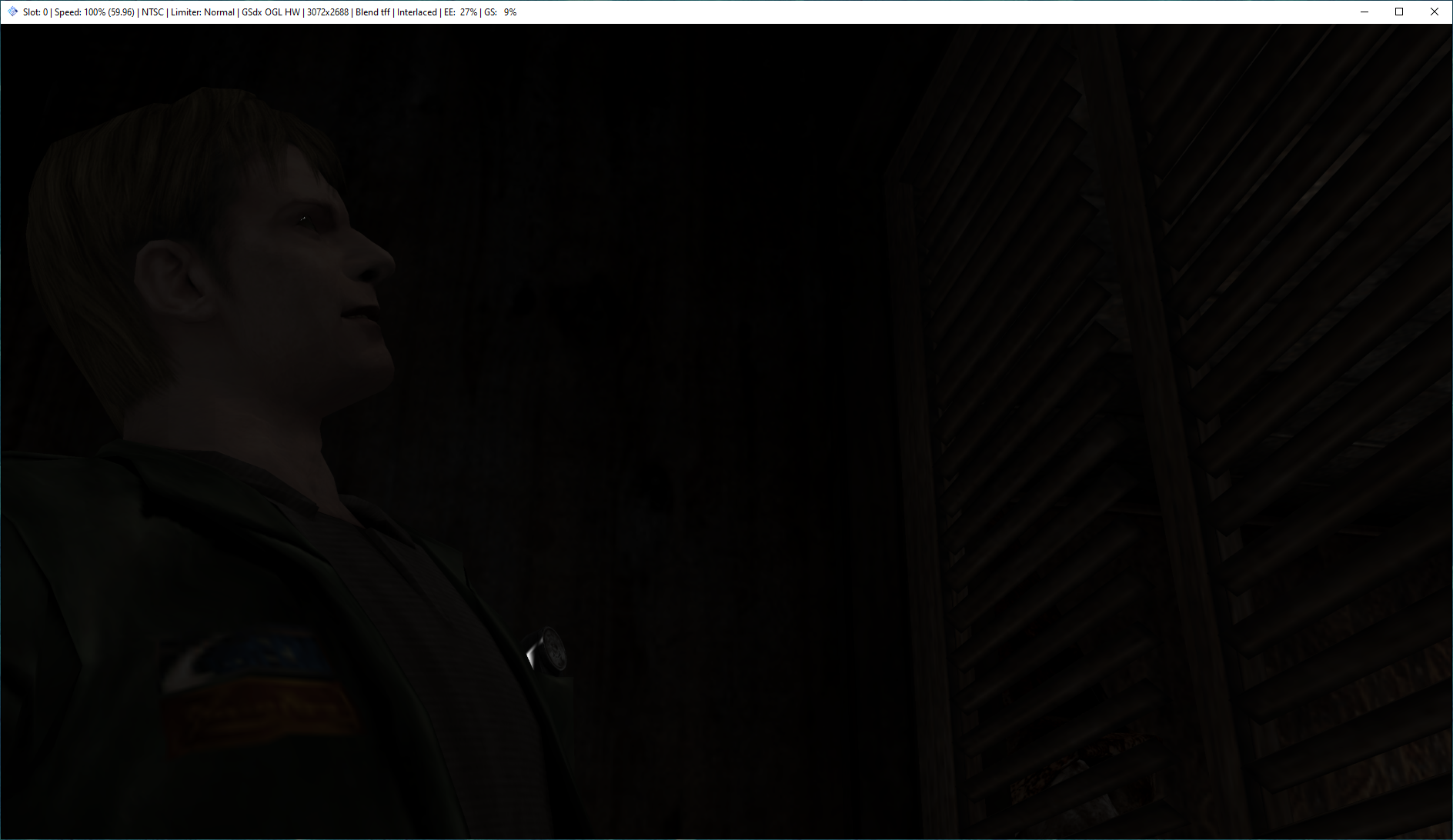
... that's a bright ass flashlight and eyeballs inside this dark closet.
Polymega
on 2 Dec 2020
Okay FrozenFish! These are the final things I have for you!
- Use "v2" of your latest test builds (the one that uses
!useFakeLight) - Remove the cutscene/flashlight conditional check for James and just have James' specularity go to 75% if in a special light zone, like as before.
- For Angela's eyes, add a cutscene ID check: If Cutscene ID =
0x53make her eyes 50% no matter what.
... and that's it; we're done!!
Polymega
on 2 Dec 2020
Here you go! Let me know if you need any more last minute tweaks.
FrozenFish24
on 3 Dec 2020
Tested a few spots and all is good!
Congratulations, FrozenFish! 🥳 🎉 🎈
You have set out and achieved the impossible once again!!!

Polymega
on 3 Dec 2020
Here are the files I modified on my end to work alongside the restored specularity (they will be included in the "Essential Files" package on the installation site come our next update release): sh2e.zip
Polymega
on 3 Dec 2020
Woo! Couldn't have done it without you @Polymega! 🎉🎉🎉
FrozenFish24
on 3 Dec 2020
❤️
Polymega
on 24 Mar 2021
Related issues
 snigelpasta
·
13Comments
Polymega
·
10Comments
snigelpasta
·
13Comments
Polymega
·
10Comments
 lebouffon88
·
17Comments
lebouffon88
·
17Comments
 yukinsaknos
·
14Comments
yukinsaknos
·
14Comments
 Psycho-A
·
16Comments
Psycho-A
·
16Comments
Most helpful comment
Tested a few spots and all is good!
Congratulations, FrozenFish! 🥳 🎉 🎈
You have set out and achieved the impossible once again!!!