Silent-hill-2-enhancements: "Fullscreen Image Enhancement Pack" Discussion
@AeroWidescreen @elishacloud
Holy cow guys,
I needed to share this with you right away because I'm blown away by the results. I happened to stumble across an image enhancement site called "Let's Enhance." I'll let their site explain it best:
Let’s Enhance uses cutting-edge Image Super Resolution technology based on Deep Convolutional Neural Networks. Before appearance of this technology it was impossible to dramatically increase photo or image size without losing quality. Your best option in Photoshop, called Bicubic Interpolation - made your image unsharp and blurry. Those of you on the math side of the things could argue – however you increase image resolution – there is no new information about the image - you just can’t add extra quality! This is not true in a case when Neural Network and AI is used. Our neural network is trained on a huge dataset of images, so it learns typical features of physical objects – bricks of walls, hair and skin. After the network recognises those features on the images uploaded and add extra details, based on its general knowledge the the world.
So... I ran a few test images through it and... wow. I think we struck pay dirt here, friends. Check out the images below to see what I mean (be sure to click them to view them at their true sizes). I used the software Texmod to extract the PCSX2 (PS2) version of these fullscreen images to guarantee I'm using the best version of these images.
It seems to struggle a little on small lettering but, can you blame it? I honestly can't believe it's able to read some of those words _at all_ from the original, low res versions. But those parts can be fixed up some in Photoshop after the fact.
I don't know about you guys but _I'm impressed_. If it's possible to pursue a "Fullscreen Enhancement Pack" mod down the line I'll pay for a package/membership with this site so we can run the images through it.
Default image (extracted from PCSX2):

Resampled (4x) through Photoshop (via Bicubic (smooth gradients)):
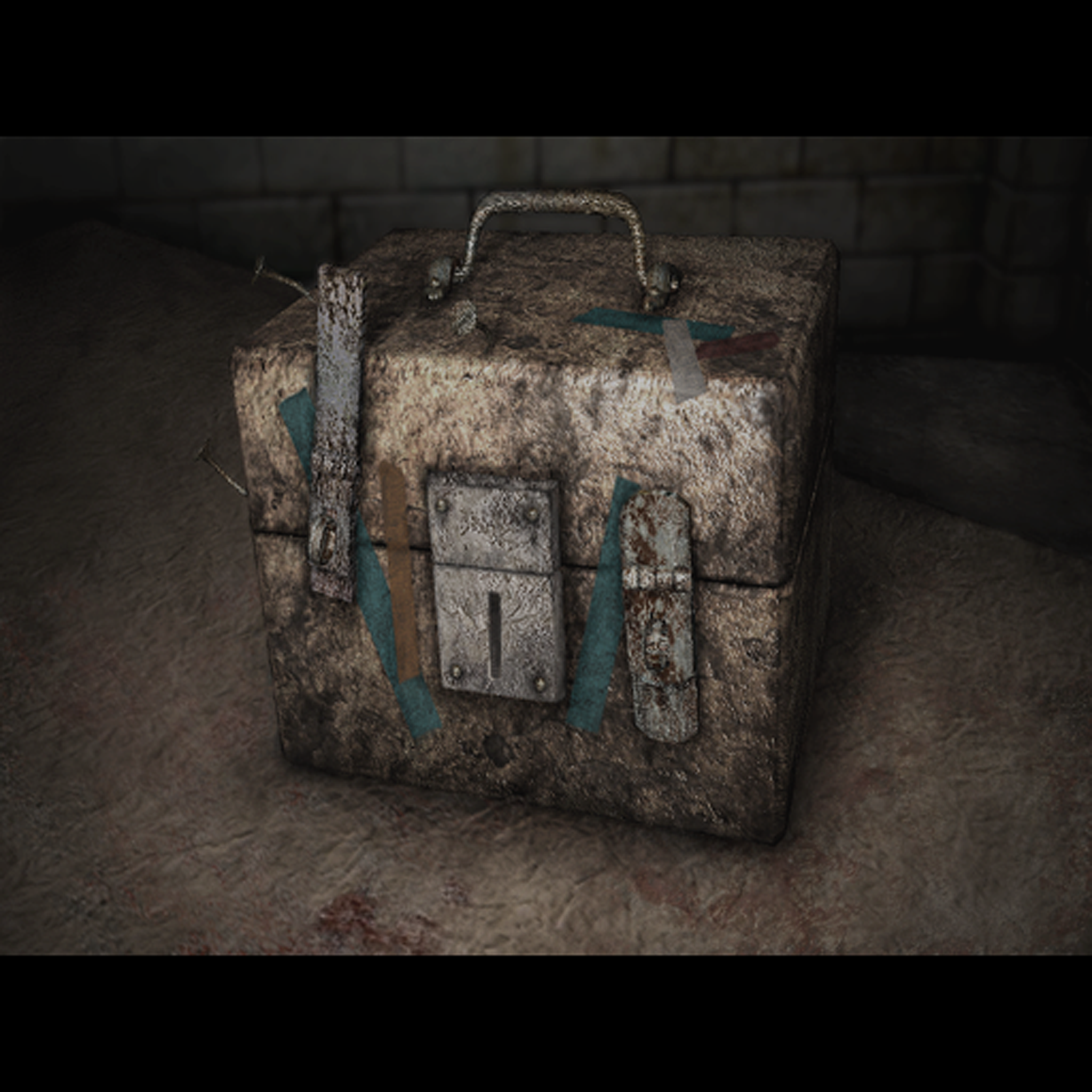
Processed/resampled (4x) through "Let's Enhance":

Default image (extracted from PCSX2):

Resampled (4x) through Photoshop (via Bicubic (smooth gradients)):

Processed/resampled (4x) through "Let's Enhance":

Default image (extracted from PCSX2):

Resampled (4x) through Photoshop (via Bicubic (smooth gradients)):

Processed/resampled (4x) through "Let's Enhance":

Default image (extracted from PCSX2):

Resampled (4x) through Photoshop (via Bicubic (smooth gradients)):

Processed/resampled (4x) through "Let's Enhance":

 Polymega
All 51 comments
I agree, the results are very impressive. Good find!
 AeroWidescreen
on 25 Sep 2018
AeroWidescreen
on 25 Sep 2018
I have to say that is pretty amazing!
 elishacloud
on 25 Sep 2018
elishacloud
on 25 Sep 2018
Looks sweet. Absolutely needs to be done!
 Mkilbride
on 26 Sep 2018
Mkilbride
on 26 Sep 2018
Well this blows the hell out of the method I've been using. You _could_ also use TexMod to replace the textures in the PC version, but that's been a clunky, inelegant solution for me so far.
 MilkManEX
on 2 Oct 2018
MilkManEX
on 2 Oct 2018
You could also use TexMod to replace the textures in the PC version, but that's been a clunky, inelegant solution for me so far.
Elisha is likely going to make memory modifications similar to what he did for the enhanced audio, so high-resolution textures will work natively. It's already been proven possible, but it was pushed back in favor of replacing WineD3D since that's been giving a lot of people trouble.
AeroWidescreen
on 2 Oct 2018
@Bigmanjapan I'm in the process of capturing the fullscreen images from the PCSX2 version (best versions). Is there a way to hex edit to change the game's riddle difficulty for the PCSX2 version on the fly (NTSC PS2 Greatest Hits) ? Would that crash the game? I'm asking as certain fullscreen images change depending on the riddle difficulty.
If you've never done this before/don't have this address on hand please do not worry about it. I'd rather not spend your time looking for such a thing with these mods.
Polymega
on 17 Nov 2018
Hi @AeroWidescreen ,
I'm in the process of capturing the fullscreen images from the PCSX2 version (best versions).
All I have left to grab, going off your list here, are the following:
Hexadecimal | Description | Location | Scenerio
-- | -- | -- | --
0000002A | Innocent Man Riddle (Extra) | Labyrinth | Main
00000032 | Innocent Man Riddle (Hard) | Labyrinth | Main
000000A6 | Whiteboard with Door Code Riddle | Brookhaven Hospital | Main
- While grabbing these images I believe I may have found some that weren't accounted for. Can you confirm if the following below should be included in the list or not? Namely: These are images that overlay on top of fullscreen images:


(Ignore the RGB to BRG for now; haven't changed them yet.) The images above are the eggs that go into the final doors and the plates for BFaW's fireplace riddle.
- What about "note" images? For example: When James acquires the Lost Memories and Crimson Ceremony books the game shows a fullscreen image of the books while the text reads over it. Same is true with Mary's Letter to Laura in the Hotel. Should those be included as well or are they handled differently in the game (not considered standard fullscreen images)?
3. Lastly, there's one image on your list I couldn't find. Granted, I've had this code memorized for 15+ years now and never go to the Examination Room anymore when I play the game but I don't think this image is present in the final build of the game? Maybe it's left over data similar to Angela's torn picture in the apartment (the one where it still shows her fathers face)?
Hexadecimal | Description | Location | Scenerio
-- | -- | -- | --
000000A6 | Whiteboard with Door Code Riddle | Brookhaven Hospital | Main
Polymega
on 17 Nov 2018
While grabbing these images I believe I may have found some that weren't accounted for. Can you confirm if the following below should be included in the list or not? Namely: These are images that overlay on top of fullscreen images:
What about "note" images? For example: When James acquires the Lost Memories and Crimson Ceremony books the game shows a fullscreen image of the books while the text reads over it. Same is true with Mary's Letter to Laura in the Hotel. Should those be included as well or are they handled differently in the game (not considered standard fullscreen images)?
You shouldn't limit yourself to what I have on that list; I never bothered listing those books or Mary's letter because they weren't letterboxed images that needed to be scaled. Feel free to add any inventory and puzzle items you see, since those will need to be enhanced as well. Worst case scenario is we can't use them due to technical limitations, but I don't think it'll be a problem unless Elisha says otherwise.
Just make sure you enhance them all the same way. So if you're going with 4x the resolution, then do that for all the images. It should make scaling everything a lot easier.
Lastly, there's one image on your list I couldn't find. Granted, I've had this code memorized for 15+ years now and never go to the Examination Room anymore when I play the game but I don't think this image is present in the final build of the game? Maybe it's left over data similar to Angela's torn picture in the apartment (the one where it still shows her fathers face)?
There's an actual puzzle you have to solve to get that door code when you have your riddle difficulty at Hard/Extra. On the lower difficulties the game just gives you the code when try to view the whiteboard and doesn't display an image.
Maybe it doesn't exist in the PS2 version, I don't know, I don't have much experience with that version.
AeroWidescreen
on 17 Nov 2018
There's an actual puzzle you have to solve to get that door code when you have your riddle difficulty at Hard/Extra.
Thank you. I can't remember the last time I did a full playthrough on Hard Riddle. Hell, I can't even remember how to unlock/initiate Extra Riddle mode! (To capture the hangman pictures.)
Maybe it doesn't exist in the PS2 version, I don't know, I don't have much experience with that version.
About that: In order to get the Searching for Another Conclusion you must beat the game at least once and also have unlocked the In Water ending. I did just that on PCSX2 and... the book never spawned on the next New Game+. I downloaded PCSX2 save files for the game that had all endings already unlocked and it still didn't spawn...
...for the NTSC Greatest Hits version. I swapped over to the regular NTSC PS2 release and loaded a save that only had the In Water ending unlocked and, yup, sure enough the book was there and I was able to get the image that way. I'm thinking perhaps the PS2 GH version is bugged to prevent that book/image from spawning? On that note: Do you recall ever seeing this book in the PC version? I don't remember ever seeing it there...
Feel free to add any inventory and puzzle items you see, since those will need to be enhanced as well.
Yes sir. I'll probably be requesting a second set of eyes from you down the line to ensure I have all/most additional images accounted for, then. If you can think of a good/free online site/tool to use for us to share image work and collaborate please do let me know. Otherwise we can just do FTP or the like and kick it old-school.
Polymega
on 17 Nov 2018
@Polymega
For SLUS-20228GH:
21236254 — Action Level selector
0х0 Beginner
0х1 Easy
0х2 Normal
0х3 Hard
21236255 — Riddle Level selector
0х0 Easy
0х1 Normal
0х2 Hard
0х3 Extra
Changes take effect on the fly, no need to re-enter a room.
 Bigmanjapan
on 17 Nov 2018
Bigmanjapan
on 17 Nov 2018
Beautiful! You've just saved me hours of work. Thank you as usual, sir.
Also, this is strange: On PCSX2 NTSC Greatest Hits the Crimson Ceremony book is not spawning for me? I already acquired the Book of Lost Memories on this same playthrough so I don't know what's going on? Same issue with the Searching for Another Conclusion book not spawning... So weird.
Polymega
on 17 Nov 2018
@Bigmanjapan one last request, if you happen to have this info on-hand: Is there a way to unlock/have ALL items in my inventory?
Polymega
on 17 Nov 2018
@Polymega
For SLUS-20228GH:
21137C64 4 byte — Quest items spawning 1
21137C68 4 byte — Quest items spawning 2
For the ease of use set both to 0xFFFFFFFF to put all quest items in the inventory. Ritual items are on the second address.
These addresses don't actually hold true 4 byte values, these are bitmasks. You can try setting one of the above addresses to binary type, select 0 starting point and 8 length. If you set it's value to 0xFFFFFFFF earlier, then now you will see a 11111111 (1 byte = 8 bits) value. Each 1 means that the item is spawned. Change it to 0 to despawn the item.
Bigmanjapan
on 17 Nov 2018
You are awesome. Again: Saving me so much time capturing these images (when you examine certain items such as letters and keys, you get unique, bigger images that I'm currently capturing). Thank you again.
Polymega
on 17 Nov 2018
Wow, nice find!
I already came across an alternative image upscaling software called "A Sharper Scaling" almost a year ago, which proved to be useful in some cases (mostly with sharp-edge computer generated images), but that one seems to be even magnitudes better!
Well, neural network behind it.. :)
 d4rkne55
on 20 Nov 2018
d4rkne55
on 20 Nov 2018
@Polymega
Do you recall ever seeing this book in the PC version? I don't remember ever seeing it there...
Yes, it's in the PC version. I had trouble getting it to spawn the first time. I think I had to complete the game from scratch (no loading old saves) for it to appear.
Otherwise we can just do FTP or the like and kick it old-school.
FTP is fine with me. We already have that working and I'm not aware of a better file sharing method.
AeroWidescreen
on 20 Nov 2018
Using Topaz Labs' Gigapixel software. At the very least, I think it's definitely well-suited for the item images.
Original (1024)

4096

Original (512)

2048

Original (512)

2048

Original (512)

2048

Original (512)

2048

Polymega
on 13 Dec 2018
Maybe photoshop some text that corrupts by this program. Like "Silent Hill" on VHS tape.
 SiarMortal
on 13 Dec 2018
SiarMortal
on 13 Dec 2018
Yeah, for sure we'd have to go back and clean up parts of the images (such as the text).
These are all just test passes for right now, with no additional work done to them after the enlargements, just to see if they're worth using to begin with.
I'm personally very pleased with Gigapixel's results for the item image, even if we have to go back and clean up some parts.
Polymega
on 13 Dec 2018
Not sure if he'd be interested in collaborating, but Ze Pilot has been doing some amazing and incredibly quick work with AI-enhancing the backgrounds in Final Fantasy IX.
MilkManEX
on 3 Feb 2019
Some guy from ResetEra forums upscaled the textures from the start toilet and on the observation deck and replaced them using a "DX9 wrapper". Results look amazing I think and make me dream of a complete HD texture mod. God damn.
http://screenshotcomparison.com/comparison/128826/
link to the original post: https://www.resetera.com/goto/post?id=17293537
SiarMortal
on 3 Feb 2019
I've finished remaking the "big three" images for the game in widescreen:
- Main menu
- James' save screen
- Maria's save screen
Maria's save screen was definitely the worst quality out of them all to work from.
Below is a preview of these images. I haven't remade the main menu "thick" font yet but that should be easy enough to do when the time comes.
The main menu's resolution will need to be adjusted down the line as it's currently 1920 x 1200 but I'll worry about that when the time comes:


Polymega
on 17 Feb 2019
Yoooooo that looks fantastic!
MilkManEX
on 17 Feb 2019
@Polymega
Superb job! I couldn't have done it better even if I wanted to. Have you remastered the start menu text yet?
AeroWidescreen
on 23 Feb 2019
Thanks, friend. :)
Have you remastered the start menu text yet?
I have not. My images above are obviously in widescreen and not the typical squared (²) texture files. I wasn't sure if we could make the main menu text image widescreen or not yet, as I'm unsure how the game would handle it, being an 'interactive' texture file and all. So I was holding off on that one until we can see what's possible for that.
Polymega
on 23 Feb 2019
Hi @lakeviewhotel and @Bigmanjapan ,
I believe one or both of you have extracted the Silent Hill 2 game files from the HD Collection, is that correct? If so, may I ask one of you to provide us the following file from the HD Collection?
\Silent Hill 2\data\demo\bp_edi_1\bp_edi_a.dds
Polymega
on 25 Apr 2019
Hi @Polymega sorry for late reply...!
Here is the file:
https://we.tl/t-WhwJGpuDw8
extracted / decompressed from the HD Collection for XBOX360.
 lakeviewhotel
on 8 May 2019
lakeviewhotel
on 8 May 2019
Thanks, Toni!
(Here are lakeviewhotel's files, as the original link's download will expire after 7 days: bp_edi_a.zip)
We wanted to compare this file to see if Hijinx Studios changed anything to make this solid black image stretch to fill the screen:

@AeroWidescreen the hex data within the HD Collection's file for bp_edi_a.dds appears to be identical to the PC version. Chances are, Hijinx probably deployed an equivalent to your alternative solution of excluding the cutscene from FullscreenImages and Fix2D.
Polymega
on 8 May 2019
Some guy from ResetEra forums upscaled the textures from the start toilet and on the observation deck and replaced them using a "DX9 wrapper". Results look amazing I think and make me dream of a complete HD texture mod. God damn.
I agree, it is my dream too. I know that creators of enhanced edition do not have currently plan for converting of all textures but I believe that just adding support for such mod would be sufficient and somebody would convert it. There are many modders who can do miracles with neural networks.
 George22x
on 15 May 2019
George22x
on 15 May 2019
I know that creators of enhanced edition do not have currently plan for converting of all textures
The two big reasons why we aren't currently looking into this is:
1) Research would need to be done to implement upscaled .map/.mdl textures without needing to use external software that must be launched alongside the game. Having such a feature integrated into the game is the ideal approach, but it surely won't be quick/easy to do.
2) Probably the more important reason why it is wiser to wait is because we're still doing adjustments/fixes/improvements for parts of the game _that directly affect certain texture files_. There's no point in upscaling these images _right now_ as certain ones may change in the future.
An example of this is the Eddie boss fight rooms. I simply recolored the entire environment texture files to have a blue-green tint to fix it. Same is true for the Hotel staircase that's on fire; instead of messing with a bunch of memory addresses to color correct the room it was easier for me to simply recolor the textures here. Same for the beginning bathroom. These are just a few examples.
The problem is, if you upscale the textures _right now_ there will surely be problems later on as we fix more environmental things. It really is best to wait and make such a thing the last big "hoorah" improvement for the game.
Polymega
on 15 May 2019
Thanks for the explanation, I will wait and look forward to it. Good to know, that it is planned at some point in the future, it will be very nice last big hoorah of this great project. 👍
George22x
on 15 May 2019
Hello,
Very nice work!
@Polymega could you tell me where is located the menu background and the second logo (creative)?
Thanks.
 legluondunet
on 15 Jun 2019
legluondunet
on 15 Jun 2019
I found them:
start00.tex and splash_logo.tex
legluondunet
on 15 Jun 2019
Those are the ones! start01.tex is also the main menu text/font.
Polymega
on 15 Jun 2019

Future note to us: If we ever need to test the loading screen footprints, an easy way to do so is to set the internal game speed to something fast (such as 20, where default is 52), initiate a cutscene, and let it play out completely.
When the cutscene ends, the cutscene's audio will continue to play. If you go to another room while this audio is still playing, you'll see the loading screen footprints for a while as the audio from that previous cutscene continues to play.
Polymega
on 19 Jun 2019
While most of this looks wonderful, I believe parts of some of the images should be enhanced manually. For example, the text on the book could be photoshopped using the text tool and a similar looking font.
 snigelpasta
on 2 Jul 2019
snigelpasta
on 2 Jul 2019
While most of this looks wonderful, I believe parts of some of the images should be enhanced manually. For example, the text on the book could be photoshopped using the text tool and a similar looking font.
Yes, we would absolutely do that. Aero_ and I are very comfortable with Photoshop and related tools (I've personally been using the software for 15+ years now), so combine that with my OCD and you can expect I'll do my part to make the images as nice as they can be within the toolsets we have.
We haven't done any cleanup work as the images you see above are all just tests done in different AI upscaling software. We are still working on a mod to allow us to use higher res images in-game. Until that time comes (proving that it's possible for the game to display them), we haven't done any _real_ work with the images.
Polymega
on 2 Jul 2019
While most of this looks wonderful, I believe parts of some of the images should be enhanced manually. For example, the text on the book could be photoshopped using the text tool and a similar looking font.
Yes, we would absolutely do that. Aero_ and I are very comfortable with Photoshop and related tools (I've personally been using the software for 15+ years now), so combine that with my OCD and you can expect I'll do my part to make the images as nice as they can be within the toolsets we have.
We haven't done any cleanup work as the images you see above are all just tests done in different AI upscaling software. We are still working on a mod to allow us to use higher res images in-game. Until that time comes (proving that it's possible for the game to display them), we haven't done any real work with the images.
Awesome.
Also, I know this is only quasi-relevant but I couldn't figure out how to PM you so i'll just ask you here.
You might be aware of Another ongoing Project called Resident Evil 4 HD Project.
They ended up re-creating the texture from scratch, but a couple years back they were trying to figure out if a cigarette pack from the game is real. The texture was too low-res to read, but since you seem to know how to use this neural image processing thing, i'll just go ahead and ask if you'd like to process this texture and see if the text is possible to decipher.
With love.
snigelpasta
on 2 Jul 2019
I _adore_ what the RE4HD team is doing with remaking the textures. That's an absolutely monumental task and I have nothing but respect for such a massive undertaking.
Unfortunately that cigarette pack is just too low res. Here is what Gigapixel gave me. It's not good at all. Although I love how crisdecuba used real-world cigarettes from Spain as the replacement texture. It's a suitable and geo-sensible compromise in remaking that texture.
Polymega
on 2 Jul 2019
Unfortunately that cigarette pack is just too low res. Here is what Gigapixel gave me.
Alright. However, just to be sure, did Gigapixel take into account that the image is already upscaled? As in only increased the size of the image without any processing? Because the result looks almost identical. Wouldn't you need to downscale the image to it's original size for this to work at all or is this a really stupid question and i'm just totally misunderstanding how this works? Thanks a bunch anyway!
snigelpasta
on 2 Jul 2019
However, just to be sure, did Gigapixel take into account that the image is already upscaled? As in only increased the size of the image without any processing? Because the result looks almost identical. Wouldn't you need to downscale the image to it's original size for this to work at all or is this a really stupid question and i'm just totally misunderstanding how this works?
You're correct that having the image already upscaled before running it through something like Gigapixel is a big reason why there was little (to no) improvement.
However, downscaling an image that was upscaled isn't the right approach for this. You need the original, unaltered source file for best results. If it was blown up by someone, downscaling back to its original resolution will result in visual discrepancies vs. the original file. Image software "guesses" what to fill in for the new pixels when an image get enlarged, and it then guesses what to remove when you downscale it; this is why there would be discrepancies in the pixel information between the two.
I will also say that I'm 99% positive you wouldn't be able to decipher the text in that cigarette pack either way, as the original texture is way too small.
Polymega
on 8 Jul 2019
https://youtu.be/Um8ed6WZrAo?t=3524
This is basically exactly what they're doing over at RE4HD project now. They have a neural network program called Topaz Gigapixel AI and use the end result as the starting point for their enhanced textures. The video is pretty interesting after the 1hr mark. English subs are available.
 umbrellacorp53
on 16 Jul 2019
umbrellacorp53
on 16 Jul 2019
I moved the large texture prototype into this module. To use the prototype you need to add a new option to the ini file: EnableTexAddrHack = 1
This prototype will not work with all textures, but should work with at least some (maybe most) of the textures. I tested it with a large Konami logo: konami2048x2048.zip
The prototype also works with the custom mod path, so you can just copy the large texture into the correct folder under sh2e for it to work.
Test module with the prototype added: d3d8.zip
elishacloud
on 13 Sep 2019
Right on!! @AeroWidescreen I've sent you an email with some test files for this (Elisha copied).
Polymega
on 13 Sep 2019
I intend to use AI Upscale in the game textures. I tought about do the same way as you guys, but the textures from SH2:Enhanced are in a strange format, .tex. So how can I convert the upscaled textures to this .tex format?
 MathRick9
on 13 Apr 2020
MathRick9
on 13 Apr 2020
I made it for ''SH2 - Born From A Wish'' https://www.moddb.com/mods/silent-hill-2-born-from-a-wish-ai-upscale-mod
But I can't do for the main game due to uMod limits.
Since you guys don't want to share how did you guys edited the game textures, there is nothing I can do. I hope your crew upscale the game textures down the road.

MathRick9
on 9 May 2020
Since you guys don't want to share how did you guys edited the game textures, there is nothing I can do.
I just have to quickly ask: What's this all about? We've never said that. Ever.
We stay consistently busy with this project, along with all other happenings going on in our lives. And the one guy on our team who has the best understanding of how to place higher res images in .map files has been MIA for quite some time now.
Polymega
on 9 May 2020
I just have to quickly ask: What's this all about?
I see he asked month ago and there was no reply. This could lead to misunderstanding.
George22x
on 9 May 2020
I see. Well, I apologize no one followed up with you. Only one person on the team was actively researching how .map files work and are structured, and he's since gone silent (and we're hoping he is okay and well). No one else on the team has actively looked into increasing the texture sizes for .map files, as it's not currently planned for our project, so we have no immediate information to lend.
Polymega
on 10 May 2020
Do you give me permission to port SH2:Enhanced textures (font, background etc) to the PS2 version? there is texture modding in PCSX2 now (it's beta and private, I'm one of the beta testers).
EDIT:
I just checked and the PS2 font is different from the PC font, so I will have to draw it from scratch.
Can you tell me the name of the font that you guys used?
MathRick9
on 10 May 2020
Sure. Just give proper credit/attribution to the project and that should be fine.
The font we use for the in-game text/subtitles is Palatino Linotype with slightly modified character height, line height, and letter spacing.
Polymega
on 10 May 2020
Related issues
Polymega
·
17Comments
 yukinsaknos
·
14Comments
Polymega
·
14Comments
yukinsaknos
·
14Comments
Polymega
·
14Comments
 OregonPacifist
·
15Comments
OregonPacifist
·
15Comments
 Psycho-A
·
16Comments
Psycho-A
·
16Comments