Signal-desktop: Messages sent in Signal Desktop for Mac don't appear in iPhone app
- [X] I have searched open and closed issues for duplicates
Bug Description
Messages sent in Signal Desktop for Mac don't appear in iPhone app
Steps to Reproduce
- Install Signal on iPhone
- Install Signal-Desktop on Mac
- Link Signal Desktop to iPhone
- Download contact data (Desktop -> Preferences)
- Send message to contact
- Look at iPhone app
- Sent message is missing
Platform Info
Signal Version: 1.39.5
Operating System: Mac 10.15.7
Linked Device Version: 14.3
Link to Debug Log
https://debuglogs.org/1250140b49446486803cfc4c00f2f2093e5c8335d8ef04b891ccecc2af2e543b
 histed
All 54 comments
corresponding iOS debug log
https://debuglogs.org/655bbfc432e7d5ae7aeb4fdcd81dca60a16ab5557183d1403da57af8bc1b2442.zip
histed
on 15 Jan 2021
Potentially related:
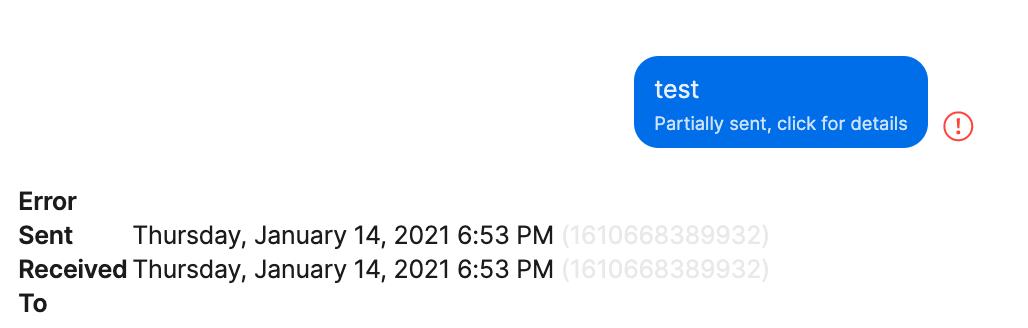
If I send a message on Desktop to Note To Self, I get the error "Partially sent, click for details". When I click on the link, no error is shown.

histed
on 15 Jan 2021
histed
on 15 Jan 2021
I have the same issue, using the Signal desktop app for Windows and the iOS app.
 vladh
on 15 Jan 2021
vladh
on 15 Jan 2021
I have the same issue. I installed the Windows app today, after fixing the contracts import bug, I had a long conversation with a friend. Then on the iPhone app I noticed that I only see the message from the other person, but not the ones that I sent.
Windows logs: https://debuglogs.org/d44121666c7355b22279740999822740c49b42624f7da8587c69e65f4666ea03
iPhone logs: https://debuglogs.org/a4d4bdc043f285607a86b5633e7c5700836f793be61bd840762f369164bd4267.zip
 myoffe
on 15 Jan 2021
myoffe
on 15 Jan 2021
Came here to report the same issue. Glad to see it is not my fault. It does not work on Linux, Windows, different networks, Firewall Ports URLs open or not. Nothing fixes it. It did work on a desktop linked 5 days ago. but every new device fails.
Desktop log: https://debuglogs.org/f7cdf99c1bc0ca3220f872fc18e57711882a9fbc391cf21fb3ede9473752e491
 Surenic
on 15 Jan 2021
Surenic
on 15 Jan 2021
My issue seems related. Cant import conversations from iphone to mac client. Using latest version of Big Sur
 sascharissling
on 15 Jan 2021
sascharissling
on 15 Jan 2021
I have the same issue. Glad I'm not the only one. 😅
My debug log from macOS Desktop: https://debuglogs.org/8f23a20a9770d553e8607f4d3d4895303585a6a6b9ec69ad17e31a589c6690d1
 maximilianschmitt
on 15 Jan 2021
maximilianschmitt
on 15 Jan 2021
Have the same issue with the Mac app and an iPhone. Just checked with a friend of mine, he sees the same problem with his iPhone and his Windows app. Friends with Android phones do not have the problem.
 jpsqq
on 15 Jan 2021
jpsqq
on 15 Jan 2021
Same issue here on Mac OS Big Sur!
 Tobi360
on 15 Jan 2021
Tobi360
on 15 Jan 2021
"Partially sent" issue also on macOS 10.15.6 with Signal Desktop app v1.39.5 and Signal iOS app 5.2.0.4
Debug log shows no information regarding the problem:
INFO  2021-01-15T11:10:40.155Z Submitting a message with 0 mentions
INFO  2021-01-15T11:10:40.156Z Send pre-checks took 1 milliseconds
INFO  2021-01-15T11:10:40.159Z Sending message to conversation [REDACTED]377 ([REDACTED]ac8) with timestamp 1610709040159
INFO  2021-01-15T11:10:40.200Z SQL channel job 652 (saveMessage) succeeded in 15ms
INFO  2021-01-15T11:10:40.201Z Sending a message with 0 mentions and 0 placeholders
INFO  2021-01-15T11:10:40.207Z GET https://textsecure-service.whispersystems.org/v2/keys/[REDACTED]377/1
INFO  2021-01-15T11:10:40.207Z Cycling agent for type -auth
INFO  2021-01-15T11:10:40.929Z GET https://textsecure-service.whispersystems.org/v2/keys/[REDACTED]377/1 200 Success
INFO  2021-01-15T11:10:43.756Z Sending a keepalive message
INFO  2021-01-15T11:10:47.542Z Loaded this list of log files from logPath: log.log
Within timeframe of sending attempt, iOS app logs show no activity:
2021/01/15 11:05:46:049  🧡 [NSData+Image.m:792 +[NSData(Image) imageMetadataWithImageSource:imageFormat:isAnimated:]]: Could not determine transparency of image
2021/01/15 11:14:43:132  💛 [AppDelegate.m:117 -[AppDelegate applicationWillEnterForeground:]]: applicationWillEnterForeground.
 christophevg
on 15 Jan 2021
christophevg
on 15 Jan 2021
Switching back to 1.39.4 fixed the issue for me!
Surenic
on 15 Jan 2021
Switching back to 1.39.4 fixed the issue for me!
How did you switch back, where do have you got the old app from?
Tobi360
on 15 Jan 2021
Switching back to 1.39.4 fixed the issue for me!
How did you switch back, where do have you got the old app from?
I still had an install file (windows) on my disk. Unistalled 1.39.5 and installed the old one. Hope this information helps solving this issue
Surenic
on 15 Jan 2021
@Tobi360 try that link: https://updates.signal.org/desktop/signal-desktop-mac-1.39.4.dmg
 julian-baumann
on 15 Jan 2021
julian-baumann
on 15 Jan 2021
https://updates.signal.org/desktop/signal-desktop-win-1.39.4.exe
connecting with the phone on 1.39.4 and then updating to 1.39.5 (the program forces you to) works for me for now. The issue seems to be there on a fresh connect on 1.39.5 only
Surenic
on 15 Jan 2021
I can confirm that downgrading to 1.39.4 also fixed the issue for me. I'm on macOS Big Sur.
julian-baumann
on 15 Jan 2021
I can confirm that downgrading to 1.39.4 also fixed the issue for me. I'm on macOS Big Sur.
Thats really strange! Downgrading didnt fix it for, messages sent on the desktop client are still not synced to the ios app and also messages to the "note to self" still are "partially sent"
Tobi360
on 15 Jan 2021
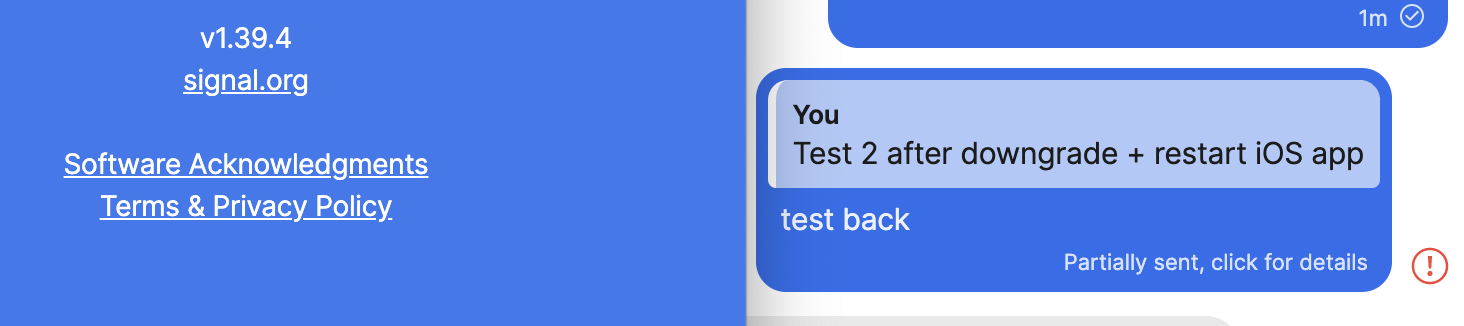
Here also: downgrading seems to provide no solution
christophevg
on 15 Jan 2021
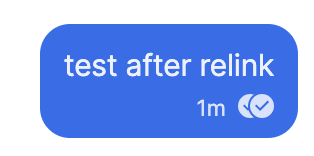
did you try to unlink the desktop and relink it on 1.39.4? That's what I did intenionally and it did work
Surenic
on 15 Jan 2021
@Tobi360 Maybe there is still something saved at "\~/Library/Application Support/Signal". Try deleting that folder and installing the 1.39.4 again. Maybe that has to do something with it. Yesterday I moved the Signal.app (1.39.5) into the Trash and removed all files in "~/Library/Application Support/Signal". Today I installed the 1.39.4 and it worked like it should. After relinking the desktop app of course.
julian-baumann
on 15 Jan 2021
did you try to unlink the desktop and relink it on 1.39.4? That's what I did intenionally and it did work
🙄 why didn't I think of that 😉
christophevg
on 15 Jan 2021
Downgrading to 1.39.4 solved the problem for me as well. Thanks for the download link @julian-baumann!
Because there's no way of disabling autoupdates, when I quit and relaunched Signal it updated to 1.39.5 by itself. However, the bug hasn't reappeared. It seems to be that so long as you set up the connection on a version before 1.39.5 then it stays working just fine. It must be the same principle as the users who say that Signal Desktop is working fine on computers they set up a few days ago, but not on the one they're trying to link now (since 1.39.5 came out).
 hampton8
on 15 Jan 2021
hampton8
on 15 Jan 2021
Downgrading to 1.39.4 solved the problem for me as well. Thanks for the download link @julian-baumann!
Because there's no way of disabling autoupdates, when I quit and relaunched Signal it updated to 1.39.5 by itself. However, the bug hasn't reappeared. It seems to be that so long as you set up the connection on a version before 1.39.5 then it stays working just fine. It must be the same principle as the users who say that Signal Desktop is working fine on computers they set up a few days ago, but not on the one they're trying to link now (since 1.39.5 came out).
wow ok, thanks for that! I downgraded, startet it, quit it, relaunched it (didnt notice it updated itself), relinked it and was wondering why it still isnt working.
Now, when relinking with 1.39.4 running, everything works and still does after updating!
Hopefully, this will be fixed asap, as there is no way im going to explain this workaround to my friends & family..
Tobi360
on 15 Jan 2021
Downgrade - link - upgrade did work here.
 ict-one-nl
on 15 Jan 2021
ict-one-nl
on 15 Jan 2021
Same issue here but also when trying to unlink and downgrade to 1.39.4 I seem to have got into some loop with "Linking Device Failed". Request failed: bad gatewat (502).
 alongwor
on 15 Jan 2021
alongwor
on 15 Jan 2021
Unlink and Downgrade to 1.9.34 worked for me too.. but only for new messages. Older messages are not synced on the Desktop !!
 PJEN512
on 16 Jan 2021
PJEN512
on 16 Jan 2021
This thread was super useful! Thank you all!
This is a bad time for such a bug to happen on Signal, when people are trying to move off of WhatsApp! Hopefully this can get resolved soon to help further adoption. :pray:
 csalvato
on 17 Jan 2021
csalvato
on 17 Jan 2021
Same here :(
 audhen
on 17 Jan 2021
audhen
on 17 Jan 2021
Same issue here on Mac OS Big Sur.
Potentially related:
If I send a message on Desktop to Note To Self, I get the error "Partially sent, click for details". When I click on the link, no error is shown.
Same issue here on Mac OS Big Sur
 sdantasuff
on 17 Jan 2021
sdantasuff
on 17 Jan 2021
- [x] I have searched open and closed issues for duplicates
Bug Description
Messages sent in Signal Desktop for Mac don't appear in iPhone app
Steps to Reproduce
- Install Signal on iPhone
- Install Signal-Desktop on Mac
- Link Signal Desktop to iPhone
- Download contact data (Desktop -> Preferences)
- Send message to contact
- Look at iPhone app
- Sent message is missing
Platform Info
Signal Version: 1.39.5
Operating System: Mac 10.15.7
Linked Device Version: 14.3
Link to Debug Log
https://debuglogs.org/1250140b49446486803cfc4c00f2f2093e5c8335d8ef04b891ccecc2af2e543b
Same issue here on Mac OS Big Sur.
sdantasuff
on 17 Jan 2021
I have the same issue.
I downgraded to 1.39.4, relinked , restarted both iOS and Mac OS on M1, but I still get the partially send bug.
I hope this will be fixed soon. Makes the desktop app somehow unusable for me if I am not finding my own messages on the mobile app :(
 JensKrause91
on 17 Jan 2021
JensKrause91
on 17 Jan 2021
Do we have a solution yet??
 alphaaGithub
on 18 Jan 2021
alphaaGithub
on 18 Jan 2021
Seeing identical issues on Signal Desktop for Linux (Flatpak version). In my case I cannot complete a contact sync with my iPhone and messages sent from Desktop do not appear in the phone app.
 ChrisWiegman
on 18 Jan 2021
ChrisWiegman
on 18 Jan 2021
Guten Morgen,
auch ich habe dieses Problem.
Desktopversionen für Linux Mint 19.3 & 20.1 Flatpack & ppa beide Version 1.39.5 synchronisieren nicht mit dem iPhone.
Welche Lösungsmöglichkeiten gibt es?
Gruß
Wolfgang
 wolfgang-58
on 18 Jan 2021
wolfgang-58
on 18 Jan 2021
Same issue on Signal for Windows 1.39.5 and iOS 5.2.0.4.
The work-around mentioned here (unlink, install 1..39.4, link, then update) "fixed" it for me too!
 kennethgeets
on 18 Jan 2021
kennethgeets
on 18 Jan 2021
I have the same issue.
I downgraded to 1.39.4, relinked , restarted both iOS and Mac OS on M1, but I still get the partially send bug.I hope this will be fixed soon. Makes the desktop app somehow unusable for me if I am not finding my own messages on the mobile app :(
Make sure to unlink your phone first: I did that from inside Signal for Desktop ("remove everything" or something) in the settings and then removed the linked device in my phone's app as well. _Then_ I uninstalled v1.39.5 completely, and only then did I install 1.39.4.
Careful during relinking your phone on v1.39.4: it asks you to restart just after linking, lick "LATER" and check it if works. Then, when it works, you can click "Restart".
kennethgeets
on 18 Jan 2021
Downgrading to 1.39.4, unlinking from the iOS app, then re-linking fixed the issue. Now back on 1.39.5 again and it's still in sync. No need to clear the data on the desktop app.
MacOS 11.1
iOS 14.3 (app version 5.2.0.4)
 bennierex
on 18 Jan 2021
bennierex
on 18 Jan 2021
I have the same issue.
I downgraded to 1.39.4, relinked , restarted both iOS and Mac OS on M1, but I still get the partially send bug.
I hope this will be fixed soon. Makes the desktop app somehow unusable for me if I am not finding my own messages on the mobile app :(Make sure to unlink your phone first: I did that from inside Signal for Desktop ("remove everything" or something) in the settings and then removed the linked device in my phone's app as well. _Then_ I uninstalled v1.39.5 completely, and only then did I install 1.39.4.
Careful during relinking your phone on v1.39.4: it asks you to restart just after linking, lick "LATER" and check it if works. Then, when it works, you can click "Restart".
That fixed it for me ! Thanks a lot!
JensKrause91
on 18 Jan 2021
Downgrading fixed for me as well just now.
Been fighting with this for days.
 JasTySYmKeq93EaCPhWxNBtHwJh6
on 18 Jan 2021
JasTySYmKeq93EaCPhWxNBtHwJh6
on 18 Jan 2021
I had the same issue than everyone else here when I tried to install the Mac OS app last friday. Following the advices in this thread, I totally uninstalled the application (and manually removed all the files related to Signal in ~/Library) and re-installed version 1.39.4. It also fixed the problem for me. This is strange, the application auto-upgraded to 1.39.5 a few minutes later and it's still working fine.
This was my very first installation (I registered to the service last week). Perhaps someone forgot to pack a file with the 1.39.5 installation.
 vega1970
on 18 Jan 2021
vega1970
on 18 Jan 2021
This is affecting linux as well (ubuntu desktop + iPhone): does anyone know how to downgrade? first previous version available is 1.38.1. Version 1.39.4 is not available on signal packages repo
 ffissore
on 18 Jan 2021
ffissore
on 18 Jan 2021
Been affected by this for the past several days on linux. The oldest version available is 1.38.1 which is too old to sync. Does anyone have a link to the 1.39.4 deb available, as it appears to have been removed from the debian repo?
 sklv
on 18 Jan 2021
sklv
on 18 Jan 2021
Had the same problem, Google search led me here, 1.39.4 fixed the problem for me (Signal on Windows 10 and IOS 14.3).
 Masek0815
on 19 Jan 2021
Masek0815
on 19 Jan 2021
Also experiencing this issue on 1.39.5 of the desktop app (from the Arch Linux repos) and 5.2.1.3 of the iOS app
 charliesome
on 19 Jan 2021
charliesome
on 19 Jan 2021
same issue.
- Unlinking device
- Uninstall signal from desktop
- Install older 1.39.4 version
- Relink device
- Profit
these steps works for me as well.
 joeltay17
on 19 Jan 2021
joeltay17
on 19 Jan 2021
As noted in duplicate #4896, I'm seeing this issue too on:
Signal Desktop v1.39.5 on macOS 11.1 (Big Sur)
Signal for iOS 5.1.0.31 on iOS 14.3
 andrew-hill
on 20 Jan 2021
andrew-hill
on 20 Jan 2021
anyone can confirm if the newest update has no issues? the 1.39.6 version
joeltay17
on 20 Jan 2021
Hi,
1.39.6 works very fine.
THX
Wolfgang
Linux Mint Cinnamon 19.3 & 20.1
iPhone 14.3 -> Signal 5.2.1.3
wolfgang-58
on 20 Jan 2021
desktop 1.39.6 and/or mobile 5.2.1.3 also seem to have fixed the issue for me (both updated today so can't say which it was with certainty)
Signal Desktop v1.39.6 on macOS 11.1 (Big Sur)
Signal for iOS 5.2.1.3 on iOS 14.3
andrew-hill
on 20 Jan 2021
For iOS 13.5.1 and Mac OSX 10.10.5 (yeah yeah I'm a laggard upgrader)
1.39.6 fixes the contacts and groups sync, and ongoing/current message sync now works bidirectionally.
Sadly, message history does not sync.
Note to self: install and sync all apps before embarking on the multi-app.
 TheAsseverate
on 20 Jan 2021
TheAsseverate
on 20 Jan 2021
1.39.6 also now working fine now for me on Kubuntu 20.10.
 robertmuil
on 20 Jan 2021
robertmuil
on 20 Jan 2021
Can confirm: 1.39.6 is working for me with Windows 10 and version 5.2.1.3 on IOS 14.3.
Masek0815
on 20 Jan 2021
I confirm it works! Thank you so much signal developers for fixing it and allowing us to keep caring about our privacy! :heart:
ffissore
on 20 Jan 2021
Related issues
 PanderMusubi
·
3Comments
PanderMusubi
·
3Comments
 halb9
·
3Comments
halb9
·
3Comments
 cmdrogogov
·
3Comments
cmdrogogov
·
3Comments
 ProactiveServices
·
3Comments
ProactiveServices
·
3Comments
 hanzei
·
3Comments
hanzei
·
3Comments
Most helpful comment
Downgrading to 1.39.4 solved the problem for me as well. Thanks for the download link @julian-baumann!
Because there's no way of disabling autoupdates, when I quit and relaunched Signal it updated to 1.39.5 by itself. However, the bug hasn't reappeared. It seems to be that so long as you set up the connection on a version before 1.39.5 then it stays working just fine. It must be the same principle as the users who say that Signal Desktop is working fine on computers they set up a few days ago, but not on the one they're trying to link now (since 1.39.5 came out).