Signal-desktop: Mac - "about signal desktop " - esc key breaks signal if in full screen mode
Bug Description
While Signal is in full-screen mode, clicking the ESC Key when viewing "about signal desktop" causes the signal screen to go blank and seems no way to go back to the normal signal screen. Have to relaunch Signal.
Steps to Reproduce
- Launch Signal and make it go full screen
- Click top Mac Menu for Signal
- Click: About Signal Desktop
- Click ESC on keyboard
Actual Result:
Screen goes blank after exiting about signal desktop.
Expected Result:
Should simply go back to normal Signal screen when ESC out of the about window.
Platform Info
Signal Version:
Been happening for months - just got around to reporting it. Currently on latest beta v1.36.3-beta.1.
Operating System:
MAC 10.15.6
 war59312
All 11 comments
Please provide your debug log. I just tried this and it didn't happen for me.
 scottnonnenberg-signal
on 25 Sep 2020
scottnonnenberg-signal
on 25 Sep 2020
Would love to, but sadly View > Debug Log does nothing while in this state.
Still broken with v1.36.3-beta.2.
war59312
on 28 Sep 2020
I just tried this too and couldn't reproduce.
You should be able to snag the debug logs if you trigger the bug, quit the app, and then start it again without opening the window.
When you say that the screen goes blank, do you just mean the About window? Or does your entire screen go blank? Or is it something else? If possible, a screen recording (or just screenshots) would help.
 EvanHahn-Signal
on 28 Sep 2020
EvanHahn-Signal
on 28 Sep 2020
Got you.
Debug log @ https://debuglogs.org/d71c3a160b50667cc4f5c8b5a8b5ea61df02c8af6be7d3fc6b33a2a436b72adf
Screenshot:

That's right after I hit ESC key when viewing the about screen. Signal just goes full blown black screen. Clicking or trying stuff in the menu has no effect.
war59312
on 28 Sep 2020
Thanks; this is helpful. One last question: are any of these windows in macOS fullscreen? It seems like the answer is "yes", based on your screenshot.
EvanHahn-Signal
on 29 Sep 2020
Yes, that is correct, Signal is full screen. Sorry, I missed that detail. And yes only happens if Signal is full screen.
war59312
on 3 Oct 2020
Thanks. I'm able to reproduce this and have filed it as a bug.
EvanHahn-Signal
on 4 Oct 2020
I'll open a PR with a fix ASAP. Thanks @war59312
 orenmagen100
on 8 Oct 2020
orenmagen100
on 8 Oct 2020
OK, sadly still not fixed 100%
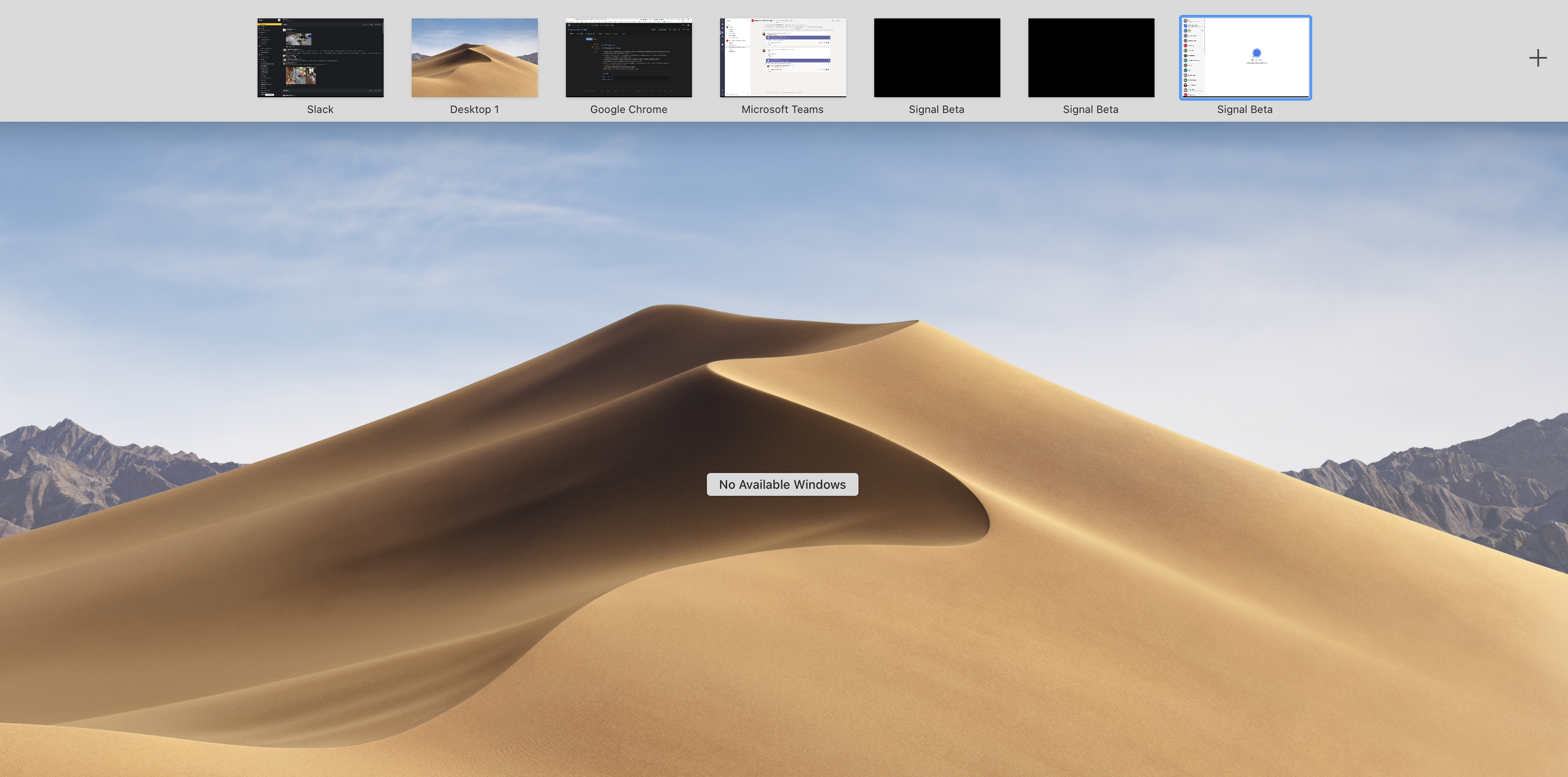
If Signal is in full screen, then open about and close it with esc key , it creates a second signal window.
I tried a second time and sure enough it then created a 2nd screen, so now I have 3 of them in the switch window.
See the screenshot. Notice there are now 3 signal beta windows and 2 are just black screens.
You can repeat this like 10 times and then you will have 10 signal screens. Whoops.
Getting closer :)
At least after I close the about screen and I can still see the main signal window.
war59312
on 13 Oct 2020
The Bug still exists in version 1.37.3 on Mac OS Catalina
:-(
 holle
on 9 Nov 2020
holle
on 9 Nov 2020
Confirmed fixed with v1.40.0-beta.3 on maOS Big Sur 11.2
:) Thank you!!
war59312
on 5 Feb 2021
Related issues
 bcsga
·
3Comments
bcsga
·
3Comments
 github-cygwin
·
3Comments
github-cygwin
·
3Comments
 McLoo
·
3Comments
McLoo
·
3Comments
 lokesh-krishna
·
3Comments
lokesh-krishna
·
3Comments
 mawed
·
3Comments
mawed
·
3Comments