Signal-desktop: Signal Desktop Windows 10 says "Error handling incoming message"
- [X] I have searched open and closed issues for duplicates
Bug Description
Signal Desktop version in windows 10 does not sync properly with iOS version, most messages including photos do not load.
Steps to Reproduce
- step one
Open Signal for Desktop.
Actual Result:
Most messages say "Error handling incoming message", the names of the contacts associated with each phone are not present. Images or other type of media does not load and shows a loading circle. Groups name does not sync, messages in groups sent by other people do not appear at all, only messages sent by me. Messages in individual conversations sync up, but not photos, and not in real time, I have to close and open the desktop version. Messages never leave the desktop version, either in groups or individual conversations. Messages sent to note to self in the mobile version do sync with the desktop version immediately.
Expected Result:
Contact names should sync, as well as all messages from groups and individuals. I should be able to send any kind of message from the desktop version.
Screenshots


Platform Info
Signal Version:
Desktop v1.33.1
Operating System:
Windows 10 Enterprise 64-bit
Linked Device Version:
iOS version 13.4.1
Signal for iOS version 3.7.1.0 [update to add signal iOS version]
Link to Debug Log
https://debuglogs.org/5718ab6d0afb698b5bea3939255a35e8d2ab67332e4e5607f622272f051e51b7
https://debuglogs.org/f3f7664b3e3c951f4709e96c788aa4eb7166898df4f18d1344b811c4788e348d.zip
 KbPWMLa
All 46 comments
Same issue here with Desktop and iOS versions. Windows version not the same.
 focusmediaproperties
on 18 Apr 2020
focusmediaproperties
on 18 Apr 2020
I am not a Signal developer and am not sure if it will really fix the issue but a similar problem I had was fixed by restarting the session from the top right menu in the corresponding conversations.
 Groschenroman
on 19 Apr 2020
Groschenroman
on 19 Apr 2020
@javierlmendez how long have you been using this instance of Signal Desktop? Can you try resetting the secure session like @Groschenroman suggested?
 kenpowers-signal
on 20 Apr 2020
kenpowers-signal
on 20 Apr 2020
I have had this version of signal since April 16, 2020, but this had been happening since v1.32.1. I don't see an option to reset the secure session either on the Desktop version or the iOS version.
KbPWMLa
on 20 Apr 2020
One thing I did was to go to settings and under the Contacts section I clicked the Import button and it said that importing my contacts and signal groups from my mobile failed because either the computer or the phone do not have internet access which is not the case.

KbPWMLa
on 20 Apr 2020
I have the same error, but not in Groups, but single conversations. On my phone (Android 9) everything works fine, but messages fail to be synced to the desktop client (Win 10). It looks like this:
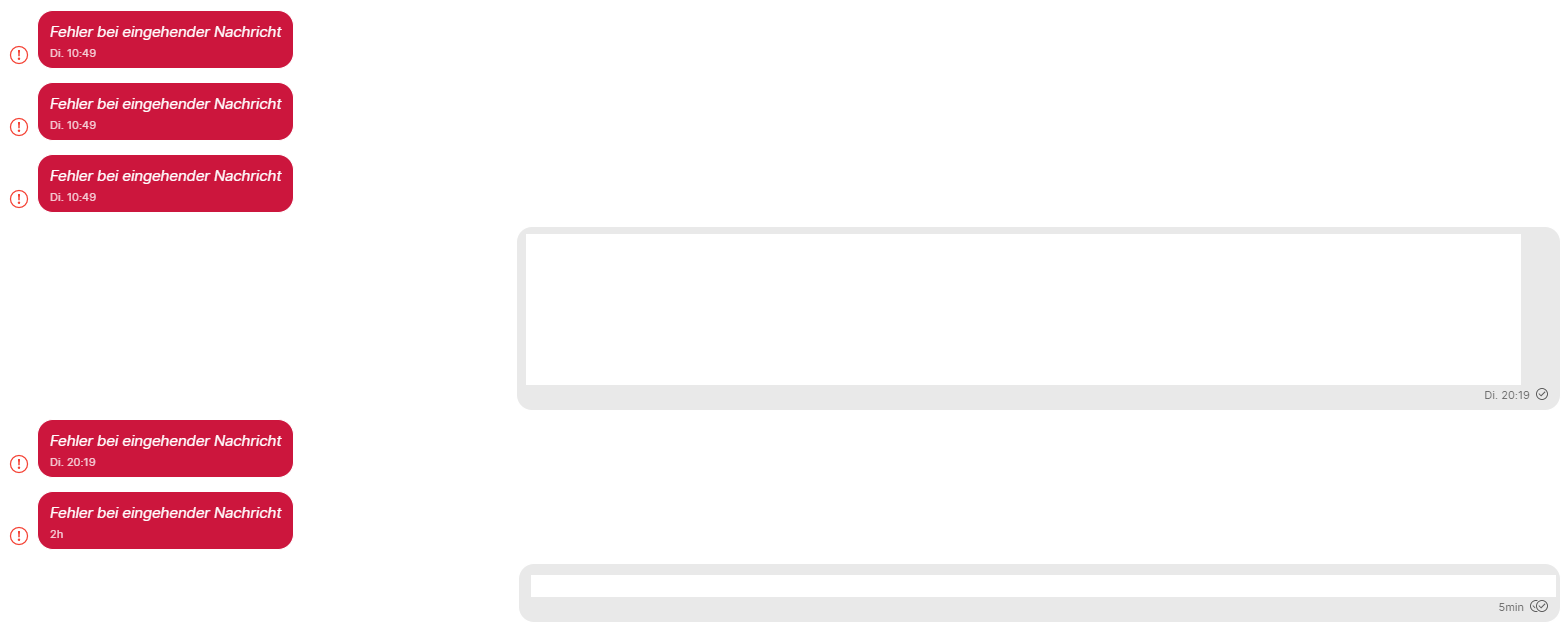
My own messages are synced, but messages from my contact fail. If I open message details this is the error: Missing Signed PreKey for PreKeyWhisperMessage
 klues
on 22 Apr 2020
klues
on 22 Apr 2020
@klues Can you try resetting the secure session with those contacts?
kenpowers-signal
on 25 Apr 2020
Yes, I'll do it. The contact with this error is a contact where I do not have regular conversations, so I'll not be able to test immediately if it makes a difference.
However there has to be some sort of bug within the Signal application that this error happens in the first place.
klues
on 27 Apr 2020
@klues Yep, we absolutely want to fix that underlying bug. The more information you can tell us about the Signal clients in question when this happens next, the better. Ideally logs from both the sending and receiving clients. Thanks!
 scottnonnenberg-signal
on 27 Apr 2020
scottnonnenberg-signal
on 27 Apr 2020
Here are debuglogs of the desktop client:
https://debuglogs.org/ce259a371e575eed93fe71968e7849bd943a64a48815f7d61415a0d5ef8c5251
This is the UI: https://prnt.sc/sa1tou
Last error message time: 2.5.2020, 22:47
Last 3 digits of the phone number where the error occured: ...637
Important note: There was no actual conversation between me and this phone number in the last weeks, so it's very strange that this error appears. On Android Signal client there is no conversation with this number at all. Unfortunately uploading debuglogs from Android client failed.
Edit: here the exact send and receive times and the error showed in UI: https://prnt.sc/sa1vgm
klues
on 3 May 2020
@klues Let's see if I have this right. You haven't directly exchanged messages with this number ...637 lately, and they are in your contacts. But you are seeing errors from them. Is that right?
This can happen if your contact just read messages in a group you're sending messages to - their devices send delivery and read receipts to you. Those are encrypted, and can result in the same encryption errors as normal messages.
So, as far as your log, this is the one error I see from that user - seems you captured this log a bit too long after all the errors happened? Logs are only kept for three days.
ERROR 2020-05-03T08:21:28.908Z queueEnvelope error handling envelope +[REDACTED]637.1 1588452441333 ([REDACTED]f84) : Error: Missing Signed PreKey for PreKeyWhisperMessage
This suggests to me that you never send message to this user from this device. You should be able to fix it if you send a message to them. Or use 'reset session.'
Next time, please provide your debug log right after the errors happen. We're looking to capture that transition from a good state to the bad state. Thanks!
scottnonnenberg-signal
on 4 May 2020
You haven't directly exchanged messages with this number ...637 lately, and they are in your contacts. But you are seeing errors from them. Is that right?
Yes, correct. More specific, I've never exchanged private messages with this contact.
This can happen if your contact just read messages in a group you're sending messages to - their devices send delivery and read receipts to you.
OK, yes, this could be the source of the error. It's correct that I'm in a group where this contact is also a member. However I'm quite sure that the number of error messages with this contact was higher than the amount of messages I've ever written into this specific group.
In the first case I reported within this issue (related to another contact), I'm sure that the person isn't member in one of my groups since the person just started using signal some days before. In this case we've exchanged some personal messages.
Yeah, I'll try to send more logs if this error happens again.
klues
on 5 May 2020
I am facing a simalar problem getting message "Error handling incoming message" with Desktop version on windows 10. It appears after sending a message (no reply from other user, just sending). It happens propably since last update (current v1.33.4). Sync contacts from mobile or reset security does not help.
Checking the console output I get this each time:
Uncaught (in promise) Error: No record for device +491xxxxxx.1
at SessionCipher.(libtextsecure.js:36342)
at async run (C:\Users\xxxx\AppData\Local\Programs\signal-desktop\resources\app.asarnode_modules\p-queuedist\index.js:255)
(anonymous) @ libtextsecure.js:36342
 joziegert
on 6 May 2020
joziegert
on 6 May 2020
Just got an error message from a number I don't know and never had contact with:
http://prntscr.com/sggl8j
https://debuglogs.org/405fcb1d7db75822444e8aa2c98f354d8c6e1b9631fad9e860d07df6691fd4bd
Number is: ...513
The error message only appeared on Desktop client, nothing happened on phone.
This number is member of a group where I am also member, but the number didn't send any message (or reaction to a message) to this group for at least a week.
klues
on 14 May 2020
@klues I'm seeing a missing signed prekey error from that number. Could they have recently read one of your messages and their client attempted to send you a read receipt or similar? Debug logs from their device would also be helpful.
kenpowers-signal
on 14 May 2020
Unfortunately I don't have access to the debug logs of the other device.
Yes, today in the morning I added reactions to some messages in the group (only reactions, no other messages), maybe the error results from a read receipt of the reactions.
klues
on 14 May 2020
@klues are you currently able to talk with this person on Signal? If not, does resetting the secure session with them from your device help at all?
kenpowers-signal
on 14 May 2020
Hi, sorry - I do not know this person. He/she is in a bigger Signal group where I don't know all of the members. I don't really want to talk to this person and get to know him/her, just because of an Signal issue. Like "Hello, we don't know each other - can I have your Signal logs?" ;)
Maybe some day it will happen to someone I know, then I can do it.
klues
on 18 May 2020
@klues That user probably sent you a read receipt for a message that you sent to the group. If you continue to get errors from that user, you can open a 1:1 conversation with them and choose 'reset session' in the top right menu.
scottnonnenberg-signal
on 18 May 2020
Myself and a friend are getting this all day today, we're in a group chat and we're both receiving the "Error handling incoming message" on Signal Desktop. I got them to upload their debug logs , and I'm including mine too. We're getting it on all our Windows 10s and Ubuntu 20.04 desktop clients.
My big struggle is I have no clue where to post these, there are many 'Error handling incoming message' threads and I don't want this to be lost either.
My phone: https://debuglogs.org/9590d2ad4c2fc96adc859dff959e6cbaba2af09b426148f6bb208ce0476d11b9
My desktop: https://debuglogs.org/2368e9e00d8d62a610d7f74736302ddbc69803bf4eb24b767c491ce7ae1bf84d
Friend phone: https://debuglogs.org/6d4714513bd5e66d254801b4558d16f2e4fee662bd0113d98b8830d616290eb0
Friend desktop: https://debuglogs.org/f54ef1092c530deb3a73b9e935efbf6da962c4cb4a19e1b3bf9c49ae9d9eddc1
 mendhak
on 19 May 2020
mendhak
on 19 May 2020
@klues That user probably sent you a read receipt for a message that you sent to the group.
More specific, I only sent reactions to messages in that group, not real messages. So the read receipts are probably coming for my reactions to messages (emojis).
@mendhak: probably it will help to debug if you also post the last three digits of your and your friends phone numbers - then it should be easier to find the corresponding lines in the debug logs.
klues
on 19 May 2020
Thanks for looking, here you go:
My last 3 digits: 639
Friend's last 3 digits: 998
mendhak
on 19 May 2020
@mendhak Thanks for providing all of those logs! Can you tell me more about the history of your Desktop instance? It looks as if crashed, based on these log entries:
INFO  2020-05-18T21:22:34.879Z SQL channel job 4049 (createOrUpdateSessions) succeeded in 23ms
INFO  2020-05-18T21:22:35.150Z SQL channel job 4050 (updateConversations) succeeded in 19ms
...Crash? Don't see the normal log entries we'd expect on a shutdown.
...Restart after ~30 seconds
INFO  2020-05-18T21:51:54.267Z app ready
INFO  2020-05-18T21:51:54.268Z starting version 1.34.0
No crashes occurred, at least no crash messages appeared. The desktop instance has simply been sitting there.
Unless I may have rebooted at around that time, would that explain lack of entries? It's possible that I did reboot, but I didn't keep track of anything I was doing.
mendhak
on 19 May 2020
I would hope that a reboot still allows us to shut down gracefully. Maybe you should do another reboot and then send us the debug log afterwards?
In case it helps you remember what was happening at that time, the timestamp for that 'app ready' log entry above resolves to: Mon May 18 2020 14:51:54 GMT-0700 (Pacific Daylight Time)
scottnonnenberg-signal
on 20 May 2020
Right, it doesn't look like it's reboot related. I did two reboots, the log is here:
https://debuglogs.org/af9e9d1e1a65b830155815c47be90468679e068aa0cd2c606dcdb5b873a28b00
The reboots are right towards the end. However the Crash? does not appear. The reboots were done at 2020-05-21T19:57:22.590Z and 2020-05-21T19:59:47.342Z
Is that Crash? related to the 'Error handling incoming message' ? Even if it were a crash, my friends in the group chat were also receiving the same message, we couldn't crash at the same time?
mendhak
on 21 May 2020
@mendhak First, the lines starting with ... in your log were added by me. The issue isn't that a reboot causes it - it's that you had sent a message right before shutting down, and needed state wasn't saved to disk. It really does look like Desktop isn't shutting down properly when you reboot. Try something for me: close the app without rebooting, and I want to see what ends up in your debug log.
scottnonnenberg-signal
on 22 May 2020
Hello @scottnonnenberg-signal here's a new log file. I opened Signal Desktop at around 1846 UTC then closed it at around 1921 UTC:
https://debuglogs.org/1b095abcbf1aa7cea73c003bae341628e3d010fd0df928e986b22c5171ba8f7d
mendhak
on 22 May 2020
Okay, that log has these lines:
INFO  2020-05-22T19:21:19.643Z close event {"shouldQuit":false}
INFO  2020-05-22T19:21:19.644Z requestShutdown: Requesting close of mainWindow...
INFO  2020-05-22T19:21:19.645Z MessageReceiver: stopProcessing requested
INFO  2020-05-22T19:21:19.645Z MessageReceiver.close()
INFO  2020-05-22T19:21:19.645Z WebSocketResource.close()
INFO  2020-05-22T19:21:19.645Z drained
INFO  2020-05-22T19:21:19.646Z MessageReceiver: unregister batchers
INFO  2020-05-22T19:21:19.648Z requestShutdown: Response received
INFO  2020-05-22T19:21:19.648Z before-quit event {"readyForShutdown":true,"shouldQuit":false}
INFO  2020-05-22T19:21:19.648Z close event {"readyForShutdown":true,"shouldQuit":true}
Those are the lines we'd expect to see when shutting down normally. Seems that Signal Desktop needs to do some research into how to behave gracefully in the face of Windows system shutdown.
scottnonnenberg-signal
on 22 May 2020
My logs are from Ubuntu 20.04, but I suppose it should be the same things you said - how to gracefully handle sudden reboots.
You've jogged a memory now!! I believe I was in Ubuntu, someone wanted to play a game, so I said 'on my way', I hit enter, and just rebooted right away.
Is the advice to me then - I should be careful with how quickly I message and then reboot. Or the cleanest way is, I should ensure Signal is exited before rebooting. I can try this over the next few months and observe if the 'error handling incoming message' reappears.
mendhak
on 22 May 2020
Ah, for some reason I assumed windows. The title of the issue, of course. :0)
Anyway, if you could provide your detailed window manager version, and anything else that might contribute to shutdown behaviors, that would help us. Like, most anything you've done to modify your system after the installation of Ubuntu 20.04.
scottnonnenberg-signal
on 23 May 2020
Back to topic of error on incoming message:
Today I've received a voice message from a contact, on phone everything worked, on Desktop client I just got the error message.
Phone logs: https://debuglogs.org/ccd1741099ba49f5734674de1be8281778ff69a0c6ac0a0011d14101fdb81547
Desktop logs: https://debuglogs.org/de3e76cdb8cef7c3dd7f78f67e744bac6380eff991358ea8de098d2e307a7748
Last 3 digits of contacts number: ...000
Time of voice message was 11:41 AM
klues
on 27 May 2020
@klues how long was your desktop instance offline before you booted it up and started seeing these errors? The logs don't go far back when your app was working fine but I do see that some messages are going through
 josh-signal
on 30 May 2020
josh-signal
on 30 May 2020
I cannot tell in detail, but for sure not longer than 1-2 days. I'm using my notebook every day and Signal always runs in the background.
More details about the specific conversation with this contact:
I've never written any message from desktop client, but only on my phone. On desktop client I see all my messages (written on phone) but all messages from my contact are errors. Since I've written a single message on desktop client last week, I also get the contact's messages on desktop client without error.
klues
on 2 Jun 2020
Same problem today, this was my scenario:
- desktop app not running (computer asleep)
- a new contact found me by phone number
- I approved the request on iOS
- we started chatting on iOS
- few hours later I opened the desktop app and saw "Error handling incoming message" for every message received, the messages I sent were displayed fine
 igorkulman
on 28 Oct 2020
igorkulman
on 28 Oct 2020
Similar issue as igorkulman
Conversation started on iOS. Conversation on Desktop is one sided - I can see my messages but all incoming messages are
"Error handling incoming message" with Details "Missing Signed PreKey for PreKeyWhisperMessage"
This continues even after the other person switched their phones and reinstalled Signal.
 oschrenk
on 17 Nov 2020
oschrenk
on 17 Nov 2020
@oschrenk Is this still continuing? If so, please provide a debug log. It's quite surprising that this error would continue through a reinstall.
scottnonnenberg-signal
on 5 Dec 2020
Thank you for checking in. The issue is solved on my end.
Re-setting security keys did the trick.
Sent from my iPhone
On 5. Dec 2020, at 00:19, Scott Nonnenberg notifications@github.com wrote:
@oschrenk Is this still continuing? If so, please provide a debug log. It's quite surprising that this error would continue through a reinstall.—
You are receiving this because you were mentioned.
Reply to this email directly, view it on GitHub, or unsubscribe.
oschrenk
on 5 Dec 2020
Thank you for checking in. The issue is solved on my end. Re-setting security keys did the trick.
…
Sent from my iPhone
On 5. Dec 2020, at 00:19, Scott Nonnenberg @.*> wrote: @oschrenk Is this still continuing? If so, please provide a debug log. It's quite surprising that this error would continue through a reinstall. — You are receiving this because you were mentioned. Reply to this email directly, view it on GitHub, or unsubscribe.
Mind to share the steps to resolve the issue? I have the same problem on the Signal desktop.
 steveoreo
on 10 Jan 2021
steveoreo
on 10 Jan 2021
@scottnonnenberg-signal I'm also having this issue, or at least a similar one. I just uninstalled/reinstalled the desktop app and my phone app. didn't fix it.
None of my contacts are synching to my desktop and every time I send a message I get the "Error handling incoming message" message.
https://debuglogs.org/29b8b692cef4c40b0a01575c5977b1daa531f7b910c46d7f1d44f918d005a077
Please let me know if there's anything else you need to look into it.
 subletter
on 10 Jan 2021
subletter
on 10 Jan 2021
Yup seeing this issue as well. Just installed on my iPhone and then installed the desktop for Mac.
Deleting the desktop app 'til fix is confirmed
 peterb0yd
on 11 Jan 2021
peterb0yd
on 11 Jan 2021
Thank you for checking in. The issue is solved on my end. Re-setting security keys did the trick.
Mind to share the steps to resolve the issue? I have the same problem on the Signal desktop.
Had the same issue, initial install on my MacOS machine failed to import the contacts, chats. Reinstalling both ends did the trick (possibly only clearing the data in the MacOS instance via Preferences > Clear Data would have been sufficient)
 adietish
on 13 Jan 2021
adietish
on 13 Jan 2021
possibly only clearing the data in the MacOS instance via Preferences > Clear Data would have been sufficient
Exactly. Clearing the data worked for me!
 gregholst
on 15 Jan 2021
gregholst
on 15 Jan 2021
Same case happens to me. It is fixed by uninstalling the Signal program, unlink and relink the devices.
 Waynelam
on 25 Feb 2021
Waynelam
on 25 Feb 2021
On my Mac app, this only occurred in one of my contacts, what I did to solve this issue is to Reset session in the contact top right arrow menu.
 chengsam
on 5 Mar 2021
chengsam
on 5 Mar 2021
This happened to me on my Windows desktop client. Looks like it happened when the mobile app auto-refreshed the chat session with one of my contacts, perhaps it's an issue with not communicating that with other linked clients?
 JHurricane96
on 18 Mar 2021
JHurricane96
on 18 Mar 2021
Related issues
 mawed
·
3Comments
mawed
·
3Comments
 github-cygwin
·
3Comments
github-cygwin
·
3Comments
 TarkanY
·
3Comments
TarkanY
·
3Comments
 hanzei
·
3Comments
hanzei
·
3Comments
 ploum
·
3Comments
ploum
·
3Comments