Signal-desktop: macOS auto update
Bug Description
on the latest macOS 10.15.4 auto updated Signal fails to start. It is required to remove it completely and install fresh version (losing all chat history etc.). Initially I thought it was a flux but it is standard occurrence for the last two month. No single auto update was successful.
Steps to Reproduce
let Signal app to ask to install auto update - after it fails to start
Platform Info
every single one in the last two month (since I started using it more)
Operating System:
macOS 10.15.4
Linked Device Version:
iOS
 kapitainsky
All 15 comments
@kapitainsky which was the last version to update normally? do you happen to have debug logs or crash logs that you can provide?
 josh-signal
on 17 Apr 2020
josh-signal
on 17 Apr 2020
Hello. I've experienced this, about 4 times (versions). Specifically, it will ask for admin credentials for the 'update helper appliation', then a green button appears asking 'restart to update'. From there afterwards, a fatal error crash report pops up (Send to Apple...). Only way out is to manually download a new copy and replace the old app.
https://debuglogs.org/1221ef965196112454f8b016e2d2e9b271d7929e0d1afc52319fdd68f8937cc1
The above file produces gibberish. The file below is actually readable.
 mischa143
on 17 Apr 2020
mischa143
on 17 Apr 2020
I can remember with the crash report (Send to Apple..), there was mention of a missing Electron library. Sorry, should have copied it before manually reinstalling!
mischa143
on 17 Apr 2020
Sorry I did not capture logs this time. Overall auto updates always breaks my Signal installation (fixable but manual reinstallation).
Not sure if it matters but I run Signal usingn on admin account - this is why like for @mischa143 I am always asked for admin password.
kapitainsky
on 17 Apr 2020
The plot thickens. I run Signal on a standard user account. It still asks for admin credentials to perform updates.
mischa143
on 17 Apr 2020
@mischa143 is this possibly related to #4095
josh-signal
on 17 Apr 2020
Yes, I believe so.
mischa143
on 17 Apr 2020
the same issue with v1.33.2 and v1.33.3. Auto update makes application not usable - it has to be deleted from Applications directory then downloaded and installed manually to make it work again.
kapitainsky
on 24 Apr 2020
Please, please find a fix for this issue. The inconvenience of having to manually update is compounded by the incredibly frequent bug fix updates, sometimes multiple per day. The application is unusable until a manual update is performed because the auto-updater tries to run so frequently. I updated to v1.33.2 yesterday only to wake up to nagging to update again this morning to v1.33.3
 kmuncie
on 24 Apr 2020
kmuncie
on 24 Apr 2020
Thank you all for your reports. I apologize for the difficulties this issue has caused. But I can tell you that we are actively working now to find a solution.
 scottnonnenberg-signal
on 25 Apr 2020
scottnonnenberg-signal
on 25 Apr 2020
@Sethur, I've deleted your comment. Disabling updates completely invites security issues down the road.
I can say that we won't be releasing anything to production until we've fixed this in beta. Please consider installing the beta everyone, to help us test our fixes out: https://github.com/signalapp/Signal-Desktop#install-the-beta
scottnonnenberg-signal
on 1 May 2020
Cool - happy to help with testing. Installing now
kapitainsky
on 1 May 2020
@scottnonnenberg-signal : Well, IMO users who are smart enough to go through GitHub issues and edit their own hosts file are also smart enough to avoid running into major security issues should there be a problem with an older version of Signal. Remember that most users and administrators still have full control when and how to update their security-critical Linux packages. In fact, running an automated updating scheme comes with its own perils, i.e. if someone hijacks your update server, you essentially have a giant bot net of Signal Desktop users running in no time.
 Sethur
on 1 May 2020
Sethur
on 1 May 2020
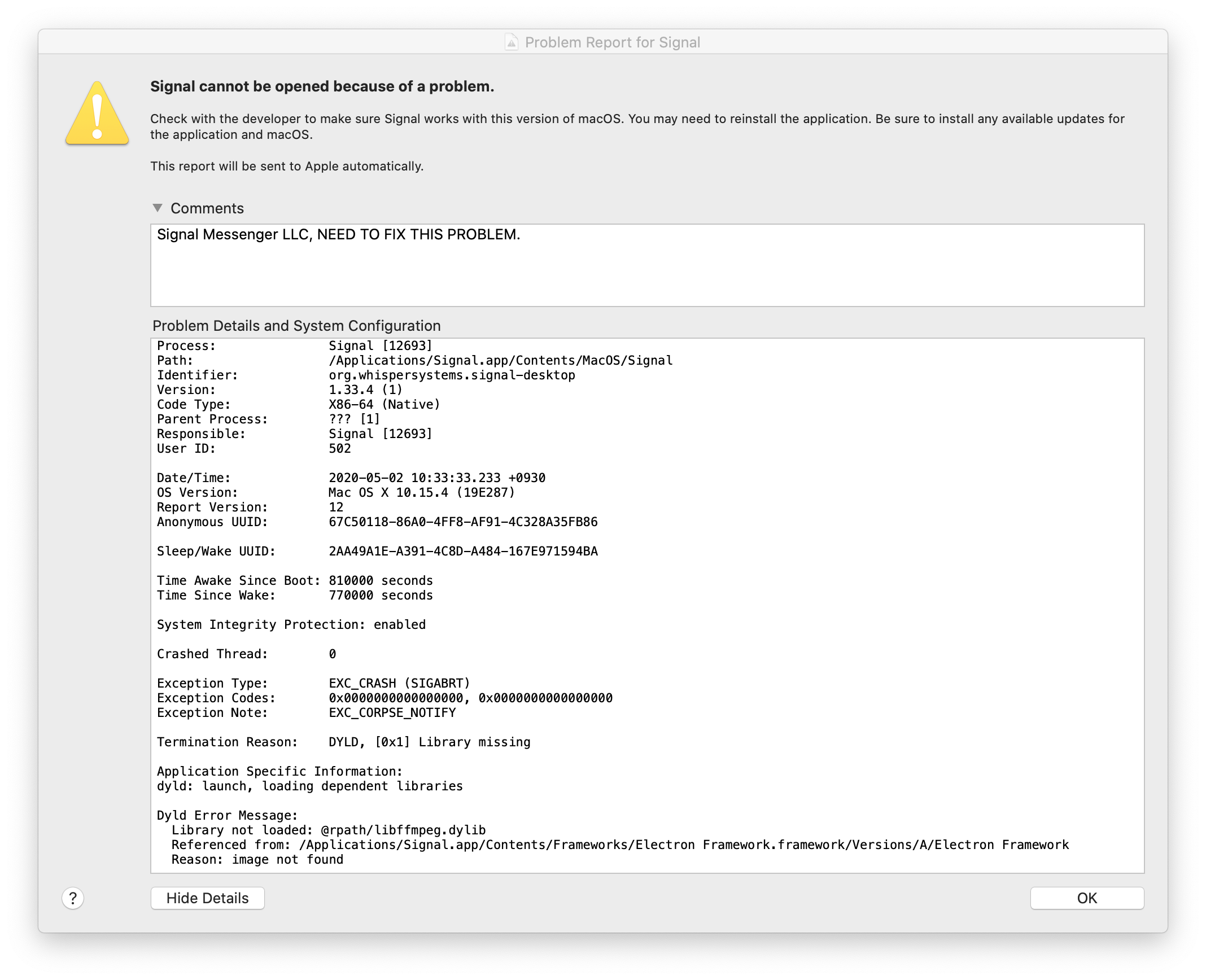
Happened again with recent version. Managed to capture the problem report. Hope this helps.
mischa143
on 2 May 2020
Going to close this in favor of https://github.com/signalapp/Signal-Desktop/issues/4095
This issue should be fixed as of release v1.34.0-beta.2
josh-signal
on 6 May 2020
Related issues
 jeremymasters
·
3Comments
jeremymasters
·
3Comments
 ploum
·
3Comments
ploum
·
3Comments
 bcsga
·
3Comments
bcsga
·
3Comments
 shaaati
·
3Comments
shaaati
·
3Comments
 McLoo
·
3Comments
McLoo
·
3Comments
Most helpful comment
Thank you all for your reports. I apologize for the difficulties this issue has caused. But I can tell you that we are actively working now to find a solution.