Signal-desktop: Signal desktop too slow when it starts
- [ ] I have searched open and closed issues for duplicates
Bug Description
When Signal desktop starts it requires too time to load all messages. I think is incredible that user must wait that long time everytime starts Signal, but I don't find anything in setup to avoid it.
Platform Info
Signal Version: 1.25.3
Operating System: Windows 10 Home 64 bit
Linked Device Version:
Link to Debug Log
 cirochiaiese
All 51 comments
Same for me! It takes so long that it's practically not usable
Signal Version: 1.25.3
Operating System: Ubuntu
 Coruna
on 26 Jul 2019
Coruna
on 26 Jul 2019
Completely agree. It takes a while once you've racked up a bunch of messages. There has to be some solution to this.
Signal Version: 1.25.3
Operating System: Win 10
 Tursko
on 1 Aug 2019
Tursko
on 1 Aug 2019
This has been observed on other operating systems as well. The fix is likely the same for all platforms. https://github.com/signalapp/Signal-Desktop/issues/3171 https://github.com/signalapp/Signal-Desktop/issues/3172
 kenpowers-signal
on 2 Aug 2019
kenpowers-signal
on 2 Aug 2019
I think a workaround would be to load a fixed number of messages (say 50) for every conversation to begin with and let the user use the application and in the background, load the rest. That way you can mitigate the initial wait time and load conversation histories in the background
Signal Version: 1.25.3
Operating System: Win 10
 kumosumo
on 2 Aug 2019
kumosumo
on 2 Aug 2019
@kumosumo I'll refer you to prior discussion on this idea here: https://github.com/signalapp/Signal-Desktop/issues/1442#issuecomment-370474206
 scottnonnenberg-signal
on 2 Aug 2019
scottnonnenberg-signal
on 2 Aug 2019
debug log after approximately an hour start up - it got stuck on loading 350 messages: https://debuglogs.org/55186b82aac5856ae32c9616009fc58d75e7cd43490c623dd34edb5c2614b593
I closed the app and started it again: log after another half an hour, when the start up suceeded: https://debuglogs.org/cc02177dc7c5f7c9c59a768057b23f021dba7a0c45df029760984f792ea9d64b
Additional information:
It was the first start up after my holiday (not online between 28th July and 11th August). But no "Error handling incoming message" ocurred. It also seems that no messages are missing.
PC Specs: Lenovo W530; i7-3610QM, 4x CPU @2.30GHz; 8GB Ram; Windows 10 (1903); HDD: TOSHIBA MK5061GSY
Signal/1.25.3
EDIT:
Log after ~45min of start up of SignalBeta/1.26.0-beta.3 which is installed alongside the production build. So exactly the same messages had to be processed: https://debuglogs.org/174310a01460cbbc5f90133a2880be2cb87133fd6e40cec2e53afdd2a596e3a9
EDIT2:
Log from my Work PC, after ~5minutes of start up with Signal/1.25.3. Again same amount of messages had to be processed: https://debuglogs.org/6e83f0144ecf52bb48308ad3c486e7fb76936d4767df8af10a3ad343ff317e95
PC Specs: Lenovo T460; i5-6300U, 2x CPU @2.40GHz; 16GB Ram; Windows 7 Enterprese (SP1); SSD: Samsung MZ7TY256HDHP-000
EDIT3: deleted the sentence about no missing messages, apparently I have been over the threshold, because old messages are missing. but it lead to no errors!
 rainerzufall
on 12 Aug 2019
rainerzufall
on 12 Aug 2019
I have not used Signal on my PC for 3 days and I have not received many messages, but still it is loading 700 messages! How is that possible??

 denver-s
on 12 Aug 2019
denver-s
on 12 Aug 2019
i have not one single message on my phone anymore, but the desktop app (freshly installed) downloads about 500 messages, what happens there?
 spychodelics
on 6 Sep 2019
spychodelics
on 6 Sep 2019
@spychodelics If you're on Linux or macOS, uninstall/reinstall of Signal Desktop does not remove data from your user directory. So your prior installation is still there if you didn't unlink it in your mobile app.
scottnonnenberg-signal
on 7 Sep 2019
i have not one single message on my phone anymore, but the desktop app (freshly installed) downloads about 500 messages, what happens there?
My experience has been that usually means your local index is corrupt or pulling down some large files that have been shared. Your best bet is to clear local messages, re-link desktop app.
 brokep
on 7 Sep 2019
brokep
on 7 Sep 2019
@scottnonnenberg-signal
@klosnet
you were both right, there seemed to be data i forgot about. after deleting the data in the desktop app and re-link it. every think were ok. sorry for "disrupting" this thread.
spychodelics
on 7 Sep 2019
In the mean time, it would be nice to change the message to something more logical. What is meant with 'messages'?
 pedzed
on 7 Oct 2019
pedzed
on 7 Oct 2019
Same here. Running Arch Linux 5.4.3. I did not open signal for about 2 days on laptop and now it takes around 6 seconds for every 10 message to load while starting.
IMHO, it is not even required for the desktop app to fetch all the messages, I would rather want past few messages with the ability to send new ones and fetch on scroll than the eternal splash message.

 Hritik14
on 19 Dec 2019
Hritik14
on 19 Dec 2019
@Hritik14 Please consider providing your debug log (View -> Debug Log) so we can see what's taking a long time for you.
scottnonnenberg-signal
on 19 Dec 2019
Hi. @scottnonnenberg-signal
I opened it again, this time it was faster (a lot) and that makes sense because I also opened it yesterday but the rate at which it was "Loading messages X so far" was the same, so I think the debug logs would still be helpful. Here they are: https://debuglogs.org/34b6afbb34adebc8f4f479dd8bb66303c25d5b13615ea0c91d5be09e8f8fc0ff
Hritik14
on 20 Dec 2019
@Hritik14 there are some unexpectedly long delays in database requests on your machine. Perhaps you could talk about your hardware, linux distro and window manager, hard drive specs?
INFO  2019-12-20T09:45:07.747Z SQL channel job 51 (createOrUpdateItem) succeeded in 2517ms
...
INFO  2019-12-20T09:45:08.694Z SQL channel job 52 (createOrUpdateItem) succeeded in 2422ms
INFO  2019-12-20T09:45:08.796Z SQL channel job 53 (saveUnprocesseds) succeeded in 2310ms
@Hritik14 Trimming my SSD on Fedora increased the speed of starting Signal tremendously:
See for more info: https://fedoraproject.org/wiki/Changes/EnableFSTrimTimer
I use this command (as root):
# fstrim --fstab --verbose
 janvlug
on 20 Dec 2019
janvlug
on 20 Dec 2019
It's a pretty decent hardware. My filesystem is XFS on HDD, distro is
Archlinux and window manager is i3-gaps.
On Fri, 20 Dec, 2019, 10:47 PM Scott Nonnenberg, notifications@github.com
wrote:
@Hritik14 https://github.com/Hritik14 there are some unexpectedly long
delays in database requests on your machine. Perhaps you could talk about
your hardware, linux distro and window manager, hard drive specs?INFO 2019-12-20T09:45:07.747Z SQL channel job 51 (createOrUpdateItem) succeeded in 2517ms
...
INFO 2019-12-20T09:45:08.694Z SQL channel job 52 (createOrUpdateItem) succeeded in 2422ms
INFO 2019-12-20T09:45:08.796Z SQL channel job 53 (saveUnprocesseds) succeeded in 2310ms—
You are receiving this because you were mentioned.
Reply to this email directly, view it on GitHub
https://github.com/signalapp/Signal-Desktop/issues/3477?email_source=notifications&email_token=ABY4SKOPGTRBUPX7KKD4WDLQZT4ZJA5CNFSM4IG6TZLKYY3PNVWWK3TUL52HS4DFVREXG43VMVBW63LNMVXHJKTDN5WW2ZLOORPWSZGOEHNROKA#issuecomment-568006440,
or unsubscribe
https://github.com/notifications/unsubscribe-auth/ABY4SKLWOL4N6X752JUKCQLQZT4ZJANCNFSM4IG6TZLA
.
Hritik14
on 22 Dec 2019
Text messages aren't known for being heavy-weight in terms of size. What on earth is signal doing to make the loading of a few megabytes take 20 minutes? Are you loading them all 100 times or something? Also, do we _need_ to load all of these messages all at once, what about loading the most recent first then lazily loading others as needed?
 timluther
on 5 Jun 2020
timluther
on 5 Jun 2020
@timluther Signal uses a stateful protocol, so we have to download all messages (in order) so that we can maintain the protocol state between your desktop device and all of the other devices you have sessions with.
What are the specs of your machine? Can you provide us with a debug log?
kenpowers-signal
on 5 Jun 2020
The machine is i7-3930k @ 3.20 ghz, 16bg ram running Ubuntu 18.04 LTS on
one partition, Windows 10 on another.
Windows 10 signal boots up fine but on Ubuntu it's 'go-and-make-lunch'
slow. Where would I find the debug logs on Ubuntu please?
On Fri, Jun 5, 2020 at 5:06 PM Ken Powers notifications@github.com wrote:
@timluther https://github.com/timluther Signal uses a stateful
protocol, so we have to download all messages (in order) so that we can
maintain the protocol state between your desktop device and all of the
other devices you have sessions with.What are the specs of your machine? Can you provide us with a debug log?
—
You are receiving this because you were mentioned.
Reply to this email directly, view it on GitHub
https://github.com/signalapp/Signal-Desktop/issues/3477#issuecomment-639598654,
or unsubscribe
https://github.com/notifications/unsubscribe-auth/ABBU56LFT7OOYPMNHK6S6PLRVEJY3ANCNFSM4IG6TZLA
.
timluther
on 6 Jun 2020
@timluther You can find debug logs by going to View > Debug Log inside of Signal.
kenpowers-signal
on 6 Jun 2020
@kenpowers-signal the thing about fetching everything at once really didn't make sense to me.
Wouldn't it be better if you it would fetch, say 10 messages from top 10 chats for startup and then proceeds to fetch the rest while we're able to actually use the app?
Hritik14
on 6 Jun 2020
Also, the windows label appears mistakenly placed as I previously reported the same issue on my Archlinux install.
Hritik14
on 6 Jun 2020
@Hritik14 There are a number of reasons we need to process all messages, and process them in order. One is the stateful encryption protocol underlying everything, another is the fact that we don't trust the times sending devices bake into their messages. You can feel free to read up more here: https://signal.org/docs/
scottnonnenberg-signal
on 8 Jun 2020
I see. Though wouldn't it be better to keep a cache of previous messages than fetching them all everytime signal starts ? Or maybe cache only the required data to decrypt the latest messages?
Hritik14
on 8 Jun 2020
@Hritik14 We only download new messages. We cannot re-download messages from the server, because they are deleted from the server when we download them.
I encourage you to go do some research on the signal protocol, how signal generally works, maybe go to the forums to talk with others about this. We certainly welcome a pull request once you get familiar enough with everything!
scottnonnenberg-signal
on 8 Jun 2020
@scottnonnenberg-signal I appreciate your patience in responding, but it feels extremely uncomfortable that the user has to wait minutes for the app to load and be ready for using! I opened the app after few days (I think 2 days) and had this happening (my Signal's logfile):
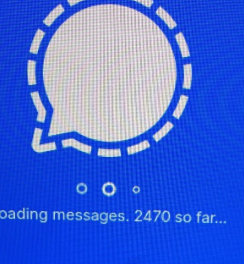
It had to load over 2600 messages and it took quite some time!! This is definitely not user-friendly and would repel many users who are coming from much less secure but snappy and fast messaging apps.
Operating System: Manjaro Linux
KDE Plasma Version: 5.20.4
KDE Frameworks Version: 5.77.0
Qt Version: 5.15.2
Kernel Version: 5.10.2-2-MANJARO
OS Type: 64-bit
Processors: 8 × Intel® Core™ i7-4770K CPU @ 3.50GHz
Memory: 15.5 GiB of RAM
Graphics Processor: GeForce GTX 1060 6GB/PCIe/SSE2
 mmahmoudian
on 12 Jan 2021
mmahmoudian
on 12 Jan 2021
I have the same issue. Every time I open Signal, it is loading hundreds of messages which are not new. Loading times are more than one minute
I am using Windows 10 20H2. I have i9 10900KF CPU, m2, and SSD disks, plus RTX 2080Ti
 Naxterra
on 14 Jan 2021
Naxterra
on 14 Jan 2021
Thanks for reporting and including your debug log. This is something we're working on improving.
 EvanHahn-Signal
on 14 Jan 2021
EvanHahn-Signal
on 14 Jan 2021
I've only been using Signal regularly for about 2 weeks, and the startup time on the desktop is already up to almost 30 seconds. If the trend of this continues it does not look healthy.
 djschny
on 15 Jan 2021
djschny
on 15 Jan 2021
I've been using Signal Desktop on Ubuntu 20.04 and recently it took about 20-30 minutes to open signal. I've seen requests for logs when searching about this issue, so hopefully this can help. A lot of "Errors" show up in the logs, and I have uploaded these from my signal client
https://debuglogs.org/fddd9056be30f721af65b7ff43a6274eea22f9dfda395fa84c0eb38d04936e0d
According to the loading screen, the client synced ~1200 messages before opening, which is not abnormal, however usually this is done within around a minute or less, as opposed to the >20 minutes it took this time for a fairly typical number of messages.
Whilst the messages were loading, I did not have high CPU, network or RAM usage according to System Monitor, however my hard drive was continually at maximum utilisation. I checked disk usage with iotop and found that a process called "jbd2" was using a lot of the disk. I believe this was something to do with signal, since disk usage dropped to very low as soon as the client had finished loading.
Info for navigating my logs: I believe Signal had finished loading by around 23:56.
I closed and re-opened Signal (I can't remember exactly at what time) and this time, since it did not need to sync any messages, opened pretty much instantly.
The machine I was using has an i5 6600k, 16GB RAM, and a SATA SSD for the operating system as well as a spinning hard drive that my home folder in Linux is mounted to.
 SamuelBailey
on 19 Jan 2021
SamuelBailey
on 19 Jan 2021
I have also experienced slow loading of messages for a number of months, especially on Linux. Typically it will take a number of minutes to load ~1000 messages, although today it took ~30 seconds to load the 30 messages received since I last time I had the application open (earlier in the day).
Logs obtained are below:
https://debuglogs.org/ac9a4318707a3fcfe3ab908cb3922bf2e00d154f7bf7abd5b92ec1f2a4eb8bab
Specs for this PC: i5 6600k, 16GB RAM, SATA SSD for the OS, 7200rpm SATA HDD for the home folder running Fedora F33 (Signal 1.39.5 built from this repo)
 Scott-Barnett
on 19 Jan 2021
Scott-Barnett
on 19 Jan 2021
@SamuelBailey, @Scott-Barnett: Did you try to trim your disk?
For details see this comment.
janvlug
on 19 Jan 2021
@janvlug I have just tried that now and it still took about 30 seconds to open Signal having only received about 10 messages since the last time I opened it.
My Signal build folder is stored on my HDD (inside my home folder) so I don't believe my SSD is being used by it.
Scott-Barnett
on 19 Jan 2021
I haven't trimmed my disk, but also I haven't really been able to test the opening time since my first post in this thread, since I don't think I've received enough messages on signal in-between sessions to check whether or not there is any difference in the rate of processing.
SamuelBailey
on 20 Jan 2021
I'm having the same issues as mentioned above. Windows machine just loads it fine in 30 seconds or so but it takes forever on my Ubuntu machine, like 20-30 minutes forever. Wondering if devs are addressing this issue.
 shermix
on 1 Mar 2021
shermix
on 1 Mar 2021
Is there any update ? on my ubuntu machine it takes 20 minutes to start up
 msevimli
on 5 Mar 2021
msevimli
on 5 Mar 2021
@msevimli The desktop engineer said that they are aware of it and the optimized build is in the works.
shermix
on 6 Mar 2021
I believe it's a long pending issue and they gotta fix this in a timely manner. The way I see it, Signal, although more secure, lacks the pizazz and oomph of Telegram. It is difficult for me personally to _sell_ it friends and family.
 Maula-Jatt
on 8 Mar 2021
Maula-Jatt
on 8 Mar 2021
It's been 2 hours now. Just wanted to send a quick message on a PC.

Windows Server 2019, Signal desktop 1.40.0
 tatusamma
on 10 Mar 2021
tatusamma
on 10 Mar 2021
@tatusamma (and everyone in this thread) When you run into problematic performance, please provide your debug log. View -> Debug Log. That will give us the tools necessary to improve things.
scottnonnenberg-signal
on 10 Mar 2021
Same issue here (Windows 10, Signal Desktop v1.40.1)
https://debuglogs.org/b204f7f06371452bd50ee9b806608d170657be0812da7e9e9a56fe2226898f24
 jasonpolites
on 12 Mar 2021
jasonpolites
on 12 Mar 2021
I used to experience this issue when I had a spinning HDD for my home directory and an SSD for the rest of the system. I have since switched to using an SSD for the whole system and noticed that this issue has got significantly better.
This would suggest to me that the issue is related to the I/O speeds on the home folder.
To be clear, I'm not advocating going out and buying an SSD, I just thought this would be useful in helping to pinpoint where the issue lies.
Scott-Barnett
on 12 Mar 2021
@jasonpolites Thanks for that debug log. However, it's important to provide some context about the debug log to help us understand what to do with it. When you say 'same issue' what exactly do you mean?
scottnonnenberg-signal
on 12 Mar 2021
@spychodelics If you're on Linux or macOS, uninstall/reinstall of Signal Desktop does not remove data from your user directory. So your prior installation is still there if you didn't unlink it in your mobile app.
Have you tied
sudo apt-get purge signal-desktop
instead of
sudo apt-get remove signal-desktop
I don't know if it will work, I'm just curious.
 NOTaMIME-jk
on 15 Mar 2021
NOTaMIME-jk
on 15 Mar 2021
I have the same problem on both Ubuntu and Manjaro with he signal-desktop app. Its very perplexing for the phone app to open instantaneously but for the desktop version to be SO slow.

NOTaMIME-jk
on 15 Mar 2021
Its very perplexing for the phone app to open instantaneously but for the desktop version to be SO slow.
That's probably because your signal runs on your phone all the time, syncing a bit here and a bit there. Good test for this would be shutting down your phone or denying internet access for signal for a few days and chatting a few days on a desktop and then testing how quickly the phone app opens.
tatusamma
on 15 Mar 2021
@scottnonnenberg-signal
Thanks for that debug log. However, it's important to provide some context about the debug log to help us understand what to do with it. When you say 'same issue' what exactly do you mean?
Hey.. so after reading through the various comments and replies, it may be that my experience is _working as intended_ but to answer your question I observer a longer-than-expected startup time as the app "loads messages". It reports around 700 messages (which by comparison to others seems lower), and takes around 20-30 seconds to complete (rough approximation).
The answer may be "that's just how signal works", but I think it's unexpected for a lot of users who are familiar with other messaging apps which take far less time to reach a usable state.
Purely from a usability standpoint, asynchronously loading these messages may be useful (i.e. allow the app to reach a usable state more quickly, prioritizing new messages and contacts with new messages ahead of older messages), but I don't know what technical barriers exists which may prevent this from being plausible.
jasonpolites
on 15 Mar 2021
According to the log from when the "app [is] ready" to when the messages are loaded took over 16 minutes (16.817 minutes to be exact):
INFO  2021-03-17T11:48:49.647Z app ready
...
INFO  2021-03-18T17:04:02.781Z Upgrade message schema (with index): {"done":false,"numProcessed":1,"fetchDuration":638,"upgradeDuration":1,"saveDuration":370,"totalDuration":1009}

@scottnonnenberg-signal Out of curiosity, is there any perspective that this gets resolved in a foreseeable future?
I would like to tag similar posts here as well:
5030, #3172
mmahmoudian
on 18 Mar 2021
@scottnonnenberg-signal Any updates on investigation of this issue (#3477) and the #5030 and #3172 ? Do you still need more log files?
I'm dealing with this in daily basis and it is annoying. The newest log file is here which shows that it took about 16 minutes to load when the last sync time was only 3 days before:
Line 19400: INFO  2021-03-19T11:06:59.974Z close event {"readyForShutdown":true,"shouldQuit":true}
Line 19401: INFO  2021-03-22T08:58:09.805Z app ready
Line 35679: INFO  2021-03-22T09:14:38.641Z Upgrade message schema (with index): {"done":false,"numProcessed":1,"fetchDuration":2,"upgradeDuration":1,"saveDuration":545,"totalDuration":548}
mmahmoudian
on 22 Mar 2021
Related issues
 mawed
·
3Comments
mawed
·
3Comments
 halb9
·
3Comments
halb9
·
3Comments
 bcsga
·
3Comments
bcsga
·
3Comments
 github-cygwin
·
3Comments
github-cygwin
·
3Comments
 ProactiveServices
·
3Comments
ProactiveServices
·
3Comments
Most helpful comment
Same for me! It takes so long that it's practically not usable
Signal Version: 1.25.3
Operating System: Ubuntu