Signal-desktop: Group names (Unknown group) and messages not syncing (Android/macOS)
Bug Description
My desktop client is not fully syncing with my Android client. Some group names are missing, as are most of the messages in those conversations.
The only obvious error messages I've found in my desktop log are: MessageCounterError: Message key not found. The counter was repeated or the key was not filled.
Steps to Reproduce
No idea, really. I've been using Signal for a month or so, and recently installed it on a new laptop. It seemed to be working fine at first, but things are not working well now.
Expected Result:
Group names and all messages in them would be synced.
Screenshots
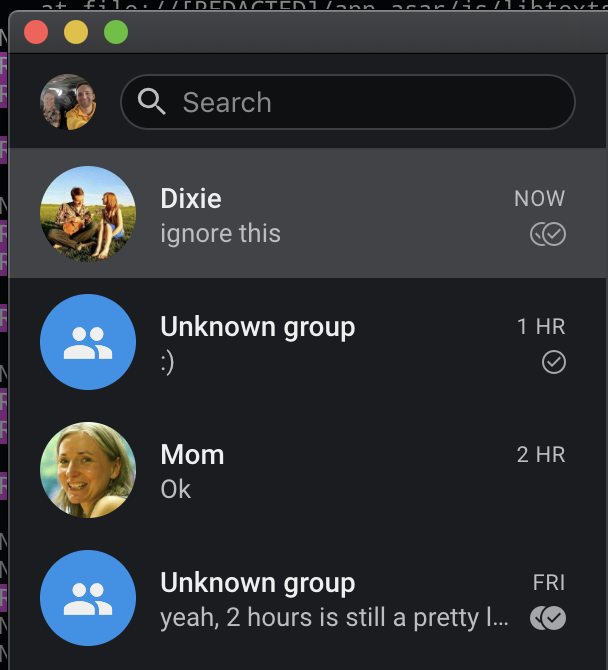
Platform Info
Android 9.0
Mac OS 10.14.5
Signal Version: 1.25.3 (desktop)
Linked Device Version: 4.41.6 (Android)
Link to Debug Log
Desktop log: https://debuglogs.org/298187b8834061375ec2c01cfe426bb9124630bacc1f70bb9b960334e501ed13
Android log: https://debuglogs.org/7bce9d68540c591b3a736607c79e8b954ac53a4b7c27699687a8e2991d26e8ec
 petergaultney
All 2 comments
Similar issue at iOS. Synced new phone, but some groups are named "New Group" and every message has icon "sent" but not "delivered". Also I can see same message on linked desktop client, but chat participants can not see those messages... Only messages sent from desktop client can be seen.
 petrkr
on 22 Jul 2019
petrkr
on 22 Jul 2019
A workaround for this kind of situation is to have the people in the group make some sort of update to the group - name, avatar, even members. That will update your devices with the current make-up of the group, and should eliminate the 'unknown group' label.
 scottnonnenberg-signal
on 22 Jul 2019
scottnonnenberg-signal
on 22 Jul 2019
Related issues
 demux4555
·
3Comments
demux4555
·
3Comments
 lokesh-krishna
·
3Comments
lokesh-krishna
·
3Comments
 ploum
·
3Comments
ploum
·
3Comments
 muellermartin
·
3Comments
muellermartin
·
3Comments
 jeremymasters
·
3Comments
jeremymasters
·
3Comments
Most helpful comment
A workaround for this kind of situation is to have the people in the group make some sort of update to the group - name, avatar, even members. That will update your devices with the current make-up of the group, and should eliminate the 'unknown group' label.