Signal-desktop: Transparent images with only black contents have problems in dark mode
- [x] I have searched open and closed issues for duplicates
Bug Description
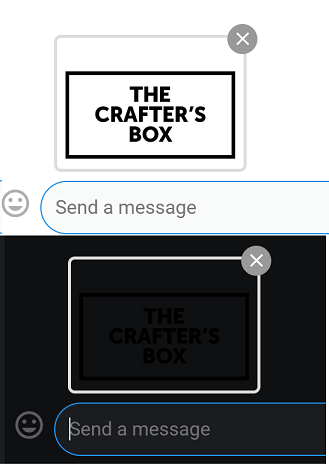
The following PNG file is shown in the app as a black image.

Steps to Reproduce
- copy paste the above image into signal
- see it pasted as a black image
Screenshots

Platform Info
Signal Version: 1.19.0-Beta.4
Operating System: Win 10
 Xashyar
All 12 comments
What happens if you change over to the Light theme in settings?
 scottnonnenberg-signal
on 7 Jan 2019
scottnonnenberg-signal
on 7 Jan 2019
What happens if you change over to the Light theme in settings?
The same
Xashyar
on 7 Jan 2019
What I see in some cases is that because the background white of that PNG appears to be transparent, dark mode has particular problems. Can you provide screenshots in other situations? (the staging thumbnail, when you click on it and make it big, etc.)
scottnonnenberg-signal
on 7 Jan 2019
What I see in some cases is that because the background white of that PNG appears to be transparent, dark mode has particular problems. Can you provide screenshots in other situations? (the staging thumbnail, when you click on it and make it big, etc.)


Xashyar
on 7 Jan 2019
What would you expect to happen for a black image on a black background?
scottnonnenberg-signal
on 7 Jan 2019
What would you expect to happen for a black image on a black background?
This:

and not this:

Xashyar
on 7 Jan 2019
So you're suggesting that we always have a white background for all images? Doesn't that cause a problem for all transparent but white images?
scottnonnenberg-signal
on 7 Jan 2019
So you're suggesting that we always have a white background for all images? Doesn't that cause a problem for all transparent but white images?
The problem is that if you Copy/Paste or Drag/Drop the specific PNG that I've sent above either in Bright or Dark Mode the result is the same Black Thumbnail and Image. (in Both Backgrounds)
So there must be sth wrong with this specific PNG, since re-Saving it in an Editor resolves the Problem everywhere except in Dark Mode's Thumbnail stage.
Xashyar
on 7 Jan 2019
@scottnonnenberg-signal
the issue still persists (v1.20-beta.3):

Xashyar
on 23 Jan 2019
@scottnonnenberg-signal
the photo provided above is from Light Mode, as you can see, so it's really not a Dark Mode Problem.
just try copy/pasting this into Signal in Light Theme:

Xashyar
on 25 Jan 2019
oddly enough the problem persists even here, could it be a problem with the Windows' clipboard functionality?
Xashyar
on 25 Jan 2019
Xashyar, is this really a bug? if you have a transparent png and the non-transparent image pixels are black then displaying that image in "dark mode" is going to render the way you'd expect...for example, from my Chrome browser, when I right-click on the image and select "open image in new tab", Chrome renders the entire screen in an almost black color and you can see the black image rendered but it is barely visible. This not a bug but expected behavior. To "fix" this would be to either display a transparent checkerboard grid first and then display that image on top or to analyze the colors in the image and then make some decisions based on color mixing on how to display those colors which seems like a bit much for the scope of this app...Your suggestion of the way you'd expect it to look assumes that you want the background of the image to be white; but it could be any color (blue, a sky, etc).
 drbitslayer
on 18 Mar 2019
drbitslayer
on 18 Mar 2019
Related issues
 ploum
·
3Comments
ploum
·
3Comments
 github-cygwin
·
3Comments
github-cygwin
·
3Comments
 mawed
·
3Comments
mawed
·
3Comments
 gesus14
·
3Comments
gesus14
·
3Comments
 TarkanY
·
3Comments
TarkanY
·
3Comments
Most helpful comment
So you're suggesting that we always have a white background for all images? Doesn't that cause a problem for all transparent but white images?