Signal-desktop: Windows notifications are not persistent
Description
Using the latest Windows desktop app, I keep missing messages because the notification is not persistent and disappears after 5 seconds.
Steps to reproduce
Use the desktop app on windows and get messaged from a contact.
Actual result:
If I'm away or not looking directly at my screen when the notification is displayed, I have no easy way of knowing a message came in.
Expected result:
Notification should remain persistent AND also have a 'Dismiss' button on it so It can be closed immediately on click. Otherwise one would have to open the action center 1st to dismiss it.
Platform info:
Signal version: Windows Desktop Client v1.18.0
 jtbrown3
All 8 comments
Additional Info:
Not only does the notification banner disappear after several seconds, it also further disappears from the 'Action Center' panel - so there is no trace of the notification anywhere. None of my other messaging apps (like Google Hangouts) have this issue.
It's not too difficult to imagine how new messages can be missed!
jtbrown3
on 21 Nov 2018
Signal Desktop is designed to keep one notification in the action center at any given time. But we will remove it as soon as you give focus to Signal Desktop, or you read that same message on another device. Maybe you could give a little more detail about what exactly you see?
 scottnonnenberg-signal
on 26 Nov 2018
scottnonnenberg-signal
on 26 Nov 2018
Signal Desktop is designed to keep one notification in the action center at any given time. But we will remove it as soon as you give focus to Signal Desktop, or you read that same message on another device. Maybe you could give a little more detail about what exactly you see?
On both of my W10 Machines, Signal notifications are displayed for only a few seconds and then disappear, regardless if the user is away from the machine or if the Signal desktop is in focus. This is a issue...
jtbrown3
on 30 Nov 2018
My apologies for raising this over one-year-old issue again, but I'm experiencing the same thing.
I have three Windows 10 Professional machines running 1909 that all exhibit this issue with Signal 1.31.
A new message comes in, the notification appears, if I do nothing the notification disappears after 5-seconds (Windows' default time) but nothing shows in the Action Center. So if I'm not looking at the computer at the moment I get a message, I don't know I have an unread message.
I have tried this with:
- Signal open but not focused.
- Signal's windows minimized.
- Starting Signal with
--use-tray-iconto close its window entirely but still keep it running.
In all cases the result is the same. The notification comes in, but doesn't stay in the Action Center. I have verified that my notification settings are set appropriately to allow notifications in the Action Center for Signal.
 dzaikos
on 24 Feb 2020
dzaikos
on 24 Feb 2020
This appears to be a bug in Electron: https://github.com/electron/electron/issues/22192
scottnonnenberg-signal
on 24 Feb 2020
Electron bug was fixed in October last year, any news on this?
 revanmj
on 16 Jan 2021
revanmj
on 16 Jan 2021
@scottnonnenberg-signal , any update to this?
dzaikos
on 20 Feb 2021
I have observed the same problem.
Bug Description
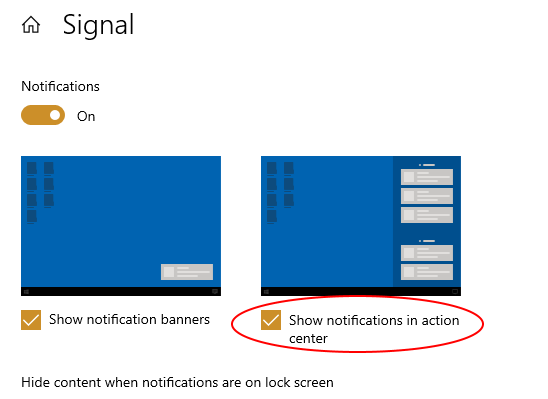
On Windows, the Signal Desktop notifications do not stay in the Action Center despite "Show notifications in action center" is selected
Steps to Reproduce
- In windows notification settings, make sure that "Show notification banners" and "Show notifications in action center" are both checked for Signal
- Get a notification in Signal
- wait for notification banner to go away
- open action center
Actual Result:
The notification isn't there
Expected Result:
If the Windows setting "Show notifications in action center" is selected, then the notification should stay in the Action Center until dismissed
If the setting is not selected, but the "Show notification banners" is selected, then it should behave as it currently does (i.e. the notification banner pops up, but does not persist in the Action Center)
If neither setting is selected, there should be neither banner nor stay in the Action Center
Screenshots
Platform Info
Signal Version:
1.40.1
Operating System:
Win 10 x64 20H2
 corobin
on 21 Mar 2021
corobin
on 21 Mar 2021
Related issues
 ploum
·
3Comments
ploum
·
3Comments
 jeremymasters
·
3Comments
jeremymasters
·
3Comments
 TarkanY
·
3Comments
TarkanY
·
3Comments
 muellermartin
·
3Comments
muellermartin
·
3Comments
 hanzei
·
3Comments
hanzei
·
3Comments