Signal-desktop: Cannot Download PDF Attachments
- [x] I have searched open and closed issues for duplicates
Bug description
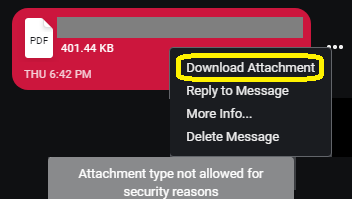
When a PDF attachment is sent, starting with the most recent updates, they have no download icon and when you select "Download Attachment" from the dot menu, it produces the following error:
Attachment type not allowed for security reasons
Which makes no sense as this exact document is viewable and downloadable on the Android client, so what's going on here? This may apply to other attachment types too which I didn't test with but in this case it is a PDF.
Steps to reproduce
- Load desktop client (Windows for me)
- Have someone send you a PDF from another desktop client (My other was also on Windows)
- You cannot download and get the error above
Actual result:
The PDF is valid, safe and simple document that has never had issues before and now is being blocked for "security reasons" without explaining what that reason is or why a document that can be viewed perfectly on other clients can't be done on the desktop client.
Expected result:
Like always any document that is sent (in this case PDF) should be viewable, downloadable and whatnot without issue.
Screenshots
Platform info
Signal version: v1.17.0-beta.2
Operating System: Windows 10 Pro 1803 (17134.345)
Linked device version: 4.28.1
Link to debug log
I have looked through the extremely chatty debug log and don't see anything but then again it might be lost in the chaos, here it is in case it helps you
https://debuglogs.org/cf3db011e169fd86eb25f258645999f45c46740d5242bfc5d163fac8ae5df589
 GuardianMajor
All 25 comments
Yep, we are filtering certain questionable files in beta right now. What is the filename?
 scottnonnenberg-signal
on 13 Oct 2018
scottnonnenberg-signal
on 13 Oct 2018
I don't see why that is necessary, as it is really not our place to censor people's shared content but the filename is Citrus_Promenade_Site Plan_Flyer.pdf and originally Citrus Promenade Site Plan Flyer PDF.pdf before she renamed it thinking the spaces might be a problem. Still both had the same issue. The only thing inside a floorplan diagram, that's it and again shouldn't matter what is in it, as long as it is not some malicious executable or script or whatever inside beyond a simple "virus/malware" scan then it should be none of our business. Clearly whatever algorithm is being used to determine this is flawed.
Add to that, if Signal Android (also in beta) doesn't seem to think anything is wrong with it, why are we?
GuardianMajor
on 13 Oct 2018
@GuardianMajor "Clearly whatever algorithm is being used to determine this is flawed." yep, clearly. That's why I asked for the filename - to figure out what the bug is here. I can send a PDF just fine. I'll try with spaces next.
scottnonnenberg-signal
on 15 Oct 2018
@scottnonnenberg You have my email, if you want the actual file, just shoot me a message and I will send it back to you so can have binary access to figure out what's up.
GuardianMajor
on 15 Oct 2018
I don't think it's the file - it would be the metadata describing it. How about this: open the dev tools, grab the message ID from the parent DOM elements - it should look like XXXXXXXX-XXXX-XXXX.... Then, go to the console and type window.Signal.Data.getMessageById('<messageid>', { Message: Whisper.Message }).then(message => console.log(message.attributes));
Feel free to reach out to me directly with the fully-expanded object that results. The stuff inside of the 'attachments' key is of particular interest.
scottnonnenberg-signal
on 15 Oct 2018
@scottnonnenberg I did as you asked, and didn't see anything but then again I might not know what to look for, so here is the raw dump of that from the console (might include some chatter while I was doing this but it is fine) - the only thing removed is the phone number of the other person, not my place to disclose. Also, we did try without the spaces, still had the same problem, so I think we can eliminate that as a glitch.
window.Signal.Data.getMessageById('94269b04-eceb-4636-8d58-15f529296af3', { Message: Whisper.Message }).then(message => console.log(message.attributes));
Promise {[[PromiseStatus]]: "pending", [[PromiseValue]]: undefined}__proto__: Promisecatch: ƒ catch()constructor: ƒ Promise()then: ƒ then()Symbol(Symbol.toStringTag): "Promise"__proto__: Object[[PromiseStatus]]: "resolved"[[PromiseValue]]: undefined
...\signal-desktop-beta\resources\app.asar\js\logging.js:103 INFO  2018-10-15T20:10:40.865Z SQL channel job 98 (getMessageById) succeeded in 5ms
...\signal-desktop-beta\resources\app.asar\js\logging.js:103 INFO  2018-10-15T20:10:40.866Z {timestamp: 1539308526842, attachments: Array(1), body: null, contact: Array(0), conversationId: "+REDACTED", …}attachments: Array(1)0: contentType: "application/pdf"digest: {}__proto__: Objectconstructor: ƒ Object()hasOwnProperty: ƒ hasOwnProperty()isPrototypeOf: ƒ isPrototypeOf()propertyIsEnumerable: ƒ propertyIsEnumerable()toLocaleString: ƒ toLocaleString()toString: ƒ toString()valueOf: ƒ valueOf()__defineGetter__: ƒ __defineGetter__()__defineSetter__: ƒ __defineSetter__()__lookupGetter__: ƒ __lookupGetter__()__lookupSetter__: ƒ __lookupSetter__()get __proto__: ƒ __proto__()set __proto__: ƒ __proto__()fileName: "Citrus_Promenade_Site Plan_Flyer.pdf"flags: nullheight: nullid: "1187722399135800132"key: {}__proto__: Objectpath: "d7\d72890ae7b55338922d2d63630ba10dc59589105ba766ab633faca087986a2f2"size: 411071thumbnail: nullwidth: null__proto__: Objectlength: 1__proto__: Array(0)body: nullcontact: []conversationId: "+REDACTED"decrypted_at: 1539308526875errors: Array(0)length: 0__proto__: Array(0)flags: 0hasAttachments: 1hasFileAttachments: 1id: "94269b04-eceb-4636-8d58-15f529296af3"quote: nullreceived_at: 1539308526842schemaVersion: 9sent_at: 1539308523290source: "+REDACTED"sourceDevice: 2timestamp: 1539308526842type: "incoming"__proto__: Object
...\signal-desktop-beta\resources\app.asar\js\logging.js:103 INFO  2018-10-15T20:10:56.483Z Sending a keepalive message
...\signal-desktop-beta\resources\app.asar\js\logging.js:103 INFO  2018-10-15T20:11:51.579Z Sending a keepalive message
...\signal-desktop-beta\resources\app.asar\js\logging.js:103 INFO  2018-10-15T20:12:46.670Z Sending a keepalive message
...\signal-desktop-beta\resources\app.asar\js\logging.js:103 INFO  2018-10-15T20:13:12.660Z Remove all notifications
...\signal-desktop-beta\resources\app.asar\js\logging.js:103 INFO  2018-10-15T20:13:13.662Z Update notifications: {shouldClearNotifications: false, shouldPlayNotificationSound: false, shouldShowNotifications: false, type: "noNotifications", isNotificationGroupingSupported: true}
...\signal-desktop-beta\resources\app.asar\js\logging.js:103 INFO  2018-10-15T20:13:17.460Z Remove all notifications
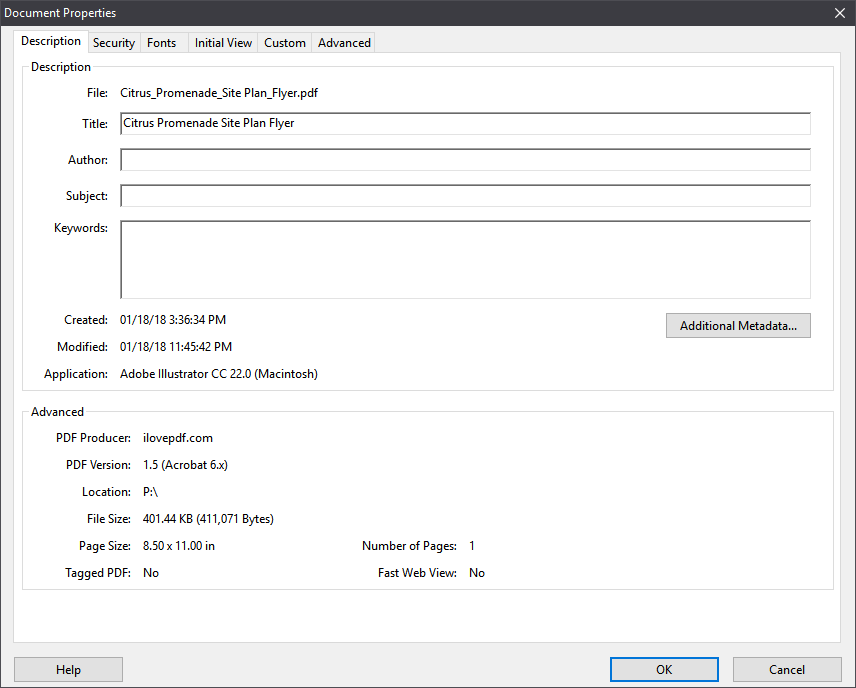
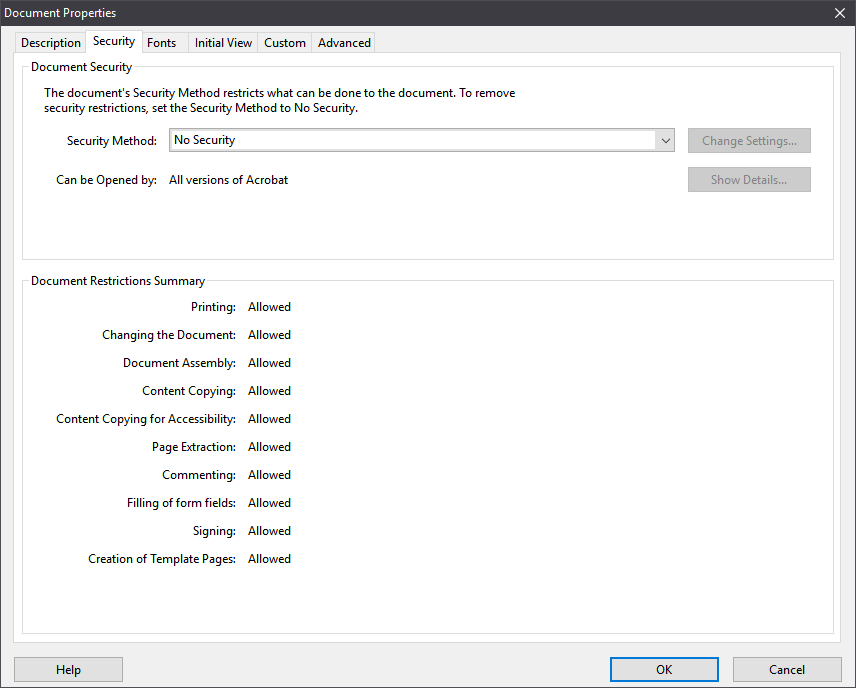
Metadata within the PDF file itself shown as this on Acrobat:
Also, here is the link to the original binary in case it helps: https://mthcdn.azureedge.net/-/media/assets/southern-ca/citrus-promenade/citrus-promenade-site-plan-flyer-pdf.ashx (link is intentionally unlinked to provide link audit before going there and also to prevent search engine indexing)
GuardianMajor
on 15 Oct 2018
Hm, the key thing we were looking for was hidden away in attachments: Array(1). Did you see anything allowing you to open that up to see the values inside? Could try console._log instead, maybe that will allow us to dig into that value?
scottnonnenberg-signal
on 15 Oct 2018
I am sorry my friend, I saw it on my own console debug but I guess when I copied the object for you, it collapsed some data, my bad for not catching that, apologies.
{
    timestamp: 1539308526842,
    attachments: Array(1),
    body: null,
    contact: Array(0),
    conversationId: "+REDACTED",
    …
}
attachments
    :
    Array(1)
0
    :
    contentType:
    "application/pdf"
digest
    : {}
fileName
    :
    "Citrus_Promenade_Site Plan_Flyer.pdf"
flags
    :
    null
height
    :
    null
id
    :
    "1187722399135800132"
key
    : {}
path
    :
    "d7\d72890ae7b55338922d2d63630ba10dc59589105ba766ab633faca087986a2f2"
size
    :
    411071
thumbnail
    :
    null
width
    :
    null
__proto__
    :
    Object
length
    :
    1
__proto__
    :
    Array(0)
body
    :
    null
contact
    : []
conversationId
    :
    "+REDACTED"
decrypted_at
    :
    1539308526875
errors
    : []
flags
    :
    0
hasAttachments
    :
    1
hasFileAttachments
    :
    1
id
    :
    "94269b04-eceb-4636-8d58-15f529296af3"
quote
    :
    null
received_at
    :
    1539308526842
schemaVersion
    :
    9
sent_at
    :
    1539308523290
source
    :
    "+REDACTED"
sourceDevice
    :
    2
timestamp
    :
    1539308526842
type
    :
    "incoming"
__proto__
    :
    Object
No additional hints there, sadly. Thanks though. Maybe try the same file again on v1.17.0-beta.3, just released yesterday? It might just fix this.
scottnonnenberg-signal
on 16 Oct 2018
I have now seen this coming up in the release version. A place where I set up signal in has one of the users dictating letters and then this is transcribed by a staff member(these are DS2 files) Signal is used to pass the files to the person transcribing the audio.
The files are safe and before 1.17 signal allowed this to be sent and opened securely now as of 1.17 it's not the "Attachment type not allowed for security reasons" is shown meaning that old less secure processes are being used pass these files around.
 geocom
on 24 Oct 2018
geocom
on 24 Oct 2018
@scottnonnenberg-signal Running the very latest beta and the issue still persists. Please advise.
GuardianMajor
on 24 Oct 2018
We've done some investigation, and it seems be specific to the 'Download Attachment' menu item you get in the triple-dot menu when the window is narrow. If you make the window wider, and use the <Down Arrow> button to download the attachment, it should work. We should be able to get a fix for this out soon. Please let me know if that workaround fixes things for you!
scottnonnenberg-signal
on 24 Oct 2018
@scottnonnenberg-signal The down arrow icon does not appear for this document, I have a widescreen and the only way I can attempt to download it IS the three dot menu and selecting download, as there is no other option available. I just checked and have 4 documents 2 before 1 after that show the icon and 2 are images and the rest PDF and just this one exposing no icon or allowing download by menu.
GuardianMajor
on 24 Oct 2018
@GuardianMajor perhaps you can send me a screenshot? If you make the window wider, the additional icons should show up:


scottnonnenberg-signal
on 24 Oct 2018
Ok, didn't happen for me but I decided to take a look at the html for it using debug tools and saw that it was hidden, so I manually flipped it to be visible and clicked it and indeed it did download it. But reloading the interface, it goes away and only presents three dot option, which we know fails for whatever reason, I mean it should be doing the same thing right? So maybe we have a situation where the icon is not becoming visible for some reason and to add to it, the alternate method fails for some reason to do the same thing. Annoying, but I can manually edit the item to show and use it for now until it resolves.
GuardianMajor
on 24 Oct 2018
To be very specific, the three icons only show up when the Signal Desktop window is at least 800 pixels wide.
scottnonnenberg-signal
on 24 Oct 2018
Thanks for the quick replies can confirm widening the window so that the 3 dots are replaced with icons does fix this issue.
geocom
on 24 Oct 2018
I hope an option will be added to disable this "feature", enlarging the screen to display the proper button to click when wrongfully marked as "unsafe" it's quite an hassle as signal already take a lot of horizontal space.
 MonoS
on 25 Oct 2018
MonoS
on 25 Oct 2018
v1.17.1 and v1.17.1-beta.1 have been released this afternoon, and fix this issue. Please close this bug if you can verify that the fix works for you.
scottnonnenberg-signal
on 25 Oct 2018
@scottnonnenberg-signal
To be very specific, the three icons only show up when the Signal Desktop window is at least 800 pixels wide.
My friend I know what you meant, trust me I know exactly what you are talking about. As I said, visible on the other ones but not the one that we were having issues with. But if I force it to show up, then clicking it does indeed download it but not via the three dot.
v1.17.1andv1.17.1-beta.1have been released this afternoon, and fix this issue. Please close this bug if you can verify that the fix works for you.
I just got the update, let me test it and make sure and I will update this ticket forthwith.
@MonoS Personally I would prefer they simply were put right below the message, no muss no fuss.
GuardianMajor
on 25 Oct 2018
@scottnonnenberg-signal , et al.
I can confirm that running v1.17.1-beta.1 on Windows that the issue has been resolved, the download icon shows up now and the three dot method of download works as intended as well. Thank you for the fix, appreciate it. I am accordingly closing this issue.
GuardianMajor
on 25 Oct 2018
Yep, we are filtering certain questionable files in beta right now. What is the filename?
@scottnonnenberg-signal @scottnonnenberg
Can you please stop filtering what users want to send to each other? Right now it causes more trouble then benefits. Where is that old idea of freedom behind Signal?
 mattimac
on 2 Feb 2019
mattimac
on 2 Feb 2019
@mattimac More trouble for you, perhaps, but not for other users with less expertise. All you have to do is put the file in some sort of archive format, and we'll happily let it through. Anyway, this kind of filtering is industry standard. For example: https://support.google.com/mail/answer/6590?hl=en
scottnonnenberg-signal
on 4 Feb 2019
@scottnonnenberg
@scottnonnenberg-signal
@mattimac More trouble for you, perhaps, but not for other users with less expertise. All you have to do is put the file in some sort of archive format, and we'll happily let it through. Anyway, this kind of filtering is industry standard. For example: https://support.google.com/mail/answer/6590?hl=en
do you really want to say my trusted contacts with whom i exchanged and confirmed the security numbers personally will send me malicious file and it is serious security risk? cmon guys what is going on here... why i have feeling last times signal is getting sabotaged?
mattimac
on 4 Feb 2019
Calling what Google does "Industry Standard" is like calling 1984 a "Best Practice" book, filtering based on extension it's second only to filtering based on hash.
MonoS
on 4 Feb 2019
Related issues
 bcsga
·
3Comments
bcsga
·
3Comments
 hanzei
·
3Comments
hanzei
·
3Comments
 fredaas
·
3Comments
fredaas
·
3Comments
 cmdrogogov
·
3Comments
cmdrogogov
·
3Comments
 vincenzopalazzo
·
3Comments
vincenzopalazzo
·
3Comments