Signal-desktop: Background CPU usage has increased (on Linux, can't reproduce on Windows)
I'm assuming this is probably an Electron thing (but maybe not as my other Electron apps are fine) -- since the last few 15.x point releases and also in 16.0, background CPU usage on Linux has gone up past acceptable levels. My Windows machine doesn't seem to have this problem.
 axfelix
All 26 comments
Please follow the bug template. We can do very little with the information you've provided. At minimum, a debug log will help us understand what the app is doing. Even better, talking through your perception of the usage of the app - how many messages per day, how often do you start the app up, how high does the message counter get when you start the app?
 scottnonnenberg-signal
on 6 Sep 2018
scottnonnenberg-signal
on 6 Sep 2018
Sure thing, sorry. Here's the debug log: https://debuglogs.org/2cca680b8fac073903528e27c2b36182012fc03d36bf719fd98b8b4651bb1729
I start the app up whenever I reboot, which is probably less than weekly, and the message counter probably gets up close to 1000? I send and receive ~50 messages a day.
axfelix
on 6 Sep 2018
Thanks. When you talk about background CPU usage, what exactly do you mean? When no messages are being received, or are you computing some sort of average that includes both truly idle times and times when messages are being received?
scottnonnenberg-signal
on 6 Sep 2018
htop is reporting ~3% background CPU usage when no messages are being received.
axfelix
on 6 Sep 2018
And what was it before?
scottnonnenberg-signal
on 6 Sep 2018
Functionally zero; it would drop below 1% when it wasn't actively doing anything.
axfelix
on 6 Sep 2018
Tell me about how you use disappearing messages. The way we update them as timers count down has changed, so that could have potentially changed the background CPU usage with the v1.15.0 release.
scottnonnenberg-signal
on 6 Sep 2018
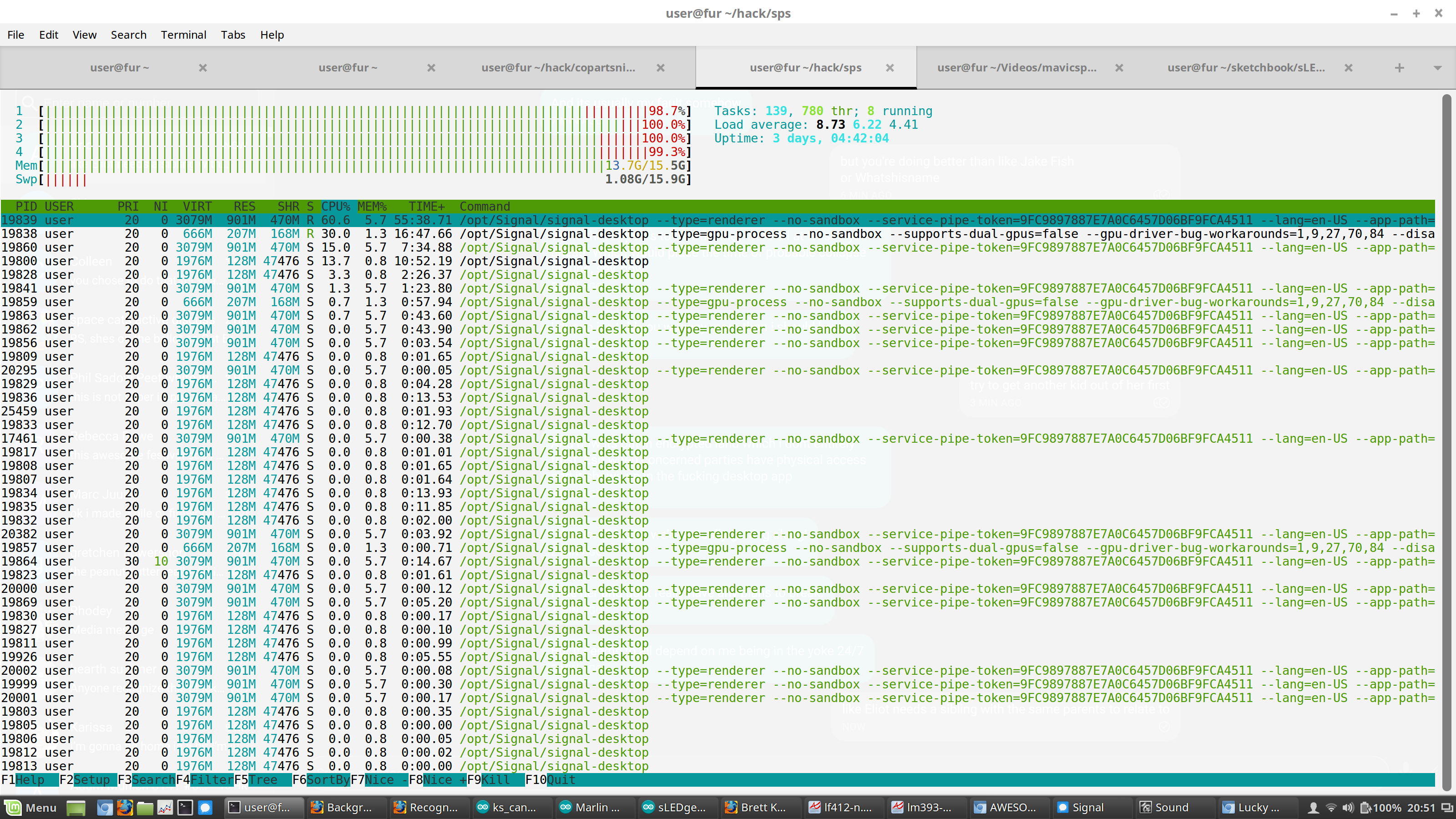
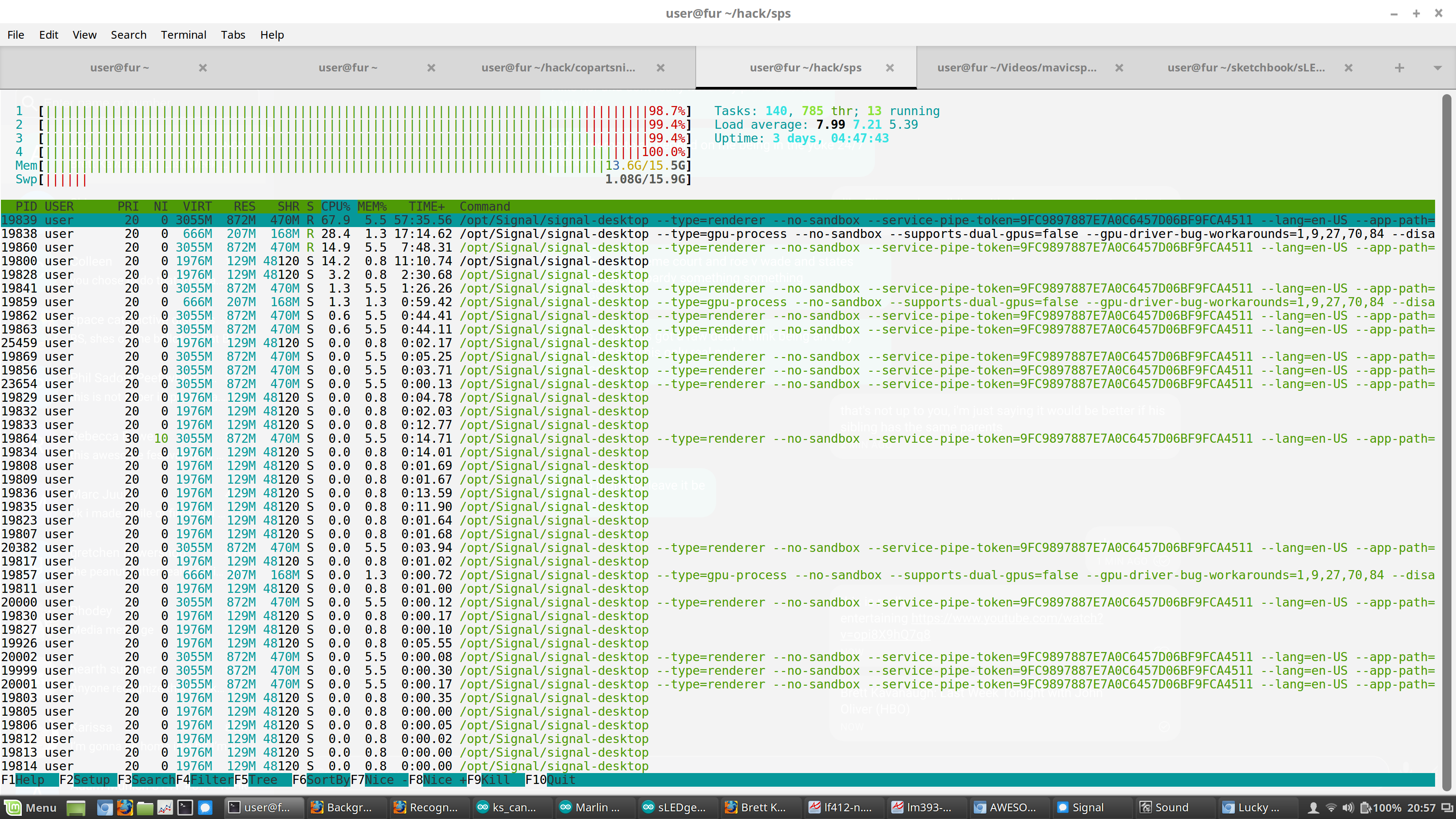
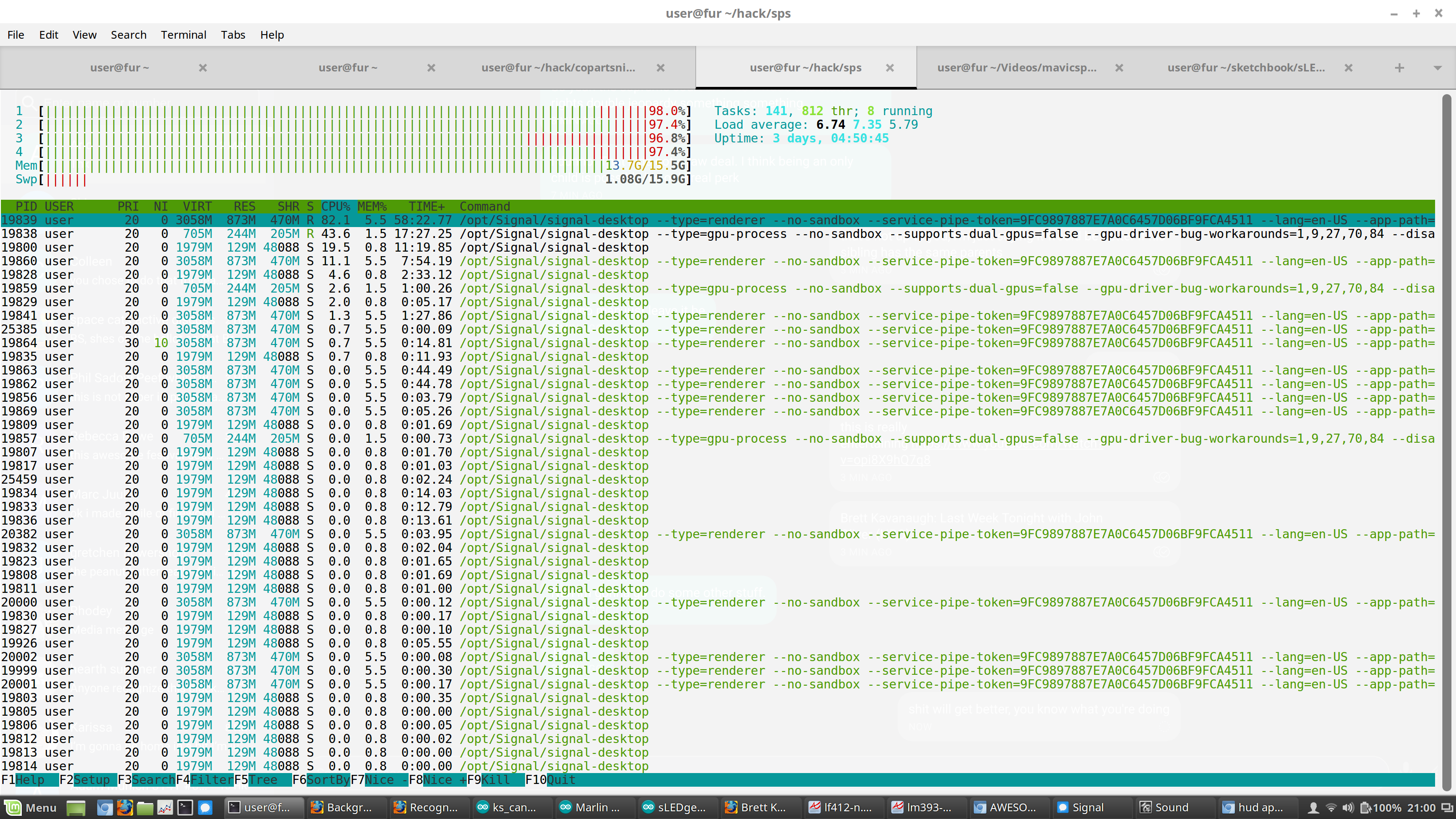
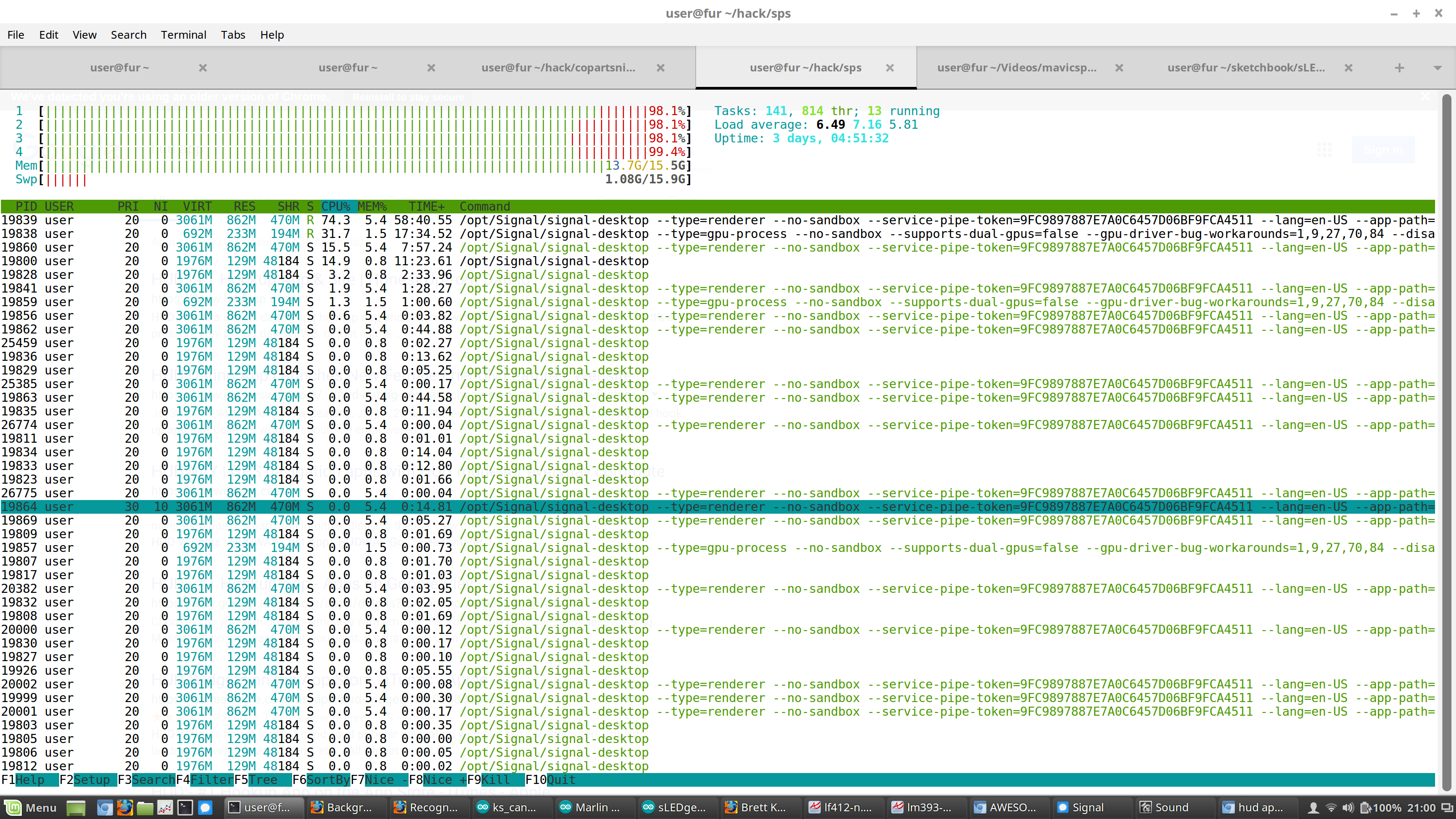
I just experienced the same thing, three CPU cores involved for a total of 200%. It ended before I could get a screenshot of htop showing that. Application totally frozen for minutes. Less than 5 messages in or out during that time.
Linux box 4.10.12-041012-generic #201704210512 SMP Fri Apr 21 09:14:40 UTC 2017 x86_64 x86_64 x86_64 GNU/Linux
LSB Version: core-9.20160110ubuntu0.2-amd64:core-9.20160110ubuntu0.2-noarch:printing-9.20160110ubuntu0.2-amd64:printing-9.20160110ubuntu0.2-noarch:security-9.20160110ubuntu0.2-amd64:security-9.20160110ubuntu0.2-noarch
Description: Linux Mint 18 Sarah
https://debuglogs.org/5d3a71d0285e3184e77270fa0a201a4cd8143dbcf112c1364b958cd00c966072
 jerkey
on 25 Sep 2018
jerkey
on 25 Sep 2018
@jerkey What's the history of that install? Based on your provided log, it has been up for quite some time (the SQL Job count was above 56 thousand). Do you sleep that device frequently? How was/is the memory usage of Signal Desktop on that machine? How big is the SQLCipher database on disk? (it's in ~/.config/Signal/sql)
scottnonnenberg-signal
on 25 Sep 2018
@jerkey What's the history of that install? Based on your provided log, it has been up for quite some time (the SQL Job count was above 56 thousand).
At the time of my bug report, the oldest thread of Signal had been open for 45 hours or so.
Do you sleep that device frequently?
Yes I do. My uptime was a bit less than two days, but I don't think that's awake time but rather time since last reboot (although I think it's been longer since I rebooted)
How was/is the memory usage of Signal Desktop on that machine?
I don't know how to find that number as a single answer so here's a screenshot of my System Monitor

How big is the SQLCipher database on disk? (it's in ~/.config/Signal/sql)
27217920 Sep 25 18:52 db.sqlite
jerkey
on 26 Sep 2018
@jerkey What's your estimated message send/receive per day? And how much of that is disappearing messages?
scottnonnenberg-signal
on 26 Sep 2018
@jerkey What's your estimated message send/receive per day? And how much of that is disappearing messages?
OK i just manually went back through my messages and counted 207 messages in the last 24 hours, 7 of them disappearing in 2 threads.
the high CPU thing happened again recently, here is another debug log
https://debuglogs.org/de62a218e35a528735edf77ab4388acaa29fefb35bf63bea27e1c556f417992b
EDIT: here are some screenshots of htop showing high CPU usage. This happens much of the time when i'm using Signal Desktop, even though i'm not doing a lot of messages.
jerkey
on 27 Sep 2018
I've noticed that in my case this tends to happen after the app isn't closed properly (e.g., after the kernel panics and I reboot); the next time I run it, the idle CPU usage is much worse than normal and doesn't go away until I wipe data.
This might be worth trying to duplicate...
axfelix
on 11 Oct 2018
I observe this too.
It seems like signal-desktop is spamming syscalls while idle:
% sudo timeout 1 strace -fp "$(pidof signal-desktop)" -c
% time     seconds  usecs/call     calls    errors syscall
------ ----------- ----------- --------- --------- ----------------
 50.41    0.113253         294       385           epoll_wait
 32.71    0.073480          90       815       124 futex
  4.81    0.010806          30       363           poll
  4.74    0.010644           9      1211      1086 recvmsg
  3.40    0.007636        1909         4         1 restart_syscall
  1.47    0.003301          18       187           write
  1.06    0.002379          19       124           sendto
  0.77    0.001729           4       453           gettid
  0.60    0.001342          10       128           read
  0.02    0.000038           8         5           munmap
  0.02    0.000035           7         5           close
  0.00    0.000004           4         1           ioctl
------ ----------- ----------- --------- --------- ----------------
100.00    0.224647                  3681      1211 total
During one second, these syscalls add up to 0.2 seconds sys CPU time spent in kernel space, so that's around 20% CPU usage spent in the kernel (this is usually the red part in htop's bars).
Not that this doesn't even account for the green bit in htop's bars (userspace CPU time), of which there is also plenty.
For perople not familiar with strace, you can pass -y instead of -w to see all the details scroll by as the syscalls happen.
 nh2
on 24 Oct 2018
nh2
on 24 Oct 2018
I can still reproduce this in the newest 1.8.0 beta -- is it possible your Electron version is running behind or something? it does seem to be Linux-specific, but I wouldn't be surprised if it's upstream.
axfelix
on 13 Nov 2018
Hi,
I have the same issue.
Since I started using flatpak'ed version of Signal-desktop it has been constantly using 15-30% in idle.
I did try to disable hw acceleration and not much has changed:
flatpak run org.signal.Signal --disable-gpu --force-cpu-draw
```sudo timeout 5 strace -fp "$(pidof signal-desktop)" -c
% time seconds usecs/call calls errors syscall
65.20 1.781230 338 5257 654 futex
32.91 0.899055 501 1793 epoll_wait
0.74 0.020309 34 596 madvise
0.62 0.016851 28 596 recvmsg
0.49 0.013392 44 299 sendto
0.03 0.000763 19 40 clock_gettime
0.00 0.000089 17 5 epoll_pwait
0.00 0.000086 86 1 restart_syscall
0.00 0.000083 16 5 write
0.00 0.000053 10 5 read
100.00 2.731911 8597 654 total
These are strace stats when Signal is started with HW accel.:
`flatpak run org.signal.Signal`
```sudo timeout 5 strace -fp "$(pidof signal-desktop)" -c
% time     seconds  usecs/call     calls    errors syscall
------ ----------- ----------- --------- --------- ----------------
 69.50    0.955129         175      5450       730 futex
 29.03    0.398945         221      1805           epoll_wait
  0.72    0.009908          16       600           recvmsg
  0.37    0.005150          17       300           sendto
  0.31    0.004287          14       301           madvise
  0.03    0.000433           9        48           clock_gettime
  0.03    0.000363         363         1           restart_syscall
  0.00    0.000028           5         5           write
  0.00    0.000003           0         5           epoll_pwait
  0.00    0.000002           0         5           read
------ ----------- ----------- --------- --------- ----------------
100.00    1.374248                  8520       730 total
My current config is:
- Fedora 31
- kernel 5.3.12-300.fc31.x86_64
- Gnome 3.34.1
- Intel i7-7600U with HD Graphics 620
- Flatpak 1.4.3
- Signal 1.28.0
$ flatpak list
Name                                                 Application ID                                                   Version                Branch             Installation
Slack                                                com.slack.Slack                                                  4.0.2                  stable             system
Spotify                                              com.spotify.Client                                               1.1.10.546             stable             system
Freedesktop Platform                                 org.freedesktop.Platform                                         18.08.38               18.08              system
Freedesktop Platform                                 org.freedesktop.Platform                                         19.08.4                19.08              system
default                                              org.freedesktop.Platform.GL.default                                                     19.08              system
Adwaita icon theme                                   org.freedesktop.Platform.Icontheme.Adwaita                                              1.0                system
Intel                                                org.freedesktop.Platform.VAAPI.Intel                                                    18.08              system
Intel                                                org.freedesktop.Platform.VAAPI.Intel                                                    19.08              system
html5-codecs                                         org.freedesktop.Platform.html5-codecs                                                   18.08              system
openh264                                             org.freedesktop.Platform.openh264                                                       19.08              system
GNOME Application Platform version 3.30              org.gnome.Platform                                                                      3.30               system
GNOME Application Platform version 3.34              org.gnome.Platform                                                                      3.34               system
Arc-solid Gtk theme                                  org.gtk.Gtk3theme.Arc-solid                                                             3.22               system
KDE Application Platform                             org.kde.Platform                                                                        5.12               system
KDE Application Platform                             org.kde.Platform                                                                        5.13               system
QGnomePlatform                                       org.kde.PlatformTheme.QGnomePlatform                                                    5.12               system
QGnomePlatform                                       org.kde.PlatformTheme.QGnomePlatform                                                    5.13               system
QGnomePlatform-decoration                            org.kde.WaylandDecoration.QGnomePlatform-decoration                                     5.12               system
QGnomePlatform-decoration                            org.kde.WaylandDecoration.QGnomePlatform-decoration                                     5.13               system
Kdenlive                                             org.kde.kdenlive                                                 19.08.3                stable             system
Signal                                               org.signal.Signal                                                1.28.0                 stable             system
 kowalcj0
on 29 Nov 2019
kowalcj0
on 29 Nov 2019
Want to bump this. Strongly correlated to incoming messages and on startup. Drags my whole system (Linux based) down. Any other CPU intensive process (e.g. video conferencing like Zoom/Jitsi/Hangouts/etc) all report high-CPU load on my side, resulting in poor performance. Killing/closing the client resolves the issue. I use a disappearing msgs heavily.
 danblah
on 17 Dec 2019
danblah
on 17 Dec 2019
@j-dimension
 j-dimension
on 25 Jan 2020
j-dimension
on 25 Jan 2020
In my case this is completely unrelated to receiving messages. It just keeps using 100% of one CPU for signal-desktop right after start and, for some reason, a systemd-journald process eats another entire processor. (Are some logs generated at a crazy pace?) (debug log)
 andrejpodzimek
on 13 Feb 2020
andrejpodzimek
on 13 Feb 2020
This problem might be related. In my case, Signal just doesn't work, fails to load chat history (and yet the GUI seems responsive and not frozen) and hogs multiple processors due to repeated attempts at the accept syscall, which is banned by a seccomp policy.
andrejpodzimek
on 14 Feb 2020
Same here. Recently wondered why my highend business laptop with Intel i7, 16GB RAM and 512 GB SSD keeps lagging and fan is not turning off. Normally I have such overload when having two virtualboxes and programming environment running, I was suprised that messanger is a reason. Attached screenshot and it is only in "idle" state for Signal. Even FireFox with 15 opened tabs is taking less CPU (3 gmails tabs, protonmail, slack, spotify). I'm inviting more and more friends to Signal and now I'm starting regret that because when I have conversation with >= 3 peoples at same time, then CPU usage is so high that I have lags while typing messages, not even in Signal, my whole system is lagging. As a senior programmer, I'm in opinion that Electron is a cancer for desktops. If you don't have resources for writting native app for desktops, then maybe you could consider publish it as webapp as Skype or Wire do? I bet that it will be working better as pinned tab in FireFox or any other browser than Electron based app
KDE Neon 5.18
KDE Plasma 5.18.2
Qt 5.14.1
Linux Kernel 5.3.0-40 generic (HWE package)
Intel i7-6500U 2.5 GHz
16 GB RAM
Intel HD 520
512 GB SSD
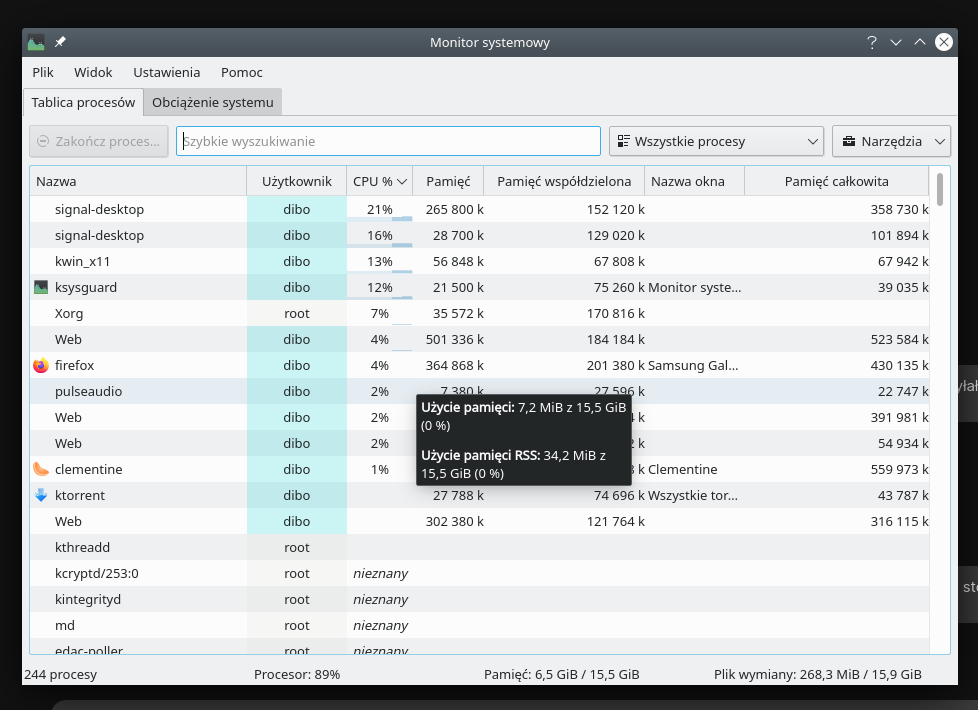
Edit: It is much better when I close main window and hide it into tray (even if it was minimized before). But it is not a solution in case when I have constant conversations and must keep it in task bar
 dibok
on 6 Mar 2020
dibok
on 6 Mar 2020
@dibok Interrupted typing is certainly a big deal, and we'd like to get to the bottom of it. Would you be open to giving us a debug log, or even a performance trace via the dev tools? (be sure to turn off the screenshots option if you have sensitive data onscreen; otherwise it can be very useful in helping us track down the issue)
scottnonnenberg-signal
on 7 Mar 2020
Same issue on Unbuntu 18.04. I'm seeing constant 12%+ CPU use. Not using disappearing messages often. Version 1.32.1
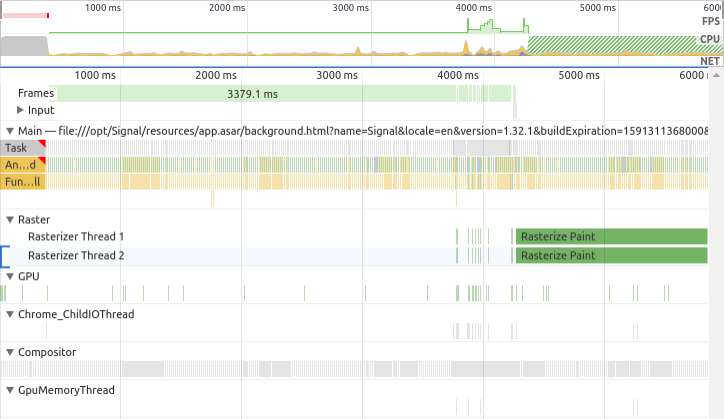
Profile-20200315T193504.json.gz
 13rac1
on 16 Mar 2020
13rac1
on 16 Mar 2020
This looks like a duplicate of https://github.com/signalapp/Signal-Desktop/issues/3904
Please take a look and let us know if your experience does not match what's reported there. We'll close this soon.
scottnonnenberg-signal
on 16 Mar 2020
Yes confirmed. Ctrl-Shift-C to close the conversation works to reduce CPU use (described in https://github.com/signalapp/Signal-Desktop/issues/3904#issuecomment-585601242) _Technically_ #3904 is the dupe :wink: :laughing:
13rac1
on 16 Mar 2020
Okay, closing. Duplicate #3904
scottnonnenberg-signal
on 17 Mar 2020
Related issues
 muellermartin
·
3Comments
muellermartin
·
3Comments
 vincenzopalazzo
·
3Comments
vincenzopalazzo
·
3Comments
 jeremymasters
·
3Comments
jeremymasters
·
3Comments
 bcsga
·
3Comments
bcsga
·
3Comments
 petcap
·
3Comments
petcap
·
3Comments
Most helpful comment
Functionally zero; it would drop below 1% when it wasn't actively doing anything.