Signal-desktop: wrong chronological order of messages
- [x] I have searched open and closed issues for duplicates
Bug description
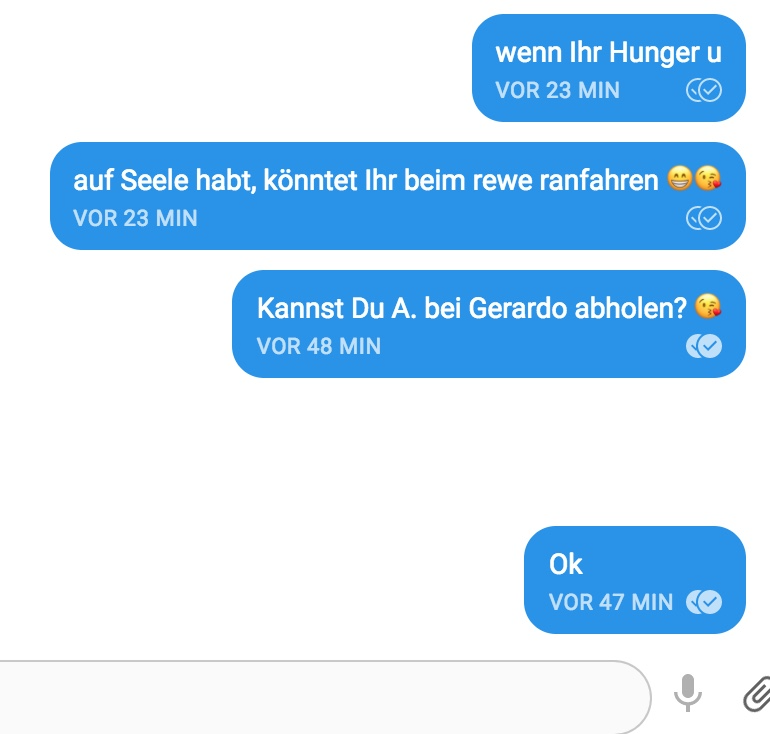
The message are not in order of the incoming; older one is underneath the newer one.
Steps to reproduce
unfortunately not reproducible. Sometimes it occurs, sometimes not
- step one
- step two
- step three
Actual result:
Expected result:
Screenshots
Platform info
Signal version: v1.15.5. desktop version
Operating System:
MacOS 10.13.6
Linked device version:
MacBook Pro (Retina, 15', Mitte 2015)
Link to debug log
https://debuglogs.org/05304e51cf1e6bb16a685949b7b9fc749ced7c7db04476310bf73145cbd9df8c
 MarcelGisler
All 34 comments
You can help us investigate this by selecting 'More Info' for each of the messages and providing the id number you find next to the 'Sent' header. Then I can cross-reference those messages with your log.
 scottnonnenberg-signal
on 4 Sep 2018
scottnonnenberg-signal
on 4 Sep 2018
1535986793101
1535985313948
Am 04.09.2018 um 18:53 schrieb Scott Nonnenberg notifications@github.com:
You can help us investigate this by selecting 'More Info' for each of the messages and providing the id number you find next to the 'Sent' header. Then I can cross-reference those messages with your log.
—
You are receiving this because you modified the open/close state.
Reply to this email directly, view it on GitHub https://github.com/signalapp/Signal-Desktop/issues/2714#issuecomment-418440794, or mute the thread https://github.com/notifications/unsubscribe-auth/Aoypc6WwpMqn3hO99Q5Ogkw__OSvIh54ks5uXrARgaJpZM4WXzMK.
MarcelGisler
on 5 Sep 2018
Which messages from the screenshot above do those represent? Which ones are out of order, which are in the right order?
Doing a quick check, you sent 1535986793101 from the device showing out-of-order messages. Where did you send the other three messages from?
scottnonnenberg-signal
on 5 Sep 2018
You can see the order by comparing the time the messages were sent.
16:59 is the first, 16:39 the next one.
All were sent from the desktop version.
Viele Grüße
Marcel Gisler
Am 05.09.2018 um 18:39 schrieb Scott Nonnenberg <[email protected] notifications@github.com>:
Which messages from the screenshot above do those represent? Which ones are out of order, which are in the right order?
Doing a quick check, you sent 1535986793101 from the device showing out-of-order messages. Where did you send the other three messages from?
—
You are receiving this because you modified the open/close state.
Reply to this email directly, view it on GitHub https://github.com/signalapp/Signal-Desktop/issues/2714#issuecomment-418798236, or mute the thread https://github.com/notifications/unsubscribe-auth/Aoypc7gPwr1mEQT2BYzDGo03oanN7_Chks5uX_5PgaJpZM4WXzMK.
MarcelGisler
on 6 Sep 2018
Happened to me too, a couple of times. Next time I'll report it.
 denver-s
on 6 Sep 2018
denver-s
on 6 Sep 2018
@MarcelGisler Please provide the details for all four messages shown in that screenshot. Incoming messages are treated very differently from outgoing messages.
scottnonnenberg-signal
on 6 Sep 2018
The blue ones were sent by me, the white I received by my friend
Am 06.09.2018 um 19:21 schrieb Scott Nonnenberg notifications@github.com:
@MarcelGisler https://github.com/MarcelGisler Please provide the details for all four messages shown in that screenshot. Incoming messages are treated very differently from outgoing messages.
—
You are receiving this because you were mentioned.
Reply to this email directly, view it on GitHub https://github.com/signalapp/Signal-Desktop/issues/2714#issuecomment-419174469, or mute the thread https://github.com/notifications/unsubscribe-auth/AoypcznxcwaPClMxUXoedBZSWgt20GQYks5uYVmbgaJpZM4WXzMK.
MarcelGisler
on 7 Sep 2018
@MarcelGisler When I say "all the details" I mean information like this, in the order from the image:
"venn lhr Hunger u"
"auf Seele..."
"Kannst du"
"Ok"
If you're not comfortable supplying that here, please reach out to me directly.
scottnonnenberg-signal
on 7 Sep 2018
Can confirm this happens, usually when loading messages after being offline for a while - incoming messages will usually appear later than they were actually sent in the order.
Guessing from your response that this is expected behavior.
EDIT: I can get more detailed information if that's necessary. I've had it happen to me a few times now.
 sauyon
on 13 Sep 2018
sauyon
on 13 Sep 2018
@sauyon It's not expected behavior in that it's supposed to be that way, but it is something we've heard about before. But we need pretty detailed information to track it down: full debug log from the receiving device, and the Sent timestamp or ID (available in the More Info screen).
scottnonnenberg-signal
on 13 Sep 2018
https://debuglogs.org/93df8e6d04abf80a9e6329b9ff2c24043f288ae89572d903feba2b313d375a25
Message 1536801755597 appears between 1536791891292 and 1536801756365, which looks something like this:
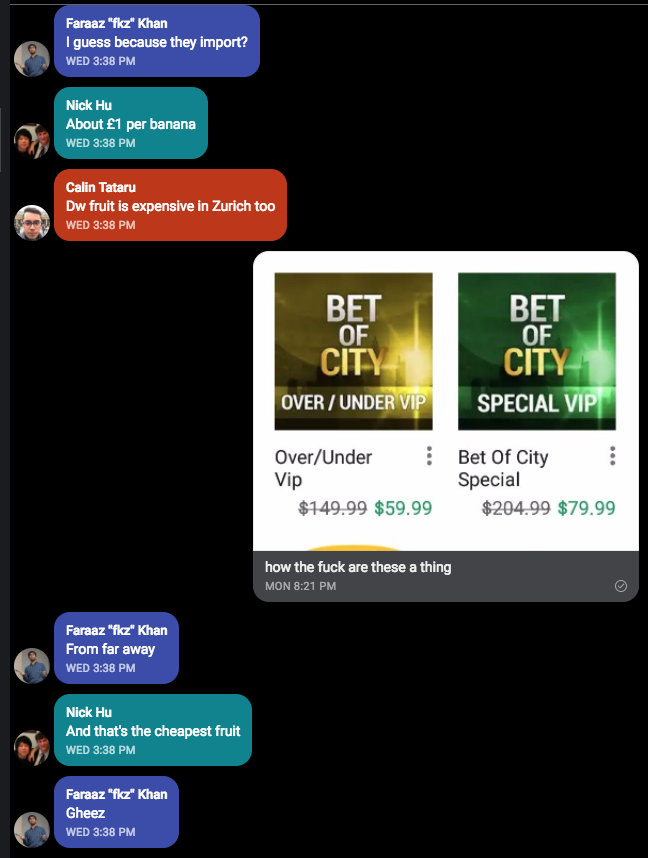
EDIT: hmm, doesn't look like those message IDs appear in the log. I'll try to repro this again tonight.
sauyon
on 13 Sep 2018
@sauyon Again, when I ask for details, I need a list like this, in the order you see it in in the conversation:
'From...'
'And that's...'
'Gheez'
It is indeed good to check that the sent ids are in your log. Since logs only last three days, the important entries related to those messages may have scrolled off.
scottnonnenberg-signal
on 13 Sep 2018
Ok, repro'd this morning, here's the info:
(Interestingly, I hit tab at some point while in the more info screen, which hid the more info screen, and then when I attempted to open the more info screen again it wouldn't open and I had to restart the app.)
https://debuglogs.org/5a4ead10646475462b0c9a1917319c1e6d61149db431db58bdd24f17e8275af9
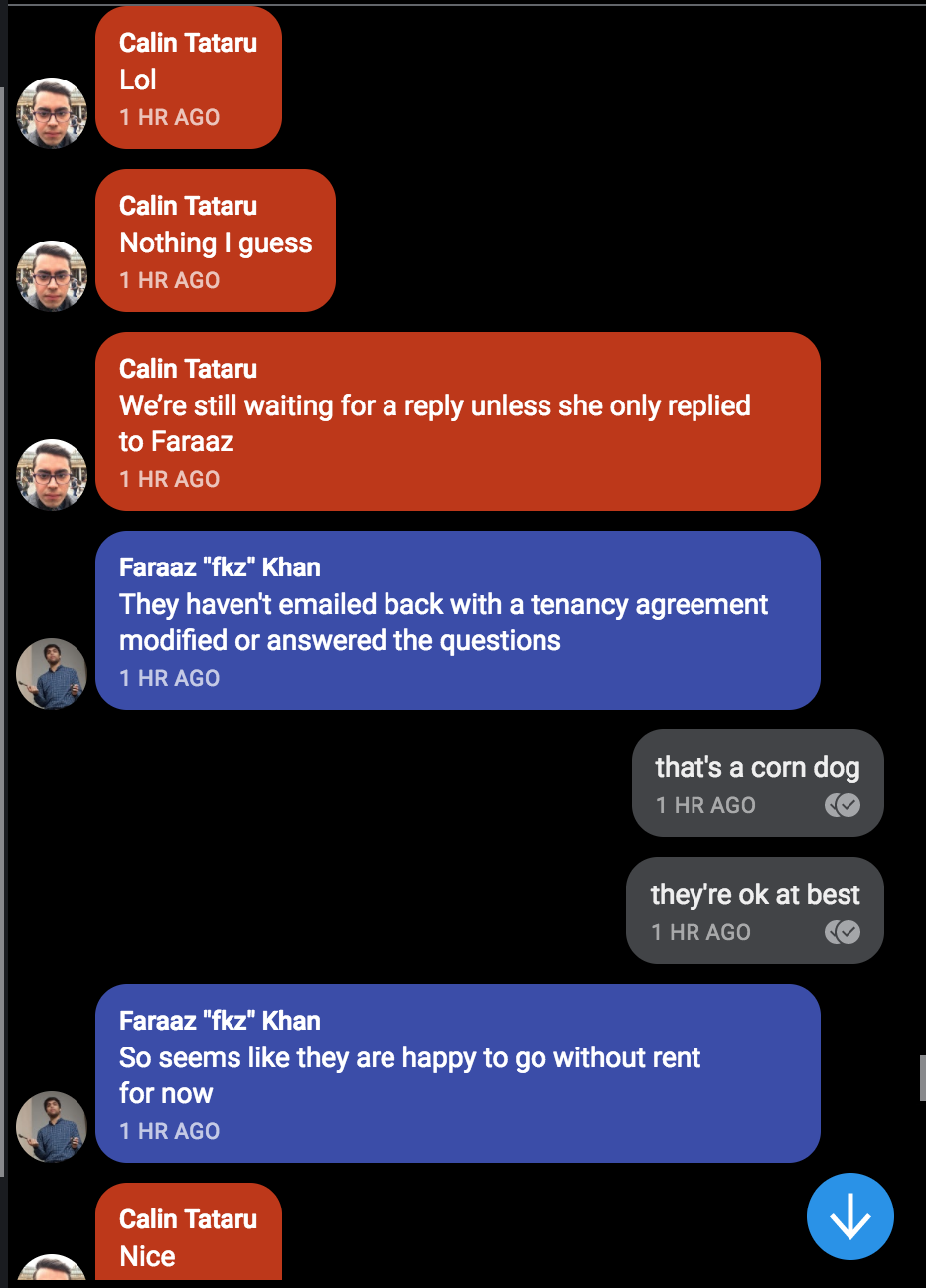
Incorrect order on Mac:
Correct order on phone:
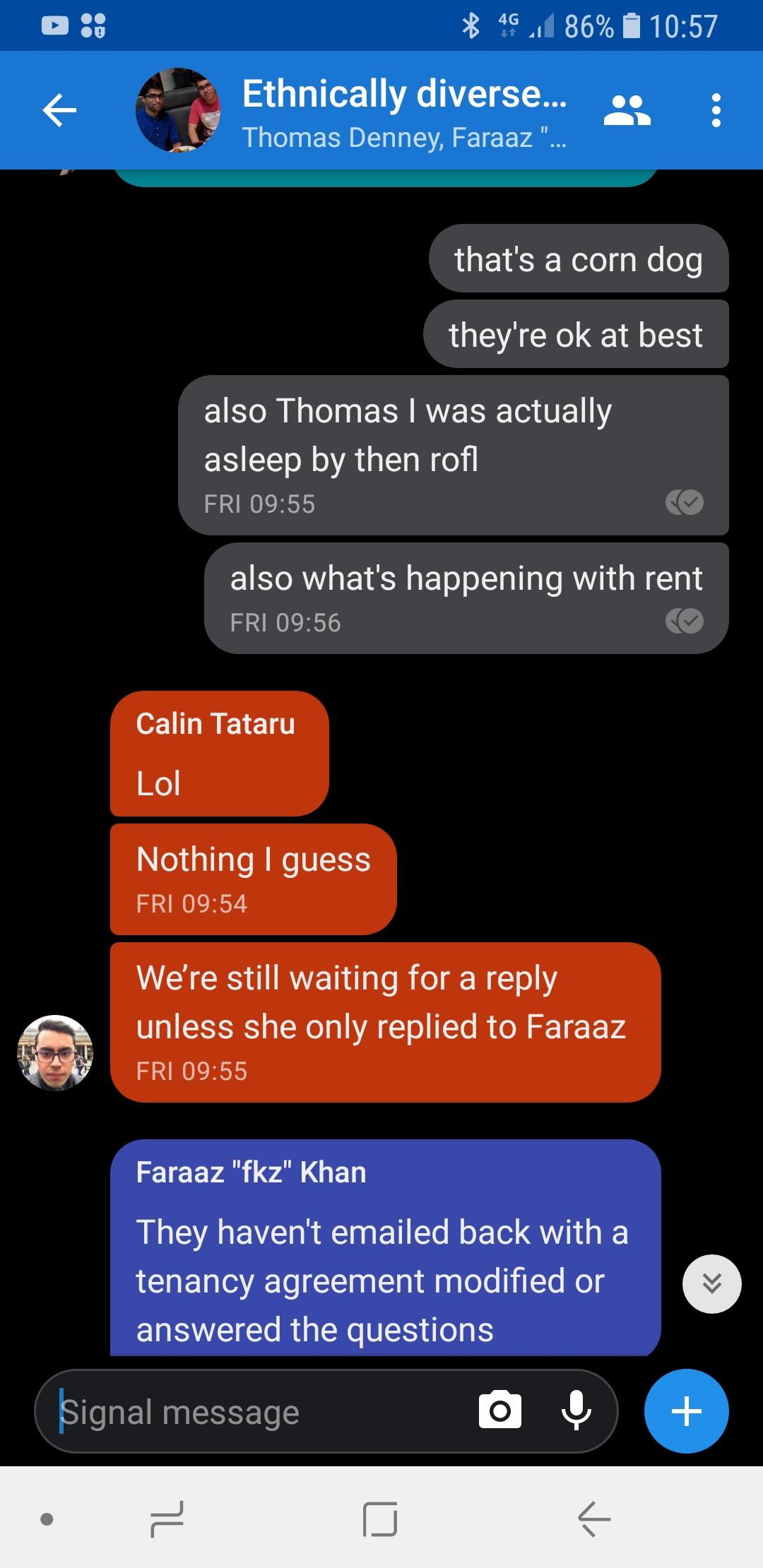
The message IDs in question are:
msg: sent, received
"Lol": 1536944080796, 1536947706191
"Nothing...": 1536944098384, 1536947706659
"We're still...": 1536944113153, 1536947707181
"They haven't...": 1536944121432, 1536947707594
"That's a...": 1536944125746, 1536947708090
"they're ok...": 1536944135477, 1536947708389
"So seems like...": 1536944139349, 1536947708703
"Nice": 1536944144364, 1536947709314
"also Thomas...": 1536944153651, 1536947710283
"also what's...": 1536944161815, 1536947710523
sauyon
on 14 Sep 2018
Huh, looking at the timestamps the order actually looks wrong on the phone. I'm guessing this is because the timestamp is based on device times? The messages in question were definitely in response to my messages, so they're definitely getting sent before.
sauyon
on 14 Sep 2018
@sauyon Thanks for all that detail. I think I could use just one more bit of information, since it's not immediately clear to me: what is the right order for all these messages?
scottnonnenberg-signal
on 14 Sep 2018
The order that they were sent and received is in the second image (from the phone) but it appears here that the timestamps are wrong rather than the desktop app is wrong; probably a misconfiguration of my phone's time.
sauyon
on 14 Sep 2018
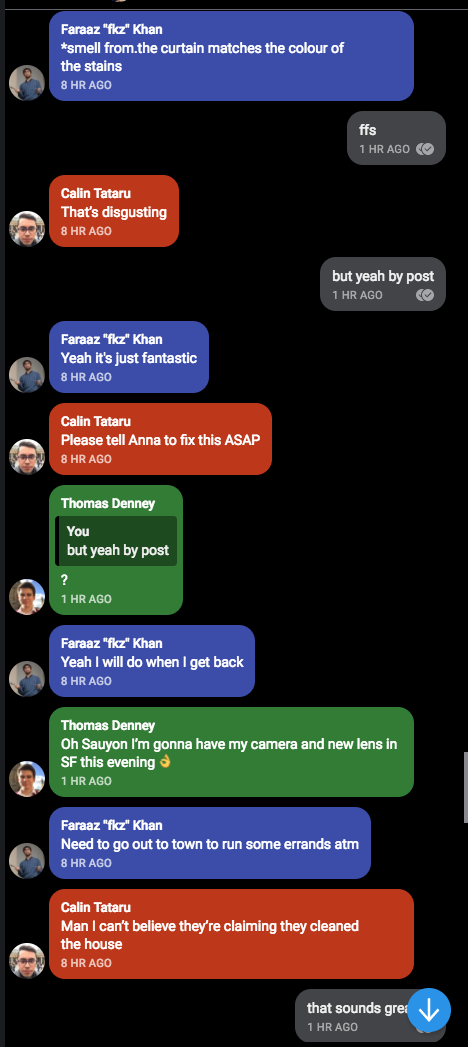
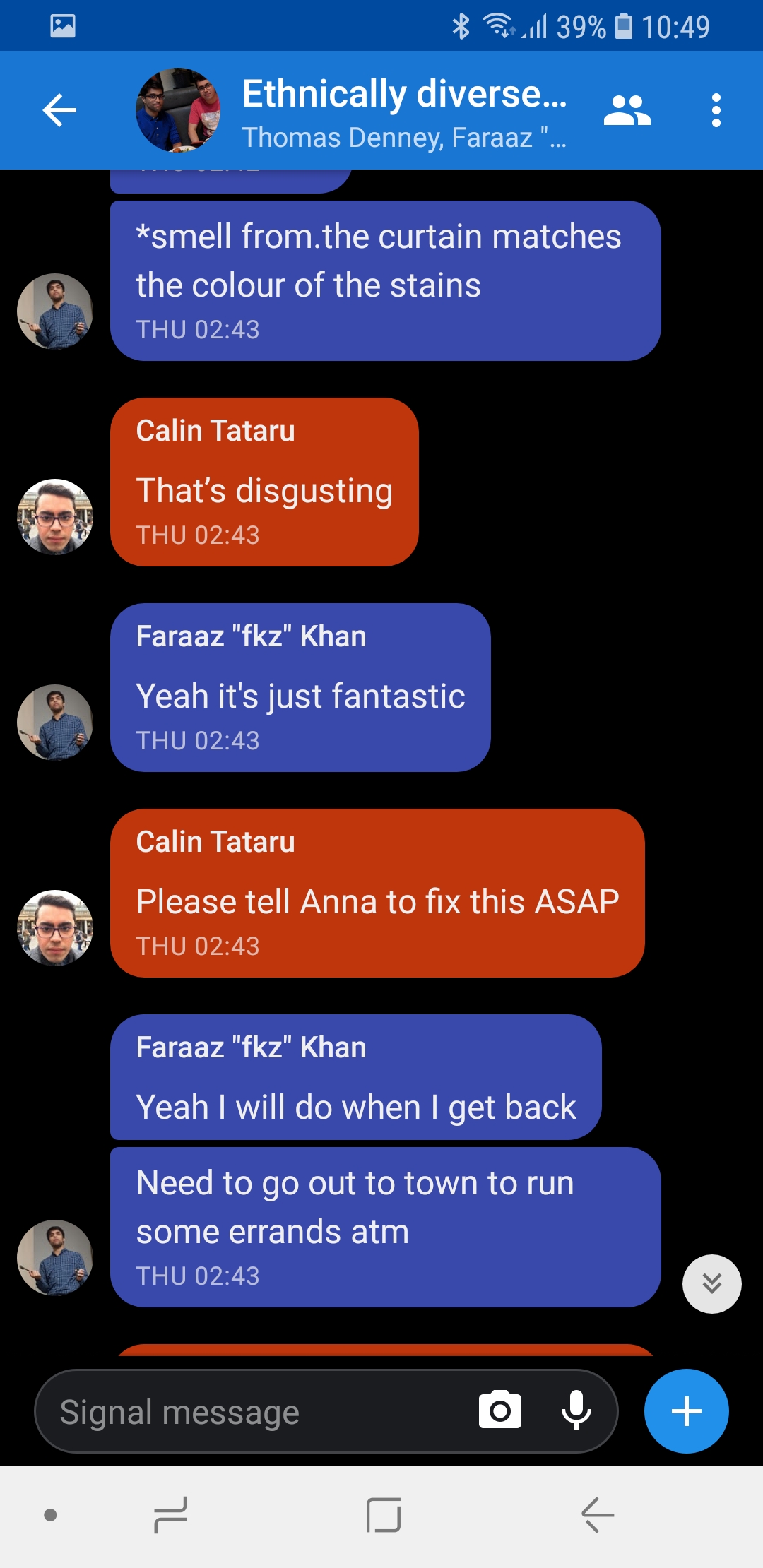
This happened again, after I fixed my clock (and judging from the timestamps, this time the order is actually incorrect):
Incorrect order of messages on desktop:
Correct order of messages on mobile:
and some time later:
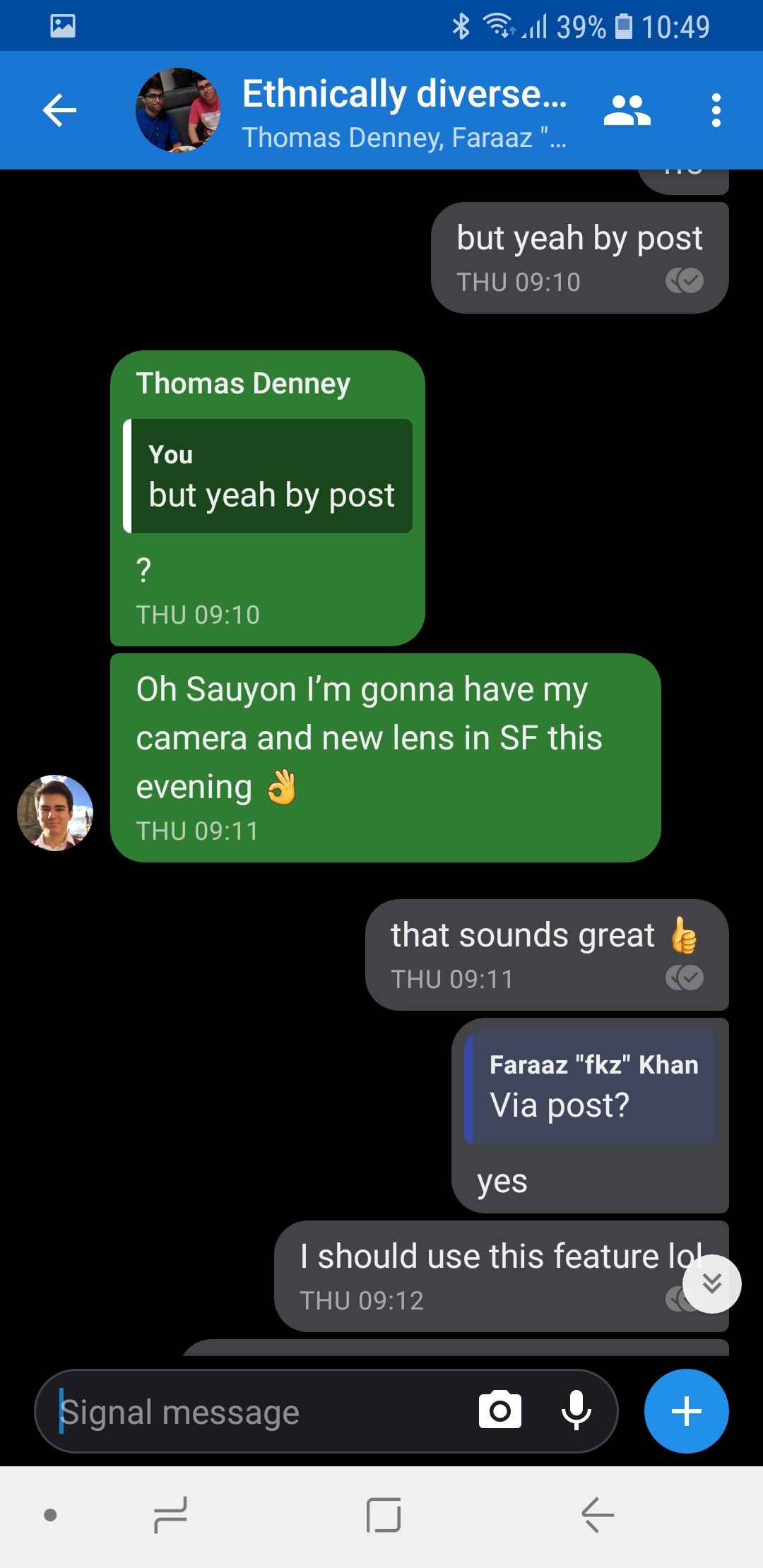
Message, Sent ID, Received ID:
"*smell...": 1537436586054, 1537465387298
"ffs": 1537459816950, 1537465388457
"That's disgusting": 1537436587135, 1537465389444
"but yeah...": 1537459820099, 1537465399230
"Yeah it's...": 1537436594221, 1537465400255
"Please tell...": 1537436600612, 1537465403154
"?": 1537459851812, 1537465404160
"Yeah I will...": 1537436610172, 1537465405177
"Oh Sauyon...": 1537459873770, 1537465407445
"Need to...": 1537436624555, 1537465408342
"Man I...": 1537436633670, 1537465411124
"that sounds...": 1537459887113, 1537465411130
sauyon
on 20 Sep 2018
Hello,
This happens to me too. I send messages using the iOS app, then when I look in the ElectronJs app order is all messed up. What logs should I provide to help debug this?
 mthld
on 13 Oct 2018
mthld
on 13 Oct 2018
@mathiasblc We need a log and the details for the out-of-order messages (and the messages nearby) as described here: https://github.com/signalapp/Signal-Desktop/issues/2714#issuecomment-418440794
The more specific you can be, the better. The observed order on all affected clients, which clients sent the messages, the 'sent id' available in the More Info screen, and of course a debug log.
scottnonnenberg-signal
on 15 Oct 2018
I just noticed this behaviour. I was using Signal on my phone, chatting with a friend, and a while later I booted up my PC, and launched Signal Desktop (with --start-in-tray option if that matters). Signal Desktop synced the messages from the server queue and two messages appeared out of order on Signal Desktop.
Signal Desktop 1.17.3
OS: Xubuntu 18.04
debug log:
https://debuglogs.org/241ca489b4bb7fe9f6ce53498c36d3bdc1c3e423be6f5760a3f2392d65f7f6c0
Signal Android 4.29.7
OS: Android 9 Pie (00WW_3_260) October patch
Device: Nokia 6.1 TA-1043
debug log:
https://debuglogs.org/210da2e79a7852870b7099ed401400e97b510e4bc402a0410f2343cb80909d89
This is the order in which messages appeared on Signal Desktop (wrong order):
Sent ID, Received ID
1541707345018, 1541708223419 - incoming
1541707807075, 1541708224510 - outgoing
1541708190036, 1541708224636 - outgoing
1541708249761, 1541708224747 - incoming
1541708252183, 1541708224880 - incoming
1541707478112, 1541708225313 - incoming
1541707480133, 1541708225408 - incoming
This is the order in which messages appeared on Signal Android (correct order):
Sent ID, Received ID
1541707345018, 1541708223419 - incoming
1541707478112, 1541708225313 - incoming
1541707480133, 1541708225408 - incoming
1541707807075, 1541708224510 - outgoing
1541708190036, 1541708224636 - outgoing
1541708249761, 1541708224747 - incoming
1541708252183, 1541708224880 - incoming
IDs of messages that appeared out of order on Signal Desktop (the last two):
1541707478112, 1541708225313 - incoming
1541707480133, 1541708225408 - incoming
 pkorba
on 8 Nov 2018
pkorba
on 8 Nov 2018
Thanks @ondondil for taking time to help debug this!
mthld
on 9 Nov 2018
I'm encountering the same issue on Signal Desktop v1.19.0 (Linux)
All messages have been sent and read on Android first (2019-01-09). A day later (2019-01-10) I opened the desktop client and waited for all messages to load.
For me group chats are not affected, but there's more than one 1-to-1 conversation and even entirely missing messages on Desktop.
I marked sent (<-) and received (->) messages. The correct order (according to my Android device) is indicated by the number behind.
Debug log:
https://debuglogs.org/bae485128529a3aa18e0e5d5a172a254a072cdc111b8945344f601040357fbbd
Chat log:
-> (0)
Sent Monday, January 7, 2019 3:02 PM (1546869726181)
Received Monday, January 7, 2019 3:02 PM (1546869726864)
(out of order messages start here)
-> (7)
Sent Wednesday, January 9, 2019 6:01 PM (1547053308434)
Received Thursday, January 10, 2019 2:09 PM (1547125753807)
<- (8)
Sent Wednesday, January 9, 2019 6:02 PM (1547053322923)
Received Thursday, January 10, 2019 2:09 PM (1547125755136)
<- (9)
Sent Wednesday, January 9, 2019 6:02 PM (1547053339308)
Received Thursday, January 10, 2019 2:09 PM (1547125756557)
-> (10)
Sent Wednesday, January 9, 2019 6:02 PM (1547053373176)
Received Thursday, January 10, 2019 2:09 PM (1547125760531)
<- (1)
Sent Wednesday, January 9, 2019 10:52 AM (1547027549673)
Received Thursday, January 10, 2019 2:10 PM (1547125800091)
-> (2)
Sent Wednesday, January 9, 2019 2:25 PM (1547040310156)
Received Thursday, January 10, 2019 2:11 PM (1547125877546)
<- (3)
Sent Wednesday, January 9, 2019 2:29 PM (1547040564165)
Received Thursday, January 10, 2019 2:11 PM (1547125879983)
-> (4)
Sent Wednesday, January 9, 2019 2:29 PM (1547040575231)
Received Thursday, January 10, 2019 2:11 PM (1547125880958)
-> (6)
Sent Wednesday, January 9, 2019 2:29 PM (1547040578469)
Received Thursday, January 10, 2019 2:11 PM (1547125882074)
<- (5)
Sent Wednesday, January 9, 2019 2:29 PM (1547040595033)
Received Thursday, January 10, 2019 2:11 PM (1547125883323)
 Whisprin
on 10 Jan 2019
Whisprin
on 10 Jan 2019
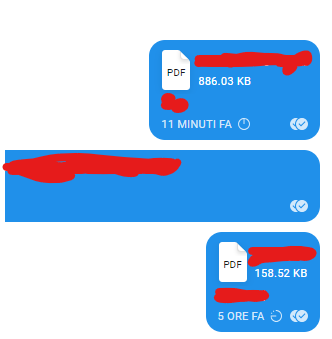
https://debuglogs.org/2ad4aab45ee00c68c51c23d63d2943f4d99d09a9c0f6fe4754a35f03c40c75ab
Signal Desktop v1.24.0-beta.3
Message #1 (5 hours ago): sent 1555994920086, received 1556014852653
Message #2 (11 mins ago): sent 1556014346653, received 1556014534828
denver-s
on 23 Apr 2019
@denver-s In your debug log, the '11 mins ago' message was received about forty seconds before the '5 hours ago' message. The server received it and delivered it before the 'older' one.
This can happen with network problems, if the sending device needs to retry, because what we display on the message is the original timestamp from the sender. Or if the sending device has a clock which isn't synchronized with yours.
We have also occasionally seen situations where a client disconnects abruptly from the server then reconnects to the server relatively quickly. The server can sometimes send out of order messages in that case. I can't tell from the log in this case, because the very beginning of the log is the startup and download that includes these messages.
scottnonnenberg-signal
on 23 Apr 2019
Actually, this happened on a laptop that I do not use very often. It synced a lot of messages since I launch the app once a week.
The laptop does not have clock problems and I was sending to myself (“note to self” chat).
denver-s
on 23 Apr 2019
Exact same issue is happening on my desktop. Not going to post logs, as there are already a lot of debug logs in the thread. Is this issue still active?
 PandarinDev
on 2 Jul 2019
PandarinDev
on 2 Jul 2019
Exact same issue is happening on my desktop. Not going to post logs, as there are already a lot of debug logs in the thread. Is this issue still active?
No idea but it still happens to me on a daily basis.
mthld
on 14 Nov 2019
This is happening to me on a regular basis even when both parties are just using the mobile app
 araa47
on 8 Jan 2020
araa47
on 8 Jan 2020
@araa47 Can you be more specific about what's happening? You're seeing out of order messages on mobile devices?
scottnonnenberg-signal
on 8 Jan 2020
@scottnonnenberg-signal , yep I'm seeing out of order messages on mobile devices. Initially I thought this only happened when I have the desktop app open, however I have now observed the issue even when both parties desktop app is closed.
araa47
on 9 Jan 2020
Can someone update the labels on this issue? It's been two years on "Need information", it's almost ridiculous, there is plenty of information about this recurring issue now.
mthld
on 18 Jan 2020
I've got the same issue multiple times per week. Desktop version v1.34.1.
In one conversation, for example, the last message was 8 hours ago. That one was sent via android app. Then I sent a new message via desktop app. This message was put 8 places and 22 hours too high. I'm not sure but in this case it looks like the newest message sent via desktop app was put right behind the last message sent via desktop app.
 terragit
on 3 Jun 2020
terragit
on 3 Jun 2020
Same issue, seems to happen every now and then on Desktop v1.34.5. Linked Android version where message is shown correctly is 4.68.3.
The messages are received on Desktop, but in a totally wrong place:
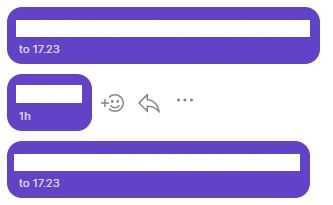
In the example the middle message is sent on Monday 10th Aug 2020 at 10.20 (1597044035874) and received at 10.24 (1597044275834). But it can be located by the search function last Thursday.
The desktop app currently is not reliable.
 mrblg
on 10 Aug 2020
mrblg
on 10 Aug 2020
We are currently working on a fix for the out-of-order issue. You've probably noticed that it happens when downloading a lot of messages at once - it's because a new message can essentially 'jump the queue' of older messages being downloaded.
scottnonnenberg-signal
on 10 Aug 2020
Related issues
 petcap
·
3Comments
petcap
·
3Comments
 mawed
·
3Comments
mawed
·
3Comments
 github-cygwin
·
3Comments
github-cygwin
·
3Comments
 muellermartin
·
3Comments
muellermartin
·
3Comments
 ProactiveServices
·
3Comments
ProactiveServices
·
3Comments
Most helpful comment
We are currently working on a fix for the out-of-order issue. You've probably noticed that it happens when downloading a lot of messages at once - it's because a new message can essentially 'jump the queue' of older messages being downloaded.