Signal-desktop: Messages still not syncing between desktop and mobile
Bug description
Does not sync with my phone
Steps to reproduce
Install latest beta
Not have all messages synced
Expected result:
All messages synced
Screenshots
Platform info
1.5.0 beta 1
Operating System:
Win 7 64
Linked device version:
Android 6.0.1
Link to debug log
https://gist.github.com/bf708ff9a94f3c77826d1ef6ba69fba6
and from mobile:
 Invictaz
All 74 comments
I'm curious, where did you download the executable for the beta? Or did you build it yourself?
 Narretz
on 25 Feb 2018
Narretz
on 25 Feb 2018
@Invictaz Thanks for reporting this issue. It be very, very helpful to us if you could go into the details screens for the messages that didn't sync, and provide the timestamps. That would give us an idea of what to look for in your very long logs.
Similarly, if you could provide some information about the kinds of messages which are missing (group, individual, disappearing, sent by Mobile or Desktop, etc.) and from which side, that would help too.
 scottnonnenberg
on 26 Feb 2018
scottnonnenberg
on 26 Feb 2018
@scottnonnenberg
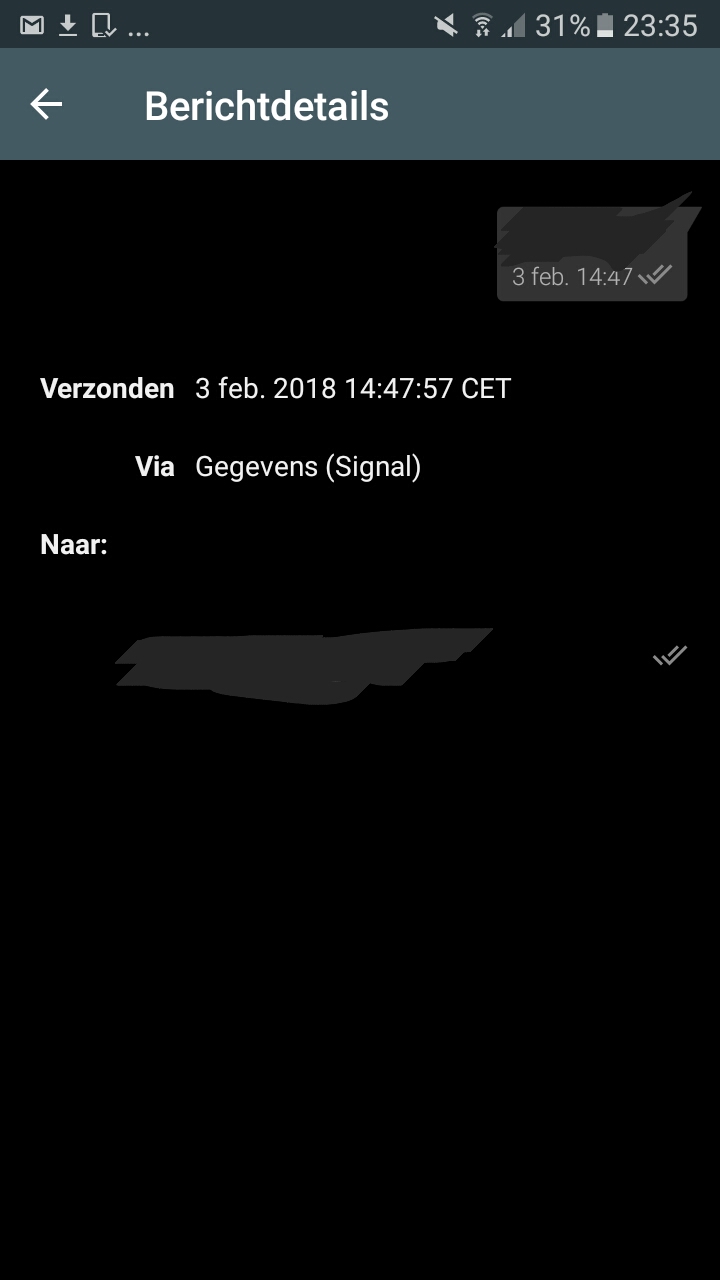
Only individual, I don't have groups. 3rd february is the only message that didn't sync. I don't send that many messages. Send by mobile not synced to desktop. It was a normal message.
@Narretz Desktop beta was auto updated.
Here is the screenshot, I edited out the recipient and the message content.
Invictaz
on 27 Feb 2018
I am having this same problem. Message threads on my Motorola Droid Z Force are not appearing in Signal Desktop on Linux Mint 18.3, which I installed by following the instructions for Linux at Signal.org.
The only messages that have synced with my desktop are those which were on the Signal app on my phone when I first linked it on my desktop.
From my desktop, there is no way for me to see new threads on my phone, or even contacts which I have not yet messaged in Signal on my phone.
Since I cannot see all of my contacts, I cannot send contacts messages from my desktop, unless they were in the message list when I first linked the desktop app to my phone.
I am about to remove Signal, reinstall through the software manager, which is probably an old version, and link it to my phone again.
 wmfinck
on 2 Mar 2018
wmfinck
on 2 Mar 2018
@wmfinck I suspect that you're running into the Signal User vs. SMS User problem with Android. Signal Android can message contacts via both normal SMS messages and Signal Messages. Signal Desktop can only message Signal users. Any SMS you send will not be sync'd to Signal Desktop.
scottnonnenberg
on 2 Mar 2018
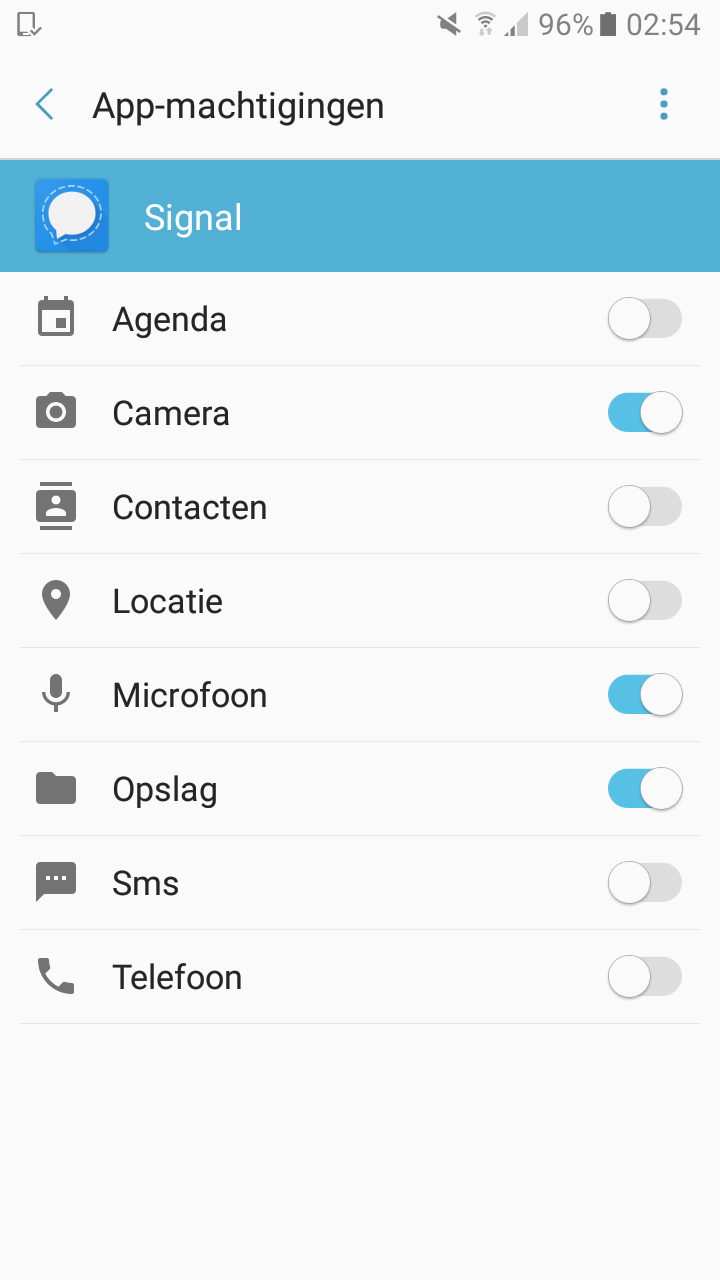
@scottnonnenberg My message was certainly not an SMS message as I revoked that permission.
Invictaz
on 3 Mar 2018
I've got a similar issue. Recently switched from the Chrome-App to the Mac OS app. I'm used to Signal not importing existing messages from the phone — nice to have but I can live with it. Today, however, having been away for a few days Signal asked to be added again as a device and failed to sync messages for one contact. I suspect this was because I got messages from the contact before I resynced so it goes from 26th Feb 2018 to 10th March 2018. I can provide screenshots but not publicly.
 Themanwithoutaplan
on 10 Mar 2018
Themanwithoutaplan
on 10 Mar 2018
@scottnonnenberg Scott, thanks much for your prompt reply. I get it now, LOL, sorry for not making that realization.
wmfinck
on 11 Mar 2018
@Themanwithoutaplan Please feel free to reach out to me directly. Your debug log would be extremely useful (View -> Debug Log).
 scottnonnenberg-signal
on 12 Mar 2018
scottnonnenberg-signal
on 12 Mar 2018
@scottnonnenberg-signal @scottnonnenberg
Any updates on this? It's really annoying that Signal can be only used on my phone. For a service that is a startup, running for only a couple of months this is acceptable. But for Signal that has millions of users and is running for years it's more than weird. It isn't a super rare bug. It should be fixable.
Invictaz
on 24 Mar 2018
I too have this problem, but it's even worse than what others have experienced. I have literally NO Signal messages synchronized between my phone and Signal for Desktop (on Linux).
What information can I provide to fix this problem?
 ervinshiznit
on 11 Apr 2018
ervinshiznit
on 11 Apr 2018
+1 here. Used to work fine, then I reinstalled OS X, install Signal 1.7.1, and now it doesn't sync.
 readmodifywrite
on 23 Apr 2018
readmodifywrite
on 23 Apr 2018
To add to the misery, on the Android app it is possible to export a plaintext copy of all of your messages (and import), but there does not appear to be a way to import a plaintext copy on the desktop version.
readmodifywrite
on 23 Apr 2018
@ervinshiznit @readmodifywrite This bug tracks when some messages sync, but others don't. You both seem to be reporting a different issue, which is that there is no sync at all between your mobile and desktop. Please file new bugs, and be sure to fill out the template fully - we especially need that debug log: View -> Debug Log
scottnonnenberg-signal
on 23 Apr 2018
Seems this bug is long lasting and still unfixed in the newest versions. We need a higher priority on this otherwise Signal is partially unusuable @scottnonnenberg
Invictaz
on 24 Apr 2018
@Invictaz moaning repeatedly won't help at all. This is open source and you know the drill…
It's a pity we don't get release notes for each version. However, looking at the commit log, it looks like nearly all the work being done is cosmetic, so I'm not sure how much work related to synchronisation is actually done in the desktop app. Personally, I haven't had any further problems since March.
Themanwithoutaplan
on 25 Apr 2018
That's why I'm moaning. Cosmetics seems to have higher priority than fixing core functionality bugs.
Invictaz
on 25 Apr 2018
I spotted something unusual that's probaby related. I started the desktop app and saw the newest messages briefly in the conversations panel, but they disappeared in about a second, and there's no trace of them any more. When I get or send new messages, the conversation panel shows them and a notification for new message for a very brief time, and then resets back to a message I sent an hour ago. Also the conversation moves to the top and then back. There's no activity in the debug log for any recent events. Developer tool logs give the following when I send a new message and it disappears:
INFO  2018-04-25T13:49:07.409Z queueing envelope REDACTED.1 1524664145756
/usr/lib/signal/resources/app.asar/js/logging.js:34 INFO  2018-04-25T13:49:07.410Z message from REDACTED.1 1524664145756
/usr/lib/signal/resources/app.asar/js/logging.js:34 INFO  2018-04-25T13:49:07.429Z sent message to REDACTED 1524664145756 from REDACTED.1 1524664145756
/usr/lib/signal/resources/app.asar/js/logging.js:34 INFO  2018-04-25T13:49:07.435Z message 1524664145756 expires at 1524750546198
/usr/lib/signal/resources/app.asar/js/logging.js:34 INFO  2018-04-25T13:49:07.435Z Updating expireTimer for conversation REDACTED to 86400 via `handleDataMessage`
/usr/lib/signal/resources/app.asar/js/logging.js:34 INFO  2018-04-25T13:49:07.472Z message 1524664145756 expires at 1524750546198
/usr/lib/signal/resources/app.asar/js/logging.js:34 INFO  2018-04-25T13:49:07.498Z next message expires 2018-04-25T14:08:50.098Z
/usr/lib/signal/resources/app.asar/js/logging.js:34 INFO  2018-04-25T13:49:08.451Z next message expires 2018-04-25T14:08:50.098Z
/usr/lib/signal/resources/app.asar/js/logging.js:34 INFO  2018-04-25T13:49:16.334Z queueing envelope REDACTED.1 1524664050510
/usr/lib/signal/resources/app.asar/js/logging.js:34 INFO  2018-04-25T13:49:16.336Z delivery receipt from REDACTED.1 1524664050510
/usr/lib/signal/resources/app.asar/js/logging.js:34 INFO  2018-04-25T13:49:16.594Z queueing envelope REDACTED.1 1524664056036
/usr/lib/signal/resources/app.asar/js/logging.js:34 INFO  2018-04-25T13:49:16.595Z delivery receipt from REDACTED.1 1524664056036
/usr/lib/signal/resources/app.asar/js/logging.js:34 INFO  2018-04-25T13:49:16.828Z queueing envelope REDACTED.1 1524664145756
/usr/lib/signal/resources/app.asar/js/logging.js:34 INFO  2018-04-25T13:49:16.829Z delivery receipt from REDACTED.1 1524664145756
 spaasis
on 25 Apr 2018
spaasis
on 25 Apr 2018
@simopaasisalo There's a feature in Signal whereby messages can be set to expire after a certain amount of time. In that case, it is expected that messages disappear and the conversation in the left side is resorted.
@Invictaz Thanks for your concern. I understand that you are frustrated. Please know that this is probably the most difficult kind of bug which can happen in the app. No callstack, and debug logs are useless without the user going above and beyond to provide additional information. And even then there's no guarantee the log will have the information needed to fix the issue. But yes, we are guaranteed to make progress on what you call 'cosmetics.'
scottnonnenberg-signal
on 25 Apr 2018
@scottnonnenberg-signal Yes, I'm aware of that (one of the killer features for me actually :) )
I agree it looks a lot like that behaviour, except that for the particular conversation the expiration time is set to one day, not one second (which is not even possible, I think?) and the messages don't disappear from the Android app, just the desktop version. Could this be the issue? For some reason the desktop app thinks that it needs to clear the messages instantly?
spaasis
on 25 Apr 2018
@simopaasisalo That is definitely some weird behavior, and it's also definitely not the same bug tracked in this issue. Please enter a new issue, and fill out the complete template. A couple questions to answer when you do that - does it happen for every message? do these messages have an hourglass icon before they disappear? Does it happen for incoming messages in that same conversation? If you open the dev tools (View -> Toggle Developer Tools) do you see any errors which don't show up in the log when this happens?
scottnonnenberg-signal
on 25 Apr 2018
My debug report from linux-desktop app:
debuglog
from Android app
debuglog-android
- I installed Signal on my phone.
- Sent and received messages.
- I installed app on my computer.
- There was no message sent or received on linux desktop app, even though I see them on my phone.
Also, when I send message from desktop, the phone gets it, and when sent from phone the desktop gets it. However previous messages are not seen in the desktop.
Let me know if you need more info.
By the way, Thank you :+1:
 ozgurakyazi
on 4 May 2018
ozgurakyazi
on 4 May 2018
@ozgurakyazi It seems that you've described behavior which is by design. When you install and then link a new desktop instance, it will only receive messages sent to you after that link is complete. Any message sent before that didn't know about your new desktop instance.
scottnonnenberg-signal
on 4 May 2018
Ok, thank you for the explanation.
ozgurakyazi
on 4 May 2018
I just experienced a problem like this for at least the second time. Sequence of events:
- Sent two messages to one contact using Signal iOS v2.19.7.6.
- Opened Signal Desktop v1.10.1. Was prompted to update.
- Updated Signal Desktop to v1.11.0 and reopened.
- Recent sent messages failed to sync to OS X.
- Reopened Signal Desktop. Recent sent messages still failed to sync to OS X.
- Quit Signal Desktop.
- Updated Signal iOS to v2.24.1. Opened and saw "Updating Database" for a little while, then app finished loading.
- Reopened Signal Desktop. Recent sent messages still failed to sync to OS X.
- Sent additional message using Signal iOS to same contact. New message appears in Signal Desktop, but old ones remain un-synced.
The first time this occurred, a very large batch of messages (both sent and received) failed to sync from iOS to OS X. Please let me know if I can provide any additional information.
I should note that as much as I really would like to, I am unwilling to recommend Signal to anyone so long as such a critical bug is left unfixed.
Thank you for your work on this project.
 davidsj
on 18 May 2018
davidsj
on 18 May 2018
@davidsj One thing to consider as we talk through this: how high did the count get on startup of the app? The Signal server only saves 1000 messages between sessions for a given client. Mobile phones are online a lot more often, so this 1000 message queue is a reasonable amount. Desktop, however, can have much larger periods of being offline.
All that to say: if your count ever gets to 1000, it's highly likely that you've dropped some messages. When a new message comes in, the previously oldest element of those 1000 saved messages is dropped. That could very easily explain a big chunk of missing messages.
A message missing here or there, that's a separate issue. And we really, really need logs to track it down.
scottnonnenberg-signal
on 18 May 2018
Thanks for the reply and apologies for the slow follow-up.
The incident I reported several days ago was just two messages being lost out of two total that had been sent since the last time the Desktop app synced. In other words, it just seemed not to sync any messages.
However, the previous incident I alluded to did involve the message counter reaching 1,000, so I guess that was probably the issue. To be honest, this seems like kind of a landmine for users — that if they happen not to use the Desktop app during some brief interval in which they've communicated frequently, the Desktop app just doesn't ever see those messages even though it normally would. I understand there are resource limits on the server, but can one of the following be done?
- Increase the limit from 1,000 to something much less likely to be hit, like 100,000.
- Introduce some mechanism for syncing messages between clients so the server doesn't need to have a large queue.
- Notify the user of this potential landmine.
In any event, what is the best way to get my logs to you?
Thanks again for your work.
davidsj
on 23 May 2018
@davidsj Feel free to reach out directly to me with the logs, but you should be fine to post them here since we redact sensitive data contained within them before uploading.
Regarding some sort of mitigation for the 1000 message limit - yes, we need to do something there.
scottnonnenberg-signal
on 24 May 2018
I believe I have this same issue. Have been using Signal Android + Desktop on win 10. This morning, I started up signal desktop and it hadn't synced the most recent message I had sent. So I sent another from my android and another from desktop. Still that one message hadn't synced, although it showed as having been read on the other end by my contact.
Desktop log
https://debuglogs.org/7b74f75130b2181369393f0cb2c27d70c13d9a7add40e978708748cbd4e41ef5
 jeremymasters
on 6 Jun 2018
jeremymasters
on 6 Jun 2018
@ozgurakyazi It seems that you've described behavior which is by design. When you install and then link a new desktop instance, it will only receive messages sent to you after that link is complete. Any message sent before that didn't know about your new desktop instance.
@scottnonnenberg If older messages exist on the mobile device would it not be possible to do some E2E sync between the mobile device and newly linked device?
 jerbaroo
on 4 Jul 2018
jerbaroo
on 4 Jul 2018
@scottnonnenberg With various debug logs by various users send in this problem has been running since february. I hope for a heads up on what the plan is on fixing this.
Invictaz
on 4 Jul 2018
@Invictaz Thanks for your passion on this! As has previously been discussed, this is a tough one: no reliable reproduction steps, no smoking gun in the logs. You can help by being a scientist - when exactly does it happen? what effects whether it happens? do the missing messages show up on restart? And so on.
In the meantime, I've made a change which may help. It will be in our next beta release: https://github.com/signalapp/Signal-Desktop/commit/e30b34f424bd5fa4da1030c8f952c5097509b46c
scottnonnenberg-signal
on 5 Jul 2018
@scottnonnenberg There is no passion. Signal is just plain unusable if you have to rely on either the PC or the Phone to use the service. Cross operation is key. This is what drove me to other messengers such as Threema or Wire as they work fine cross device with sync.
To answer your questions:
-For me it happens all the time. Messages do not reach the PC at all, although the PC can send messages
-There is no effect, even after recoupling as you suggested
-I restarted hundreds of times and no show up
Let's wait for the new beta.
Invictaz
on 5 Jul 2018
@Invictaz Do you have an updated log to share?
scottnonnenberg-signal
on 5 Jul 2018
@scottnonnenberg-signal I have had trouble with signal-android not being notified of new slaves before (https://github.com/signalapp/Signal-Desktop/issues/1386), maybe that was the same problem?
What is your current assumption? I suspect this could be a server problem problem and not a signal-desktop one. @Invictaz ~I assume you tried linking the signak-desktop client again?~ (yeah you already said that, sorry) Does this happen with every slave you link? Did you try linking a signal-cli slave?
 Trolldemorted
on 5 Jul 2018
Trolldemorted
on 5 Jul 2018
@scottnonnenberg
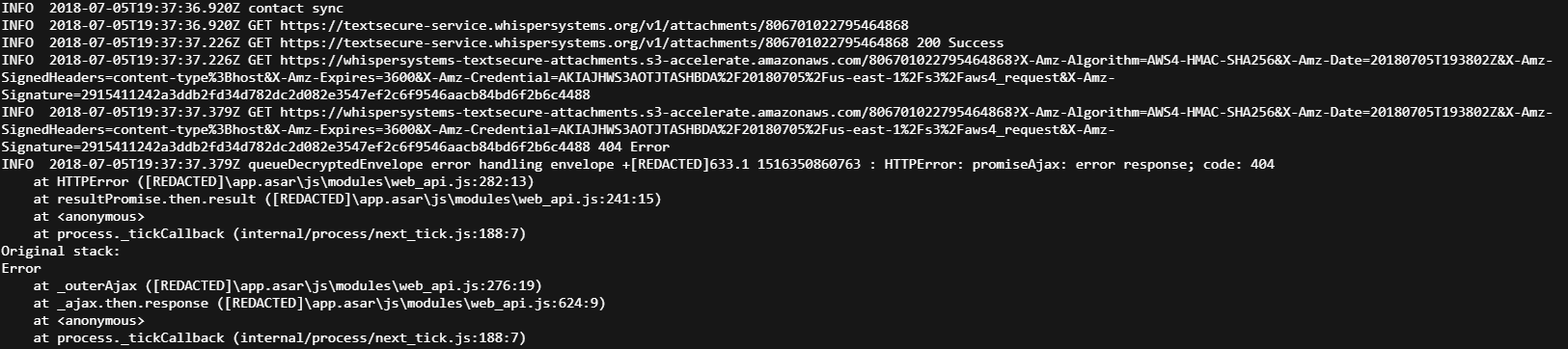
Absolutely, here it is. I have found some 404 errors within the 1.13 beta 2 (updated 5 mins ago)
https://debuglogs.org/e9f6c1f18b9eb44587baa3b289dbebe871729bb53210c8541d8264f75c031639
Invictaz
on 5 Jul 2018
@Trolldemorted
I havn't tried a cli slave yet. I'm not that Linux savvy but I hope to try later
Invictaz
on 5 Jul 2018
@scottnonnenberg in more readable format. If this contains any privacy info please delete this post.
Invictaz
on 5 Jul 2018
FWIW, yesterday Signal seemed to a completely new import and didn't lose any messages. I assume it's a new version except that this information is missing from the about box.
Themanwithoutaplan
on 5 Jul 2018
@Themanwithoutaplan In my log you mean?
My Signal Desktop has the last message from 7th of March. Now it's July. In between no messages ended up on the PC (and they do exist on my mobile)
Invictaz
on 5 Jul 2018
I was referring to my desktop client. I had problems in March but since having to reinstall it at some point it's been okay since. There was a new mobile version last week and I suspect an update to the messages database was required on the desktop client. It took a couple of minutes but seemed to work well.
Scott already pointed out that historical messages are never synced. I agree that other programmes have better clients (Telegram is particularly good on multiple devices) but that's not really what I use Signal for. Looking forward to the improved performance on shitty networks.
Themanwithoutaplan
on 5 Jul 2018
@Invictaz You don't need linux, signal-cli runs fine on windows.
The 404s look like attachments, that should not be related to messages.
Do no messages arrive on your desktop, or just the ones that you send from your own mobile device?
Trolldemorted
on 5 Jul 2018
@Invictaz All I see in that log is attempts to pull down contact sync messages from your primary device, and getting 404 errors. That's strange, but it doesn't explain the messages you see on your phone but don't see on your mobile device.
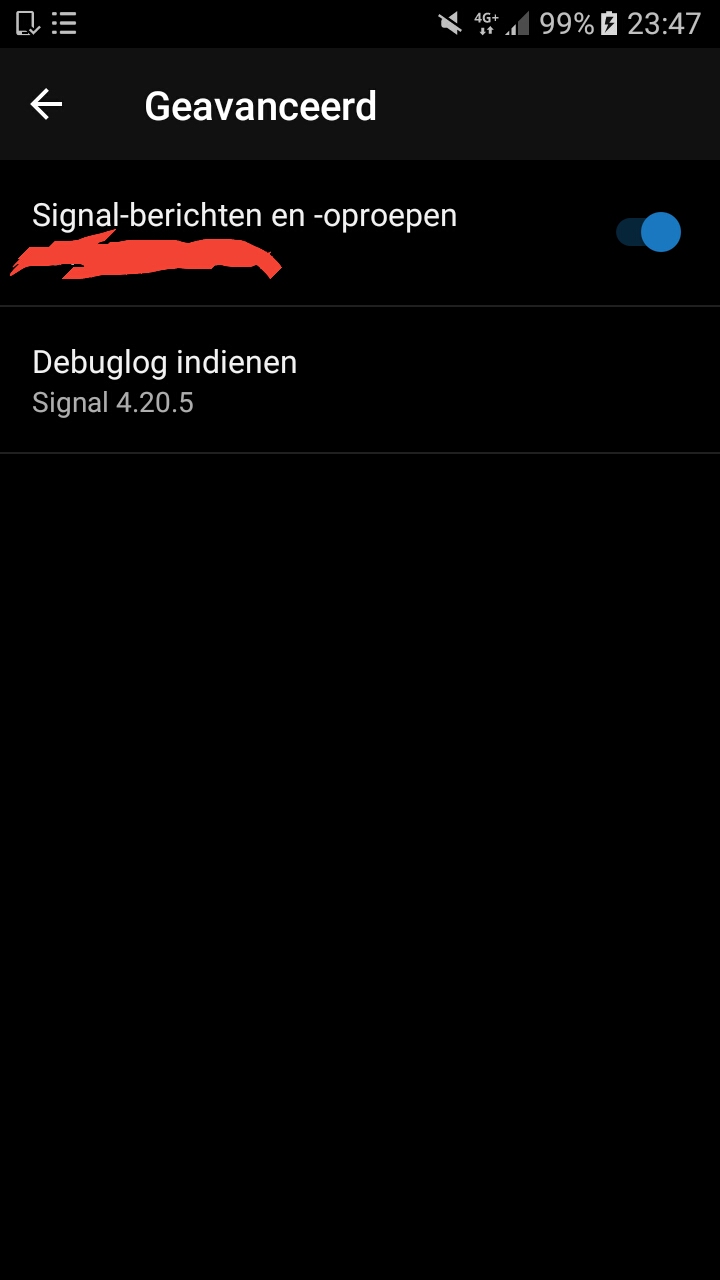
One thought I had: if you go to Android, then Settings -> Advanced do you have 'Signal messages and calls' selected or deselected? If you have that deselected, no messages would end up on desktop because they would all be SMS messages instead of Signal messages.
scottnonnenberg-signal
on 5 Jul 2018
@scottnonnenberg it is enabled
Invictaz
on 5 Jul 2018
@Invictaz I think it's time for your to contact us directly, either my email or [email protected]. We're going to need to verify a lot of things about your account as part of this investigation, and that's not stuff we'll want to share publicly.
scottnonnenberg-signal
on 6 Jul 2018
@scottnonnenberg I think I found part of the problem.
I revoked the "Phone" permission in Android permission settings for Signal. Enabling that let's the messages come through on PC. I mostly revoke the permissions because of privacy reasons. Not sure if the problem is definately fixed though.
Invictaz
on 7 Jul 2018
I have a Sony Experia (G8441) phone with Android 8.0.0 and wanted to connect and sync Signal to a Dell laptop computer (64-bit) with Windows 7 Professional. I can see my old messages, but new ones don't appear on my desktop. I restarted Signal Desktop and also delinked and relinked the phone.
 afoldes
on 6 Aug 2018
afoldes
on 6 Aug 2018
@afoldes Your report is noted, but we won't be able to do anything about it unless you provide more information, especially a Debug Log. Please file a new issue and follow the full template.
scottnonnenberg-signal
on 6 Aug 2018
Yep...having the same issue. Not syncing with desktop app
 kevinwr
on 1 Sep 2018
kevinwr
on 1 Sep 2018
@kevinwr To make progress on this, we really need logs and on top of that the details of the missing messages so they can be cross-referenced in the log. Please consider providing that information.
scottnonnenberg-signal
on 4 Sep 2018
As for me the messages do not sync with certain accounts. I did not check thoroughly but it seems at the moment it is one account I am communicating with. This very person claims to have the latest update installed but does not receive notifications reliably. So sometimes I use SMS to get notifications right but since her signal app is not the standard app also for sms it may have something to do with this.
 karlsebal
on 6 Sep 2018
karlsebal
on 6 Sep 2018
@karlsebal logs. the devs need logs
jeremymasters
on 6 Sep 2018
@jeremymasters tell me what to do. Should I send some messages back and forth with that person? Where are the logs stored?
karlsebal
on 7 Sep 2018
@karissa View -> Debug Logs and whatever information you can provide about the missing messages would be useful - the last three digits of who sent them, and the full timestamp of when they were sent.
scottnonnenberg-signal
on 7 Sep 2018
I revoked the "Phone" permission in Android permission settings for Signal. Enabling that let's the messages come through on PC. I mostly revoke the permissions because of privacy reasons. Not sure if the problem is definately fixed though.
thx for pointing that out (didn't gave permission to read phone state on setup cause I entered the code myself and there was no hint or other reason for this permission back then).
had to enable it also.. otherwise nothing synched with pc.
still looking for a way to import my old conversation though
 curlyfrie
on 10 Sep 2018
curlyfrie
on 10 Sep 2018
@curlyfrie There is currently no way to sync old messages between clients.
scottnonnenberg-signal
on 11 Sep 2018
@scottnonnenberg ok thx..
Regarding the phone permission (should not be necessary i believe) it would probably be better to ask this again in the android hub :)
curlyfrie
on 11 Sep 2018
I think I'm having this issue too @scottnonnenberg-signal...
I just lost everything on my phone and I had to reinstall Signal and relink all my desktop instances and just noticed that this was happening.
For instance, I sent this message to myself on the Desktop:
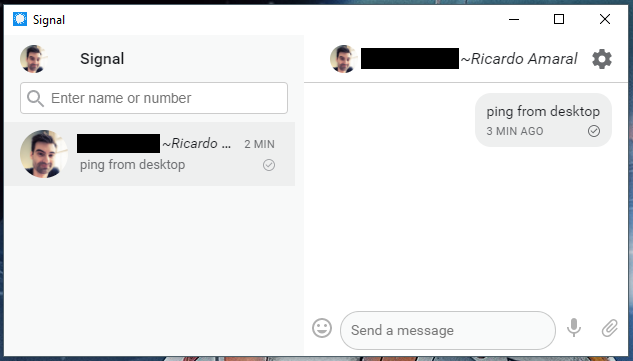
And this is how the conversation went on my mobile phone:
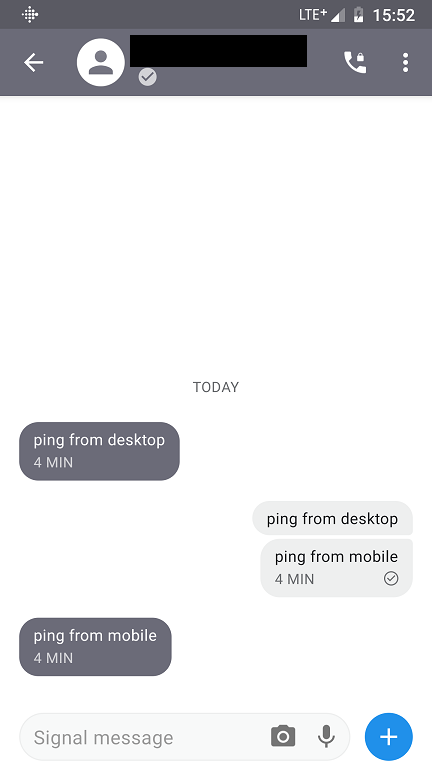
You see, the messages I sent from the phone ("ping from mobile") never reached the desktop device.
Here's the logs I took right after testing this: https://debuglogs.org/574d44aebd9cc984629dcc1507adb4c89b44c0c47fc002c9c6fe4b2c191ef452
The identity you're looking for (blacked out in the screenshots) is +**********48.
I hope this information helps solve this annoying issue :)
 rfgamaral
on 30 Oct 2018
rfgamaral
on 30 Oct 2018
@rfgamaral It looks like you're sending to yourself in those screenshots. In that case, the inconsistency you see is in fact by design. Desktop will send self-sent message to your other linked devices, but Android doesn't. I believe iOS does.
scottnonnenberg-signal
on 30 Oct 2018
@scottnonnenberg-signal Yes, I sent to myself so I didn't bother anyone 😁
But later I observed the same behavior while chatting with my wife. Every time I typed something on the desktop app it was reflected to the chat conversation on the Android app but not the other way around. Everything I sent through the Android app was not reflected back to the desktop app.
rfgamaral
on 30 Oct 2018
@scottnonnenberg-signal Yes, I sent to myself so I didn't bother anyone 😁
But later I observed the same behavior while chatting with my wife. Every time I typed something on the desktop app it was reflected to the chat conversation on the Android app but not the other way around. Everything I sent through the Android app was not reflected back to the desktop app.
"Phone" permission?
curlyfrie
on 30 Oct 2018
@curlyfrie It's enabled, like it always been.
rfgamaral
on 30 Oct 2018
Upgrading Signal Desktop on Linux Mint 18 SUCKS and it is a huge pain in
the butt. Please think "repository" and APT.
On Tue, Oct 30, 2018 at 3:56 PM Ricardo Amaral notifications@github.com
wrote:
@curlyfrie https://github.com/curlyfrie It's enabled, like it always
been.—
You are receiving this because you were mentioned.
Reply to this email directly, view it on GitHub
https://github.com/signalapp/Signal-Desktop/issues/2068#issuecomment-434446658,
or mute the thread
https://github.com/notifications/unsubscribe-auth/AZgbep_OMh4-K8_Uqv3tEVVd6_Aov_qyks5uqK8KgaJpZM4SRroK
.
wmfinck
on 17 Nov 2018
@wmfinck Maybe you should enter a new bug and provide a bit more detail? I'm not sure what you mean.
scottnonnenberg-signal
on 19 Nov 2018
I have no syncing beetwen mobile and desktop version
mobile signal version : 4.30.8 (android 8.0.0 on samsung A5)
desktop signal version : 1.18.1 (windows 10 x64)
The mobile version have the lastest messages (i use it to write), but last message of desktop version is very old (more than 20 days)
log from mobile version : https://debuglogs.org/4a87860623702bd8bd201d65cee13524da1cab2150f65bc9c73bd1a68ceec1ef
log from desktop version : https://debuglogs.org/ca771f25caf35bc42aeee257d38be52b21b0a89332769de322c9ebd2a84900b1
 Lurikbolding
on 27 Nov 2018
Lurikbolding
on 27 Nov 2018
@Lurikbolding Can you talk about what does show up in desktop? Do messages from your contacts show up there? What happens if you send a message to a group or to a single contact from your phone, does it never appear on your desktop? What about the other direction?
Also, if you read a message on Desktop, does that read state show up in your mobile device? What about the other direction?
scottnonnenberg-signal
on 27 Nov 2018
Hello,
I made a history of all exchanges with one friend (only this friends and
me in the discusison).
- 17 mai : start of discussion only on mobile app.
- lot of message (text / pictures /video)
- 8 sept : installation of desktop app
- good synchronization beetwen the 2 app
- 4 oct : i have "The secure session has been reset" only on the desktop
app => synchronization lost, - only message on mobile app, no message on dekstop app
- 13 oct : i have "The secure session has been reset"on the mobile app
only => synchronization restore between 2 app - the message are synchronize but only text. There is no image/video on
the dekstop version - 31 oct : the synchronization of the picture restart.
- 2 nov : 1 message with a missing video on the mobile app
- 16 nov : the deskstop app stop synchronization in the middle of an
exchange (1 message missing) - lot of messages on the mobile app, no message on the desktop app
- 27 nov : restart of synchronization : the message was write on the
desktop version => the message is visible in the same time on the mobile
app.
other way to show the problem of synchronizartion, with another contact.
today :
1:24 pm : a new contact install the mobile app => we exchange somes
messages on the mobile app (at this time, the desktop version is not
running)
8:00 pm : start of the desktop app, update of the app. The update
restart 4 times => i stop the update and restart "signal" (it's look
like at the end of the update, the update did not start signal bu
re-start the update)
when the deskstop finaly start => the new contact is not visible on the
desktop app => there is no message visible.
I start a new conversation on the desktop app => the message is visible
on the mobile app at the same time.
From now, this conversation have a good synchronization.
Olivier
Le 27/11/2018 à 21:23, Scott Nonnenberg a écrit :
>
@Lurikbolding https://github.com/Lurikbolding Can you talk about
what does show up in desktop? Do messages from your contacts show up
there? What happens if you send a message to a group or to a single
contact from your phone, does it never appear on your desktop? What
about the other direction?Also, if you read a message on Desktop, does that read state show up
in your mobile device? What about the other direction?—
You are receiving this because you were mentioned.
Reply to this email directly, view it on GitHub
https://github.com/signalapp/Signal-Desktop/issues/2068#issuecomment-442203860,
or mute the thread
https://github.com/notifications/unsubscribe-auth/ArTOB6JVpg00GbAQvyaWr-LnIjMOp_aRks5uzZ87gaJpZM4SRroK.
Lurikbolding
on 27 Nov 2018
In my case, not only are messages not sync'ing, but neither are contacts. Android phone and Windows 10 desktop.
 jovial2121
on 13 Mar 2019
jovial2121
on 13 Mar 2019
This is the detail of the message when sending to a contact NOT IN THE LIST OF KNOWN CONTACTS:
Number is not registered. (original: promiseAjax: invalid response; code: 404)
jovial2121
on 13 Mar 2019
@jovial2121 If you're getting that error, then you won't be able to send that that user from Desktop. Desktop can only send to users with Signal accounts. To track down any sync issues, you'll need to provide a debug log from both your phone and your desktop instance. It's especially helpful if you go to Settings in Desktop and select 'Import Now' right before you capture those debug logs.
Finally, a reminder: if you use Signal Android and use it to send exclusively SMS messages (not full Signal Messages), Desktop will not be useful at all. Those contacts will not sync over, and you won't be able to send messages to them.
scottnonnenberg-signal
on 14 Mar 2019
Still not solved, tried both official and beta versions. installing app on pc and mobile miss up with phone version
 norhantharwat
on 17 Mar 2019
norhantharwat
on 17 Mar 2019
Signal Desktop has been working wonderfully, especially since a repository
has been added for Linux update. Thank you!
However I would gladly pay a subscription fee to support SMS-to-Desktop. I
do not know how big a deal that would be, but Verizon does it. I can log
into Verizon and keep a tab open in my browser and send and receive my SMS
messages. Verizon might have an advantage as they are my actual carrier,
but if it could be done by a 3rd party app, it would be worth an annual fee
I think! Of course,this is just a suggestion for future development.
On Sun, Mar 17, 2019 at 6:16 AM norhantharwat notifications@github.com
wrote:
Still not solved, tried both official and beta versions. installing app on
pc and mobile miss up with phone version—
You are receiving this because you were mentioned.
Reply to this email directly, view it on GitHub
https://github.com/signalapp/Signal-Desktop/issues/2068#issuecomment-473652066,
or mute the thread
https://github.com/notifications/unsubscribe-auth/AZgbemI1i7K0WYCBQne5dZ1K6Q2GtaCQks5vXhX-gaJpZM4SRroK
.
wmfinck
on 17 Mar 2019
Same issue between iOS and MacOS. Contacts sync, but not all messages.
 joshhopkins
on 4 Jul 2019
joshhopkins
on 4 Jul 2019
I'm going to close and lock this issue. If you're still running into this behavior, please enter a new bug, following the full bug template.
scottnonnenberg-signal
on 8 Jul 2019
Related issues
 muellermartin
·
3Comments
muellermartin
·
3Comments
 shaaati
·
3Comments
shaaati
·
3Comments
 PanderMusubi
·
3Comments
PanderMusubi
·
3Comments
 McLoo
·
3Comments
McLoo
·
3Comments
 cmdrogogov
·
3Comments
cmdrogogov
·
3Comments
Most helpful comment
@ozgurakyazi It seems that you've described behavior which is by design. When you install and then link a new desktop instance, it will only receive messages sent to you after that link is complete. Any message sent before that didn't know about your new desktop instance.