Signal-desktop: No GUI appeared on Windows 10 Home -- new Signal desktop app without chrome
- [X ] I have searched open and closed issues for duplicates
Bug description
I have installed the new Signal-Desktop app on two different windows 10 systems.
1.) an hp elite x2 1012 g1 convertible with windows 10 pro version 1703.
2.) an Acer Aspire V 15 Nitro (VN7-591G) with windows Home version 1703. <-- didn't work
The signal desktop version works perfect on the 1.) system.
But when I start the signal desktop on the system 2.) then no GUI appears.
I can see an process named 'Signal' in the task manager but there is no GUI.
I tried to start the app as administrator but this didn't change anything.
When starting the signal for desktop application then the Windows-'Wheel' is rotating for ~ 10 seconds.
One difference between both systems that I had an installed signal-chrome-extension on system 2.) before.
I tried to search for an log file associated with the signal desktop app, but I was not able to find an log file. I couldn't find an description where an log file is located.
I only found the following description: https://support.signal.org/hc/en-us/articles/215188737-How-do-I-submit-a-debug-log-from-the-Desktop-
But this description based on a working GUI to get access to the log file.
All visible files in the signal-desktop folder have the same 'last-change_timestamp' so I assume there is no log file.
The signal-desktop application was installed at system 2.) in the folder:
C:\Users\Max Mustermann\AppData\Local\Programs\signal-desktop
The signal-desktop application was installed at system 1) in the folder:
C:\Users\MaxM\AppData\Local\Programs\signal-desktop
I do not expect that the 'Space' between Max and Mustermann is responsible for the non working app
Steps to reproduce
-- Bug seems to be system dependent so I assume you will not be able to reproduce the issue.
-- starting signal desktop app on a win 10 home
Actual result: no GUI starts.
Expected result: Signal for desktop GUI starts.
Screenshots
I can not add a screenshot of the not opening GUI because the GUI didn't open. As result the screenshot would only show the desktop background picture.
Platform info
Operating System: windows Home version 1703.
Browser: The Browsers 'Firefox', 'Chrome' and 'Edge' are installed. But I do not understand why the Browser is important for the new desktop app which is not any more a extension to the chrome browser. The chrome version is 62.0.3202.75
Signal version: 1.0.35 (according to the name of the installation exe file)
Link to debug log
Due to the fact that no GUI opens I can not press any button to extract an debug log.
It would be a pleasure for me to extract a debug log from a file.
Therefore I need informations about the location of such an file.
With best regards
Robak
 Robak238
All 39 comments
Same issue. Win 10 1703, Acer Aspire s7-392.
 blazick
on 6 Nov 2017
blazick
on 6 Nov 2017
There are a couple things to try to help us out with this. First, you can start the desktop app from the command line, and see what it prints out:
- Type 'command prompt' in the Start menu search box
- Type
cd AppData\Local\Programs\signal-desktop, press enter - Type
Signal.exe, press enter
Second, you can find the log files by finding the Signal user data directory: C:/Users/<Your Name>/AppData/Roaming/Signal. You should see a logs directory in that folder that might have some useful information.
 scottnonnenberg
on 6 Nov 2017
scottnonnenberg
on 6 Nov 2017
I don't know is this the same issue, but I suddenly started having problems with Signal Desktop on Linux. Using either the stable or beta from the PPA, or running it directly from this repo, I see the first window where I can click new install, but after that I get a white screen and this error to the logs:
{"name":"log","hostname":"kubrick","pid":14764,"level":30,"msg":"Model caught error triggering install-new event: TypeError: textsecure.AccountManager is not a constructor\n at window.getAccountManager (file:///opt/Signal%20Beta/resources/app.asar/js/background.js:49:30)\n at child.connect (file:///opt/Signal%20Beta/resources/app.asar/js/views/install_view.js:63:34)\n at child.initialize (file:///opt/Signal%20Beta/resources/app.asar/js/views/install_view.js:53:18)\n at child.Backbone.View (file:///opt/Signal%20Beta/resources/app.asar/js/components.js:20767:21)\n at child.constructor (file:///opt/Signal%20Beta/resources/app.asar/js/views/whisper_view.js:28:27)\n at new child (file:///opt/Signal%20Beta/resources/app.asar/js/components.js:21332:41)\n at child.openInstaller (file:///opt/Signal%20Beta/resources/app.asar/js/views/app_view.js:79:48)\n at triggerEvents (file:///opt/Signal%20Beta/resources/app.asar/js/reliable_trigger.js:60:39)\n at child.trigger (file:///opt/Signal%20Beta/resources/app.asar/js/reliable_trigger.js:120:17)\n at child.onClickNew (file:///opt/Signal%20Beta/resources/app.asar/js/views/install_choice_view.js:25:12)","time":"2017-11-06T20:29:06.078Z","v":0}
 pimeys
on 6 Nov 2017
pimeys
on 6 Nov 2017
@pimeys You're probably running into https://github.com/WhisperSystems/Signal-Desktop/issues/1619
scottnonnenberg
on 7 Nov 2017
@scottnonnenberg Here is what I got running from the command line:
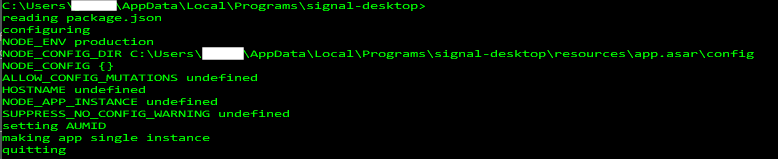
I also checked the log file, which was empty.
blazick
on 7 Nov 2017
@blazick That 'quitting' log entry means that there's another instance of SIgnal running on the system. I'd recommend using process manager to find that and kill it, then try again.
scottnonnenberg
on 7 Nov 2017
Hello I executed signal.exe and got the following log:
Microsoft Windows [Version 10.0.15063]
(c) 2017 Microsoft Corporation. Alle Rechte vorbehalten.

C:\Users\Max Mustermann>cd AppData

C:\Users\Max Mustermann\AppData>cd Local

C:\Users\Max Mustermann\AppData\Local>cd Programs

C:\Users\Max Mustermann\AppData\Local\Programs>cd signal-desktop

C:\Users\Max Mustermann\AppData\Local\Programs\signal-desktop>Signal.exe

C:\Users\Max Mustermann\AppData\Local\Programs\signal-desktop>
reading package.json
configuring
NODE_ENV production
NODE_CONFIG_DIR C:\Users\Max Mustermann\AppData\Local\Programs\signal-desktop\resources\app.asar\config
NODE_CONFIG {}
ALLOW_CONFIG_MUTATIONS undefined
HOSTNAME undefined
NODE_APP_INSTANCE undefined
SUPPRESS_NO_CONFIG_WARNING undefined
setting AUMID
making app single instance
userData: C:\Users\Max Mustermann\AppData\Roaming\Signal
{"name":"log","hostname":"Max_Aspire","pid":17572,"level":30,"msg":"app ready","time":"2017-11-07T23:02:59.569Z","v":0}
{"name":"log","hostname":"Max_Aspire","pid":17572,"level":30,"msg":"Initializing BrowserWindow config: {\"width\":800,\"height\":610,\"minWidth\":700,\"minHeight\":360,\"autoHideMenuBar\":false,\"webPreferences\":{\"nodeIntegration\":false,\"preload\":\"C:\\\\Users\\\\Max Mustermann\\\\AppData\\\\Local\\\\Programs\\\\signal-desktop\\\\resources\\\\app.asar\\\\preload.js\"}}","time":"2017-11-07T23:02:59.591Z","v":0}
_I also had an look into the log folder and found the following log.log file_
{"name":"log","hostname":"Max_Aspire","pid":12612,"level":30,"msg":"app ready","time":"2017-11-07T22:58:47.631Z","v":0}
{"name":"log","hostname":"Max_Aspire","pid":12612,"level":30,"msg":"Initializing BrowserWindow config: {\"width\":800,\"height\":610,\"minWidth\":700,\"minHeight\":360,\"autoHideMenuBar\":false,\"webPreferences\":{\"nodeIntegration\":false,\"preload\":\"C:\\\\Users\\\\Max Mustermann\\\\AppData\\\\Local\\\\Programs\\\\signal-desktop\\\\resources\\\\app.asar\\\\preload.js\"}}","time":"2017-11-07T22:58:47.647Z","v":0}
{"name":"log","hostname":"Max_Aspire","pid":12612,"level":50,"msg":"Error: Error: Cannot download \"https://updates.signal.org/desktop/Signal-win-1.0.36.exe\", status 404: \n    at ClientRequest.request.doRequest.response (C:\\Users\\Max Mustermann\\AppData\\Local\\Programs\\signal-desktop\\resources\\app.asar\\node_modules\\electron-updater\\node_modules\\builder-util-runtime\\src\\httpExecutor.ts:153:18)\n    at Object.onceWrapper (events.js:290:19)\n    at emitOne (events.js:96:13)\n    at ClientRequest.emit (events.js:188:7)\n    at URLRequest.ClientRequest.urlRequest.on (C:\\Users\\Max Mustermann\\AppData\\Local\\Programs\\signal-desktop\\resources\\electron.asar\\browser\\api\\net.js:207:12)\n    at emitOne (events.js:96:13)\n    at URLRequest.emit (events.js:188:7)\nFrom previous event:\n    at CancellationToken.createPromise (C:\\Users\\Max Mustermann\\AppData\\Local\\Programs\\signal-desktop\\resources\\app.asar\\node_modules\\electron-updater\\node_modules\\builder-util-runtime\\src\\CancellationToken.ts:51:5)\n    at C:\\Users\\Max Mustermann\\AppData\\Local\\Programs\\signal-desktop\\resources\\app.asar\\node_modules\\electron-updater\\src\\electronHttpExecutor.ts:20:44\n    at Generator.next (<anonymous>)\nFrom previous event:\n    at ElectronHttpExecutor.download (C:\\Users\\Max Mustermann\\AppData\\Local\\Programs\\signal-desktop\\resources\\app.asar\\node_modules\\electron-updater\\out\\electronHttpExecutor.js:60:11)\n    at C:\\Users\\Max Mustermann\\AppData\\Local\\Programs\\signal-desktop\\resources\\app.asar\\node_modules\\electron-updater\\src\\NsisUpdater.ts:58:31\nFrom previous event:\n    at NsisUpdater.doDownloadUpdate (C:\\Users\\Max Mustermann\\AppData\\Local\\Programs\\signal-desktop\\resources\\app.asar\\node_modules\\electron-updater\\out\\NsisUpdater.js:167:11)\n    at C:\\Users\\Max Mustermann\\AppData\\Local\\Programs\\signal-desktop\\resources\\app.asar\\node_modules\\electron-updater\\src\\AppUpdater.ts:301:25\n    at Generator.next (<anonymous>)\nFrom previous event:\n    at NsisUpdater.downloadUpdate (C:\\Users\\Max Mustermann\\AppData\\Local\\Programs\\signal-desktop\\resources\\app.asar\\node_modules\\electron-updater\\out\\AppUpdater.js:358:11)\n    at C:\\Users\\Max Mustermann\\AppData\\Local\\Programs\\signal-desktop\\resources\\app.asar\\node_modules\\electron-updater\\src\\AppUpdater.ts:276:49\nFrom previous event:\n    at NsisUpdater.doCheckForUpdates (C:\\Users\\Max Mustermann\\AppData\\Local\\Programs\\signal-desktop\\resources\\app.asar\\node_modules\\electron-updater\\out\\AppUpdater.js:329:11)\n    at C:\\Users\\Max Mustermann\\AppData\\Local\\Programs\\signal-desktop\\resources\\app.asar\\node_modules\\electron-updater\\src\\AppUpdater.ts:222:25\n    at Generator.next (<anonymous>)\n    at runCallback (timers.js:651:20)\n    at tryOnImmediate (timers.js:624:5)\n    at processImmediate [as _immediateCallback] (timers.js:596:5)\nFrom previous event:\n    at NsisUpdater._checkForUpdates (C:\\Users\\Max Mustermann\\AppData\\Local\\Programs\\signal-desktop\\resources\\app.asar\\node_modules\\electron-updater\\out\\AppUpdater.js:282:11)\n    at NsisUpdater.checkForUpdates (C:\\Users\\Max Mustermann\\AppData\\Local\\Programs\\signal-desktop\\resources\\app.asar\\node_modules\\electron-updater\\src\\AppUpdater.ts:166:35)\n    at checkForUpdates (C:\\Users\\Max Mustermann\\AppData\\Local\\Programs\\signal-desktop\\resources\\app.asar\\app\\auto_update.js:18:15)\n    at Object.initialize (C:\\Users\\Max Mustermann\\AppData\\Local\\Programs\\signal-desktop\\resources\\app.asar\\app\\auto_update.js:69:3)\n    at App.<anonymous> (C:\\Users\\Max Mustermann\\AppData\\Local\\Programs\\signal-desktop\\resources\\app.asar\\main.js:272:14)\n    at emitTwo (events.js:111:20)\n    at App.emit (events.js:191:7)","time":"2017-11-07T22:58:50.533Z","v":0}
{"name":"log","hostname":"Max_Aspire","pid":12612,"level":30,"msg":"Got an error while updating:  Error: Cannot download \"https://updates.signal.org/desktop/Signal-win-1.0.36.exe\", status 404: \n    at ClientRequest.request.doRequest.response (C:\\Users\\Max Mustermann\\AppData\\Local\\Programs\\signal-desktop\\resources\\app.asar\\node_modules\\electron-updater\\node_modules\\builder-util-runtime\\src\\httpExecutor.ts:153:18)\n    at Object.onceWrapper (events.js:290:19)\n    at emitOne (events.js:96:13)\n    at ClientRequest.emit (events.js:188:7)\n    at URLRequest.ClientRequest.urlRequest.on (C:\\Users\\Max Mustermann\\AppData\\Local\\Programs\\signal-desktop\\resources\\electron.asar\\browser\\api\\net.js:207:12)\n    at emitOne (events.js:96:13)\n    at URLRequest.emit (events.js:188:7)\nFrom previous event:\n    at CancellationToken.createPromise (C:\\Users\\Max Mustermann\\AppData\\Local\\Programs\\signal-desktop\\resources\\app.asar\\node_modules\\electron-updater\\node_modules\\builder-util-runtime\\src\\CancellationToken.ts:51:5)\n    at C:\\Users\\Max Mustermann\\AppData\\Local\\Programs\\signal-desktop\\resources\\app.asar\\node_modules\\electron-updater\\src\\electronHttpExecutor.ts:20:44\n    at Generator.next (<anonymous>)\nFrom previous event:\n    at ElectronHttpExecutor.download (C:\\Users\\Max Mustermann\\AppData\\Local\\Programs\\signal-desktop\\resources\\app.asar\\node_modules\\electron-updater\\out\\electronHttpExecutor.js:60:11)\n    at C:\\Users\\Max Mustermann\\AppData\\Local\\Programs\\signal-desktop\\resources\\app.asar\\node_modules\\electron-updater\\src\\NsisUpdater.ts:58:31\nFrom previous event:\n    at NsisUpdater.doDownloadUpdate (C:\\Users\\Max Mustermann\\AppData\\Local\\Programs\\signal-desktop\\resources\\app.asar\\node_modules\\electron-updater\\out\\NsisUpdater.js:167:11)\n    at C:\\Users\\Max Mustermann\\AppData\\Local\\Programs\\signal-desktop\\resources\\app.asar\\node_modules\\electron-updater\\src\\AppUpdater.ts:301:25\n    at Generator.next (<anonymous>)\nFrom previous event:\n    at NsisUpdater.downloadUpdate (C:\\Users\\Max Mustermann\\AppData\\Local\\Programs\\signal-desktop\\resources\\app.asar\\node_modules\\electron-updater\\out\\AppUpdater.js:358:11)\n    at C:\\Users\\Max Mustermann\\AppData\\Local\\Programs\\signal-desktop\\resources\\app.asar\\node_modules\\electron-updater\\src\\AppUpdater.ts:276:49\nFrom previous event:\n    at NsisUpdater.doCheckForUpdates (C:\\Users\\Max Mustermann\\AppData\\Local\\Programs\\signal-desktop\\resources\\app.asar\\node_modules\\electron-updater\\out\\AppUpdater.js:329:11)\n    at C:\\Users\\Max Mustermann\\AppData\\Local\\Programs\\signal-desktop\\resources\\app.asar\\node_modules\\electron-updater\\src\\AppUpdater.ts:222:25\n    at Generator.next (<anonymous>)\n    at runCallback (timers.js:651:20)\n    at tryOnImmediate (timers.js:624:5)\n    at processImmediate [as _immediateCallback] (timers.js:596:5)\nFrom previous event:\n    at NsisUpdater._checkForUpdates (C:\\Users\\Max Mustermann\\AppData\\Local\\Programs\\signal-desktop\\resources\\app.asar\\node_modules\\electron-updater\\out\\AppUpdater.js:282:11)\n    at NsisUpdater.checkForUpdates (C:\\Users\\Max Mustermann\\AppData\\Local\\Programs\\signal-desktop\\resources\\app.asar\\node_modules\\electron-updater\\src\\AppUpdater.ts:166:35)\n    at checkForUpdates (C:\\Users\\Max Mustermann\\AppData\\Local\\Programs\\signal-desktop\\resources\\app.asar\\app\\auto_update.js:18:15)\n    at Object.initialize (C:\\Users\\Max Mustermann\\AppData\\Local\\Programs\\signal-desktop\\resources\\app.asar\\app\\auto_update.js:69:3)\n    at App.<anonymous> (C:\\Users\\Max Mustermann\\AppData\\Local\\Programs\\signal-desktop\\resources\\app.asar\\main.js:272:14)\n    at emitTwo (events.js:111:20)\n    at App.emit (events.js:191:7)","time":"2017-11-07T22:58:50.533Z","v":0}
{"name":"log","hostname":"Max_Aspire","pid":12612,"level":40,"msg":"Unhandled rejection Error: Cannot download \"https://updates.signal.org/desktop/Signal-win-1.0.36.exe\", status 404: \n    at ClientRequest.request.doRequest.response (C:\\Users\\Max Mustermann\\AppData\\Local\\Programs\\signal-desktop\\resources\\app.asar\\node_modules\\electron-updater\\node_modules\\builder-util-runtime\\src\\httpExecutor.ts:153:18)\n    at Object.onceWrapper (events.js:290:19)\n    at emitOne (events.js:96:13)\n    at ClientRequest.emit (events.js:188:7)\n    at URLRequest.ClientRequest.urlRequest.on (C:\\Users\\Max Mustermann\\AppData\\Local\\Programs\\signal-desktop\\resources\\electron.asar\\browser\\api\\net.js:207:12)\n    at emitOne (events.js:96:13)\n    at URLRequest.emit (events.js:188:7)\nFrom previous event:\n    at CancellationToken.createPromise (C:\\Users\\Max Mustermann\\AppData\\Local\\Programs\\signal-desktop\\resources\\app.asar\\node_modules\\electron-updater\\node_modules\\builder-util-runtime\\src\\CancellationToken.ts:51:5)\n    at C:\\Users\\Max Mustermann\\AppData\\Local\\Programs\\signal-desktop\\resources\\app.asar\\node_modules\\electron-updater\\src\\electronHttpExecutor.ts:20:44\n    at Generator.next (<anonymous>)\nFrom previous event:\n    at ElectronHttpExecutor.download (C:\\Users\\Max Mustermann\\AppData\\Local\\Programs\\signal-desktop\\resources\\app.asar\\node_modules\\electron-updater\\out\\electronHttpExecutor.js:60:11)\n    at C:\\Users\\Max Mustermann\\AppData\\Local\\Programs\\signal-desktop\\resources\\app.asar\\node_modules\\electron-updater\\src\\NsisUpdater.ts:58:31\nFrom previous event:\n    at NsisUpdater.doDownloadUpdate (C:\\Users\\Max Mustermann\\AppData\\Local\\Programs\\signal-desktop\\resources\\app.asar\\node_modules\\electron-updater\\out\\NsisUpdater.js:167:11)\n    at C:\\Users\\Max Mustermann\\AppData\\Local\\Programs\\signal-desktop\\resources\\app.asar\\node_modules\\electron-updater\\src\\AppUpdater.ts:301:25\n    at Generator.next (<anonymous>)\nFrom previous event:\n    at NsisUpdater.downloadUpdate (C:\\Users\\Max Mustermann\\AppData\\Local\\Programs\\signal-desktop\\resources\\app.asar\\node_modules\\electron-updater\\out\\AppUpdater.js:358:11)\n    at C:\\Users\\Max Mustermann\\AppData\\Local\\Programs\\signal-desktop\\resources\\app.asar\\node_modules\\electron-updater\\src\\AppUpdater.ts:276:49\nFrom previous event:\n    at NsisUpdater.doCheckForUpdates (C:\\Users\\Max Mustermann\\AppData\\Local\\Programs\\signal-desktop\\resources\\app.asar\\node_modules\\electron-updater\\out\\AppUpdater.js:329:11)\n    at C:\\Users\\Max Mustermann\\AppData\\Local\\Programs\\signal-desktop\\resources\\app.asar\\node_modules\\electron-updater\\src\\AppUpdater.ts:222:25\n    at Generator.next (<anonymous>)\n    at runCallback (timers.js:651:20)\n    at tryOnImmediate (timers.js:624:5)\n    at processImmediate [as _immediateCallback] (timers.js:596:5)\nFrom previous event:\n    at NsisUpdater._checkForUpdates (C:\\Users\\Max Mustermann\\AppData\\Local\\Programs\\signal-desktop\\resources\\app.asar\\node_modules\\electron-updater\\out\\AppUpdater.js:282:11)\n    at NsisUpdater.checkForUpdates (C:\\Users\\Max Mustermann\\AppData\\Local\\Programs\\signal-desktop\\resources\\app.asar\\node_modules\\electron-updater\\src\\AppUpdater.ts:166:35)\n    at checkForUpdates (C:\\Users\\Max Mustermann\\AppData\\Local\\Programs\\signal-desktop\\resources\\app.asar\\app\\auto_update.js:18:15)\n    at Object.initialize (C:\\Users\\Max Mustermann\\AppData\\Local\\Programs\\signal-desktop\\resources\\app.asar\\app\\auto_update.js:69:3)\n    at App.<anonymous> (C:\\Users\\Max Mustermann\\AppData\\Local\\Programs\\signal-desktop\\resources\\app.asar\\main.js:272:14)\n    at emitTwo (events.js:111:20)\n    at App.emit (events.js:191:7)","time":"2017-11-07T22:58:50.533Z","v":0}
{"name":"log","hostname":"Max_Aspire","pid":12612,"level":30,"msg":"Using OS-level spell check API with locale de_DE","time":"2017-11-07T22:58:50.880Z","v":0}
{"name":"log","hostname":"Max_Aspire","pid":12612,"level":30,"msg":"pre-main prep time: 0 ms","time":"2017-11-07T22:58:51.365Z","v":0}
{"name":"log","hostname":"Max_Aspire","pid":12612,"level":30,"msg":"Build expires:  2018-01-02T00:11:53.000Z","time":"2017-11-07T22:58:51.396Z","v":0}
{"name":"log","hostname":"Max_Aspire","pid":12612,"level":30,"msg":"background page reloaded","time":"2017-11-07T22:58:51.418Z","v":0}
{"name":"log","hostname":"Max_Aspire","pid":12612,"level":30,"msg":"environment: production","time":"2017-11-07T22:58:51.418Z","v":0}
{"name":"log","hostname":"Max_Aspire","pid":12612,"level":30,"msg":"migration 1.0","time":"2017-11-07T22:58:51.588Z","v":0}
{"name":"log","hostname":"Max_Aspire","pid":12612,"level":30,"msg":"creating object stores","time":"2017-11-07T22:58:51.588Z","v":0}
{"name":"log","hostname":"Max_Aspire","pid":12612,"level":30,"msg":"creating debug log","time":"2017-11-07T22:58:51.589Z","v":0}
{"name":"log","hostname":"Max_Aspire","pid":12612,"level":30,"msg":"migration 13.0","time":"2017-11-07T22:58:51.590Z","v":0}
{"name":"log","hostname":"Max_Aspire","pid":12612,"level":30,"msg":"Adding fields to identity keys","time":"2017-11-07T22:58:51.590Z","v":0}
{"name":"log","hostname":"Max_Aspire","pid":12612,"level":30,"msg":"migration 14.0","time":"2017-11-07T22:58:51.617Z","v":0}
{"name":"log","hostname":"Max_Aspire","pid":12612,"level":30,"msg":"Adding unprocessed message store","time":"2017-11-07T22:58:51.617Z","v":0}
{"name":"log","hostname":"Max_Aspire","pid":12612,"level":30,"msg":"migration 15.0","time":"2017-11-07T22:58:51.618Z","v":0}
{"name":"log","hostname":"Max_Aspire","pid":12612,"level":30,"msg":"Adding messages index for de-duplication","time":"2017-11-07T22:58:51.618Z","v":0}
{"name":"log","hostname":"Max_Aspire","pid":12612,"level":30,"msg":"migration 16.0","time":"2017-11-07T22:58:51.618Z","v":0}
{"name":"log","hostname":"Max_Aspire","pid":12612,"level":30,"msg":"Dropping log table, since we now log to disk","time":"2017-11-07T22:58:51.618Z","v":0}
{"name":"log","hostname":"Max_Aspire","pid":12612,"level":30,"msg":"ConversationController: starting initial fetch","time":"2017-11-07T22:58:51.627Z","v":0}
{"name":"log","hostname":"Max_Aspire","pid":12612,"level":30,"msg":"ConversationController: done with initial fetch","time":"2017-11-07T22:58:51.629Z","v":0}
{"name":"log","hostname":"Max_Aspire","pid":12612,"level":30,"msg":"New version detected: 1.0.35","time":"2017-11-07T22:58:51.632Z","v":0}
{"name":"log","hostname":"Max_Aspire","pid":12612,"level":30,"msg":"listening for registration events","time":"2017-11-07T22:58:51.632Z","v":0}
I see ERRORs associated with download another *.exe.
With best regards
Robak
Robak238
on 8 Nov 2017
@Robak238 Your manual start of the app does look like the window is never created. You don't see any popups, or any errors?
The log entries you found indicate that a window was created, and the app was started successfully five minutes before you went to the command prompt and tried to start it that way. Is it perhaps on a different monitor, or obscured by another window?
Can you find Signal.exe in Task Manager?
scottnonnenberg
on 8 Nov 2017
Same issue here: Signal GUI is not visible, but Signal task is visible in task manager.
Restart of computer did not help. Killing visible task in task manager and restarting, it did not help either.
Is it a graphics issue?
If launched (by "clicking"), two signal.exe processes appear in the task manager. After about 10 sec, one of them disappears, leaving one task visible in the task manager (but not GUI appearing anywhere).
On: Windows 10 Home Version 1703, Acer Aspire E5-573G, 64bit, log.log

 sakudo
on 8 Nov 2017
sakudo
on 8 Nov 2017
@sakudo According to your log, the entire application loaded and was behaving normally. And this is the window size and location:
{
  "maximized":false,
  "autoHideMenuBar": false,
  "width":800,
  "height":620,
  "x":368,
  "y":108
}
There's nothing in the taskbar at all? Just Signal.exe in task manager? Has this ever happened with any other application on that machine?
scottnonnenberg
on 8 Nov 2017
No, nothing. I had the problem once that a window wandered off the screen. On windows, you can move it back by clicking the open task bar symbol, then with short cuts you can move it back onto the screen. But in this case, the Signal symbol in the task bar is not highlighted, see attachment, hence unlikely that there is a window somewhere. (The signal symbol in the task bar is a link to the signal.exe to launch is easily; it is not an open window; it would be underlined like the other symbols to the left.) - I have not experienced this kind of problem on this machine which I use a lot and with different programs (except the other problem as described).
Furthermore:
- Killing explorer.exe in the task manager and restarting it did not help.
- Using Alt-Tab (short cut to jump from window to window) did not make Signal window visible (by pressing this combination, you see preview thumbnails of all currently open windows).
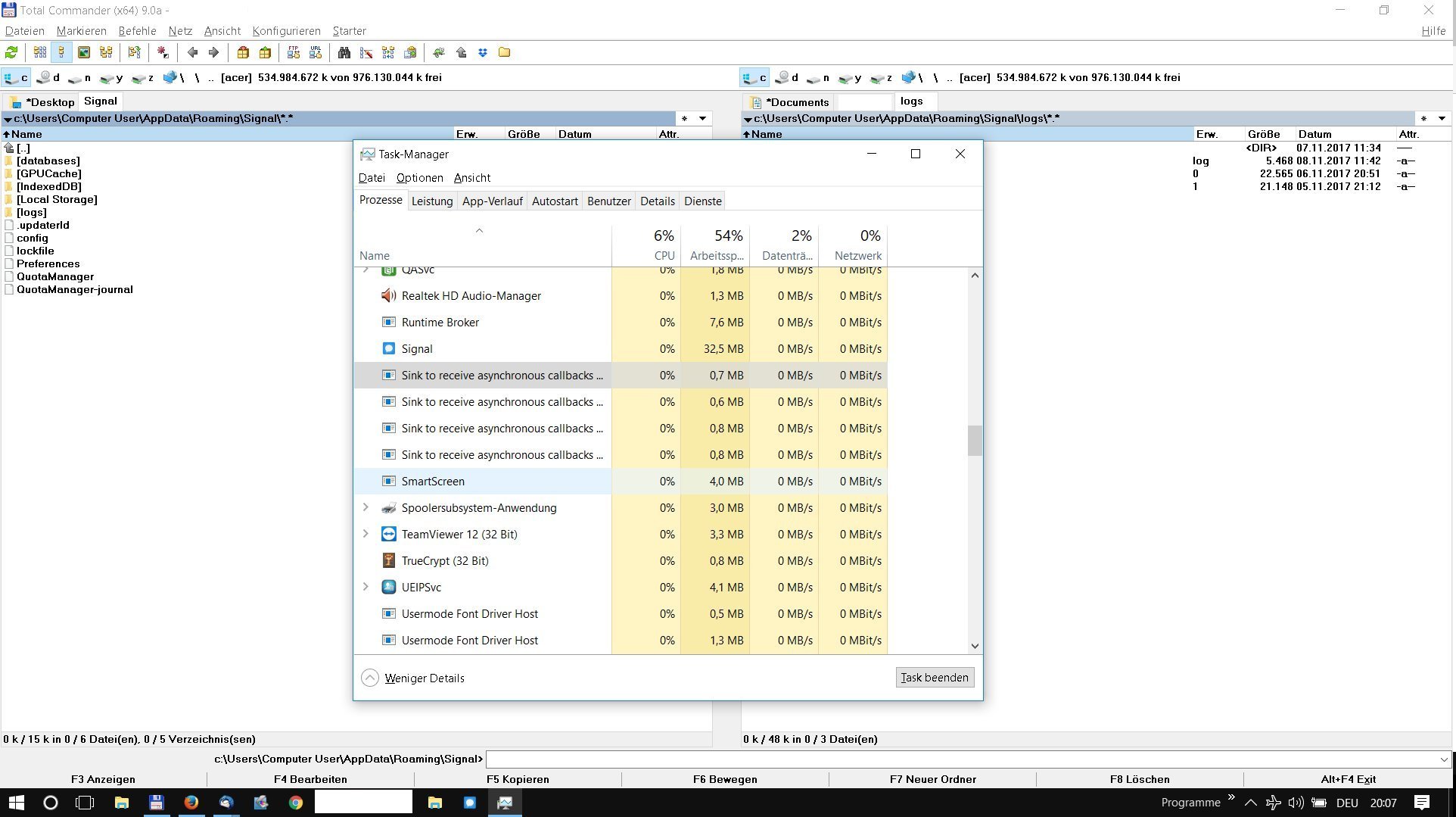
sakudo
on 8 Nov 2017
@scottnonnenberg In my case, my system is a laptop that is often connected to a second monitor that extends my desktop in such a way that when this second monitor is connected, my laptop screen is NOT my primary screen. I was in this dual-monitor configuration when I installed Signal. I have discovered that if I disconnect the second monitor and launch Signal, the Signal initial setup window appears as expected on my laptop screen.
blazick
on 8 Nov 2017
I work with two screens too, but it did not help to disconnect the second one, to kill Signal.exe in the task manager and to restart it.
sakudo
on 8 Nov 2017
@sakudo Sorry, more clarity on my part. I had to disconnect the second screen and restart Windows to get the app to appear on my laptop screen.
FWIT, my case may be at least slightly different than yours in that when I am experiencing the issue, the Signal app icon never appears in my taskbar as it appears to on yours.
blazick
on 8 Nov 2017
@blazick It did not help in my case: still no Signal GUI window after disconnect & reboot. NB: The Signal app icon in my taskbar is a link that I placed there myself; it is not "active" (underlined) or not associated with a (invisible) window.
sakudo
on 8 Nov 2017
@blazick It seems that you've solved your problem? And it had something to do with multiple displays? Are you saying that the window appeared on something other than your primary display? Can you tell me a little more about the details of your setup?
@sakudo It seems that you have not yet figured out where the window is showing up, but you do have multiple displays connected. Can you talk a little bit more about how your various displays are set up?
scottnonnenberg
on 8 Nov 2017
In my case, I have no indication to suspect that the no-show of the GUI is related to the 2nd screen set up. But I am happy to give you details: 2nd screen acts as an "extension" of the desktop enlarging the screen, see attachment. The taskbar is replicated, but otherwise is just one large connected area giving one big screen shot. (Note again that the Signal symbol in the task bar is just a manually placed link there. There are no signs of an open window anywhere.)
I have temporarily disabled antivirus software (which never has caused any issues), but no effect.
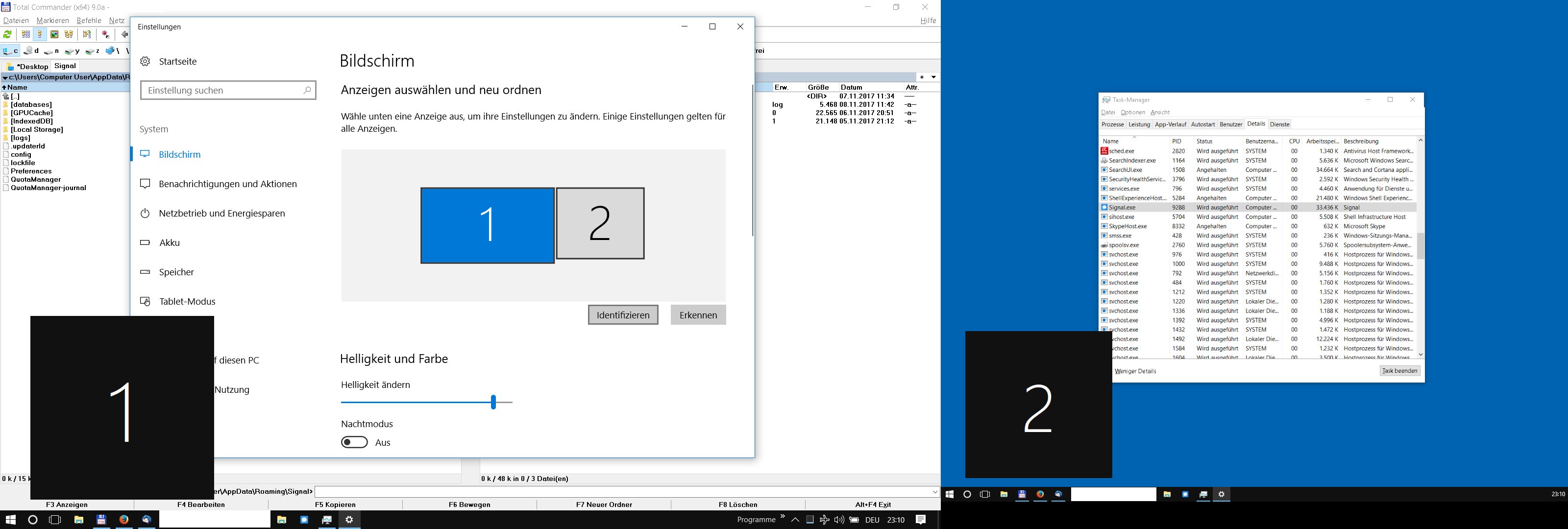
sakudo
on 8 Nov 2017
@scottnonnenberg No, the problem is still unresolved. The Signal window does not appear when I have extended my desktop with the second display.
- When I boot my laptop _without_ the second monitor attached, signal launches and behaves as expected.
- When I boot my laptop _with_ a second monitor attached, the Signal window never appears.
- The second monitor is designated as my Main Display, a role it assumes when active.
Display 1, Laptop, 2560x1440, UI 200% scaled (as recommended by OS)
Display 2, DELL U2410 1920 x 1200, UI 100% scaled, "Make this my main display" checked ON
Configured as such:
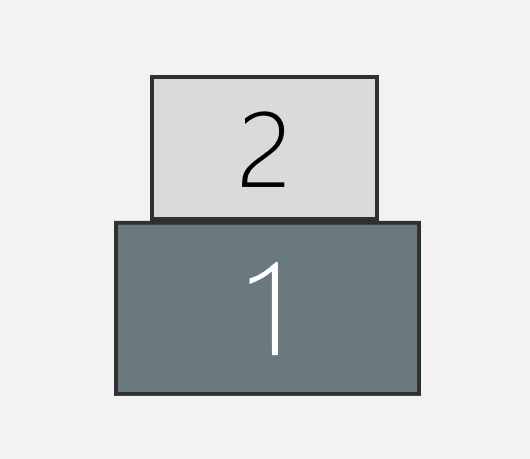
blazick
on 8 Nov 2017
Having the same issue, it does appear that the app is running but it launches outside the window of view, i have 4 monitors running windows 10 1709, same issue with 1703 before the update...
[Update] Sorry guys, my bro suggested changing my main screen and it came back...
 wiedemannsr
on 15 Nov 2017
wiedemannsr
on 15 Nov 2017
Okay, to summarize, it seems to happen when you have more than one monitor. And it seems to happen with build Windows 10 1709 or 1703.
Is everyone affected running Windows Home? Or are there other editions of Windows with this behavior?
For those who are experiencing this, are the computers all laptops? All made by Acer?
If you've run into this, can you find any multi-monitor setup where Signal Desktop appears properly?
scottnonnenberg
on 15 Nov 2017
I can confirm that I have two monitors running, but I have no indication that this is the cause. (I have no sign that there is another window open as task bar symbol is not highlighted, see screen shot above.)
I have rebooted the laptop without the 2nd monitor plugged in and Signal did not show up.
I can confirm that it is on a Acer E5-573G running Nvidia GeForce 940M.
sakudo
on 15 Nov 2017
@sakudo Are there any keyboard shortcuts or settings you could change which might affect the screen mirroring behavior? Maybe the laptop still remembers the other monitor until you make a manual change?
Sadly, I'm leaning towards some sort of Acer graphics driver problem. But I still need more information so we can narrow it down, report bugs perhaps to Acer, perhaps to the Electron team.
scottnonnenberg
on 16 Nov 2017
Hello again,
My Acer laptop has an NVIDIA 860M graphic card and Intel(R) Core(TM) i7-4710HQ CPU.
The Nvidia graphic card has a technology called 'optimus' which automatically disables the NVIDIA 860M graphic card when the CPU graphic card (Intel HD Graphics 4600) is sufficient.
(This is usually the case when one uses office, web and signal).
I also use a Laptop together with an external monitor where the external (HDMI) connected monitor.
This external monitor is set up as primary display. [because the monitor is larger as the laptop).
the external monitor uses 100% scaling while the (smaller) laptop monitor uses 125 % scaling.
Both monitors have (and are used with) Full-HD.
(I also use a Night-Mode but I do not think that this is important).
Disconnecting the external monitor and rebooting the laptop allowed me to start signal with appearing GUI and i can use the app.
When I now plug in the external monitor as primary monitor then signal app remains visible (at the external monitor). I can use the app and also move them to another monitor.
Now I switched the primary monitor to the internal monitor. The signal app is still visible.
Now I switch off the signal app
As next step i started signal again and the GUI is not visible.
I will now reboot with external monitor as second monitor.
Regards
Robak
PS: I own a Microsoft wireless display adapter which isn't in use actually but is installed on the Laptop.
Robak238
on 16 Nov 2017
Ok. I restarted with the external monitor as secondary monitor.
Now i directly tied to start signal (before all auto-start programs were ready).
As result the signal app GUI appeared on the internal(now primary) monitor.
Signal ask me to install an update.
I did this.
As part of this signal was switched off again.
1 Minute later (after finishing all autostarts) I tried to start signal again.
But no GUI appeared.
Robak238
on 16 Nov 2017
@Robak238 Thank you for this investigation. To confirm, you're saying that after installing an update, Signal Desktop did not automatically restart? What do you see in Task Manager? Is Signal currently running according to it?
scottnonnenberg
on 16 Nov 2017
Okay, I investigated after reading your comments:
- Unplugged external monitor (btw: VGA connection)
- Went into "projection menu" (or called similarly, on my Acer machine access by blue "Function key" + F5) and set to "computer only"
- Signal did not start / was not visible
- Reboot + Signal worked.
A previous reboot without changing the projection menu did not change anything.
I reconnected my monitor, and the computer automatically recognised it (hence in the menu it changed from "computer only" to "enlarge" ("Erweitern")); Signal was still around. Then I closed Signal & try to reopen: nothing!
Then I changed it manually to "computer only" (2nd screen went dark as desired but still plugged in), Signal started again.
But then repeating this process did not work: unplugged monitor and set projection to "computer only", but Signal window did not reappear. I guess, it would need a reboot.

EDIT: I played around a bit and observed the following (now with version Signal v 38). Running on two screens won't allow Signal to appear. I disconnected one screen and set to "computer only". Signal launches in the task manager, but no window is appearing. I launch Signal 2 or 3 times again, then the window icon in the task bar is highlighted ("underlined"), but window not visible. Reconnected the 2nd screen (with "enlarge desktop" or similarly) and - hey! - Signal window there...
Strange behaviour that is probably not worth pursuing if there are only few people affected...
EDIT II: I must report that somehow the issue seems to have disappeared as I could start Signal now (with both screens on).... My specs:
Windows 10 Home 64 bit, Acer, Aspire E5-573G, Intel i7-5500U @ 2.4 GHz,
Intel HD Graphis 5500, driver 20.19.15.4703
NVIDIA GeForce 940M, driver version 22.21.13.8205 (windows menu) / 382.05
sakudo
on 16 Nov 2017
I have a virtually identical issue, albeit while only running a single screen. I am also running Win 10 Home 64 bit on an Acer (V5), but was able to install the client without issue on an Asus laptop, interestingly
When I try to open the app, either from the desktop shortcut or command line, two instances appear in the background processes section of Task Manager, with one of them disappearing after 30 seconds or so; when I run the app on the Asus laptop, the generated window shows an instance in the apps section, as one would expect. The CMD window looks identical to the image posted by @sakudo when run from command line. At no time is there a taskbar item which is clickable, precluding the window being generated in a hidden desktop.
So far I've tried a couple of uninstall-reinstall cycles, including laptop restarts, and have checked my graphics settings to make absolutely sure that there isn't some other desktop being generated anywhere.
 Cthulku
on 19 Nov 2017
Cthulku
on 19 Nov 2017
@Cthulku If you could provide your graphics card, graphics driver version, and exact computer model, that would help us start to develop an overall picture for this issue.
Same goes for everyone. We need this information so we can file bugs on Electron, or perhaps even the graphics driver.
Another thought is that if you're feeling adventurous, you might consider trying the Beta. You can find the latest Windows beta build here: https://updates.signal.org/desktop/beta.yml. Right now it's https://updates.signal.org/desktop/signal-desktop-beta-win-1.1.0-beta.1.exe. It's designed to install side-by-side with the production version.
scottnonnenberg
on 20 Nov 2017
But of course!
Model: Acer V5 473G-6814
Graphics card: NVIDIA GeForce GT 740M/Intel HD Graphics
Graphics drivers: (NVIDIA) 22.21.13.8205/ (Intel) 10.18.15.4248
Both drivers are considered the most up to date as per Device Manager. Seems a bit fishy to me since the Intel driver is dated 2015. Tried updating both just for thoroughness, with no "better" ones found.
e: The beta version appears to have resolved the issue!
Cthulku
on 21 Nov 2017
Acer Aspire VN7-591G
Graphics Cards:
1.) NVIDIA GeForce GTX 860M Driver 21.21.13.7654
2.) Intel(R) HD Graphics 4600 Driver 20.19.15.4549
Robak238
on 27 Nov 2017
I updated the
NVIDIA GeForce GTX 860M to Driver version 22.21.13.8205.
I restarted the computer with the external monitor as primary Monitor and the notebook monitor as extended monitor.
The signal GUI appears now with signal v.1.0.39.
So everything works as expected.
I do not have the issue any more.
Thanks for your help.
Robak238
on 27 Nov 2017
I'm going to close this, as it seems to have something to do with graphics drivers on Acer Windows 10 laptops and multiple displays. And it is addressed by the version of Electron in the beta, as well as newer graphics drivers.
scottnonnenberg
on 27 Nov 2017
I had the same problem and this was the solution:
In the config "%AppData%\Signal\config.json" the setting for X coordinate was negative, thus never showing the window. Changing it to 0 and restarting Signal fixed it.
{
    "window": {
        "maximized": false,
        "autoHideMenuBar": false,
        "width": 1368,
        "height": 712,
        "x": -1920,
        "y": 0
    }
}
Maybe when starting there should be a check if the coordinates make it completely invisible?
The minus coordinates resulted because I had 2 screens and the right one as main display, putting Signal on the left. Then disconnecting and starting it was always "hidden".
CC @scottnonnenberg
 Kleissner
on 28 Nov 2017
Kleissner
on 28 Nov 2017
@Kleissner Many thanks for that bug report. That scenario should be fixed after I merge this - and it may fix things for users up-thread as well: https://github.com/WhisperSystems/Signal-Desktop/pull/1830
scottnonnenberg
on 30 Nov 2017
Hello the Issue is back.
Now I went inside the config.json File
I see the following content:
{
"window": {
"maximized": true,
"autoHideMenuBar": false,
"width": 1552,
"height": 849,
"x": -8,
"y": -8
}
}
I changed both values from -8 to 10.
I killed the task in the task manager.
I started signal again but no GUI is visible
I didn'f found a Signal version information without the GUI.
I find the signal.exe in folder
\AppData\Local\Programs\signal-desktop
while the Signal config.json is located at
\AppData\Roaming\Signal
The splitting is a bit confusing.
I will deinstall signal completely and delete both folders before I reinstall it.
With best regards
Robak
Robak238
on 5 Dec 2017
Now I restarted the laptop (with only one monitor) and installed 1.40. Seems to work.
Now I stopped Signal.
Now I connected my 'Microsoft wireless display adapter' as secondary extended monitor.
After starting signal.exe no Gui appears.
Task manager shows a running signal.
config.json looks ok:
(But I do not know which point is the 0/0)
{
"window": {
"maximized": false,
"autoHideMenuBar": false,
"width": 796,
"height": 606,
"x": 368,
"y": 111
}
}
Robak238
on 5 Dec 2017
@Robak238 Please provide logs. If you start Signal from the command line you'll be able to see those logs show up as they happen. Otherwise, you can look in the logs directly right next to config.json. Also, it may be time to enter a new bug.
scottnonnenberg
on 6 Dec 2017
When excecuting 'Signal.exe' from
'\AppData\Local\Programs\signal-desktop>'
then I see the following outputs:
reading package.json
configuring
NODE_ENV production
NODE_CONFIG_DIR C:\Users\Max_Mustermann\AppData\Local\Programs\signal-desktop\resources\app.asar\config
NODE_CONFIG {}
ALLOW_CONFIG_MUTATIONS undefined
HOSTNAME undefined
NODE_APP_INSTANCE undefined
SUPPRESS_NO_CONFIG_WARNING undefined
setting AUMID
making app single instance
quitting
unfortunately the Folder \AppData\Roaming\Signallogs does not show any new log.
The newest log is from 15 of December.
Can I change the 'logging settings' from 'minimized logging' to 'show-me-more-Logging?'.
I am wondering that parts or 'Signal' are installed in 'AppData\Local' and other parts in 'AppData\Roaming'. I am not sure if this is like it should be.
Robak238
on 29 Dec 2017
@Robak238 First, it seems like you're running an old version of the app. What's the version number of Signal.exe on your system? Second, I think it's time to enter a new bug. I'm going to lock this conversation. Third, it looks like your attempt to start the app is failing because the app is already running! You can kill it with Task Manager.
scottnonnenberg
on 2 Jan 2018
Related issues
 demux4555
·
3Comments
demux4555
·
3Comments
 ProactiveServices
·
3Comments
ProactiveServices
·
3Comments
 github-cygwin
·
3Comments
github-cygwin
·
3Comments
 gesus14
·
3Comments
gesus14
·
3Comments
 cmdrogogov
·
3Comments
cmdrogogov
·
3Comments
Most helpful comment
Having the same issue, it does appear that the app is running but it launches outside the window of view, i have 4 monitors running windows 10 1709, same issue with 1703 before the update...
[Update] Sorry guys, my bro suggested changing my main screen and it came back...