Signal-desktop: Signal Desktop shows way too many messages loaded on startup
- [x] I have searched open and closed issues for duplicates
Bug description
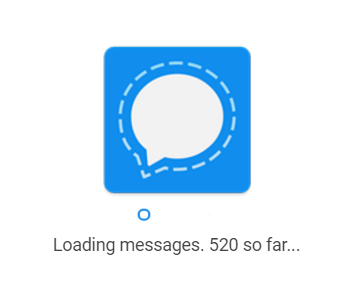
When starting up Signal Desktop, way too many messages are shown as loaded.
Steps to reproduce
- send a few messages using the mobile client (Android in my case)
- open Signal Desktop
- watch as the number of messages is way too many
Actual result: Too many messages are shown (ex. 520, when I only send about 20 since last load)
Expected result: It should only show about 20 messages, as that's all I sent through Signal
Screenshots
Platform info
Operating System: Windows 10
Signal version: 1.0.34
Mobile version: Android 4.12.0
Debug log
https://gist.github.com/anonymous/abd622eb81435ec915bcf650fca407ba
 zanedb
All 14 comments
When you report bugs, please include a log. We can tell you exactly what the app is doing during that time with the log.
 scottnonnenberg
on 2 Nov 2017
scottnonnenberg
on 2 Nov 2017
I apologize. I was in a bit of a rush. Here is the debug log. Note that it only includes events from today. The issue occurred at about 9:00PM CST.
zanedb
on 2 Nov 2017
I knew I wasn't crazy! This exact thing happens for me, it loads up to 1k messages even if I've "only" sent about 200.
https://gist.github.com/anonymous/60bc0928fc3b365a4bdc989b7ac4a67e
^ Taken immediately after loading "200" messages. I'd estimate I sent about 50 in that time. It's 12 hours of messages since I last opened the program.
If delivery receipts are counted as a "message" during the "loading screen" I would strongly suggest changing that, since, to be honest, it's pretty stupid for them to count as a separate message.
Also, something unrelated to consider changing is that in the log my account name can be seen:
/Users/johan/Applications/Signal.app/Contents/Resources/app.asar/preload.js
 Dyras
on 2 Nov 2017
Dyras
on 2 Nov 2017
One thing to note - a 'message' includes the synchronization messages sent between your devices, and delivery receipts from the server when one of your messages is sent successfully, and the new read receipts, sent by an opted-in recipient when they actually read your message. So it's very easy to see a number bigger than the number of messages you see exchanged.
Even so, logs would be useful - be sure to tell me when the unexpected load happened. Three days of logs are kept, so that gives you an idea of how long you can wait.
scottnonnenberg
on 2 Nov 2017
Startup is really slow here too. Also, the menu above the conversation list only shows "Settings" and "Restart Signal" but no "Submit debug log"
 dcherian
on 6 Nov 2017
dcherian
on 6 Nov 2017
@dcherian To submit a debug log, first make sure that the Hide menu bar option in Settings is unchecked. Then, click on View at the top, and then Debug Log. It's a little bit hidden. Hope this helps :)
zanedb
on 6 Nov 2017
Thanks, here it is: https://gist.github.com/7c64accb84cb0280ecf1168efee010e5
The issue template needs to be updated with these instructions...
dcherian
on 6 Nov 2017
@dcherian It looks like it took about 1 minute to load the app, pull down messages, and dismiss the loading screen in that log. Is that about average for you?
scottnonnenberg
on 6 Nov 2017
@scottnonnenberg yes. My counter only goes up to 150 or so.
dcherian
on 6 Nov 2017
I don't know if this is related but Signal-Desktop is quite slow to use for a couple of minutes after resuming from sleep. I see CPU usage at 100% for a while (at least 30s). If I type in a message and hit Enter to send, the textbox is greyed out for O(5sec). There seems to also be a race condition when the text box is grayed out.
- I typed "abc" then Enter.
- Kept typing "def", but the box was grayed out.
- The message sent was "abcdef"
https://gist.github.com/2083deb003bc0411156cda62db03aee6
Can't reproduce now because all background operations are over (I guess) and the "grayed-out" time delay is tiny.
dcherian
on 7 Nov 2017
@dcherian Is this about when you came back from sleep? https://gist.github.com/anonymous/2083deb003bc0411156cda62db03aee6#file-debuglog-txt-L8578
I see some long delays in 'send pre-checks' but I don't see a lot of evidence of other things happening in the app, sadly. What else was happening on your machine?
Lastly, please consider adding a new issue tracking that 'abcdef' message-sending behavior you mentioned.
scottnonnenberg
on 7 Nov 2017
Is this about when you came back from sleep? https://gist.github.com/anonymous/2083deb003bc0411156cda62db03aee6#file-debuglog-txt-L8578
That looks right (assuming time is in UTC).
What else was happening on your machine?
Not sure anymore. I did notice high CPU usage by signal-desktop for a while though.
dcherian
on 7 Nov 2017
If it makes any difference, I am often bothered by very long (~5min) startup times while 'Loading messages' is displayed in Signal Desktop. I work on both Linux and Windows, desktops and laptops (so both always on and sometimes suspended) of both OSes, and both Chrome and Chromium. This problem persists across all configurations. I use signal for most of my messaging, so I have a lot of signal messages.
I realize this comment is getting more into 'feature request' territory, but this is the only search hit related to this problem, AFAIK.
 ohinds
on 9 Nov 2017
ohinds
on 9 Nov 2017
Closing this in favor of #1442, which tracks the request to remove the loading screen entirely.
scottnonnenberg
on 16 Nov 2017
Related issues
 TarkanY
·
3Comments
TarkanY
·
3Comments
 vincenzopalazzo
·
3Comments
vincenzopalazzo
·
3Comments
 cmdrogogov
·
3Comments
cmdrogogov
·
3Comments
 bcsga
·
3Comments
bcsga
·
3Comments
 gesus14
·
3Comments
gesus14
·
3Comments
Most helpful comment
If it makes any difference, I am often bothered by very long (~5min) startup times while 'Loading messages' is displayed in Signal Desktop. I work on both Linux and Windows, desktops and laptops (so both always on and sometimes suspended) of both OSes, and both Chrome and Chromium. This problem persists across all configurations. I use signal for most of my messaging, so I have a lot of signal messages.
I realize this comment is getting more into 'feature request' territory, but this is the only search hit related to this problem, AFAIK.