Signal-desktop: 'Illegal buffer' or 'InvalidModificationError' exporting from Chrome extension
- [X] I have searched open and closed issues for duplicates
Bug description
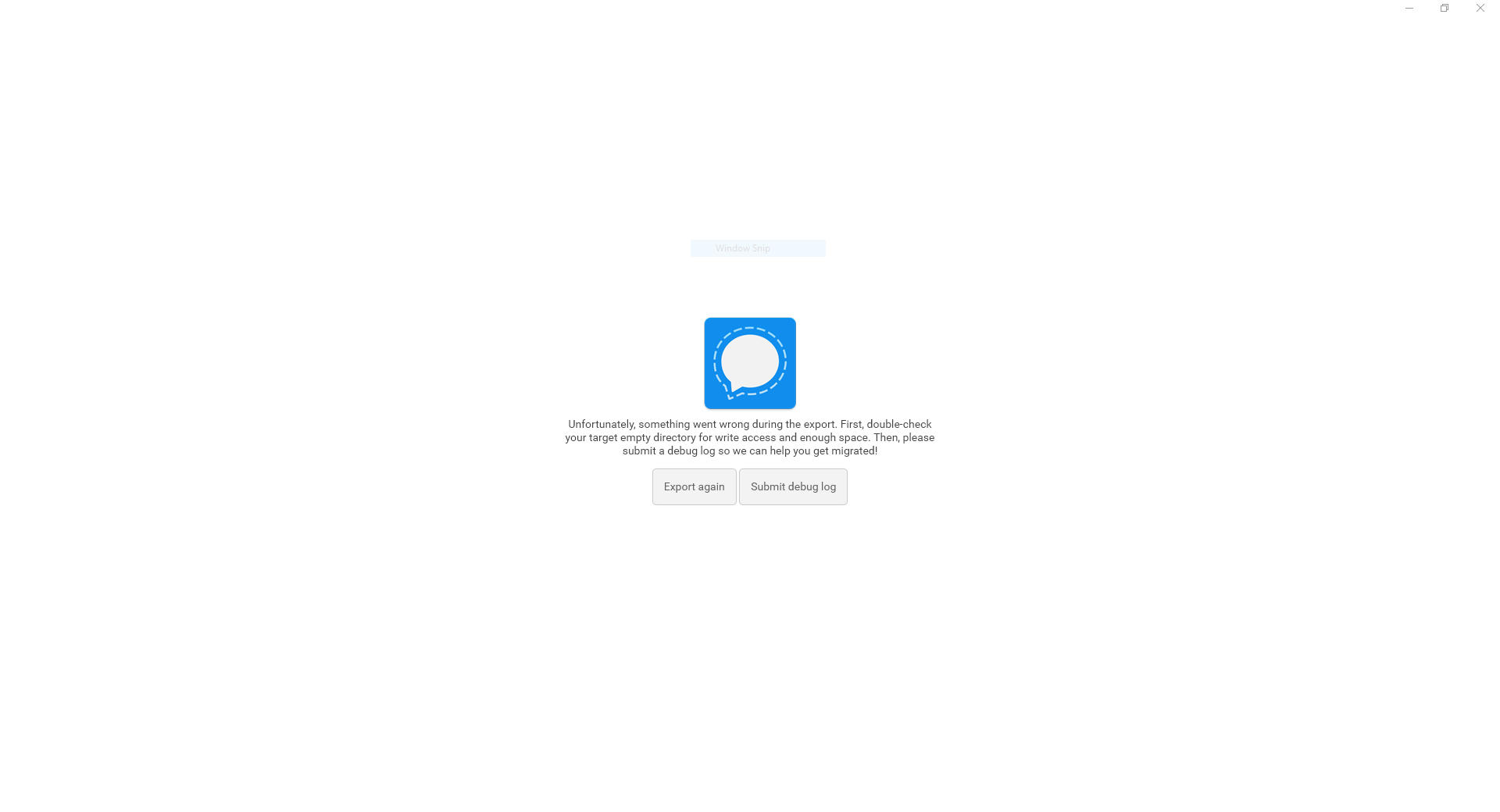
I get the following error:
Unfortunately, something went wrong during the export. First, double-check your target empty directory for write access and enough space. Then, please submit a debug log so we can help you get migrated!
It happens when Chrome addon offers me to migrate to Desktop app and tries to export data.
Steps to reproduce
- Try to export when offered to migrate to desktop app
Actual result: Describe here what happens after you run the steps above (i.e. the buggy behaviour)
Expected result: Describe here what should happen after you run the steps above (i.e. what would be the correct behaviour)
Screenshots
Platform info
Operating System: Windows 10 x64
Browser: Chrome 62.0.3202.75
Signal version: 0.44.0
Link to debug log
https://gist.github.com/anonymous/65bc7f4717dfeb8b45063702ec0729a5
 robimarko
All 71 comments
Hey there, sorry you're running into difficulty! Can you take a look at your conversation with a contact whose phone number ends in 606? We had trouble writing one of the attachments to disk. What can you tell us about the attachments in that conversation?
 scottnonnenberg
on 31 Oct 2017
scottnonnenberg
on 31 Oct 2017
Well that conversation is quite long.
There are files and pictures as attachments.
robimarko
on 31 Oct 2017
Try going to your export folder, and take a look at the attachments present in the problematic conversation. They should be exported in order, so that might help you determine which one is missing. It would really help us out, since we don't have access to your data. Thanks!
scottnonnenberg
on 31 Oct 2017
Same problem.
Operating System: ubuntu 17.04
Browser: Chromium Version 61.0.3163.100 (Official Build) Built on Ubuntu , running on Ubuntu 17.04 (64-bit).
Signal version: 0.44.0
Link to debug log: https://gist.github.com/anonymous/218d0a3141aca4239daec7c1f315d1dd
I first installed the new desktop-application (and wondered how to export the messages of the Chrome-app until i restarted the Chrome-app). Then i started the export and tried several locations but got always the same message as @robimarko.
 wizardofid
on 31 Oct 2017
wizardofid
on 31 Oct 2017
Hm,
it only exports 3 attachments and then fourth is corrupted.
That one is a png screenshot.
On 31 October 2017 at 19:39, Scott Nonnenberg notifications@github.com
wrote:
Try going to your export folder, and take a look at the attachments
present in the problematic conversation. They should be exported in order,
so that might help you determine which one is missing. It would really help
us out, since we don't have access to your data. Thanks!—
You are receiving this because you authored the thread.
Reply to this email directly, view it on GitHub
https://github.com/WhisperSystems/Signal-Desktop/issues/1616#issuecomment-340861936,
or mute the thread
https://github.com/notifications/unsubscribe-auth/ABTDsKdIlvfF7m1r99D1pqHTmqqHhXpCks5sx2lfgaJpZM4QNKVK
.
robimarko
on 31 Oct 2017
For those of you having trouble with this, you can reenable the Chrome app for use with these commands in the DevTools (go to chrome://extensions in your browser, find Signal, then click the background.html link, then enter this text in the Console tab):
window.storage.put('migrationEnabled', false);
window.storage.put('migrationState', 0);
window.storage.put('migrationEverCompleted', false);
Wait a bit, then:
window.location.reload();
@robimarko Can you tell me a little bit more about the corrupted image? Is it corrupt on disk after export? Or did it even make it to disk at all? Does it show as corrupted when you see it in its conversation in the app?
scottnonnenberg
on 31 Oct 2017
I also run into this problem:
2017-10-31T21:29:20.145Z exporting conversation 1508436929192 (+[REDACTED]715)
2017-10-31T21:29:20.878Z writeAttachments: error exporting conversation 1508436929192 (+[REDACTED]715) : InvalidModificationError: The object can not be modified in this way.
2017-10-31T21:29:21.196Z exportConversation: error exporting conversation 1508436929192 (+[REDACTED]715) : InvalidModificationError: The object can not be modified in this way.
2017-10-31T21:29:21.205Z the backup went wrong: InvalidModificationError: The object can not be modified in this way.
The respective conversation folder contains 39 subfolders with all sorts of attachments, non of which appear to be corrupted.
The first attachment from the convo not saved during export is a simple jpeg file...?
 AlfonsoMuskedunder
on 31 Oct 2017
AlfonsoMuskedunder
on 31 Oct 2017
My working theory is that these are very old attachments, and they don't have an id, or at least not one of the right type. So my current approach is to clean up all the data before we do an export. Watch for that PR soon.
scottnonnenberg
on 31 Oct 2017
@scottnonnenberg The respective files from said convo were sent on August 15th this year, in case that's valuable info.
AlfonsoMuskedunder
on 31 Oct 2017
I have the same problem but with Signal desktop version 0.44.1
The last exported file is a broken PNG image (broken on disk)
EDIT: there was a time when sending/receiving images with signal desktop did not work. Images sent with the Desktop Client were not transmitted to the app or the recipient, Images sent with the app showed up as empty messages in signal desktop. I think this is related to the broken image messages in my case.
EDIT2: I can now confirm the image in question was not sent. however other pictures, that had the same problem, were exported without errors. The others were JPEGs, the not working one is PNG. the Image is intact in signal.
2017-11-01T13:55:16.588Z writeAttachments: error exporting conversation 1509542677205 (+[REDACTED]651) : TypeError: Illegal buffer
    at Function.ByteBuffer.wrap (chrome-extension://bikioccmkafdpakkkcpdbppfkghcmihk/js/libtextsecure.js:27083:23)
    at stringToBlob (chrome-extension://bikioccmkafdpakkkcpdbppfkghcmihk/js/backup.js:6:37)
    at chrome-extension://bikioccmkafdpakkkcpdbppfkghcmihk/js/backup.js:55:30
    at chrome-extension://bikioccmkafdpakkkcpdbppfkghcmihk/js/backup.js:51:18
2017-11-01T13:55:16.602Z exportConversation: error exporting conversation 1509542677205 (+[REDACTED]651) : TypeError: Illegal buffer
    at Function.ByteBuffer.wrap (chrome-extension://bikioccmkafdpakkkcpdbppfkghcmihk/js/libtextsecure.js:27083:23)
    at stringToBlob (chrome-extension://bikioccmkafdpakkkcpdbppfkghcmihk/js/backup.js:6:37)
    at chrome-extension://bikioccmkafdpakkkcpdbppfkghcmihk/js/backup.js:55:30
    at chrome-extension://bikioccmkafdpakkkcpdbppfkghcmihk/js/backup.js:51:18
2017-11-01T13:55:16.607Z the backup went wrong: TypeError: Illegal buffer
    at Function.ByteBuffer.wrap (chrome-extension://bikioccmkafdpakkkcpdbppfkghcmihk/js/libtextsecure.js:27083:23)
    at stringToBlob (chrome-extension://bikioccmkafdpakkkcpdbppfkghcmihk/js/backup.js:6:37)
    at chrome-extension://bikioccmkafdpakkkcpdbppfkghcmihk/js/backup.js:55:30
    at chrome-extension://bikioccmkafdpakkkcpdbppfkghcmihk/js/backup.js:51:18
EDIT3:
Deleting the broken message results in a successful export, but import isn't working:
INFO  2017-11-01T18:10:08.754Z the import went wrong: SyntaxError: Unexpected end of JSON input
    at JSON.parse (<anonymous>)
    at C:\Users\<USERNAME>\AppData\Local\Programs\signal-desktop\resources\app.asar\js\backup.js:624:23
INFO  2017-11-01T18:10:08.754Z Error importing: SyntaxError: Unexpected end of JSON input
    at JSON.parse (<anonymous>)
    at C:\Users\<USERNAME>\AppData\Local\Programs\signal-desktop\resources\app.asar\js\backup.js:624:23
There are 3 broken conversations:
~/Signal Export 2017 Nov. 1. at 7.07.15 pm $ jsonlint 1509545294483\ \([REDACTED]651\)/messages.json
1509545294483 ([REDACTED]651)/messages.json:1:546051: Warning: Strings containing non-BMP characters (U+1F44D) may not be portable
   |  At line 1, column 546051, offset 546051
1509545294483 ([REDACTED]651)/messages.json:1:681611: Error: Array literal (list) is not terminated
   |  At line 1, column 681611, offset 681611 (AT-END)
   |    near text: True
   |  Array started at line 1, column 12, offset 12
1509545294483 ([REDACTED]651)/messages.json:1:681611: Error: Object literal (dictionary) is not terminated
   |  At line 1, column 681611, offset 681611 (AT-END)
   |    near text: True
   |  Object started at line 1, column 0, offset 0 (AT-START)
1509545294483 ([REDACTED]651)/messages.json: has errors

~/Signal Export 2017 Nov. 1. at 7.07.15 pm $ jsonlint 1509458817995\ \([REDACTED]326\)/messages.json
1509458817995 ([REDACTED]326)/messages.json:1:21810: Warning: Strings containing non-BMP characters (U+1F609) may not be portable
   |  At line 1, column 21810, offset 21810
1509458817995 ([REDACTED]326)/messages.json:1:451158: Error: Array literal (list) is not terminated
   |  At line 1, column 451158, offset 451158 (AT-END)
   |    near text: True
   |  Array started at line 1, column 12, offset 12
1509458817995 ([REDACTED]326)/messages.json:1:451158: Error: Object literal (dictionary) is not terminated
   |  At line 1, column 451158, offset 451158 (AT-END)
   |    near text: True
   |  Object started at line 1, column 0, offset 0 (AT-START)
1509458817995 ([REDACTED]326)/messages.json: has errors

~/Signal Export 2017 Nov. 1. at 7.07.15 pm $ jsonlint 1509461167891\ \([REDACTED]Group\)/messages.json
1509461167891 ([REDACTED]Group)/messages.json:1:2071: Warning: Strings containing non-BMP characters (U+1F61C) may not be portable
   |  At line 1, column 2071, offset 2071
1509461167891 ([REDACTED]Group)/messages.json:1:425993: Error: Array literal (list) is not terminated
   |  At line 1, column 425993, offset 425993 (AT-END)
   |    near text: True
   |  Array started at line 1, column 12, offset 12
1509461167891 ([REDACTED]Group)/messages.json:1:425993: Error: Object literal (dictionary) is not terminated
   |  At line 1, column 425993, offset 425993 (AT-END)
   |    near text: True
   |  Object started at line 1, column 0, offset 0 (AT-START)
1509461167891 ([REDACTED]Group)/messages.json: has errors
 MarcSN311
on 1 Nov 2017
MarcSN311
on 1 Nov 2017
Everyone: When you've installed 0.44.2 of the Chrome App, just released to the Chrome Web Store, try to migrate again. It should help make those exports more reliable.
@MarcSN311 Thanks for those extra details on the JSON problems; seems that we may need to do a little bit of work to better handle odd character combinations in that export.
scottnonnenberg
on 1 Nov 2017
No change for me on 0.44.2. Same error:
2017-11-01T20:49:15.913Z the backup went wrong: TypeError: Illegal buffer
    at Function.ByteBuffer.wrap (chrome-extension://bikioccmkafdpakkkcpdbppfkghcmihk/js/libtextsecure.js:27083:23)
    at stringToBlob (chrome-extension://bikioccmkafdpakkkcpdbppfkghcmihk/js/backup.js:6:37)
    at chrome-extension://bikioccmkafdpakkkcpdbppfkghcmihk/js/backup.js:55:30
    at new Promise (<anonymous>)
    at chrome-extension://bikioccmkafdpakkkcpdbppfkghcmihk/js/backup.js:51:18
It exports a fair amount of data, including images, but the last one is a 0 byte png.
 larrywright
on 1 Nov 2017
larrywright
on 1 Nov 2017
@larrywright Was that intentionally sent as a 0-byte PNG, or was it some sort of receive error? I'm inclined to eliminate that kind of zero-content attachment in the next Chrome app release.
scottnonnenberg
on 1 Nov 2017
@scottnonnenberg It wouldn't have been intentional, but it's possible it failed for some reason. It's old enough that it would be painful to go back and find it.
larrywright
on 1 Nov 2017
Just tried it with 44.2. Export fails at the exact same point as yesterday:
Mozilla/5.0 (X11; Linux x86_64) AppleWebKit/537.36 (KHTML, like Gecko) Ubuntu Chromium/62.0.3202.62 Chrome/62.0.3202.62 Safari/537.36 Signal-Desktop/0.44.2
...
2017-11-01T21:33:28.614Z exporting conversation 1508436929192 (+[REDACTED]715)
2017-11-01T21:33:29.250Z writeAttachments: error exporting conversation 1508436929192 (+[REDACTED]715) : InvalidModificationError: The object can not be modified in this way.
2017-11-01T21:33:29.418Z exportConversation: error exporting conversation 1508436929192 (+[REDACTED]715) : InvalidModificationError: The object can not be modified in this way.
2017-11-01T21:33:29.424Z the backup went wrong: InvalidModificationError: The object can not be modified in this way.
I think I know exactly at which picture the process stops. Let me know if you would like to know anything about it, @scottnonnenberg
AlfonsoMuskedunder
on 1 Nov 2017
@AlfonsoMuskedunder is it a PNG image? seems like this is only affecting PNGs.
MarcSN311
on 1 Nov 2017
Nope, a jpeg.
AlfonsoMuskedunder
on 1 Nov 2017
My theory is that Invalid Buffer errors come from our attempt to write null or zero-length attachments. 0.44.2 took care of null data in an attachment, but a zero-length array can still sneak through. 0.44.3 will address that.
I'm really not sure what is still causing the InvalidModificationError. It may have had something to do with attachments missing certain keys (addressed in 0.44.2, but perhaps it also has something to do with messages without a received_at property? I'll try that next.
@AlfonsoMuskedunder if you'd be willing to find the offending message in IndexedDB (in the devtools, application tab), I'd really, really love to see the structure of that data.
@MarcSN311 What platform are you on? It looks like we might have an encoding error when we output the JSON. Still, surprising since we've tested the process on all platforms.
scottnonnenberg
on 1 Nov 2017
@scottnonnenberg Sure, but I'm afraid I need some more info on how to find it? The menu item "IndexedDB" has many sub items...?
AlfonsoMuskedunder
on 1 Nov 2017
@AlfonsoMuskedunder You'll need to find the id of the message in question (it will be in the messages.json), and then you can go to the messages object store under the IndexedDB database, and search for that key.
scottnonnenberg
on 1 Nov 2017
@scottnonnenberg I think I found it - here's the content (with the real phone number redacted):
attachments: Array(1)
  0:
    contentType: "image/jpeg"
    data: ArrayBuffer(501438)
      byteLength: (...)
    digest: ArrayBuffer(32)
      byteLength: (...)
    fileName: null
    flags: null
    id: "2210174069911734283"
    key: ArrayBuffer(64)
      byteLength: (...)
    size: 501438
    thumbnail: null
  length: 1
body: null
conversationId: "[REDACTED]715"
decrypted_at: 1502842307992
errors: Array(0)
  length: 0
flags: 0
id: "dcc9f35c-2a6b-48fc-a73d-daac560a581a"
received_at: 1502842294487
sent_at: 1502813966069
source: "[REDACTED]715"
sourceDevice: 1
timestamp: 1502842307981
type: "incoming"
Is that what you're looking for...?
Just to be clear: This is the first message from that convo that is missing in the export - whether it is actually the one that's screwing things up, I don't know exactly. I just inferred it from the fact that all prior message attachments from the convo are there.
Do you guys use TeamViewer...?
AlfonsoMuskedunder
on 1 Nov 2017
Wait a minute... My debug log above contained the line exporting conversation 1508436929192... I noticed that the number 1508436929192 shows up in the messages.json as a timestamp. Here's the output for that message (which does not contain an attachment at all & which is by coincidence the actual last message in the conversation):
attachments: Array(0)
length: 0
body: "Eine Nachricht an [REDACTED] ist gerade erfolgreich durchgegangen (2 Häkchen)"
conversationId: "+[REDACTED]715"
decrypted_at: 1508436929192
errors: Array(0)
length: 0
flags: 0
id: "c4243f3d-0ec1-4b98-b354-ac4f84ce3b8f"
received_at: 1508436929192
sent_at: 1508411228029
source: "+[REDACTED]715"
sourceDevice: 1
timestamp: 1508436929192
type: "incoming"
(Or is the entire conversation identified by its last timestamp, which is why it shows up in the debug log...?)
AlfonsoMuskedunder
on 2 Nov 2017
@AlfonsoMuskedunder Okay, so all previous attachments are there, and this the first missing one. If that's the case, I'm surprised that we ran into an error. That structure is well-formed.
So, popping up a level, the way the directory structure works is a folder for each conversation (named based on the last active date, contact/group name, etc.), then another within that for each message with an attachment, based on the received_at field. And in that folder we put the attachments for that message, named best we can based on what we know about the attachment.
The InvalidModificationError seems to come from duplicate or improperly-named filenames. And InvalidBuffer comes from missing data. I'm not sure what went wrong here. What does the rest of the directory structure look like?
I don't use TeamViewer. You can send me an email directly, though, and we can work out a way to dig in a little deeper.
scottnonnenberg
on 2 Nov 2017
All: I'm planning to release a 0.44.3 tomorrow which logs detailed export information to the devtools console (and not the official logfile), so we can track this down once and for all. Watch for that update!
scottnonnenberg
on 2 Nov 2017
@scottnonnenberg It's a german Windows 8.1x86_64 install, I can find out more information when I get home, just tell me what you need!
MarcSN311
on 2 Nov 2017
So I couldn't wait for tomorrow's 0.44.3 release and pulled the commits from #1683. Despite my initial issue in #1617 being InvalidModificationError (which shouldn't be solved yet by #1683 if I'm understanding that correctly), the export now completes successfully. Unfortunately I can't go back to v.0.44.2, so I'm not able to reproduce the error for you...
Anyway, #1683 solves the issue for me. Thanks!
Let me know if I still can be of some help; I'll leave my v0.44.2+#1683 setup as is for now.
 fncnt
on 2 Nov 2017
fncnt
on 2 Nov 2017
Chrome 0.44.3 has been released. If you're still running into problems with export after upgrading to it, you can open the DevTools (go to chrome://extensions in your browser, enable developer mode, find Signal, then click the background.html link, then find the 'Console' tab).
Note that phone numbers, group names, and contact names are not redacted in these DevTools logs, so maybe just look for the message id right before the error, and the folder or file that caused the error. Then you can see what that message looks likes in IndexedDB (DevTools Application tab, find IndexedDB on the left, then open the 'messages' item under the database name - you can search by id here).
That would be enough information to really make some good progress on these bugs! Let me know!
scottnonnenberg
on 2 Nov 2017
Hmmm... Just tried the new version. I did not receive any error ("Your data has been exported to...") - however, not a single attachment has been saved?
In the main folder of the export there is one file, db.json, plus one folder per conversation. Each of these conversation subfolders contains one and only one item, messages.json.
AlfonsoMuskedunder
on 2 Nov 2017
0.44.4 is now available, and does proper zero-length attachment filtering. 0.44.3, I'm sorry to say, did erase all attachments because I checked length instead of byteLength. I got the new release out as fast as I possibly could. Those of you who ran into this, I'm very sorry.
scottnonnenberg
on 2 Nov 2017
@scottnonnenberg No change for me with 0.44.4
the backup went wrong: TypeError: Illegal buffer
    at Function.ByteBuffer.wrap (chrome-extension://bikioccmkafdpakkkcpdbppfkghcmihk/js/libtextsecure.js:27083:23)
    at stringToBlob (chrome-extension://bikioccmkafdpakkkcpdbppfkghcmihk/js/backup.js:6:37)
    at chrome-extension://bikioccmkafdpakkkcpdbppfkghcmihk/js/backup.js:55:30
    at new Promise (<anonymous>)
    at chrome-extension://bikioccmkafdpakkkcpdbppfkghcmihk/js/backup.js:51:18
    at <anonymous>
It's stopping at the same point. The last image exported is a 0 byte png, and the image that was exported before it is the same every time.
There are hundreds of these errors in the console:
libtextsecure.js:27083 Uncaught (in promise) TypeError: Illegal buffer
    at Function.ByteBuffer.wrap (libtextsecure.js:27083)
    at stringToBlob (backup.js:6)
    at backup.js:55
    at new Promise (<anonymous>)
    at backup.js:51
    at <anonymous>
@larrywright Hm. I definitely expected that to go away, since my testing indicated that Illegal Buffer was coming from null or zero-length attachments. At least we have additional debugging tools now: what do you see in the DevTools log? What message are we attempting to save right before that error?
scottnonnenberg
on 2 Nov 2017
@scottnonnenberg Here's what I see:
 about to create directory 1488309670315
backup.js:230 -- about to create file attachment208.png
debugLog.js:49 writeAttachments: error exporting conversation 1509662539786 (+REDACTED) : TypeError: Illegal buffer
attachment208.png is the 0-byte png.
larrywright
on 2 Nov 2017
@scottnonnenberg Is there anything you have to do before re-running the export? Or can you just run it over and over?
larrywright
on 3 Nov 2017
@larrywright I think it's only zero-byte on disk because we create the file but never write to it successfully.
If you look up a little earlier in the log, you should see a -- writing attachments for message entry. If you go look in IndexedDB for that message id, we'll all have a very enlightening moment. :0)
scottnonnenberg
on 3 Nov 2017
You can run it over and over, no prep necessary.
scottnonnenberg
on 3 Nov 2017
@scottnonnenberg Where do I find IndexedDB?
larrywright
on 3 Nov 2017
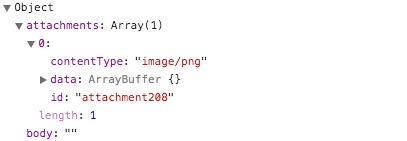
In the DevTools, you'll see a tab at the top named 'Application.' In that tab, on the left side, you'll see an entry named IndexedDB. Expand that, and expand the database beneath it. Then click the 'messages' object store inside of that. That should show you a list of messages. You can enter the id in the 'Start from key' field at the top, and then the first entry should be the message in question.
scottnonnenberg
on 3 Nov 2017

larrywright
on 3 Nov 2017
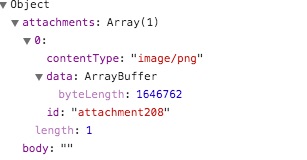
Wow. Is that really it for the object? There's no sent_at, received_at? Just attachments, body, and errors?
What happens when you expand that data key in the attachment? BTW, if you want to make this a private conversation, feel free to reach out to me directly.
scottnonnenberg
on 3 Nov 2017
I clipped out the middle part with the recipients.
My email is my Github user at Google's mail service if you want to reach out to me there.
larrywright
on 3 Nov 2017
I tried to export with 0.44.5 but still get the same error. https://gist.github.com/anonymous/00fc69533b0c5380ad239285e9fbab4f
 Enevira
on 3 Nov 2017
Enevira
on 3 Nov 2017
@Enevira Would you consider going through some of the same steps I laid out above? There's more data we can use to debug this in your devtools log (not the log that gets uploaded) because it's a little bit sensitive. You're getting a different error from @larrywright above, so I'd really like to see what you're running into. Again, feel free to reach out to me individually.
scottnonnenberg
on 3 Nov 2017
Also, I should mention that Chrome 0.44.5 allows you to cancel out of a completed migration and go back to using the Chrome app.
scottnonnenberg
on 3 Nov 2017
@scottnonnenberg I've tried again with 0.44.5 and it's still erroring out at the same place:
https://gist.github.com/anonymous/97eb28fb4bf47758bbd5e2a635b6a36f
I followed the steps you outlined above for diving into the IndexedDB, here's a screenshot of the information for the message that was listed just before the error:
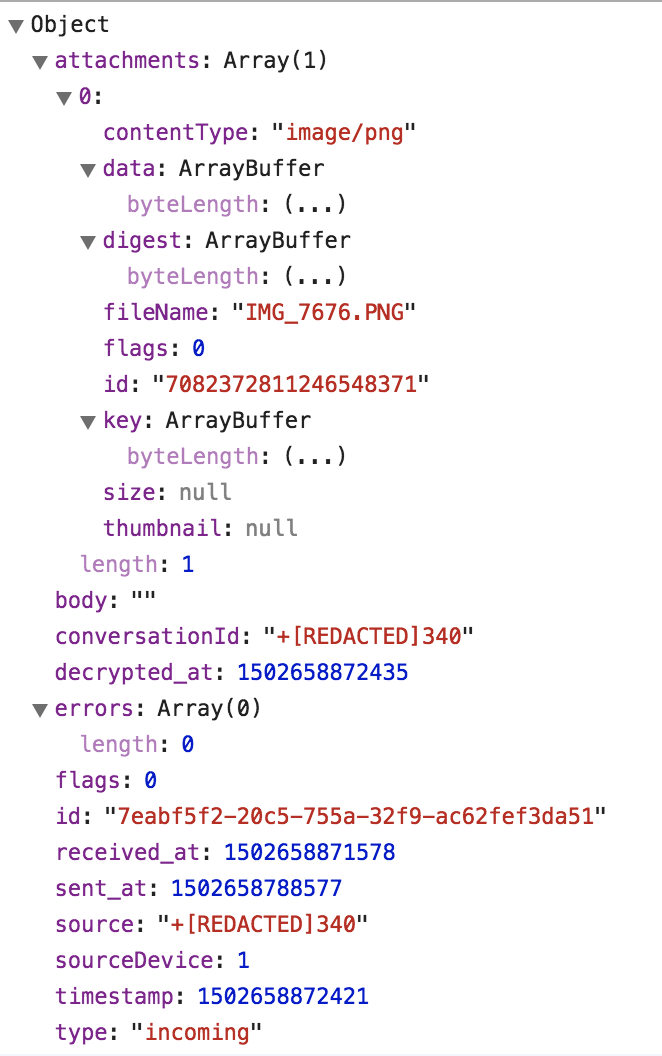
The first uncaught exception in the console shows:
Promise rejected (async)
request.onsuccess @ backup.js:412
It also appears that the folder for this message attachment had not yet been created before the failure.
 corywright
on 3 Nov 2017
corywright
on 3 Nov 2017
@MarcSN311 I'm looking at the JSON issue, and I wonder: what happens if you add ]} to the three problematic JSON files. Does that make import work? Also, can you post the log from your successful export? You can do that by running this on the console:
window.owsDesktopApp.inboxView.migrationScreen.openDebugLog();
You can send it to me directly if you prefer.
scottnonnenberg
on 3 Nov 2017
Chrome 0.44.6 is released, and has some fixes for the InvalidModificationError errors, and extra debugging information for the Illegal buffer errors. Lemme know!
scottnonnenberg
on 4 Nov 2017
@scottnonnenberg Here's the output now:
writeAttachments: error exporting conversation 1509763356578 (+13098304715) : Error: stringToBlob: provided value is something strange:
    at stringToBlob (chrome-extension://bikioccmkafdpakkkcpdbppfkghcmihk/js/backup.js:7:13)
    at chrome-extension://bikioccmkafdpakkkcpdbppfkghcmihk/js/backup.js:58:30
    at new Promise (<anonymous>)
    at chrome-extension://bikioccmkafdpakkkcpdbppfkghcmihk/js/backup.js:54:18
    at <anonymous>
I think my theory (sent in my last email) might be correct.
larrywright
on 4 Nov 2017
@scottnonnenberg Thanks, 0.44.6 fixed it for me.
Enevira
on 4 Nov 2017
@scottnonnenberg Thanks, 0.44.6 fixed it for me, too.
wizardofid
on 4 Nov 2017
@scottnonnenberg 0.44.6 worked for me too, thanks!
corywright
on 4 Nov 2017
I tried upgrading from 0.44.6 and am seeing similar errors to those described by larrywright re: stringToBlob. Ex:
2017-11-05T23:51:28.981Z exportConversation: error exporting conversation 1509592475272 (+[REDACTED]231) : Error: stringToBlob: provided value is something strange:
    at stringToBlob (chrome-extension://bikioccmkafdpakkkcpdbppfkghcmihk/js/backup.js:7:13)
    at chrome-extension://bikioccmkafdpakkkcpdbppfkghcmihk/js/backup.js:58:30
    at new Promise (<anonymous>)
    at chrome-extension://bikioccmkafdpakkkcpdbppfkghcmihk/js/backup.js:54:18
    at <anonymous>
Additionally I still see some of the previously-described illegal buffer/type errors, à la:
2017-11-05T08:55:38.749Z writeAttachments: error exporting conversation 1509592475272 (+[REDACTED]231) : TypeError: Illegal buffer
    at Function.ByteBuffer.wrap (chrome-extension://bikioccmkafdpakkkcpdbppfkghcmihk/js/libtextsecure.js:27083:23)
    at stringToBlob (chrome-extension://bikioccmkafdpakkkcpdbppfkghcmihk/js/backup.js:6:37)
    at chrome-extension://bikioccmkafdpakkkcpdbppfkghcmihk/js/backup.js:55:30
    at new Promise (<anonymous>)
    at chrome-extension://bikioccmkafdpakkkcpdbppfkghcmihk/js/backup.js:51:18
    at <anonymous>
In particular, the export of the above redacted conversation contains a 0-byte gif attachment.
My entire debug log is here: https://gist.github.com/anonymous/fb1102b98f0c6b4367a510a3b5b7a992.
 jtobin
on 6 Nov 2017
jtobin
on 6 Nov 2017
Chrome v0.44.7 is released, and has changes to help us track down (and perhaps fix) the 'something strange' errors people are getting when we attempt to export attachments. Let me know how it goes! Even if it is now working for you, I'd love to see your logs. Thanks!
scottnonnenberg
on 7 Nov 2017
How do I upgrade from 0.44.6 to 0.44.7 on Chrome for Windows? Still getting failed exports.
 fongaboo
on 7 Nov 2017
fongaboo
on 7 Nov 2017
Nevermind found the update extensions button
fongaboo
on 7 Nov 2017
No joy here - still failing. Also, once it fails I'm not given the option to generate a debug log anymore.
Verifying messages.json produced for conversation 1510087182800 (+REDACTED)
0fccd50f-0ec0-458f-bb67-f89a5df83f58 Failed to load resource: the server responded with a status of 404 (Not Found)
debugLog.js:49 exportConversation: error exporting conversation 1510087182800 (+REDACTED) : ProgressEvent {isTrusted: true, lengthComputable: false, loaded: 0, total: 0, type: "error", …}
debugLog.js:49 Total attachments: 684 Failed attachments: 0
debugLog.js:49 Total conversations: 0 Failed conversations: 0
debugLog.js:49 the backup went wrong: ProgressEvent {isTrusted: true, lengthComputable: false, loaded: 0, total: 0, type: "error", …}
0.44.7 did the trick it seems... importing now
fongaboo
on 7 Nov 2017
@larrywright Would you be willing to share your full log? You can reach out to me directly if you aren't comfortable sharing it publicly.
scottnonnenberg
on 7 Nov 2017
@scottnonnenberg I'm happy to do that, but it doesn't prompt me to create one anymore, it takes me back to the beginning of the upgrade process instead.
larrywright
on 7 Nov 2017
@larrywright Here's a workaround to get to the debug log window -
enter it into the console when you're on the migration screen: owsDesktopApp.inboxView.migrationScreen.openDebugLog();
I've also fixed the issue that causes that button not to appear; a new build will be coming out shortly.
scottnonnenberg
on 7 Nov 2017
v0.44.8 is now released, and it addresses the missing 'Submit Debug Log' button.
All: If you're still having problems with export on the latest Chrome builds, I'd love to see your logs.
scottnonnenberg
on 7 Nov 2017
@scottnonnenberg I provided it via email.
larrywright
on 8 Nov 2017
Tried again with 0.44.8 and all seems good now - thanks!
 dcarosone
on 8 Nov 2017
dcarosone
on 8 Nov 2017
No luck for me on v0.44.8. Here are some representative excerpts from the log; note there are many more errors like these present that I haven't displayed:
TypeError: Illegal buffer
2017-11-05T23:41:40.442Z writeAttachments: error exporting conversation 1509592475272 (+[REDACTED]231) : TypeError: Illegal buffer
    at Function.ByteBuffer.wrap (chrome-extension://bikioccmkafdpakkkcpdbppfkghcmihk/js/libtextsecure.js:27083:23)
    at stringToBlob (chrome-extension://bikioccmkafdpakkkcpdbppfkghcmihk/js/backup.js:6:37)
    at chrome-extension://bikioccmkafdpakkkcpdbppfkghcmihk/js/backup.js:55:30
    at new Promise (<anonymous>)
    at chrome-extension://bikioccmkafdpakkkcpdbppfkghcmihk/js/backup.js:51:18
    at <anonymous>
Error: stringToBlob: provided value is something strange
2017-11-05T23:51:26.162Z writeAttachments: error exporting conversation 1509592475272 (+[REDACTED]231) : Error: stringToBlob: provided value is something strange:
    at stringToBlob (chrome-extension://bikioccmkafdpakkkcpdbppfkghcmihk/js/backup.js:7:13)
    at chrome-extension://bikioccmkafdpakkkcpdbppfkghcmihk/js/backup.js:58:30
    at new Promise (<anonymous>)
    at chrome-extension://bikioccmkafdpakkkcpdbppfkghcmihk/js/backup.js:54:18
    at <anonymous>
Error: Unsupported content message
017-11-07T07:40:36.859Z queueEnvelope error handling envelope +[REDACTED]231.1 1510040435013 : Error: Unsupported content message
    at MessageReceiver.innerHandleContentMessage (chrome-extension://bikioccmkafdpakkkcpdbppfkghcmihk/js/libtextsecure.js:38736:19)
    at MessageReceiver.<anonymous> (chrome-extension://bikioccmkafdpakkkcpdbppfkghcmihk/js/libtextsecure.js:38723:25)
    at <anonymous>
SyntaxError: Unexpected end of JSON input
2017-11-07T20:35:31.687Z Export of conversation 1509941464698 (+[REDACTED]336) was malformed: SyntaxError: Unexpected end of JSON input
    at JSON.parse (<anonymous>)
    at chrome-extension://bikioccmkafdpakkkcpdbppfkghcmihk/js/backup.js:396:14
    at <anonymous>
(Note that shortly after the above error there is an enormous base64-encoded binary blob in the log.)
In the [REDACTED]231 conversation backup there is a 0-byte gif attachment present.
In the [REDACTED]336 conversation backup there don't appear to be any 0-byte or otherwise suspicious-looking files. There are a number of .png, .jpeg/.jpg, .pdf, .html, and .mov files.
jtobin
on 8 Nov 2017
@jtobin Would you be willing to follow up with me directly? I'd like to see the whole log, and ask some more prying questions. :0)
Some general notes on your stuff:
error handling envelopeis to be expected, given that Chrome Desktop doesn't support read receipts. The new Electron Desktop does.- Unexpected end of JSON input likely means that's a really, really huge conversation that isn't done being flushed to disk. I thought a 10-second delay would be enough! :0(
- I would really, really like to know what comes right before that
Illegal buffererror. :0) provided value is something strangeis not an error from0.44.8- maybe you're providing errors from more than one export?
scottnonnenberg
on 8 Nov 2017
@scottnonnenberg No sweat. I've just sent you an email.
jtobin
on 8 Nov 2017
v0.44.9 has been published. If you still are having problems exporting once you upgrade to that version, please provide logs, and please consider reaching out to me directly.
scottnonnenberg
on 8 Nov 2017
I am still experiencing the Unexpected end of JSON input error when importing into the standalone client. (0.44.11 -> 1.0.37)
INFO  2017-11-10T19:53:25.798Z messages done saving via puts scheduled
INFO  2017-11-10T19:53:26.231Z messages done saving via transaction complete
INFO  2017-11-10T19:53:26.304Z the import went wrong: SyntaxError: Unexpected end of JSON input
    at JSON.parse (<anonymous>)
    at C:\Users\<USERNAME>\AppData\Local\Programs\signal-desktop\resources\app.asar\js\backup.js:644:23
INFO  2017-11-10T19:53:26.305Z Error importing: SyntaxError: Unexpected end of JSON input
    at JSON.parse (<anonymous>)
    at C:\Users\<USERNAME>\AppData\Local\Programs\signal-desktop\resources\app.asar\js\backup.js:644:23
Surprisingly there are just 2 broken files now, not 3 as in my last comment (https://github.com/WhisperSystems/Signal-Desktop/issues/1616#issuecomment-341115956)
jsonlint output:
./1510342831965 ([REDACTED]Group)/messages.json:1:2095: Warning: Strings containing non-BMP characters (U+1F61C) may not be portable
   |  At line 1, column 2095, offset 2095
./1510342831965 ([REDACTED]Group)/messages.json:1:2311525: Error: Array literal (list) is not terminated
   |  At line 1, column 2311525, offset 2311525 (AT-END)
   |    near text: True
   |  Array started at line 1, column 12, offset 12
./1510342831965 ([REDACTED]Group)/messages.json:1:2311525: Error: Object literal (dictionary) is not terminated
   |  At line 1, column 2311525, offset 2311525 (AT-END)
   |    near text: True
   |  Object started at line 1, column 0, offset 0 (AT-START)
./1510342823425 ([REDACTED]651)/messages.json:1:545653: Warning: Strings containing non-BMP characters (U+1F44D) may not be portable
   |  At line 1, column 545653, offset 545653
./1510342823425 ([REDACTED]651)/messages.json:1:3046305: Error: Array literal (list) is not terminated
   |  At line 1, column 3046305, offset 3046305 (AT-END)
   |    near text: True
   |  Array started at line 1, column 12, offset 12
./1510342823425 ([REDACTED]651)/messages.json:1:3046305: Error: Object literal (dictionary) is not terminated
   |  At line 1, column 3046305, offset 3046305 (AT-END)
   |    near text: True
   |  Object started at line 1, column 0, offset 0 (AT-START)
@MarcSN311 We've discovered that waiting 5-10 minutes after the export is "complete" is sometimes necessary to allow all of our file writes to end up on disk. What happens if you try importing that set of files once more?
scottnonnenberg
on 11 Nov 2017
Chrome 0.44.12 has been released, which only treats export as successful if it can verify the JSON structure of every exported messages.json file. Closing this bug. Please let me know if you're still having problems with export.
scottnonnenberg
on 16 Nov 2017
0.44.12 fixed it for me
MarcSN311
on 17 Nov 2017
Related issues
 PanderMusubi
·
3Comments
PanderMusubi
·
3Comments
 cmdrogogov
·
3Comments
cmdrogogov
·
3Comments
 ploum
·
3Comments
ploum
·
3Comments
 gesus14
·
3Comments
gesus14
·
3Comments
 TarkanY
·
3Comments
TarkanY
·
3Comments