Shell: "Launch and Switch applications" shortcut is not configurable
Distribution (run cat /etc/os-release):
NAME="Pop!_OS"
VERSION="20.04 LTS"
ID=pop
ID_LIKE="ubuntu debian"
PRETTY_NAME="Pop!_OS 20.04 LTS"
VERSION_ID="20.04"
HOME_URL="https://system76.com/pop"
SUPPORT_URL="http://support.system76.com"
BUG_REPORT_URL="https://github.com/pop-os/pop/issues"
PRIVACY_POLICY_URL="https://system76.com/privacy"
VERSION_CODENAME=focal
UBUNTU_CODENAME=focal
LOGO=distributor-logo-pop-os
Related Application and/or Package Version (run apt policy pop-shell or provide the latest commit if building locally):
op-shell:
Installed: 0.1.0\~1588777613\~20.04\~387bebf
Candidate: 0.1.0\~1588777613\~20.04\~387bebf
Version table:
* 0.1.0\~1588777613\~20.04\~387bebf 1001
1001 http://ppa.launchpad.net/system76/pop/ubuntu focal/main amd64 Packages
1001 http://ppa.launchpad.net/system76/pop/ubuntu focal/main i386 Packages
100 /var/lib/dpkg/status
Issue/Bug Description:
Launcher shortcut does not appear in the shortcut configuration.
Steps to reproduce (if you know):
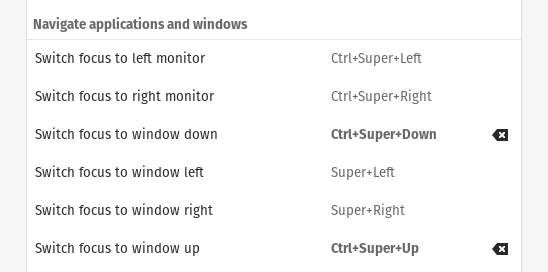
Expected behavior:
"Launch and Switch applications" option should appear in the Navigate applications and Windows section of the shortcuts configuration.
 rodrigoreyes79
All 10 comments
Do you know a workaround for this issue? I tried to find out the terminal command to start the application launcher so I could make a custom command but I was unable to find it.
 alpakaxaxa
on 10 May 2020
alpakaxaxa
on 10 May 2020
The keybinding is set in the schema, and can modified with dconf. I set it to "Super" and "-" since it's in the same physical location as english keyboard has the slash, and easy to access. With my keyboard layout the slash is under shift and 7, so using launcher doesn't work at all with default keybinding. Running command below worked for me, not running Pop!_OS though. If Pop!_OS has the schema installed, you should find it it dconf-editor too.
dconf write /org/gnome/shell/extensions/pop-shell/search "['<Super>minus']"
Note that this doesn't change the shortcut shown in extension menu, as it seems to be coded in, but it's just cosmetics. You should be able to edit any keybinding defined in the schema with same method.
 koylio
on 12 May 2020
koylio
on 12 May 2020
@koylio That worked great. I was able to change the keyboard shortcut. Thank you!!!
Nevertheless, the shortcut is still not showing up in the Shortcut configuration. That bug remains :/
rodrigoreyes79
on 12 May 2020
dconf editor isn't showing me entries for things like super-L (currently mapped to super-
 UltraSalem
on 13 May 2020
UltraSalem
on 13 May 2020
@koylio That worked for me. Thanks a lot
 Osa1989
on 15 May 2020
Osa1989
on 15 May 2020
Similar problem to @UltraSalem here. any way to unbind/change the bindings for Pop!_shell?
What it is bound to "Launch and Switch applications" I need it to be my terminal shortcut :(
Edit: I just set the shortcut from the settings and it seems it has overridden the shell shortcut
 miltoncandelero
on 17 May 2020
miltoncandelero
on 17 May 2020
dconf editor isn't showing me entries for things like super-L (currently mapped to super- which is a window navigation).
Devs might not appreciate issue tracker being used as a support forum. I'll try to explain this in enough detail so anybody guided here by google can help them selfs. If you still have questions, please post eg. on reddit at r/pop_os or some other forum of your choice.
Keyboard shortcuts are defined in schema:
https://github.com/pop-os/shell/blob/master_focal/schemas/org.gnome.shell.extensions.pop-shell.gschema.xml
From there you can look up the keybinding you want to change, in your case:
<key type="as" name="focus-right">
            <default><![CDATA[['<Super>Right','<Super>l']]]></default>
            <summary>Focus right window</summary>
</key>
Part after "name=" tells the key to edit with dconf:
dconf write /org/gnome/shell/extensions/pop-shell/focus-right "['<Super>Right']"
This should remove the Vim style keybinding Super+l, but didn't test it.
koylio
on 18 May 2020
Devs might not appreciate issue tracker being used as a support forum.
good point, and apologies for treating it as such. I guess for the purposes of this issue, the fact that these schema keys are not exposed in the standard system keybindings section is the bug we are hoping is fixed/feature added.
dconf write /org/gnome/shell/extensions/pop-shell/focus-right "['<Super>Right']"
tested and working for my issue (freeing the keybind of super-L to do it's settings keybinding of lock the screen). Thank you.
UltraSalem
on 19 May 2020
This is indeed a bug, in some form or another.
Closing as a duplicate of https://github.com/pop-os/gnome-control-center/issues/93.
 ids1024
on 23 Jun 2020
ids1024
on 23 Jun 2020
Just pointing out that with recent pop shell extension, the launcher shortcut has been renamed and has to be set with:
dconf write /org/gnome/shell/extensions/pop-shell/activate-launcher "['<Super>minus']"
 Elinvention
on 2 Nov 2020
Elinvention
on 2 Nov 2020
Related issues
 herder
·
6Comments
herder
·
6Comments
 rengare
·
5Comments
rengare
·
5Comments
 diegobernardes
·
3Comments
diegobernardes
·
3Comments
 JoelMon
·
4Comments
JoelMon
·
4Comments
 derpmatt
·
7Comments
derpmatt
·
7Comments
Most helpful comment
Devs might not appreciate issue tracker being used as a support forum. I'll try to explain this in enough detail so anybody guided here by google can help them selfs. If you still have questions, please post eg. on reddit at r/pop_os or some other forum of your choice.
Keyboard shortcuts are defined in schema:
https://github.com/pop-os/shell/blob/master_focal/schemas/org.gnome.shell.extensions.pop-shell.gschema.xml
From there you can look up the keybinding you want to change, in your case:
Part after "name=" tells the key to edit with dconf:
dconf write /org/gnome/shell/extensions/pop-shell/focus-right "['<Super>Right']"This should remove the Vim style keybinding Super+l, but didn't test it.