Pop-Shell in default auto-tiling mode is magnificent with ultrawide and dual-monitor setups. However, as much as I adore tiling on my laptop, I'm not a fan of 1/8th size windows on the 15-inch screen. I'm suggesting a toggle mode called "Small-Screen".
On the small laptop screen, the 1/8th window is close to useless during general use. Sure, the 1/8th window can be floated, or, moved to a new workspace, but that needs to happen every time. For me, a typical workflow consists of two to four windows before switching workspace. If four tiled windows are present on one workspace, the next window launched turns one of those quarters into eighths. When that occurs it's usually something like Settings, Tweaks, or a Terminal that I'm opening briefly, doing one thing, and quitting the window. I find 1/4 windows about the limit of functional usability on the laptop.
_Pictures were created on a 21" screen, 20.04 test machine. The 1/8th is noticeably more unusable on a 15" laptop._
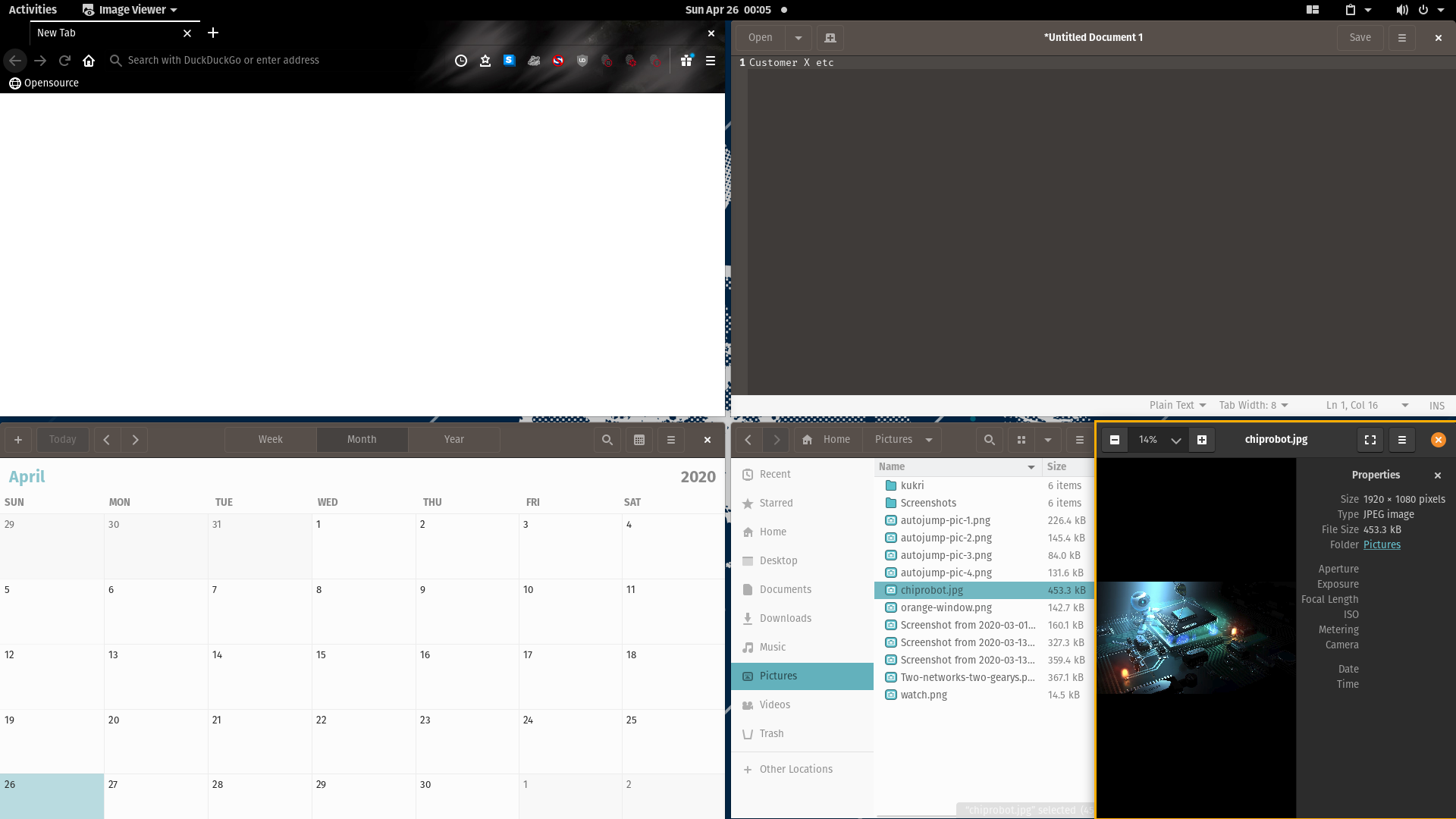
How Does It Work?
Small-Screen mode would limit the tree to 1/4 tiling on a screen in landscape orientation. The creation of any new windows after the limit is reached, would launch floated and centered in 1/4 window size also. The user would either briefly use and then quit the window, or move it to a workspace. I could also imagine the default size of the small-screen-floating-window (ssfw) being configurable, or at least two sizes to choose from - equivalent-quarter or slightly bigger.
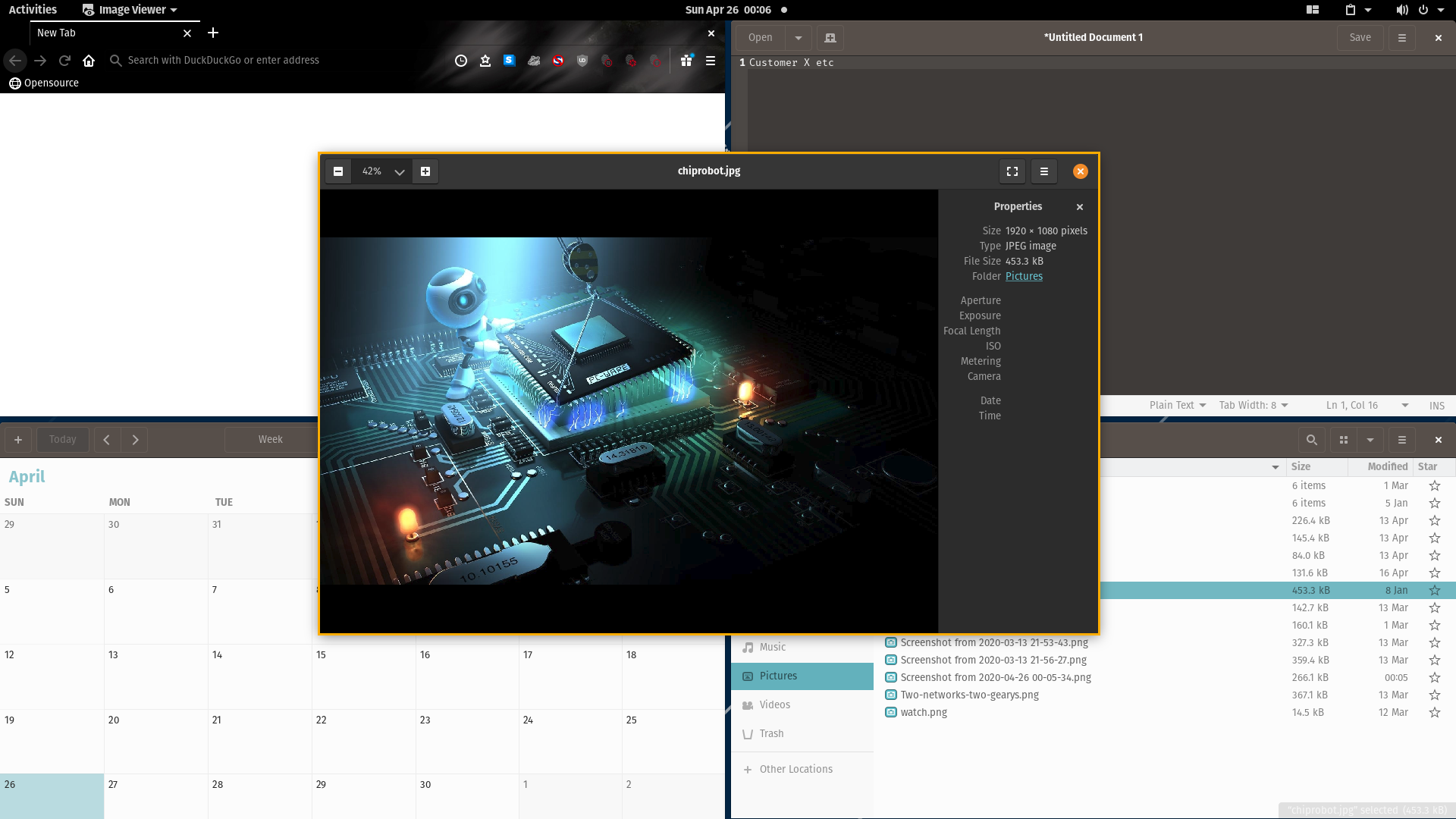
Launching Apps.
Everything works the same as in default until the four window quartered-screen limit is reached. When the limit is reached, launching apps with super + /, or making commands with t: will launch the ssfw window. If the ssfw already exists ( 5 windows), launched apps will appear on a new workspace in full screen.
Why did I think of this?
In addition to my general workflow preferences, this is a business laptop, and Pop with Pop-Shell is often seen by clients as I'm explaining products or aspects of our process. Pop-Shell is a game-changer in this regard. I don't have to reach to a touchpad or connect an external mouse on-site with the customer. A typical consultation would mean having a browser open to our website, Nautilus ready at my product pictures folder, a calendar(Thunderbird/Lightning with fruux) for scheduling and customer details, and an order form for details of customization. People are often amazed when I do super + B, super + G, super + F, super + arrow, and super + shift + T. Four programs launched and neatly tiled always gets a comment! I normally need to describe product-related detail using pictures, which are Ok being viewed in 1/4 screen windows, but with those other apps open they normally launch in 1/8th size. I have to move it to a new workspace. It looks awkward as I super + enter / super + shift + arrow, then super + page up /down to get back to the first workspace - rinse repeat. I think the initial interest wears off when the 1/8th windows appear and I proceed to fiddle around.
Expected Outcome.
Small-Screen mode would give the option to briefly work in the ssfw, then super + q, move workspace, or attach to the tree if desired. Additionally, if a picture launched in Viewer in the ssfw, I could just tab forward or back through the pictures I need. Small-Screen mode would smooth out the tiling experience for people using laptops. Perhaps it will be popular with people who use smaller single-monitors as well.
 derpmatt
All 7 comments
For what it's worth, I think this is a GREAT idea. If anything, the only thing I'd suggest changing is not limiting it to small screens. Rather than having a "small-screen" mode, simply having an optional "max-tiles" setting. That way, the principle is valid on any size screen.
 evertiro
on 26 Apr 2020
evertiro
on 26 Apr 2020
I like the idea of the "max-tiles" setting. That would be a nice addition to the tiling experience and would help with small screen workflow. I am wondering about launching the fifth ssfw window. It might be a bit too much of an unexpected behavior compared to the overall tiling. I wonder if the fifth window should simply launch full size on a new workspace. I understand that having Viewer in the ssfw would be helpful for the workflow described above but I am wondering if that would be useful for anyone choosing to use "max-tile".
 maria-komarova
on 27 Apr 2020
maria-komarova
on 27 Apr 2020
I can see that "max-tiles" is _effectively_ the same thing as Small-Screen if I set it up the way I want. I would be satisfied with that solution. I initially thought a dedicated mode would be credible, easier to implement, and better for stability. I can see how max-tiles could work out and be more versatile. [Set limit reached = ssfw]
I also wondered about the difficulties involved in getting the ssfw to float. A default behavior of sending it to a new workspace automatically would be Ok. Maybe not quite as functional as the Small-Screen mode model, but it does remove the need to do that action every time. [Set limit reached = Full screen on new workspace]
I understand that having Viewer in the ssfw would be helpful for the workflow described above but I am wondering if that would be useful for anyone choosing to use "max-tile".
For my personal workflow the 1/8th window is usually a terminal that I'm getting quick info from to use elsewhere. For example, which <something>, apt policy <something> or an ag search. Having it launch on a new workspace, instead of the 1/8th window would be preferable, but the original ssfw would still be optimal.
The current auto-tiling default is great with the 1/8th on my dual-monitors. Even the 1/16th is usable for some tasks, but as seen on my testing machine's 21" screen above, the 1/8th is mostly unusable and must always be moved. It's definitely unusable on my laptop. An option to change that behavior would be welcome, regardless of how it's implemented.
derpmatt
on 27 Apr 2020
There's 0 difficulty in implementing this kind of feature, should we decide to do that. The work involved would be adding a boolean check if more than max-tiles windows already exists, and then adding the floating tag to a window instead of calling the auto-tiling function on it.
 mmstick
on 28 Apr 2020
mmstick
on 28 Apr 2020
Tiling does take some getting used to. If you're opening a 5th window, and don't want to split any windows on your workspace, you'd move to another workspace first or, after launching, press Super+ Shift+ Down arrow or j to move the window to the next workspace. Treating a max+1 window different breaks the tiling UX pattern.
 WatchMkr
on 28 Apr 2020
WatchMkr
on 28 Apr 2020
After the official release I've been using stacking mode on the business laptop. It completely fulfils the desired functionality that inspired "Small Screen Mode". Stacking the window is actually better than the proposed Small Screen Mode because all programs and any pictures selected are all launched in full screen size. If the consensus is that Stacking is superior to this suggestion, then this issue could be closed.
derpmatt
on 2 Oct 2020
There might be a use case for automatically stacking after a certain point though.
mmstick
on 2 Oct 2020
Related issues
 danielyzli
·
4Comments
danielyzli
·
4Comments
 qnm
·
9Comments
qnm
·
9Comments
 diegobernardes
·
3Comments
maria-komarova
·
8Comments
diegobernardes
·
3Comments
maria-komarova
·
8Comments
 leviport
·
7Comments
leviport
·
7Comments
Most helpful comment
There's 0 difficulty in implementing this kind of feature, should we decide to do that. The work involved would be adding a boolean check if more than
max-tileswindows already exists, and then adding the floating tag to a window instead of calling the auto-tiling function on it.