shell holds a blank area when minimizing the discord and terminator
Distribution (run cat /etc/os-release):
NAME="Pop!_OS"
VERSION="20.04 LTS"
ID=pop
ID_LIKE="ubuntu debian"
PRETTY_NAME="Pop!_OS 20.04 LTS"
VERSION_ID="20.04"
HOME_URL="https://system76.com/pop"
SUPPORT_URL="http://support.system76.com"
BUG_REPORT_URL="https://github.com/pop-os/pop/issues"
PRIVACY_POLICY_URL="https://system76.com/privacy"
VERSION_CODENAME=focal
UBUNTU_CODENAME=focal
LOGO=distributor-logo-pop-os
Related Application and/or Package Version (run apt policy pop-shell or provide the latest commit if building locally):
pop-shell:
Installed: 0.1.0~1588624471~20.04~dfb378c
Candidate: 0.1.0~1588624471~20.04~dfb378c
Version table:
* 0.1.0~1588624471~20.04~dfb378c 1001
1001 http://ppa.launchpad.net/system76/pop/ubuntu focal/main amd64 Packages
1001 http://ppa.launchpad.net/system76/pop/ubuntu focal/main i386 Packages
100 /var/lib/dpkg/status
Issue/Bug Description:
When I minimize Discord app, it does not change the view, the shell is acting like the app is not minimized and holds it as a blank area.
Steps to reproduce (if you know):
- Open a window
- Open the Discord app
- Minimize the Discord app
Expected behavior:
It should expend the first window.
Other Notes:
I installed discord from pop-shop (.deb version)
There is no problem when minimizing terminal (I used pop os's default terminal on the video to show expected behavior), but the same problem with Discord is happening with Terminator app too.

 cansozbir
All 26 comments
I am also experiencing this for other applications including Firefox and Thunderbird.
NAME="Pop!_OS"
VERSION="20.04 LTS"
ID=pop
ID_LIKE="ubuntu debian"
PRETTY_NAME="Pop!_OS 20.04 LTS"
VERSION_ID="20.04"
HOME_URL="https://system76.com/pop"
SUPPORT_URL="http://support.system76.com"
BUG_REPORT_URL="https://github.com/pop-os/pop/issues"
PRIVACY_POLICY_URL="https://system76.com/privacy"
VERSION_CODENAME=focal
UBUNTU_CODENAME=focal
LOGO=distributor-logo-pop-os
 TC68
on 7 May 2020
TC68
on 7 May 2020
I'm experiencing this with most of my applications, but the issue seems to go away when Dash to Dock is disabled (Which seems to be an enabled extension in @cansozbir 's gif)
Can you try disabling Dash to Dock and see if this makes the issue go away? It might be making Pop Shell think Dash to Dock is a window when it gets large enough.
 acerspyro
on 8 May 2020
acerspyro
on 8 May 2020
I haven't experienced this issue myself, but I also don't use Dash to Dock. Perhaps this is the key?
 mmstick
on 8 May 2020
mmstick
on 8 May 2020
I disabled it and rebooted my pc but that didn't affect.
cansozbir
on 8 May 2020
@cansozbir Interesting, thanks for confirming. Your issue may be caused by another application.
In my case, it's definitely Dash-to-Dock.
Can you list the extensions you have enabled?
acerspyro
on 9 May 2020
Seems to have resolved with the recent updates
EDIT: Looks like I was wrong. Not resolved
TC68
on 9 May 2020
I tried it with disabling all of my extensions (even built-in ones) but that didn't affect. I just let these run:
pop-shell
System76 Power
No update shows on my Extensions app.
cansozbir
on 9 May 2020
@mmstick I am able to reproduce this issue with Slack and Telegram(replacing Discord) too. Could this issue be caused in apps which have tray icons(Turning off Ubuntu AppIndiacators or Dash-to-Dock had no effect)?
 the1derer
on 11 May 2020
the1derer
on 11 May 2020
@the1derer I have a number of applications with tray icons, but none of the remain after closing.
mmstick
on 11 May 2020
Hmm. I only checked with Slack, Discord and Telegram and these behaved exactly like the description of this issue(i.e. if using minimize button to minimize slack/discord/telegram they hold a blank area).
One thing I would like to point out is this behaviour is not observed if I use "click-dock- icon-to-minimize" feature.
the1derer
on 11 May 2020
So... Electron-based applications?
acerspyro
on 11 May 2020
When right-clicking on what seems to be an Electron app (e.g. JetBrains Toolbox, Slack, Teams, etc) - selecting Minimize, it works as expected. The issue also does not show when clicking the icon of the Electron app in a dock to minimize as mentioned above. So something with minimize icon or - on the toolbar's binding.
Issue only appears when clicking the minimize icon on an Electron app's window bar.
UPDATE: 5/13
It looks like Electron apps are not sending a minimize signal (or it might be sending it but a different one or signal name - not sure, and only seeing on_grab_start when it is doing minimize button. Sprinkled a local build with lots of Log.debug :))
UPDATE: 5/14
It only sends initial on_grab_end. But when you maximize it from the dock or toolbar, only time it sends a on_minimize signal. Kind of delayed - and the screen is already maximized.
 jmmaranan
on 12 May 2020
jmmaranan
on 12 May 2020
It happens with the Spotify desktop app as well.
 matguidi
on 12 May 2020
matguidi
on 12 May 2020
It happens with the Spotify desktop app as well.
I second this and why I ended up here. Looks like there are multiple programs doing this. I just tested Discord and it seems that when minimizing it does this, but if you select close to system tray, it does not leave a clear/blank window. There is no setting for Spotify to close to the system tray unfortunately. Is this an electron type JS container thing?
 sawyermade
on 20 May 2020
sawyermade
on 20 May 2020
Hmm. I only checked with Slack, Discord and Telegram and these behaved exactly like the description of this issue(i.e. if using minimize button to minimize slack/discord/telegram they hold a blank area).
One thing I would like to point out is this behaviour is not observed if I use "click-dock- icon-to-minimize" feature.
Where is this click to minimize feature located?
sawyermade
on 20 May 2020
@sawyermade probably he's talking about his dock. I don't know what he is using but for example, there is a behavior in the dash-to-dock extension to minimize a window with a click.
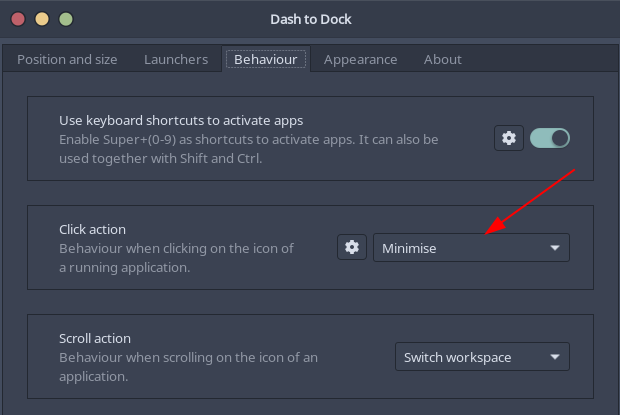
And if you don't want to use a dock extension, you can use your keyboard shortcut to minimize a window, this also solves the problem.
cansozbir
on 20 May 2020
@sawyermade probably he's talking about his dock. I don't know what he is using but for example, there is a behavior in the dash-to-dock extension to minimize a window with a click.
And if you don't want to use a dock extension, you can use your keyboard shortcut to minimize a window, this also solves the problem.
Thanks for the info, also I just noticed this same behavior with the gnome settings application as well. I just set a keyboard shortcut in settings for minimize, which is called "Hide Window", because there isn't one set by default for some reason, seems weird. They should set super+n for that since super+m is maxmize. No one gives a crap about focusing notifications, they dont work very well anyways lol.
Also, I am still noticing strange behavior with spotify, like screwing up the orientations of the other windows and stuff like that.
sawyermade
on 20 May 2020
It seems a little bit messed up on the last update (keep seeing a Pop Shell Fork error). Even after doing some shell restarts (alt + f2, r). Not a deal breaker but I'll go with the manual edge tiling for now. E.g. dragging to left or right edges and get half tiles. Or just alt-tabbing :)
jmmaranan
on 21 May 2020
Hey @cansozbir , not sure how comfortable you are cloning this repo and trying out the dev_focal branch? Thanks @mmstick for merging.
From the cloned directory then switching to dev_focal (git checkout --track origin/dev_focal):
sh rebuild.sh- to install on$HOME/.local.make uninstall- to remove after testing and then..ALT+F2, r- to refresh aftermake uninstallremoves it from$HOME/.local.
See more here: https://github.com/pop-os/shell#installation
jmmaranan
on 15 Jun 2020
@jmmaranan actually 2 days ago, I spilled a glass of water to my laptop accidentally :) I wish.
cansozbir
on 18 Jun 2020
@jmmaranan, to give you some feedback on this, I checked this locally on dev branch with Microsoft Teams. After running the latest commits, Teams seems to work fine in tiling mode. Splits the screen fine when it opens and returns space correctly when minimized. Double checked that is doesn't work with the latest release.
Cheers for the effort on this!
 ajcool2k
on 22 Jun 2020
ajcool2k
on 22 Jun 2020
@jmmaranan actually 2 days ago, I spilled a glass of water to my laptop accidentally :) I wish.
That's unfortunate :(
@jmmaranan, to give you some feedback on this, I checked this locally on dev branch with Microsoft Teams. After running the latest commits, Teams seems to work fine in tiling mode. Splits the screen fine when it opens and returns space correctly when minimized. Double checked that is doesn't work with the latest release.
Cheers for the effort on this!
Thanks! Just waiting for the PR to be merged!
jmmaranan
on 22 Jun 2020
@mmstick - I just pulled the latest release from apt - and can verify that this is working.
pop-shell:
  Installed: 0.1.0~1592948910~20.04~b739459
  Candidate: 0.1.0~1592948910~20.04~b739459
  Version table:
 *** 0.1.0~1592948910~20.04~b739459 1001
       1001 http://ppa.launchpad.net/system76/pop/ubuntu focal/main amd64 Packages
       1001 http://ppa.launchpad.net/system76/pop/ubuntu focal/main i386 Packages
        100 /var/lib/dpkg/status
@mmstick - I think this can also be closed. Not sure if the OP has his machine setup to try this again.
jmmaranan
on 27 Jun 2020
@mmstick - thank you! I appreciate working with you on the minimize issues!
jmmaranan
on 27 Jun 2020
Just installed Pop OS 20.04 LTS and this still seems to be an issue on my system. I too am using dash to dock but disabling it does not fix the issue. Discord (deb), VSCode (deb), Spotify (deb), and whatsdesk (snap) are a few packages I can confim the issue with. Im using the latest version of pop-shell which should include the fix above?
pop-shell:
Installed: 1.1.0~1610693127~20.04~1557528
Candidate: 1.1.0~1610693127~20.04~1557528
Version table:
* 1.1.0~1610693127~20.04~1557528 1001
1001 http://ppa.launchpad.net/system76/pop/ubuntu focal/main amd64 Packages
1001 http://ppa.launchpad.net/system76/pop/ubuntu focal/main i386 Packages
100 /var/lib/dpkg/status
 FunWithUrban
on 22 Jan 2021
FunWithUrban
on 22 Jan 2021
Related issues
 depletionmode
·
7Comments
depletionmode
·
7Comments
 WatchMkr
·
9Comments
WatchMkr
·
9Comments
 carlwgeorge
·
8Comments
carlwgeorge
·
8Comments
 qnm
·
9Comments
qnm
·
9Comments
 TomFaulkner
·
4Comments
TomFaulkner
·
4Comments
Most helpful comment
When right-clicking on what seems to be an Electron app (e.g. JetBrains Toolbox, Slack, Teams, etc) - selecting Minimize, it works as expected. The issue also does not show when clicking the icon of the Electron app in a dock to minimize as mentioned above. So something with minimize icon or
-on the toolbar's binding.Issue only appears when clicking the minimize icon on an Electron app's window bar.
UPDATE: 5/13
It looks like Electron apps are not sending a minimize signal (or it might be sending it but a different one or signal name - not sure, and only seeing
on_grab_startwhen it is doing minimize button. Sprinkled a local build with lots of Log.debug :))UPDATE: 5/14
It only sends initial
on_grab_end. But when you maximize it from the dock or toolbar, only time it sends aon_minimizesignal. Kind of delayed - and the screen is already maximized.